
Most merchants who want subscriptions start small. They have a product people reorder, like coffee, supplements, or pet food, and they want a “Subscribe & save” option next to Add to cart without hiring a developer or signing up for an enterprise platform.
Subi pitches itself at exactly that merchant. It has been on the Shopify App Store since 2022, holds a 4.9 rating across more than 900 reviews, and carries the Built for Shopify badge. Its paid plans start at $29 a month, well below the big names in the category.
The catch is in how it charges. Every paid plan adds a percentage of each subscription transaction, and that percentage drops as the monthly fee rises. So the useful question is really two questions. How quickly can a merchant get a working Subscribe & Save offer live with Subi, and at what point does the transaction fee change which plan makes sense?
We installed Subi on a Shopify development store and built a monthly Subscribe & Save plan at 20% off for every product. Then we switched on the storefront widget and checked the result on a live product page.
Key Takeaways
- Best for small and growing subscription brands: Setup is short, stays inside the Shopify admin, and the entry plan is cheap enough to test demand.
- The setup is quick and plain: A four-step builder took us from a blank plan to a live widget, and the theme connection was a single guided step.
- The storefront result was accurate and restrained: The widget showed the 20% saving with correct maths and didn’t add benefits we hadn’t set up.
- Small rough edges: The builder’s summary panel didn’t reflect our product selection before saving, and the widget carried a “Powered by Subi” link.
- Watch the fee, not just the price: Starter is $29 a month plus 1.6% per subscription transaction. Above roughly $11,000 a month in subscription revenue, the $119 plan works out cheaper.
Our Verdict
Subi is a sensible choice for a merchant who wants a clean Subscribe & Save offer live quickly and doesn’t want to pay a high monthly fee before subscriptions have proven themselves.
The best part of our test was how little stood between an empty plan and a working widget. The discount, frequency, and product scope sit in one builder, and the storefront connection is a guided step with a clear confirmation.
The main caution is cost at scale. Subi’s percentage fee is what you pay for the low monthly price. As subscription revenue grows, the fee becomes the bigger number, and you’ll want to move up a plan at the right time rather than stay on Starter out of habit.
Our test also stopped at the product page. We didn’t place a test order, trigger a recurring charge, or open the customer portal. This review makes no claims about what happens after a shopper subscribes.
What Subi Subscriptions Offers
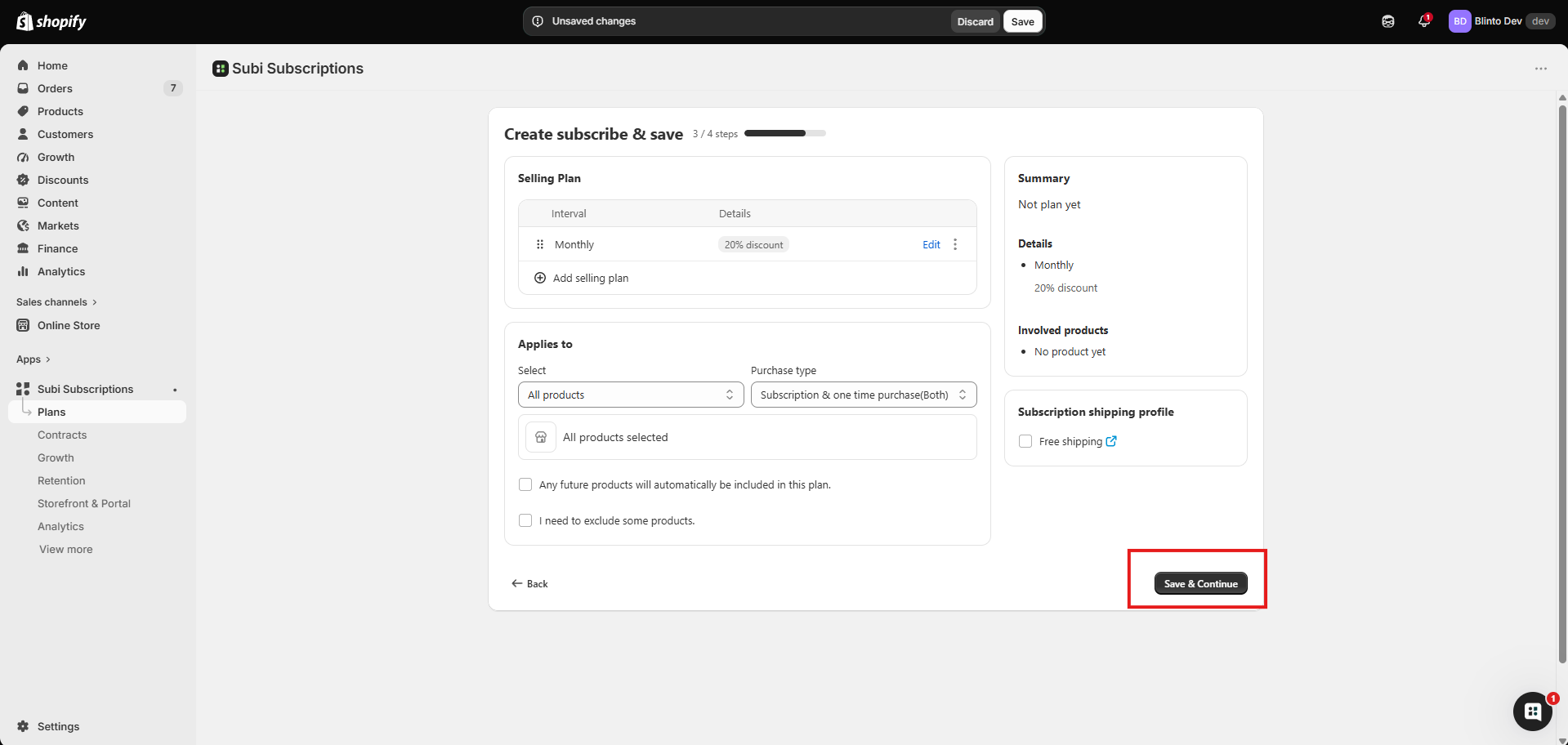
Subi runs recurring orders inside the Shopify admin. Its menu splits the app into Plans, Contracts, Growth, Retention, Storefront & Portal, and Analytics, which is a fair outline of what it covers.
Beyond Subscribe & Save, Subi offers memberships with tiers and member perks, loyalty points, subscription boxes, bundles, and mystery boxes. Subscribers get a self-service portal where they can skip, pause, swap products, change frequency, or cancel, and merchants can restrict which of those actions are allowed.
It works with Shopify Checkout, customer accounts, Shopify POS, and the Shopify admin. It also connects with Klaviyo, Mailchimp, and Fast Bundle. For stores moving from another subscription app, Subi’s team handles migration from platforms including Recharge, Bold, Appstle, and Stay AI.
The app is available in 19 languages, and the builder we used had a Languages tab for plan wording. That is useful for stores selling across markets.
What We Tested
We installed Subi on the Blinto Dev Shopify development store, running the Savor theme.
We used the Create subscribe & save builder to add a monthly selling plan with a 20% percentage discount. We applied it to all products and allowed both one-time and subscription purchases. Then we completed the Activate subscription widgets step, which turned on Subi’s app embed for our live theme, and viewed the widget on a product page.
We didn’t place a test order, go through checkout, or trigger a first or recurring charge. We also didn’t test the customer portal, cancellation flows, prepaid plans, memberships, loyalty, boxes, bundles, analytics, migration, or support.
We didn’t confirm which Subi plan was active on our development store, so we don’t tie any feature we used to a specific paid plan.
Building a Monthly Subscribe & Save Plan
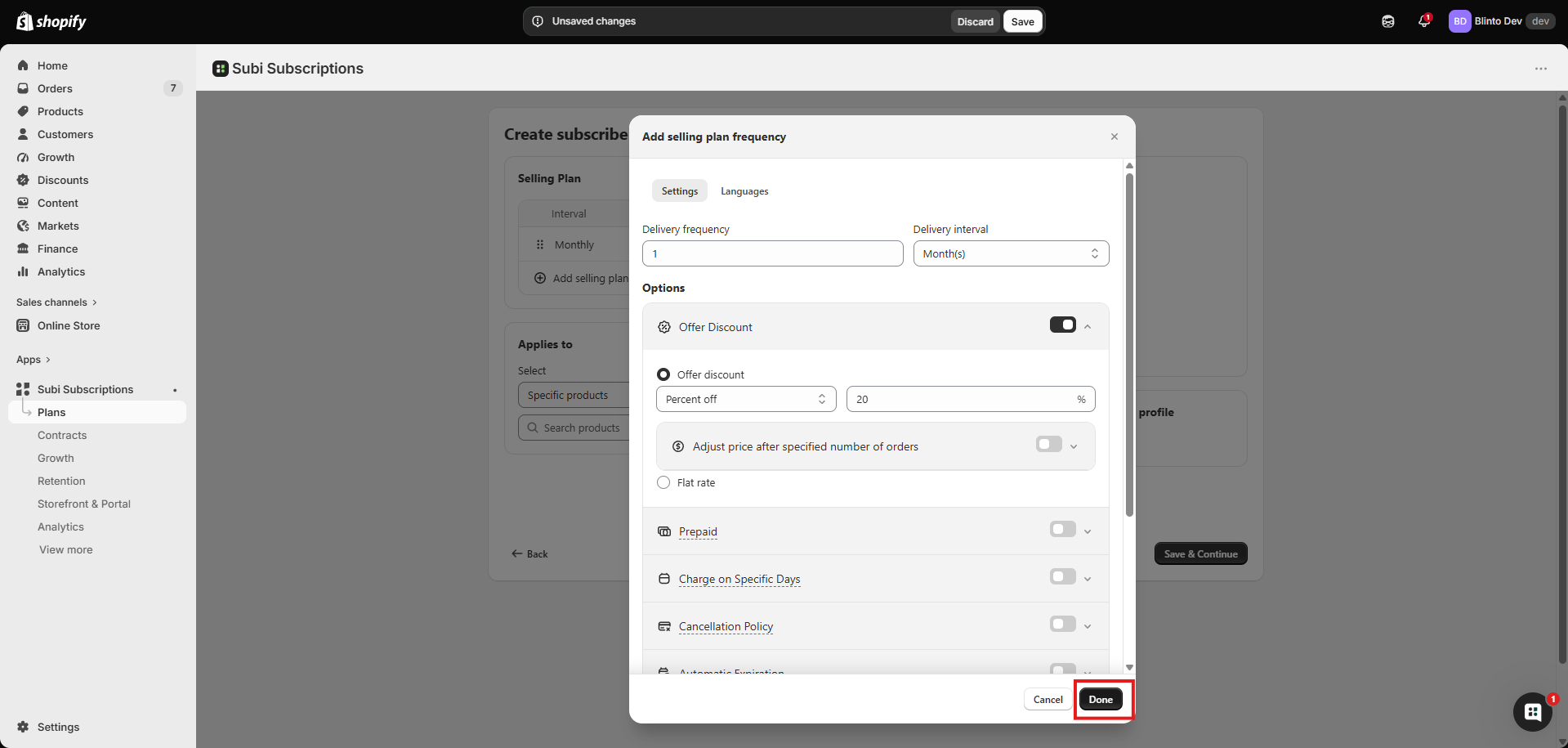
Subi builds a Subscribe & Save offer in four steps. The third step is where most of the decisions happen.
Each selling plan starts with a delivery frequency and interval. We set every 1 month. Below that is a list of options you switch on as needed: Offer Discount, Prepaid, Charge on Specific Days, Cancellation Policy, and Automatic Expiration.
We turned on the discount and chose 20% off. You can also set a flat rate instead of a percentage. There is a toggle to adjust the price after a set number of orders, which is how you’d run a bigger first-order discount that settles into a smaller ongoing one. We didn’t use it, but it’s a useful option to find without digging.
The window also has a Display Content section for the plan label and subscription details, plus the Languages tab. After we clicked Done, the plan appeared in a table as “Monthly” with a “20% discount” tag, ready to take more intervals through Add selling plan.
Product scope is set below the plan. You can pick specific products or all products, and choose whether shoppers can buy as a subscription, a one-time purchase, or both. With all products selected, two checkboxes appear: one to include future products automatically, and one to exclude some. That’s a thoughtful touch for stores that add products often.
A Subscription shipping profile panel sits beside the builder with a Free shipping checkbox. We left it off, and the storefront didn’t mention shipping, which is how it should be.
Where the Builder Needs Polish
The same screen is where we noticed Subi’s rough edges.
The Summary panel on the right is meant to confirm what you’re building. With the monthly plan created and all products selected, it still read “Not plan yet” at the top and “No product yet” under Involved products. It may update once the step is saved, but a summary that disagrees with the form in front of you is exactly when a merchant starts second-guessing their setup.
It’s a small issue and it didn’t stop anything from working. But subscription settings decide what customers are charged every month, so we’d rather the confirmation be exact.
The second point is on the storefront. The widget showed a Powered by Subi link beneath the purchase options. We didn’t check whether it can be hidden, or on which plan. If you care about a fully branded product page, confirm that before you pick a plan.
Putting the Widget Live
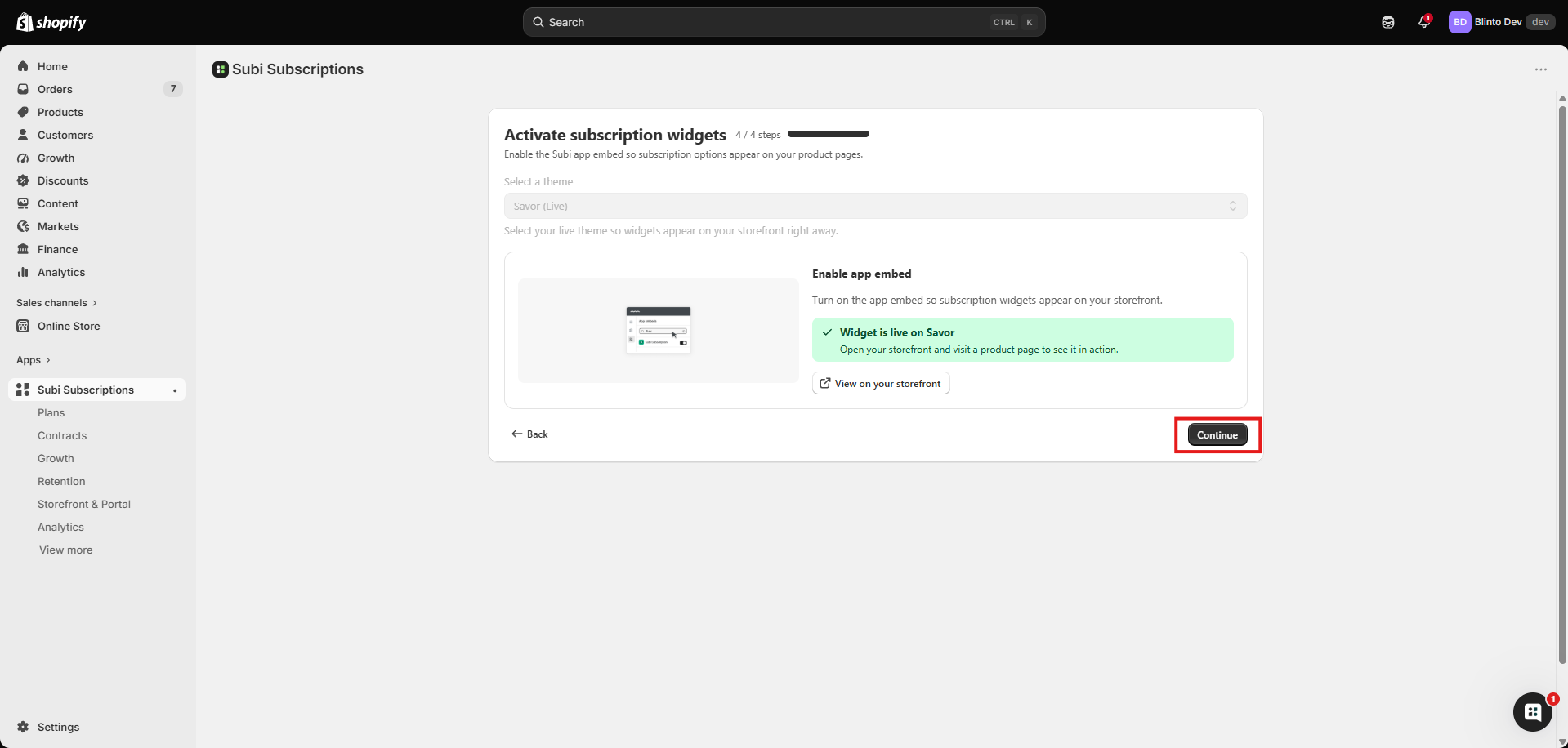
The final step was the easiest part of the whole setup.
Subi asks you to pick a theme and offers a single Enable app embed button. We chose our live theme, Savor, used the button, and the screen confirmed the widget was live on Savor, with a link straight to the storefront. There was no block to find and drag into a product section.
For a merchant without theme experience, that matters. It removes the step where most setups go wrong: finding the right section in the theme editor and dragging in the right block.
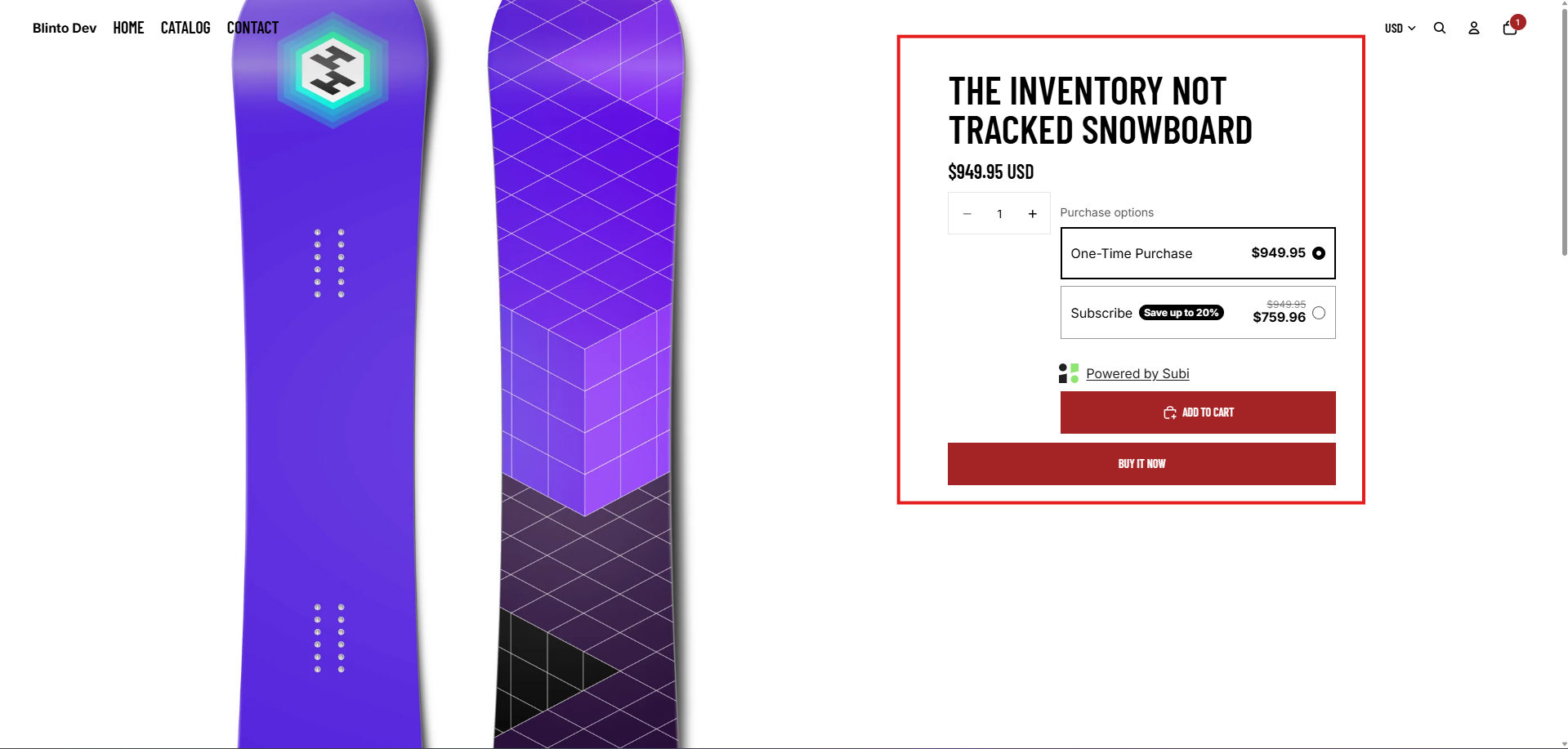
On the storefront, the widget appeared under Purchase options on a snowboard from Shopify’s sample catalogue. One-Time Purchase was selected by default at $949.95. Subscribe showed a Save up to 20% badge and $759.96 next to the crossed-out original, which is exactly 20% off.
It fitted the Savor theme without any styling work from us. It also stayed restrained. It showed the discount we set and nothing else, with no extra claims about free shipping or cancellation terms that we hadn’t configured.
We didn’t select the subscription option, add it to the cart, or check out, so we can’t say how the choice carries through to the cart and checkout.
What Merchants Report
Subi’s public reviews are overwhelmingly positive, and the praise centres on support. Merchants often mention named support staff who helped with setup, fixed portal issues quickly, or handled small code changes for them.
The complaints are rare, but a few themes repeat. Some merchants report being charged after uninstalling and having to chase it. Others describe slow replies or getting a chatbot instead of a person. A small number of stores selling restricted products, such as alcohol, report their accounts being suspended. Older reviews also mention widget customisation that didn’t save and features missing for the price.
We didn’t contact support, uninstall, or run billing, so we can’t confirm any of these reports. They’re a useful list of things to check during the trial: read the terms for restricted products if that applies to you, and note exactly how cancellation and billing work.
Pricing and Value
Verified 23 September 2026.
| Plan | Monthly fee | Fee per subscription transaction | What it adds |
|---|---|---|---|
| Free | $0 | None | Development stores only. Memberships, recurring payments, customer portal, subscription bundles, analytics |
| Starter | $29 ($290/year) | 1.6% | Unlimited subscriptions, customisation, prepaid subscriptions, 4 widget templates, contract management, live chat and email support |
| Subi | $119 ($1,190/year) | 0.8% | Quick checkout link with free shipping, cancellation management, loyalty programs, bulk edits, payment recovery |
| Subi Plus | $479 ($4,790/year) | 0.4% | Advanced analytics, priority support and feature requests, dedicated customer success manager |
Paid plans include a 7-day free trial and a 3-month money-back guarantee. Annual billing saves about 17%.
The Free plan is for development stores, so it’s a way to build and preview your setup, not to run a live subscription program. For a real store, Starter at $29 plus 1.6% is the true entry price.
The fee structure means the right plan depends on your subscription revenue, not your ambitions:
- Starter to Subi: The two plans cost the same at about $11,250 a month in subscription revenue. Below that, Starter is cheaper. Above it, the $119 plan’s lower rate saves money even before you count its extra features.
- Subi to Subi Plus: The break-even is about $90,000 a month. Below that, Plus is only worth it for the account management and priority support.
As an example, a store doing $5,000 a month in subscription orders pays about $109 on Starter ($29 plus $80 in fees) and about $159 on the Subi plan. At $20,000 a month, Starter costs about $349 and Subi about $279.
Subi’s Starter plan is inexpensive to start on, and there’s no subscriber cap at that level. But unlike Loop and Appstle, which both offer free plans with limits on live stores, Subi has no free option once you launch.
What We Liked
- A short, guided setup: Four steps took us from nothing to a live Subscribe & Save widget, all inside the Shopify admin.
- Useful options in one place: Discount, prepaid, charge days, cancellation policy, and expiration are all switches in the same window, alongside a Languages tab.
- Sensible product scope controls: All products with automatic inclusion of future products and an exclusion option suits stores that add products often.
- A simple theme connection: One Enable app embed step, followed by a clear “live” confirmation.
- An accurate, restrained widget: The storefront price matched the 20% discount exactly, and the widget didn’t promise anything we hadn’t set up.
What Could Be Better
- The summary panel didn’t match the form: It showed no plan and no products while both were set, which undermines confidence at the moment it matters.
- Subi branding on the widget: A “Powered by Subi” link appeared on our product page. Check whether your plan lets you remove it.
- The fee grows with you: At 1.6% on Starter, the percentage quickly outweighs the $29 base. Plan to move up once subscription revenue passes about $11,000 a month.
- No free plan for live stores: Free covers development stores only.
- Billing and support concerns in a minority of reviews: We didn’t test either, but they’re worth checking during the trial.
Who Subi Subscriptions Is Best For
Subi suits small and growing brands launching their first Subscribe & Save offer. The setup is short, the theme connection is a single step, and $29 a month is a modest commitment while you find out whether customers want to subscribe.
It suits stores that sell across markets, given the admin languages and the per-plan Languages tab.
It also suits brands that want memberships, loyalty, and subscriptions from one app. We didn’t test those features, but they’re part of the same product rather than add-ons from other vendors.
Who Should Upgrade or Consider an Alternative
Stay on Starter while subscription revenue is under about $11,000 a month. Move to the Subi plan once you pass that point, or earlier if you need cancellation management, loyalty, or payment recovery.
Move to Subi Plus when revenue approaches $90,000 a month, or when a dedicated account manager is worth the extra $360 a month to you.
Look elsewhere if you want to run a small live program for free. Loop and Appstle both have free plans that cover a basic Subscribe & Save offer. If you sell restricted products, check Subi’s terms before you build anything.
Final Verdict
Subi did what a first subscription app should do. We built a monthly 20% Subscribe & Save plan for every product, switched on the widget through a single app-embed step, and saw the correct price on a live product page without writing any code.
The strongest reason to choose Subi is how little setup it takes, paired with a low entry price. The biggest caveats are the transaction fee as you grow and a few rough edges, like a summary panel that didn’t keep up with the form.
If you’re launching subscriptions for the first time, start the 7-day trial on Starter and build your real offer. Then place a test order, cancel it, and refund it before you go live. Once subscription revenue passes about $11,000 a month, move to the Subi plan.
Frequently Asked Questions
Does Subi Subscriptions have a free plan? Only for development stores. On a live store, the cheapest plan is Starter at $29 per month plus 1.6% per subscription transaction.
How much does Subi charge per transaction? Starter charges 1.6%, the Subi plan 0.8%, and Subi Plus 0.4% per subscription transaction, on top of $29, $119, or $479 per month.
Do you need a developer to set up Subi? Not for a basic Subscribe & Save offer. We created a plan and put the widget live through Subi’s builder, and the widget went live through a single app-embed step, with no block to place by hand.
Can Subi apply a subscription plan to all products at once? Yes. The builder lets you apply a plan to all products, include future products automatically, and exclude specific ones.
Is Subi Built for Shopify? Yes. The app carries the Built for Shopify badge as of September 2026.