
Most Shopify stores that want subscriptions end up wanting bundles too, or the other way round. A coffee shop wants a monthly bag and a three-bag starter box. A supplement brand wants subscribe-and-save and a multipack. That often means two apps, two widgets and two bills.
Beez ‑ Subscriptions & Bundles, made by a Paris-based developer, puts both in one app. When we checked on 15 October 2026, its Shopify App Store listing showed a single Free plan, the Built for Shopify badge and a 5.0 rating from 70 reviews. The app launched in March 2026, so it is still young.
So the question we wanted to answer was: can a small store set up a subscribe-and-save offer in Beez quickly, and what should it check before relying on it?
We installed Beez on Blinto’s Shopify development store, built a subscription offer and checked it on a product page. Our short answer: the offer builder is quick, and the widget showed up cleanly on our product page. But the preset copy needs a careful read before launch, the pricing gives no hint of future paid plans, and the app has only a few months of track record.
Key Takeaways
- Best fit: Small stores that want subscribe-and-save and simple bundles from one free app.
- Fast offer builder: Pick a product, and the builder shows a ready-made Subscribe & Save widget with a live preview.
- Three offer types: Subscription, Bundle + Subscription, and Bundle, all from the same screen.
- Main limitation: The preset widget promised “Save up to 25%” while its largest discount was 20%, and it listed free shipping and priority support as benefits. Check every line before going live.
- Watch for: The listing shows only a Free plan, with no limits or future pricing stated. The app launched in March 2026, and every review on the listing is five stars, most written within days of installing.
- Our scope: We did not place a subscription order, run a renewal, test the customer portal, build a bundle or contact support.
Our Verdict
Beez is a quick, free way for a small store to put subscribe-and-save on a product page, with bundles in the same app for later.
The best part of our test was the offer builder. Once we picked a product, the preview filled in with a one-time option and two subscription options, each with its own discount, and the saved offer looked the same on our storefront. A full set of customer emails for payments, pauses, skips and cancellations was already active when we opened the Emails screen.
The trade-offs are about the details and the unknowns. The preset widget copy can make promises a store does not keep, so it needs editing. And with a single Free plan, a short history and no public help docs we could find, a store is placing some trust in a new developer.
What Beez Offers
Beez adds subscription and bundle offers to Shopify product pages and gives subscribers a place to manage their orders.
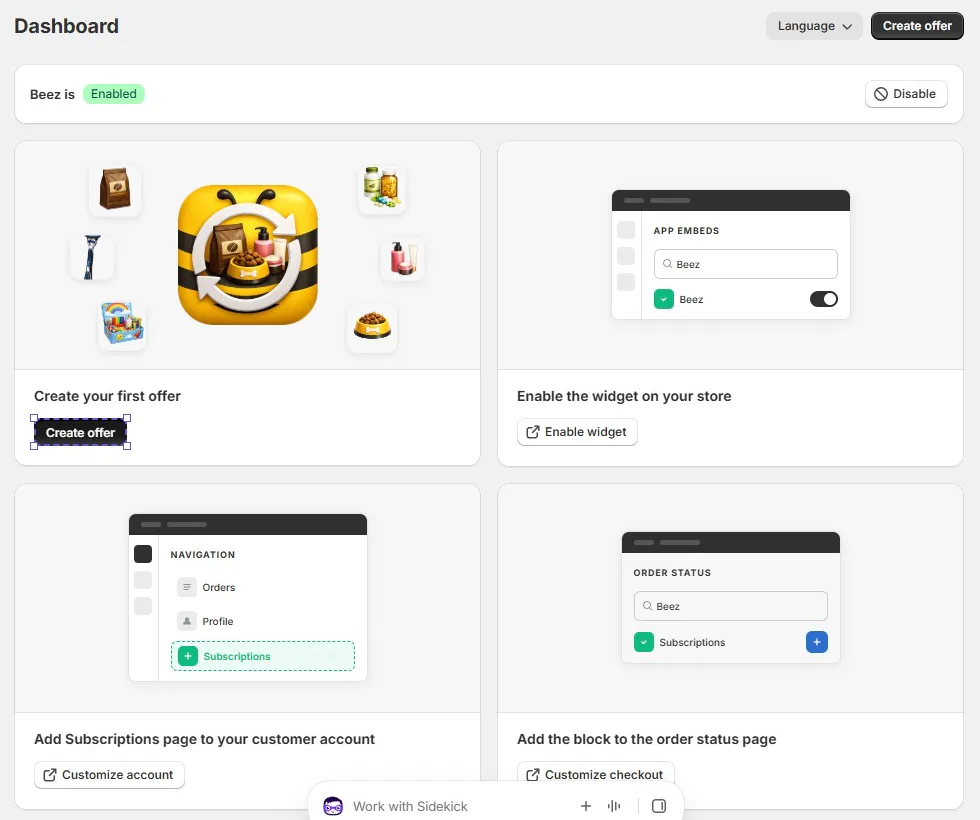
Inside Shopify admin, the app is listed as Beez Sub & Bundle, with Offers, Subscriptions, Emails and Settings in its menu. The dashboard shows whether the app is enabled, with a button to disable it, and a set of setup cards:
- Create your first offer.
- Enable the widget on your store, through the theme’s app embeds.
- Add a Subscriptions page to your customer account.
- Add a block to the order status page.
According to the listing, Beez also covers prepaid subscriptions, tiered discounts, mix-and-match boxes through a box builder, fixed bundles, a customer portal where shoppers can pause, skip or swap orders, and analytics for MRR, retention and lifetime value. The listing says it works with Shopify Checkout, customer accounts and Shopify admin. We did not test these.
What We Tested
We installed Beez on Blinto Dev, a Shopify development store we use for testing.
We worked through:
- the dashboard and its setup cards
- creating a subscription offer, from product selection to saving
- the Offers list after saving
- the subscription widget on a live product page
- the Emails screen
We did not place a subscription order or trigger a renewal. We did not add the Subscriptions page to customer accounts, add the order status block, build a bundle or box, open the Subscriptions or Settings screens, edit an email, or contact support.
Setup: Building a Subscription Offer
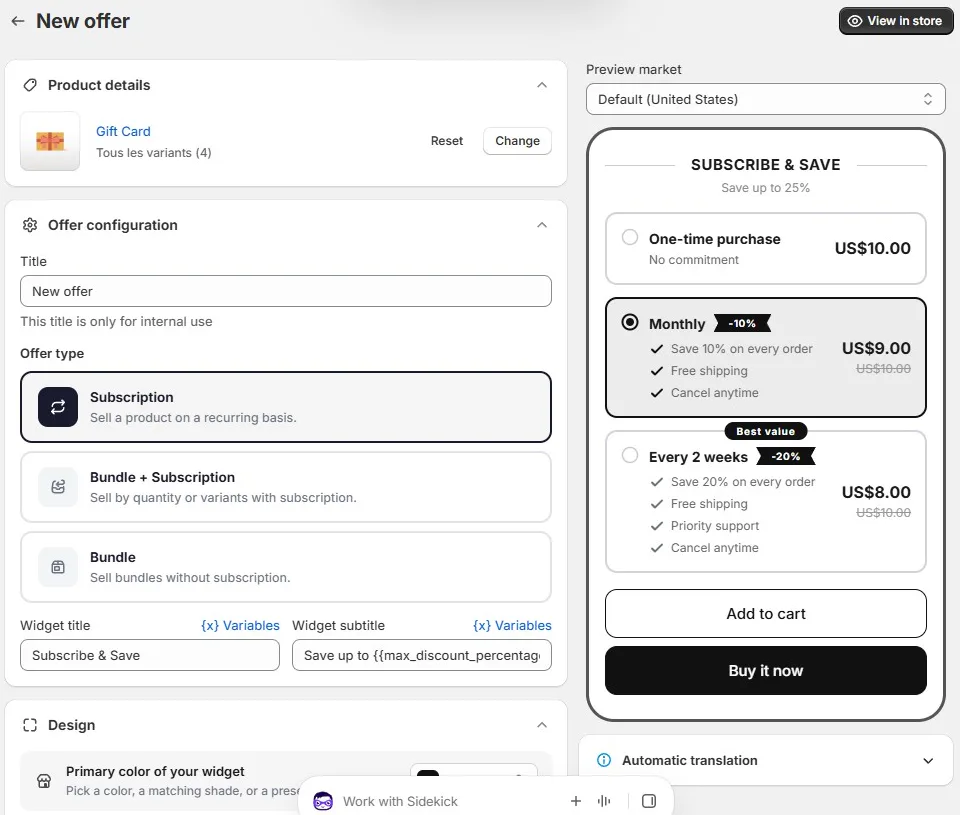
Clicking Create offer opens the New offer screen. Everything below the product section stays greyed out with a “Select a product to unlock this section” note until you choose a product, which keeps the order of steps clear.
The product picker lists your products with their variants, stock and prices. We picked a gift card with four variants, $10, $25, $50 and $100, and added all four.
As soon as the product was in, the rest of the screen opened up:
- Title: a name for the offer, marked as internal only.
- Offer type: Subscription (“Sell a product on a recurring basis”), Bundle + Subscription (“Sell by quantity or variants with subscription”) or Bundle (“Sell bundles without subscription”).
- Widget title and subtitle: “Subscribe & Save” and “Save up to” followed by a discount variable, with a Variables menu for each.
- Design: a primary colour for the widget, with matching shades or presets.
- Preview market and Automatic translation: a market selector for the preview, set to the United States, and a translation panel we did not open.
The live preview on the right showed three choices: a one-time purchase at US$10.00, Monthly at US$9.00 with 10% off, and Every 2 weeks at US$8.00 with 20% off and a “Best value” label. Each subscription option had its own list of benefits.
We kept Subscription and saved. The Offers list then showed our offer as Active, with columns for type, orders in the last 30 days, subscribers and last update, plus a row of action icons. Both counts were at zero, as expected on a test store.
The Storefront Widget
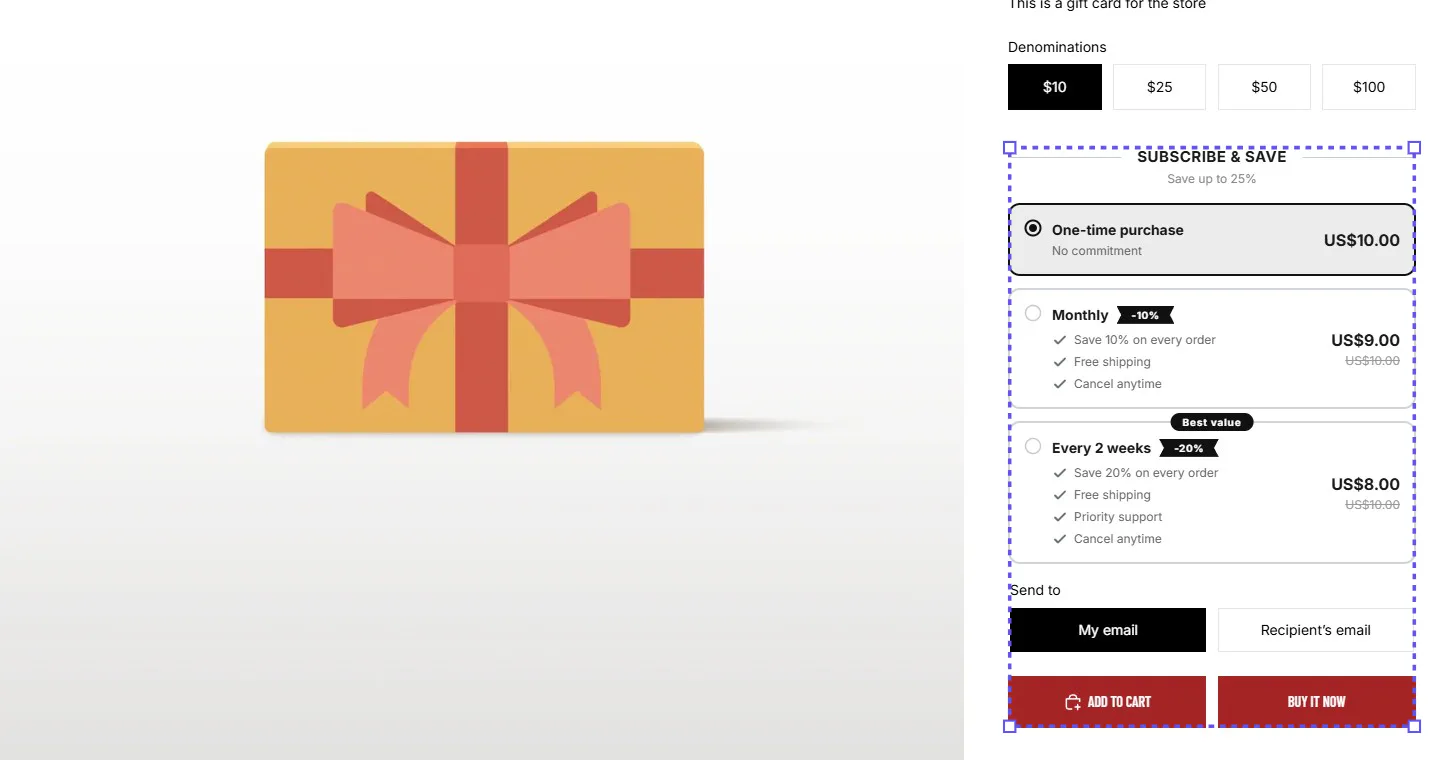
On our test product page, the widget appeared once, under the variant buttons and above the theme’s own Add to cart and Buy it now buttons. It matched the preview: the same three options, the same prices, with the original US$10.00 struck through on the subscription options.
One difference: in the builder preview, Monthly was selected, while on the storefront the one-time purchase was selected by default. Defaulting to one-time is the safer choice for shoppers. If you want subscriptions to be the default, check how your own product page loads.
Subscription Emails
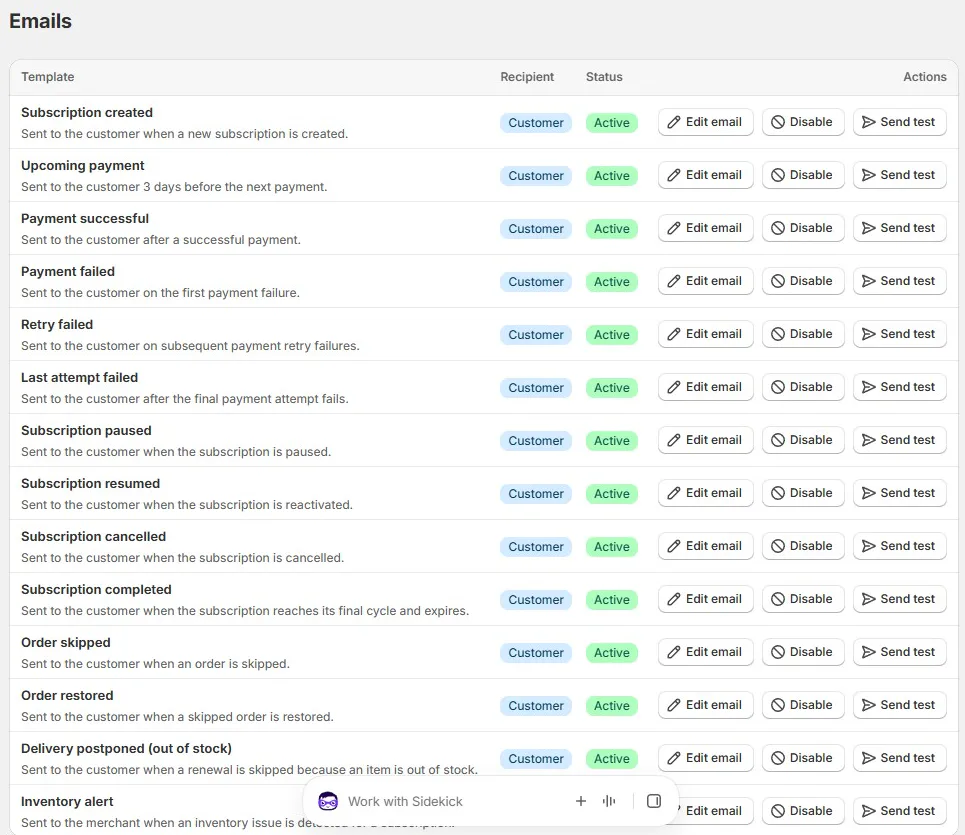
The Emails screen already had a full set of templates switched on. The visible list covered:
- Lifecycle: subscription created, paused, resumed, cancelled and completed.
- Payments: an upcoming payment notice three days before the charge, payment successful, payment failed, retry failed and last attempt failed.
- Orders: order skipped, order restored, and delivery postponed when a renewal is skipped because an item is out of stock.
- For the merchant: an inventory alert when a subscription runs into a stock problem.
Each template has buttons to edit it, disable it or send a test. We did not open or edit any of them, so we cannot say how much of the design you can change. Still, having failed-payment and out-of-stock emails ready from the start saves a store from writing them itself.
Where Beez Falls Short
The issues we found are about the preset content and the unknowns around a new app, not about anything breaking.
- The preset copy over-promises. The widget subtitle read “Save up to 25%”, but the largest discount in our offer was 20%. The subtitle is built from a discount variable, and we did not track down why it showed 25%. Either way, a shopper who expects 25% and finds 20% has been misled.
- The preset benefits may not be yours. The subscription options came with “Free shipping” on both and “Priority support” on the two-week option. These are promises to shoppers, not app features. We did not edit these lines, so make sure each benefit is true for your store, or remove it, before the offer goes live.
- A small translation slip. In our English admin, the product section described the selected variants in French (“Tous les variants”). It does not affect the storefront, but it shows the admin is still being polished.
- Pricing is an open question. The listing shows a single Free plan, with no order limits, paid plans or transaction fees mentioned. That is good news today, but there is no way to tell from the listing whether it will stay that way as the app grows.
- A short track record. Beez launched in March 2026. Every review on the listing was five stars when we checked, and most were written within a few days of installing. That says a lot about first impressions and support, and little about how the app handles months of renewals.
- Few integrations listed. The listing names Shopify Checkout, customer accounts and Shopify admin, but no email marketing, helpdesk or loyalty apps. If you rely on Klaviyo or similar for subscription flows, confirm support with the developer first.
- No public help docs found. We could not find public documentation for the app, so setup questions go to the developer’s support.
Pricing and Value
On 15 October 2026, the Shopify App Store listing showed one plan:
| Plan | Price | Limits listed |
|---|---|---|
| Free | Free | None stated |
We did not see a billing or plans screen inside the app during our test.
For what the listing describes, that is strong value. Subscriptions, bundles, a box builder, a customer portal, analytics and the subscription emails we saw all sit in one free app.
The catch is uncertainty rather than cost. Before you move a large subscriber base onto Beez, ask the developer whether pricing or limits are planned.
What Merchants Report
At the time of our check, all 70 reviews on the listing were five stars.
Fast, helpful support is the most common theme. Several merchants say the team helped them quickly with setup or problems, and one mentions the developer helping with code directly. Easy setup comes up often too.
Several reviewers use Beez mainly for bundles, such as multipacks or quantity options, and some plan to add subscriptions later. A few mention needing design changes to match their theme.
There are no critical reviews to learn from yet, and most reviews come from merchants who had used the app for hours or days. Treat the rating as a sign of good onboarding, not of long-term reliability.
What We Liked
- A quick offer builder: Picking a product unlocked the rest of the screen, and a ready Subscribe & Save widget appeared in the preview.
- Subscriptions and bundles together: Subscription, Bundle + Subscription and Bundle are three choices on one screen.
- A clean storefront widget: The widget appeared once, matched the preview and defaulted to the one-time purchase.
- Emails ready from day one: Payment, retry, pause, skip, cancellation and out-of-stock emails were all active, each with a test button.
- Free, per the listing: A single Free plan, with no limits stated.
What Could Be Better
- Misleading preset subtitle: “Save up to 25%” appeared on an offer whose top discount was 20%.
- Preset benefits to remove: Free shipping and priority support were listed as benefits by default.
- Unclear future pricing: The listing gives no detail beyond Free.
- A young app: Launched in March 2026, with reviews that mostly reflect the first few days of use.
- Thin integration list and no public docs: Only Shopify’s own surfaces are listed, and we found no help documentation.
Who Beez Is Best For
Beez suits a small or new Shopify store that wants subscribe-and-save, simple bundles, or both, without paying for an app. If you sell something people reorder, such as coffee, supplements, pet food or refills, and you also want multipacks or a starter box, Beez covers both from one offer builder.
It also suits merchants who value quick, hands-on support during setup, which is what most reviewers praise.
Who Should Consider an Alternative
If you are moving hundreds of existing subscribers, you may prefer an app with a longer track record and published plans and limits.
If your subscription flows run through Klaviyo or a helpdesk app, check integration support with the developer before you install, since the listing names none.
And if you want a free plan with clearly stated limits, Blinto’s review of Easy Subscriptions App covers an app whose listing showed a free Starter plan for up to 100 subscription orders.
Final Verdict
Beez gives a small Shopify store a fast, free way to start selling subscriptions, with bundles in the same app. In our test, the offer builder had a working subscribe-and-save widget on our product page in a few steps, and the customer emails were already active.
The main caveats are the preset widget copy, which promised a bigger discount and benefits a store may not offer, the unstated future pricing, and the app’s short history.
Our advice: install it, build your offer, then rewrite the subtitle and benefit lines so every promise is true. Add the Subscriptions page to customer accounts, place a test subscription order and send yourself the key emails before you promote it.
Frequently Asked Questions
Is Beez free?
On 15 October 2026, the Shopify App Store listing showed Beez as Free, with no paid plans, order limits or transaction fees listed. We did not see a billing screen in the app.
Can Beez do bundles as well as subscriptions?
Yes. The offer builder has three offer types: Subscription, Bundle + Subscription, and Bundle. The listing also describes a box builder for mix-and-match boxes. We only tested a subscription offer.
Can customers pause, skip or cancel their subscriptions?
The listing says the customer portal lets shoppers pause, skip or swap orders, and the app has emails for paused, resumed, skipped and cancelled subscriptions. The dashboard has a setup card for adding a Subscriptions page to customer accounts. We did not test the customer side.
What happens when a subscription payment fails?
The Emails screen has templates for a first failed payment, later retry failures and a final failed attempt. We did not trigger a failed payment, so we cannot confirm how retries are scheduled.
Does Beez work with Klaviyo?
The listing names Shopify Checkout, customer accounts and Shopify admin, and does not mention Klaviyo or other email apps. Check with the developer if you need it.
Did you test billing and renewals?
No. We built a subscription offer and checked the storefront widget and emails screen, but we did not place a subscription order, run a renewal or test failed-payment retries.