
Most merchants who add subscriptions want the same first result: a Subscribe and save option on the product page, a discount that makes it worth choosing, and a way for subscribers to pause or cancel without emailing the store. The hard part is getting there without a long setup project or a big monthly bill before the first subscriber arrives.
Joy Subscriptions App is built around that first step. When we checked on 15 October 2026, its Shopify App Store listing showed a 4.9 rating from 462 reviews, the Built for Shopify badge and a launch date of August 2024. It has a Free plan for up to 50 active subscriptions, with paid plans from $49 a month plus a transaction fee.
So the question we wanted to answer was: how far can a store get on the Free plan, and when does it have to start paying?
We installed it on Blinto’s Shopify development store in October 2026, built a subscription plan through the onboarding flow, turned it on in our theme, opened the customer portal settings and walked through the setup checklist. Our short answer: onboarding is quick and well guided, and the portal controls are clear. The trade-offs are the 50-subscription cap on the Free plan, a transaction fee on every paid plan, and several retention tools that only start on Starter.
Key Takeaways
- Best fit: Stores launching subscribe-and-save for the first time that want a guided setup and help from the team.
- Fast onboarding: A three-step flow builds a plan with a live product-page preview, then guides you through turning it on in your theme.
- Free plan cap: Up to 50 active subscriptions. Past that, Starter costs $49 a month plus 0.75% per transaction.
- Main limitation: Dunning, advanced cancellation flows, win-back flows and subscription boxes are listed on Starter and above, not Free.
- Watch for: Merchant reviews are mostly about fast support, but the few negative ones describe backend order problems and slow fixes.
- Our scope: We did not create a subscription order, run a renewal, use the portal as a subscriber or contact support.
Our Verdict
Joy Subscriptions App is a good choice for a store that wants to get subscribe-and-save live quickly and test demand before committing to a paid subscription platform.
The best part of our test was the onboarding. Three steps took us from install to an active plan, and the plan builder showed exactly what shoppers would see while we chose products, delivery frequency and discount. A setup checklist then kept track of what was still missing.
The trade-offs are about what happens as you grow. The Free plan covers 50 active subscriptions, and the tools that protect recurring revenue, such as failed-payment recovery and cancellation flows, sit on the paid plans. Both paid plans with a listed price add a fee on each transaction. And because we did not run a real subscription order, we cannot judge billing or the subscriber experience.
What Joy Subscriptions App Offers
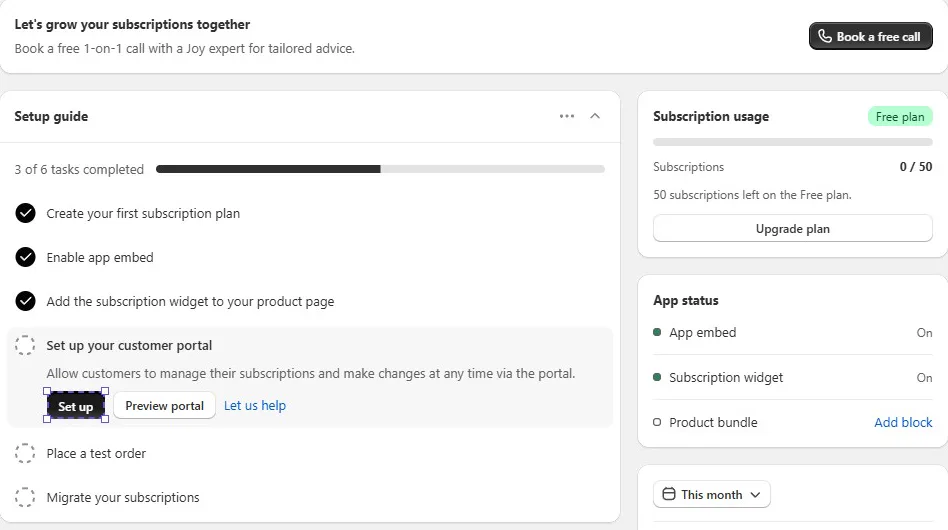
Joy Subscriptions App adds subscriptions to a Shopify store: a subscribe-and-save widget on product pages, subscription plans you manage in the app, and a customer portal where subscribers manage their own plans.
Inside Shopify admin, the app menu has Plans, Subscriptions, Orders, Widget, Retention, Customer portal, Analytics and Settings. The dashboard opens with a setup guide, a Subscription usage card showing how many subscriptions you have left on your plan, an App status card and a Help center with chat, a call booking link and guides.
According to the listing, the app also covers subscription boxes, volume bundles, cancellation flows, failed-payment recovery, win-back flows, MRR, churn, LTV and retention reporting, and migration from other apps. It lists Checkout, Customer accounts, Shopify POS, Shopify Flow, Klaviyo, Joy Loyalty, PageFly and EComposer among its integrations, and the admin is available in English, Japanese, French, German, Italian and Spanish. We did not test these.
What We Tested
We installed Joy Subscriptions App on Blinto Dev, a Shopify development store we use for testing, on the Free plan.
We worked through:
- the three-step onboarding flow
- building a subscription plan with a live preview
- turning on the app embed and adding the widget block in the theme
- the setup checklist and dashboard
- the customer portal settings and adding the subscriptions page to customer accounts
- the Plans list
- the in-app pricing page
We placed a test order from the checklist, but it was a one-time purchase of a product outside our plan, so it did not create a subscription. We did not run a renewal, use the portal as a subscriber, open the Retention or Analytics screens, try a migration, build a bundle or contact support.
So we can judge how the app is set up, how plans are built and how the portal is configured. We cannot judge billing, renewals, the subscriber experience or support quality.
Setup: From Install to an Active Plan
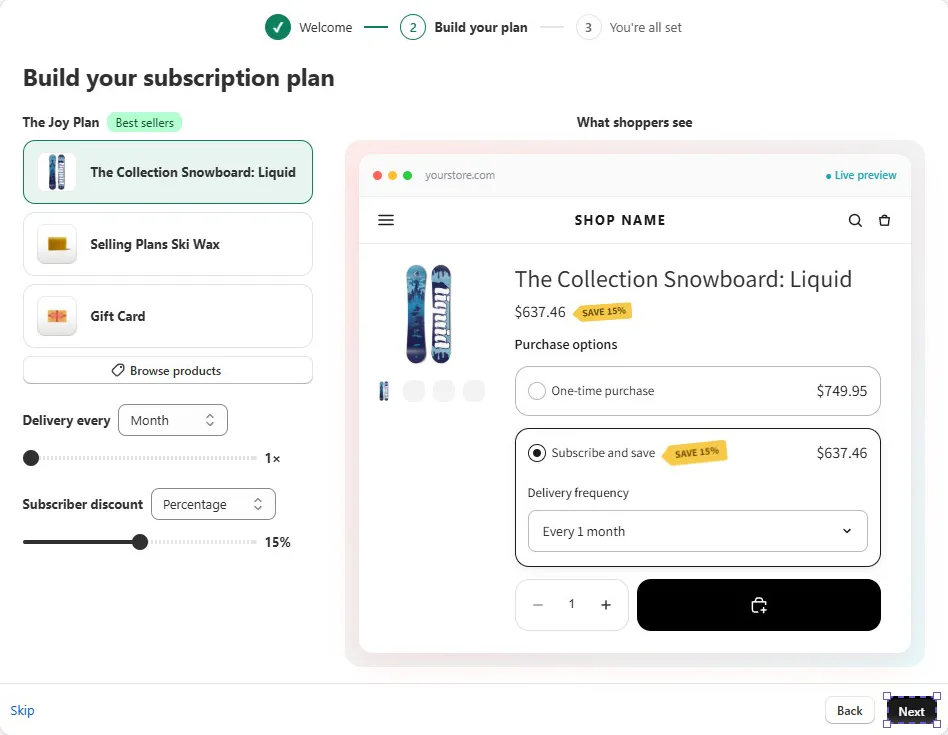
The app opens with a three-step onboarding flow: Welcome, Build your plan and You’re all set.
The first step asks how you want to start. You can ask a Joy expert to guide you, or set it up yourself with guided steps. We chose to set it up ourselves.
The second step is the plan builder. The default plan is called The Joy Plan, and it listed three products from our store under a Best sellers label, with a Browse products button to change them. Below the products, you set the delivery frequency and the subscriber discount with sliders, plus a dropdown for the discount type, which was set to Percentage. On the right, a What shoppers see panel shows a product page with One-time purchase and Subscribe and save options, the discounted price, a Save badge and a delivery frequency dropdown. It updated as we changed the settings. We kept a monthly delivery and set the discount to 15%.
The third step puts the plan live in your theme. It has two short tasks, each with a video and a button that opens the theme editor: switch on the Joy Subscriptions app embed and save, then drag the subscription widget block onto your product page and save. A Refresh status link lets the app check that each one worked.
After that, our plan appeared on the Plans screen as active, applied to three products with one frequency option and automatic charges.
The whole flow is well designed for a first-time merchant. It asks for very little and shows the result before you commit. The flip side is that onboarding only covers one simple plan. Anything more involved, such as several frequencies or a box, means going back into Plans afterwards.
The Customer Portal
The setup guide’s fourth task is the customer portal, which lets subscribers manage their plans from their customer account.
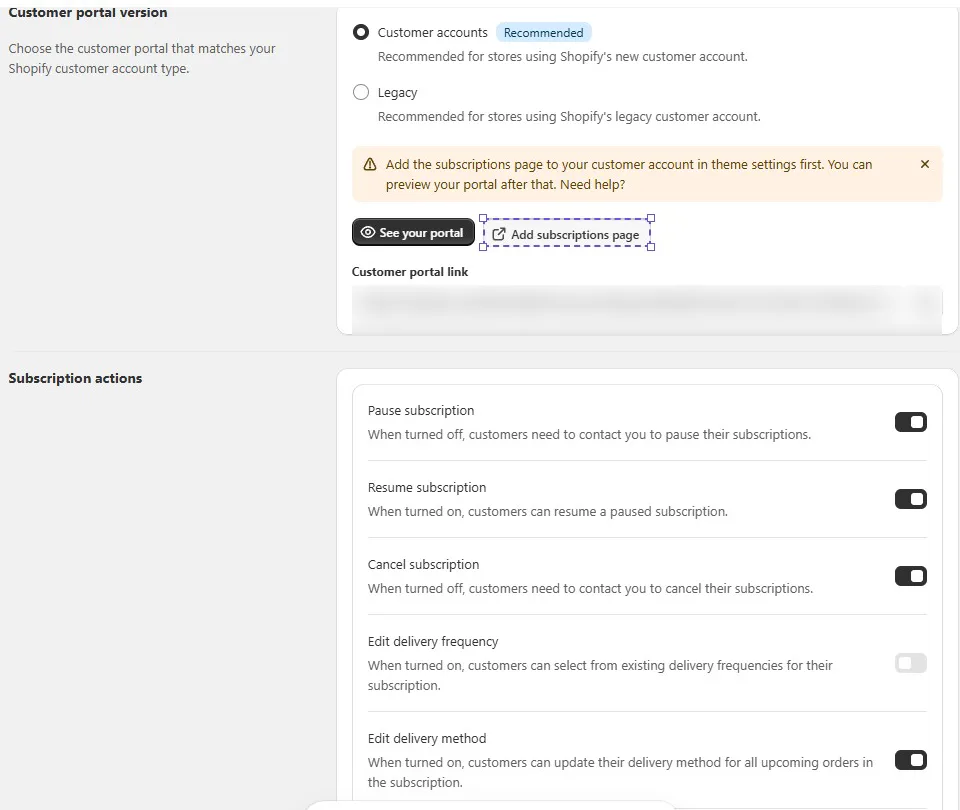
The Customer portal screen starts with the portal version. Customer accounts is recommended for stores using Shopify’s new customer accounts, and Legacy is for stores still on legacy accounts. Until the subscriptions page is added to customer accounts, a warning tells you to do that first before you can preview the portal.
The Add subscriptions page button opened Shopify’s checkout and accounts editor. The app offered three blocks there: Subscriptions (Custom), View Subscription and Subscriptions, with an option to add a page to Accounts. Once that was done, the setup guide marked the portal task complete.
A See your portal button opens the portal with sample subscriptions. The app notes that nothing you change there affects real data, which makes it a safe way to check the subscriber view.
Below that, Subscription actions controls what subscribers can do on their own. Each action has a toggle and a short note on what happens when it is off. In our store, Pause, Resume and Cancel subscription were on, Edit delivery method was on, and Edit delivery frequency was off. When Pause or Cancel is off, the app notes that customers will need to contact you instead.
These toggles are useful. A store that wants subscribers to talk to someone before cancelling can turn that off, and a store that wants a fully self-service experience can leave it all on. The caveat is the same as with most subscription apps: the portal is not live until you add the page in Shopify’s editor, so finish this step before you promote subscriptions.
We did not log in as a subscriber, so we cannot confirm how each action behaves in practice.
Pricing and Value
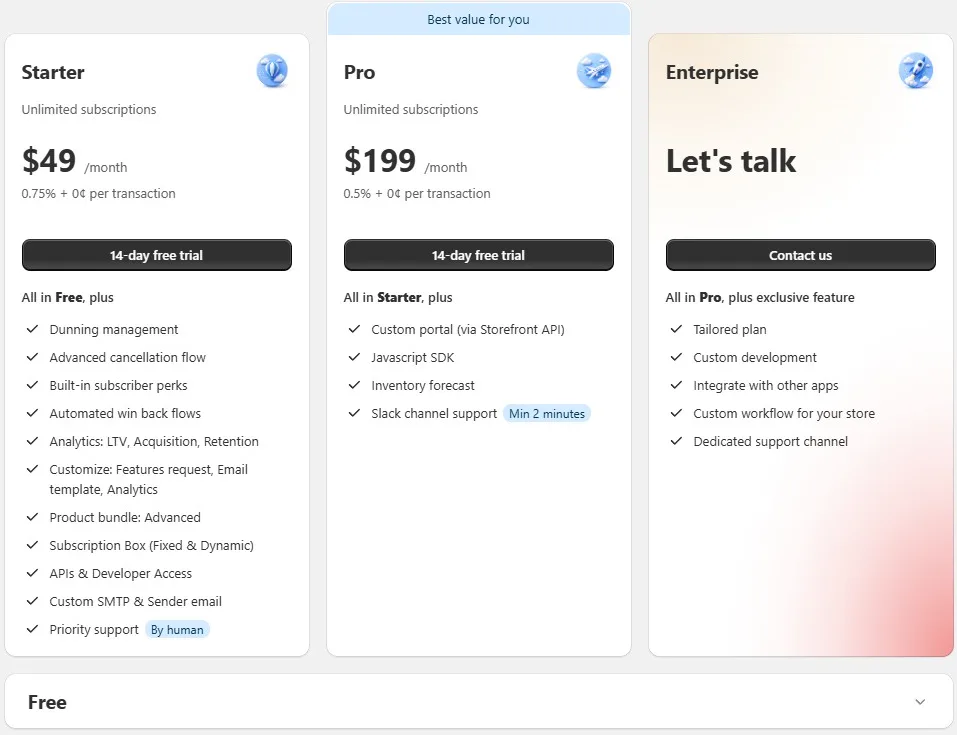
On 15 October 2026, the in-app pricing page and the Shopify App Store listing showed these plans:
| Plan | Price | Transaction fee | Subscriptions |
|---|---|---|---|
| Free | $0 | None listed | 50 active |
| Starter | $49/month | 0.75% | Unlimited |
| Pro (Professional on the listing) | $199/month | 0.5% | Unlimited |
| Enterprise | Contact sales | Not listed | Not listed |
Starter and Pro both have a 14-day free trial.
The Free plan includes the customer portal and widget, performance reports, Klaviyo, Shopify Flow and POS integrations, and human support. Starter adds dunning management, an advanced cancellation flow, subscriber perks, automated win-back flows, LTV, acquisition and retention analytics, advanced bundles, fixed and dynamic subscription boxes, API access and custom sender email. Pro adds a custom portal through the Storefront API, a JavaScript SDK, inventory forecasting and Slack support. Enterprise adds a tailored plan, custom development and a dedicated support channel.
The Free plan is enough to launch and test demand. Our dashboard showed 50 subscriptions left on it. But the retention tools that tend to matter once a subscription base grows, especially failed-payment recovery and cancellation flows, start on Starter.
The transaction fee is the cost to plan for. At 0.75% on Starter, every $10,000 of subscription revenue adds $75 on top of the $49 monthly fee. Shopify’s own payment processing fees still apply. Compare that against flat-fee subscription apps once you know your likely volume.
What Merchants Report
Merchant reviews are overwhelmingly positive. When we checked, 448 of 462 reviews were five stars, 8 were four stars and 6 were one star. The most common theme by far is quick, friendly support, often during setup.
The four-star reviews add some detail:
- Billing dates: One merchant asked for customers to choose their first billing date and to reschedule all future orders, not only the next one.
- Currency: One merchant switched apps because of currency conversion issues, while still praising support.
The one-star reviews are few, but they are worth reading before you commit:
- Backend problems: One merchant reported orders not processing, settings being ignored and duplicate or missing orders, each taking days to resolve.
- Data import: One merchant said imported customer addresses came through wrong. The developer says it corrected the data.
- Support quality: Two merchants described repeated questions or AI support that did not solve the problem. One of them also reported that automatic tagging of paused and cancelled subscriptions stopped working.
The developer replied to most of these with fixes or follow-ups. We did not test support or migration ourselves, so treat these as merchant reports.
What We Liked
- Quick onboarding: Three steps from install to an active plan.
- Live preview: The plan builder shows the product-page widget as you change products, frequency and discount.
- Clear setup checklist: Each remaining task opens with its own action button, and the portal step has a Let us help option.
- Flexible portal controls: Pause, resume, cancel, frequency and delivery method can each be switched on or off.
- Safe portal preview: Sample subscriptions let you check the subscriber view without touching real data.
- Usable Free plan: Up to 50 active subscriptions with the portal and widget included.
What Could Be Better
- 50-subscription cap: The Free plan suits testing, not a growing subscription base.
- Transaction fees: Starter and Pro add a percentage on top of the monthly fee.
- Retention tools on paid plans: Dunning, cancellation flows and win-back start on Starter.
- Manual portal step: The subscriptions page has to be added in Shopify’s editor.
- Reported backend issues: A small number of merchants describe order and data problems.
Who Joy Subscriptions App Is Best For
Joy Subscriptions App suits stores adding subscribe-and-save for the first time, especially those that want to see how subscriptions perform before paying for a larger platform. The Free plan, quick onboarding and offers of help from the team make it a low-risk way to start.
It also suits stores already using Joy Loyalty, since the two apps are listed as working together.
Who Should Consider an Alternative
If you already expect well over 50 subscribers, the decision is really about Starter or Pro, and the transaction fee needs to be part of that comparison.
Stores with complex subscription operations, or that cannot afford order-processing problems during a migration, should place real test orders and run renewals before moving over.
If you want to compare options, we have also reviewed Recharge, Appstle, Seal, Loop, Subi, Kaching, PayWhirl, Recurpay and Supr Bundle & Subscription App. We have not run them head to head, so we are not ranking them here.
Final Verdict
Joy Subscriptions App makes the first subscription plan easy. In our test, the onboarding flow took us from install to an active plan with a live preview, and the customer portal settings give clear control over what subscribers can do themselves.
The main caveats are the 50-subscription Free plan, the transaction fee on paid plans, retention tools that start on Starter, and the parts we could not test in a setup run, especially billing and the subscriber experience.
Our advice: start on the Free plan, build one plan through onboarding, finish the customer portal step and place a real subscription test order. If billing and the portal work as described and demand is there, work out what Starter will cost at your volume before you upgrade.
Frequently Asked Questions
Is Joy Subscriptions App free?
It has a Free plan for up to 50 active subscriptions. Paid plans start at $49 a month plus 0.75% per transaction, as of 15 October 2026.
Does Joy Subscriptions App charge transaction fees?
The Starter plan charges 0.75% per transaction and the Pro plan charges 0.5%, on top of the monthly fee. No transaction fee was listed for the Free plan.
Can subscribers pause or cancel on their own?
Yes, if you allow it. The Customer portal settings have toggles for pausing, resuming and cancelling subscriptions, editing the delivery frequency and changing the delivery method.
Do I need to add the customer portal myself?
Yes. You add the subscriptions page to customer accounts in Shopify’s checkout and accounts editor. The app links you there from its Customer portal screen.
Did you test billing and renewals?
No. We did not create a subscription order, so we could not test billing, renewals, failed-payment recovery or the subscriber portal.