
Most stores that add subscriptions are small when they start. They sell something people reorder, like coffee, snacks, or skincare, and they want a “Subscribe & save” option on the product page without handing a share of every renewal to an app.
Seal Subscriptions is built around that worry. None of its plans take a transaction fee. There’s a free plan, and the paid plans start at $5.95 a month. It has been on the Shopify App Store since March 2020, holds a 4.9 rating across more than 3,100 reviews, and carries the Built for Shopify badge.
The trade-off is that Seal charges by the number of subscriptions and puts features behind plan tiers. So the useful question isn’t whether Seal is cheap. It’s this: Can a small store launch subscriptions on Seal’s low plans, and at what point do the plan limits push you to pay more?
We installed Seal on a Shopify development store, created a Subscribe & Save rule for a set of products, and checked the widget on a live product page.
Key Takeaways
- Best for small stores that hate percentage fees: Every plan has a 0% transaction fee, so your cost stays flat as subscription revenue grows.
- You pay by subscription count instead: Free covers 50 subscriptions, and the plans step up through 100, 250, 500, and beyond.
- Setup is guided and stays in the Shopify admin: A get-started checklist, a rule builder with a live widget preview, and a one-screen choice between charging models.
- Key tools sit on higher plans: Applying a rule to all products needed the $24.95 Legend plan in our test. Cancellation flows, fixed schedules, and the Quick Checkout Wizard are also Legend features.
- The widget is plain by default: It showed the purchase options and a “Powered by Seal Subscriptions” link on our product page.
Our Verdict
Seal is a good fit for a small store that wants subscriptions without a per-transaction fee. It’s especially good if you expect subscription revenue to grow faster than your subscriber count.
The rule builder was the strongest part of our test. It puts the widget name, the plan selector label, the selling plan, and the product list on one screen, with a preview of the widget next to it. The choice between auto-charging, membership, and invoice-based rules is explained in plain language before you start.
The main caution is the plan ladder. Seal is cheap at the bottom, but useful tools are spread across tiers. On our store, the option to apply a rule to every product was locked behind Legend. If you have a large catalogue, you’ll either select products by hand or pay $24.95 a month.
Our test stopped at the product page. We didn’t place a test order, trigger a charge, or open the customer portal. This review makes no claims about what happens after a shopper subscribes.
What Seal Subscriptions Offers
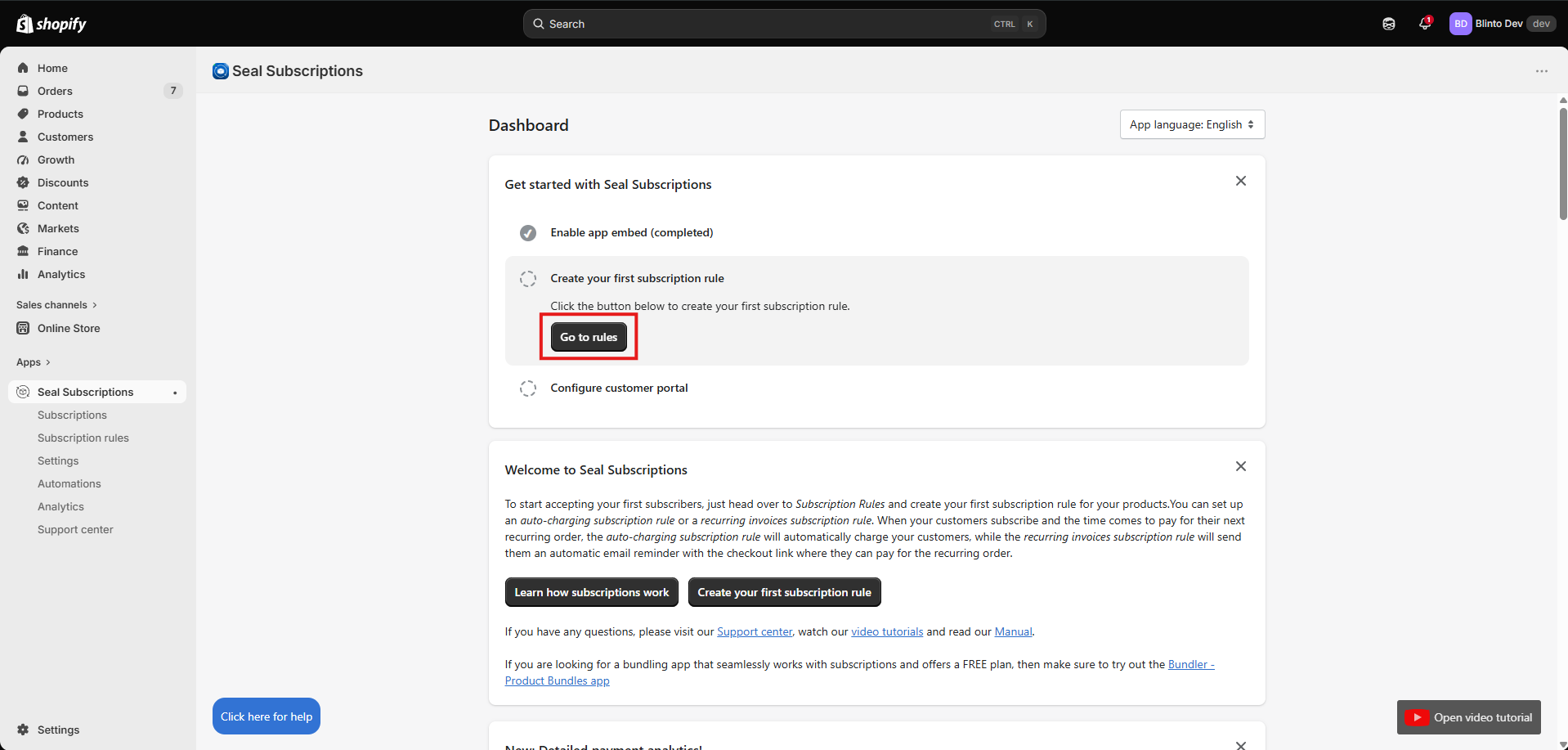
Seal runs recurring orders from inside the Shopify admin. Its menu is short: Subscriptions, Subscription rules, Settings, Automations, Analytics, and Support center. The dashboard opens with a three-step checklist: enable the app embed, create your first subscription rule, and configure the customer portal. There’s also an app language switcher at the top.
The app handles classic and prepaid subscriptions, subscription boxes, and memberships. It supports tiered discounts, free trials, and custom shipping for subscribers. Customers can reach their subscriptions through magic links rather than a password. The developer also lists analytics and automated billing.
Seal works with Shopify Checkout, customer accounts, Shopify POS, and the Shopify admin. It connects with Klaviyo, Attentive, Gorgias, Bundler, GemPages, and PageFly. The app is available in 18 languages.
The dashboard also suggests Bundler, a bundling app that works with Seal. That’s a reasonable pairing, but it’s still a promotion sitting on your subscription dashboard.
What We Tested
We installed Seal on the Blinto Dev Shopify development store. The app embed was already enabled when we reached the dashboard, and the Subscription rules page confirmed the widgets were enabled in our shop.
We created an auto-charging subscription rule named Subscribe & save, with a monthly selling plan called Monthly subscription, and chose products for it from our catalogue. Then we viewed the widget on a product page.
We didn’t set a subscription discount in the screens we recorded. We also didn’t place a test order, go through checkout, or trigger a first or recurring charge. We didn’t test the customer portal, memberships, recurring invoices, prepaid plans, fixed schedules, the Quick Checkout Wizard, automations, analytics, migration, or support.
We didn’t confirm which plan was active on our development store. We only know it was below Legend, because Legend-only options were locked.
Choosing How Subscribers Pay
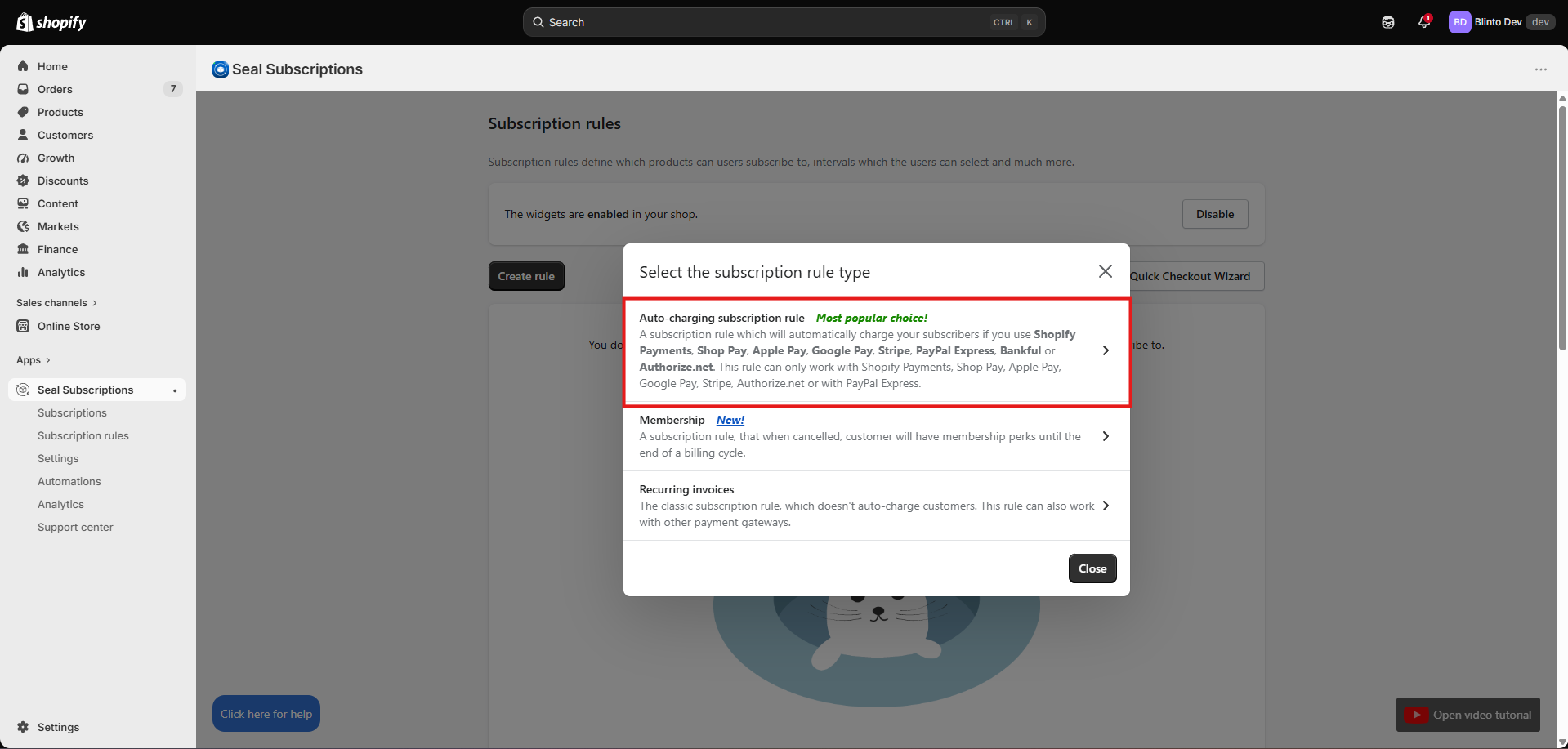
When you click Create rule, Seal asks you to choose one of three rule types first. This is the most important decision in the setup, and Seal explains it well.
- Auto-charging subscription rule: Seal charges subscribers automatically. It works only with Shopify Payments, Shop Pay, Apple Pay, Google Pay, Stripe, PayPal Express, Bankful, or Authorize.net. Seal marks it as the most popular choice.
- Membership: A subscription rule where a cancelled customer keeps their perks until the end of the billing cycle.
- Recurring invoices: The older model. Seal doesn’t charge the customer. It emails them a checkout link to pay for each order. This works with other payment gateways.
The recurring invoices option is useful. If your store runs on a payment gateway that doesn’t support automatic charges, you can still offer subscriptions. The cost is that customers have to act on every order, and a missed email means a missed order. The welcome panel on the dashboard explains the same difference before you open this dialog, so it’s hard to choose the wrong one by accident.
The Subscription rules page also has Reorder rules, Fixed schedules, and Quick Checkout Wizard buttons. A Disable button lets you switch the storefront widgets off in one click.
Building the Rule
The rule editor is a single long page with a Widget preview panel on the right.
Under General information, you set three names. The Rule name appears in the widget on product pages. The Internal name is for you only. The Label for plan selector appears before the interval choice, and Seal suggests something like “Subscribe and deliver every.” A tip points to Settings > Translations if you want to change any other text in the widget.
Under Selling plans, you name each plan. Seal notes that this name appears on customer invoices and suggests including the frequency and discount. There’s a checkbox to make the plan prepaid, and Add selling plan lets you offer more intervals in the same rule.
The preview reflects the rule as you build it. With our monthly plan, it showed One-time purchase and Subscribe & save, with “Deliver every month” under the subscription option. Because we hadn’t set a discount, both options showed the same price. That’s a useful check: if you meant to add a discount and the preview shows the same price, you haven’t finished.
The page also tells you how to remove the one-time purchase option, but the setting isn’t in Seal. You have to go to the product in the Shopify admin and change its purchase options there. That’s how Shopify handles it, but it would be easier if Seal linked to the product directly.
Where the Plan Limits Show Up
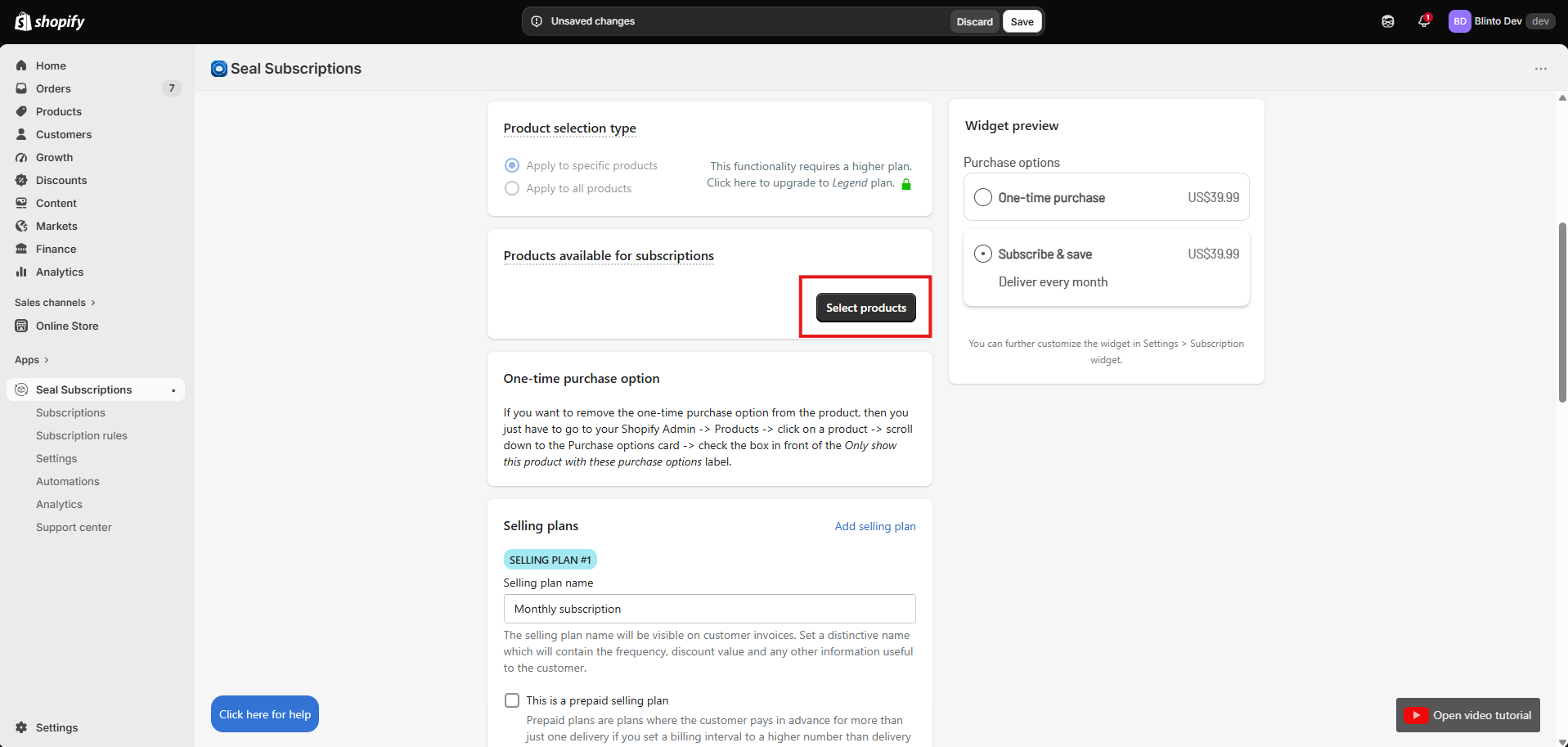
Seal’s biggest limitation in our test came at Product selection type. There are two choices: Apply to specific products or Apply to all products. On our plan, the second was greyed out with a lock and a note saying it requires an upgrade to the Legend plan.
That means below Legend, you pick products through Select products and keep the list up to date yourself. Our test store’s list showed seven products, so that was manageable. For a store with hundreds of products, or one that adds new products every week, it’s ongoing work, and forgetting a new product means it simply won’t offer a subscription.
This is the pattern across Seal’s pricing. The low plans are affordable, but some everyday conveniences sit on Legend at $24.95 a month. That includes cancellation flows, fixed schedules, the Quick Checkout Wizard, and automatic product price updates.
The Widget on the Storefront
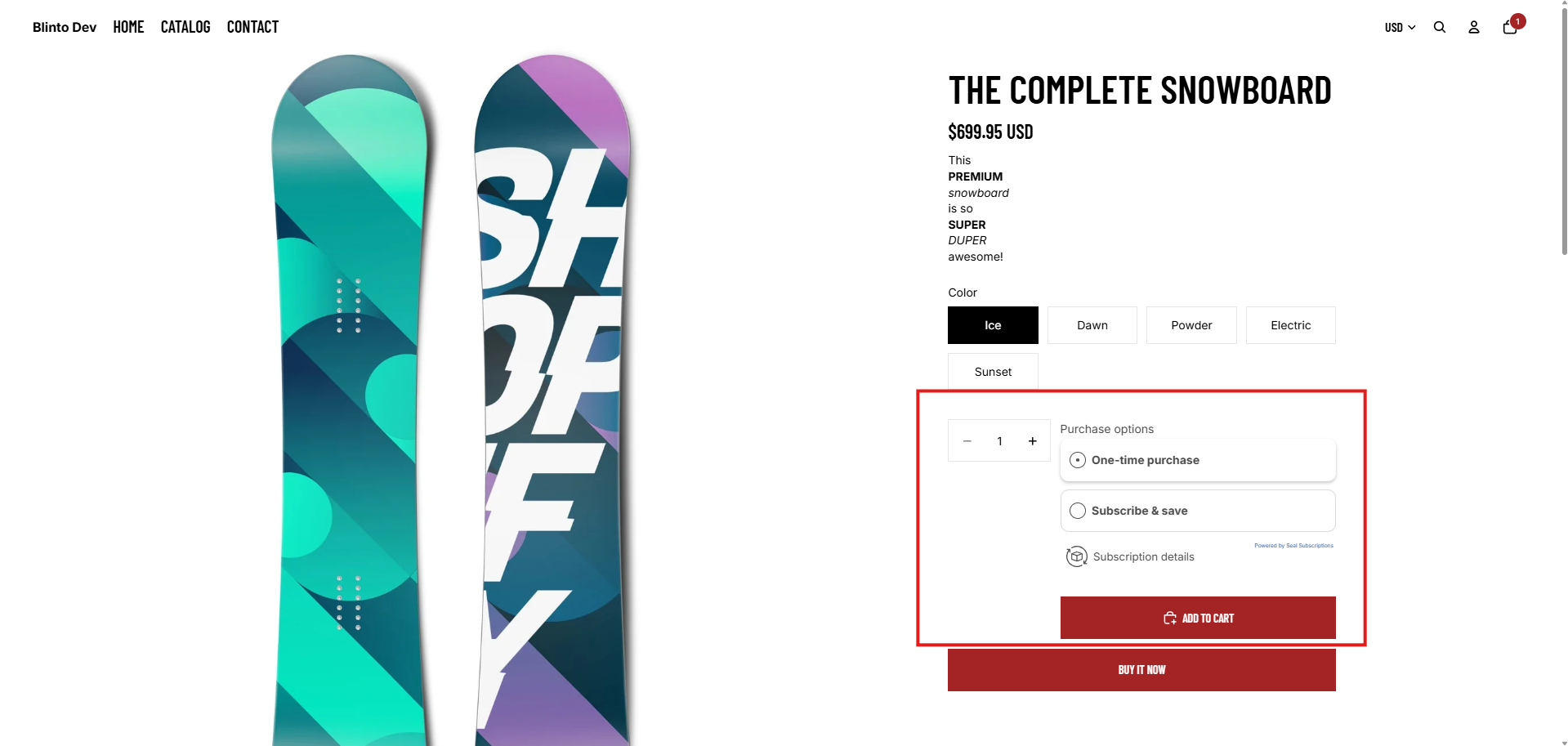
On the storefront, the widget appeared under Purchase options on a snowboard from Shopify’s sample catalogue. It sat between the quantity picker and Add to cart, and it matched the look of the theme’s other product-page elements. One-time purchase was selected by default, and a Subscription details link sat below the options.
Two things stood out. First, the options on the page didn’t show prices, although the admin preview did. With no discount set, that doesn’t cost the shopper anything here, but check how it looks once you add one. Second, a small Powered by Seal Subscriptions link appeared under the options.
Seal’s help centre says the branding is removed automatically on any paid plan. Stores on the Free plan can ask Seal’s team to verify the store and remove it at no cost. So it’s easy to get rid of, but it’s on by default.
We didn’t select the subscription option, add it to the cart, or check out, so we can’t say how the choice carries through to the cart and checkout.
What Merchants Report
Seal’s public reviews are overwhelmingly positive. Merchants most often praise how easy setup is, how cleanly it fits into Shopify, and how quickly support answers questions. Some also credit it with bringing customers back to reorder.
The lower-rated reviews are few, but some themes repeat. Some merchants find features hard to understand without help, including one report of a payment retry setting leading to repeated charge attempts. Some beginners find the interface confusing. Others say the Free plan did less than they expected. Growing stores mention features and capacity being gated behind higher plans and reporting that feels limited at scale. There are also reports of slow or unavailable support at critical moments, support hours that don’t suit US merchants, and a tedious manual migration from Recharge.
We didn’t contact support, run billing, or migrate from another app, so we can’t confirm any of these reports. They’re a useful checklist for the trial: read what each billing setting does before you go live, and check that the plan you pick covers the features you need.
Pricing and Value
Verified 23 September 2026.
| Plan | Monthly fee | Yearly fee | Subscription limit | What it adds |
|---|---|---|---|---|
| Free | $0 | $0 | 50 | Subscription discounts, inventory forecast, custom email HTML, automated product swaps, regular support |
| Supersale | $5.95 | $57.12 | 100 | A higher subscription limit |
| Rising Star | $9.95 | $95.52 | 250 | A higher subscription limit |
| Legend | $24.95 | $239.52 | 500 | Cancellation flow, Quick Checkout Wizard, auto-update product prices, fixed schedules, priority support |
| Leader | $89.95 | $863.52 | 2,000 | Custom email domain, codeless email editor, loyalty discounts, out of stock alerts, skipping out-of-stock subscriptions |
| Mega Star | $199 | $1,910.40 | 50,000 | Dedicated success manager, API and webhooks, delivery profiles, phone support, product upsells, bulk actions |
| Superstar | $399 | $3,830.40 | 150,000 | All features |
Every plan has a 0% transaction fee. Paid plans include a 30-day free trial, and yearly billing saves 20%. The Shopify App Store listing shows the first four plans. The three larger plans are on Seal’s own pricing page.
The fee structure is Seal’s biggest advantage. Your bill depends on how many subscriptions you have, not how much they’re worth. A store with 200 subscribers pays $9.95 a month on Rising Star whether those subscribers spend $10 or $100 an order. Apps that charge a percentage of each transaction get more expensive as your order values rise. Seal doesn’t.
The catch is that the subscription limit and the feature list don’t always move together. You might have only 80 subscribers but need to apply a rule to every product, and that means paying for Legend. Before you choose a plan by subscriber count, check the feature list for the tools you’ll use every week.
What We Liked
- No transaction fees on any plan: The monthly price is the whole cost, which makes budgeting simple.
- A clear choice of charging model: Auto-charging, membership, and recurring invoices are explained before you commit, with the supported payment gateways listed.
- A live preview in the rule builder: The widget preview sits beside the form and showed our rule name and monthly plan.
- A guided start: The dashboard checklist and welcome panel explain the setup in order.
- A widget that fitted the theme: It appeared under Purchase options and matched the product page.
What Could Be Better
- Apply to all products needs Legend: Below $24.95 a month, you choose subscription products by hand.
- Useful tools are spread across tiers: Cancellation flows, fixed schedules, and skipping out-of-stock subscriptions sit on higher plans.
- Branding on the Free plan: The widget showed a “Powered by Seal Subscriptions” link. Removing it takes a paid plan or a request to Seal’s team.
- No prices in the storefront widget options: The admin preview showed prices, but our product page didn’t.
- Some settings need careful reading: A minority of merchants report confusion over what features do, including billing retries. We didn’t test billing.
Who Seal Subscriptions Is Best For
Seal suits small stores launching their first Subscribe & Save offer on a tight budget. The Free plan covers up to 50 subscriptions, and no plan takes a cut of your revenue.
It suits stores with higher order values, where a percentage fee would add up quickly.
It suits stores on payment gateways that don’t support automatic charging, since the recurring invoices rule still lets them offer subscriptions.
It also suits stores selling across markets, given the 18 app languages and the Translations settings for widget text.
Who Should Upgrade or Consider an Alternative
Move to Legend if you want one rule to cover your whole catalogue, need a cancellation flow, or want fixed delivery schedules. At $24.95 a month with no transaction fee, it’s still inexpensive for most stores.
Move to Leader or above if you need a custom email domain, loyalty discounts, or skipping for out-of-stock subscriptions. Go to Mega Star if you need an API, webhooks, or phone support.
Look elsewhere if you want a guided migration from another subscription app and don’t want to do manual work. Look elsewhere too if you need support during US business hours.
Final Verdict
Seal did what a low-cost subscription app should do. We created an auto-charging Subscribe & Save rule with a monthly plan, chose products for it, and saw the widget appear on a live product page, all without writing any code.
The strongest reason to choose Seal is its pricing model. There’s no transaction fee on any plan, and there’s a genuine free plan. The biggest caveat is that some conveniences, starting with applying a rule to all products, are locked behind Legend.
If you’re launching subscriptions for the first time, start on Free or take the 30-day trial of a paid plan, and build your real offer. Then place a test order, cancel it, and refund it before you go live. If your catalogue is large or changes often, budget for Legend from the start.
Frequently Asked Questions
Does Seal Subscriptions have a free plan? Yes. The Free plan covers up to 50 subscriptions with no monthly fee and no transaction fee.
Does Seal charge a transaction fee? No. Every plan, from Free to Superstar, has a 0% transaction fee.
Can Seal apply a subscription rule to all products? Yes, on the Legend plan and above. On our lower plan, the option was locked and we had to select products individually.
Can Seal work without automatic charging? Yes. The recurring invoices rule emails customers a checkout link for each order instead of charging them automatically, and it works with payment gateways that don’t support auto-charging.
How do you remove the “Powered by Seal Subscriptions” link? It’s removed automatically on any paid plan. On the Free plan, you can ask Seal’s team to verify your store and remove it at no cost.
Is Seal Subscriptions Built for Shopify? Yes. The app carries the Built for Shopify badge as of September 2026.