
Repeat orders are the reason most Shopify stores look at a subscription app. The pitch is simple. Sell once, get paid every month.
The hard part is the fine print. Which plan lets you charge on the 1st? Which one gives you API access? And what happens when you outgrow the free tier?
Loop Subscriptions is one of the highest-rated subscription apps on the Shopify App Store. It holds a 5.0 rating across 762 reviews and carries the Built for Shopify badge.
We installed it on a Shopify development store and stayed on the Free plan. We built a monthly Subscribe & Save plan with a 10% discount and mapped it to three products.
Our question was narrow and practical. How far does Loop’s Free plan take a merchant, and where exactly does it stop?
Key Takeaways
- Best for brands that plan to grow into it: The Free plan builds a real Subscribe & Save offer. It is a genuine starting point, not a demo.
- Loop shows you the wall before you hit it: Two controls in the plan builder were locked and labelled with the plan that unlocks them. That is honest design.
- The free tier caps at 50 active subscriptions: Loop’s App Store listing states this. Loop’s own pricing page does not show the Free plan at all.
- The first paid step is steep: Starter is $99 per month plus 1.0% of subscription transactions. There is nothing between Free and that.
Our Verdict
Loop is a strong pick if you expect subscriptions to become a real revenue line, and you want the free tier to prove the idea first.
The best part of our test was the plan builder. We set the schedule, the discount, and the billing rules in one form. No code. No theme edits.
The most useful thing we found was not a feature. It was a limit. Loop locks paid controls in place and stamps them with the tier that unlocks them. You learn the plan boundary while you are configuring, not after you have committed.
The caution is the price step. Free ends at 50 active subscriptions. The next stop is $99 per month plus 1.0%. If your subscription volume sits just above the free cap, that jump is a real cost with no middle option.
Our test also stopped at setup. We did not run a checkout, a charge, or a cancellation. This review does not judge what happens after a customer subscribes.
What Loop Subscriptions Offers
Loop launched on the Shopify App Store in July 2021. It is listed under Subscriptions and Product bundles.
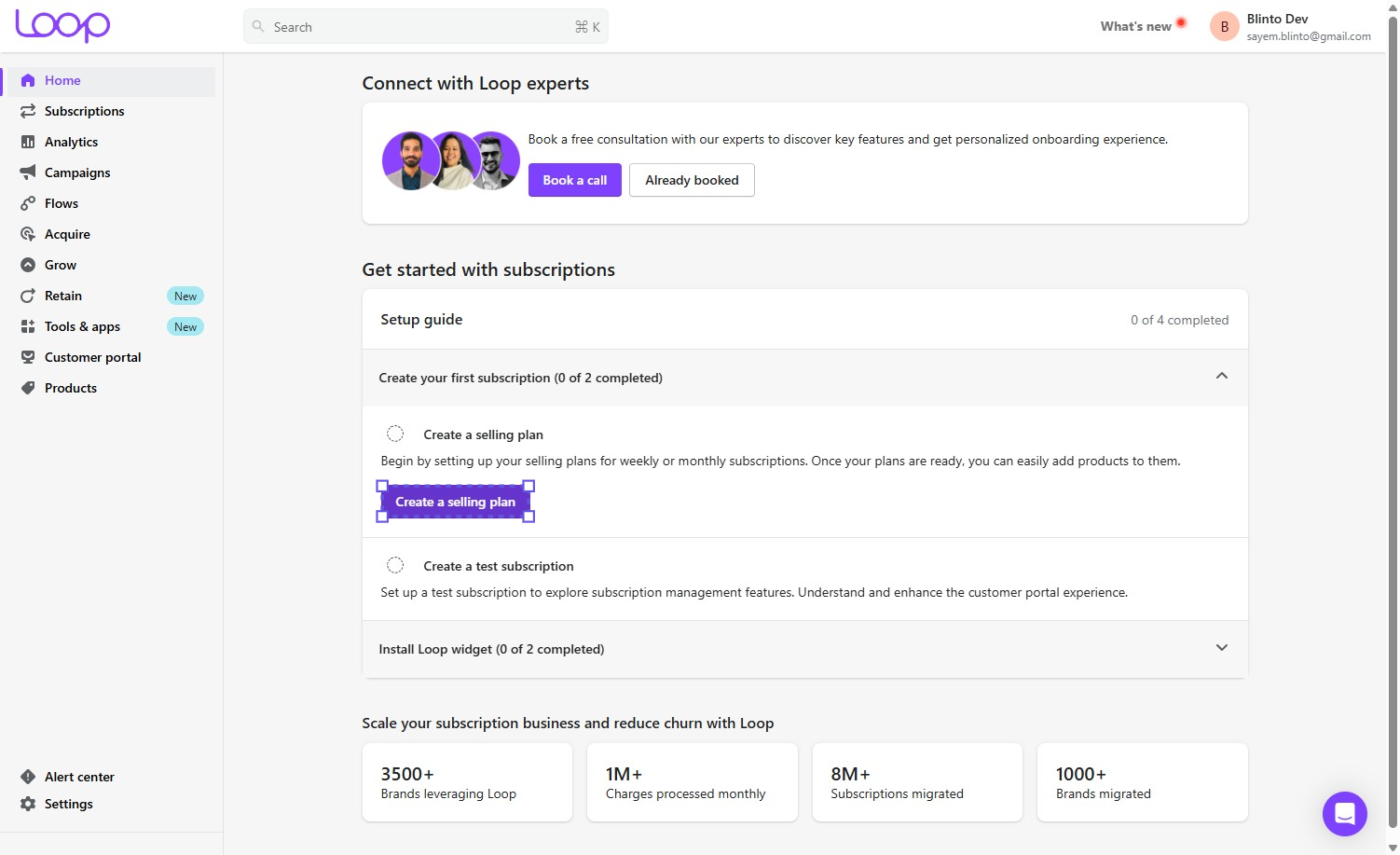
The app covers more than recurring billing. The left navigation is grouped by lifecycle stage. Acquire holds selling plans, bundles, checkout links, and widgets. Grow and Retain hold campaigns, flows, and cancellation tools. There is a customer portal section and an analytics section.
That structure tells you who Loop is built for. It assumes you will run offers, recover failed payments, and fight churn. It is not a simple refill tool.
On a fresh install, the home screen leads with a setup guide. Ours showed 0 of 4 completed. It splits into creating your first subscription and installing the Loop widget.
Loop also lists 35+ integrations, including Klaviyo, Attentive, Gorgias, Rebuy, Smile, and Stamped. It works with Shopify Checkout and customer accounts.
What We Tested
We installed Loop on the Blinto Dev Shopify development store and stayed on the Free plan throughout. We did not upgrade at any point.
We completed one realistic scenario. We built a “Subscribe and Save” selling plan that charges and delivers every month with a 10% percentage discount. We saved it, then mapped it to three products.
We verified the plan builder, the discount setup, the billing-cycle controls, the plan-tier locks, the product mapping step, and its stated limits.
We did not test the storefront widget, checkout, the first charge, a recurring charge, failed-payment recovery, the customer portal, cancellation flows, bundles, campaigns, or migration. This review makes no claims about those areas.
The app was already installed on our store when we started, so we did not observe the install flow itself.
Building a Subscribe & Save Plan on the Free Plan
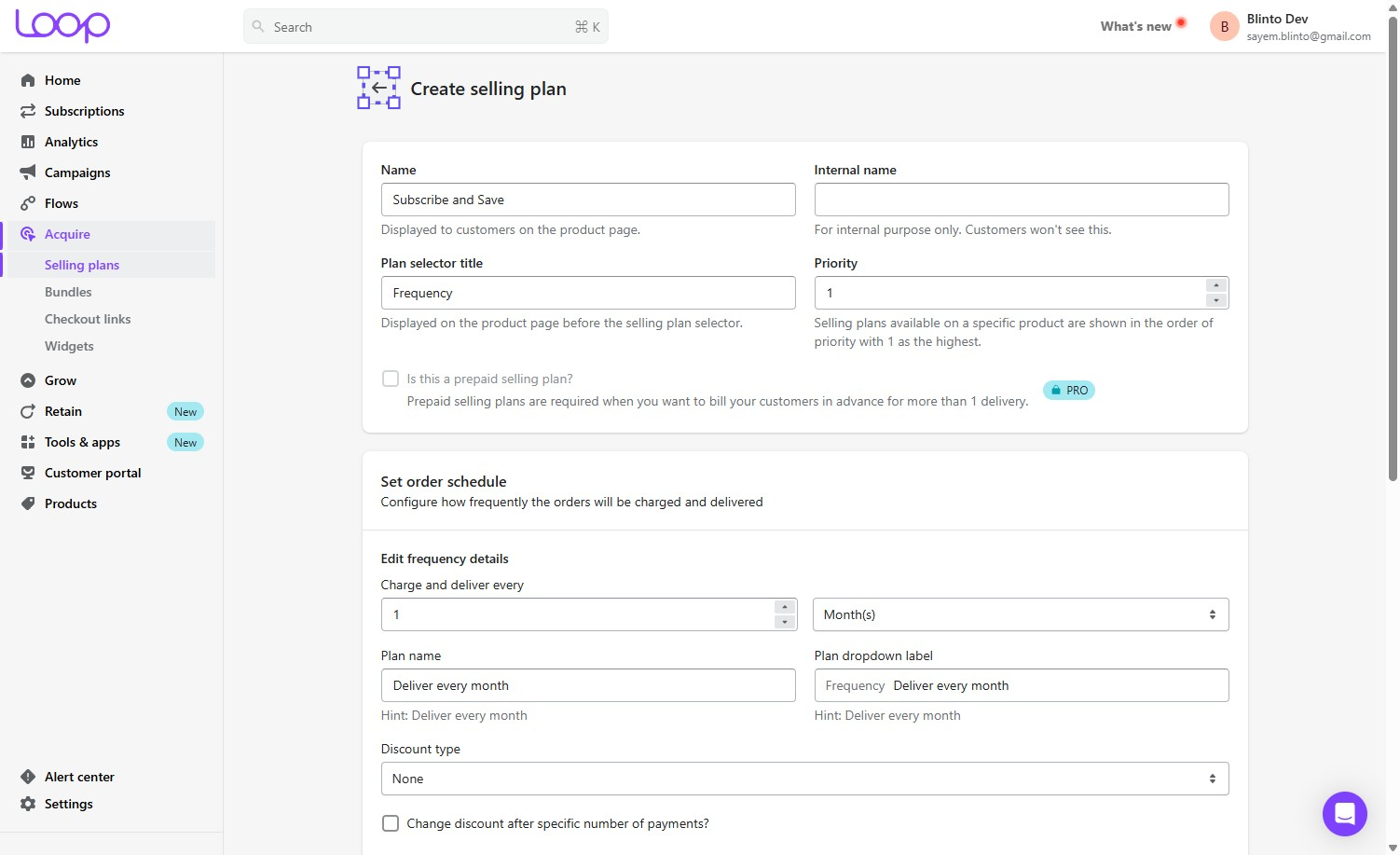
This worked, and it worked without paying.
The form asks for a customer-facing plan name and a separate internal name. We used “Subscribe and Save” for the first. The plan selector title defaults to “Frequency”, which is what a buyer sees on the product page.
The order schedule is one line. We set charge and deliver every 1 month. Loop then generated the frequency label “Deliver every month”.
Discount type starts at None. We switched it to Percentage and entered 10.
Two advanced controls matter more than they look. Minimum billing cycles sets how long before a customer can cancel. Maximum billing cycles sets when the subscription expires by itself. We left them at Unset and Unlimited.
Those two fields are where most subscription disputes start. It is good that they sit in the main form and not in a settings page three clicks away.
Nothing in this scenario needed a developer. That answers the first half of our question.
Where the Free Plan Stops
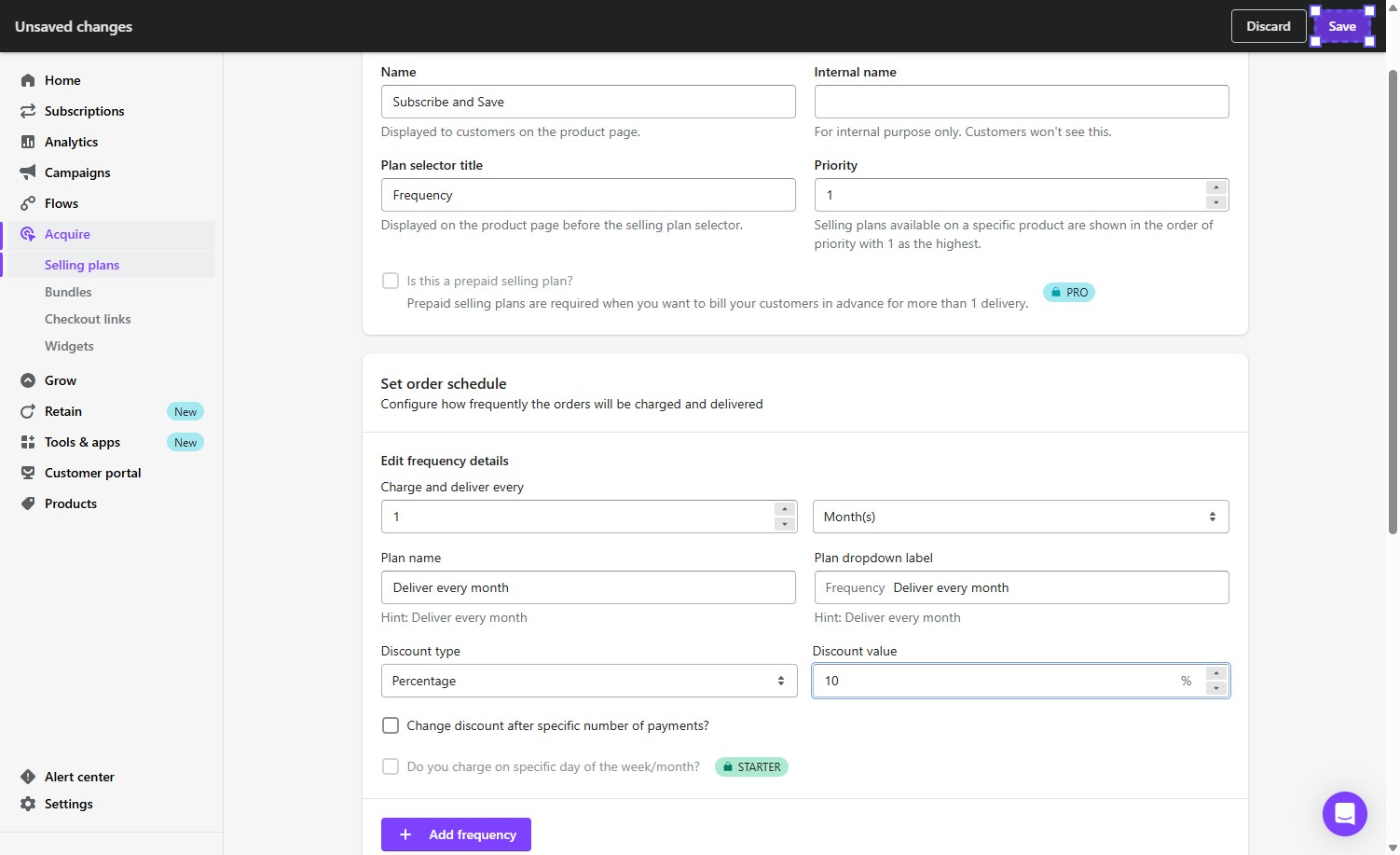
This is the most useful thing we found.
Two controls in the same form were greyed out and stamped with a plan badge:
- “Is this a prepaid selling plan?” carried a PRO badge. Loop’s inline text explains prepaid plans are needed to bill in advance for more than one delivery.
- “Do you charge on specific day of the week/month?” carried a STARTER badge.
The second one is the one to check before you install anything. Charging every customer on the 1st is a normal requirement for coffee, supplements, and pet food. On Loop, it starts at $99 per month.
Two things follow from this.
First, it confirms the free tier is a real working tier, not a trial. A Starter-level control was locked, so our store was on something below Starter.
Second, Loop deserves credit for the design. The lock sits on the control, at the moment you reach for it, with the tier named. Many apps let you build a configuration and only reveal the paywall on save.
There is a caveat worth knowing before you budget for the upgrade. A merchant of more than two years reported on the App Store in July 2026 that anchor-day handling remains limited and that development in the area has stagnated. We cannot verify that from the Free plan. But it means paying for Starter may not fully solve the problem the badge implies it solves. Test it during the 14-day trial.
The Product Mapping Step Is Separate
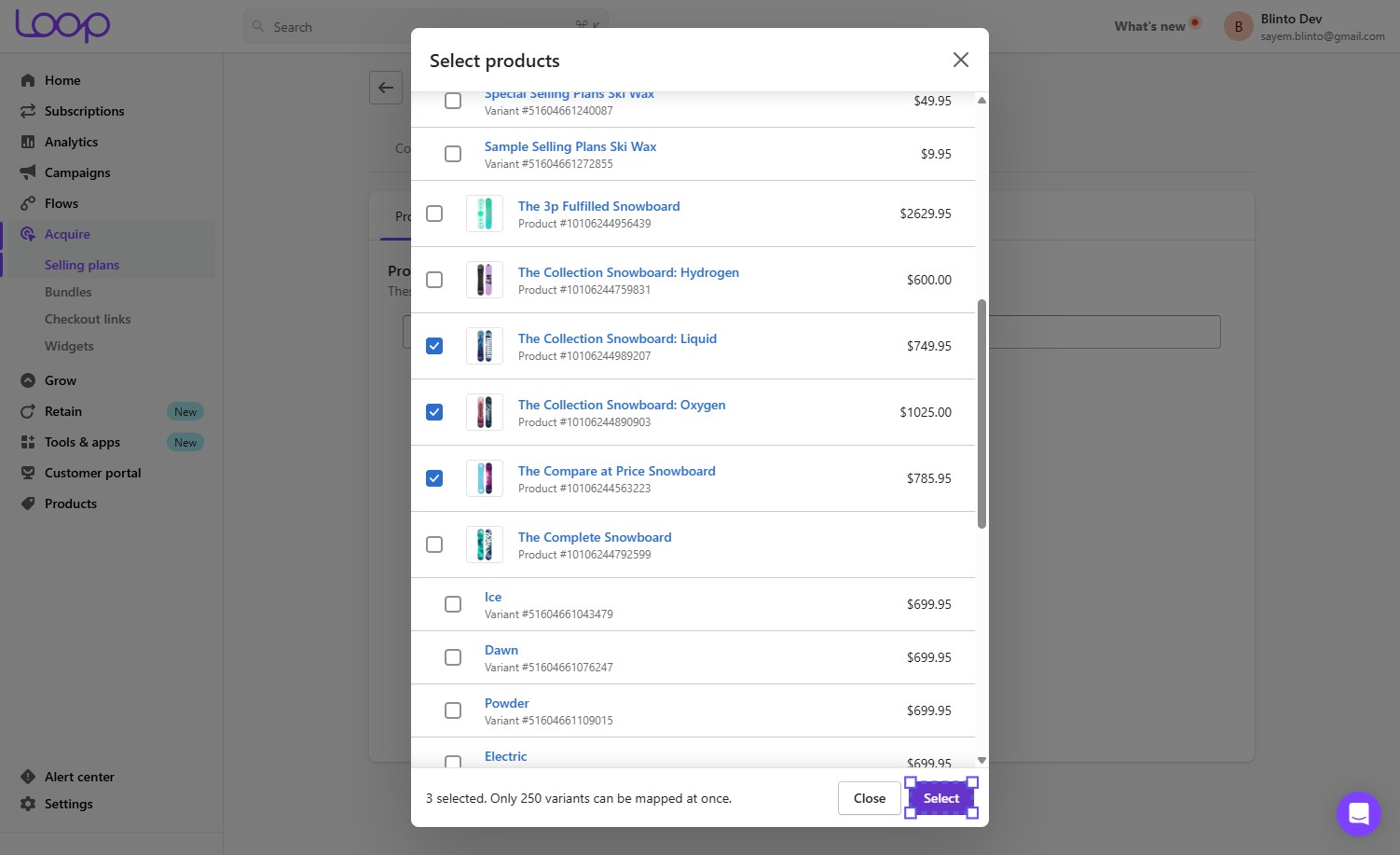
Saving the plan does not attach any products to it.
After we saved, the plan reopened with three tabs: Configuration, Products, and Availability. The Products tab read “No products found.”
That reads like a failure. It is not. Product mapping is a separate step by design, and the empty state does not say so.
We opened the product selector and chose three snowboard products from Shopify’s sample catalogue. The modal footer stated the real limit: “Only 250 variants can be mapped at once.”
That is a batch limit, not a total cap. For a store with a few dozen SKUs it will never matter. For a large apparel or variant-heavy catalogue, mapping a subscription plan across the range becomes repeated work.
The confirmation was clean. A “Products added successfully” toast, then a prompt to create a first test subscription.
Pricing and Value

Verified 22 September 2026.
| Plan | Price | Transaction fee |
|---|---|---|
| Free | $0 | 50 active subscriptions |
| Starter | $99/month | 1.0% |
| Pro | $399/month | 0.75% |
| Enterprise | Negotiable | Negotiable |
Loop charges $0 per-order fees on every plan. That headline is accurate. It does not mean there is no variable cost. The percentage transaction fee is the variable cost.
Starter includes failed payment recovery, cancellation prevention, the self-serve customer portal, bundles, out-of-stock protection, and the integrations. Pro adds a dedicated CSM, gifting and prepaid plans, targeted campaigns, multi-language portal support, and API and webhook access.
Two numbers decide the plan for most merchants.
The free cap is 50 active subscriptions. Loop’s App Store listing states this. Note that Loop’s own pricing page at loopwork.co does not list a Free plan at all — it opens at $99. A merchant researching Loop on the marketing site would reasonably conclude there is no free option. There is.
Starter to Pro is a 4x flat-fee jump to save 0.25 percentage points. At $399 versus $99, the extra $300 per month only pays for itself at roughly $120,000 in monthly subscription revenue. Below that, you are buying Pro for its features, not its rate.
The single feature most likely to force that upgrade is API and webhook access. If your stack needs to read or write subscription data programmatically, your entry price is $399, not $99. Merchant reviews on the App Store repeatedly raise this, including one merchant who reported gaps in what the API can do even after upgrading.
Starter and Pro include a 14-day free trial. The Free plan does not need one.
What We Liked
- A real free tier, not a teaser: We built a complete monthly Subscribe & Save plan with a discount, billing-cycle rules, and three mapped products without paying anything.
- Honest paywalls: The PRO and STARTER badges sit on the locked controls with the tier named. You find the boundary while configuring, not after committing.
- Cancellation terms are front and centre: Minimum and maximum billing cycles are in the main plan form, with plain explanations of what each one does.
- A concrete, stated limit: The 250-variant mapping ceiling is written in the interface rather than buried in documentation.
What Could Be Better
- Charging on a fixed day costs $99/month: Anchor-day billing is a common requirement, and it is gated at the first paid tier. A merchant review from July 2026 also suggests the feature has known gaps once you pay for it.
- The free plan is missing from Loop’s own pricing page: The App Store listing shows it. The marketing pricing page opens at $99. That is a confusing first impression for a merchant doing research.
- Product mapping looks broken when it is not: The Products tab reads “No products found” after a successful save, with no explanation that mapping is a separate step.
- No middle plan: Free ends at 50 active subscriptions. The next option is $99 plus 1.0%. Stores sitting just over the cap have no gentle step up.
- Support quality is the most common complaint: Reported response times of one to two days appear in App Store reviews, and one merchant reported that free-plan users received no support. We did not contact support, so we cannot confirm this either way.
Who Loop Subscriptions Is Best For
Loop fits brands that treat subscriptions as a growth programme rather than a checkbox.
The lifecycle structure — acquire, grow, retain — only pays off if you actually intend to run win-back campaigns, recover failed payments, and work on churn. If you want a plain recurring-order toggle, you will pay for a lot you never open.
It fits well if you are migrating. Merchant reviews consistently praise the pre-migration planning and named onboarding staff, which is the part most platform moves go wrong.
It also fits a store testing the idea. Fifty active subscriptions is enough to learn whether your customers will actually subscribe before you spend anything.
Who Should Upgrade or Consider an Alternative
Upgrade to Starter when you cross 50 active subscriptions, or sooner if you need to charge on a fixed day of the month. Use the 14-day trial to confirm the anchor-day behaviour matches your needs before the first invoice.
Go to Pro only for the features. API and webhook access is the usual reason. Do not upgrade for the 0.25-point rate cut unless your subscription revenue is well into six figures monthly.
Look elsewhere if your plans are simple and your budget is tight. A store running one basic refill offer is unlikely to use the retention tooling that justifies Loop’s floor price. Our Appstle Subscriptions review covers a lower-cost route through the same Subscribe & Save setup.
Also look elsewhere if you need API access at a small scale. A $399 entry price for webhooks is hard to justify for a store doing modest subscription volume.
Final Verdict
Loop’s Free plan does the job it should do. We built a working Subscribe & Save offer on it, with a discount and cancellation rules, without writing code or paying anything.
The strongest reason to choose Loop is that it is honest about the boundary. The locked controls name their tier on the spot. You can map your real requirements against real paywalls before you spend.
The biggest caveat is the shape of the pricing. Free stops at 50 active subscriptions, the next step is $99 per month plus 1.0%, and the feature most likely to force a further jump — API access — sits at $399.
The sensible next action is to install it on the Free plan and build your actual plan, not a sample one. If every control you reach for is unlocked, you have a free subscription app. If you hit a badge, you now know exactly what it will cost.
Frequently Asked Questions
Does Loop Subscriptions have a free plan? Yes. Loop’s Shopify App Store listing shows a Free plan limited to 50 active subscriptions, including the customer portal and analytics. Loop’s own pricing page does not display it, and opens at $99 per month.
Can you charge subscribers on a fixed day of the month on the free plan? No. In our test, the “charge on specific day of the week/month” control was locked behind a STARTER badge. That plan starts at $99 per month.
Do you need a paid plan for API access? Yes. API and webhook access is listed as a Pro feature, which is $399 per month.
Does Loop charge per-order fees? No. Loop advertises $0 per-order fees on all plans. Paid plans charge a percentage of subscription transactions instead — 1.0% on Starter and 0.75% on Pro.
How many products can you map to one selling plan? Loop’s product selector states that only 250 variants can be mapped at once. This is a per-batch limit, so larger catalogues need repeated passes.
Is Loop Subscriptions Built for Shopify? Yes. The app carries the Built for Shopify badge on its App Store listing as of September 2026.