
Repeat plans can give a Shopify store more repeat orders. But the offer on the product page is only one part of the work.
A merchant must choose the products and billing schedule. The discount and repeat-order terms must also be clear before a buyer commits.
Appstle is one of the most-installed apps for this job. We tested it on a Shopify test store.
We made a monthly Subscribe & Save plan for three products. We added a 10% discount on the first order, saved the plan, and checked the store result.
Our main question was simple. Can a merchant launch a clear Subscribe & Save offer without custom code?
Key Takeaways
- Best for guided Subscribe & Save setup: Appstle made it easy to build a monthly offer for three products. The offer appeared on the product page.
- The buyer-facing offer was clear: The product page separated one-time purchase from Subscribe & Save. It showed the lower price, monthly plan, and plan details.
- Setup is not the full lifecycle: We did not test checkout, new charges, failed payments, cancellation, or buyer account tools.
- Check the likely paid tier before launch: The Free plan caps repeat sales at $500 per month. Higher limits and advanced features need a paid plan.
Our Verdict
Appstle is worth considering if you want a guided way to launch Subscribe & Save. It also has room for more complex plans later.
The strongest part of our test was the path from setup to storefront. We chose a repeat-order model and added three products. The summary kept the monthly plan and discount clear. The offer then appeared beside the one-time purchase option.
The main limit is the depth of our test. We did not complete checkout, manage a live plan, trigger a new charge, or use the buyer portal.
The smooth setup is a good first sign. It does not prove that every later task will fit your store.
What Appstle Subscriptions Offers
Appstle manages repeat purchases inside Shopify. Its Shopify App Store listing describes more than a basic refill tool.
The wider product includes prepaid plans, subscription boxes, loyalty tools, retention controls, buyer account tools, analytics, and app links.
That range matters if you want to start simple and add more control later. It also means a product-page widget is not the whole test.
Billing, customer management, payment recovery, portal use, and plan limits matter once subscriptions are live.
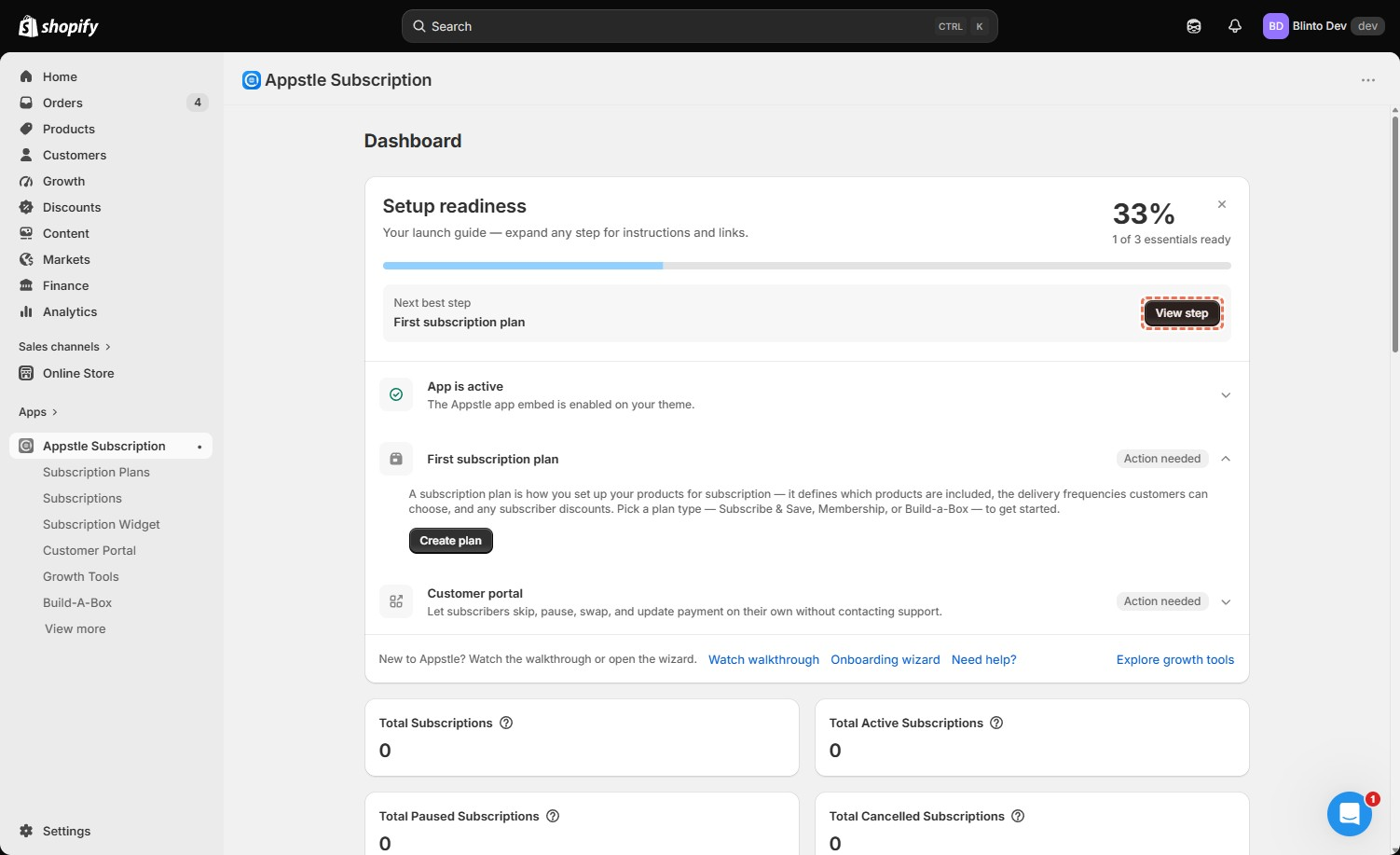
The dashboard in our store organised setup around three main tasks. It showed the app as active. The first plan and buyer portal still needed action.
It also had totals for active, paused, and cancelled plans. Our store had no subscription data to fill them.
What We Tested
We used Appstle on the Blinto Dev Shopify test store. We built a starter offer with three products from one collection. It billed monthly and gave 10% off the first order.
We saved the plan. We then checked the one-time and Subscribe & Save choices on the password-protected storefront.
Our evidence covers:
- the setup-readiness dashboard,
- the plan-type chooser,
- collection-based product selection,
- the monthly plan and discount summary,
- the saved plan state,
- and the buyer-facing plan choice and details panel.
The active Appstle pricing tier was not clear in our screenshots. We therefore do not attribute the controls we used to the Free plan or any paid plan.
We did not complete checkout or create a test plan contract. We did not run a first charge, a new charge, or a failed-payment retry. We also did not use the pause, skip, swap, date-change, cancel, or payment-update controls.
We did not test memberships, Build-A-Box, prepaid plans, translations, POS, app links, APIs, or webhooks. Support, live analytics, and store speed were also outside the test.
For these reasons, this is a Level 2 — Partial Hands-On Test.
What Public Sources Add
Appstle had a 5.0 rating and roughly 8.6K reviews on the Shopify App Store when we checked. The distribution was overwhelmingly positive.
Recent positive reviews repeatedly praised easy setup, a clean dashboard, simple buyer tools, and responsive chat support. That broadly matches the clear setup we saw, though we did not contact support ourselves.
The smaller one-star sample raised more specific concerns. These included plan limits, webhook costs, Shop Pay, payment updates, cart loading, Build-A-Box, and portal setup.
Appstle replied to several reviews. In some cases, it linked the issue to Shopify or the payment system.
These reports do not show what happens in every store. We did not reproduce them. Use them as a test list for your own store.
If your offer depends on one of these areas, run test orders before you commit.
Creating the First Subscription Plan
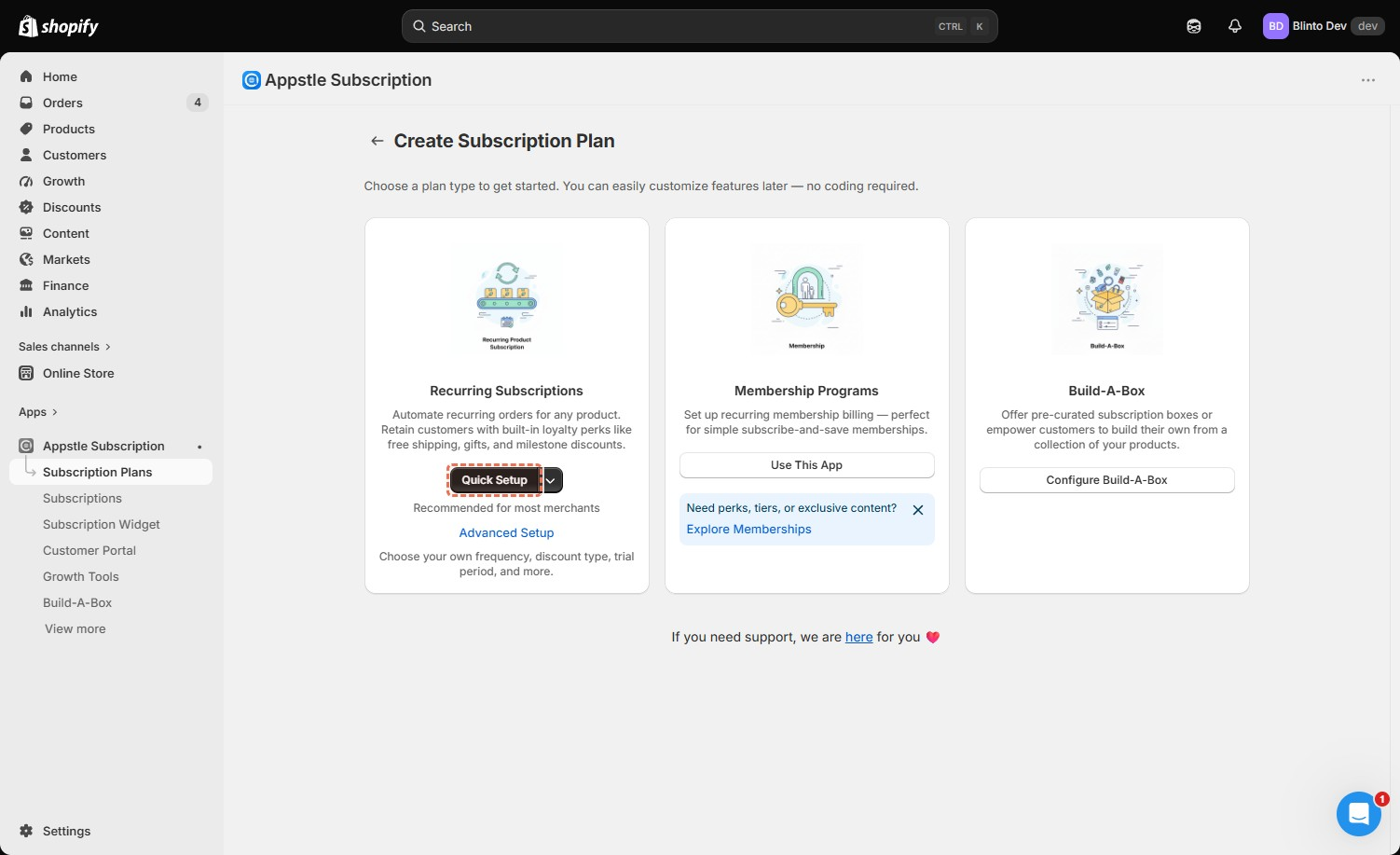
Appstle starts by asking what kind of plan you want to create. We saw three clear paths: Recurring Subscriptions, Membership Programs, and Build-A-Box.
We picked the quick setup for repeat orders. It is the common starting point for products that customers buy on a schedule.
Appstle also offered an advanced setup path. This gives merchants more control than the quick setup.
The choice was easy to grasp. Still, the three models may not be equally simple or cost the same.
We did not set up memberships or Build-A-Box. Current public pricing places Build-A-Box and bundles on the Business tier.
Building a Monthly Subscribe & Save Offer
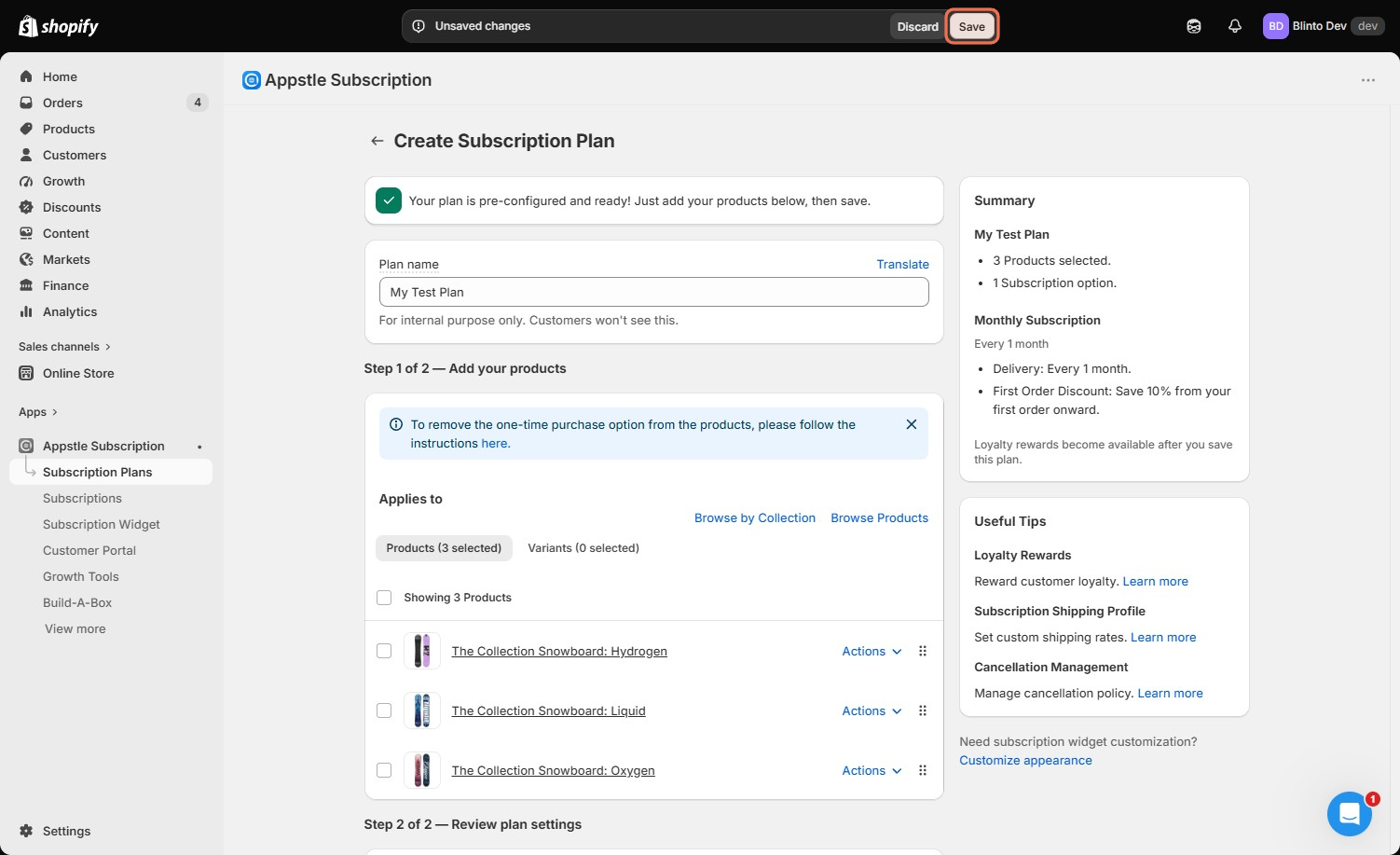
The core setup followed clear steps. We could browse by collection or by product.
We selected three snowboard products from the Hydrogen collection. We used a monthly pay-as-you-go plan with 10% off the first order.
The review panel was the best part. It showed three products, one plan, monthly delivery, and the first-order discount before saving. Keeping these terms together can help prevent basic setup mistakes.
After saving, we opened the plan again. The three products and monthly plan were still there. We hit no error or blocked step.
This part of Appstle was easy for one normal repeat-order offer. We do not know how the app feels with many plans, hard rules, a few markets, or many buyers.
The Storefront Result Was Clear
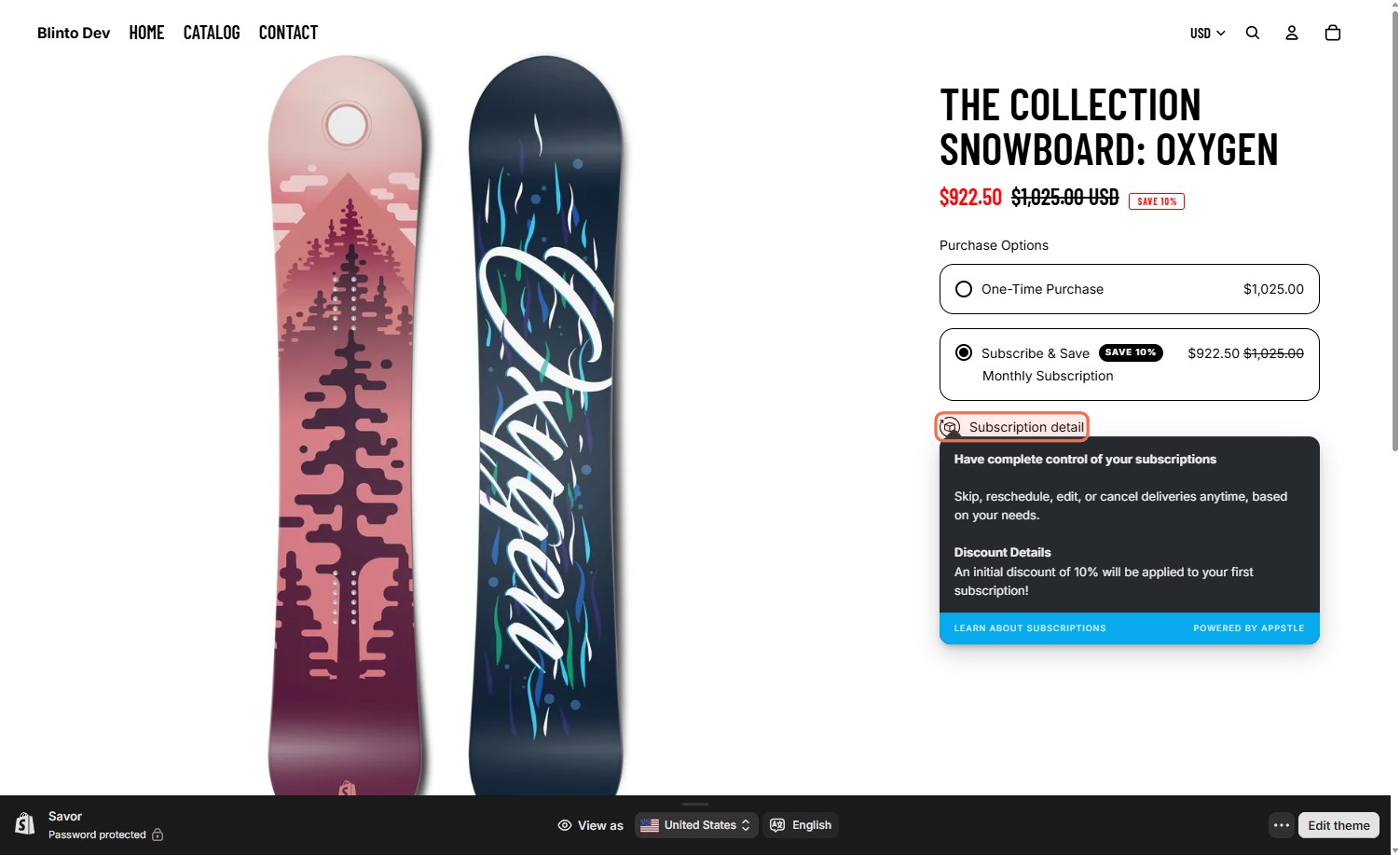
The product page showed one-time purchase and Subscribe & Save as separate choices. We selected the subscription. The price changed from $1,025.00 to $922.50, and the 10% saving was clear. “Monthly Subscription” appeared under the option.
The details panel said a buyer could skip, change the date, edit, or cancel orders. It also repeated the first-order discount terms. This gives more context than a discount label alone.
A repeat plan asks for more trust than a normal order. The terms must be clear.
The buyer could see the price, monthly plan, discount, and account tools before adding the item to the cart.
We only checked this product-page state. We did not confirm the terms in checkout, the order email, the plan contract, or the buyer portal. We also did not use the account tools shown in the panel.
The Biggest Caveat: Setup Is Not the Full Subscription Lifecycle
Appstle did well in the part we tested. But the harder work starts after the first buyer signs up.
New charges must work. Failed payments need a clear fix. Buyers need sound account tools. Product and address changes must reach later orders.
We did not test any of those later events. We cannot make a broad claim about reliability. The store result also does not prove that every plan type will run without problems.
Low-rated App Store reviews add useful warning signs. Some merchants mention payment updates, Shop Pay, cart loading, portal setup, and Build-A-Box.
These are single reports, not findings from our test. Still, they point to tasks worth checking before a migration or large launch.
Pricing: Revenue Limits Drive the Upgrade
We checked pricing on the Shopify App Store listing on September 10, 2026. Prices and plan inclusions can change, and our screenshots do not show which tier was active during the test.
| Plan | Price shown | Subscription-revenue limit and notable inclusions |
|---|---|---|
| Free | $0 | Up to $500/month in repeat sales; pay-as-you-go and prepaid subscriptions, multiple frequencies, custom shipping, built-in emails, analytics, and churn controls listed |
| Starter | $10/month or $96/year | Up to $5,000/month; manual subscription creation, passwordless portal login, loyalty features, weekly reports, inventory forecasting, and SMS listed |
| Business | $30/month or $288/year | Up to $15,000/month; Build-A-Box, bundling, customised widget placement, retention controls, advanced portal, and bulk operations listed |
| Business Premium | $100/month or $960/year | Up to $100,000/month; product swap, automatic price and address sync, checkout links, custom email domain, order unification, and add-to-subscription tools listed |
The listing showed a 14-day trial for paid plans and said they have 0% transaction fees. We did not start a trial or check billing. Treat these as listing terms, not hands-on findings.
Free is useful for a small test. But a working offer could reach its $500 monthly sales limit fast.
Starter is the next plan for a small store with repeat sales. Look at Business if you need Build-A-Box or more save and portal tools.
Do not ask only, “Can I start for free?” Ask which plan will fit the store six months after launch.
Check the upgrade rules before going live. Find out what happens to dashboard access when the store passes a plan limit.
What We Liked
- The starting paths were clear: Repeat orders, memberships, and Build-A-Box had separate setup paths.
- The plan review was clear: Product count, timing, delivery gap, and discount stayed clear before saving.
- The store terms were clear: Single-buy and repeat-order choices appeared with the price, monthly plan, and account details.
- The basic flow needed no custom code: We completed the plan-to-storefront sequence entirely through the app.
What Could Be Better
- The full order lifecycle needs a test: Easy setup does not prove the later steps will fit your needs. Test checkout, new charges, retries, edits, and cancellation.
- Price rises with repeat sales: Work out your likely plan instead of judging only the starting price.
- Buyer account tools remain untested: The product page showed pause, skip, edit, and cancel options. We did not use them in a real account.
- Complex needs require deeper testing: Test Build-A-Box, several languages, Shop Pay, and migrations on their own. Do the same for APIs, webhooks, and high order volume.
Who Appstle Is Best For
Appstle is a strong option for Shopify merchants starting with a normal Subscribe & Save offer. The app also has more advanced plan types for later.
It fits stores that want guided setup and clear product-page terms. Those stores should still test the steps after checkout before launch.
Free keeps the first test cheap for a very small store. If you expect more than $500 in monthly repeat sales, test Starter or a higher plan from the start.
Who Should Consider an Alternative
Appstle may be more than you need for a very simple repeat-order offer. Compare it more closely if you need complex bundles, APIs, a migration, a few markets, or a specific payment flow.
Relevant alternatives include Shopify Subscriptions, Seal Subscriptions, Recharge, and Loop Subscriptions. We did not test those apps for this review, so we are not ranking them against Appstle here.
Final Verdict
Appstle answered the first part of our question well. We built a monthly Subscribe & Save offer and showed it clearly on a product page without custom code.
The setup steps were clear. The summary kept the key terms clear. The storefront made the price and repeat-order terms easy to grasp.
That earns a Consider verdict for Appstle’s basic setup experience.
It is not enough for a full recommendation. Before launch, test checkout, new charges, failed payments, the buyer portal, and cancellation. Use the plan and payment methods your store will rely on.
Also work out the likely plan cost before customers depend on the system.
Frequently Asked Questions
Is Appstle Subscriptions free?
Yes. On September 10, 2026, the Shopify listing showed a Free plan with a $500 monthly repeat-sales limit. Stores above that limit need a paid plan.
Is Appstle easy to set up?
The repeat-order setup was clear in our test. We chose a plan, added three products, set a monthly plan and discount, and saved it. The offer then appeared on the storefront. We did not test the full billing flow.
Does Appstle support Build-A-Box and prepaid subscriptions?
Appstle’s listing and documentation describe both. Build-A-Box appeared in our plan chooser, but we did not configure it. The pricing listing placed Build-A-Box and bundling on the Business tier when we checked.
Can Appstle customers pause or cancel subscriptions themselves?
The storefront details panel in our test showed skip, date-change, edit, and cancel controls. We did not create a buyer plan or use those actions, so the real flow remains untested in this review.
Does Appstle charge transaction fees?
The listing stated 0% transaction fees for the paid plans when we checked on September 10, 2026. We did not start billing, so confirm the latest terms and any optional add-on costs before subscribing.