
Most merchants adding subscriptions for the first time want two things. They want a “Subscribe & save” option on the product page without a developer, and they don’t want the app to take a slice of every renewal while they find out whether customers will subscribe at all.
Recurpay goes after both. Every plan has a 0% transaction fee, and the paid plans are $9 and $19 a month. It has been on the Shopify App Store since November 2021, holds a 5.0 rating across more than 560 reviews, and carries the Built for Shopify badge.
That price makes it one of the cheapest ways to run a live subscription program on Shopify. So the useful question is less about cost and more about setup. How much of the work does Recurpay do for you, and what do you need to check before its defaults go live on your store?
We installed Recurpay on a Shopify development store, followed its guided tour to build a monthly Subscribe & Save plan, and checked the widget on a live product page.
Key Takeaways
- Best for small and cost-conscious subscription brands: $9 a month buys unlimited subscriptions with no transaction fee.
- Setup is heavily guided: Recurpay asks for your industry, creates a starter plan, and walks you through editing it in a 10-step tour.
- The live preview is accurate: The admin preview and the storefront both showed the correct 5% saving to the cent.
- Check the defaults before launch: “Select all active products” included our gift cards, the widget loaded with Subscribe preselected, and the plan came with customer-facing promises already written in.
- Useful retention tools sit on Growth: Cancellation flows, Build a Box, email campaigns, and API access are on the $19 plan.
Our Verdict
Recurpay is a strong choice for a merchant who wants a working Subscribe & Save offer quickly and wants a low, predictable monthly bill.
The best part of our test was how much the app did before we touched anything. It created a monthly plan with a 5% discount for us, then explained each field one at a time while a live widget preview updated beside the form.
The main caution is that guided setup can make it easy to accept settings you haven’t thought about. In our test, one click put every active product into the plan, gift cards included. The storefront widget loaded with the subscription option already selected. And the plan description promised “Skip, edit, or cancel anytime” before we had set up anything about cancellation. None of these is a flaw on its own, but each one is worth a deliberate decision.
Our test stopped at the product page. We didn’t place a test order, trigger a charge, or open the customer portal. This review makes no claims about what happens after a shopper subscribes.
What Recurpay Subscriptions Offers
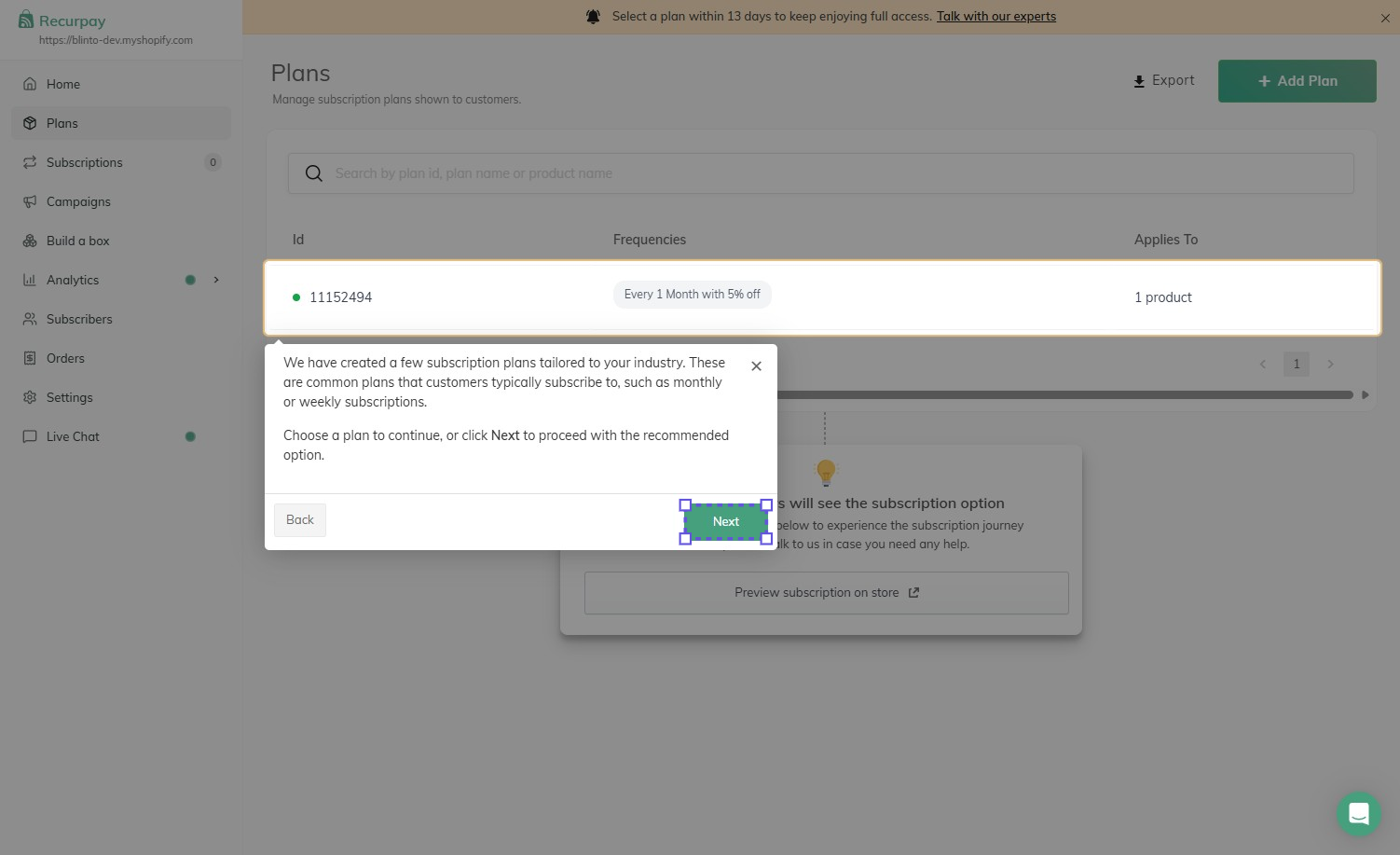
Recurpay runs recurring orders from inside the Shopify admin. Its menu covers Home, Plans, Subscriptions, Campaigns, Build a box, Analytics, Subscribers, Orders, and Settings, plus a Live Chat link.
The app supports pay-as-you-go and prepaid subscriptions, subscription upsells on the cart, and curated boxes. Subscribers get a self-service portal to skip, pause, swap, or cancel. On the merchant side, the developer lists analytics for MRR, churn, lifetime value, and retention, plus automatic payment recovery for failed charges.
Recurpay works with Shopify customer accounts, Shopify POS, and Shopify Flow. Listed integrations include Klaviyo, Omnisend, Mailchimp, Zapier, Make, Judge.me, Yotpo, and page builders such as PageFly, GemPages, and EComposer. The developer also offers migration help for stores moving from another subscription app.
The app’s listed language is English only. That’s fine for most stores, but worth knowing if your team works in another language.
What We Tested
We installed Recurpay on the Blinto Dev Shopify development store, running the Savor theme. Recurpay was in its trial period, with a banner asking us to pick a plan within 13 days.
We chose Sports & Outdoor as our industry, enabled the Recurpay Widget app embed in the theme editor, and followed the guided tour through the starter plan Recurpay had created: monthly delivery with a 5% discount. We then added products to the plan, saved it, and viewed the widget on a product page.
We didn’t place a test order, go through checkout, or trigger a first or recurring charge. We also didn’t test prepaid plans, the customer portal, cancellation flows, Build a Box, campaigns, analytics, migration, or support.
Onboarding and the Starter Plan
Recurpay’s onboarding starts with one question: which industry your store operates in. The app says it uses the answer to personalise onboarding and the dashboard.
Next comes the storefront connection. Recurpay lists four steps: open the theme settings, switch on the Recurpay Widget toggle under App embeds, save, and come back. A preview beside the steps shows exactly where the toggle is. It’s a manual step compared with apps that enable the embed for you, but the instructions are clear, and you can skip it and come back later.
After that, Recurpay drops you into Plans with a plan already built: every 1 month with 5% off, applied to one product. A welcome message explains that the plan is there to speed things up and that the tour will walk you through it. It’s a sensible way to teach the plan editor, because you learn it by changing a real plan rather than filling in an empty form.
Building the Plan
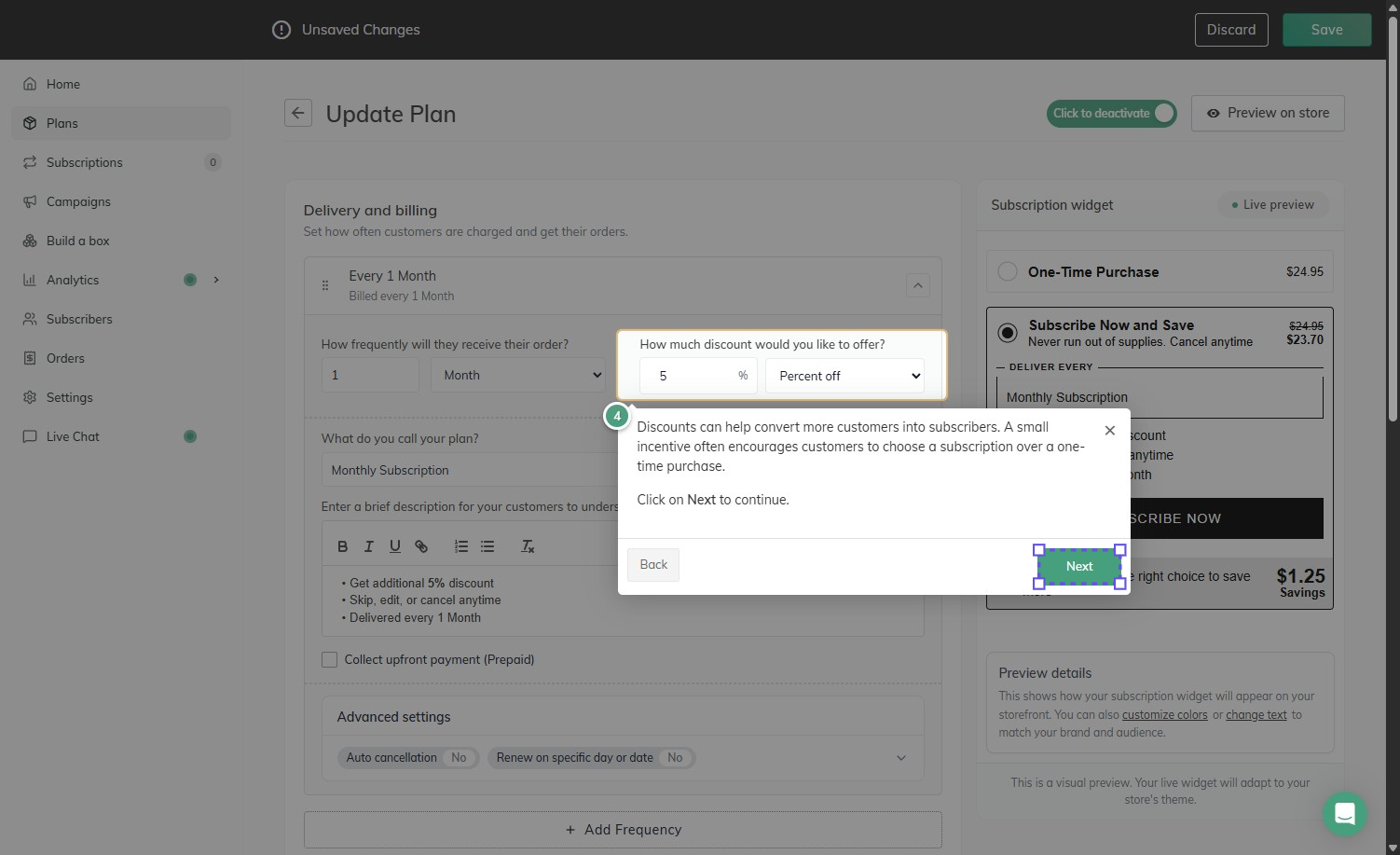
The plan editor is one page with a Live preview of the subscription widget on the right. The tour moves through it one field at a time.
Delivery and billing sets how often customers receive their order. Ours was 1 month. Beside it, you choose the discount: 5% in our case, with a dropdown for the discount type. Below that, you name the plan, which customers see, and write a short description in a rich-text editor.
The starter description came pre-filled with three bullets: an additional 5% discount, “Skip, edit, or cancel anytime,” and delivery every month. The widget also carried a default tagline, “Never run out of supplies. Cancel anytime.” Both appeared on our live product page unchanged. That’s convenient, but it’s text your customers will read as a promise, so rewrite it to match your actual policy before launch.
A Collect upfront payment (Prepaid) checkbox switches the plan to prepaid. The tour explains this as charging for 3, 6, or 12 deliveries at once and fulfilling them over time. Under Advanced settings, Auto cancellation and Renew on specific day or date were both off by default. Add Frequency lets you offer more intervals in the same plan.
The preview did its job. With a $24.95 product, it showed Subscribe Now and Save at $23.70 and a $1.25 saving, which is exactly 5% off. Links under the preview let you customise colours or change the widget text, and a note explains that the live widget adapts to your theme.
Choosing Products: Where to Slow Down
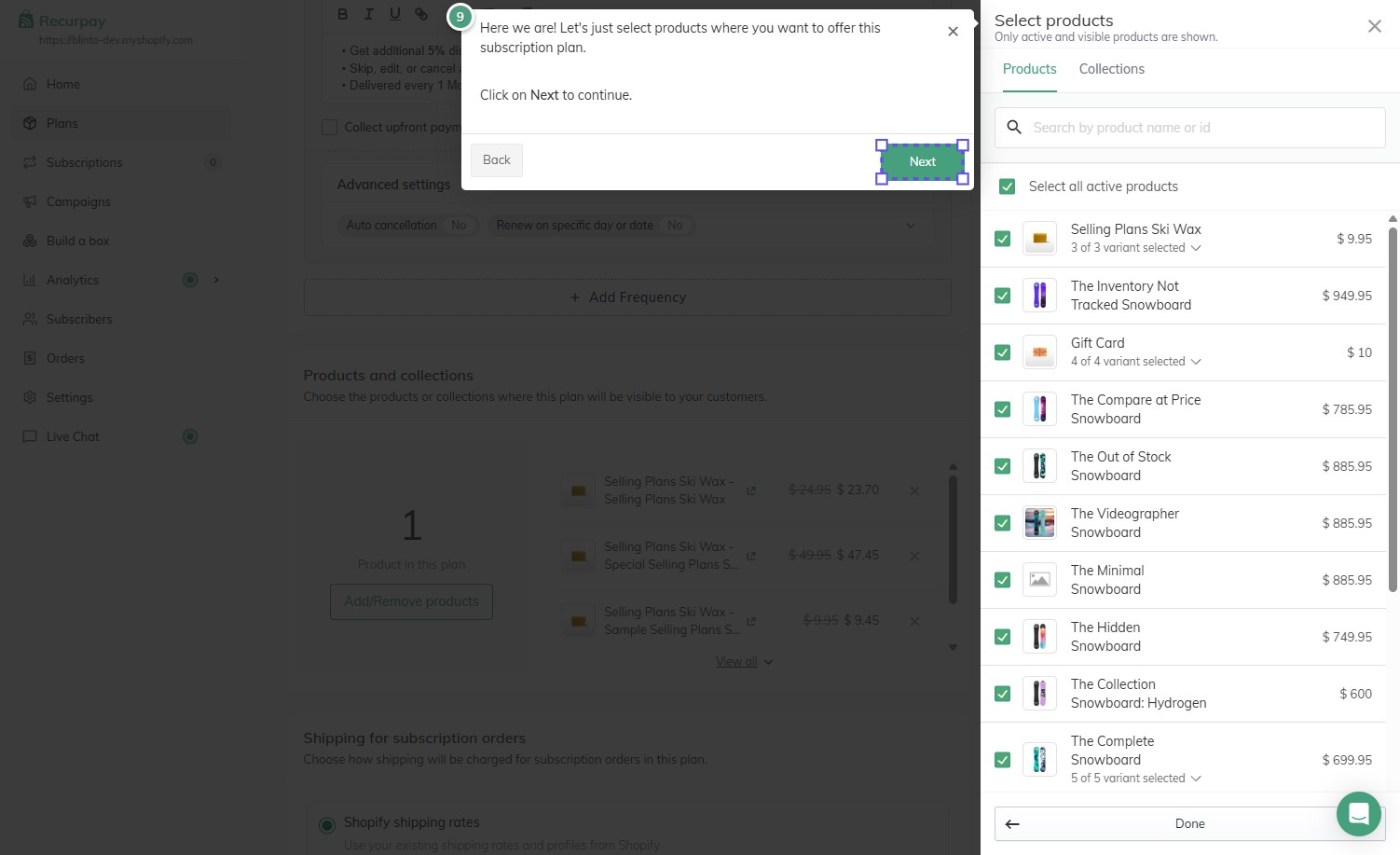
Products are added from a side panel with Products and Collections tabs, a search box, and a Select all active products checkbox. The panel notes that only active and visible products are shown. You can also choose individual variants.
We used Select all active products, and the plan went from 1 product to 15. That included our gift cards, which then appeared in the plan list at 5% off. A $10 gift card became $9.50.
This isn’t a bug. “All active products” means exactly that. But a store with gift cards, one-off items, or products that make no sense to reorder will want to use collections or pick products by hand, then check the list before saving. The plan list shows each product with its original and subscription price, so it’s easy to review.
The Widget on the Storefront
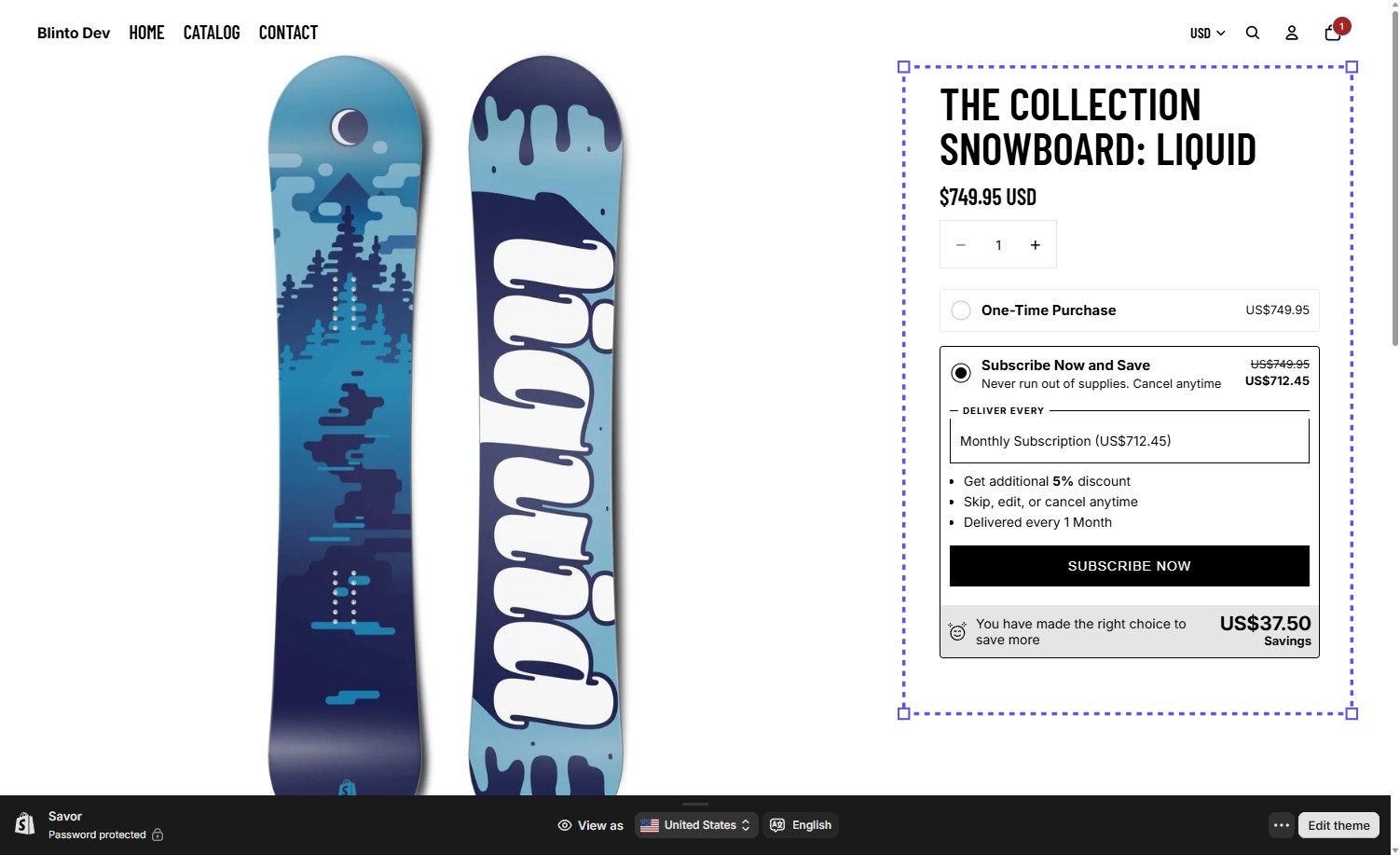
After saving, we opened a snowboard from Shopify’s sample catalogue on the storefront. The widget matched the admin preview closely.
One-Time Purchase showed US$749.95. Subscribe Now and Save showed US$712.45 next to the crossed-out original, and the delivery dropdown read “Monthly Subscription (US$712.45).” A banner at the bottom showed a US$37.50 saving. All three numbers are exactly 5% off. The widget has its own Subscribe Now button, and we didn’t see any Recurpay branding on it.
One detail stood out. Subscribe Now and Save was selected when the page loaded, not One-Time Purchase. Defaulting to subscription can lift sign-ups, but some shoppers will subscribe without meaning to, and that tends to come back as cancellations and refund requests. Decide deliberately which option you want selected, and check the widget settings before you go live.
We didn’t select either option, add the product to the cart, or check out, so we can’t say how the choice carries through to the cart and checkout.
What Merchants Report
Recurpay’s public reviews are almost entirely five-star. The praise centres on support: merchants describe a team that responds quickly, follows up proactively, and is willing to adjust the app to fit their store. Smooth setup and a useful dashboard come up often too.
The lower-rated reviews are very few, but they’re worth reading. One merchant reported severe slowdowns and orders failing to process automatically. Another described billing problems, including interrupted charges and overcharges, that cost them customers. Others mentioned the widget still showing on their site after uninstalling, trouble after a theme update, and pricing they found unclear.
We didn’t run billing, contact support, update our theme, or uninstall, so we can’t confirm any of these reports. They’re a useful checklist for the trial: place and cancel a test order, confirm the charge amounts, and note how to remove the widget if you leave.
Pricing and Value
Verified 23 September 2026.
| Plan | Monthly fee | Transaction fee | What it includes |
|---|---|---|---|
| Free | $0 | 0% | Development stores only. Pay-as-you-go and prepaid plans, customisable widget, cart upsells, analytics, customer portal, dunning and payment recovery |
| Launch | $9 | 0% | Everything in Free for a live store, with unlimited subscriptions |
| Growth | $19 | 0% | Bots for tiered discounts, gifts, and swaps; email campaigns and Build a Box; AI and code-editor widget building; cancellation flows; advanced analytics and forecasting; 20+ integrations including Klaviyo; full API and webhook access |
Paid plans include a 14-day free trial. Charges are billed in USD every 30 days.
This is where Recurpay stands out. There’s no transaction fee on any plan, and Launch has no subscription cap. A store pays $9 a month whether it has 20 subscribers or 2,000, and whether those orders are worth $10 or $500. Apps that charge a percentage of each order get more expensive as you grow. Recurpay’s cost stays flat.
The main decision is Launch or Growth. Launch covers the core: plans, prepaid, the widget, the customer portal, and payment recovery. Growth adds the tools that help keep subscribers, especially cancellation flows and tiered rewards, plus Build a Box and the API. At $10 a month more, most stores with an established subscriber base will find Growth worth it.
We didn’t confirm which features were available during our trial versus which plan, so we don’t tie anything we used to a specific paid plan. The Free plan is for development stores only, so a live store starts at $9.
What We Liked
- No transaction fee and a low flat price: $9 or $19 a month is the whole cost, with no cap on subscriptions.
- A starter plan built for you: Recurpay created a monthly 5% plan and taught the editor by walking through it.
- A clear guided tour: Each field is explained in plain language, including prepaid billing.
- An accurate live preview: The admin preview and storefront prices matched the discount exactly.
- Flexible product selection: Products, variants, or collections, with search and a select-all option.
What Could Be Better
- Select all includes everything: Our gift cards were added to the subscription plan at a discount.
- Customer-facing promises are pre-written: “Skip, edit, or cancel anytime” appeared on our storefront before we had set any cancellation rules.
- Subscription was preselected on the storefront: Check which option you want shoppers to see selected first.
- The theme connection is manual: You toggle the app embed yourself in the theme editor, guided by instructions.
- Retention tools need Growth: Cancellation flows and tiered rewards aren’t on the $9 plan.
- Billing and performance concerns in a small number of reviews: We didn’t test either, but they’re worth checking during the trial.
Who Recurpay Subscriptions Is Best For
Recurpay suits small and growing brands launching their first Subscribe & Save offer. The guided setup does much of the thinking for you, and $9 a month is a small commitment while you test demand.
It suits stores with higher order values, where a percentage fee would add up quickly.
It also suits merchants who expect to want hands-on help. Support is the most consistent theme in its public reviews, and a Live Chat link sits in the app menu.
Who Should Upgrade or Consider an Alternative
Move to Growth once you have regular subscribers and want to reduce churn with cancellation flows, reward loyal subscribers with tiered discounts, sell subscription boxes, or connect Klaviyo and other tools through the API.
Look elsewhere if you need the app admin in a language other than English, or if you want an app that enables its storefront widget for you without a trip to the theme editor.
Final Verdict
Recurpay did what a first subscription app should do. It built a starter plan for us, walked us through every setting, and showed the correct 5% saving on a live product page, all without any code.
The strongest reason to choose Recurpay is value: no transaction fee, no subscription cap, and a $9 entry price. The biggest caveat is its defaults. Select-all included gift cards, the widget preselected the subscription option, and the plan came with promises we hadn’t configured.
If you’re launching subscriptions for the first time, start the 14-day trial on Launch. Pick your products deliberately, rewrite the plan description and tagline, and decide which purchase option loads first. Then place a test order, cancel it, and refund it before you go live.
Frequently Asked Questions
Does Recurpay Subscriptions charge a transaction fee? No. Every plan, including Launch at $9 a month and Growth at $19 a month, has a 0% transaction fee.
Does Recurpay have a free plan? Only for development stores. On a live store, the cheapest plan is Launch at $9 a month, with a 14-day free trial.
Is there a limit on subscriptions? No. The Launch plan includes unlimited subscriptions.
Does Recurpay support prepaid subscriptions? Yes. A checkbox in the plan editor switches a plan to prepaid, so customers pay for several deliveries upfront.
Do you need a developer to set up Recurpay? Not for a basic Subscribe & Save offer. We built a plan and put the widget live through the guided tour and one app-embed toggle in the theme editor.
Is Recurpay Built for Shopify? Yes. The app carries the Built for Shopify badge as of September 2026.