
When a Shopify store first thinks about subscriptions, the obvious place to start is Shopify itself. Shopify Subscriptions is the free app Shopify makes for selling products on a recurring basis, and it runs inside the admin like any other part of the store.
When we checked on 15 October 2026, its Shopify App Store listing showed one Free plan and a 3.7 rating from 860 reviews. The app launched in January 2024. That is a mixed rating for an app made by Shopify itself, so the question we wanted to answer was: is Shopify’s own app enough for a simple subscribe-and-save offer, and what should a store check before relying on it?
We installed Shopify Subscriptions on Blinto’s Shopify development store, worked through its setup guide, created a subscription plan and checked it on a product page. Our short answer: setting up a basic weekly plan is quick, and the customer account pieces are built in. But the feature set is kept simple, the storefront widget needs placing with care, and the reviews show real frustration with flexibility and support.
Key Takeaways
- Best fit: Stores that want a straightforward subscribe-and-save offer, run by Shopify, at no app cost.
- Simple plan builder: A plan is a title, a set of products, a discount and a delivery frequency.
- Built into customer accounts: Subscription management blocks go into the order status, orders, thank you and account pages.
- Main limitation: The app keeps things simple. Shopify’s help pages say bundles are not compatible with it, and merchants ask for more control over billing dates, product swaps and cancellations.
- Watch for: On our test product page, the widget showed up below the product image, away from the buy buttons. Several low-rated reviews also describe widget, variant and support problems.
- Our scope: We did not place a subscription order, run a renewal, edit notifications, import contracts, open Contracts or Settings, or contact support.
Our Verdict
Shopify Subscriptions is a sensible free starting point for a store with a simple offer: a discount for customers who reorder the same product on a schedule.
The best part of our test was how little there is to learn. A six-step setup guide on the app’s home screen walks you through everything, the plan form fits on one screen, and the customer self-service pieces come from Shopify’s own customer accounts.
The trade-offs are flexibility and confidence. The app does fewer things than most dedicated subscription apps, it depends on your theme and payment gateway meeting Shopify’s requirements, and its review profile is mixed. Stores with anything beyond a basic offer should read the limitations below first.
What Shopify Subscriptions Offers
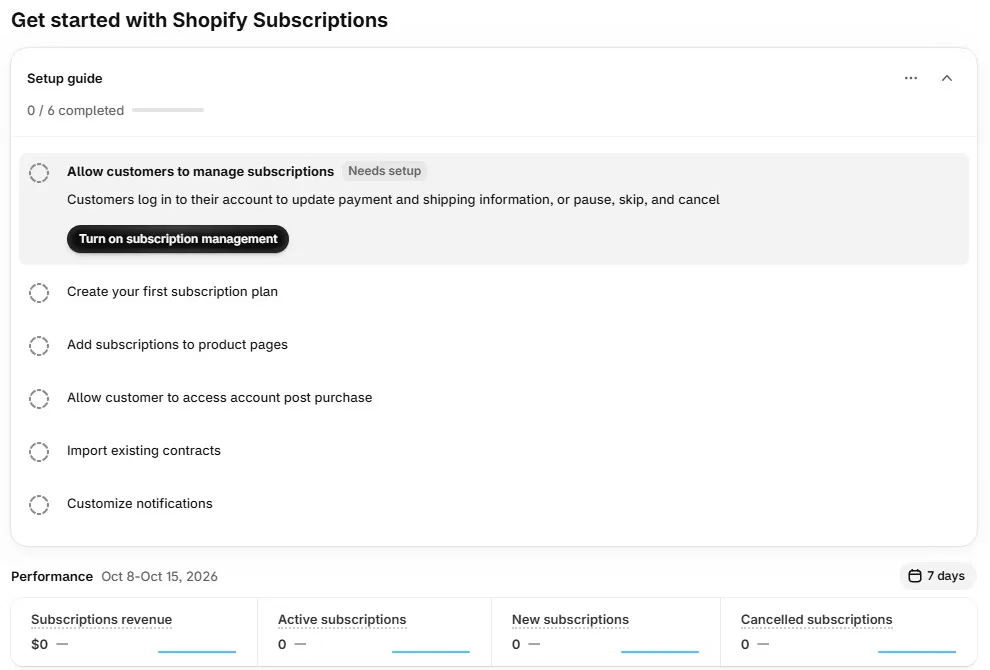
Shopify Subscriptions lets a store sell products on a recurring, auto-billed schedule, with a discount for subscribers, and gives customers a way to manage their subscriptions from their account.
Inside Shopify admin, the app has three menu items: Plans, Contracts and Settings. The home screen opens with a setup guide of six steps:
- Allow customers to manage subscriptions.
- Create your first subscription plan.
- Add subscriptions to product pages.
- Allow customers to access their account after purchase.
- Import existing contracts.
- Customize notifications.
Below the guide, a Performance section shows subscriptions revenue, active, new and cancelled subscriptions for a chosen date range.
According to the listing and Shopify’s help pages, the app also covers weekly, monthly or yearly renewals, percentage and fixed-amount discounts, customer pause, skip and cancel, customizable email templates, contract import and export, and selling subscriptions in person through Shopify POS. We did not test these.
What We Tested
We installed Shopify Subscriptions on Blinto Dev, a Shopify development store we use for testing.
We worked through:
- the setup guide on the app’s home screen
- turning on subscription management in customer accounts
- creating a subscription plan, from title to saving
- the Plans list after saving
- the subscription widget on a live product page
We did not place a subscription order or trigger a renewal. We did not edit any notifications, import contracts, open the Contracts or Settings screens, test POS, or contact support.
Setup: Customer Account Blocks
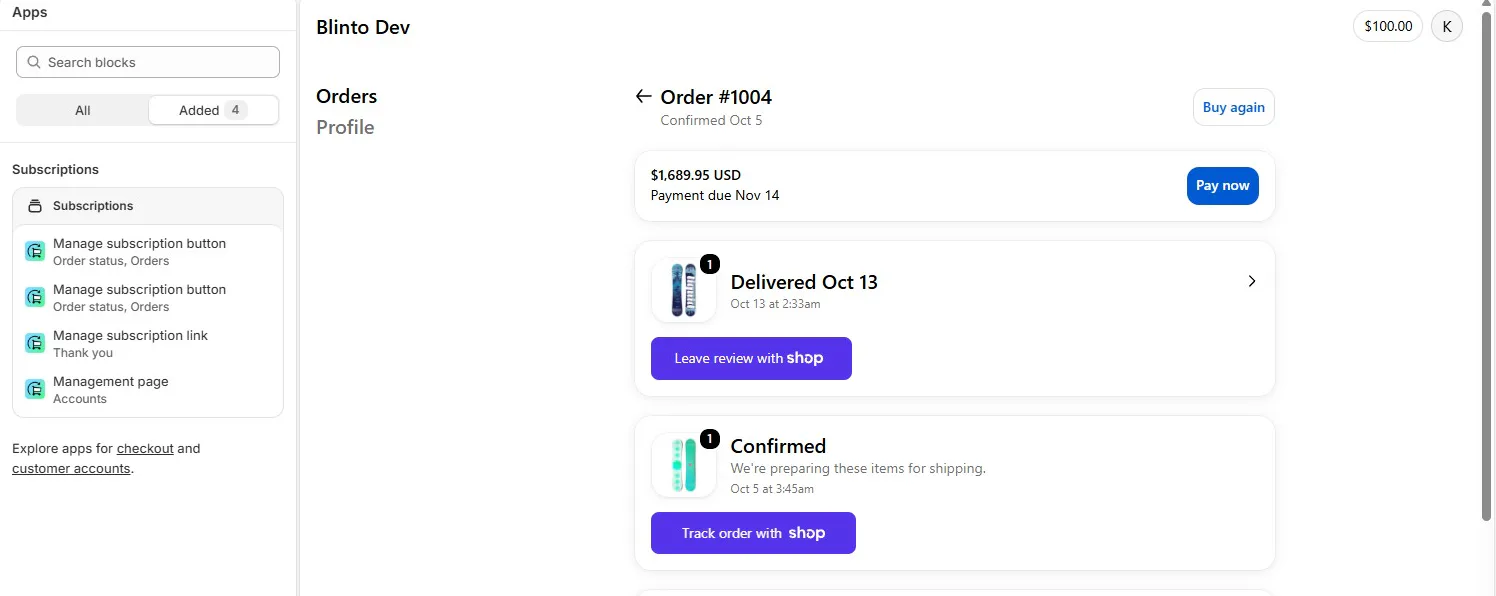
The first step in the guide is “Allow customers to manage subscriptions”. Its description says customers log in to their account to update payment and shipping details, or to pause, skip and cancel.
From the Turn on subscription management step, we moved into Shopify’s checkout and accounts editor. Under Apps, the Subscriptions section listed four blocks, all added:
- a Manage subscription button for the order status and orders pages, listed twice
- a Manage subscription link for the thank you page
- a Management page for customer accounts
Because these are Shopify’s own customer account blocks, subscription management sits inside the store’s customer accounts rather than in a separate portal. Shopify’s help pages note that the thank you page link can be repositioned but not restyled.
Back on the home screen, the guide later showed three of six steps completed.
Setup: Creating a Subscription Plan
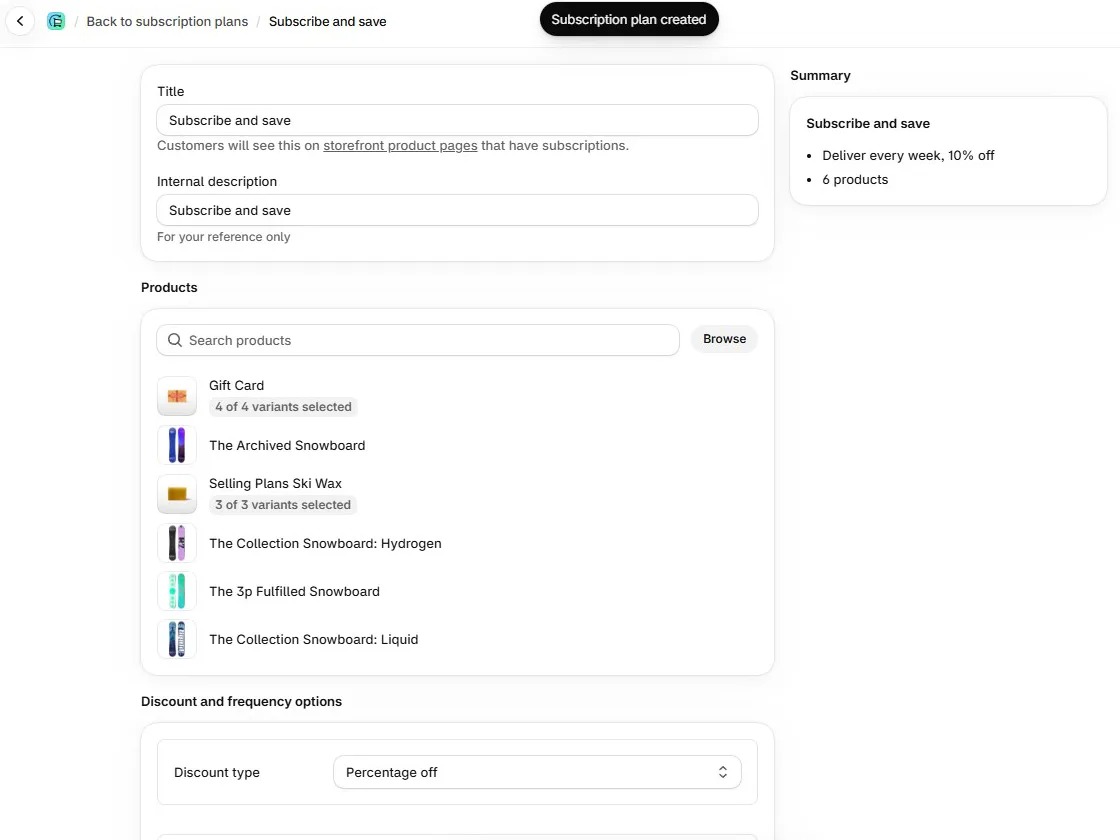
Create plan opens a single form:
- Title: the name customers see on product pages that have subscriptions.
- Internal description: a note for your own reference.
- Products: a search box and a Browse button. You can add whole products or pick variants.
- Discount and frequency options: a discount type, such as Percentage off, and a delivery frequency.
We named the plan “Subscribe and save”, added six products, including a gift card with all four of its variants and a ski wax with all three, and set delivery to every week with 10% off. A summary panel on the right updated as we went: “Deliver every week, 10% off” and “6 products”.
After saving, a “Subscription plan created” message appeared. The Plans list then showed the plan with its products, delivery frequency and pricing in columns: 6 products, Every week, 10% off.
That is about as simple as a plan builder gets. We saw no widget design options or storefront preview on this screen, which keeps setup short but leaves little to customise here.
The Storefront Widget
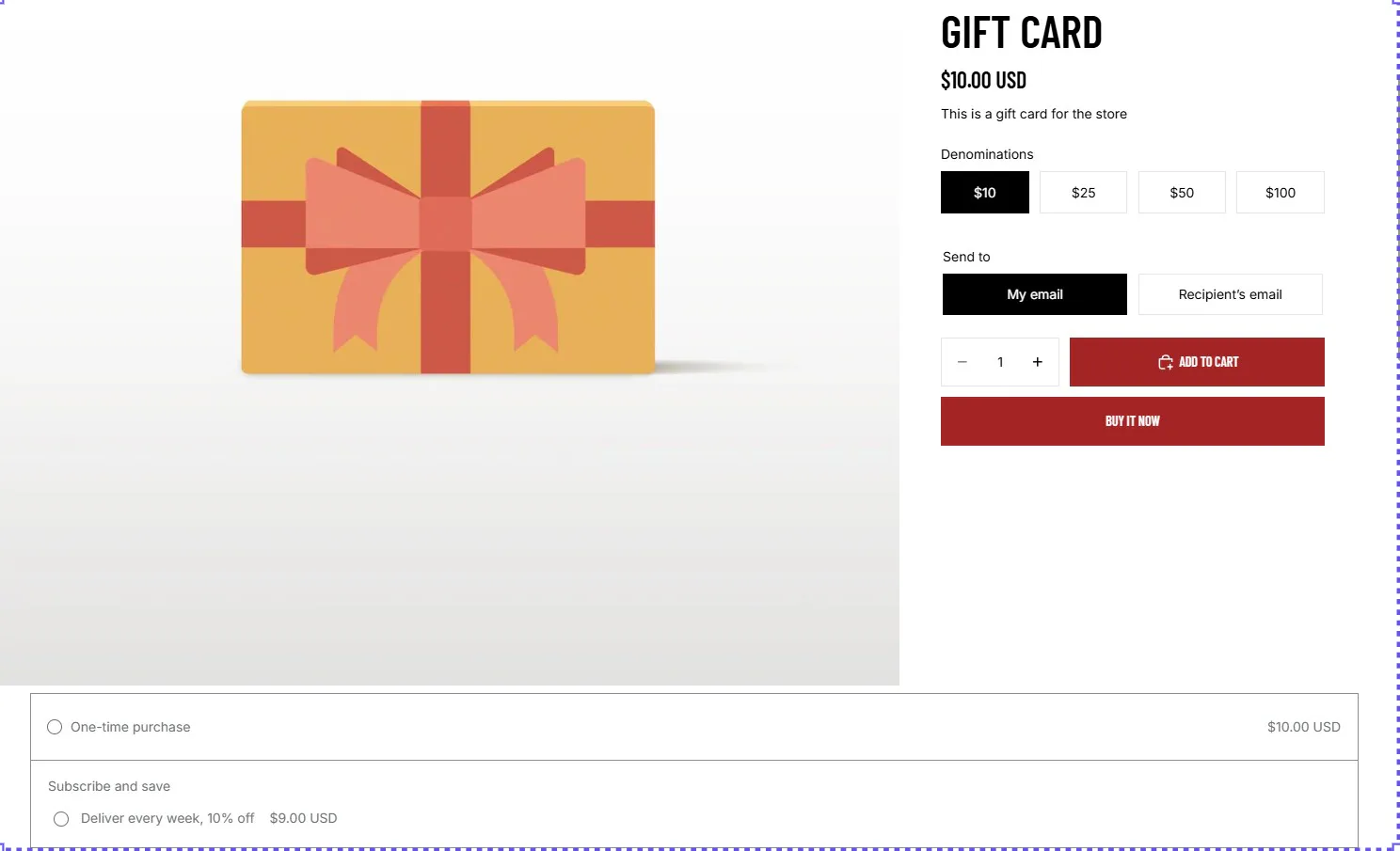
On our gift card product page, the subscription options appeared as two choices: a one-time purchase at $10.00 USD, and “Subscribe and save” with “Deliver every week, 10% off” at $9.00 USD. The prices matched the plan.
The placement was the problem. The widget appeared below the product image, under the Add to cart and Buy it now buttons rather than above them, stretching across the page. A shopper choosing a denomination and clicking Add to cart could easily miss it.
Shopify’s help pages say that on Online Store 2.0 themes, the widget should be added as a block under Product information in the theme editor, with its App embeds toggle left off. We did not change the placement, so we cannot say what caused it on our store. Either way, check the widget on your own product pages before you promote subscriptions.
Requirements to Check First
Shopify Subscriptions is free, but it does not work on every store. Shopify’s help pages list these conditions:
- Sales channels: online store, Shopify POS, Shop and custom storefronts.
- Themes: themes that support sections and blocks, meaning Shopify’s Online Store 2.0 themes and the Horizon family, or Debut 15.0+ and Brooklyn 17.0+ for older themes.
- Payment gateways: Shopify Payments, PayPal Express and Authorize.net, with Adyen and Stripe available only to some merchants. Without Shopify Payments, third-party transaction fees apply to PayPal.
- Card updates: automatic card updates work with Shopify Payments. On other gateways, customers may need to update their details themselves.
- Billing time: customers are billed the day after a subscription is due, at 10:00 am store time.
If your store uses an older theme or a gateway not on this list, the app will not work for you.
Where Shopify Subscriptions Falls Short
Most of the issues are about what the app does not do, plus the mixed results other merchants report.
- Widget placement needs checking. On our test product page, the widget appeared below the product image instead of near the buy buttons.
- No bundles. Shopify’s help pages say bundles are not compatible with the app. If you want multipacks or build-a-box offers alongside subscriptions, you will need a different app.
- Other unsupported features. Draft orders cannot be used with subscriptions, and order edits are not supported for subscription orders.
- Limited billing control. Some merchants want to move a subscriber’s next billing date, or charge every subscriber on the same day of the month, and say they cannot.
- Few retention rules. One merchant reports that customers can subscribe for the discount and cancel straight after the first order, with no option for a minimum number of orders.
- Variant and widget problems. A few reviewers report that changing a variant switched the purchase option to subscription, or that the widget would not appear on their theme.
- Support is a common complaint. Several low-rated reviews describe support that could not resolve their problem.
Pricing and Value
On 15 October 2026, the Shopify App Store listing showed one plan:
| Plan | Price | Limits listed |
|---|---|---|
| Free | Free | None stated |
We did not see a billing or plans screen inside the app during our test.
For what it does, the value is hard to argue with. Plans, the storefront widget, customer self-service and subscription emails come at no app cost, and the app is made by Shopify itself.
The real cost is in what it leaves out. If you outgrow simple subscribe-and-save and need bundles, flexible billing dates or retention rules, you will be moving subscribers to another app later.
What Merchants Report
At the time of our check, the listing’s 860 reviews were split. Just under half were five stars, and about one in five were one star.
On the positive side, merchants praise how easy the app is to set up and manage, and how it automates recurring orders with a discount for subscribers.
On the negative side, the most common requests are for more control: moving billing dates, swapping products inside a subscription, and stopping customers from cancelling after a single discounted order. Individual reviewers report unwanted subscriptions after a variant change, cart errors, a widget that would not show on their store, or customers struggling to log in. Unhelpful support comes up repeatedly in the lower ratings.
Many of the recent one-star ratings have no written text, so they say little about the specific problem.
What We Liked
- A clear setup guide: Six steps on the home screen, with direct buttons for each.
- A short plan form: Title, products, discount and frequency, with a live summary.
- Built-in customer accounts: Management blocks for the order status, orders, thank you and account pages, added from Shopify’s own editor.
- Performance at a glance: Revenue, active, new and cancelled subscriptions on the home screen.
- Free, from Shopify: A single Free plan, with no limits stated on the listing.
What Could Be Better
- Widget placement: On our product page, the widget appeared below the image and away from the buy buttons.
- No bundles: Shopify’s help pages say bundles are not compatible.
- Limited flexibility: Merchants ask for movable billing dates, product swaps and minimum commitments.
- Mixed reviews: A 3.7 rating, with repeated complaints about support and widget behaviour.
- Requirements to meet: A supported theme and payment gateway are needed before it works at all.
Who Shopify Subscriptions Is Best For
Shopify Subscriptions suits a store on a supported theme and payment gateway that wants a simple subscribe-and-save offer: the same product, delivered on a schedule, at a discount. Think coffee, supplements, pet food or refills, with no bundles or complicated rules.
It also suits merchants who would rather keep subscriptions inside Shopify’s own admin and customer accounts than add a third-party app.
Who Should Consider an Alternative
If you want bundles, build-a-box offers or subscribe-and-save with multipacks, the help pages rule it out. Blinto’s review of Beez covers a free app that offers subscriptions and bundles from one offer builder.
If you need flexible billing dates, product swaps or retention rules such as a minimum number of orders, look at a dedicated subscription app with those features listed.
And if you want a free plan with clearly stated limits and paid tiers to grow into, Blinto’s review of Easy Subscriptions App covers an app whose listing showed a free Starter plan for up to 100 subscription orders.
Final Verdict
Shopify Subscriptions gives a store a free, simple way to start selling subscriptions, made by Shopify and built into its admin and customer accounts. In our test, the setup guide and plan form had a weekly 10%-off plan live on a product page in a few steps.
The main caveats are the narrow feature set, the store requirements, the widget placement we saw on our product page, and a review profile with plenty of frustrated merchants.
Our advice: check your theme and payment gateway against Shopify’s requirements first. Then create your plan, check where the widget sits on your product pages, place a test subscription order and walk through the customer account pages before you promote it.
Frequently Asked Questions
Is Shopify Subscriptions free?
On 15 October 2026, the Shopify App Store listing showed Shopify Subscriptions as Free, with no paid plans or limits listed. Shopify’s help pages note that third-party transaction fees apply to PayPal if Shopify Payments is not active.
Can Shopify Subscriptions do bundles?
No. Shopify’s help pages say bundles are not compatible with the Shopify Subscriptions app.
Can customers pause, skip or cancel their subscriptions?
The app’s setup guide says customers can log in to their account to update payment and shipping details, or pause, skip and cancel. We added the customer account blocks for this but did not test the customer side.
Which themes does it work with?
Shopify’s help pages list themes that support sections and blocks, meaning Online Store 2.0 themes and the Horizon family, plus Debut 15.0+ and Brooklyn 17.0+.
Can I move my existing subscribers to Shopify Subscriptions?
The setup guide includes an “Import existing contracts” step, and the listing mentions transferring existing subscription contracts. We did not test an import.
Did you test billing and renewals?
No. We created a subscription plan, set up the customer account blocks and checked the storefront widget, but we did not place a subscription order, run a renewal or test failed payments.