
A recurring order needs more than a discount label. It needs the right products, a clear schedule, and an offer that actually shows up on the storefront.
Kaching Subscriptions promises all of this without custom code. It runs through Shopify’s own checkout, not an off-site flow. We tested it on a Shopify test store.
We opened the app’s setup guide. We built a monthly Subscribe & Save plan for two products. We applied a 10% discount and reviewed the plan before publishing.
Our main question was simple. Can a merchant set up a working Subscribe & Save offer here without missing a step that quietly keeps it off the storefront?
Key Takeaways
- Plan setup was quick and guided: We picked two products, set a monthly schedule, and applied a 10% discount. A live preview showed the exact price before we published.
- The app flagged its own setup gap: A dashboard warning told us the storefront widget would not appear. The theme app embed was inactive. That’s an easy detail to miss.
- That warning matches a real merchant complaint: Public Shopify App Store reviews describe the same problem — a subscription widget that fails to show on the product page. It’s a real support issue, not a hypothetical.
- Our test stopped at the preview screen: We did not publish the plan. We did not confirm the widget on the storefront. We did not test checkout, billing, or the customer portal.
- Pricing scales by revenue, not features: Paid plans are capped by monthly subscription revenue. Check your expected revenue before you commit.
Our Verdict
Kaching Subscriptions is worth shortlisting if you want a guided way to build a Subscribe & Save offer on native Shopify Checkout. But treat the app-embed step as a required launch check, not a footnote.
The strongest part of our test was the plan builder. Choosing products, setting a monthly schedule, and applying a discount was clear. The live preview showed the exact price comparison before we committed to anything.
The most important thing we found wasn’t a feature. It was a warning. The app told us the subscription widget would not show up on the product page, because the theme app embed was off. We did not turn the embed on ourselves to confirm the fix. But the app flagged this on its own, and real merchants report the same widget problem. That earns its own pre-launch check. Saving a plan is not the same as shoppers actually seeing it.
What Kaching Subscriptions Offers
Kaching Subscriptions adds pay-per-delivery and prepaid subscription plans to Shopify products. Its Shopify App Store listing describes a broader product than a single discount widget.
The wider feature set includes a customer self-service portal, retention and payment-recovery tools, BOGO/BXGY automatic discounts, and analytics for MRR, churn, ARPU, and LTV. It runs on native Shopify Checkout, not an off-site subscription flow.
That range matters because a subscription app earns trust over more than one plan. Billing accuracy, portal reliability, and storefront visibility all matter once real customers are involved.
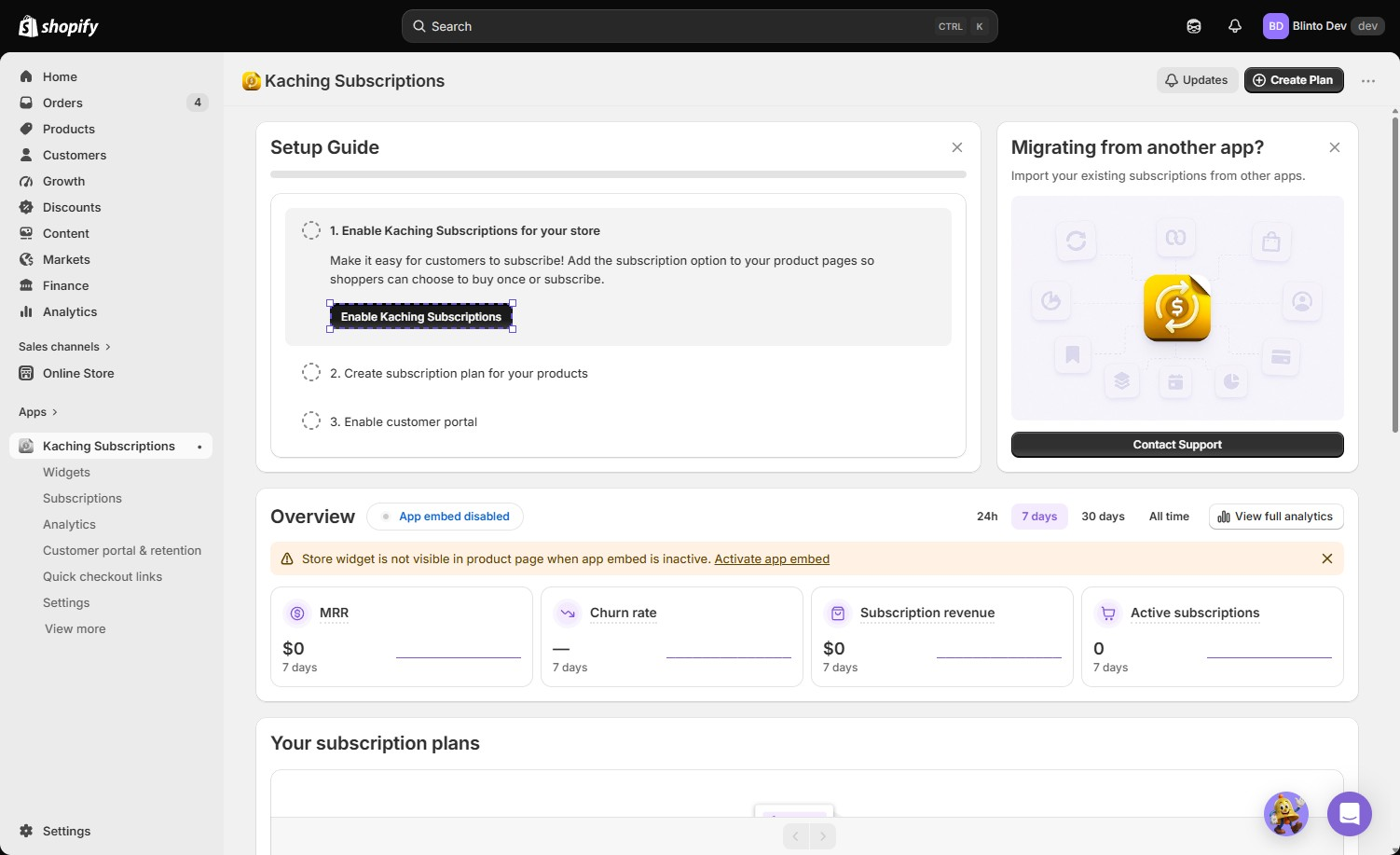
The dashboard in our test laid out three setup steps: enable the app, create a subscription plan, and enable the customer portal. It also showed MRR, churn rate, subscription revenue, and active subscriptions, all at zero. That’s expected for a fresh install with no live subscribers. A banner also offered to import existing subscriptions from another app; we did not use it.
The same dashboard carried a persistent warning: the storefront widget would not be visible on the product page, because the app embed was inactive.
The developer behind this app, Kaching Apps, also publishes five other Shopify apps, including Kaching Bundles and Kaching CartDrawer, each holding a 5.0 or 4.9 rating and a Built for Shopify badge. That’s a useful trust signal, though it’s a portfolio pattern rather than evidence about this specific app’s reliability.
What We Tested
We used Kaching Subscriptions on the Blinto Dev Shopify test store. We built a plan for two products. We set it to bill monthly and applied a 10% Subscribe & Save discount.
We reviewed the plan in the app’s live preview panel. It compared the one-time price to the subscription price for one selected product, before we reached the Publish step.
Our evidence covers:
- the setup dashboard and its app-embed warning,
- the product-search step of plan creation,
- both products being added to the plan,
- and the completed plan with its monthly schedule, discount, and live price preview.
We did not click Publish, confirm the widget on the storefront, or complete checkout. We also did not activate the app embed ourselves, use the customer portal, test a prepaid plan, apply a BOGO/BXGY discount, or contact support. The active Kaching pricing tier on the test account was not visible in our screenshots. So we do not attribute what we saw to the Free, Starter, Basic, or Growth plan.
For these reasons, this is a Level 2 — Partial Hands-On Test.
What Public Sources Add
Kaching Subscriptions had a 5.0 rating and roughly 1,034 reviews on the Shopify App Store when we checked. The large majority were five-star.
Recent positive reviews describe fast setup and a native-checkout experience. Merchants say it feels more stable than older subscription apps. That broadly matches the guided plan builder we saw.
The smaller negative sample is more specific, and one pattern lines up directly with our own test. A merchant reported the subscription widget failing to display correctly on a product page, described as unresolved for over a week. That’s the same symptom our own test’s app-embed warning was pointing at: a widget that should appear, but doesn’t.
A separate pattern involves subscription renewal amounts. A few reviews describe customers being charged the wrong renewal price, including one merchant citing a roughly $3,000 impact from a missed setting. The developer’s public replies in these cases pointed to a Shopify-side billing behavior affecting subscription apps generally, and described a workaround.
We did not reproduce either issue ourselves. Treat them as a pre-launch test list, not a confirmed defect. Confirm the storefront widget renders after you turn on the app embed. Then audit a live subscription’s renewal price against the plan you configured.
Building a Subscribe & Save Plan
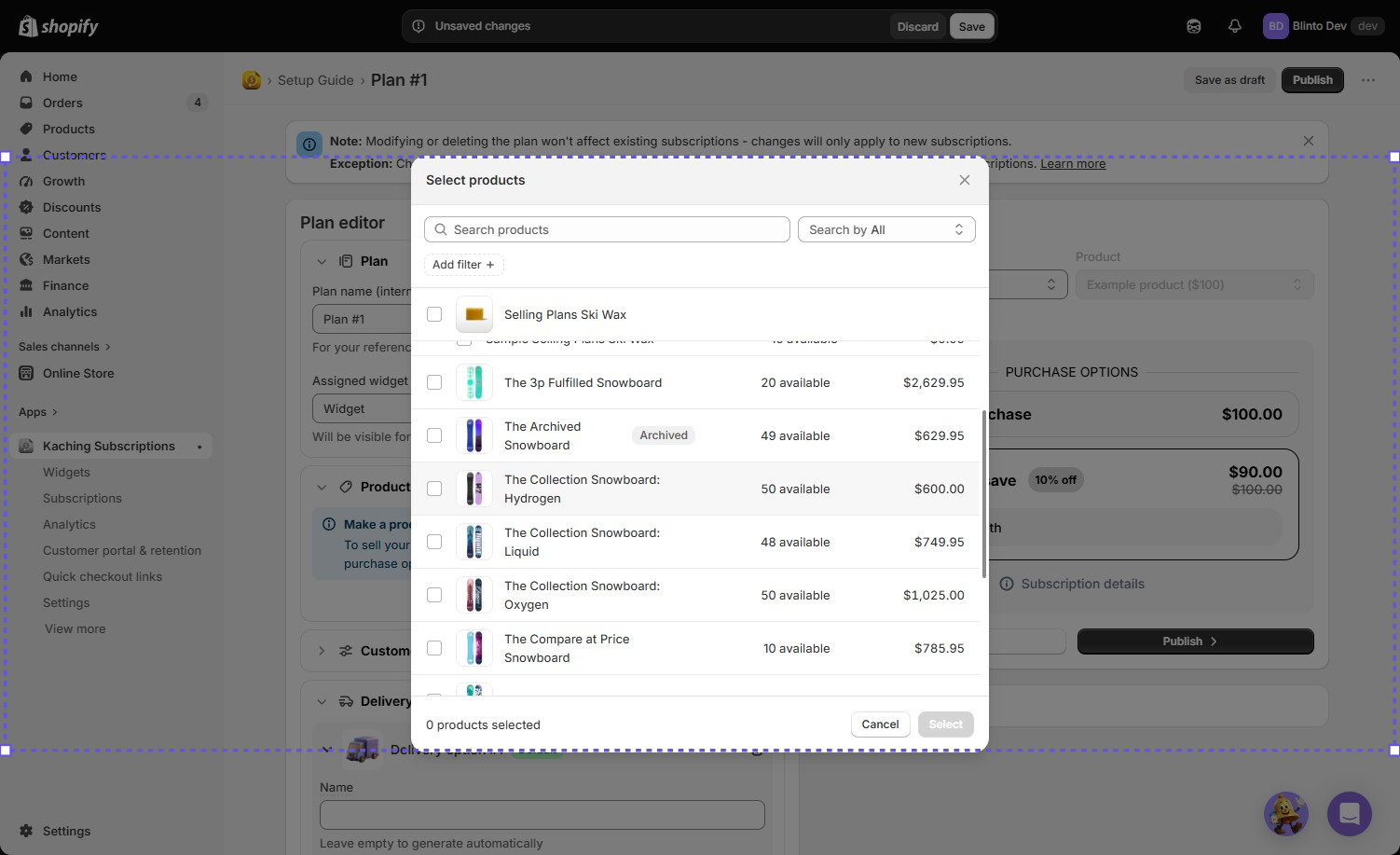
Plan creation started with a product-search step. We could search by name and filter results. The picker showed live inventory counts and prices for each product as we browsed, which made it easy to see exactly what we were adding.
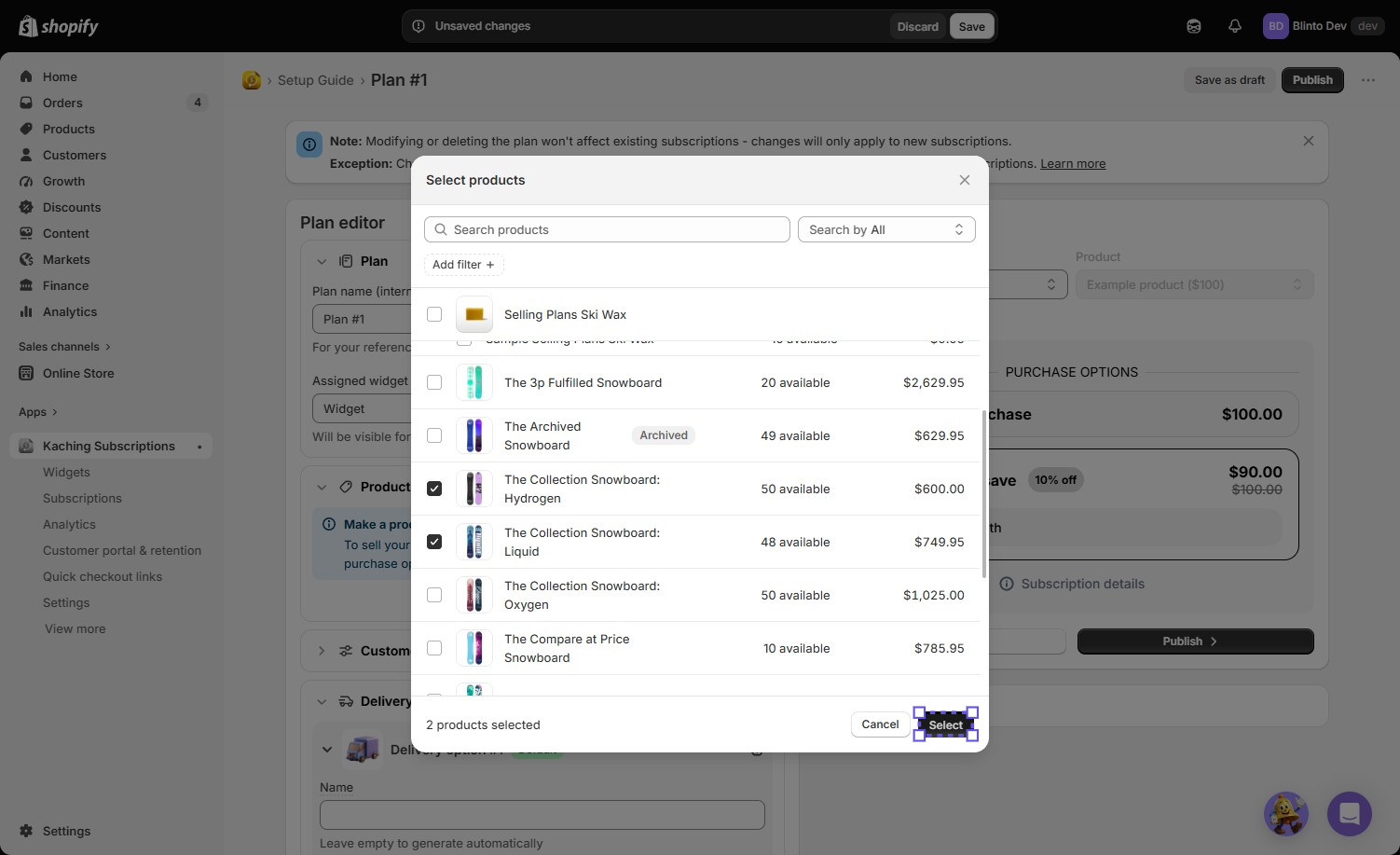
We selected two products — The Collection Snowboard: Hydrogen and The Collection Snowboard: Liquid — and added them to Plan #1.
We set the plan to bill monthly and applied a 10% Subscribe & Save discount. The plan editor’s preview panel let us pick a product and see exactly how the offer would look. For Hydrogen, that meant a one-time price of $600.00 next to a Subscribe & Save price of $540.00, with “Deliver every: month” shown underneath.
Keeping the product list, schedule, and live price comparison on one screen made the offer easy to check before we committed to it. We reached the Publish button with no error and no blocked step.
The Plan Was Ready — But We Couldn’t Confirm It Went Live
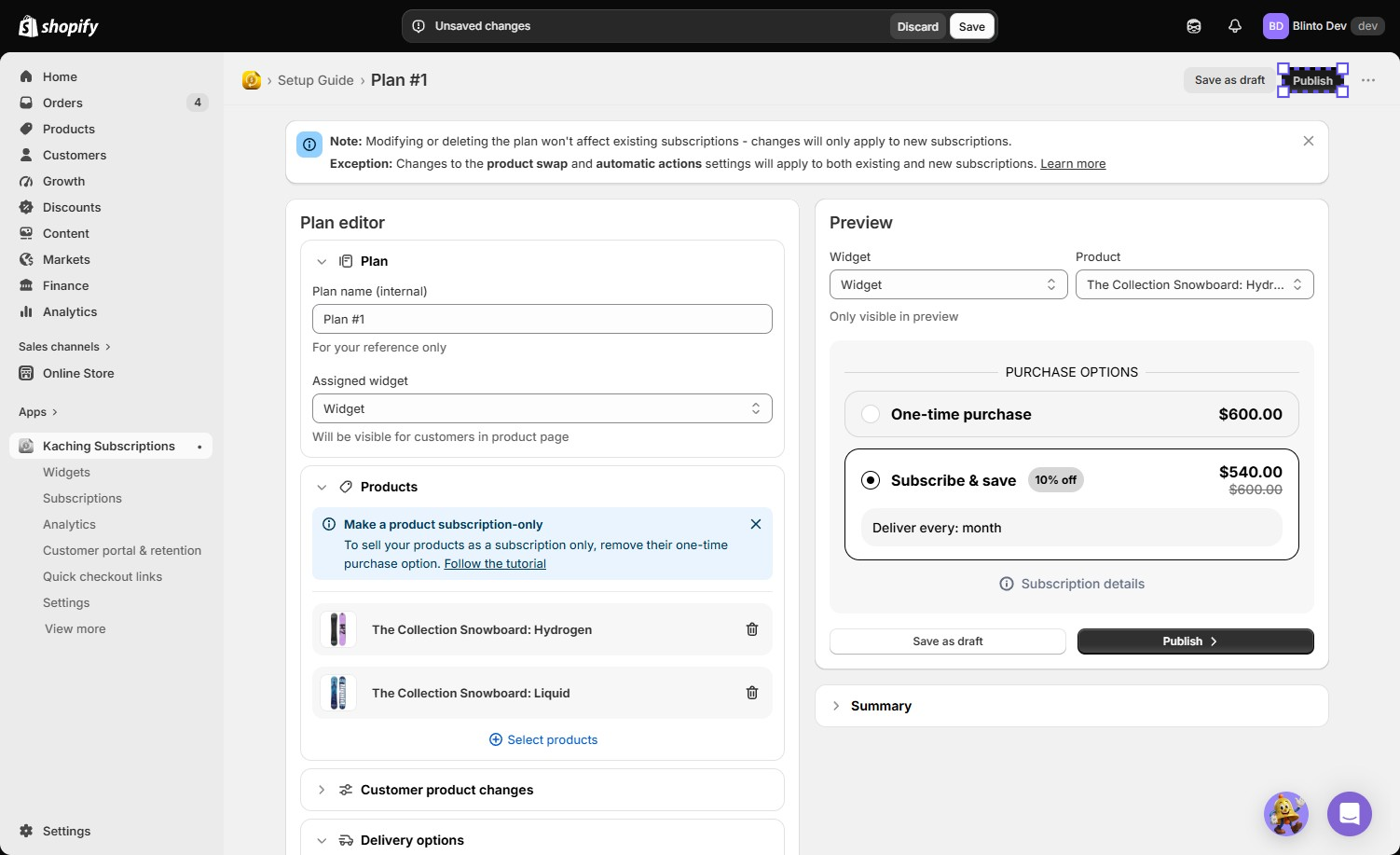
The plan editor made the offer look finished: two products attached, a monthly schedule, a clear discount, and a preview that matched what we’d configured.
We stopped at that screen. We did not publish the plan. We did not check the actual storefront product page to see whether the Subscribe & Save option appeared the way the preview showed it.
That gap matters, because of what we’d already seen in the same test. The dashboard had already warned us that the widget would not show up while the app embed was inactive. A finished-looking plan and a visible storefront widget are not automatically the same thing here. Our test can’t tell you which one you’ll get. You have to check both yourself.
The Biggest Caveat: An Easy-to-Miss Activation Step
The clearest finding from our test wasn’t a broken feature. It was a warning the app displayed twice, on the same dashboard we used to build the plan: the storefront widget would not be visible on the product page until the theme app embed was turned on.
We did not go back and activate the embed in this test, so we can’t confirm whether that fixes it. But we don’t have to guess whether the underlying symptom is real. Public Shopify App Store reviews describe the exact same outcome: a merchant configures a subscription offer, and it fails to appear where shoppers can see it.
This is a low-effort check with a high cost if skipped. A merchant could build a plan, see that it “looks right” in the app’s own preview, and assume that’s the same as a live storefront offer. It isn’t, unless you check the actual product page.
We also did not test the customer portal, checkout, first charge, renewal billing, or payment recovery. Low-rated App Store reviews raise a second, separate concern: a small number of merchants report incorrect renewal amounts being charged. We did not reproduce this. But it’s a second item worth confirming with a real test subscription before you rely on this app for revenue.
Pricing: Revenue Tiers, Not Feature Tiers
We checked pricing on the Shopify App Store listing on September 17, 2026. Prices and inclusions can change, and our screenshots do not show which tier was active during our test.
| Plan | Price shown | Subscription-revenue limit |
|---|---|---|
| Free | $0 | Development stores only |
| Starter | $9.99/month | Up to $1,000/month in subscription revenue |
| Basic | $14.99/month | Up to $3,000/month |
| Growth | $24.99/month | Up to $10,000/month |
The listing shows a 14-day free trial on paid plans and states there are no transaction fees. We did not start a trial or check billing ourselves. Treat these as listing terms, not hands-on findings.
Unlike some competitors, every paid tier here lists the same feature set: pay-per-delivery and prepaid subscriptions, BOGO/BXGY discounts, portal and analytics tools, and integrations. The tiers scale by how much subscription revenue you process, not by which features you can use. That makes the pricing decision simpler. Estimate your monthly subscription revenue first, not which feature list you need.
What We Liked
- The plan builder was fast and clear: Product search, schedule, and discount stayed on one screen, with a live price preview before publishing.
- The app was upfront about a real risk: Instead of failing silently, the dashboard told us directly that the storefront widget needed the app embed active.
- Native checkout positioning: The app runs through Shopify’s own checkout, not an off-site subscription flow. That’s a meaningful trust and reliability signal on paper.
- Flat feature access across paid tiers: You don’t have to plan around losing features at a lower tier, only around revenue volume.
What Could Be Better
- The activation step needs a hands-on test, not an assumption: Confirm the app embed is on. Confirm the widget actually renders on your product pages before you tell customers the offer exists.
- Renewal billing accuracy deserves its own test: A small number of public reviews describe incorrect renewal charges. Run at least one real test subscription through a full billing cycle before you depend on this for revenue.
- The full order lifecycle remains unverified in our test: We did not test checkout, first charge, retries, the customer portal, or cancellation.
- Local European payment methods aren’t supported for recurring orders, per the developer’s own documentation. Check this before you target those markets.
Who Kaching Subscriptions Is Best For
Kaching Subscriptions fits Shopify merchants who want a fast, guided way to configure a Subscribe & Save offer on native checkout, and who will treat storefront confirmation as a required step, not an assumption.
It’s a reasonable starting point if your subscription revenue fits the Starter or Basic tier, and your main need is pay-per-delivery replenishment rather than prepaid boxes, memberships, or complex bundling.
Who Should Consider an Alternative
If you need certainty around renewal billing accuracy at scale, EU local payment methods, or a longer track record, weigh Kaching Subscriptions against other options before you commit.
We previously tested Appstle Subscriptions on the same test store, with a similar setup-only scope. Appstle offers a broader plan-type chooser (recurring, membership, and Build-A-Box), but comes with its own untested lifecycle caveats. Seal Subscriptions, Recharge, and Loop Subscriptions are also relevant alternatives. We have not tested those three for this review, so we are not ranking them against Kaching here.
Final Verdict
Kaching Subscriptions answered the first part of our question well. We built a monthly Subscribe & Save plan for two products, with a clear discount and a live price preview, entirely without custom code.
But the more important answer came from the app itself. It flagged, unprompted, that the plan we’d just built wouldn’t reach the storefront without an extra activation step. That exact symptom shows up in real merchant complaints too.
That earns a Consider, and verify before launch verdict. The setup experience is genuinely guided. Whether your specific plan actually reaches customers, and whether renewals bill correctly once it does, are two things this test could not confirm. Confirm both yourself before you depend on this app for recurring revenue.
Frequently Asked Questions
Is Kaching Subscriptions free?
The Shopify App Store listing we checked on September 17, 2026 shows a free plan for development stores only. Paid plans start at $9.99/month for up to $1,000 in monthly subscription revenue, with a 14-day free trial.
Is Kaching Subscriptions easy to set up?
Building a single plan was straightforward in our test. We chose two products, set a monthly schedule, applied a discount, and reviewed a live price preview. We did not publish the plan or test the full setup guide, including the customer portal step.
Why didn’t my Kaching Subscriptions widget show up on my product page?
In our test, the app displayed a warning that the storefront widget will not appear while the theme app embed is inactive. Public Shopify App Store reviews describe the same symptom. Activate the app embed, then check the live product page directly. Don’t rely on the in-app preview alone.
Does Kaching Subscriptions charge transaction fees?
The Shopify App Store listing states no transaction fees on paid plans, as of September 17, 2026. We did not start billing ourselves, so confirm current terms before you subscribe.
Can Kaching Subscriptions customers pause, skip, or cancel their subscription?
The app’s listing and documentation describe a customer portal with these controls. We did not enable or test the portal in this review. The real customer-facing flow remains unverified here.