
Subscriptions sound like a simple idea: a customer buys once, and the order repeats every month. For a store selling coffee, supplements, pet food or refills, that repeat order can be the most valuable sale it makes. The catch is that many subscription apps charge a monthly fee before the first subscriber turns up.
Easy Subscriptions App, made by ECA Subscriptions, offers a way in without that fee. When we checked on 15 October 2026, its Shopify App Store listing showed a free Starter plan for up to 100 subscription orders, with paid plans from $39 a month. The app launched in December 2023, carries the Built for Shopify badge and had a 5.0 rating from 216 reviews.
So the question we wanted to answer was: can a small store get subscribe-and-save running on the free plan, and how soon does it need to pay?
We installed it on Blinto’s Shopify development store in October 2026, stayed on the Starter plan, created a subscription plan and checked it on a product page. Our short answer: setup is quick and the plan builder is easy to follow. Our test product page showed the purchase option widget twice, though, so check your own product pages after setup. And the free plan’s 100-order limit, plus the bundles and integrations held back for paid plans, mean a growing store will be paying sooner or later.
Key Takeaways
- Best fit: Small and new stores that want a simple subscribe-and-save option and are happy to start on a free plan.
- Fast setup: A three-step setup guide covers the storefront widget, the first plan and the customer’s manage button. We completed the first two.
- A useful free plan: Starter includes pause, skip, reschedule and cancel, product swapping, prepaid orders, custom email domain and language translation, all on the in-app plan list.
- Main limitation: Our test product page showed the purchase option block twice, and only one of the two had an option pre-selected.
- Watch for: Starter covers up to 100 subscription orders. Bundles, build-a-box and third-party integrations like Klaviyo and Gorgias need a paid plan.
- Our scope: We did not place a subscription order, run a renewal, test the customer portal, try a migration or contact support.
Our Verdict
Easy Subscriptions App is a good way for a small store to test whether its customers want subscriptions, without paying for an app first.
The best part of our test was how little work it took. The setup guide links straight to each step, the plan builder came with a ready-made “Subscribe & Save” plan, and adding products was a matter of picking them from a list. Within a few screens, our test product page offered a Subscribe & Save price next to the regular one.
The trade-offs are about the storefront and the ceiling. The duplicate widget on our product page needs fixing before a store goes live. And the Starter plan is a starting point, not a long-term home: once subscription orders pass 100, or once you want bundles or Klaviyo, the next step is $39 a month.
What Easy Subscriptions App Offers
Easy Subscriptions App adds subscribe-and-save to Shopify product pages and gives customers ways to manage their subscriptions after they buy.
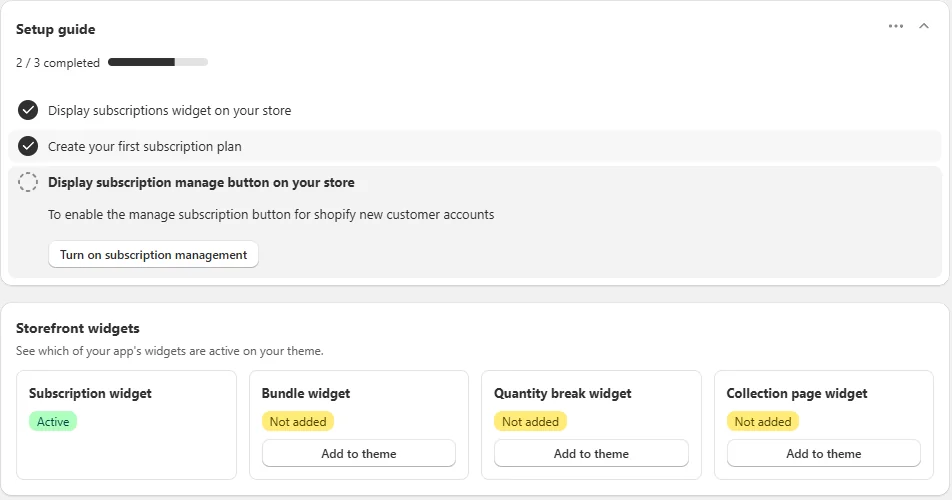
Inside Shopify admin, the app menu has Subscription Plan, Subscription, Growth Tools, Analytics, Support, Settings, Billing, Customers, Integrations and Partners. The dashboard opens with a setup guide and a Storefront widgets panel that shows which of the app’s four widgets are on your theme: subscription, bundle, quantity break and collection page.
According to the listing, the app also covers weekly, monthly or custom billing schedules, subscription boxes and build-a-box bundles, automatic payment retries for failed charges, upsells, and an analytics dashboard for revenue, churn and forecasting. The listing says it works with Shopify Checkout, customer accounts, Shopify POS and Shopify Flow, plus apps including Klaviyo, Gorgias, Smile, Yotpo and Zapier. We did not test these.
What We Tested
We installed Easy Subscriptions App on Blinto Dev, a Shopify development store we use for testing, on the free Starter plan.
We worked through:
- the dashboard setup guide and the subscription widget
- creating a subscription plan and adding products to it
- the plan list in Manage subscription plan
- the subscription widget on a live product page
- the Billing screen and its plans
- the App Integration screen
We did not place a subscription order or trigger a renewal. We did not turn on the subscription manage button, log in as a subscriber, add the bundle, quantity break or collection page widgets, open Analytics or Growth Tools, connect an integration, try a migration or contact support.
Setup: From Install to a Live Plan
The setup guide has three steps:
- Display the subscriptions widget on your store.
- Create your first subscription plan.
- Display the subscription manage button on your store.
In our test, the first step was marked complete and the Subscription widget showed as Active.
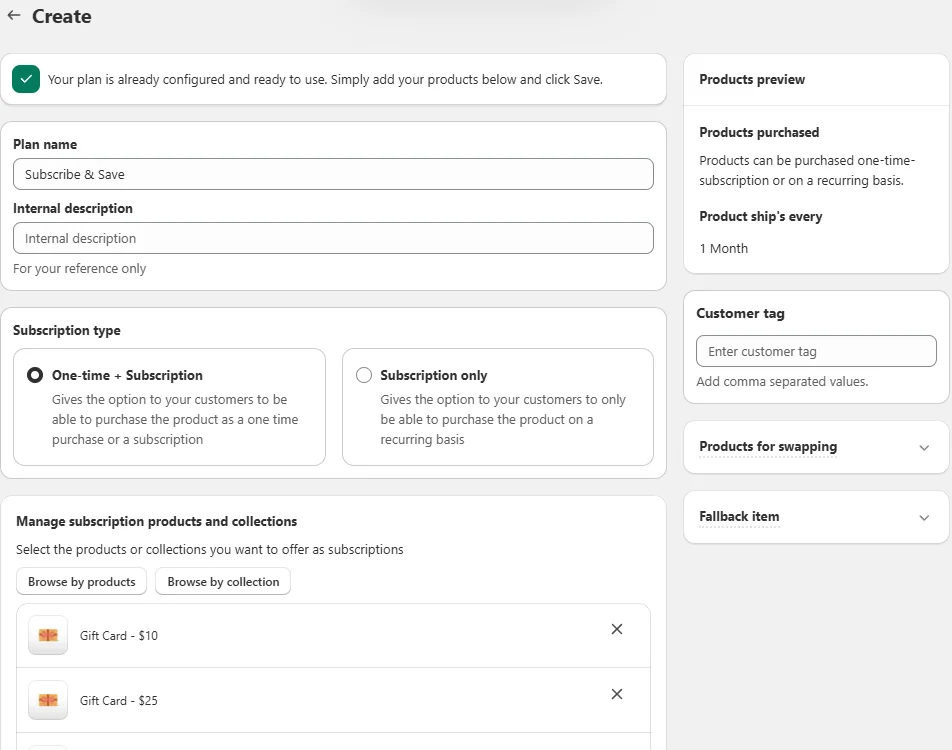
The second step opens the plan builder, and it does most of the work for you. A message at the top says the plan is already configured and ready to use, and you only need to add products and save. The plan was named “Subscribe & Save”, and the preview on the right showed products shipping every month.
The main choices on the page are:
- Subscription type: One-time + Subscription, which lets customers choose either, or Subscription only.
- Products and collections: add products one by one or by collection.
- Customer tag: a field for comma-separated tags.
- Products for swapping and Fallback item: two collapsed sections, which we did not open.
We kept One-time + Subscription and added products. After saving, the Manage subscription plan screen listed our plan as On, with a “Discount available” label, one delivery frequency and 24 products. The setup guide moved to 2 of 3.
For a merchant who just wants a monthly subscribe-and-save option, this is about as short as setup gets. Our plan had a single delivery frequency. We did not try adding more.
Where Easy Subscriptions App Falls Short
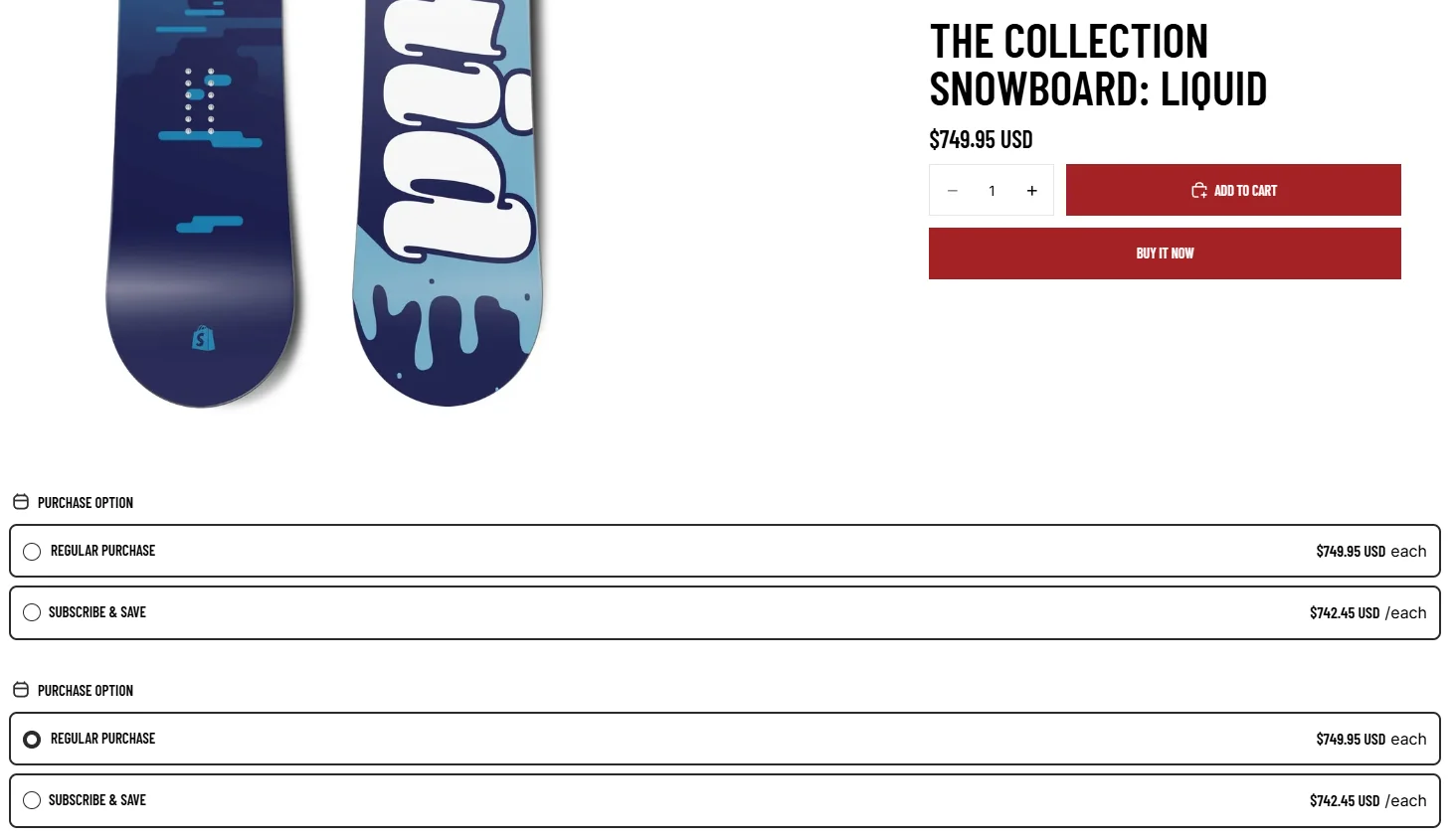
On our test product page, the purchase option block appeared twice, one under the other. Both showed Regular purchase at $749.95 and Subscribe & Save at $742.45. In the first block, neither option was selected. In the second, Regular purchase was.
A shopper seeing two identical choices, one of them with nothing selected, may not know which one counts. We did not track down the cause. It may come from how the widget was added to our theme rather than from the app itself. Either way, it is the first thing we would check after installing: open a product page in your own theme and make sure the block appears once.
The other limits are about plans rather than bugs:
- Integrations are mostly paid. The App Integration screen lists 29 integrations. On Starter, Shopify Flow Automation was open to us, while Klaviyo Contact Sync, Klaviyo Mail Sync, Gorgias Automation and ECA’s own loyalty app showed “Upgrade to access”.
- Bundles need a paid plan. The bundle, quantity break and collection page widgets sit on the dashboard, but the in-app plan list puts fixed bundles, build-your-own box and bundle pricing on Growth and above.
- The manage button is a separate step. The third setup step turns on a subscription manage button for Shopify’s new customer accounts. We did not complete it, so make sure it is on before you launch.
- Promotions in the dashboard. The dashboard carries a banner for the developer’s loyalty app, offering a free year on a paid plan. You can close it, but it takes up space on the main screen.
Pricing and Value
On 15 October 2026, the Shopify App Store listing showed four plans:
| Plan | Price | Subscription orders |
|---|---|---|
| Starter | Free | Up to 100 |
| Growth | $39/month or $421/year | Up to 1,000 |
| Scale | $99/month or $1,069/year | Up to 10,000 |
| Enterprise | $399/month or $4,309/year | Unlimited |
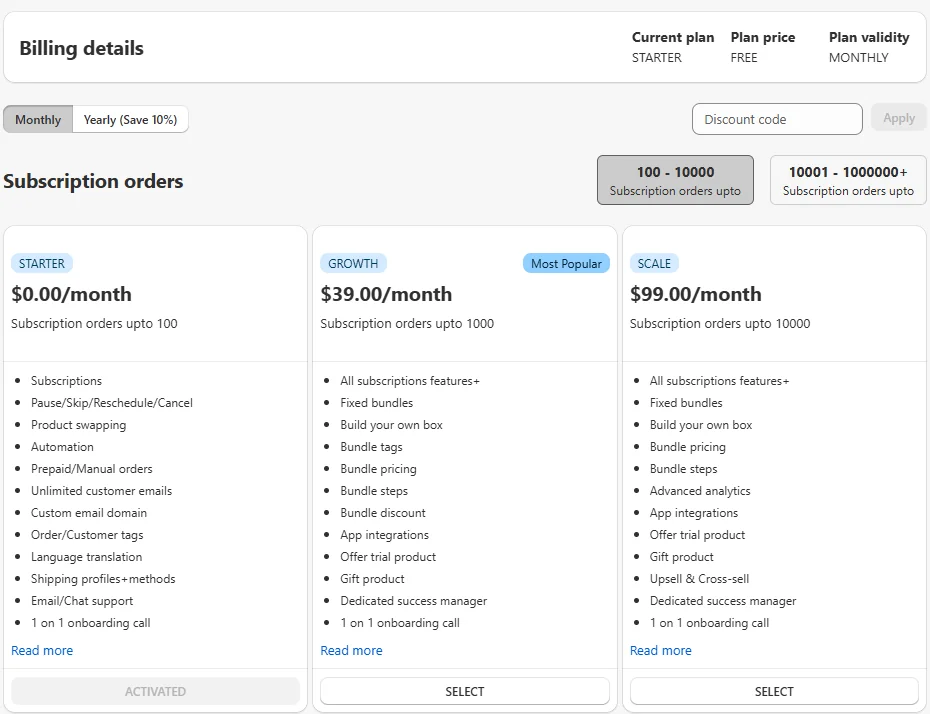
The paid plans have a 7-day free trial. Inside the app, the Billing screen showed the same Starter, Growth and Scale prices, with a toggle for stores above 10,000 orders and a field for a discount code.
The listing describes these limits as lifetime subscription orders with 0% transaction fees. That matters for a free plan: 100 subscription orders is a test run, not a ceiling a store will stay under for long. We did not reach the limit, so we cannot say exactly what happens when a store passes it.
What Starter includes is generous. The in-app plan list gives it subscriptions, pause, skip, reschedule and cancel, product swapping, automation, prepaid and manual orders, unlimited customer emails, a custom email domain, order and customer tags, language translation, shipping profiles and methods, email and chat support, and a one-to-one onboarding call.
Growth at $39 a month adds bundles, build-your-own box, trial and gift products, and app integrations. Scale at $99 a month adds advanced analytics and upsells and cross-sells. The listing also puts dunning, or automatic retries for failed payments, on Starter.
For a store that only needs subscribe-and-save and has not yet proven demand, Starter is a sensible place to begin. For a store that already knows it will sell hundreds of subscription orders or needs Klaviyo, the real starting price is $39 a month.
What Merchants Report
At the time of our check, the listing showed 215 five-star reviews and one one-star review.
The recent reviews mostly praise the support team. Several merchants say the team helped them set up, fix configuration issues or move over from another subscription platform. Easy setup comes up often too.
The one negative review, from early 2025, came from a merchant who felt they could not customise the app. The developer replied that customisation is on the free plan, while build-a-box and upsells need a paid plan.
A very high rating with almost no criticism is a good sign, but it does not replace testing. Run your own subscription order through the store before you rely on it.
What We Liked
- Quick setup guide: Three clear steps, each linked to the right screen. We went from install to a live plan in a few screens.
- A plan that starts ready: The first plan came pre-configured as Subscribe & Save with monthly delivery. Adding products was the main task.
- Useful plan options: One-time + Subscription or Subscription only, customer tags, product swapping and a fallback item are all set on one page.
- A free plan with real features: Pause, skip, reschedule, cancel, swapping, prepaid orders and a custom email domain are all on Starter, according to the in-app plan list.
- Free help to get started: The dashboard offers a free onboarding call and a free migration call for stores moving from another app.
What Could Be Better
- Duplicate widget: Our test product page showed the purchase option block twice. Check yours before going live.
- A low free limit: Starter covers 100 subscription orders, which the listing describes as a lifetime limit.
- Integrations behind a paywall: Klaviyo and Gorgias showed “Upgrade to access” on Starter.
- Bundles are paid: The bundle widgets are on the dashboard, but bundles start at Growth.
- Dashboard promotions: A banner for the developer’s loyalty app takes up space on the main screen.
Who Easy Subscriptions App Is Best For
Easy Subscriptions App suits a small or new Shopify store that wants to try subscribe-and-save without paying for an app first. If you sell a product people reorder, such as coffee, supplements, pet food or skincare, and you want a monthly option with a small discount, the free plan gets you there quickly.
It also suits stores that expect to grow into bundles and subscription boxes, since those are in the same app on the paid plans.
Who Should Consider an Alternative
If you already know you will pass 100 subscription orders quickly, compare Easy Subscriptions’ $39 Growth plan with other subscription apps’ paid plans before you install.
If Klaviyo or a helpdesk integration is essential from day one, budget for a paid plan, since those integrations were locked on Starter.
And if you want a free app with no order limit at all, Blinto’s review of Supr Bundle & Subscription App covers an app whose listing showed a single Free plan.
Final Verdict
Easy Subscriptions App gives a small Shopify store a quick, low-risk way to start selling subscriptions. In our test, the setup guide and the ready-made plan got a subscribe-and-save option onto a product page in a few screens, on the free plan.
The main caveats are the duplicate purchase option block we saw on our product page, the 100-order limit on Starter, and bundles and integrations being kept for paid plans.
Our advice: install it, finish all three setup steps, then open a product page in your own theme and check that the widget appears once. Place a test subscription order and check the customer’s manage options before you promote it. If subscriptions take off, plan for the $39 Growth plan.
Frequently Asked Questions
Is Easy Subscriptions App free?
It has a free Starter plan. On 15 October 2026, the listing showed Starter as free for up to 100 subscription orders. Paid plans were $39, $99 and $399 a month, with 10% off for yearly billing and a 7-day free trial.
Does Easy Subscriptions App charge transaction fees?
The listing describes each plan’s order limit as subscription orders with 0% transaction fees. We did not pass the Starter limit, so we cannot confirm what happens after it.
Can customers pause, skip or cancel their subscriptions?
The in-app plan list includes pause, skip, reschedule and cancel on the free Starter plan. To show customers the manage button, you need to complete the third setup step for Shopify’s new customer accounts. We did not test the customer side.
Does it support bundles and subscription boxes?
Yes, but not on the free plan. The in-app plan list puts fixed bundles, build-your-own box and bundle pricing on Growth ($39 a month) and above.
Can I move my subscribers from another app?
The dashboard offers a free migration call for stores switching apps, and several merchants say the team helped them move over. We did not test a migration.
Did you test billing and renewals?
No. We set up a plan and checked the storefront widget, but we did not place a subscription order, run a renewal or test failed-payment retries.