
Most Shopify merchants who look at Recharge already know they want subscriptions. The harder questions are about cost and effort. How long does it take to get a Subscribe & Save offer onto the product page? And is the monthly fee plus a cut of every transaction worth paying?
Recharge has been on the Shopify App Store since 2014. It holds a 4.8 rating across more than 3,100 reviews, and carries the Built for Shopify badge. It also costs more to run than the free-tier apps it competes with.
We installed it on a Shopify development store and went through its guided onboarding. We set up a monthly Subscribe & Save offer at 25% off for three products, previewed the product-page widget, then built and customised the Recharge cart.
Our question was practical. Does Recharge’s guided setup get a merchant to a working subscription offer without a developer, and what will it cost to keep running?
Key Takeaways
- Best for brands that treat subscriptions as a core revenue line: The setup is polished and goes beyond the product page into the cart. The pricing assumes real subscription volume.
- The guided setup is quick and clear: Products, discount, and delivery frequency sit on one screen, with a live preview beside the form.
- The cart is the stand-out: It converts one-time items to subscriptions and suggests related products, and the storefront result matched the offer we built.
- Check the default widget copy: Our widget preview promised free shipping, even though nothing in the steps we completed asked about shipping.
- Fees add up: Starter is $99 per month plus 1.49% + 19¢ per transaction. A $25 plan with no transaction fees covers only your first 50 subscribers.
Our Verdict
Recharge is a strong pick if subscriptions are, or will soon be, a big part of your revenue and you want a mature platform with hands-on migration help.
The best part of our test was how far the onboarding went. It didn’t stop at a product-page widget. It moved straight into a subscription-aware cart, and every step came with a preview. We didn’t write any code.
The first caution is the widget’s default copy. It listed benefits we hadn’t set up, so read it carefully before launch.
The second is cost. Recharge charges a monthly fee and a per-transaction fee on its main plans. A small store will feel that sooner than it would with apps that have a free tier.
Our test also stopped before checkout. We didn’t place a test order, trigger a recurring charge, or use the customer portal. This review makes no claims about what happens after a customer subscribes.
What Recharge Subscriptions Offers
Recharge runs recurring orders for Shopify stores. It covers product-page subscriptions, a self-serve customer portal where subscribers can skip, swap, or reschedule, cancellation prevention, failed-payment recovery, bundles, loyalty rewards, and retention analytics.
It works with Shopify Checkout, customer accounts, Shopify POS, and Shopify Flow. It also connects with tools such as Klaviyo, Attentive, Gorgias, Avalara, Stripe, and Triple Whale.
The onboarding shows how Recharge wants you to start. A left-hand rail splits setup into three stages: Launch your widget, Set up your cart, and Create an upsell. Revenue beyond the first order is treated as part of the setup, not an extra you find later.
What We Tested
We installed Recharge on the Blinto Dev Shopify development store and followed the guided onboarding.
We finished the first two stages. We picked three snowboard products from Shopify’s sample catalogue and sold them as one-time and subscription. We set a 25% subscriber discount with monthly delivery. Then we followed the steps to add the subscription widget to the theme and opened the widget preview on a product page.
Next we built the Recharge cart. We turned on the subscription upsell and product recommendations, reviewed the style and wording settings, added the cart to the storefront, and viewed it with a subscription item inside.
We didn’t complete the third stage, Create an upsell. We didn’t place a test order, go through checkout, or trigger a first or recurring charge. We also didn’t test failed-payment recovery, the customer portal, cancellation flows, bundles, gifting, loyalty, SMS, analytics, migration, or support.
We didn’t confirm which Recharge plan was active on our store, so we don’t tie any of the features we used to a specific plan.
Setting Up a Subscribe & Save Offer
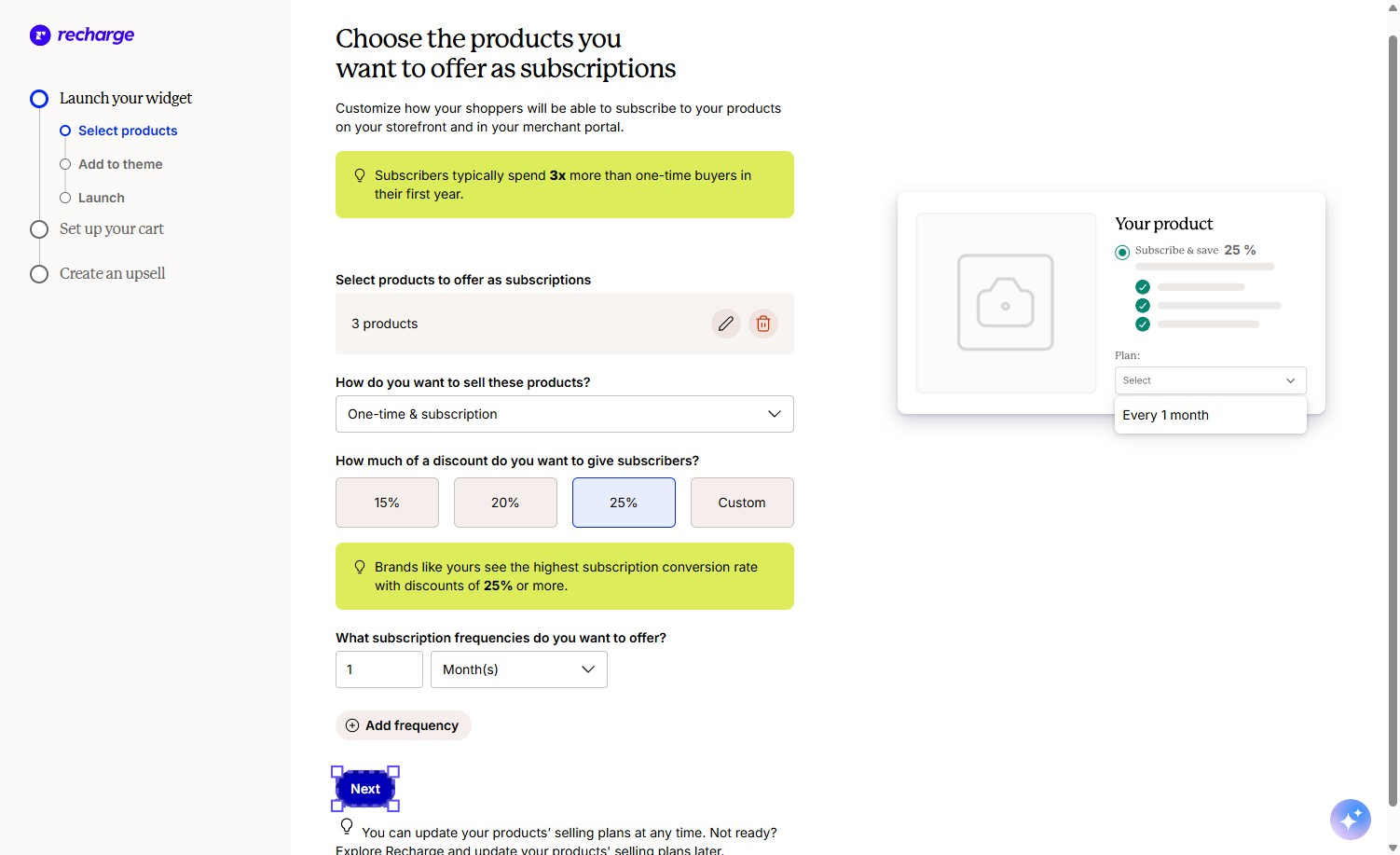
The first stage takes one screen. You choose products, choose how to sell them, choose a discount, and choose delivery frequencies.
The product picker is a simple checklist. We ticked three snowboards and the form showed “3 products”, with edit and delete icons beside it. The selling option was set to one-time and subscription, so shoppers could still buy once.
The discount step has quick buttons for 15%, 20%, and 25%, plus a Custom option. We chose 25%. Frequency is a number and a unit. We used every 1 month, and you can add more options with Add frequency.
A small mock product card on the right updates as you go. It’s a simple touch, but it lets you see the offer from the shopper’s side before anything goes live.
Adding the widget to the theme is manual. Recharge lists four steps: open the theme editor, add a block in the product information section, drag in the Subscription Widget block, and save. Then you come back and confirm. It’s easy, but it happens in Shopify’s theme editor, not inside Recharge.
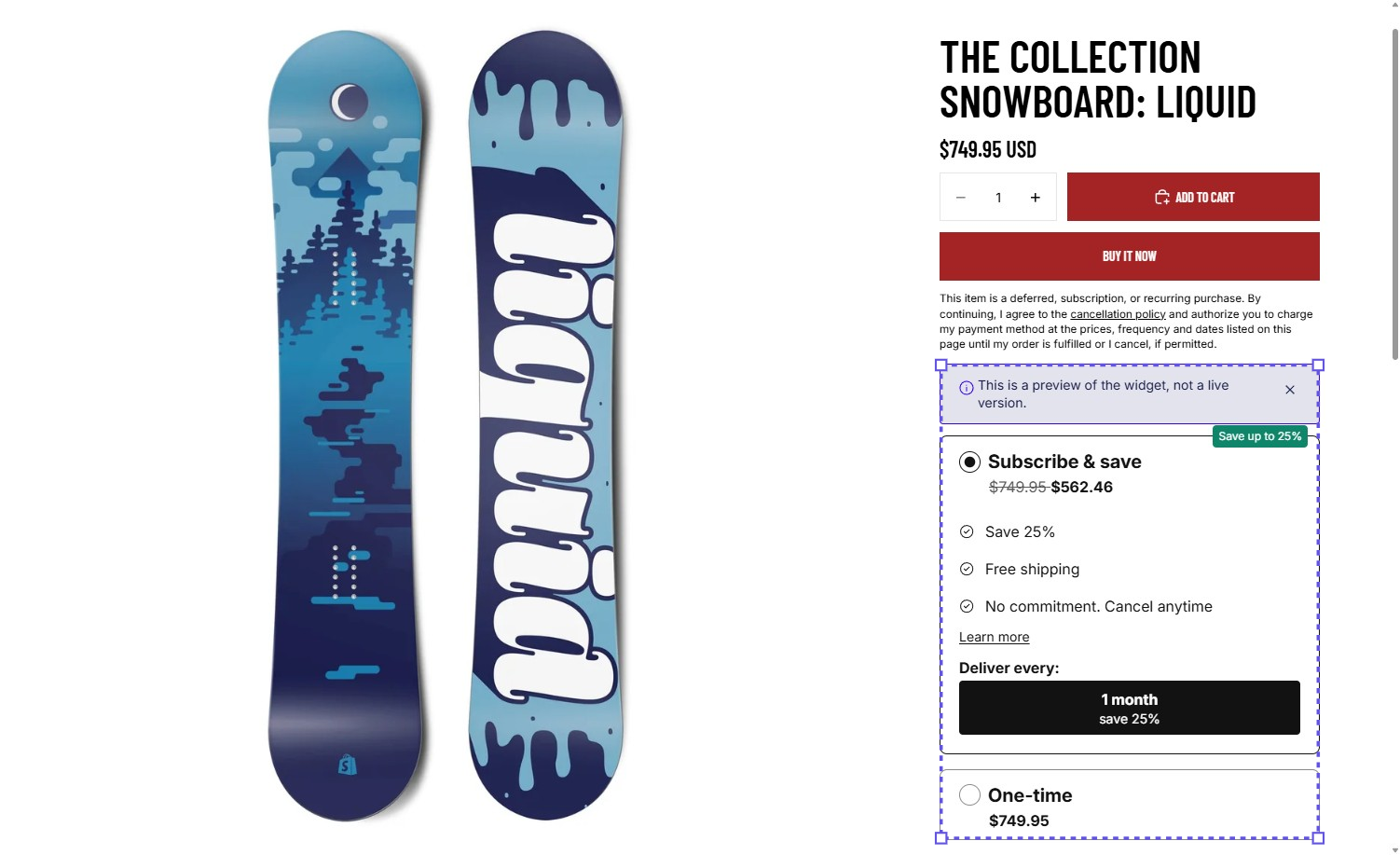
The preview matched our setup. On the Liquid snowboard, Subscribe & save showed $562.46 against a crossed-out $749.95, which is 25% off. A “Save up to 25%” badge sat on the option, delivery showed as every 1 month, and the one-time price appeared below. A banner made it clear this was a preview, not a live widget.
We didn’t need any code for this stage.
Where to Slow Down: Default Copy and In-App Claims
The same preview is also where we’d tell merchants to slow down.
The widget listed three benefits under Subscribe & save: Save 25%, Free shipping, and No commitment. Cancel anytime. The discount line came from our setup. The other two didn’t. Nothing in the steps we completed asked about shipping rates or cancellation terms.
If your subscription orders aren’t shipped free, or your plan has a minimum commitment, that default copy would promise shoppers something your store doesn’t offer. We didn’t edit the widget text in this test, so check where each line comes from and change it before launch.
The onboarding also features Recharge’s own performance claims in highlighted tips. For example, it says subscribers spend more than one-time buyers, discounts of 25% or more convert best, and the Recharge cart lifts subscription sales. These may be true across Recharge’s customer base, but a development store can’t verify them. Read them as the vendor’s figures, not a forecast for your store.
The 25% advice is worth thinking about separately. A deeper discount on every recurring order is a permanent margin decision, not just a setup choice. Pick the number your margins can handle, not the one the tip recommends.
The Recharge Cart Goes Beyond the Product Page
This is where Recharge stands out from simpler subscription apps.
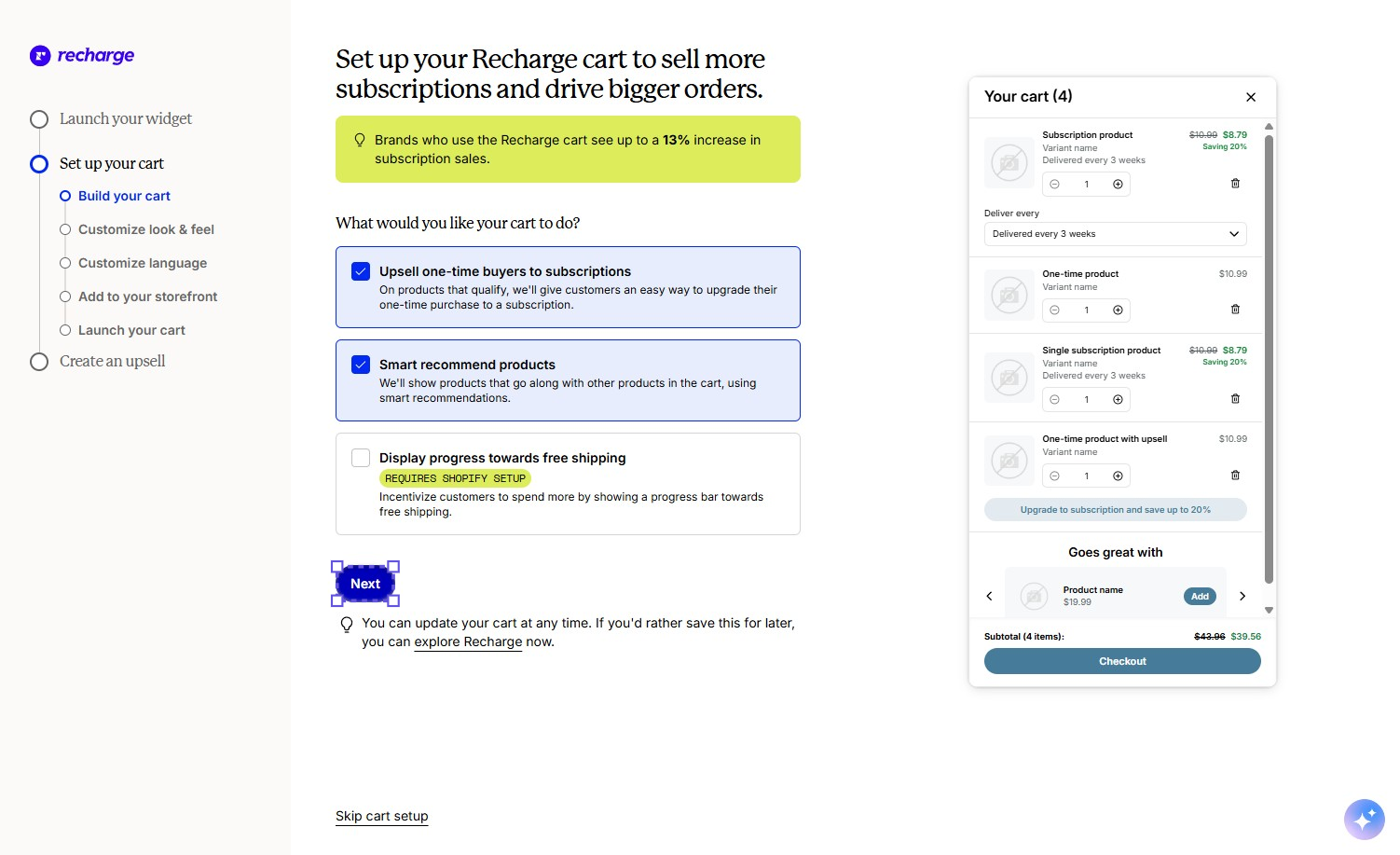
The second stage builds a cart drawer that understands subscriptions. You pick what it does from three options: upsell one-time buyers to a subscription, show smart product recommendations, and show progress toward free shipping. The last one is labelled as needing extra Shopify setup, so we left it off.
The look-and-feel step covers eight colour settings plus a choice of fully rounded, gently rounded, or square corners. The wording step lets you edit every label, including the upsell line. That line uses a discount variable, so the saving it shows follows your plan. Our changes saved with a “Your flow was saved” confirmation.
Adding the cart to the storefront was easier than adding the widget. One button opens the theme editor, and Recharge says it switches on the app embed for you. You then save in Shopify and confirm back in Recharge.
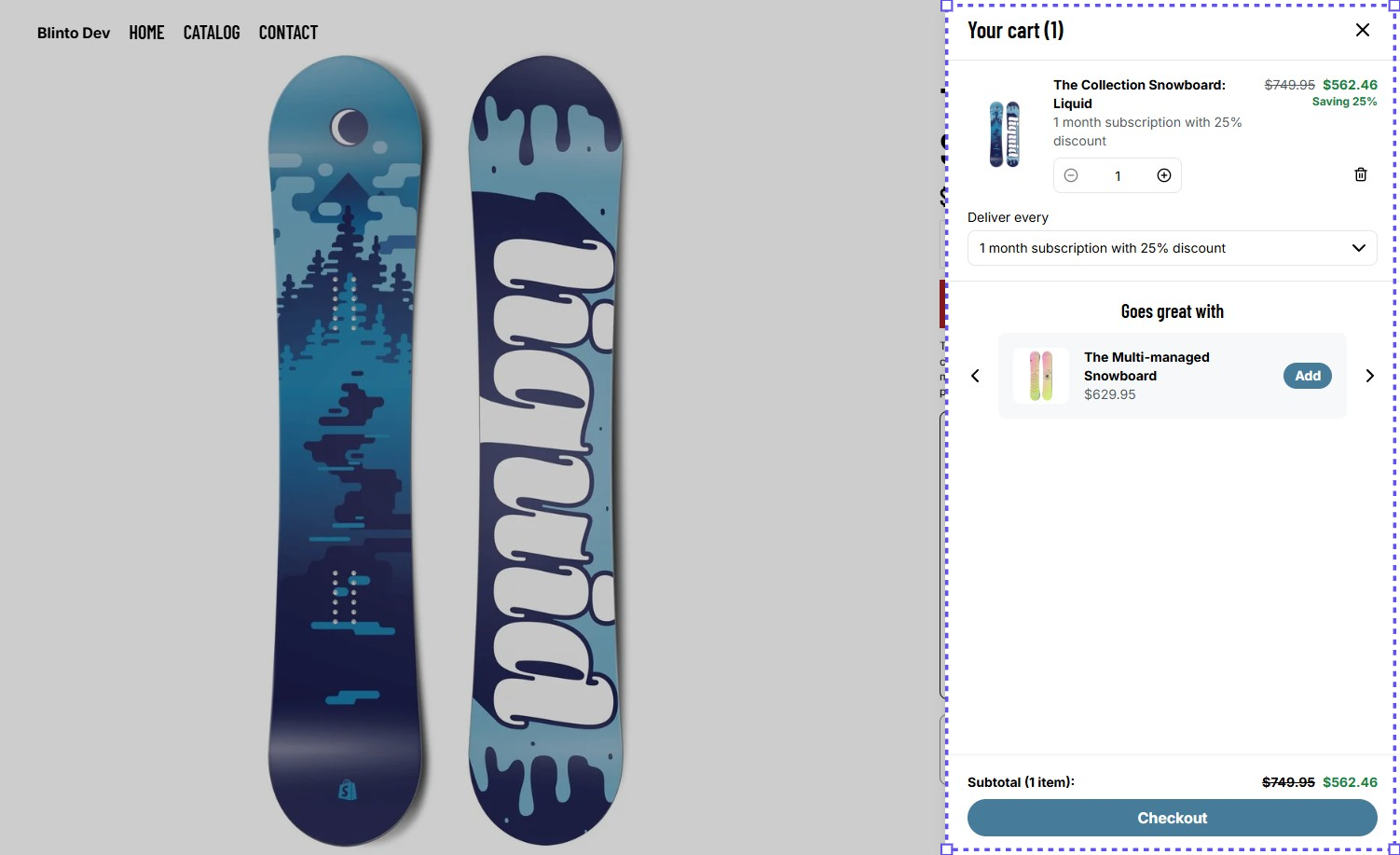
On our storefront, the cart showed the Liquid snowboard as a 1 month subscription with 25% discount. It showed the crossed-out and discounted prices, a “Saving 25%” label, and a delivery dropdown where shoppers can change frequency without going back to the product page. A “Goes great with” section suggested another snowboard from the catalogue with an Add button.
That’s a practical design choice. Shoppers can manage the subscription inside the cart, and the upsell and cross-sell happen before checkout, where they’re easier to act on.
We didn’t add a one-time item to test the upsell-to-subscription prompt on the live cart. We also didn’t go through checkout, so we can’t say how the cart hands off to it.
What Merchants Report
Recharge’s public reviews are mostly very positive. The praise that comes up most often is for migration help and implementation staff. Merchants moving from another platform often say the move went smoothly because of the people guiding it.
The complaints are fewer but consistent. They focus on cost, especially for small stores and for long-time merchants who have seen fees rise. Other themes include how hard it is to reach a human for support, how complex setup can be, and billing or payment problems after migrations and platform updates.
We didn’t contact support or run billing, so we can’t confirm any of these reports. They are a useful checklist for your trial, though: run a real test order, cancel it, and refund it before you commit.
Pricing and Value
Verified 23 September 2026.
| Plan | Monthly fee | Transaction fee | Notes |
|---|---|---|---|
| 25–50 | $25 | None for your first 50 subscribers | Entry plan for new subscription programs |
| Starter | $99 | 1.49% + 19¢ | Widget, customer portal, upsells and cross-sells, cancellation prevention, failed-payment recovery, analytics |
| Plus | $499 | 1.34% + 19¢, with scalable rates | Adds hands-on implementation, custom bundles and tiered discounts, Concierge SMS, loyalty rewards and referrals, JavaScript SDK and Storefront API |
| Custom | Volume-based | Negotiated | For high-volume subscription brands |
Starter and Plus come with a 60-day free trial.
The fee structure matters more than the headline price. On Starter, a store running 500 subscription orders a month at $40 each pays $99, plus about $298 in percentage fees, plus $95 in per-order fees. That’s roughly $492 a month, about 2.5% of that subscription revenue.
The $25 plan makes Recharge affordable while you’re testing demand. The published terms don’t spell out what happens to fees once you pass 50 subscribers. Check that before you rely on it.
Plus costs $400 a month more than Starter and cuts the rate by only 0.15 points. Most brands will upgrade for the features, not the rate: implementation help, custom bundles, loyalty, or API access. If your stack needs the Storefront API or SDK, plan for $499 a month.
Compared with other apps we’ve reviewed in this category, Recharge has no permanently free tier. Loop and Appstle both offer free plans with caps. That puts Recharge further up the market.
What We Liked
- A guided setup that goes further than most: Onboarding covered the product-page offer and then a full subscription-aware cart, with a preview at every step.
- Everything on one screen: Products, selling mode, discount, and frequency sit on one form, with a live mock-up beside it.
- Accurate storefront output: The widget preview and the cart both showed the discount we set, with correct maths.
- A cart that sells subscriptions: Changing frequency in the cart, converting one-time items, and recommending products all happen before checkout.
- Easier cart install: A single button takes you to the theme editor, and Recharge handles the app embed toggle.
What Could Be Better
- Default widget copy can overpromise: Free shipping and cancel-anytime lines appeared in our preview without being set up. Every merchant should check them before launch.
- The widget install is still manual: Unlike the cart, the product-page widget needs you to place a block in the theme editor yourself.
- Vendor claims in the setup flow: Performance figures and the push toward 25% discounts come from Recharge, not from your data.
- Fees on top of fees: Starter combines a monthly fee, a percentage, and a per-order charge. There is no free tier.
- Support and billing concerns come up in merchant reviews: We didn’t test either, but the theme is consistent enough to test during the trial.
Who Recharge Subscriptions Is Best For
Recharge fits brands where subscriptions are a real revenue line. Think coffee, pet food, supplements, and other repeat purchases with enough volume that the transaction fee is a small share of what the platform returns.
It fits merchants who want the cart to do some of the selling. The subscription-aware cart with upsells and recommendations is the most useful thing we saw that simpler apps don’t include.
It also fits brands moving from another subscription platform. Merchant feedback about Recharge’s migration and implementation help is consistently positive.
Who Should Upgrade or Consider an Alternative
Stay on the $25 plan while you prove demand. Move to Starter once you pass 50 subscribers, and use the 60-day trial to place, cancel, and refund real test orders.
Move to Plus only for its features. Implementation help, custom bundles, loyalty, and API access are the usual reasons. The small rate cut alone won’t cover the $400 difference unless your subscription volume is very high.
Look elsewhere if your budget is tight and your offer is simple. A store with one refill product and a handful of subscribers will pay for tools it never opens. Loop and Appstle both have free plans that cover a basic Subscribe & Save offer.
Final Verdict
Recharge’s guided setup did what it promised. We built a monthly Subscribe & Save offer for three products, saw it priced correctly on the product page, and got a subscription-aware cart onto the storefront without writing any code.
The strongest reason to choose Recharge is that its setup goes past the widget. The cart handles subscription upsells, frequency changes, and recommendations out of the box.
The biggest caveats are cost and checking. The fee structure makes Recharge a platform for brands with real subscription volume. And the default widget copy needs a careful read before it promises shoppers something your store doesn’t offer.
If subscriptions are central to your business, start the trial and build your real offer. Then place a test order, cancel it, and refund it before you launch. If you’re still testing the idea with a few customers, start on the $25 plan or with a free alternative.
Frequently Asked Questions
Does Recharge Subscriptions have a free plan? No. The cheapest option is $25 per month, with no transaction fees for your first 50 subscribers. Starter and Plus include a 60-day free trial.
How much does Recharge charge per transaction? Starter charges 1.49% + 19¢ per transaction on top of $99 per month. Plus charges 1.34% + 19¢ on top of $499 per month, with scalable rates. Custom pricing is based on volume.
Do you need a developer to set up Recharge? Not for the basics. We set up a Subscribe & Save offer, added the widget to the theme, and added the Recharge cart through the guided onboarding without code. Placing the widget does mean adding a block in Shopify’s theme editor.
Does Recharge include a subscription cart? Yes. The onboarding includes a Recharge cart drawer that can upsell one-time items to subscriptions, recommend products, and let shoppers change delivery frequency inside the cart.
Is Recharge Built for Shopify? Yes. The app carries the Built for Shopify badge as of September 2026.