
A Shopify merchant usually wants more control than the standard theme editor provides. But each landing-page change should not become a development task.
Zipify Pages Builder approaches that problem with a visual page editor, reusable global sections, responsive controls, analytics, and built-in split testing.
For this review, we tested a practical buying question. Can a Shopify merchant use Zipify Pages to build and publish a custom promotional landing page? Can they make useful layout changes without writing code?
In our test, we created a promotional page for a fictional bedding store. We edited its structure and the appearance of its sections. We then published the result to the Shopify storefront. We also inspected Zipify’s Global settings and Statistics areas.
Our test showed that Zipify provides detailed page-level control. Its main strengths include section structure, reusable design components, and responsive settings. However, some key conversion features were outside the scope of this test. These included A/B testing and revenue attribution.
Key Takeaways
- Best fit: Shopify merchants regularly building landing pages, promotional pages, product offers, or campaign-specific storefront experiences.
- Strongest finding: We were able to build and publish a custom promotional page while controlling its content structure and section-level appearance from the visual editor.
- Biggest limitation in our test: We did not generate real traffic, transactions, or a live split test, so we cannot independently judge Zipify’s analytics accuracy or the effectiveness of its experimentation tools.
- Buying guidance: Zipify makes more sense when you expect to use its reusable page system, analytics, or testing capabilities regularly; merchants needing only occasional basic page edits should consider whether the extra tooling and monthly cost are necessary.
Our Verdict
Based on our test, Zipify Pages is a capable option for merchants who build campaign-focused Shopify pages. They can create the layout without working entirely in theme code.
The editor gave us a strong level of control. Our test page contained an announcement area, header, hero section, promotional copy, calls to action, and countdown content. Each item appeared in a clear page hierarchy.
Zipify also goes beyond individual page editing with Global Styles, Global Sections, Global Scripts, analytics, and split-testing functionality.
Our hands-on test focused on building and publishing the page. We inspected the statistics interface. However, our test store had no meaningful traffic or transactions. We also did not complete an A/B test.
What Zipify Pages Builder Offers
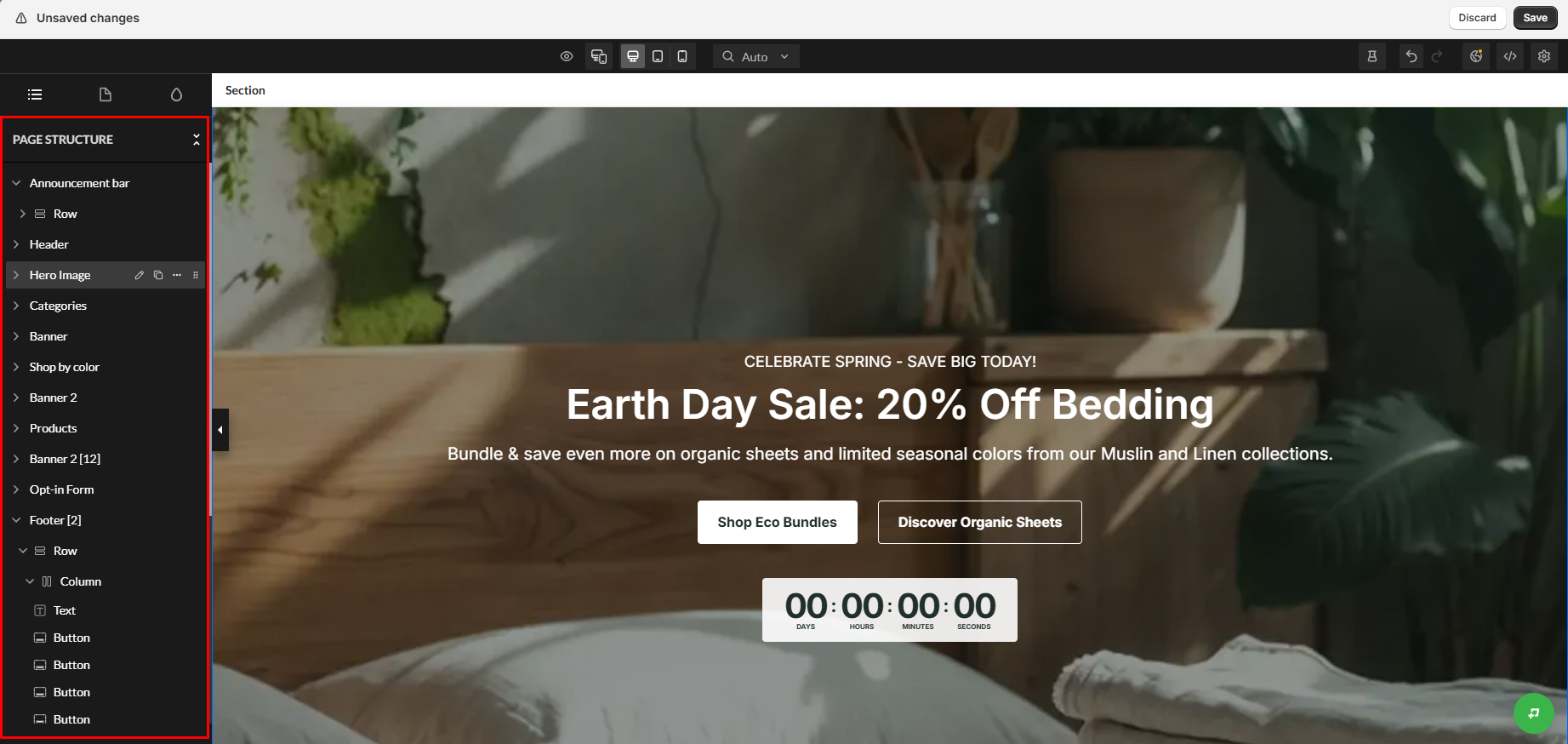
Zipify Pages organizes pages as a hierarchy of sections, rows, columns, and individual elements.
Our test page included an announcement bar, header, and hero image. It also had category and banner sections, products, an opt-in form, and footer content. Expanding the page structure revealed smaller elements such as text and buttons.
That structure matters as a landing page grows. Zipify does not treat the page as one large canvas. It lets you find and edit specific parts of the layout.
Zipify’s page-builder documentation also describes prebuilt sections, reusable sections, device-specific editing, backgrounds, spacing controls, visibility controls, and custom CSS classes.
What We Tested
We tested Zipify Pages on a Shopify store by building a promotional storefront page for a fictional bedding brand.
Our hands-on test covered:
- Editing a multi-section page in the Zipify Pages visual editor.
- Inspecting the page hierarchy and individual content elements.
- Working with section-level appearance controls.
- Checking responsive/device-specific editing options.
- Publishing the finished page and checking the storefront result.
- Inspecting Zipify’s Global Styles, Global Sections, and Global Scripts area.
- Opening the Statistics dashboard and reviewing the metrics available there.
We did not run a live split test, generate meaningful customer traffic, complete test purchases for analytics attribution, evaluate long-term page performance, or test every available landing-page, product-page, blog, and collection-page workflow.
This is therefore a Level 2 — Partial Hands-On Test, not a complete validation of every Zipify Pages feature.
Can You Build and Publish a Custom Shopify Page Without Coding?
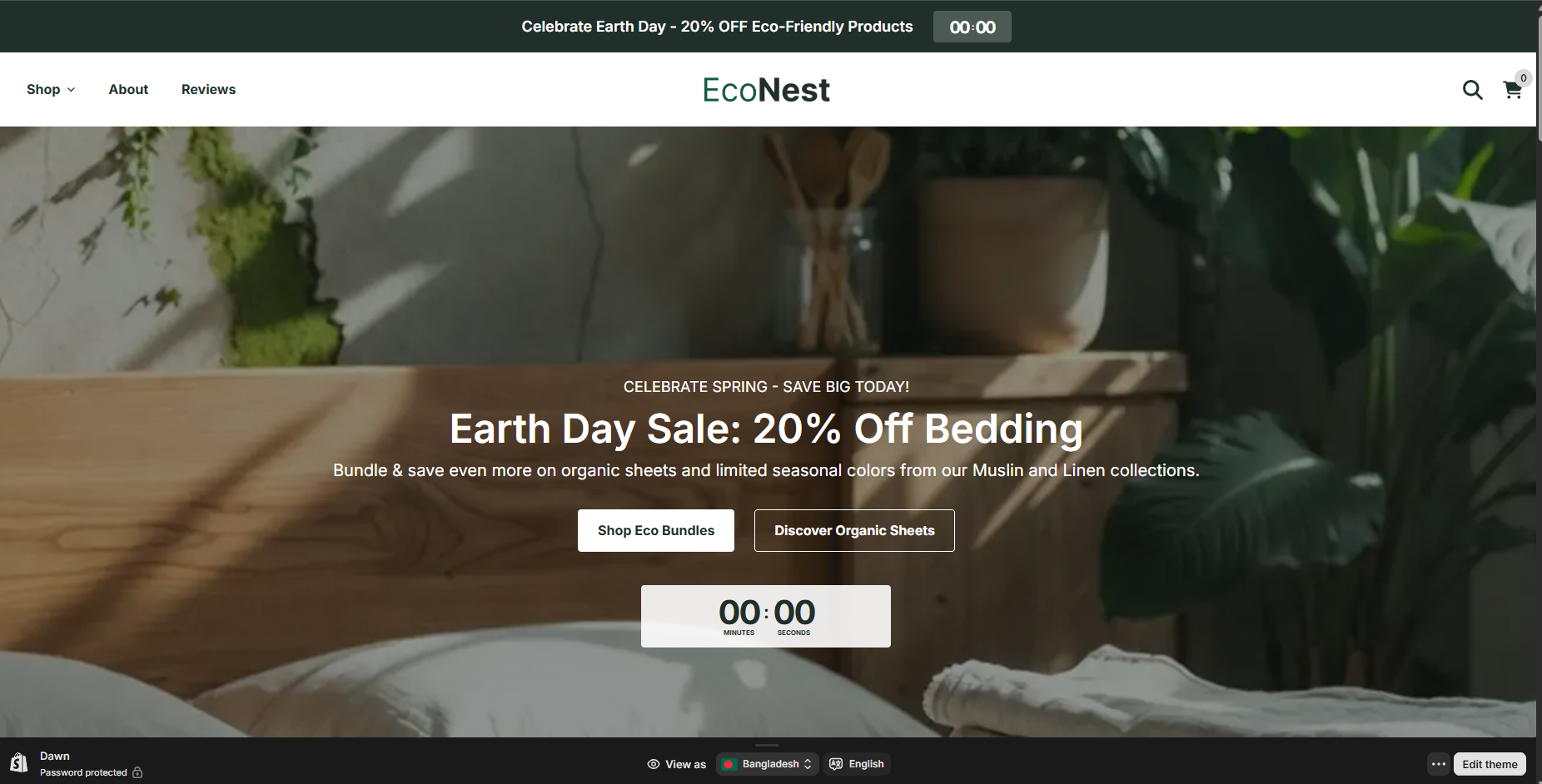
For the scenario we tested, yes.
We built a promotional storefront experience around an Earth Day bedding campaign. The published page included a large hero image, campaign headline, supporting text, two calls to action, and countdown content beneath the primary offer.
Most importantly, the storefront output reflected the design we had been working with inside the editor.
That gave us a concrete answer to the main question behind this test: Zipify can handle a custom promotional layout without requiring the merchant to build that layout directly in Shopify theme code.
Section-Level Editing Gives You Detailed Layout Control
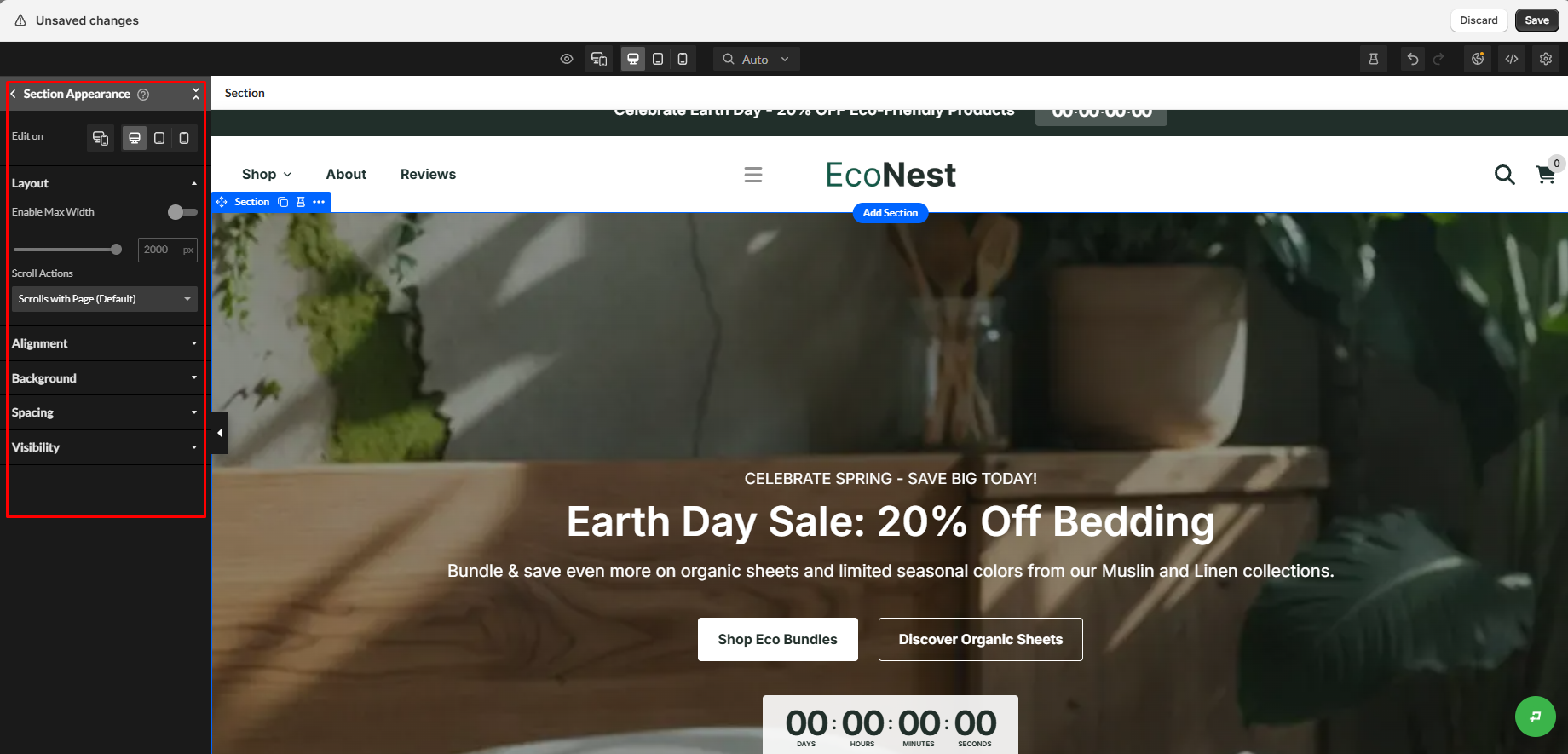
When we selected a section in our page, Zipify exposed a dedicated Section Appearance panel.
The interface included controls for each device, layout, and maximum width. It also offered settings for scroll behavior, alignment, background, spacing, and visibility.
Zipify’s current page-builder documentation also documents background colors, images or video, margin and padding settings, device-specific visibility, and custom CSS classes.
Page-building flexibility does not stop at adding or removing sections. Merchants can adjust how each section looks and behaves at different screen sizes.
The trade-off is visible in the interface. Zipify shows many controls and nested page elements. Merchants used to Shopify’s simpler theme editor should expect a more detailed workspace.
Global Controls Matter When You Build More Than One Page
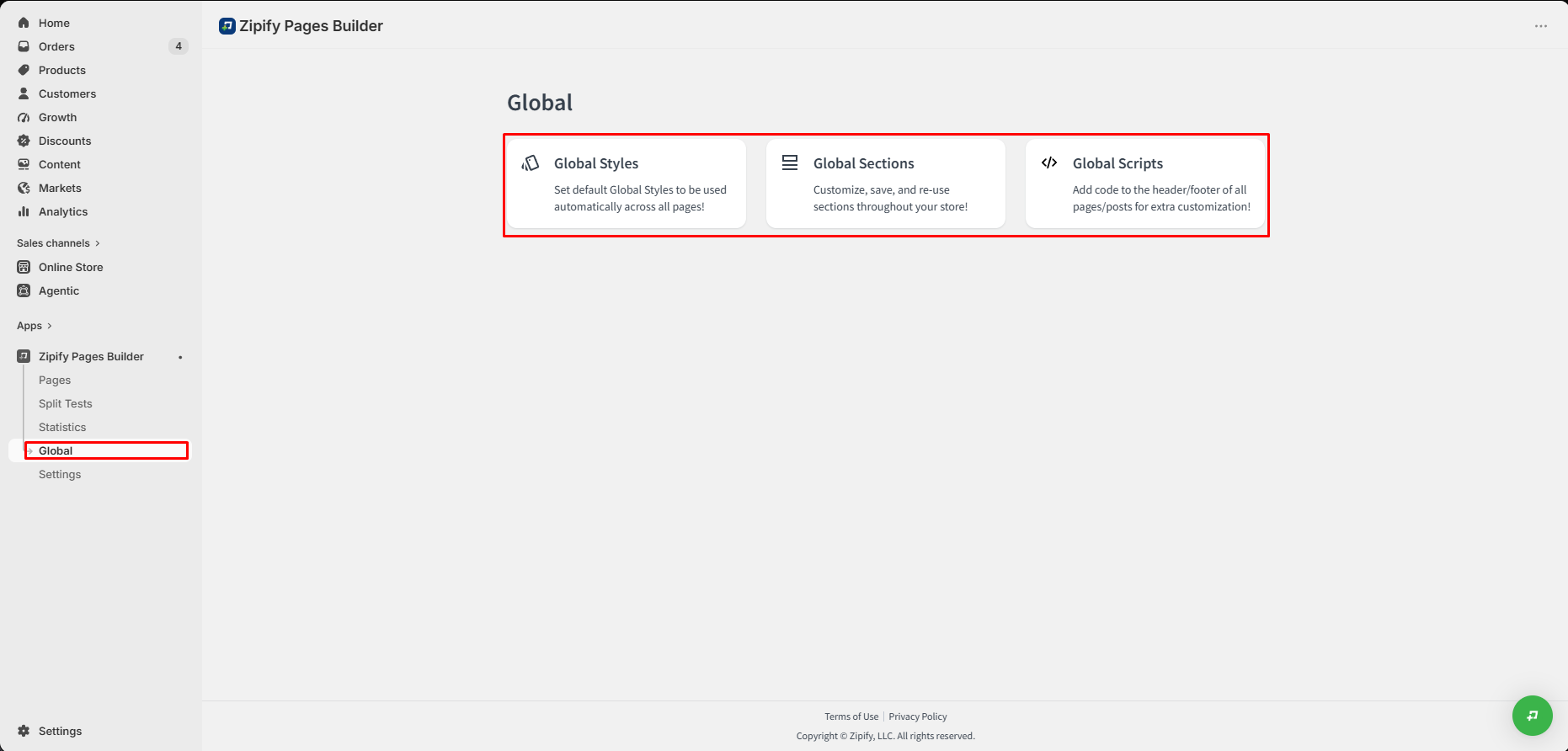
Another area we inspected was Global, where Zipify presented three options: Global Styles, Global Sections, and Global Scripts.
This becomes more relevant as the number of pages grows.
Zipify supports reusable Global Sections, so merchants do not need to rebuild the same content block on every campaign page. According to Zipify’s Global Sections documentation, a change can appear wherever that Global Section is used.
That can be useful for shared promotional sections, branded content blocks, headers, footers, or other components that need to remain consistent across several pages.
We inspected these options during testing. We did not build a large multi-page site, so we cannot judge how well the workflow scales over time.
Analytics Are Built In, but We Could Not Validate Their Accuracy
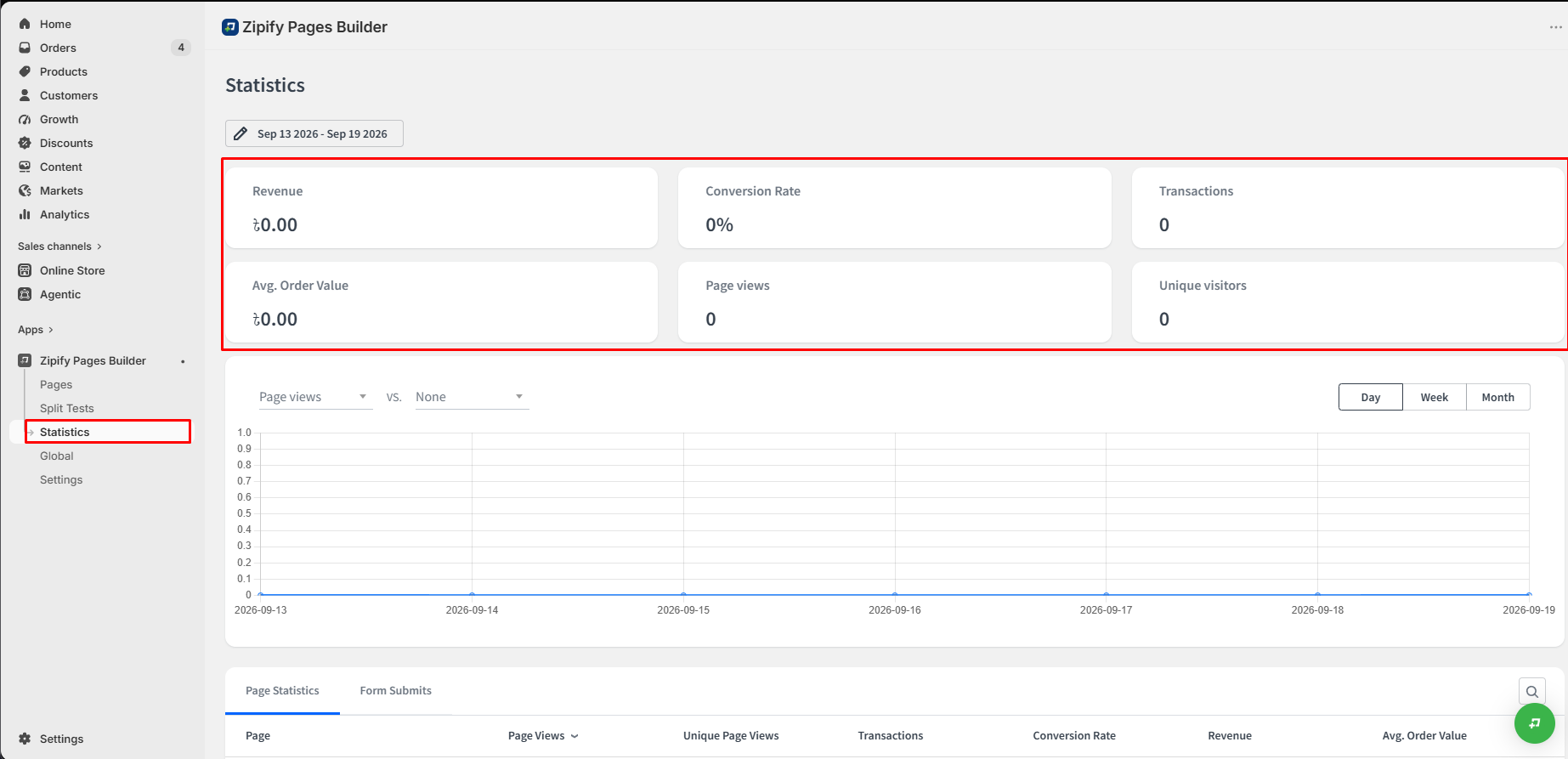
Zipify includes a dedicated Statistics area.
The dashboard displayed revenue, conversion rate, transactions, and average order value. It also showed page views, unique visitors, page-level statistics, and performance charts.
Our test environment had no meaningful traffic or transactions during this period. We verified that the reporting tools exist and inspected what they track. However, we did not establish whether Zipify’s revenue attribution or conversion reporting is accurate with real production traffic.
That distinction matters for merchants evaluating Zipify primarily because of its analytics.
Split Testing Is Important, but We Did Not Test It
A/B testing helps set Zipify apart from a basic visual page builder. However, it was not part of our completed hands-on workflow.
Zipify’s current split-testing documentation describes testing between Zipify landing pages and supported product-page templates. Test goals include conversion rate, sales, average order value, page value, product revenue, revenue per view, form submissions, and form submission rate.
The same documentation says the default traffic split is 50/50. Merchants can adjust that split. It also says ecommerce test data relies on the Zipify Analytics pixel. Initial statistics can take a few hours to appear.
Those tools may help stores that run paid campaigns or often optimize promotional pages. We did not launch a split test ourselves. Therefore, we cannot judge how easy the setup is or whether Zipify testing improves conversion performance.
Pricing and Value
Pricing was re-verified on September 21, 2026 from the Shopify App Store listing and Zipify’s subscription documentation.
| Plan | Monthly price | Notable limits |
|---|---|---|
| Development Stores | Free | Development and Partner stores; landing pages, product pages, custom homepage, split testing |
| Starter | $19/month | 5 landing pages, 1 product page, 1 blog article, custom homepage, 1 page split-test campaign, 1 section split-test campaign |
| Basic | $39/month | 15 landing pages, 5 product pages, 5 blog articles, 1 collection page |
| Advanced | $99/month | Unlimited pages, unlimited split tests, multi-assign, Markets, setup call, priority support |
The three paid plans currently include a 14-day free trial. Zipify also lists annual billing at a 10% discount.
The page limits matter more than the headline monthly price. Starter may suit a merchant who builds only a few promotional pages. A store with frequent campaigns, product-page variations, or several content types may reach its limits sooner.
What We Liked
- The published page matched the workflow we built in the editor: We could move from page editing to an actual storefront result rather than stopping at a design preview.
- Detailed section controls: Layout, spacing, backgrounds, visibility, and device-specific controls gave us meaningful flexibility.
- Clear page hierarchy: The structure panel made sections and their underlying rows, columns, text, and buttons visible from one place.
- Reusable global functionality: Global Styles, Global Sections, and Global Scripts provide a foundation for maintaining multiple pages.
- Conversion tooling sits inside the same product: Statistics and documented split-testing functionality extend Zipify beyond visual page creation.
What Could Be Better
- The interface contains many nested controls: The same flexibility that makes Zipify powerful also produces a denser editing environment than Shopify’s standard theme editor.
- Lower plans impose meaningful page limits: Merchants running a high volume of campaigns may need to move beyond Starter or Basic.
- Analytics require real traffic to evaluate properly: We could inspect the reporting interface but could not validate its attribution accuracy in this test.
- We could not independently validate split testing: It is an important part of Zipify’s value proposition, but our current evidence does not justify a hands-on judgment about it.
Who Zipify Pages Builder Is Best For
Based on our test, Zipify Pages makes the most sense for merchants who often need dedicated marketing experiences. It is less relevant for stores that make only occasional theme edits.
That includes stores creating promotional landing pages, seasonal campaign pages, product-specific offers, paid-ad destination pages, custom homepages, and reusable campaign layouts.
It becomes more compelling when reusable sections, analytics, and experimentation are part of the merchant’s ongoing workflow.
Who Should Upgrade or Consider an Alternative
The Starter plan may be sufficient for a merchant experimenting with a small number of pages.
Stores producing more campaigns need to watch the page caps. A merchant who only wants a few extra visual sections may not need Zipify’s broader system. That system includes analytics, global management, and testing.
Merchants who plan to test pages should compare the higher tiers carefully. The right tier depends on the number of pages and simultaneous experiments, not only the starting price.
Final Verdict
Our hands-on test confirmed the most important point. We could build and publish a custom Shopify promotional page without creating the layout directly in theme code.
The editor offered detailed control over the structure and appearance of individual sections, and the published storefront retained the campaign design we created.
Global Styles and Global Sections help merchants manage several campaign pages in a consistent way. They do not need to build each page independently.
The main caveat is scope. We did not generate enough live traffic to judge the Statistics dashboard under real conditions. We also did not run a Zipify A/B test. Merchants buying for those tools should test them during the trial before making a longer-term decision.
Zipify Pages is worth evaluating for a store that regularly creates campaign and conversion-focused pages. Its page builder, reusable design system, analytics, and testing tools live in one product. Merchants who only need basic page changes should weigh the page limits and recurring cost more carefully.
Frequently Asked Questions
Does Zipify Pages Builder require coding?
Not for the page-building workflow we tested. We created and published our promotional page using Zipify’s visual editor and section controls. Zipify also provides advanced options such as custom CSS classes and global scripts for merchants or developers who need them.
Can Zipify Pages build product pages as well as landing pages?
Yes. Zipify’s current Shopify listing includes both landing pages and product pages, and its documented split-testing system supports certain product-page template tests.
Does Zipify Pages include A/B testing?
Yes. Zipify documents landing-page and product-page split testing with configurable goals and traffic distribution. We verified the feature through current documentation but did not run a live test ourselves.
Does Zipify Pages include analytics?
Yes. We directly inspected the Statistics dashboard, where the app exposed revenue, conversion rate, transactions, average order value, page views, and unique visitors. Because our test environment had no meaningful traffic or sales, we did not validate reporting accuracy.
How much does Zipify Pages cost?
As of September 21, 2026, Shopify lists Development Stores as free, Starter at $19/month, Basic at $39/month, and Advanced at $99/month. The paid plans currently include a 14-day free trial.