
Shopify themes work well for routine store updates. Yet they can feel restrictive when you need a custom landing page or product page. Custom code can solve that problem, but it costs more and takes longer.
GemPages offers another option. It is a visual page builder for Shopify. We tested its core tools, templates, app links, AI feature, and pricing. Our main question was simple: Is the Free plan enough, or do most stores need the $29 Build plan?
Key Takeaways
- Best for regular page building: GemPages suits stores that often create landing pages, product pages, campaigns, or funnels.
- Free is mainly for testing: The Free plan allows one published page. That is enough to try the builder, but not enough for most ongoing work.
- Build is the useful paid plan: It costs $29 per month. It adds unlimited published pages, version history, theme sections, animation, interactions, page export, and live chat.
- Test before you upgrade: Use Free to build your most important page. Publish it, check it on desktop and mobile, and test the Shopify app blocks your store needs before paying for Build.
Our Verdict
GemPages is worth a look if you want more design control. It is best for stores that build landing pages, product pages, or funnels often.
The builder offers more than basic drag and drop. You can start with a blank page or a template. You can also import a page file. The editor includes sections, elements, app blocks, interactions, and an AI layout tool.
The main drawback is the limit on the Free plan. It allows only one published page. Build costs $29 per month and removes that limit. It also adds several tools for regular page work. For most active stores, Build is the more useful starting point.
What GemPages Offers
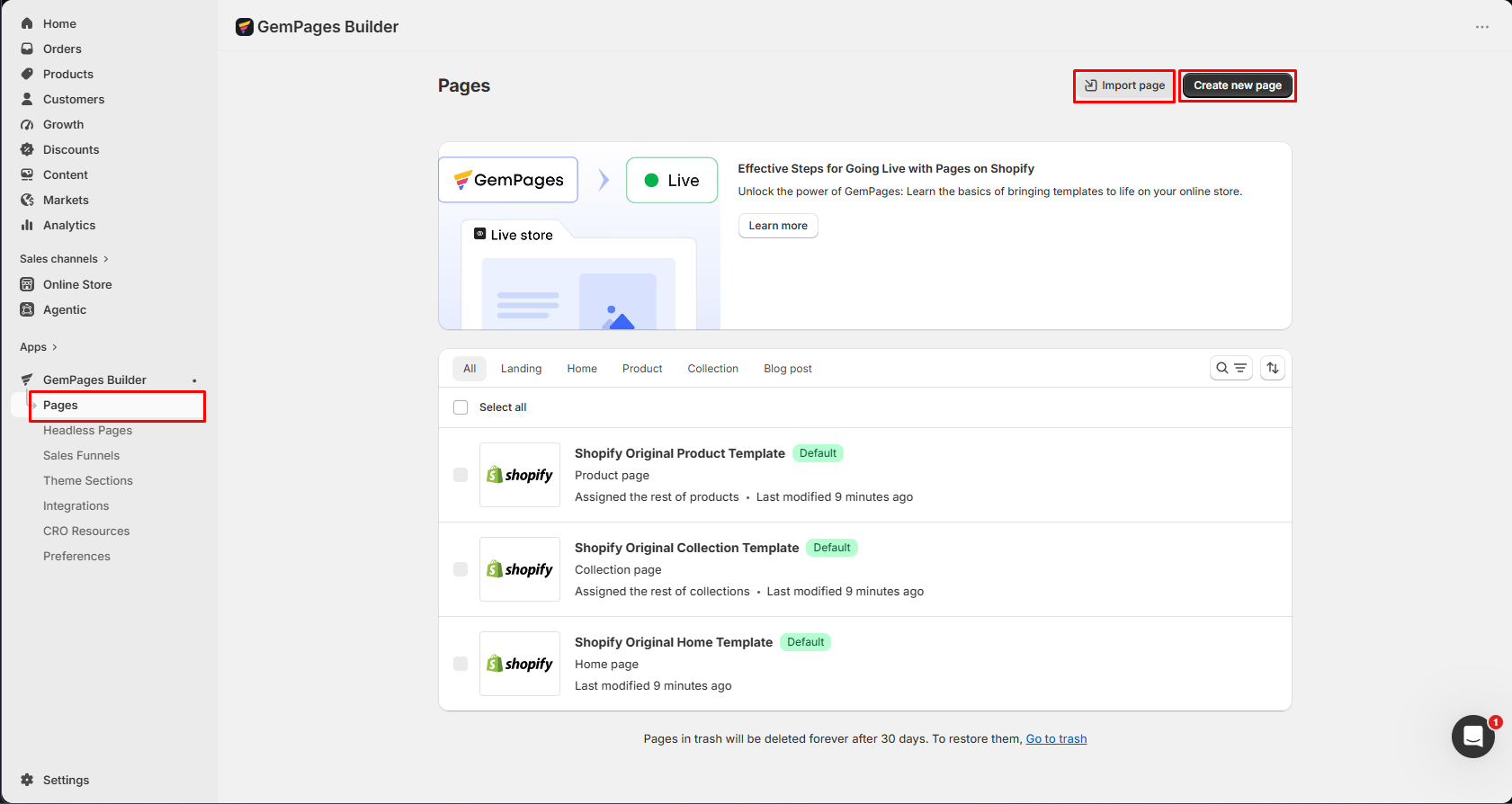
GemPages puts many page tools in one workspace. It includes sections, elements, app blocks, AI tools, interactions, and sales funnels. The Pages screen covers landing, home, product, collection, and blog pages. It also keeps the main create and import buttons easy to find.
This wide tool set can help stores that run many campaigns. Yet it may feel like too much for a store that needs only simple page edits.
What We Tested
We tested GemPages in a Shopify store on September 9, 2026. The test used GemPages 7 and a store on the Build plan.
Our test covered:
- the Pages screen and page controls,
- blank pages and ready-made templates,
- the section and element library,
- page interactions,
- Shopify app blocks in the editor,
- the Image-to-Layout entry point,
- and the prices shown for all four plans.
We did not publish a final store page. We also did not test page speed, sales results, or support quality. We opened Image-to-Layout but did not rate its output. For these reasons, this is a Level 2 — Partial Hands-On Test.
What Public Sources Add
Our screenshots are the main basis for this review. We also checked public sources on September 11, 2026.
- The official pricing page matched the four plan prices in our app screen. It also confirmed one published page on Free and unlimited pages on paid plans.
- The official Image-to-Layout guide confirmed the URL and image inputs. It also warns that AI output can have errors. This supports our choice not to rate the tool without an output test.
- The Shopify App Store listing showed a 4.9 rating from about 4,200 reviews. About 96% of ratings were five stars. Shopify’s summary highlighted ease of use, templates, and support as common strengths.
- Recent one-star merchant reviews raised concerns about device layouts, published results, billing, support, and some app blocks. These are user reports, not findings from our own test. We did not reproduce those issues.
The feedback suggests a useful check before you pay. Build one real sample page and check it on desktop, tablet, and mobile. Publish it as a test and inspect the result. Test any app blocks that your store needs. You should also review the billing date before you remove or change the app.
Getting Started: Three Main Options
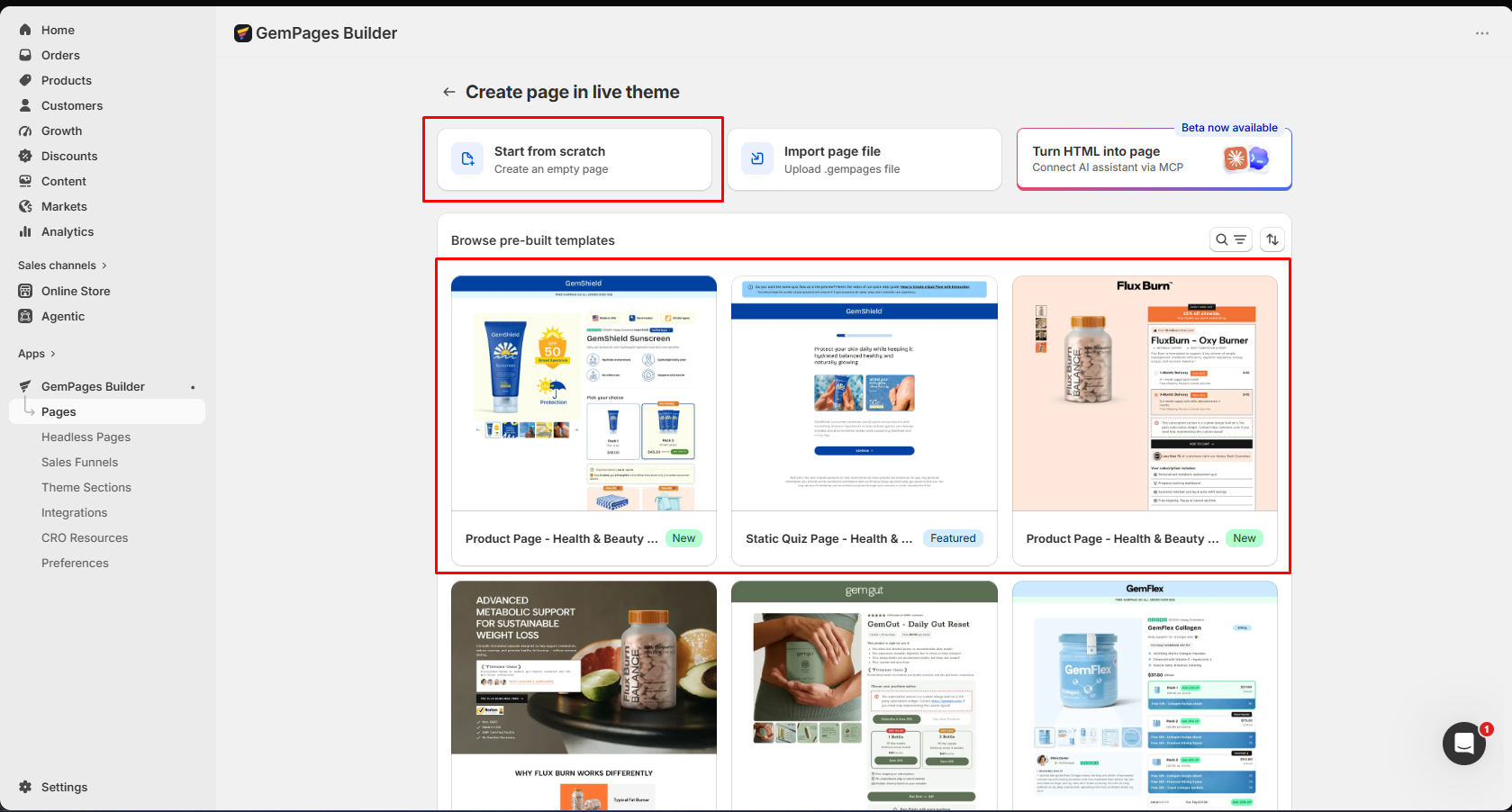
The Pages screen makes the main choices clear. You can start from scratch, import a GemPages file, or pick a template. We also saw a beta Turn HTML into page option.
The templates can save time when you do not need a fully custom design. Our test showed product and quiz layouts made for online stores. The library was not limited to plain starter pages.
Editing Experience: Sections and Elements
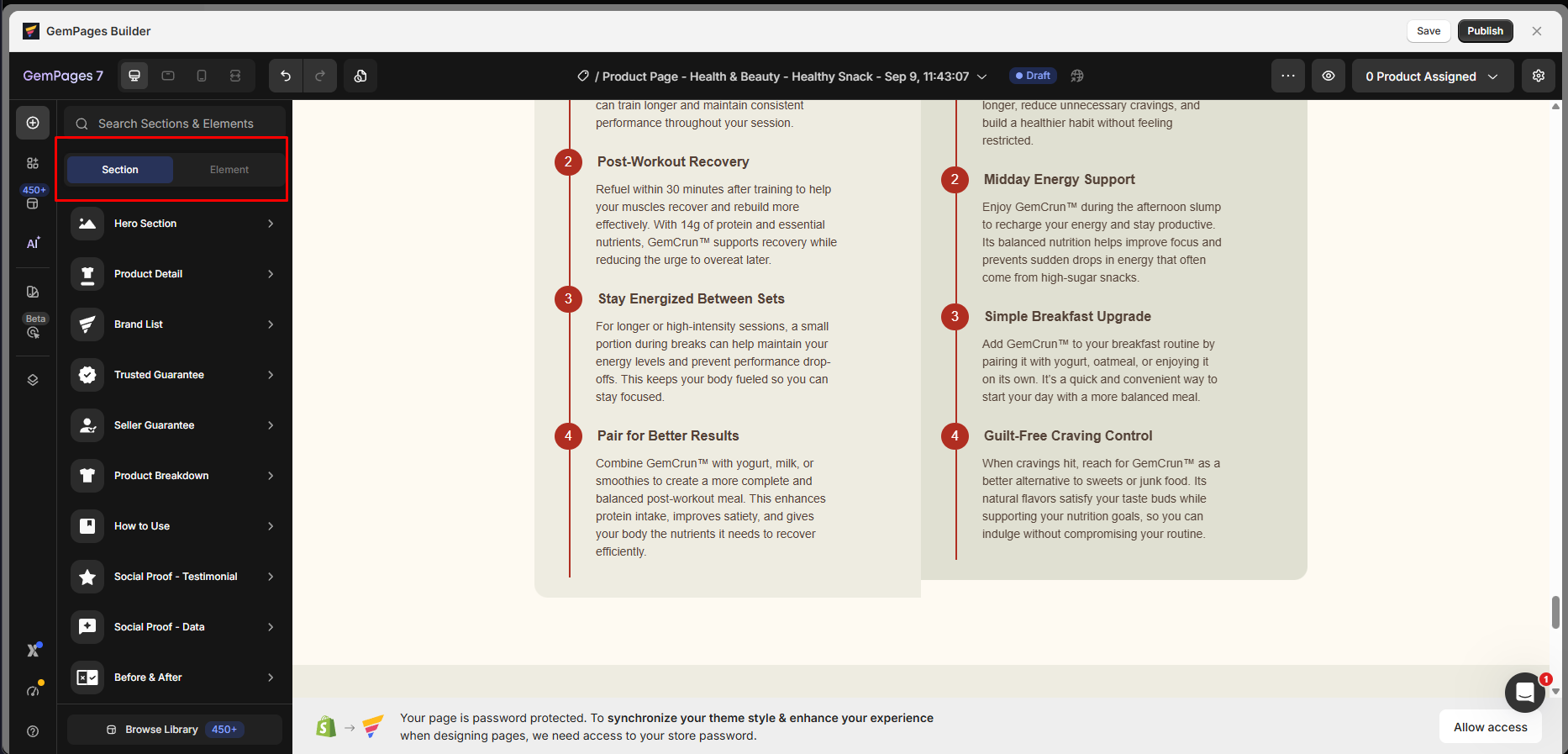
GemPages splits its building blocks into Sections and Elements. Sections are ready-made groups of content. Elements are smaller items such as text, images, and buttons.
The section list included many blocks for online stores. We saw heroes, product details, brand lists, guarantees, how-to content, social proof, and before-and-after layouts. These blocks can make common sales pages faster to build.
The top bar also had desktop, tablet, and mobile controls. We did not run a full test on each screen size. We also did not compare the editor view with a published page. We cannot yet confirm the final display quality.
Page Interactions
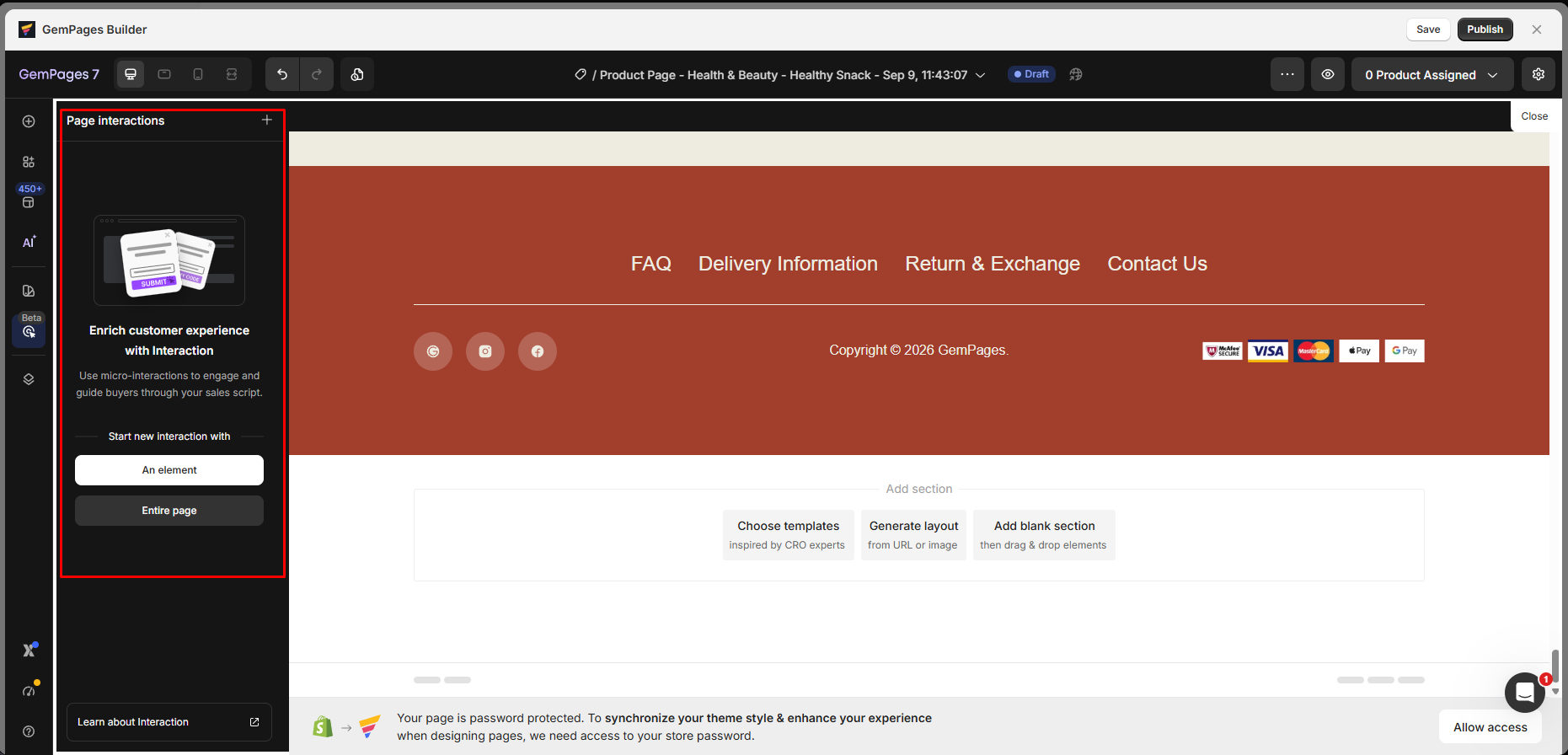
GemPages has a separate Page interactions panel. An effect can start from one element or from the whole page.
This lets a store add page behavior without leaving the editor. The price screen placed interactions on Build and higher plans. They were not listed on the Free plan.
We opened this workflow during the test. We did not publish and test an effect on the store. Our evidence confirms access to the tool, not its final results.
Shopify App Integrations
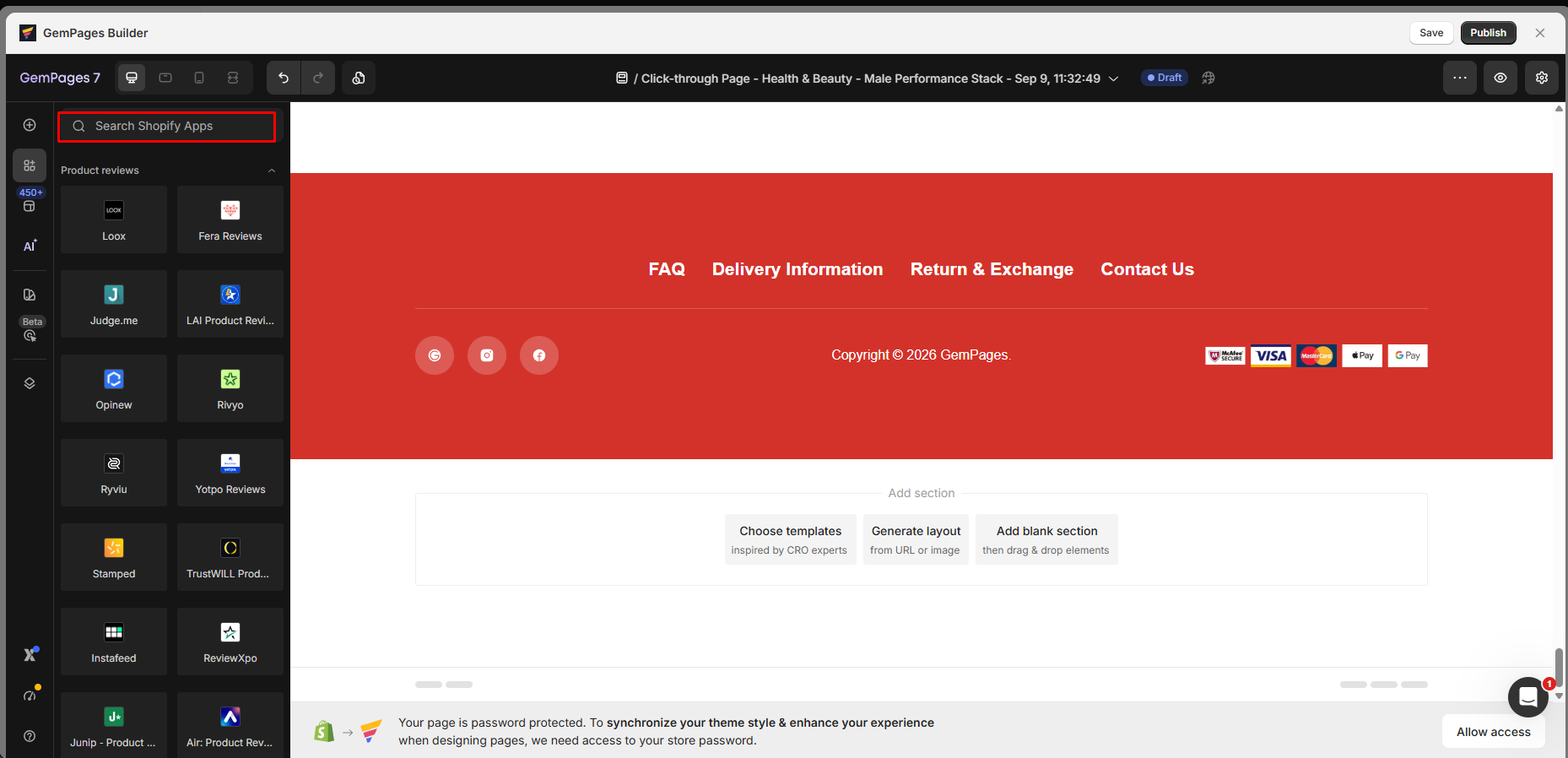
The editor has a search area for Shopify apps. We saw many review apps in the list. They included Loox, Fera, Judge.me, Opinew, Rivyo, Ryviu, Yotpo, Stamped, and others.
This can make page building easier. You can find a supported app block while you work on the layout. You do not have to treat the builder and every other app as separate tools.
We confirmed that these apps appeared in the editor. We did not set up and publish every app. Their storefront behavior was outside this test.
AI Image-to-Layout
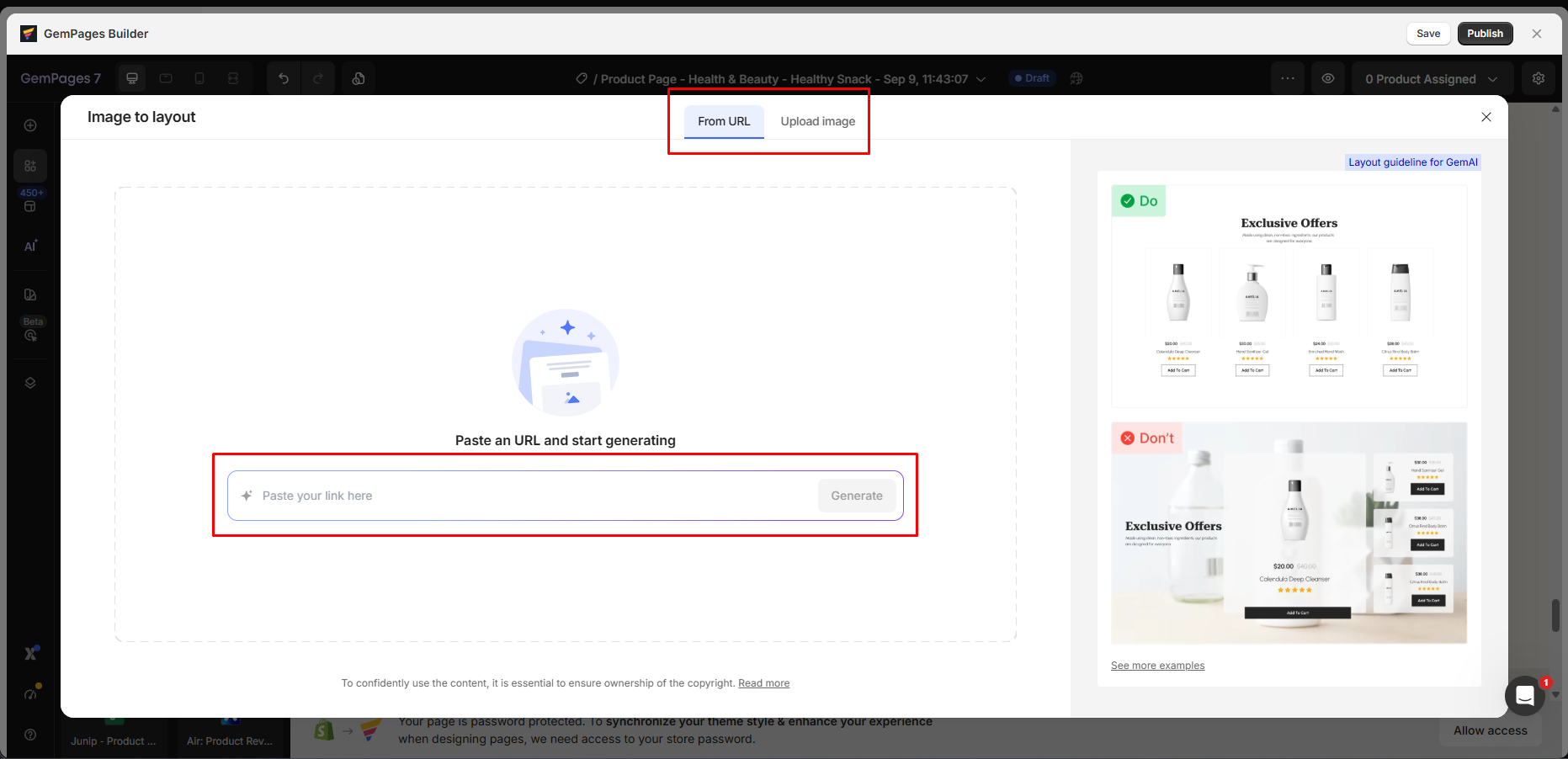
The Image to layout tool accepts a URL or an uploaded image. GemPages also shows tips for the type of source image it expects.
The idea is useful. A merchant can start with a visual example instead of rebuilding each part by hand.
However, we only confirmed access to the tool. We did not test the quality of the page it creates. We also cannot say how much time it saves. Those claims need a full output test.
Pricing: The Main Free Plan Limit
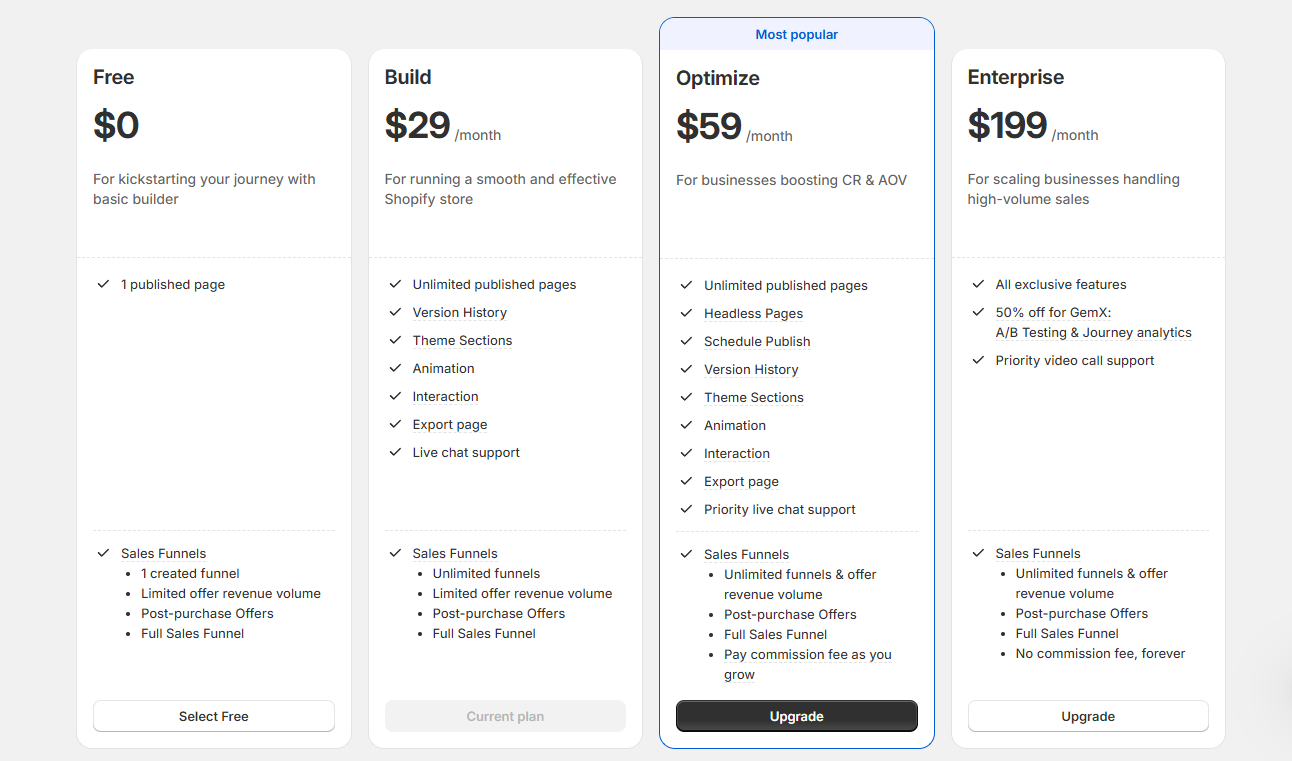
We checked these prices on September 9, 2026. Prices and plan limits can change, so check them again before you buy.
| Plan | Price shown | Main features and limits shown in our test |
|---|---|---|
| Free | $0 | 1 published page; 1 sales funnel; a limit on offer revenue; post-purchase offers; full sales funnel |
| Build | $29/month | Unlimited published pages; version history; theme sections; animation; interactions; page export; live chat; unlimited funnels with a limit on offer revenue |
| Optimize | $59/month | Unlimited published pages; headless pages; scheduled publishing; version history; theme sections; animation; interactions; page export; priority chat; unlimited funnels with a fee model shown |
| Enterprise | $199/month | Exclusive tools; 50% off GemX testing and analytics; priority video calls; unlimited funnels and offer revenue; no fee shown |
The Free plan allows only one published page. That is enough to try the editor or run one small page. The limit becomes a problem when you need several campaigns or product pages.
Build is the more practical plan for regular use. Our test store was on Build. Keep that in mind when looking at the tools shown in our screenshots.
What We Liked
- Several ways to start: You can begin with a blank page, file, HTML, or template.
- Store-focused sections: The library has product details, guarantees, social proof, guides, and other sales blocks.
- Clear building blocks: Sections give you ready-made groups. Elements give you more control.
- Built-in interactions: You can add page effects in the same editor on Build or a higher plan.
- App blocks in the editor: You can find review apps and other Shopify apps while you build.
- A useful AI input method: Image-to-Layout can start with a URL or image instead of a long prompt.
What Could Be Better
- Free reaches its limit fast: One published page makes it best for a trial or one small use case.
- Useful tools need a paid plan: Build adds interactions, animation, theme sections, export, and unlimited published pages.
- The editor has many tools: New users may need time to learn the large set of sections, elements, apps, funnels, and AI tools.
- AI output still needs a full test: We cannot call Image-to-Layout a proven strength yet.
- Published page results remain unknown: We have not checked if a published page matches the editor or has theme conflicts.
Who GemPages Is Best For
GemPages is best for Shopify stores that often build landing pages and product pages. Those stores are more likely to gain value from a full visual builder.
It also suits merchants who want ready-made store sections and app blocks. The richer page effects and funnel tools may help as a store grows.
The Free plan is useful for a trial. Most stores that run several campaigns will need Build or a higher plan. The one-page limit makes Free hard to use for ongoing work.
Who Should Consider an Alternative
You may not need GemPages if your theme already handles your page needs. It may also feel too complex if you only make rare content changes.
You can compare it with PageFly, EComposer, Shogun, and other page builders. We did not run a direct test against those apps, so we are not ranking them here.
Final Verdict
GemPages stood out for the range of tools in one editor. It offers several ways to start a page. It also has store sections, detailed elements, app blocks, interactions, funnels, and an AI layout tool.
The plan limit is the key buying point. Free is good for a trial, but one published page will not be enough for many stores. Build costs $29 per month and is the first plan made for regular page work.
Our verdict is Consider. Start with Free if one page is enough to test the editor. Choose Build if you need pages for regular campaigns or several products. We still want to test a published page and the AI output before giving GemPages a stronger rating.
Frequently Asked Questions
Is GemPages free?
Yes. The Free plan shown in our test cost $0 and allowed one published page. It works for a trial or one GemPages page. Wider use needs a paid plan.
How much does GemPages cost?
Our test showed Build at $29 per month. Optimize was $59 per month, and Enterprise was $199 per month. Prices can change, so check the latest rates before you buy.
Does GemPages have AI page building?
Yes. Image-to-Layout accepts a URL or uploaded image. We opened the tool but did not test the quality of its output.
Can GemPages work with Shopify review apps?
The editor listed several review apps. They included Judge.me, Loox, Fera, Opinew, Rivyo, Ryviu, Yotpo, and Stamped. We saw these apps in the editor but did not test each one on a published page.