
Shopify themes work well for basic store pages. They can feel limiting when a store needs a custom landing page, product page, or home page. Custom code can solve that problem. Yet it takes more time and often costs more.
EComposer offers another route. It is a visual page builder for Shopify. We reviewed its dashboard, editor, templates, page tools, advanced features, and prices. Our main question was simple: How useful is the Free plan, and when does a store need to pay?
Our answer is clear. Free is useful for a trial or one focused page. Stores that plan to build several pages will need Standard or a higher plan.
Key Takeaways
- Best for regular page work: EComposer suits stores that often build landing, product, home, collection, or campaign pages.
- Free is mainly a trial: It allows one live page or section, five saved items, and 50 AI credits per month.
- Standard is the first useful upgrade: It costs $25 per month. It adds 15 live slots, VIP templates, page data, advanced AI tools, and key extensions.
- Pro opens the wider tool set: It costs $49 per month. It adds A/B testing, Global Blocks, Shopify Markets, and all CRO extensions.
- Test one live page first: Check the result on real devices. Compare store speed before moving key pages into the app.
Our Verdict
EComposer is worth a look if your theme does not give you enough design control. It supports many page types. It also puts AI tools, templates, store sections, and sales tools in one app.
The dashboard gives you both manual and AI paths. The editor includes desktop, tablet, and mobile views. You can also manage pages and templates from one list.
The main limit is the Free plan. It allows only one live page or section. Standard is a better fit for regular page work. Pro makes more sense when a store will use testing, shared blocks, regional pages, or several sales tools.
Free is still a useful place to start. Build one real page with it. Publish the page and check the live result before you pay.
What EComposer Offers
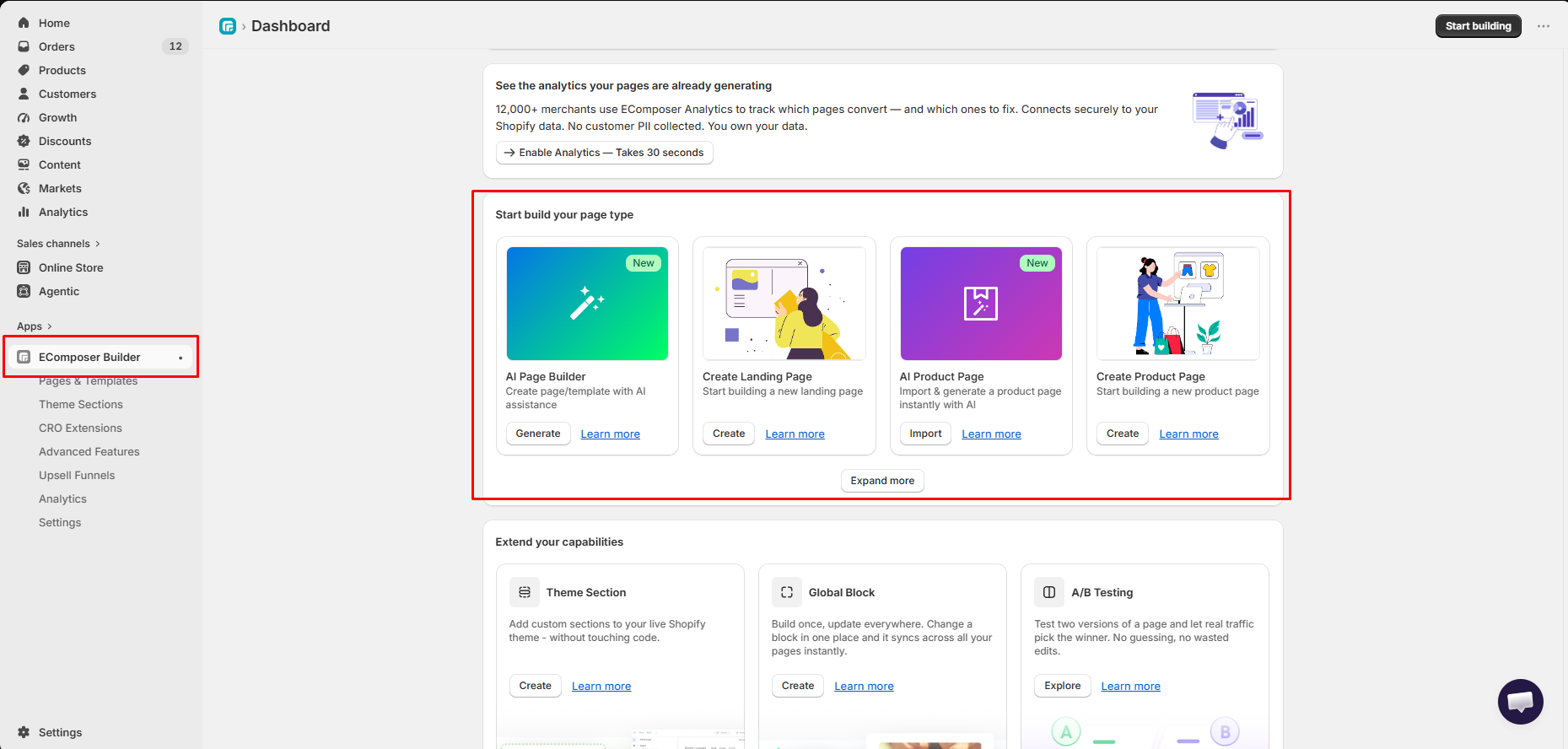
EComposer puts many store-building tools in one workspace. The dashboard shows four main starting points. They are AI Page Builder, Create Landing Page, AI Product Page, and Create Product Page.
The app can be used for:
- landing and regular pages,
- home and product pages,
- collection and blog pages,
- cart, footer, and theme sections,
- ready-made page and section templates,
- desktop, tablet, and mobile previews,
- page data and shared content blocks,
- and sales tools such as Ajax Cart and A/B testing.
This is a wider tool set than a basic landing-page editor. It may help a store keep more design work in one app. It may also be more than a small store needs.
EComposer says it offers more than 400 templates, 30-plus CRO tools, and over 100 app links. These are developer claims. We saw the related areas in the app. We did not count or test every item.
What We Tested
We reviewed EComposer inside Shopify Admin on September 11, 2026. The active plan was not shown in the supplied evidence.
Our test evidence covered:
- the main dashboard and its manual and AI options,
- the Pages & Templates list,
- the visual editor,
- desktop, tablet, and mobile preview buttons,
- Free and VIP templates,
- the Advanced Features screen,
- and the Ajax Cart settings.
One item in the page list was marked Published. We did not receive a matching store screenshot. We therefore did not rate the final live result.
We also did not test page speed, sales results, support, AI output, page data, translation, or a full A/B test. We did not check the finished page on real phones or tablets. For these reasons, this is a Level 2 — Partial Hands-On Test.
What Public Sources Add
Our screenshots are the main basis for this review. We also checked public sources on September 11, 2026.
- The official plan guide confirmed the four plans and their main limits. It also says each store gets the seven-day paid trial only once.
- The Shopify App Store listing showed a 4.9 rating from about 3,350 reviews. It listed the page types, AI tools, templates, sales tools, and app links.
- Positive reviews often praised support and the pages merchants built.
- Recent one-star reviews raised concerns about editor friction, bugs, loading, live output, billing, and support. These are user reports. We did not reproduce them. Some refer to older versions.
These reports suggest a simple check. Build one real page before you pay. View it on several devices. Test the app blocks and sales tools your store needs. Check your billing date too.
Getting Started With EComposer
The dashboard makes the main choices easy to find. You can start a landing page or product page by hand. You can also open an AI path.
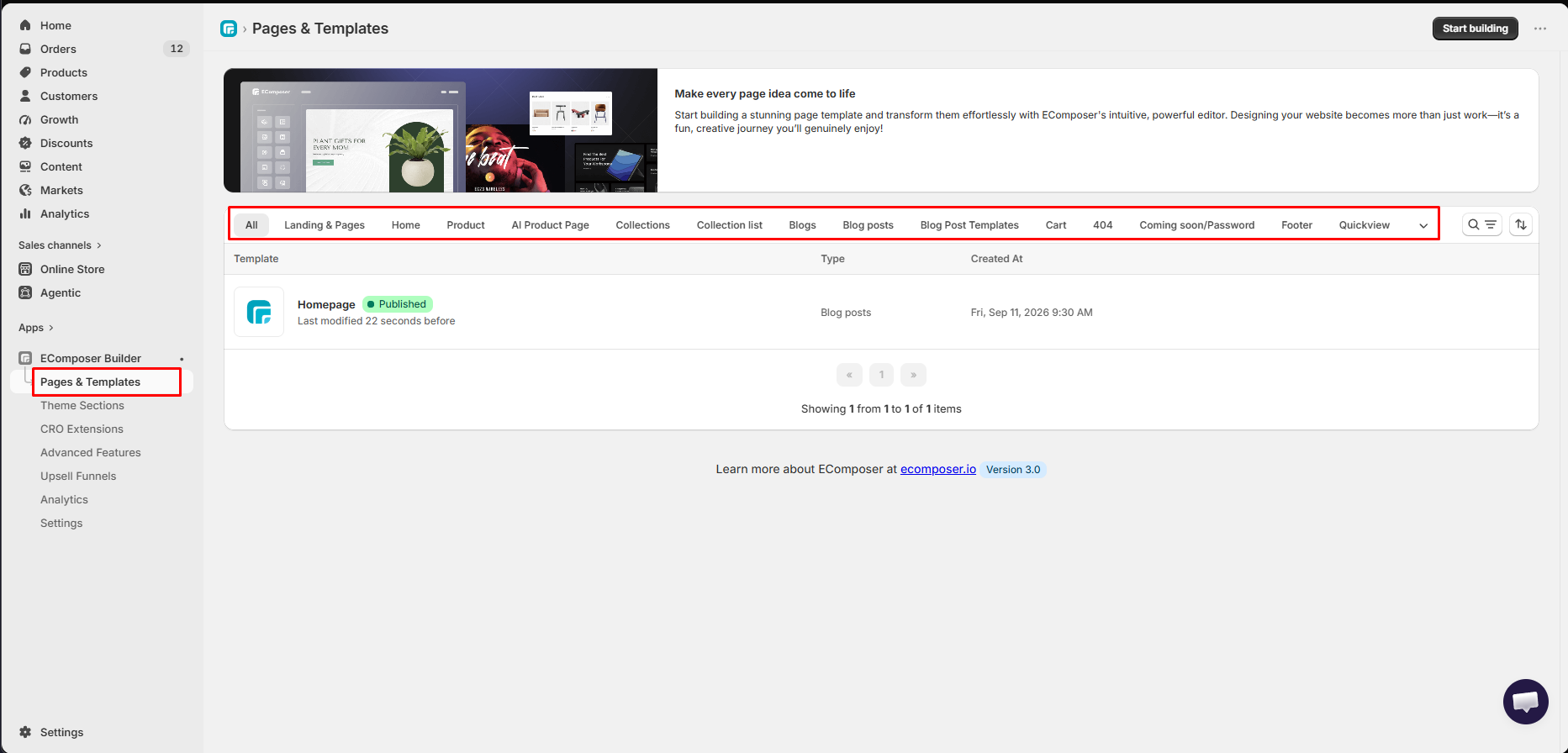
The Pages & Templates screen keeps finished and draft work in one place. It has tabs for many store areas. We saw pages, home, product, collections, blogs, cart, 404, password, footer, and quick view.
The list also shows the publish state, content type, and date. Search, filter, and sort tools sit above it. One item in our evidence was marked Published.
This setup can help a team manage many page types. It also makes the plan limit more important. A store can reach the Free plan’s one-live-item limit very quickly.
Editing Experience: Page and Device Controls
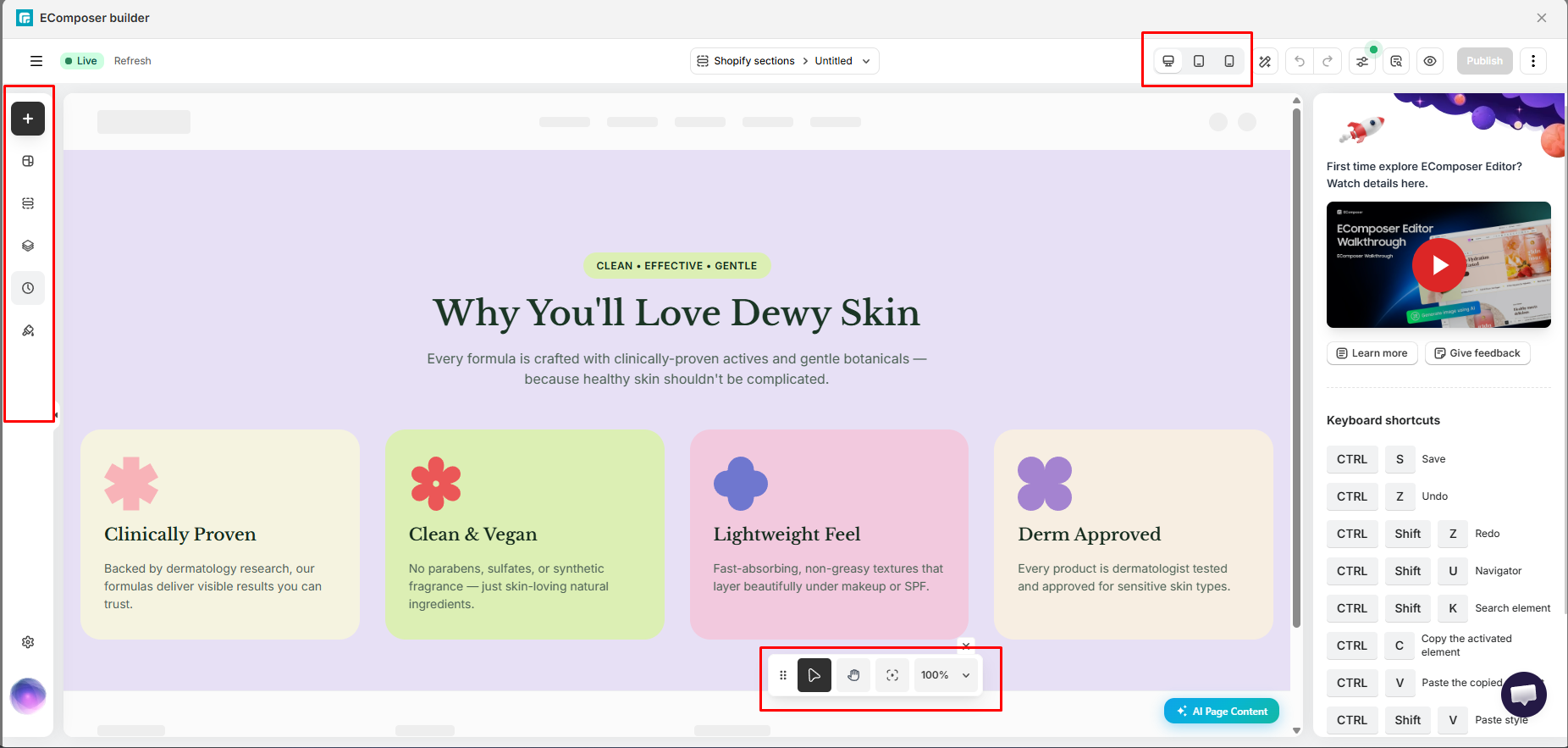
The editor places the page canvas in the middle. A tool bar runs down the left side. The top bar includes undo, redo, settings, preview, and publish controls.
Desktop, tablet, and mobile buttons stay at the top. A small canvas bar gives access to select, pan, fit, and zoom tools. The help panel also lists useful keyboard shortcuts.
These controls make it easy to switch views while you work. Yet a preview is not the same as a real device test. We did not compare each editor view with a live store page. We cannot confirm that every layout will look the same after it is published.
Templates: Free and VIP Options
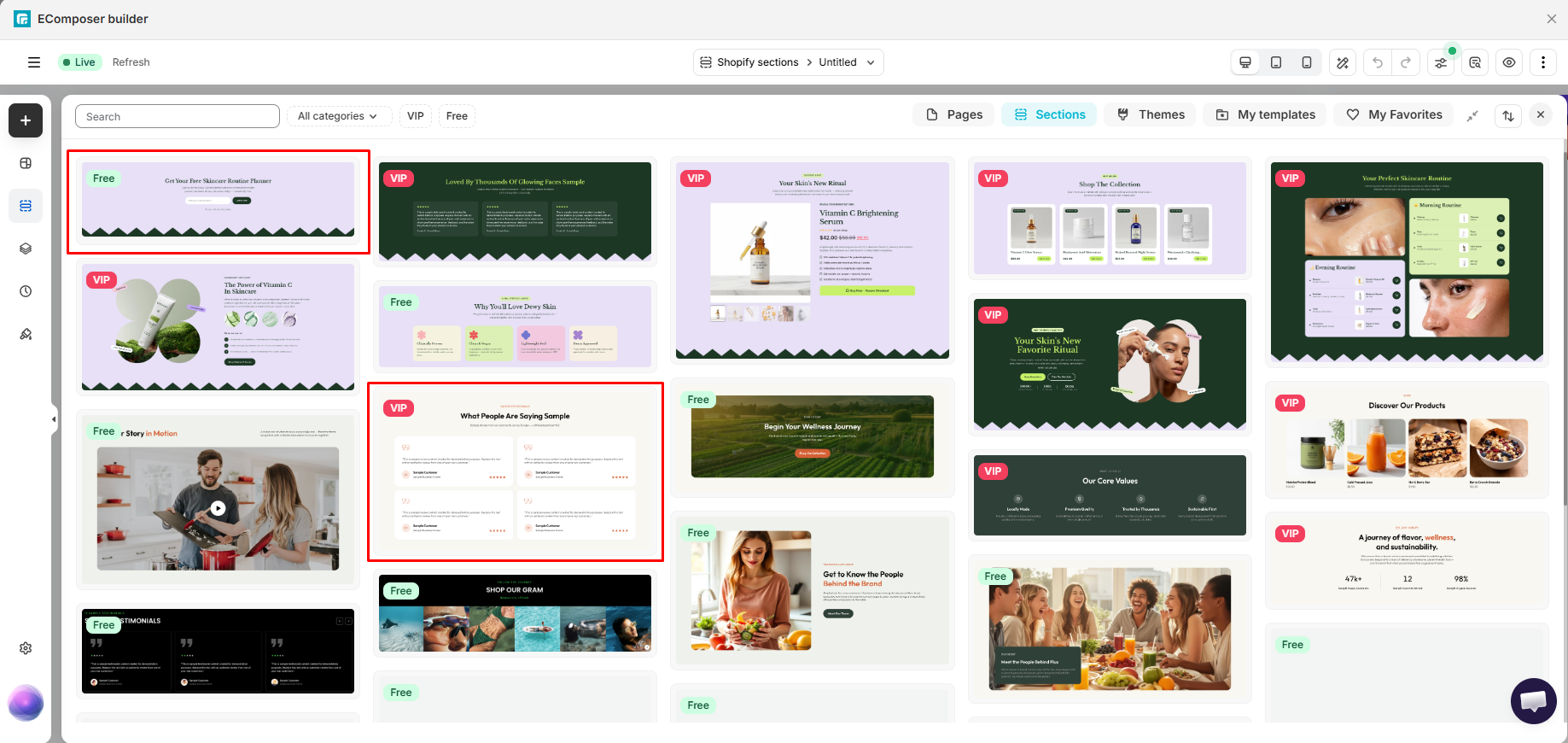
The template library includes full pages and smaller sections. It has search and category filters. It also has areas for themes, saved templates, and favorites.
Some designs have a Free label. Others have a VIP label. This makes the paid boundary easy to see while you browse.
The larger limit is still the number of live items. Free allows one live page or section. It also includes five saved items, basic templates, and 50 AI credits each month.
One live slot is enough to test the app. It may also cover one campaign page or theme section. It is not enough for a home page, product template, and several campaigns at the same time.
Advanced Features and CRO Tools
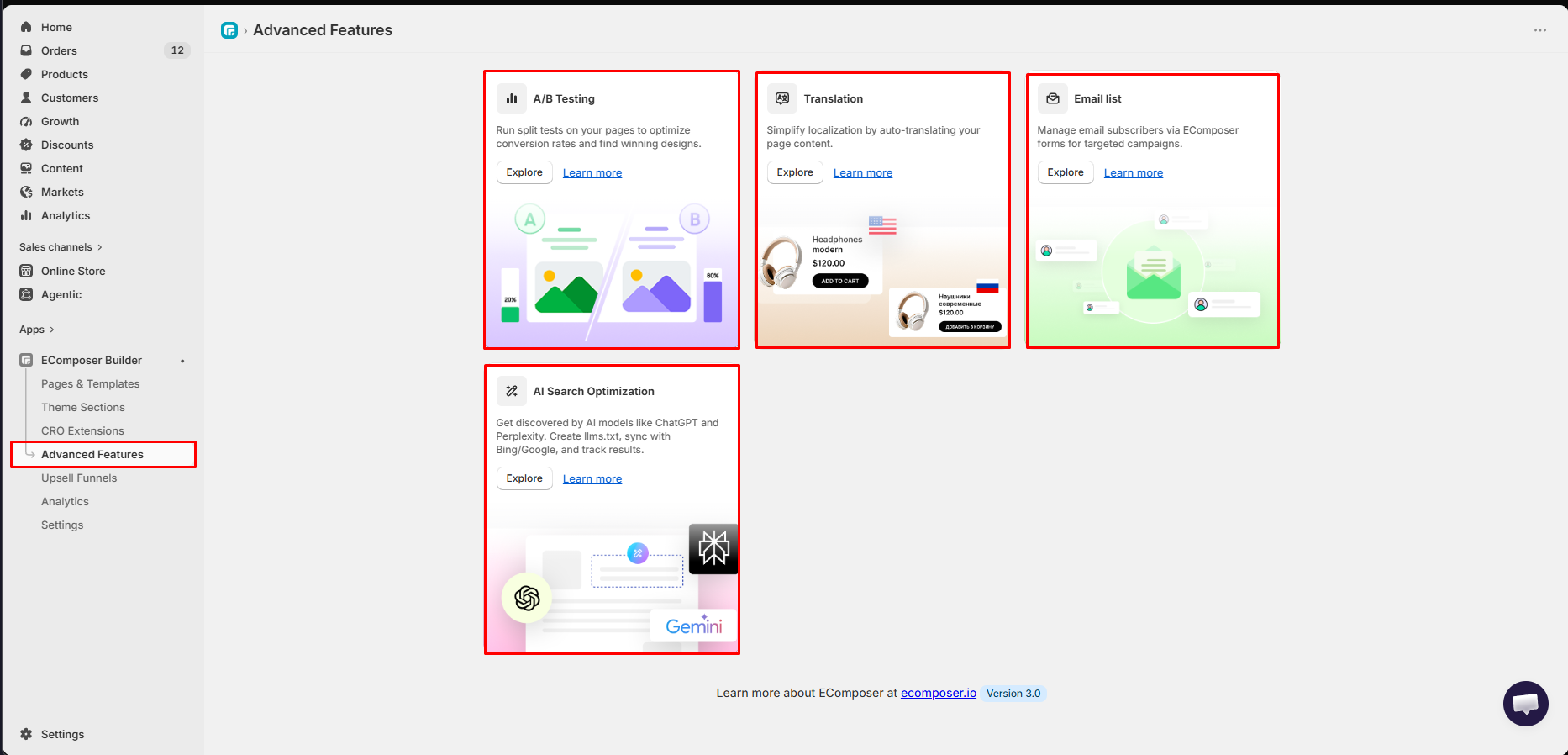
The Advanced Features screen showed four tools. They were A/B Testing, Translation, Email list, and AI Search Optimization.
These tools move the app beyond page design. They may help a store manage tests, regional content, forms, and search content in the same system. However, we only opened the feature area. We did not run these tools from start to finish.
Plan access also matters. The official guide places A/B testing, Global Blocks, Shopify Markets, and the full CRO tool set on Pro. Premium adds unlimited A/B tests and removes the page limit.
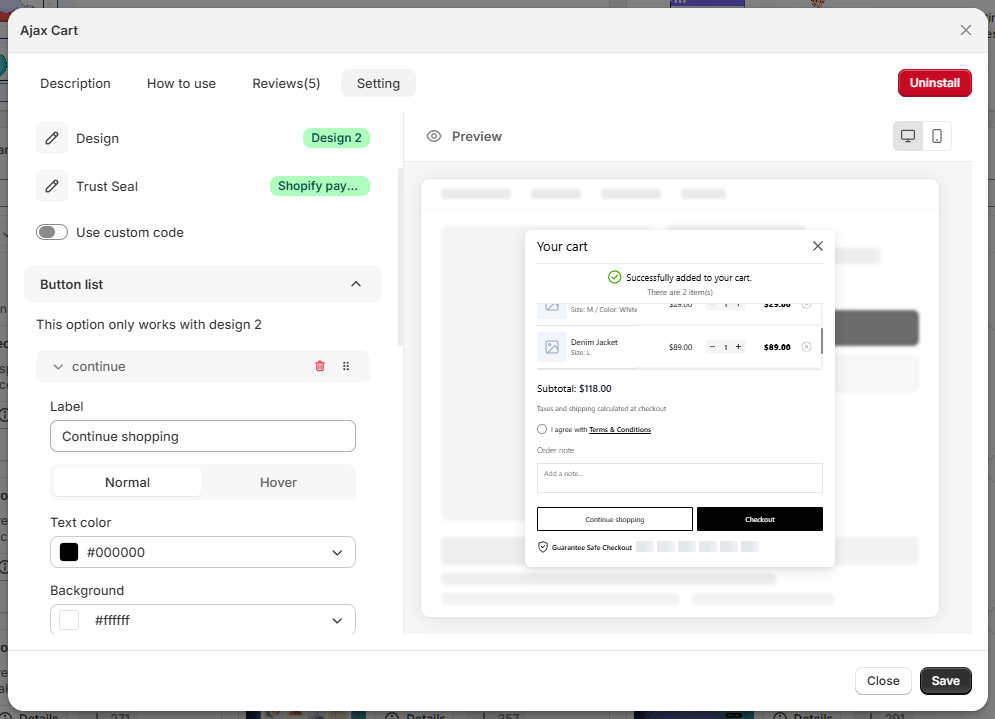
Ajax Cart gives a closer look at one sales tool. Its settings include a cart design, trust seal, custom code, and button controls. A live preview appears beside the settings.
The screen let the user change the “Continue shopping” label. It also showed normal and hover states, text color, and background color. Desktop and mobile preview buttons were available.
We did not test this cart on a live store. We also did not measure its effect on sales. The current plan guide lists Ajax Cart on Standard and higher plans.
Pricing: Where Free Stops
We checked EComposer’s public prices on September 11, 2026. Prices are in US dollars and can change.
| Plan | Price shown | Main features and limits |
|---|---|---|
| Free | $0 | 1 live page or section; 5 saved items; 50 AI credits; basic templates; section and footer tools; 100+ listed app links |
| Standard | $25/month | 15 live and 15 saved items; 200 AI credits; VIP templates; advanced AI tools; page data; 7+ key extensions |
| Pro | $49/month | 50 live and 50 saved items; 800 AI credits; all premium AI tools; 29+ CRO extensions; Global Blocks; popups; Shopify Markets; A/B testing |
| Premium | $129/month | Unlimited live and saved items; 2,000 AI credits; unlimited A/B testing; all advanced tools; priority support |
The yearly prices were $228 for Standard, $468 for Pro, and $1,236 for Premium. All paid plans offered a seven-day trial. The guide says each store can use that trial only once.
Free is best for a trial or one small project. Standard is the practical choice for a store that needs several pages. Pro is for teams that will use the sales and test tools. Premium is aimed at stores or agencies that need unlimited page work.
A paid plan does not prove that the app will raise sales. Stores should set a goal and track the result before paying for Pro or Premium.
What We Liked
- Several ways to start: You can build by hand or open an AI workflow.
- Many page types: The app covers core pages, blogs, cart, footer, and theme sections.
- Device buttons in the editor: Desktop, tablet, and mobile views are close to the canvas.
- A clear page list: Teams can search and manage different page types in one area.
- Useful extension controls: Ajax Cart offers design, trust, button, and code settings.
- Room to grow: Paid plans add more pages, templates, shared blocks, tests, and sales tools.
What Could Be Better
- Free reaches its limit fast: One live page or section is mainly useful for a trial.
- Key tools need higher plans: A/B testing and the full CRO set require Pro at $49 per month.
- The app has many areas: New users may need time to learn the pages, editor, templates, extensions, and advanced tools.
- The live result is still unknown: We did not compare the editor with a finished store page.
- Speed claims need a real test: We did not measure page weight or store speed.
Who EComposer Is Best For
EComposer is best for Shopify stores that often need custom pages. This may include landing pages, product pages, home pages, and campaign pages.
It also suits teams that want templates and sales tools in one app. Standard is likely the best starting plan for regular page work. Pro is more useful when a team will run tests or use several CRO tools.
Free works well as a trial. It can also support one focused page or section.
Who Should Consider an Alternative
You may not need EComposer if your theme already handles your layouts. A full page builder may add more work than value when page changes are rare.
The app may also be a poor fit if you need several live pages at no cost. Stores with strict speed rules should test one live page before moving key templates into the app.
You can compare EComposer with PageFly, GemPages, Shogun, and other builders. We did not run a direct test against them, so we are not ranking them here.
Final Verdict
EComposer stood out for the range of tools in one app. It offers manual and AI starting points. It also has many page types, templates, device views, store sections, and sales tools.
The plan limit is the key buying point. Free is good for a trial, but one live page or section will not support most ongoing page work. Standard costs $25 per month and is the first plan built for several live pages. Pro adds the larger sales and test toolkit.
Our verdict is Consider. Start with Free and build one important page. Publish it and check it on real devices. Test speed and any app blocks you need. Upgrade only if that test works well and the page limits match your plans.
Frequently Asked Questions
Is the app called Ecompressor or EComposer?
The app in the screenshots is EComposer Landing Page Builder. Ecompressor appears to be a spelling mix-up.
Is EComposer free?
Yes. The Free plan has one live page or section, five saved items, and 50 AI credits per month. It works best as a trial or for one small project.
How much does EComposer cost?
Standard was $25 per month when we checked. Pro was $49 per month. Premium was $129 per month. Prices can change, so check them before you buy.
Can EComposer build product pages and home pages?
Yes. The app lists home, product, landing, collection, blog, cart, footer, theme section, and other page types. We saw these options but did not test every type on a live store.
Does EComposer include AI page building?
Yes. The dashboard showed AI Page Builder and AI Product Page options. We opened the entry points but did not rate the AI output.
Which plan includes A/B testing?
The official guide lists A/B testing on Pro at $49 per month. Premium includes unlimited A/B testing. We did not run a full test with live traffic.