
PageFly is a drag-and-drop page builder for Shopify. It gives stores more control over landing, product, sales, and home pages without code.
We installed PageFly on a Shopify test store. We built and published a page, checked its device views, and explored its CRO tools.
Our main takeaway is simple. PageFly makes it easy to build polished campaign and landing pages. A full homepage redesign needs more care because PageFly still works with the Shopify theme.
Key Takeaways
- Best for focused page building: PageFly suits stores that often need landing, campaign, sales, or product pages without custom code.
- The builder was easy: We started with a template and built a full page in about 30–40 minutes.
- Free is good but restrictive: One published slot and 10 AI credits make it better for evaluation than broad production use.
- Homepage work needs extra care: Our Home page kept theme content beside the PageFly design. The two designs did not match.
- Check access to key tools: A/B testing worked on Free in our store. The pricing screen placed it on Builder.
Our Verdict
PageFly makes the most sense for stores that need custom landing or sales pages. It can reduce the need for a coder on every change.
The builder was clear in our test. A template gave us a good starting point. We built a full page in about 30–40 minutes after planning the layout.
The biggest limit appeared when we published the page as the store’s Home page. Content from the Shopify theme stayed beside the new PageFly content. The result did not look like one design.
PageFly is still a good builder. But a full homepage redesign may need extra work in Shopify’s theme editor.
What PageFly Offers
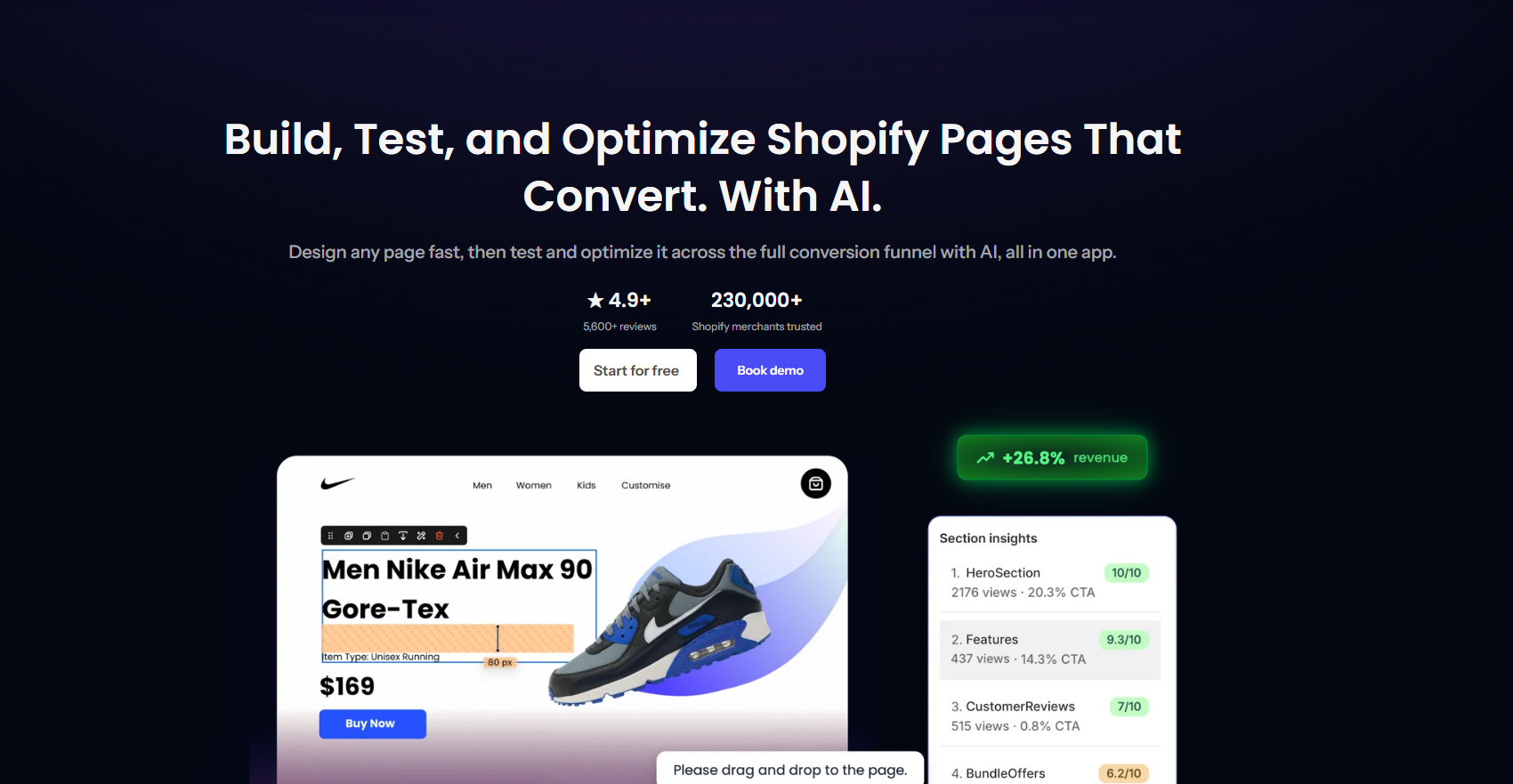
PageFly is a visual page builder for Shopify. Merchants can use templates and drag-and-drop blocks instead of relying only on theme sections or custom code. The builder also includes Shopify blocks and links to other apps.
It also has tools for CRO and page improvement. These include analytics, A/B testing, heatmaps, section data, an AI page check, a cart drawer, and an AEO tool.
PageFly’s public homepage shows store, review, and revenue figures. These are PageFly’s claims. We did not verify them in our test.
What We Tested
We tested PageFly’s Free plan on a Shopify test store on September 1, 2026.
Our test covered:
- app install and first-time setup,
- a page built from a template,
- block editing,
- desktop, tablet, and mobile views,
- a Home-type page publish,
- and the main CRO tools in the dashboard.
We did not test long-term upkeep, live-chat support, a full multi-page site, or every paid-plan tool. We also did not test competing page builders.
What Public Sources Add
Our hands-on test is the main basis for this review. We also checked PageFly’s Shopify App Store listing and pricing page on September 14, 2026.
Those pages explain PageFly’s wider set of tools. They do not prove that every feature or app link will work the same way in every store.
Our findings only cover the Free-plan work we tested. The pricing table below comes from the in-app plan screen checked on September 1, 2026.
Getting Started With PageFly
Setup was easy. After opening PageFly for the first time, we were shown a plan-choice screen before entering the main dashboard. We continued with the Free plan.
The setup flow offered a few paths. We could start with a template or AI. Other choices included importing a PageFly page, rebuilding a current page, or opening the dashboard. The options were clear.
We first tried PageFly’s AI page builder. The Free plan’s 10 AI credits were not enough for our full-page attempt. We switched to the Juicy – New Year template.
This is an important Free-plan limit. The plan is good for trying the builder, but heavy AI use can consume the credits quickly.
Building a Page: Our Experience
This was the strongest part of our test.
PageFly splits a page into sections. Its visual canvas sits beside a block library.
We could add headings, text, buttons, images, video, icons, PageFly blocks, and Shopify blocks. PageFly can also connect blocks from other apps.
The builder felt easy to use. We did not need a coder to understand the basic steps. The template also helped us move faster than an empty page would have.
We also checked the page using PageFly’s built-in desktop, tablet, and mobile previews. That made it easy to inspect layout issues while editing rather than waiting until the page was published.
With the page structure planned beforehand, the complete build took us about 30–40 minutes.
The Biggest Issue We Found: Homepage Design Continuity
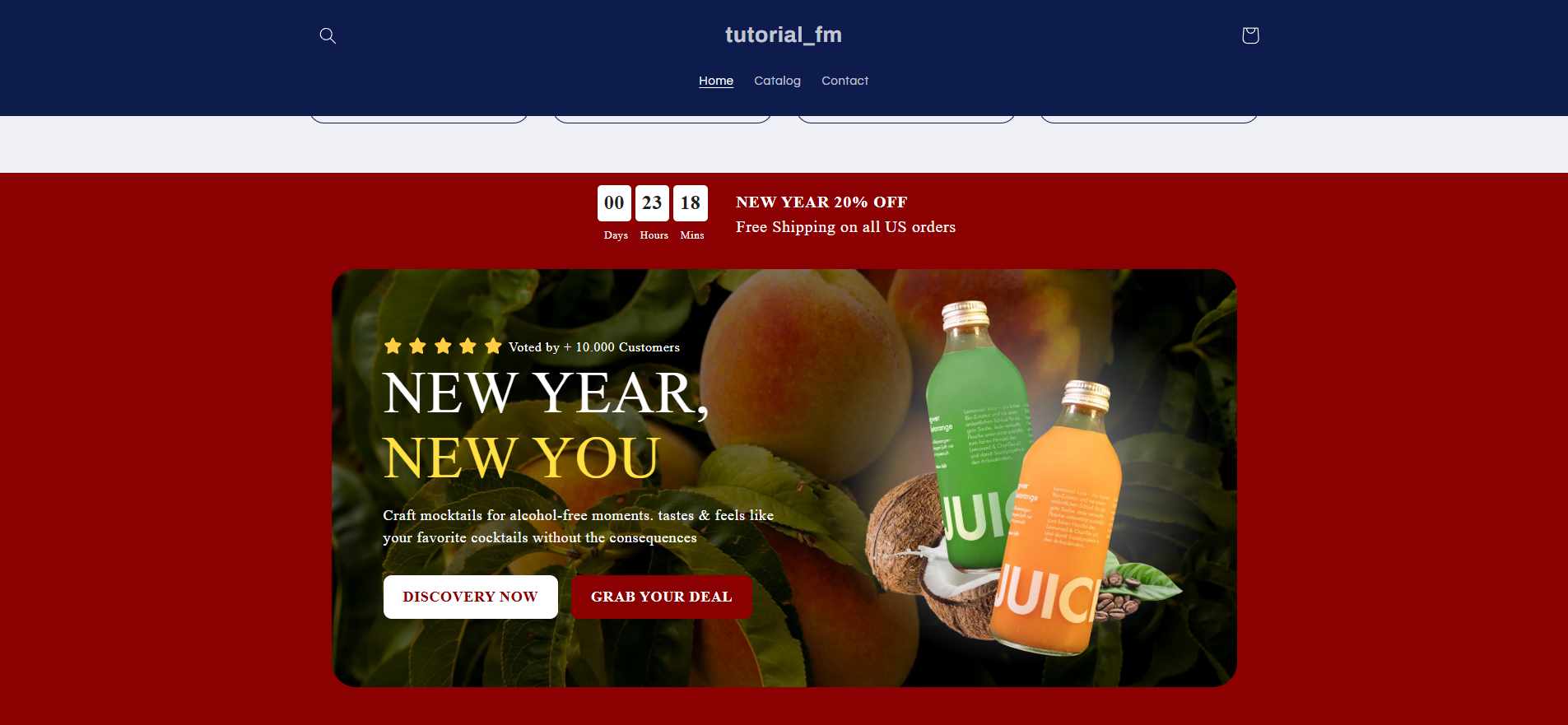
Publishing the page revealed the most important limitation from our test.
We set the PageFly page as the store’s Home page. PageFly says this content works with the current Shopify theme. The theme builder still controls parts such as the header and footer.
In our test store, the existing theme’s navigation and hero content remained visible alongside the new PageFly content. The two designs did not match, so the published homepage looked split rather than like one joined design.
This may matter less for a separate landing or campaign page. A full homepage redesign needs more care. Plan extra theme work so the header, hero, and PageFly sections look like one design.
We did not test another PageFly method that might avoid this issue. Our finding only covers the Home-page setup we used.
CRO and Optimization Tools
PageFly includes more sales tools than we expected from a page builder.
Analytics
The data screen worked in our test store. It showed page views, sessions, visitors, engagement, orders, traffic sources, countries, visitor type, and devices.
Our store had little traffic, so the data had little use. A live store would make this screen more useful.
AI Page Checkup
We ran PageFly’s AI page check. It reviewed page health and returned a score out of 100.
A/B Testing
We could access and use A/B testing while our test store was still on the Free plan. However, PageFly’s pricing screen listed A/B testing as a Builder-plan feature when we checked it.
The access and pricing details did not match. If A/B testing matters to you, check the current plan before you buy.
Heatmaps and Section Performance
The heatmap views showed visitor, traffic-source, and device details. Section Performance also showed data in our test.
Cart Drawer and AEO Optimizer
PageFly also has a Cart Drawer for cart offers and product suggestions. Its AEO tool aims to make product data easier for answer engines to understand. The screen we tested said the AEO tool works on product pages.
These tools may appeal to stores that want page building and CRO in one product. They may reduce the need for a few separate apps.
Pricing: Where Free Stops
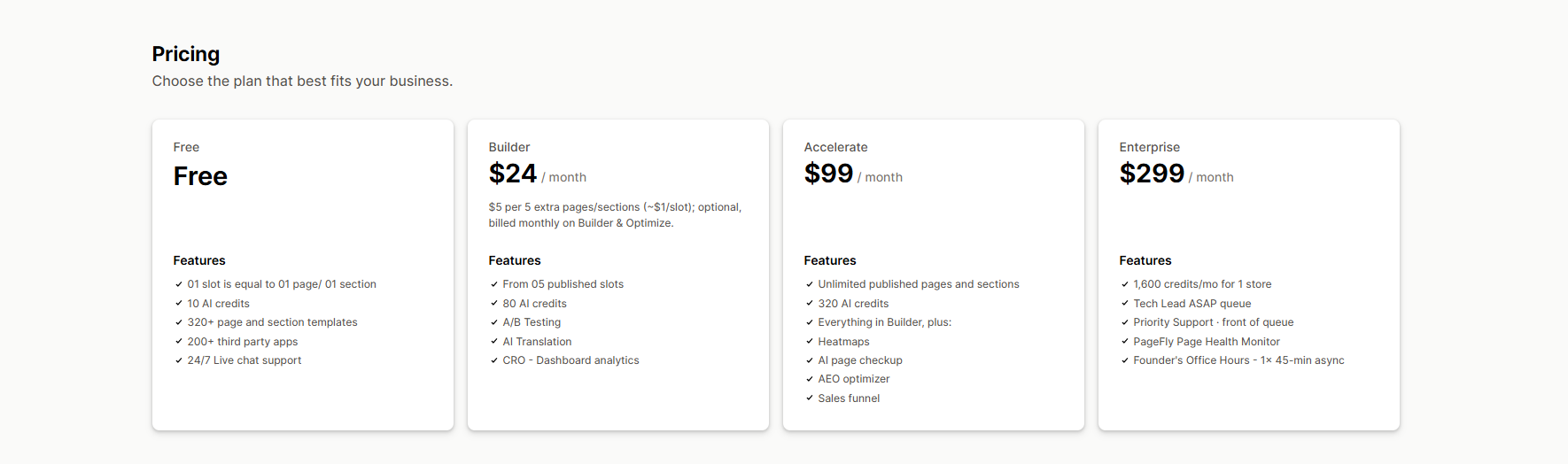
We verified the following pricing directly inside PageFly on September 1, 2026. Pricing can change, so stores should re-check it before subscribing.
| Plan | Price | Key limits/features shown during our test |
|---|---|---|
| Free | $0/month | 1 published page or section, 10 AI credits, 320+ page/section templates, 200+ integrations, 24/7 live chat |
| Builder | $24/month | Starts with 5 published slots, 80 AI credits, A/B testing, AI translation, CRO dashboard analytics; additional slots available |
| Accelerate | $99/month | Unlimited published pages/sections, 320 AI credits, plus heatmaps, AI page checkup, AEO optimizer and sales funnel tools |
| Enterprise | $299/month | 1,600 AI credits/month for one store plus additional priority/support features |
Free is enough to test one page and learn how PageFly works. But one slot and 10 AI credits limit wider use. Stores that need a few PageFly pages will likely need a paid plan.
What We Liked
- Easy visual builder: We found the core editing workflow easy even without writing code.
- Fast page creation: Starting from a template, we built a full page in around 30–40 minutes with prior planning.
- Responsive previewing: Desktop, tablet, and mobile views are available directly in the builder.
- Large building toolkit: PageFly combines templates, PageFly blocks, Shopify blocks, and app links.
- Built-in CRO tools: Analytics, testing, page checkup, section performance and other optimization tools extend PageFly beyond page design alone.
What Could Be Better
- The Free AI limit is low: Our full-page AI attempt used the available credits. Treat Free as a test plan, not a plan for heavy AI use.
- Homepage redesigns may need theme work: Our Home page kept theme content beside the PageFly design. The two styles did not match.
- Plan access was unclear: A/B testing worked on Free in our store. The pricing screen placed it on Builder. Check key features before choosing a plan.
Who PageFly Is Best For
PageFly is a strong fit for Shopify stores that often need custom landing, sales, campaign, or product pages. It gives them more design freedom than many themes.
It is also good when a store wants page building and basic CRO tools in one place. This can reduce reliance on a coder and a few apps.
Who Should Consider an Alternative
PageFly may be a poor fit if you want to replace every part of a homepage without touching the theme. A full redesign may require work in both PageFly and the theme editor.
Merchants comparing Shopify page builders may also want to test alternatives such as GemPages, EComposer, and Shogun. We did not hands-on test those products for this review, so we are not ranking them against PageFly here.
Final Verdict
PageFly did the main job well in our test. It made custom page building fast and easy without code.
The builder was easy to understand. Templates sped up the work. Device checks were built into the builder, and the CRO tools offered ways to improve a live page.
PageFly still works with the Shopify theme. Our Home-page test showed a clear mismatch between theme content and the PageFly design. Plan for that extra theme work before a full homepage rebuild.
For separate landing and sales pages, PageFly is a strong option. It lets stores build and update pages without waiting for a coder each time.
Frequently Asked Questions
Is PageFly free?
Yes. On September 1, 2026, Free included one published page or section and 10 AI credits. It also listed 320+ templates and 200+ app links. Stores that need more pages or AI use will likely need a paid plan.
Is PageFly easy to use?
In our hands-on test, yes. We found the template-based builder easy and built a full page in about 30–40 minutes with some planning completed beforehand.
Can PageFly build a Shopify homepage?
Yes, but it still works with the Shopify theme. In our test, the Home page kept existing theme content beside the PageFly content. We needed more theme work to make the page look consistent.
Does PageFly include A/B testing?
PageFly’s pricing screen listed A/B testing under its Builder plan when we checked it. However, A/B testing was accessible on our Free-plan test store. Because of that gap, stores that consider A/B testing key should verify the current plan requirement directly before subscribing.