
Foxify AI Store Builder combines a visual Shopify page builder, ready-made templates, AI-assisted layout tools, and a blank-canvas workflow. That mix sounds useful for both beginners and experienced designers.
We tested Foxify on its Free plan. The setup was easy, the editor was approachable, the templates looked polished, and we successfully published a product page. The biggest limitations appeared around the features that make Foxify sound most distinctive: AI generation and homepage-template publishing.
Quick Verdict
Foxify is easy to get into and gives merchants two sensible ways to build: start from a template or design from a blank canvas.
The templates are especially useful for beginners who do not have much design experience. At the same time, the blank-canvas option gives a stronger designer enough freedom to create something more custom.
The main issue is the Free plan. In our test, the included AI credits were not enough to complete even a small AI-generation task, and the homepage template we tried could not be published without upgrading. A product page did publish successfully.
For a basic Shopify store, that makes the paid plan harder to justify unless Foxify’s templates, higher publishing limits, or paid AI tools are features you expect to use regularly.
Key Takeaways
- Installation and onboarding were easy in our test.
- Foxify asks for industry and page-type preferences before taking you into the builder.
- The templates looked polished and were useful from a beginner’s point of view.
- The editor was easy to understand, but the icon-only left toolbar could use clearer text labels.
- The Free plan showed 20 AI credits, but our balance was not enough to complete the small AI task we attempted.
- We could publish a product page on Free.
- The homepage template we tried required a paid plan before it could be published.
- App Extensions were visible in the interface, but we did not install or test any of them.
- Foxify’s current Shopify listing shows paid plans at $19, $39, and $99 per month, with a 7-day trial on the paid tiers.
Getting Started Is Straightforward
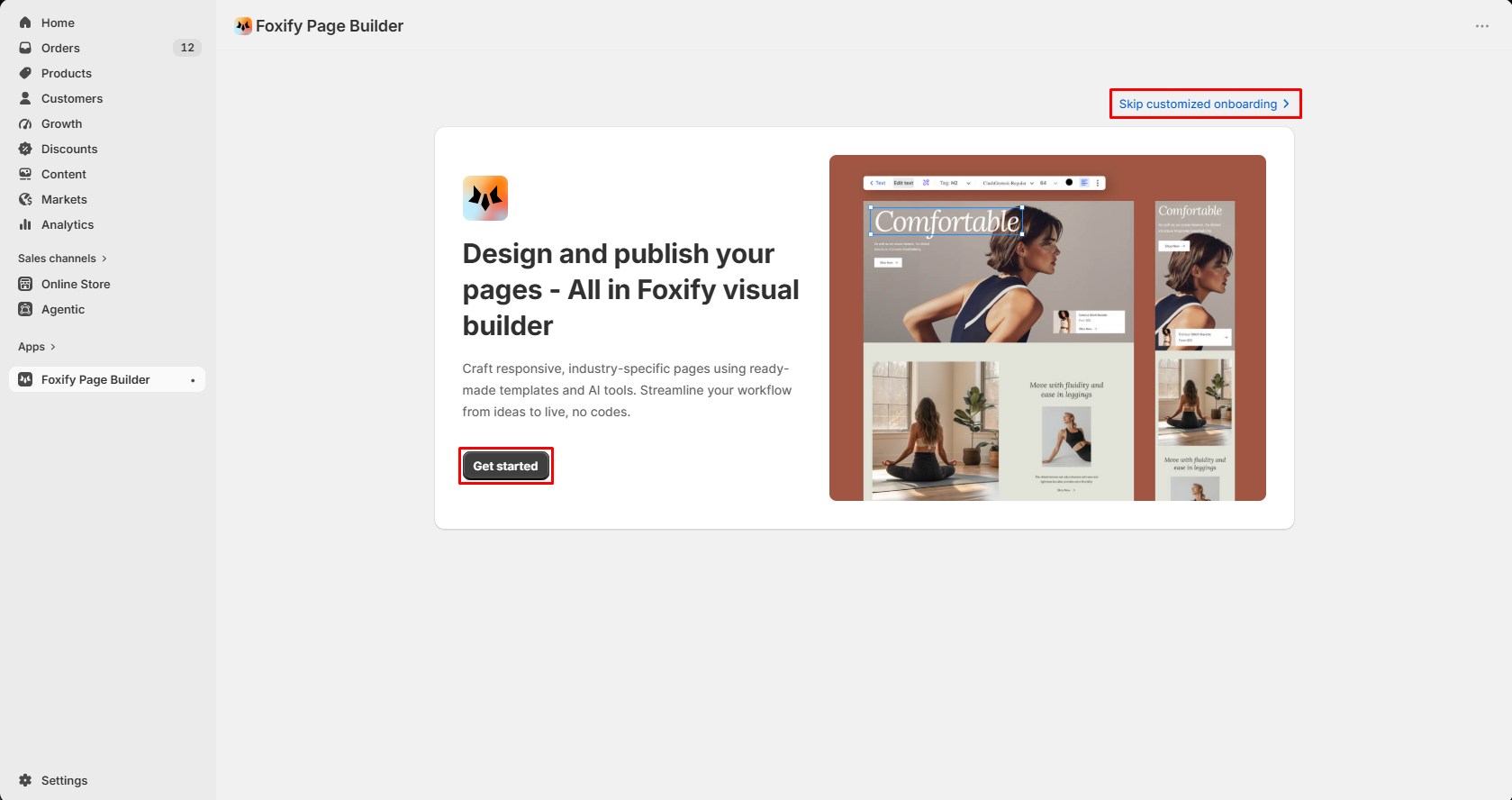
The first-run experience was simple. Foxify presents a clear Get started action and also lets you skip the customized onboarding flow.
We did not run into any setup blocker before reaching the builder. From our test, installation and onboarding were easy.
Foxify Personalizes the Starting Point by Industry
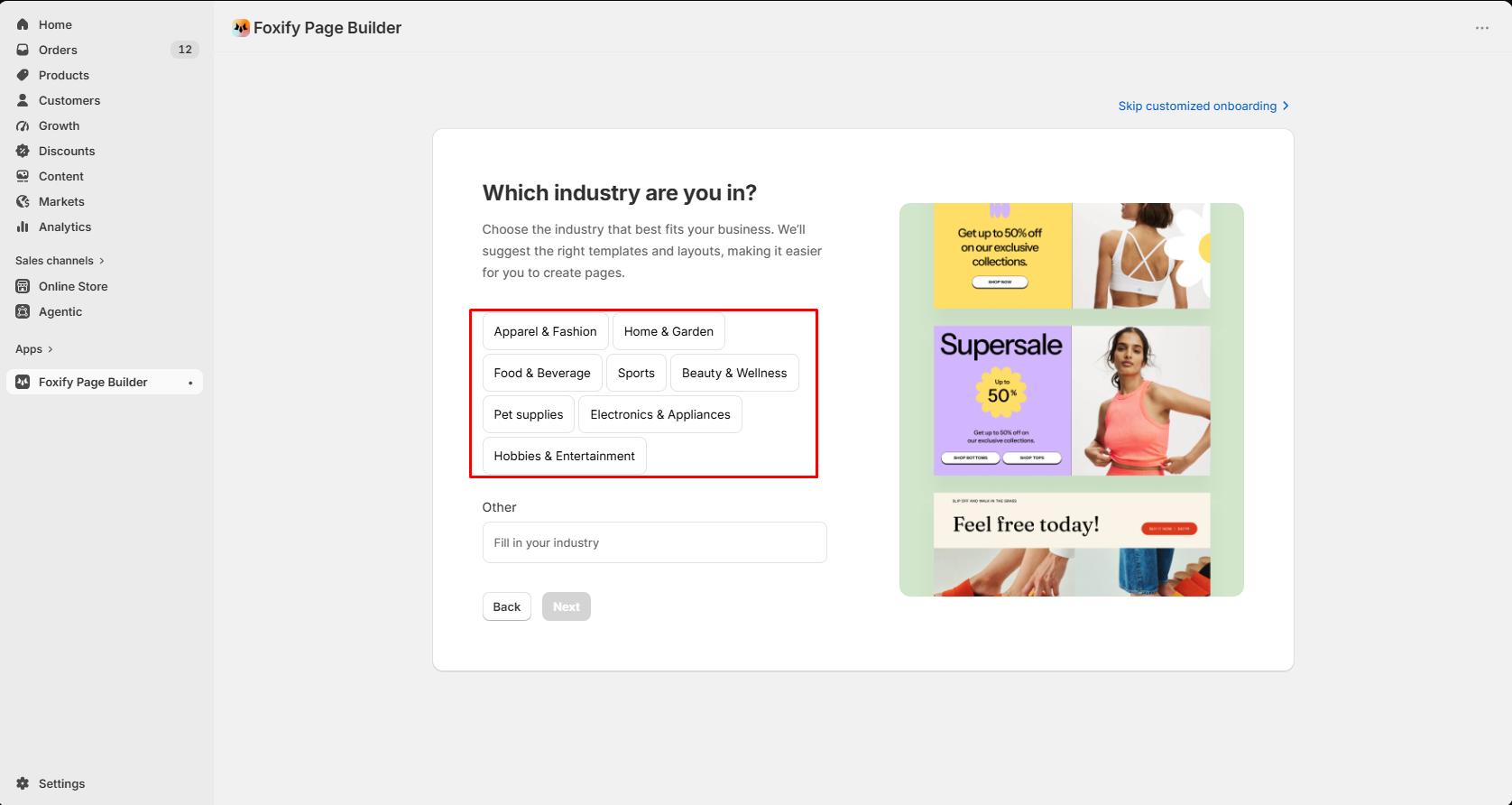
The onboarding asks what industry the store belongs to. We saw options for Apparel & Fashion, Home & Garden, Food & Beverage, Sports, Beauty & Wellness, Pet supplies, Electronics & Appliances, and Hobbies & Entertainment, plus an Other field.
The purpose is clear: Foxify says it will use that choice to suggest relevant templates and layouts.
It Also Asks What You Want to Build First
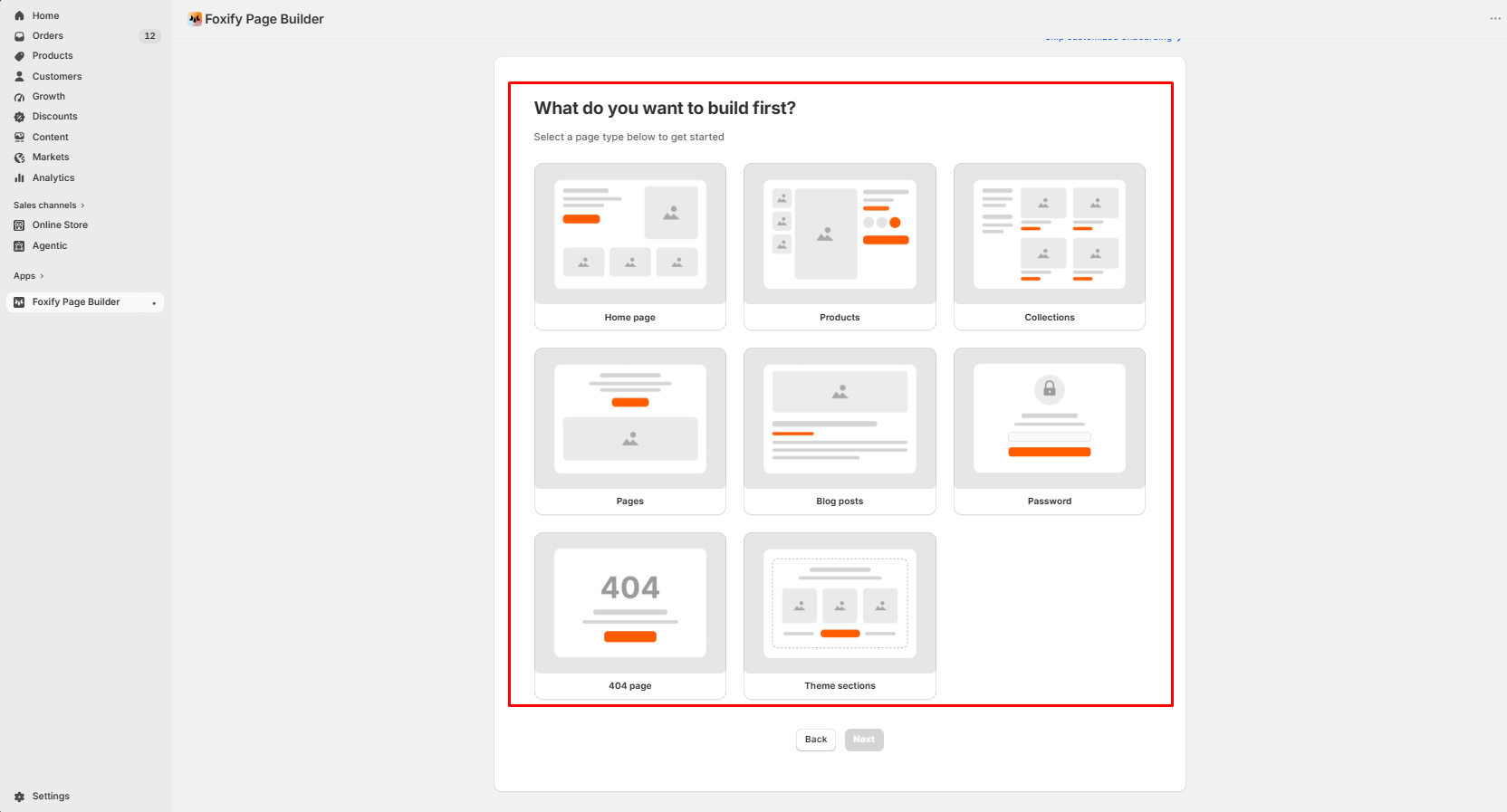
The next step presents the main content types that Foxify can work with. In our screen, those included Home page, Products, Collections, Pages, Blog posts, Password, 404 page, and Theme sections.
That makes the workflow easier for a new user because the app does not drop you directly into an empty editor without context.
Templates Are One of Foxify’s Stronger Areas
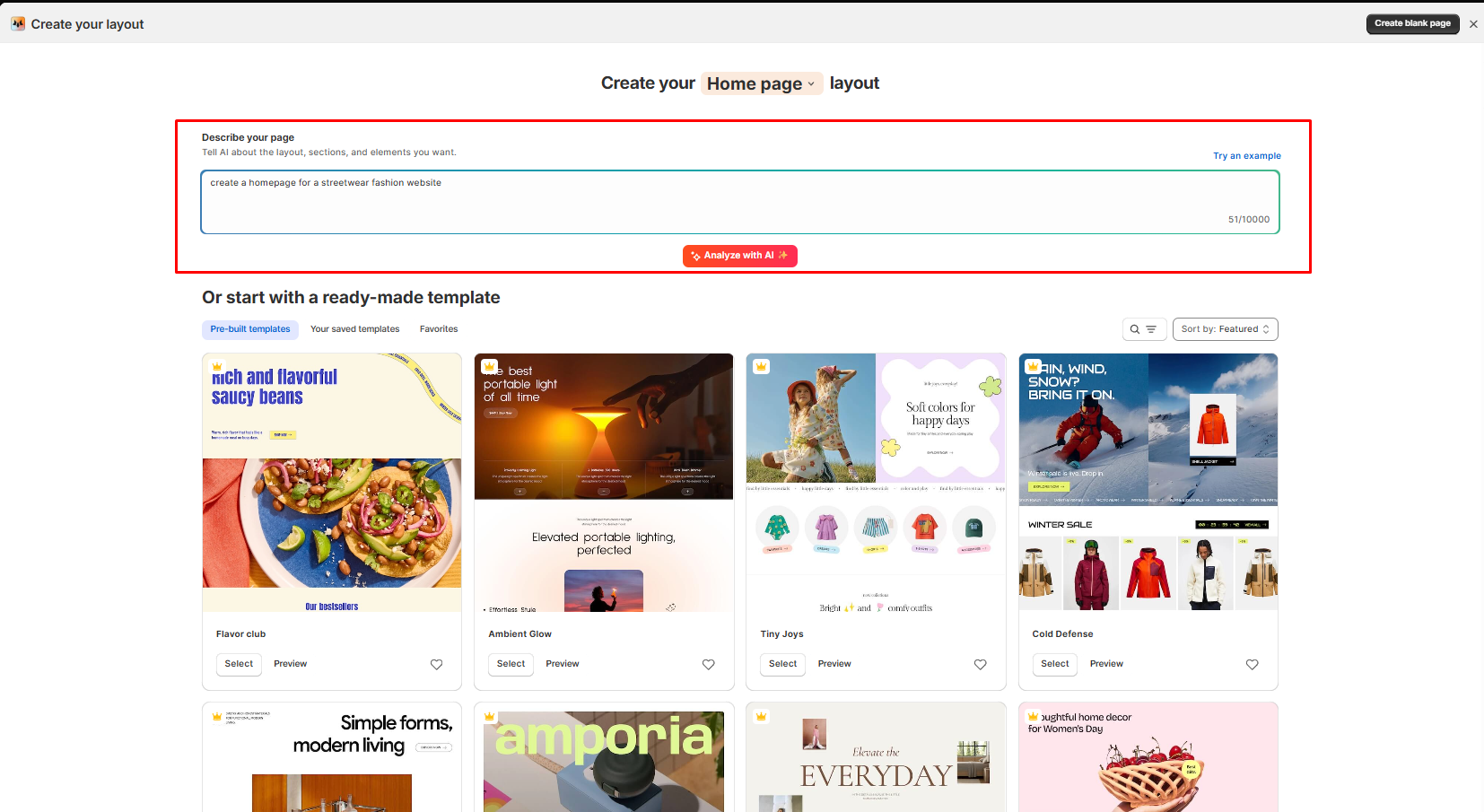
The template library was one of the better parts of our test. The designs looked polished enough that someone without much design knowledge could start from a template and build a respectable page without creating the entire layout from scratch.
Foxify also supports a blank-page route. That matters because experienced designers are not forced to work inside a preset layout. A designer who already understands hierarchy, spacing, and ecommerce structure can use FoxStudio more like a flexible visual canvas.
This gives Foxify a useful split: templates reduce design friction for beginners, while the blank canvas preserves creative freedom for more experienced users.
The Free AI Credits Were Not Enough for Our Test
The same Create your layout screen also promotes AI-assisted page generation. You can describe the layout, sections, and elements you want and then ask Foxify to analyze the request with AI.
The Free plan currently advertises 20 AI credits per month on Shopify’s listing.
In our test, however, the available Free-plan credits were not enough to complete even the small AI task we attempted. Because of that, we could not meaningfully judge the quality of Foxify’s AI-generated layouts.
That distinction is important. The Free plan does include AI credits, but our experience suggests that merchants should not assume the included amount is enough to properly evaluate the full AI page-building workflow.
We are treating this as a Free-plan limitation, not as evidence that Foxify’s AI output is poor. We did not get far enough to assess the generated result itself.
FoxStudio Is Easy to Understand
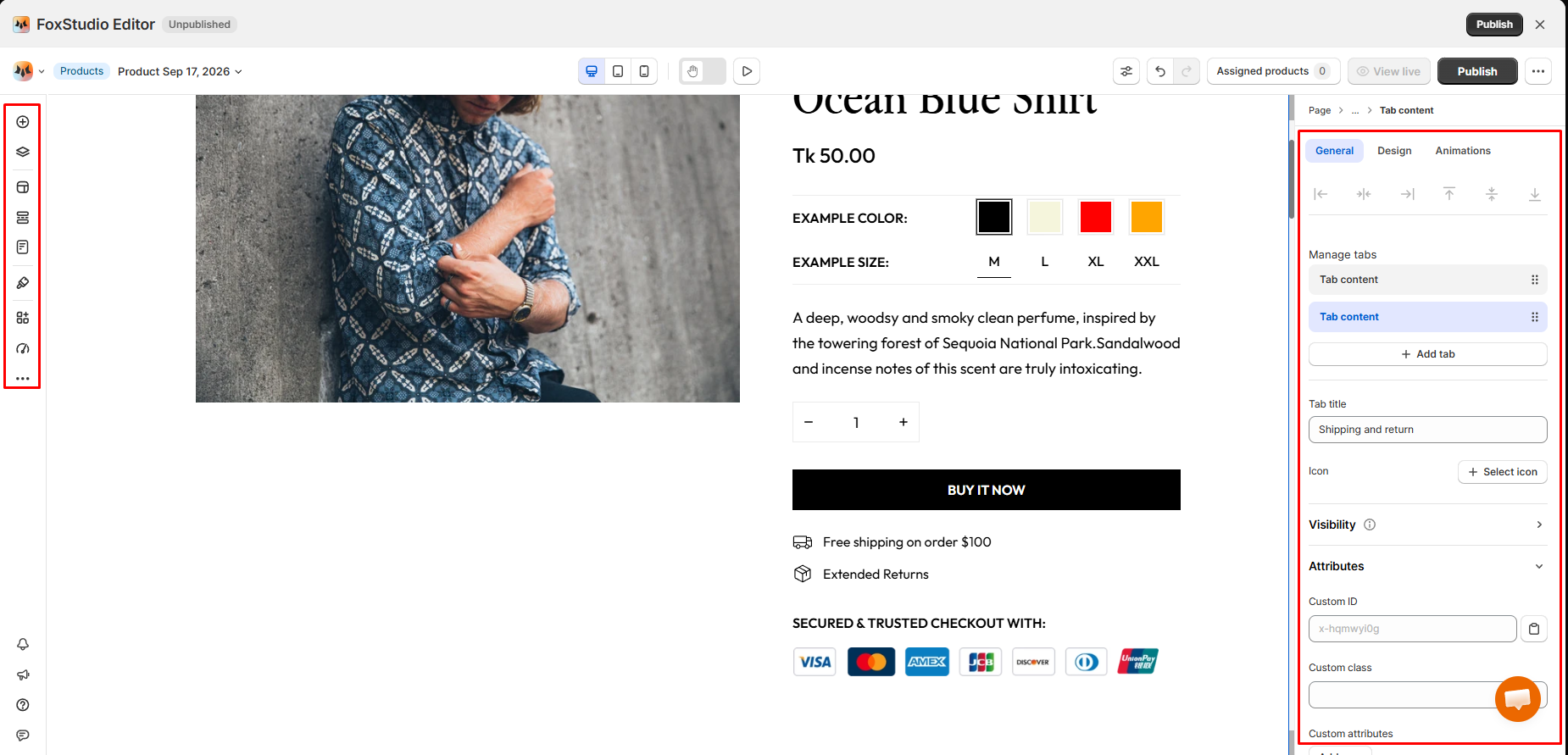
The FoxStudio editor was easy to understand during our test. The page stays visible in the main canvas while editing controls sit around it, and we could follow the interface without needing a long learning period.
The editor also exposes settings such as General, Design, and Animations, along with responsive preview controls and fields for custom IDs, classes, and attributes.
One small usability issue stood out. The left toolbar relies heavily on icons. A user who already knows page builders may understand them immediately, but a beginner may not know what every symbol means.
Adding short text labels beside those icons, or making the labels more obvious on hover, would make the editor easier to learn without changing the overall interface.
Publishing Worked, but the Homepage Template Hit a Paywall
We successfully published a product page on the Free plan. The publishing flow was straightforward, and we did not notice obvious problems in the live result.
The homepage-template workflow was different. Foxify let us browse and work with the homepage templates, but the homepage template we tried could not be published without moving to a paid plan.
That makes the Free plan more limited in practice than the simple “1 published page” line may suggest.
The useful nuance is that Free is not completely blocked: our product page published successfully. The restriction appeared when we tried to publish the homepage template.
For merchants installing Foxify mainly because they want a free homepage redesign, that is worth knowing before spending time building the page.
App Extensions Are Built In, but We Did Not Test Them
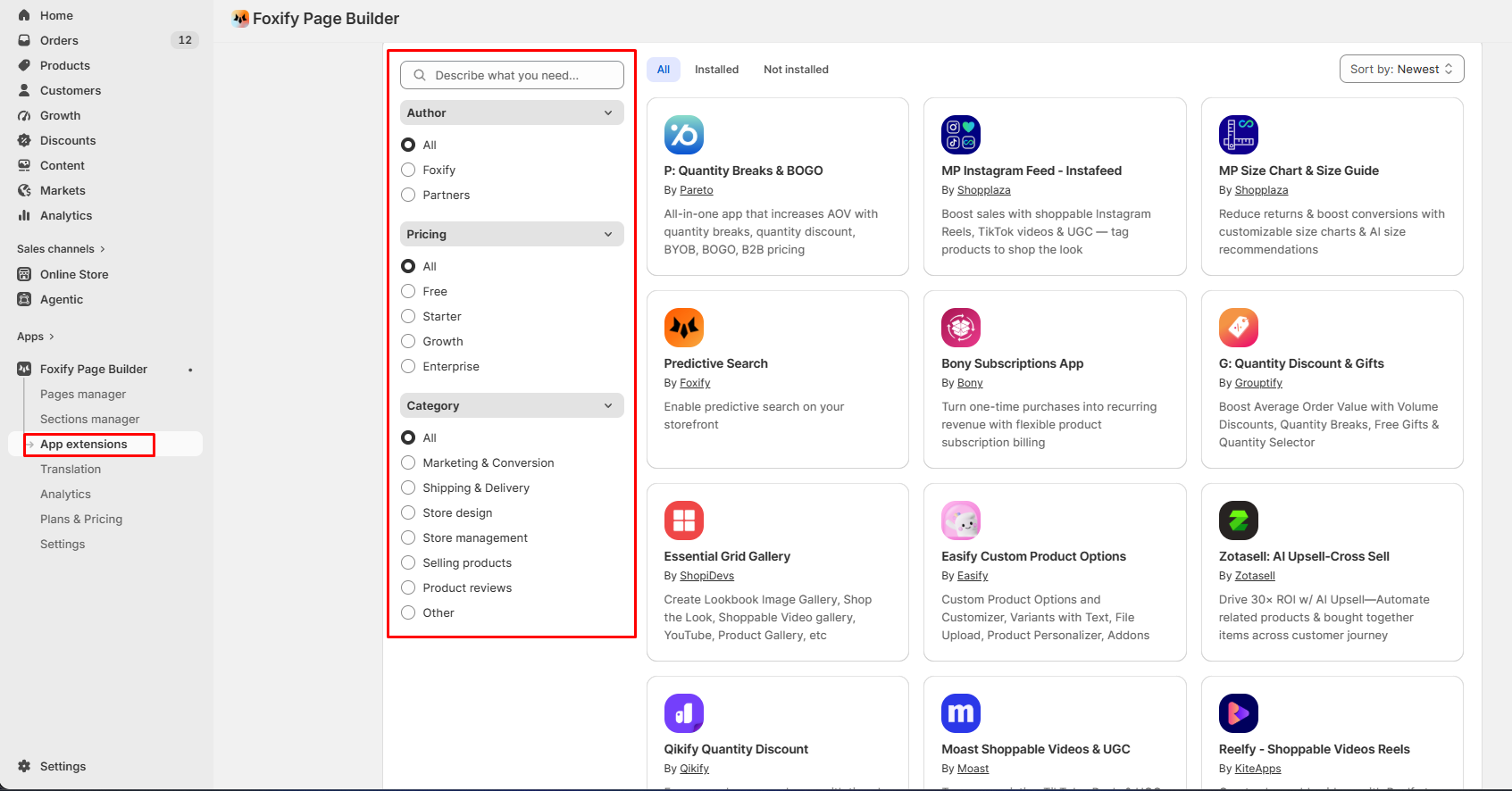
Foxify includes an App extensions area inside the product. The screen we captured included filters for Author, Pricing, and Category, with categories such as Marketing & Conversion, Shipping & Delivery, Store design, Store management, Selling products, Product reviews, and Other.
We also saw extensions from Foxify and third-party developers.
We did not install or test an extension, so we cannot judge setup quality, reliability, performance, or how well those extensions behave on a published storefront. Our evidence confirms the marketplace exists and is integrated into the Foxify interface, nothing more.
Pricing: Free Looks Generous on Paper, but Has Practical Limits
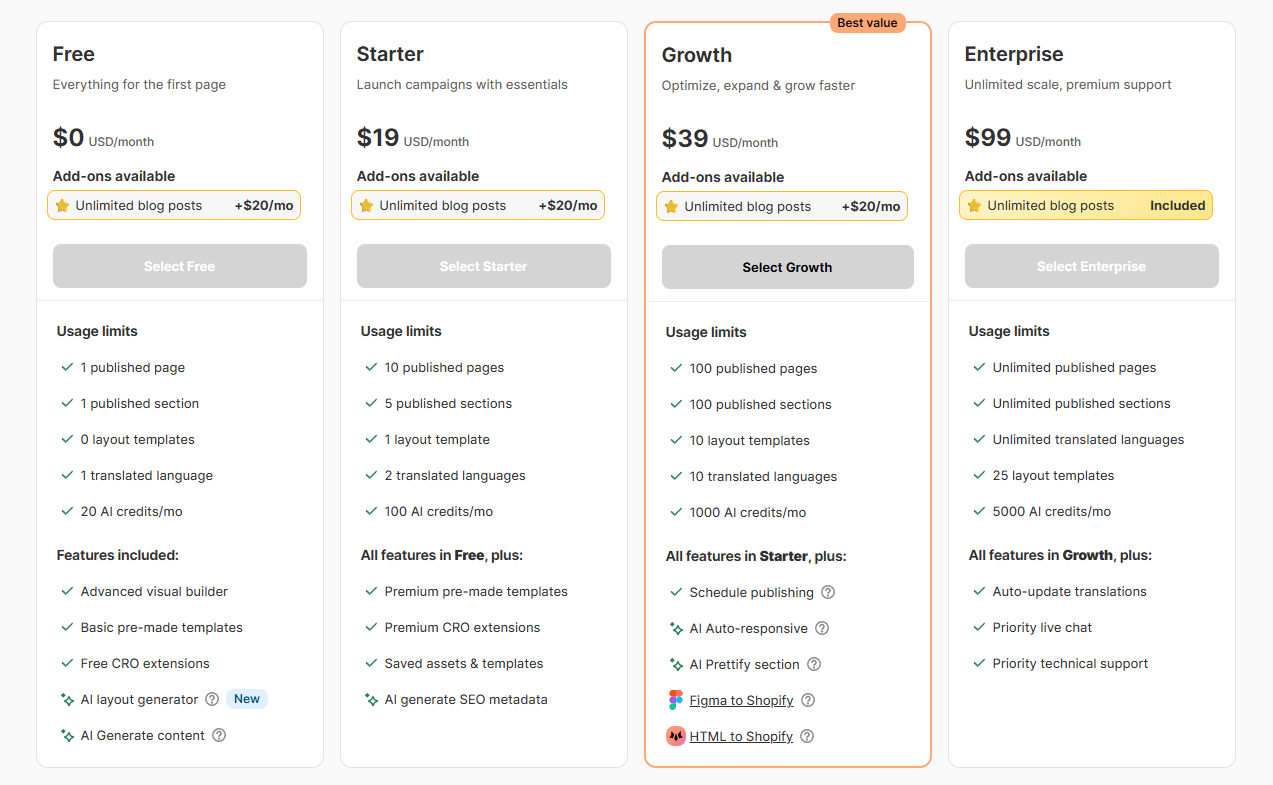
We checked Foxify’s in-app pricing during testing and rechecked the current Shopify App Store listing on September 17, 2026.
| Plan | Current public price | Main limits/features relevant to this review |
|---|---|---|
| Free | $0 | 1 published page, 1 published section, basic pre-made templates, free CRO extensions, 20 AI credits/month |
| Starter | $19/month | 10 published pages, 5 published sections, 1 layout template, premium templates/extensions, saved assets/templates, 150 AI credits/month |
| Growth | $39/month | 100 pages, 100 sections, 10 layout templates, AI Auto-responsive & Prettify, Figma to Shopify, HTML to Shopify, 1,000 AI credits/month |
| Enterprise | $99/month | Unlimited pages and sections, 25 layout templates, advanced analytics, auto-update translations, 5,000 AI credits/month |
The paid plans currently show a 7-day free trial on Shopify’s listing.
There is one pricing detail worth checking before upgrading. Our in-app pricing screenshot showed 100 AI credits/month for Starter, while the current Shopify listing shows 150 AI credits/month. Pricing and plan allowances can change, so merchants should verify the current allowance inside Shopify at the time they subscribe.
What Public Sources Add
Our hands-on screenshots are the main evidence for this review. We also checked Foxify’s current Shopify App Store listing on September 17, 2026.
The listing currently describes Foxify as Built for Shopify, names FoxEcom as the developer, and advertises AI page generation, responsive layouts, SEO features, analytics, testing, tracking, global styles, custom code, translation, and other page-management functions.
It also says Foxify offers more than 250 page and section templates. We did not count the full template library ourselves, so that number is a developer/listing claim rather than a result of our test.
At the time we checked, the Shopify listing showed a rating around 4.8 stars from more than 320 reviews. Ratings and review counts change, so that figure should be treated as dated context rather than a fixed product score.
What We Liked
- Easy onboarding: We reached the builder without setup friction.
- Beginner-friendly templates: The designs give non-designers a useful starting point.
- Blank-canvas flexibility: More experienced designers can build without relying on a template.
- Understandable editor: FoxStudio was easy to follow during our test.
- Successful product-page publishing: The Free-plan product page went live without an obvious issue.
- Broad page-type coverage: The onboarding supports several common Shopify page and section types.
What Could Be Better
- Free AI was difficult to evaluate: The included credits were not enough for the small task we attempted.
- Homepage-template publishing required an upgrade in our test: That limits the usefulness of Free for merchants specifically redesigning a homepage.
- Toolbar clarity: Text labels would make the left-side FoxStudio controls easier for beginners to understand.
- Starter credit wording differed: Our in-app screen showed 100 credits while the current public listing showed 150.
- Extensions remain unproven in this review: We saw the marketplace but did not install or validate any extension.
Who Foxify Is Best For
Foxify is a good fit for beginners who want polished templates without designing every section from scratch.
It can also suit experienced designers who prefer a visual Shopify builder but still want to start from a blank canvas.
Stores that build many campaign, product, collection, or landing pages may get more value from the paid publishing limits than a very small store would.
Who May Not Need a Paid Plan
A basic Shopify store that already has a capable theme may not get enough extra value from Foxify to justify another monthly subscription.
That was the main value concern from our test. The product-building experience itself was good, but some of the more attractive reasons to use Foxify — meaningful AI generation and the homepage-template workflow we tried — pushed us toward a paid tier.
If your main need is simply one basic homepage or a few theme edits, compare what your current theme can already do before adding another paid builder.
For more page-builder context, Blinto also has hands-on reviews of PageFly, GemPages, EComposer, Shogun, and Omnise AI Page Builder. Those reviews were completed separately and should not be treated as a controlled head-to-head test.
Final Verdict
Foxify has a good core building experience. The onboarding is easy, the templates are attractive, the editor is understandable, and the product-page publishing workflow worked properly in our test.
The Free plan is where the value question becomes more complicated. The included AI credits were not enough for our small AI task, and the homepage template we tried could not be published without upgrading. That makes Free more useful for evaluating Foxify than for fully experiencing everything that makes the app interesting.
Our verdict is Consider. Foxify is worth testing if you like its templates or want a more flexible visual builder. For a basic Shopify store, we would only move to a paid plan after confirming that the extra publishing capacity or paid AI features solve a real need.
Frequently Asked Questions
Does Foxify Have a Free Plan?
Yes. The current Shopify listing shows a Free plan with one published page, one published section, basic templates, free CRO extensions, and 20 AI credits per month.
Can You Use Foxify AI on the Free Plan?
Foxify gives the Free plan AI credits, but in our test the available balance was not enough to complete the small AI-generation task we attempted. We therefore could not judge the quality of its generated layouts.
Can You Publish a Page on Foxify Free?
Yes. We successfully published a product page on the Free plan. However, the homepage template we tested required an upgrade before publishing.
Is Foxify Good for Beginners?
The templates and onboarding are beginner-friendly. We also found the editor easy to understand. The main interface improvement we would make is adding clearer text labels to the icon-heavy left toolbar.
Is Foxify Only for Beginners?
No. Foxify also lets users start from a blank canvas, which gives experienced designers more control than a template-only workflow.