
PageFly and EComposer both give Shopify merchants substantially more design freedom than a standard theme editor, but their current product strategies are increasingly different.
PageFly combines visual page building with a stronger emphasis on conversion-rate optimization. EComposer combines page building with a larger collection of built-in ecommerce and CRO extensions, plus generous publishing limits on its mid-tier plans.
The practical decision is not simply whether either app can build a landing page. Both can. The more useful question is what you want the page builder to do as your store grows.
Key Takeaways
- PageFly is strongest when CRO analysis is central to the workflow: Higher tiers add A/B testing, funnels, AI Page Checkup, heatmaps, and section-performance analysis around page building.
- EComposer offers more publishing capacity at lower mid-tier prices: Standard includes 15 live pages or sections at $25/month, while Pro includes 50 at $49/month.
- EComposer bundles more storefront functionality: Its Pro tier combines Global Blocks, popups, Shopify Markets, A/B testing, premium AI tools, and 29+ extensions.
- PageFly reaches unlimited publishing at a lower current price: Accelerate is $99/month, compared with EComposer Premium at $129/month.
- The workflow is the real deciding factor: PageFly suits teams that want to build, measure, test, and optimize; EComposer suits merchants who want broader built-in storefront tools and reusable content.
Quick Verdict
PageFly is the stronger fit when page building and ongoing CRO analysis need to live in the same workflow. Its current plan structure adds A/B testing, funnels, AI Page Checkup, heatmaps, and section-performance analysis as merchants move into higher tiers.
EComposer is the stronger fit when you need more published pages at mid-tier pricing or want the builder to replace several smaller storefront tools. Its current Pro plan supports 50 live pages or sections and includes A/B testing, Shopify Markets, Global Blocks, popups, premium AI tools, and 29+ extensions.
There is a pricing crossover: EComposer is especially competitive around 15–50 published layouts, while PageFly reaches unlimited publishing at $99/month compared with EComposer Premium at $129/month.
Side-by-Side Comparison
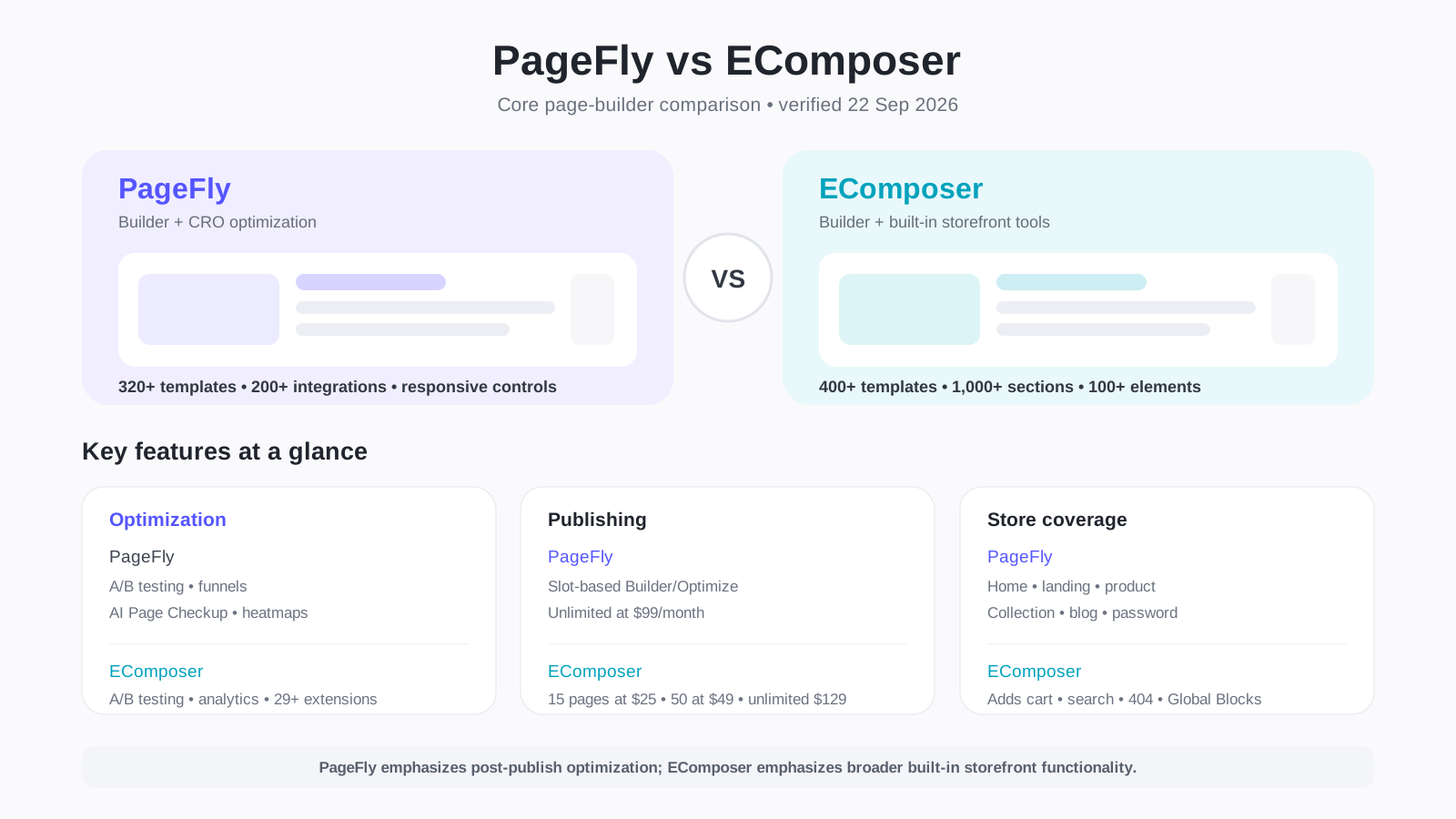
| Area | PageFly | EComposer |
|---|---|---|
| Free publishing | 1 page or section | 1 page or section |
| Entry paid plan | Builder from $24/month | Standard $25/month |
| Entry publishing allowance | Starts at 5 slots | 15 pages/sections |
| Mid-tier | Optimize from $39/month, starts at 20 slots | Pro $49/month, 50 pages/sections |
| Unlimited publishing | Accelerate $99/month | Premium $129/month |
| Templates | 320+ page/section templates | 400+ page templates and 1,000+ section layouts |
| AI | Smart Pages and optimization-oriented AI tools | AI layout/content tools with plan-based credits |
| CRO | A/B testing, funnels, heatmaps, page checkup, section performance | A/B testing, analytics, 29+ CRO extensions |
| Integrations | 200+ advertised | 100+ advertised |
| Support | 24/7 support | Live chat; 24/7 on Pro and priority on Premium |
| Primary fit | Build, measure, test, optimize | Build, reuse, add storefront functionality |
Pricing and product availability can change. The figures above were checked against current official product information on September 22, 2026.
Who Each App Is Best For
PageFly is best suited to merchants who
- Want landing, product, collection, home, and other custom pages with CRO tools around the same workflow.
- Expect to run A/B tests and analyze page behavior after publishing.
- Want heatmaps and section-performance analysis on higher plans.
- Need unlimited publishing and prefer the $99/month Accelerate price point.
- Depend on a broad third-party Shopify integration ecosystem.
EComposer is best suited to merchants who
- Need roughly 15–50 custom pages without moving to a $99+ plan.
- Want a larger page-template and section-layout library.
- Want built-in ecommerce/CRO extensions that can reduce reliance on separate apps.
- Need custom cart/search layouts or reusable Global Blocks.
- Want Shopify Markets, popups, bulk import/export, and A/B testing in the Pro tier.
How This Comparison Was Evaluated
This comparison follows Blinto’s research-and-documentation comparison methodology.
No hands-on testing claims are used. Both products are evaluated against the same merchant-facing criteria: onboarding, editor capabilities, customization, responsive controls, ecommerce elements, publishing limits, integrations, AI, CRO features, pricing, support, scalability, and best-fit use cases.
Time-sensitive pricing and plan limits were verified close to publication.
Core Feature Comparison
Both PageFly and EComposer provide visual drag-and-drop editing for Shopify stores without requiring code for ordinary layouts.
PageFly documents support for regular pages, homepages, collection pages, product pages, password pages, and blog posts. It combines standard web elements with Shopify-specific product, collection, customer, and blog elements.
EComposer documents an even wider range of storefront templates, including landing pages, homepages, product and collection templates, blogs, cart pages, search pages, 404 pages, password pages, Quick View, footers, Theme Sections, and Global Blocks.
That broader documented page coverage matters if the goal is to customize more of the storefront architecture from one builder.
Installation and Onboarding
PageFly’s documented workflow starts from the Shopify app install and moves into its dashboard and editor. The editor organizes elements, templates, page assignment, settings, version history, custom code, integrations, and support. PageFly also uses a Shopify Theme Extension, which can be enabled from Shopify’s Theme Editor or during publishing.
EComposer’s onboarding exposes both AI-assisted creation and manual creation routes. From its dashboard, merchants can move into standard page types, Theme Sections, Global Blocks, and A/B testing.
Both follow a familiar Shopify app workflow, but their product direction differs: PageFly increasingly points toward build, measure, and optimize, while EComposer exposes a broader collection of store-building and reusable-content functions.
Ease of Use
Both products describe their editors as drag-and-drop builders.
PageFly’s interface is relatively concentrated around templates, sections, elements, Shopify blocks, integrations, responsive controls, and optimization features.
EComposer combines its editor with 100+ elements, Theme Sections, Global Blocks, extensions, analytics, AI features, popups, and testing tools.
That creates a trade-off rather than a universal ease-of-use winner. Merchants wanting a more focused build-and-optimize process may prefer PageFly’s structure, while merchants trying to consolidate more storefront functions may value EComposer’s broader toolset.
Responsive and Mobile Controls
Both builders provide device-specific layout controls.
PageFly documents responsive views for mobile, tablet, laptop, and desktop, with style settings that can be adjusted globally or for specific devices.
EComposer documents Desktop, Tablet, and Mobile editing modes and lets responsive-compatible settings change independently by device size. Its help center recommends using the editor itself on a desktop or laptop rather than a phone or tablet because the drag-and-drop workspace is designed for larger screens.
Both therefore support mobile-responsive storefront output; the distinction is between designing a mobile layout and using the editor from a mobile device.
Ecommerce Elements
PageFly includes Shopify-specific elements for products, collections, forms, blogs, and dynamic store data.
EComposer also provides Shopify-specific product grids and Add to Cart functionality, then extends the editor with built-in extensions. Its current Pro plan advertises 29+ CRO extensions plus popup/spin-wheel functionality and post-purchase/thank-you-page upsell rules.
This difference reflects the broader product strategies: PageFly’s expansion is increasingly about analyzing and improving pages, while EComposer puts more emphasis on adding ecommerce functionality around them.
Customization and Design Control
PageFly offers detailed controls for typography, spacing, backgrounds, borders, effects, layout, responsive behavior, custom fonts, and custom CSS/JavaScript. Its Global Styles system helps merchants keep typography and color choices consistent.
EComposer supports global typography and colors, custom fonts, reusable Theme Sections, and Global Blocks. Its Code element supports HTML, CSS, JavaScript, and Shopify Liquid.
Both provide meaningful design freedom beyond prebuilt templates. EComposer’s Global Blocks are especially relevant when a merchant wants a reusable block updated across several placements.
AI Features
Both apps now use AI as part of the page-building workflow.
PageFly’s current pricing documentation lists Smart Pages plus plan-based AI credits, with higher tiers connecting AI to CRO through AI Page Checkup and translation tools.
EComposer currently includes 50 AI credits on Free, 200 on Standard, 800 on Pro, and 2,000 on Premium, with progressively more capable AI tools across the plan structure.
The credit counts should not be treated as directly equivalent because each platform can consume credits differently. The more useful distinction is direction: PageFly connects AI to creation and optimization, while EComposer uses AI inside a broader store-building toolkit.
CRO and Optimization
PageFly’s current product strategy puts significant emphasis on conversion optimization.
Optimize introduces Sales Funnel, AI Page Checkup, AI Translator, and A/B Testing alongside analytics. Accelerate adds heatmap previews and Section Performance.
EComposer’s Standard tier includes Page Analytics, while Pro adds A/B testing, popups, Global Blocks, Shopify Markets, premium AI tools, and 29+ extensions.
For merchants focused on how visitors behave after a page goes live, PageFly’s heatmap and section-performance tooling is notable. For merchants who view CRO as page testing plus onsite selling functionality, EComposer’s extensions offer a different form of value.
Publishing Model and Limits
Publishing limits are one of the clearest differences.
PageFly uses a slot-based model. Free includes one slot. Builder starts at five slots, Optimize starts at 20, and both can scale within their tier. Accelerate removes the limit at $99/month.
EComposer uses fixed allowances on most plans: one live page/section on Free, 15 on Standard, 50 on Pro, and unlimited on Premium.
A store needing around 15 published layouts can get that capacity from EComposer Standard for $25/month. A store around 20–50 layouts enters EComposer Pro’s strongest value range. Once unlimited publishing is needed, PageFly’s $99 Accelerate tier changes the comparison.
Pricing and Value
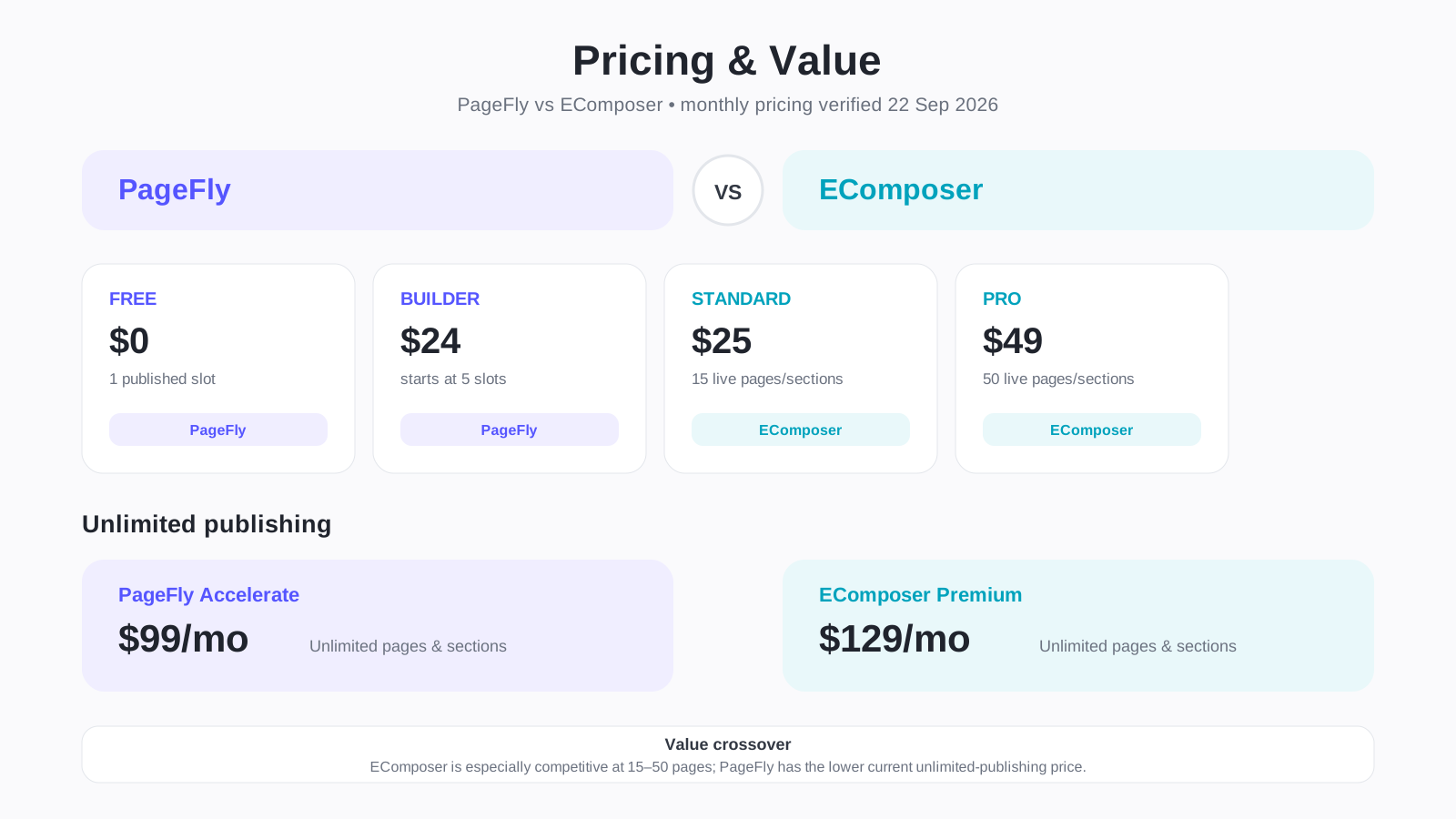
Current monthly pricing checked September 22, 2026:
| Plan level | PageFly | EComposer |
|---|---|---|
| Free | $0 — 1 slot | $0 — 1 page/section |
| Entry paid | Builder from $24 — starts at 5 slots | Standard $25 — 15 pages/sections |
| Mid-tier | Optimize from $39 — starts at 20 slots | Pro $49 — 50 pages/sections |
| Unlimited | Accelerate $99 | Premium $129 |
PageFly Builder and Optimize use adjustable slot models, so their starting allowances are not absolute ceilings. EComposer’s Standard and Pro tiers use fixed page/section allowances.
The value crossover is straightforward: EComposer is particularly competitive from 15 to 50 layouts, while PageFly has the lower current price for unlimited publishing.
Integrations
PageFly currently advertises 200+ third-party integrations and also supports compatible Shopify App Blocks.
EComposer advertises 100+ integrations across reviews, email, subscriptions, loyalty, product options, bundles, upsells, tracking, translation, and other categories.
Integration counts alone should not decide this comparison. Stores that depend on a specific review widget, subscription selector, product-options block, or bundle app should verify that exact workflow before rebuilding high-value pages.
Support and Documentation
Both products maintain large public help centers and live support.
PageFly advertises 24/7 support across its current plans and documents installation, page creation, responsive design, integrations, custom code, styling, theme compatibility, and optimization features.
EComposer documents page types, individual elements, extensions, publishing, responsive editing, integrations, and advanced features. Its pricing structure lists live chat across plans, 24/7 support on Pro, and priority support on Premium.
Both also maintain strong Shopify App Store review histories. EComposer currently carries Shopify’s Built for Shopify designation.
Scalability
Scalability depends on whether a merchant is scaling page quantity, store complexity, or optimization activity.
PageFly scales through adjustable Builder and Optimize slot counts, then moves to unlimited publishing at Accelerate. Higher tiers increase AI and advanced optimization capacity, and PageFly also markets enterprise options.
EComposer scales more predictably by page allowance: 15 on Standard, 50 on Pro, unlimited on Premium. Pro adds Global Blocks, Shopify Markets, bulk import/export, popups, A/B testing, and additional tools relevant to larger storefront operations.
Pros and Cons
PageFly pros
- Strong connection between page building and CRO analysis.
- A/B testing, sales funnels, AI Page Checkup, and translation from Optimize.
- Heatmaps and section-performance analysis on Accelerate.
- Unlimited publishing from $99/month.
- 320+ page/section templates.
- 200+ advertised integrations.
- Global Styles and custom-font support.
- 24/7 support.
PageFly cons
- Entry paid tier starts with only five published slots.
- Stores with dozens of pages need to manage the slot-based pricing structure.
- Several important CRO features require Optimize or Accelerate.
- Documented core page types are narrower than EComposer’s cart/search coverage.
EComposer pros
- 15 pages at $25/month and 50 at $49/month.
- 400+ page templates and 1,000+ section layouts.
- Broad page-type coverage including cart and search.
- Global Blocks and reusable Theme Sections.
- 29+ extensions on Pro.
- Shopify Markets, bulk import/export, popups, and A/B testing on Pro.
- HTML, CSS, JavaScript, and Liquid support through its Code element.
EComposer cons
- Unlimited publishing costs $129/month versus PageFly’s $99 tier.
- Many differentiating features require Pro.
- The editor itself is primarily designed for desktop/laptop use.
- A/B testing requires analytics/pixel setup according to EComposer’s documentation.
Best Fit by Use Case
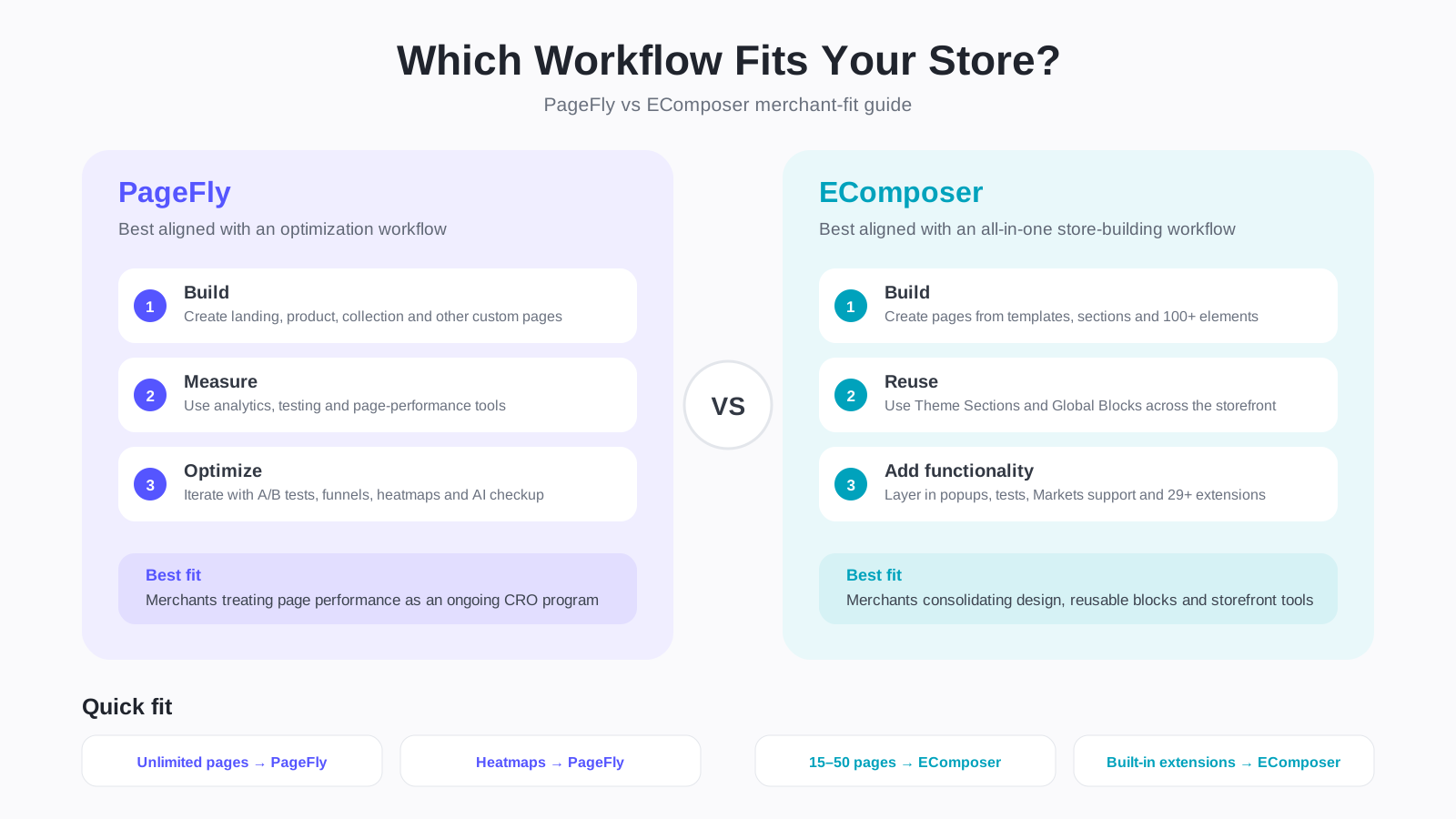
| Merchant need | Better fit | Why |
|---|---|---|
| One custom page on a free plan | Either | Both provide one live page/section |
| Around 10–15 custom pages | EComposer | Standard includes 15 at $25/month |
| Around 20–50 custom pages | EComposer | Pro provides 50 at $49/month |
| Unlimited custom pages | PageFly | Unlimited starts at $99 vs. $129 |
| Heatmaps and behavioral analysis | PageFly | Native heatmap and section-performance tools on higher tier |
| Built-in CRO/ecommerce extensions | EComposer | 29+ extensions on Pro |
| Custom cart/search layouts | EComposer | Both are explicitly documented page types |
| Reusable site-wide blocks | EComposer | Global Blocks update across placements |
| Large advertised integration catalog | PageFly | 200+ advertised integrations |
| A/B testing at lower starting price | PageFly | Optimize starts at $39; EComposer Pro is $49 |
| Page building plus ongoing CRO analysis | PageFly | CRO is central to current product direction |
| Replacing several small storefront tools | EComposer | Built-in extensions broaden its role beyond design |
PageFly or EComposer for Landing Pages?
Both are well suited to landing-page creation.
PageFly is especially relevant when the workflow continues after publishing through analytics, A/B testing, page auditing, funnels, and heatmap analysis.
EComposer becomes particularly attractive for teams producing many campaign pages because Standard and Pro provide 15 and 50 live layouts respectively, while the extension library can add storefront functionality without immediately installing another app.
PageFly or EComposer for Product Pages?
Both support custom Shopify product layouts and ecommerce elements.
PageFly combines product elements with a broad third-party integration system and its CRO toolkit.
EComposer combines product elements with Quick View, product grids, Global Blocks, popups, upsells, recommendations, and other extensions depending on plan.
Stores with complex product pages should map the exact review, subscription, options, bundle, and upsell components they need before deciding.
PageFly or EComposer for a Full Store Redesign?
EComposer has broader documented page-type coverage when the goal is to customize more storefront surfaces from one builder. Its supported templates include cart pages, search, 404, footers, product and collection templates, blogs, and standard landing pages.
PageFly covers the major page types most stores need and can create reusable sections that work alongside Shopify’s theme system.
The deciding question is whether you mainly need custom marketing/commerce pages or want the page builder to take responsibility for more of the storefront structure.
Final Recommendation
PageFly and EComposer overlap heavily as Shopify page builders, but the difference becomes clearer once page volume, CRO requirements, and built-in ecommerce functionality enter the decision.
Choose PageFly when page optimization is central to your workflow. Its current structure increasingly connects page creation with analytics, A/B testing, AI Page Checkup, funnels, heatmaps, and section-performance analysis. It also reaches unlimited publishing at $99/month.
Choose EComposer when you want more pages for a mid-tier budget or want the builder to replace several smaller storefront tools. Standard provides 15 layouts at $25/month, while Pro provides 50 plus A/B testing, Global Blocks, Shopify Markets, premium AI features, popups, and 29+ extensions at $49/month.
For merchants maintaining roughly 15–50 custom layouts, EComposer’s publishing allowances are particularly competitive. For merchants moving toward unlimited pages and deeper behavioral optimization, PageFly’s Accelerate tier changes the value equation.
Frequently Asked Questions
Is PageFly better than EComposer?
Neither is universally better. PageFly emphasizes page optimization and CRO analysis, while EComposer combines page building with broader storefront functionality and stronger mid-tier publishing allowances.
Which is cheaper?
Their entry paid plans are almost identical: PageFly Builder starts at $24/month and EComposer Standard is $25/month. EComposer provides more publishing capacity in the mid-tier range, while PageFly reaches unlimited publishing at a lower price.
Do both have free plans?
Yes. Both currently allow one published page or section on their free plans.
Which has more templates?
EComposer currently advertises 400+ page templates and 1,000+ section layouts. PageFly lists 320+ page/section templates.
Which has stronger CRO tools?
They emphasize different areas. PageFly offers an analysis-oriented toolkit with testing, funnels, AI Page Checkup, heatmaps, and section-performance reporting. EComposer combines testing and analytics with 29+ built-in extensions.
Which is better for 20–50 pages?
EComposer has a straightforward proposition in this range because Pro supports 50 live pages/sections for $49/month. PageFly Optimize starts from $39/month with 20 slots and uses an adjustable slot model.
Which is better for unlimited pages?
PageFly currently reaches unlimited publishing at $99/month. EComposer requires its $129/month Premium plan.
Can both create mobile-responsive pages?
Yes. Both document desktop, tablet, and mobile responsive controls.
Can both work with other Shopify apps?
Yes. PageFly advertises 200+ integrations and compatible Shopify App Blocks. EComposer advertises 100+ integrations across major Shopify app categories.
Continue Your Research with Blinto
Before installing either builder, compare the individual Blinto reviews as well. The PageFly review focuses on its page-building and optimization workflow, while the EComposer review covers its editor, templates, reusable components, and built-in extensions.
Reading the individual reviews alongside this comparison makes it easier to separate the features that matter for your store from the ones you are unlikely to use.