
Many Shopify themes limit how much a merchant can change. A new campaign page may need code or help from a developer. A visual page builder can make that work much faster.
Replo aims to give design and growth teams more control. It combines a page editor with mobile views, app links, analytics, and A/B tests. We reviewed these tools in a Shopify test store. We also checked Replo’s current plans and help guides.
Our main question was simple: Is Replo worth its high paid entry price?
Our short answer is yes for the right team. Replo suits brands that build and test pages often. Its editor has useful depth and clear page controls. Yet the Free plan is only for building and previewing. It cannot publish a page. Analytics and A/B tests also need a paid plan.
Small stores may find that limit hard to accept. At least one rival we tested gives free users basic analytics.
Key Takeaways
- Best for active growth teams: Replo fits teams that build campaign and product pages often.
- Free is only a test space: You can build and preview, but you cannot publish.
- Analytics needs a paid plan: The free screen shows data cards, but full tracking stays locked.
- Starter is the first live plan: It costs $119 monthly or $99 per month with annual billing.
- A/B tests look useful: We set up a draft with two versions, but we did not run it.
Our Verdict
Replo gives design teams a deep page-building space. The editor has a clear layer tree, mobile views, preview tools, and an AI edit box. It also puts analytics and tests near the page work. This can help a paid team keep related tasks in one place.
Cost is the main concern. Replo lets free users explore the editor for as long as they want. However, the Free plan cannot publish. It also does not include full analytics or A/B tests.
This makes Free useful for a trial or a mockup. It is not a plan for a live store. A brand that ships new pages each month may get fair value from Starter. A small store that needs one page now and then may not.
The editor was also slow to load in our test. It took more time to open than the other page builders in our review pilot. We did not record exact times, so this is not a lab speed test.
What Replo Offers
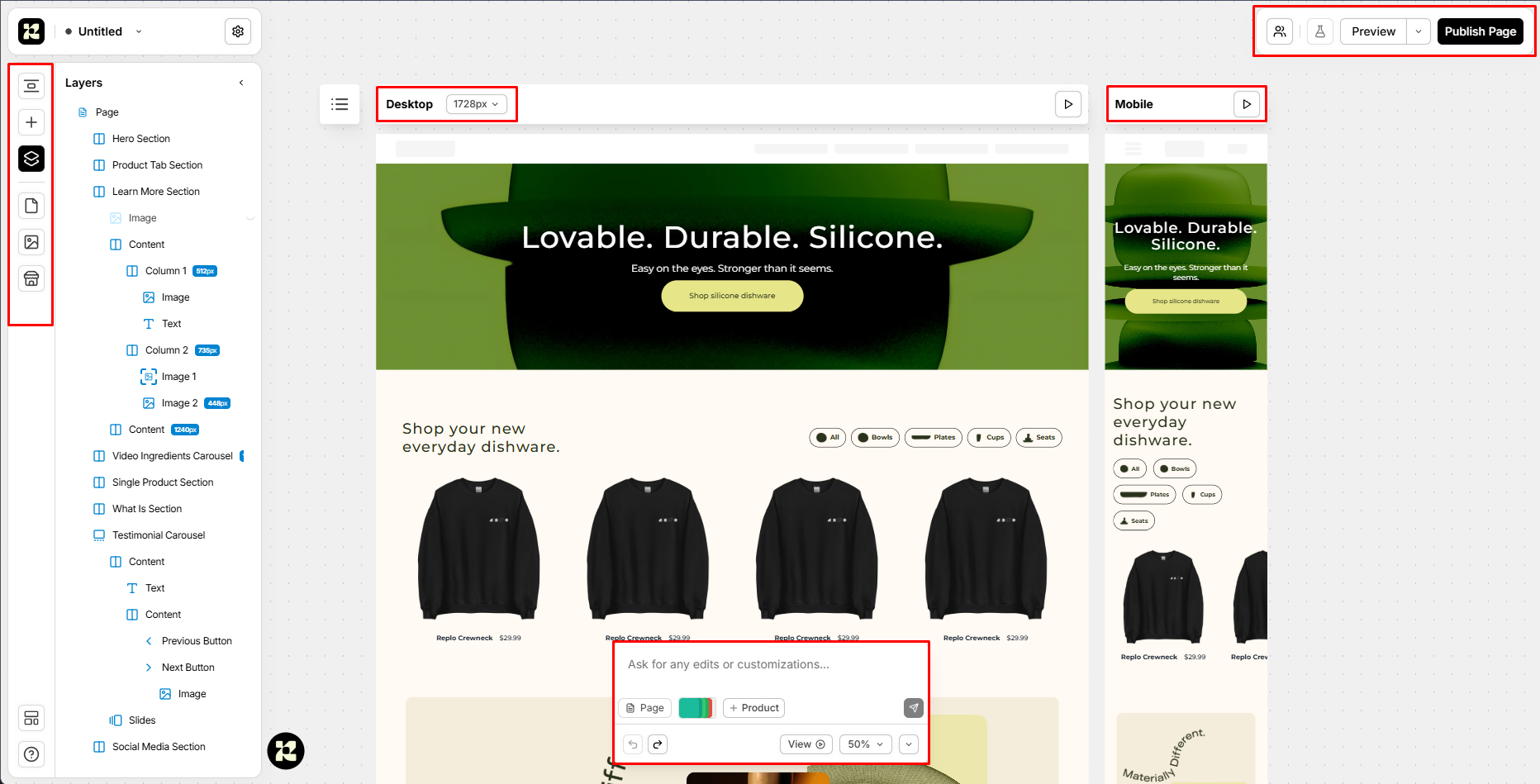
Replo can build landing pages, homepages, store sections, and product templates. The screen we tested showed a full page tree on the left. The desktop and mobile page views sat next to each other. Preview and publish buttons were easy to find.
The page tree showed sections, columns, images, text, buttons, and slides. This structure can help a designer move through a large page. It is more useful than working with one flat canvas.
Replo also showed an AI edit box at the bottom of the page. We did not use it or check its output. We can only confirm that the option was present.
Replo’s help guides describe hundreds of templates and sections. We did not count the full library in this test.
Replo now has two builder paths. The classic Shopify Theme Editor can publish into a Shopify theme. The newer AI Builder can publish to a Replo domain or a custom domain. Our screen matched the classic visual editor. Merchants should check which builder they select during setup.
What We Tested
This was a Level 2 partial hands-on test. We used a Replo workspace linked to a Shopify test store on September 15, 2026.
We reviewed a page inside the editor. We checked its layer tree, desktop view, mobile view, and AI edit box. We also opened the app list, Analytics area, and A/B test setup.
The editor and dashboard loaded more slowly than the rival page builders we had tested. This was a clear hands-on concern. It was not a timed test, so we cannot give an exact gap.
We did not build the shown page from a blank start. We also did not publish it or test it on real phones. We did not measure live store speed. We did not check analytics data or run a live A/B test. We did not test support or every paid tool.
These limits matter. A button or screen can prove that a tool exists. It cannot prove that the full task works well.
The Editor Has Depth, but Loading Felt Slow
The editor was the strongest part of our test. Its page tree gave the design a clear order. A designer could see how each section and item fit together.
The desktop and mobile views were also helpful. They kept screen size in view while we worked. This may help teams catch layout issues sooner. A live page still needs checks on real phones and tablets.
Loading time was the main problem. The editor and dashboard took more time to open than the other builders in our pilot. That wait can break the flow of quick campaign work. It may become more annoying when a team moves between many pages.
We did not use a timer or repeat the test under set network rules. We cannot say that every user will see the same result. We also cannot use this finding to judge live store speed. It only applies to the editor and dashboard we used.
Integrations Cover Key Store Tasks
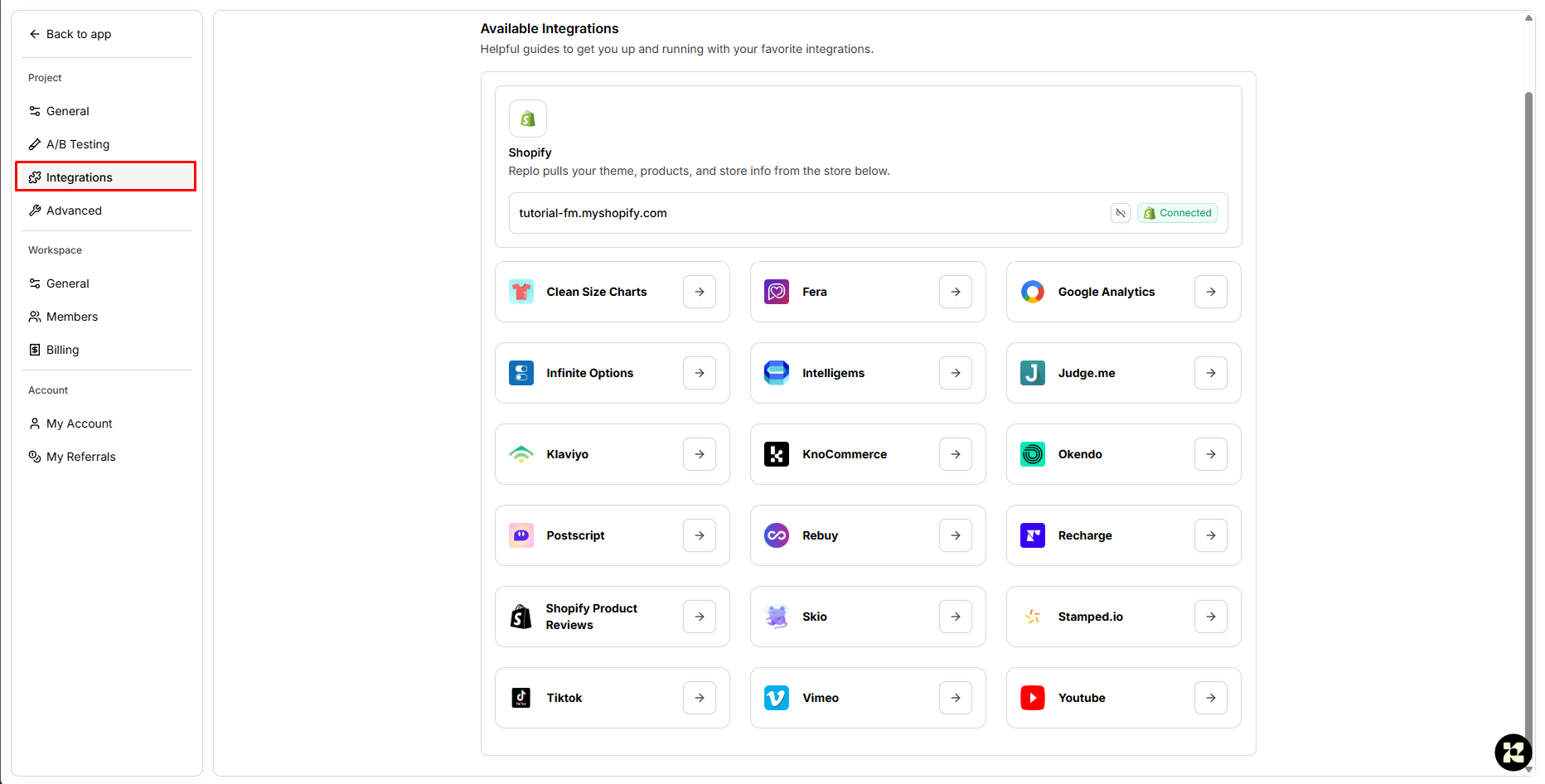
The app list linked Replo with several common store tools. We saw review apps such as Judge.me, Fera, Okendo, and Stamped.io. We also saw Recharge and Skio for subscriptions. Marketing and tracking choices included Klaviyo, Google Analytics, and TikTok.
These links can matter on a sales page. A page may need reviews, a plan choice, email tools, and tracking. Replo gives teams one place to find those links.
We only saw the list. We did not set up or test any of these apps. A team should test each key app before it moves a live page to Replo.
The Free Plan Locks Useful Analytics
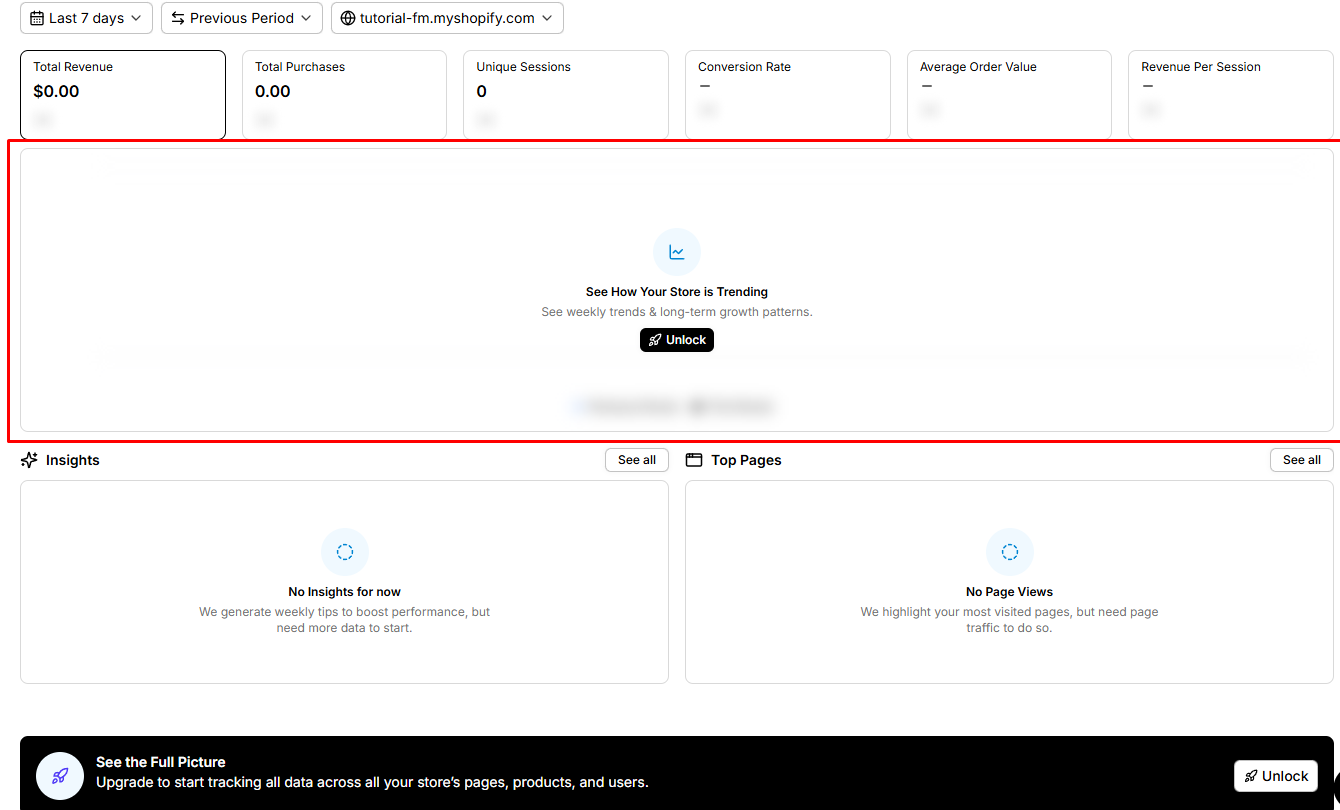
Replo has an Analytics area with key store data. The screen listed sales, orders, visits, conversion rate, average order value, and revenue per visit.
The free screen did not give us the full tool. Its trend area showed an Unlock button. A notice also said an upgrade was needed to track all page, product, and user data.
Replo’s own Analytics guide confirms this limit. Analytics is for paying customers. The paid tool includes page data, sales tracking, trends, and dashboard views.
This is a real weakness for merchants on a tight budget. In our September 1, 2026 PageFly review, analytics worked on the Free plan. The two tools do not track the exact same things. This does not make PageFly better in every case. It does show that Replo puts useful data behind a higher price wall.
The Free plan also cannot publish. A merchant can learn the editor without paying. They cannot publish a page and use Replo to track it on that plan.
A/B Testing Looks Useful but Was Not Completed
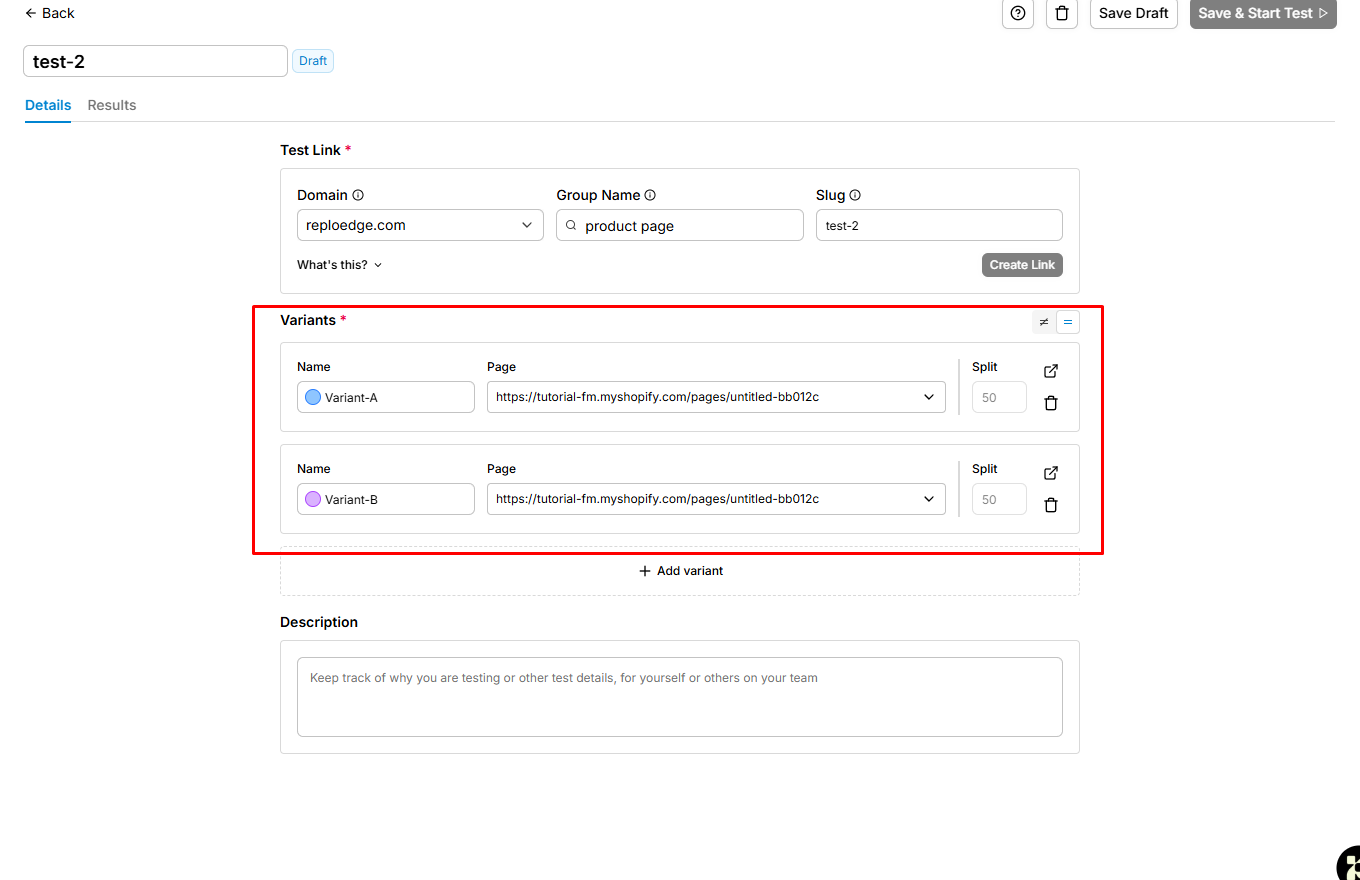
We opened the A/B test tool and made a draft. It had one test link and two page versions. Each version had half of the traffic. The screen also let us add more versions and write notes.
Replo says paid plans include this tool. Its guides also list reusable test links, built-in data, and no fixed limit on variants. This could help teams that run tests for ads and campaign pages.
We did not start the test. No real traffic passed through the link. We did not check the results page. The screen proves that setup is possible. It does not prove that the test or reports work well.
Pricing and Value
We checked Replo’s prices on September 15, 2026. We used its price page, help guides, and Shopify App Store listing. The main price page shows the lower annual rate first.
| Plan | Price | What it means for a merchant |
|---|---|---|
| Free | $0 | Build and preview with no time limit, but no publishing |
| Starter | $119 monthly or $99/month billed yearly | First live plan; starts with 15 published Shopify Theme Editor items, one store link, Analytics, and A/B tests |
| Pro | $599 monthly or $499/month billed yearly | Adds far higher limits and unlimited Shopify Theme Editor publishing |
| Custom | Custom | Custom limits and large-team support |
Free is not a true live plan. It can help a team learn the editor and make a mockup. Starter is the first plan that can support real store work.
Starter makes more sense when a team ships many pages. The fee can then support work across campaigns and tests. A store that builds one or two pages a year may get poor value.
Replo has changed its plan names and product setup over time. Its two builders also have different rules. Check the billing screen before you pay. Make sure the plan fits your builder, page count, and traffic.
What We Liked
- Clear page structure: The layer tree keeps large pages in order.
- Mobile work stays in view: Desktop and mobile previews sit in the same editor.
- Useful app list: Replo lists tools for reviews, subscriptions, email, and tracking.
- Build and test in one system: Paid teams can move from page work to data and tests.
What Could Be Better
- Free cannot publish: It is a test space, not a live plan.
- Analytics needs payment: Free users can see the area but cannot use the full tool.
- Starter costs a lot for light use: Small stores may not build enough pages to gain fair value.
- The editor loaded slowly: It took longer to open than the other builders in our pilot.
- The two builder paths may confuse new users: Each path has different publishing rules.
- Key results remain untested: We did not publish a page, test live speed, or run an experiment.
Who Replo Is Best For
Replo is best for Shopify brands, agencies, and growth teams that build pages often. It fits teams that need shared design tools and plan to run tests. It can also suit stores that rely on several app links.
The cost is easier to defend when the team has steady campaign work. It may also suit designers who value deep page control more than a low fee.
Who Should Consider an Alternative
Small stores should compare other tools first. The same is true for teams that need a useful free plan. PageFly may be worth a test when a lower paid price and free analytics matter.
GemPages and EComposer use other page limits and paid feature rules. These are useful options to test, not ranked winners.
Build the same sample page in two tools. Then compare the live page, the editor speed, and the full monthly cost.
Final Verdict
Replo has a strong set of design and growth tools. Its editor gives teams clear page structure and mobile views. The app list, Analytics area, and A/B test setup also fit serious campaign work.
The limits are just as clear. Free users can build and preview, but they cannot publish. Analytics also needs a paid plan. The editor and dashboard were slower to load than the rival builders in our pilot.
Replo is worth a close look for teams that ship pages and run tests often. It is harder to suggest for a small store with light page needs.
Start with one sample campaign page. Check it on real devices. Test each key app link. Note how often the team waits for the editor. Upgrade only when the full workflow can support the cost.
Frequently Asked Questions
Is Replo free?
Replo has a Free plan with no time limit. You can build and preview pages, but you cannot publish them.
Is Replo Analytics free?
No. The free screen shows the Analytics area, but full tracking stays locked. Replo says Analytics is for paying customers.
How much does Replo cost?
Starter costs $119 monthly or $99 per month with annual billing. Pro costs $599 monthly or $499 per month with annual billing. Replo also offers custom plans.
Does Replo include A/B testing?
Yes, on paid plans. We made a draft with two page versions. We did not run the test or check its data.
Does Replo load slowly?
The editor and dashboard loaded more slowly than the other page builders in our pilot. We did not run a timed test. This finding does not cover the speed of a live store page.
What apps work with Replo?
The list we saw included Shopify, Google Analytics, Klaviyo, Judge.me, Fera, Okendo, Stamped.io, Recharge, Skio, Rebuy, and Postscript. We saw these options but did not test them.