
Shopify themes work well for most stores. The problem starts when a merchant needs a custom landing page fast. Page builders exist to fill that gap. Omnise goes one step further: it says AI can build the first draft for you.
We spent more than an hour testing Omnise on a Shopify development store. We completed onboarding, changed background images in the editor, checked the mobile preview, published a page successfully, ran the Store Health audit, and reviewed the template library and pricing.
The key question was simple: can a merchant try Omnise’s AI page generation before paying?
In our test, the answer was no. The Free plan showed a page-generation limit of 0/0 before we created anything with AI. That means the Free plan lets you test the editor, templates, responsive preview, and publishing workflow, but not the feature that gives the app its name.
Quick Verdict
Omnise is a capable template-based page builder with a clean editor, modern templates, a useful Store Health audit, and built-in A/B testing on paid plans.
The editing and publishing workflow worked properly in our test. We changed background images, previewed the page on mobile, and published it to the storefront without a problem. The mobile layout looked fine, and we did not see Omnise branding on the published page we checked.
The main issue is still the free AI experience. Omnise recommends Build with AI during onboarding, but our Free-plan account gave us zero full-page AI generations. You only discover that after entering the AI workspace.
If you want to test the editor and templates, the Free plan is useful. If you want to judge the AI itself, you should expect to move to a paid plan.
Key Takeaways
- The Free plan allowed zero full-page AI generations in our test.
- We spent more than one hour testing the app hands-on.
- We changed background images, checked mobile preview, and published a page successfully.
- The mobile layout looked fine in our test.
- The published page we checked did not show Omnise branding, even though the plan/listing says the Free slot includes branding or a watermark.
- In our homepage template view, nine of ten visible templates were marked Pro.
- Current public pricing starts at $19.99/month for Start; Pro is $39.99/month and Max is $79.99/month.
- Omnise is currently marked Built for Shopify and is the renamed version of Beae.
What Omnise Offers
Omnise is more than a basic page builder. Its main navigation includes Pages, Theme sections, Store Health, A/B Testing, Pricing plans, and Preferences.
The current Shopify App Store listing identifies the developer as Omnise.com, marks the app Built for Shopify, and says Omnise was formerly Beae. The listing says the app first launched on November 22, 2021.
The product idea is easy to understand. Build a page, improve it, and test it inside the same app.
That is a strong direction for merchants who want fewer tools. The question is how much of that workflow you can actually test before paying.
Setup Takes One Click
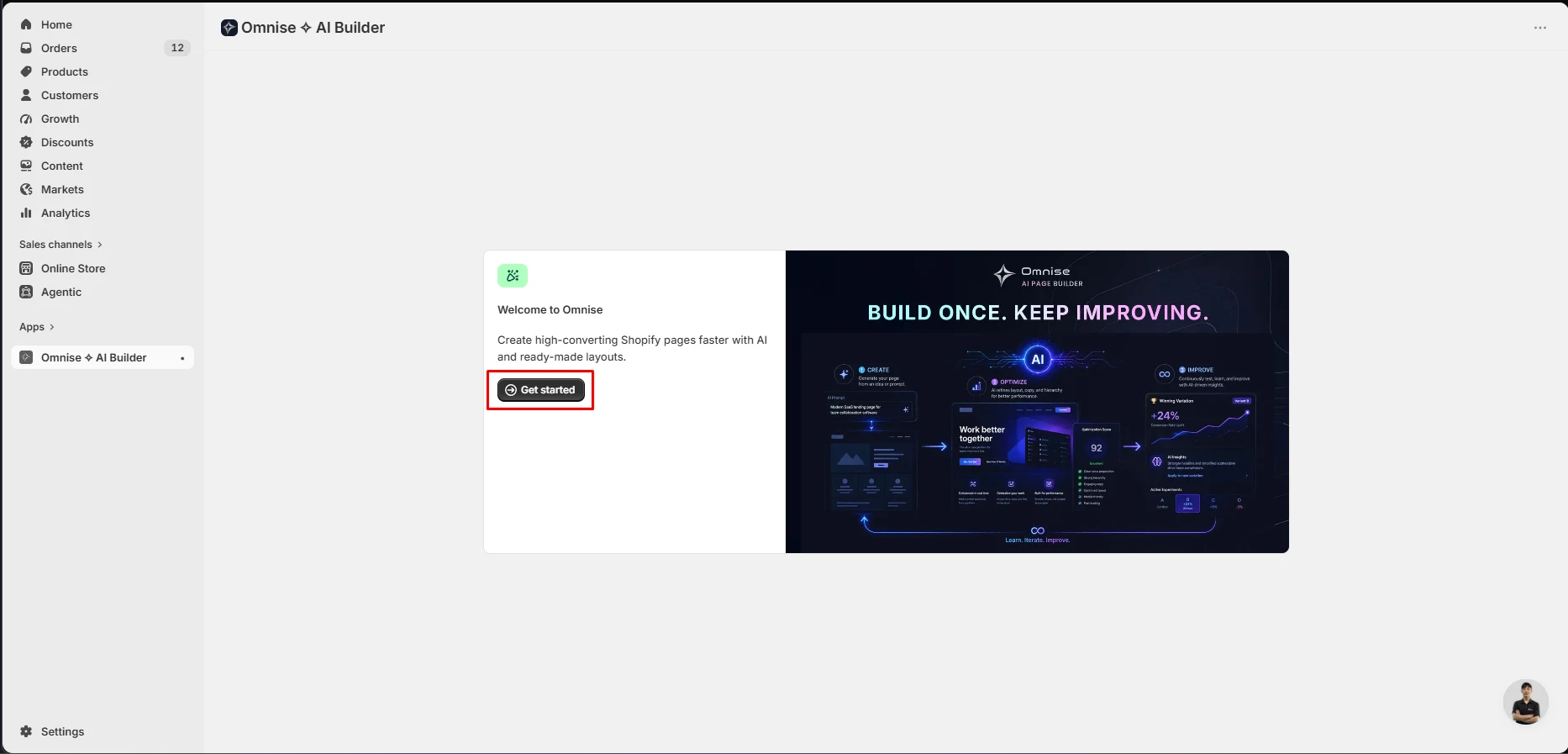
The first screen is simple. It explains the product and gives you one Get started button.
We did not see a long setup wizard, account-creation step, theme-embed flow, or data import before reaching the builder.
That makes the first-run experience fast.
Omnise Pushes the AI Route First
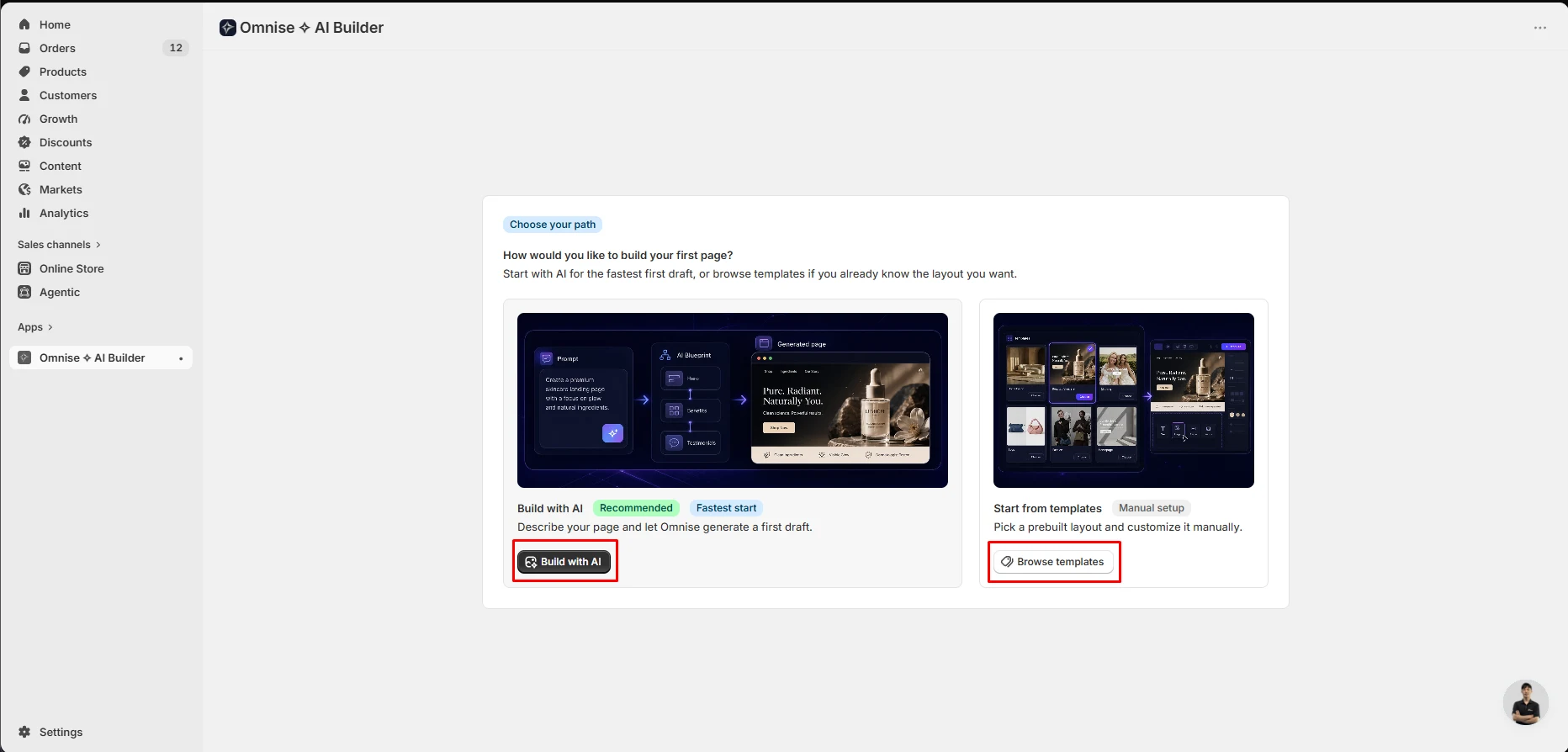
After setup, Omnise asks how you want to build your first page.
The two choices are Build with AI and Start from templates. The AI route is marked Recommended and Fastest start. The template route is described as manual setup.
That makes the AI route feel like the default choice. On the Free plan, that creates the biggest problem we found.
What We Tested
We tested Omnise on a Shopify development store on September 16, 2026, for more than one hour.
We used the Free plan and completed the parts of the workflow that the plan allowed. We:
- completed onboarding;
- opened the AI page-generation workspace;
- browsed the template library;
- opened a template in the editor;
- changed background images;
- checked the mobile preview;
- published a page successfully to the storefront;
- ran a Store Health scan;
- checked the in-app pricing screen.
The published page worked properly in our test. Its mobile preview also looked fine. We did not see Omnise branding on that published page, even though the Free-plan wording says branding or a watermark is included.
We did not generate a full AI page because the Free plan blocked that action. We also did not run an A/B test, test translation, contact support, measure page speed, or test paid AI output.
Because the headline AI feature could not be exercised, this remains a Level 2 — Partial Hands-On Test. We can judge the Free-plan experience, editor, publishing flow, templates, responsive preview, audit, and current pricing. We cannot judge the quality of Omnise’s generated AI pages.
The Free Plan Did Not Let Us Generate an AI Page
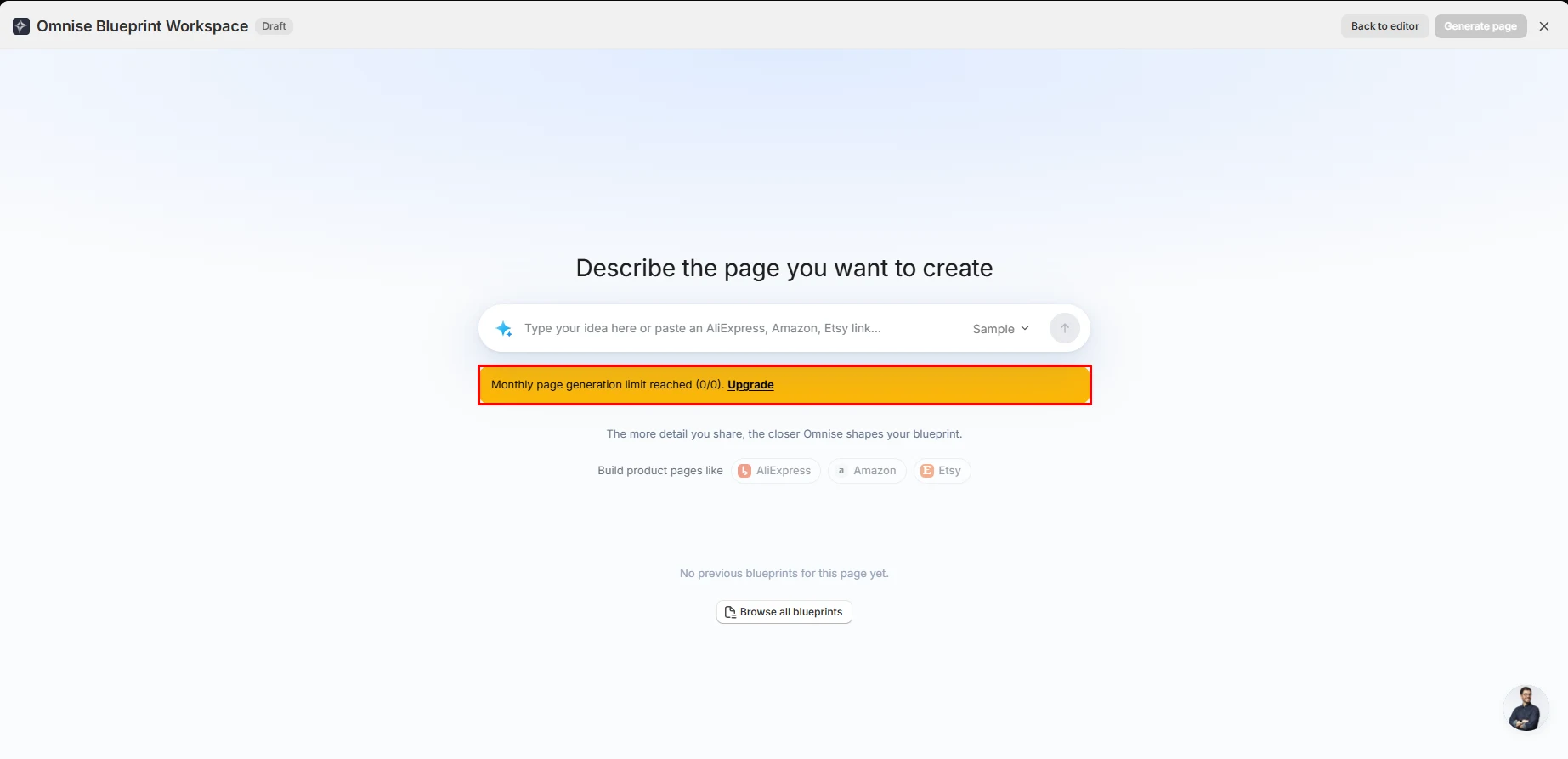
This was the most important finding in our test.
The AI workspace looks ready to use. It asks you to describe the page you want and also accepts product links from marketplaces such as AliExpress, Amazon, and Etsy.
But the screen showed this message on first use:
“Monthly page generation limit reached (0/0). Upgrade.”
The 0/0 limit matters. We had not used a generation. Our tested account simply did not include one.
There is one important source conflict. The current Shopify App Store listing describes the Free plan as AI usage tier 01, while our in-app Free-plan screen showed AI Tier 0 and blocked full-page generation at 0/0.
That may reflect timing, account rules, or a difference between section-level AI and full-page generation. What matters for this review is the direct result: we could not generate a full AI page on the Free plan we tested.
The problem is not only the limit. It is when Omnise reveals it.
A new merchant is told that Build with AI is the recommended and fastest route. The merchant then enters the AI workspace and learns that the tested free quota is zero.
A clearer onboarding message would set the right expectation before the merchant chooses that path.
The Free Plan Is Better for Templates
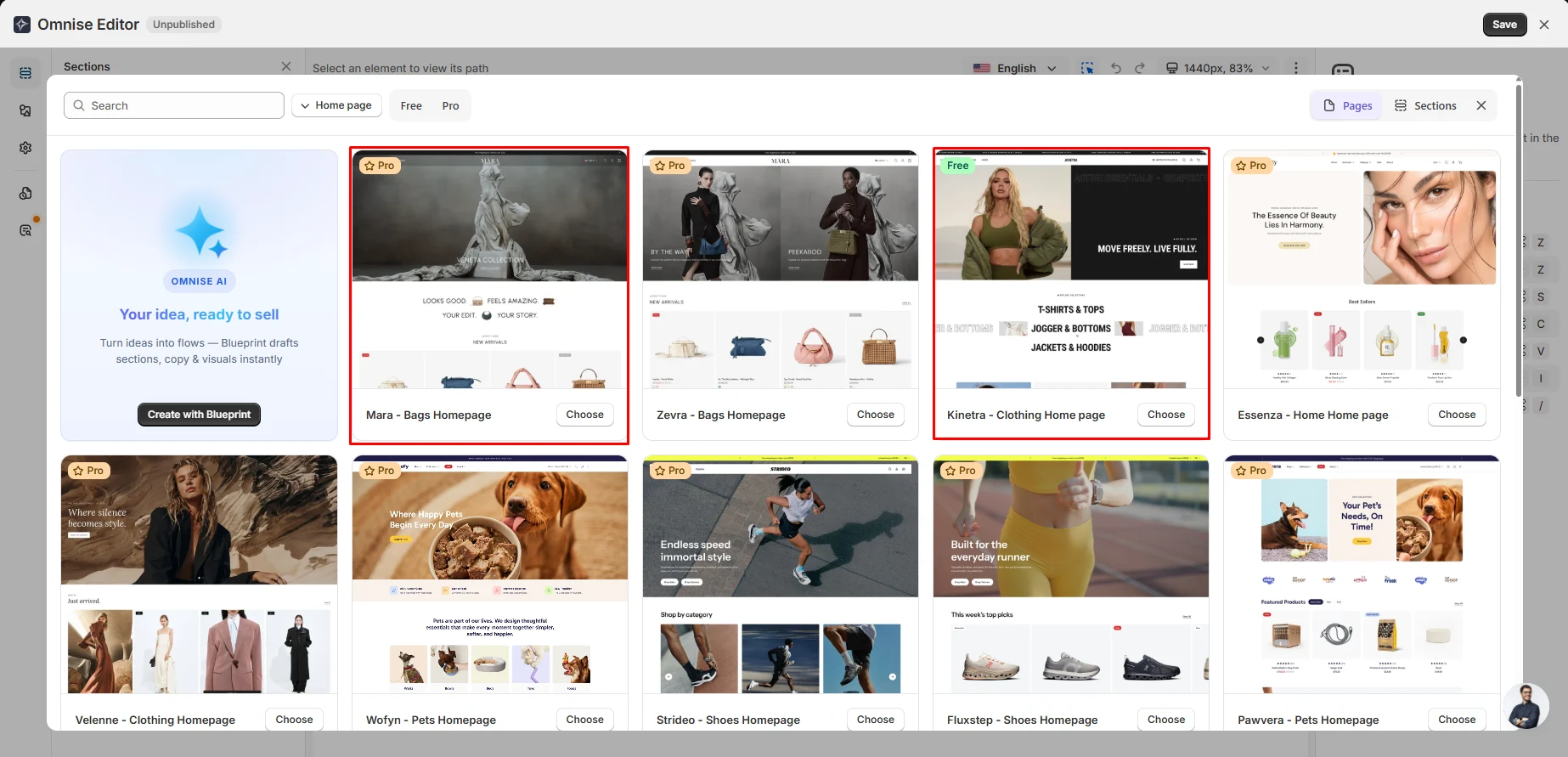
The template route was more useful.
Omnise separates Pages and Sections and provides Free and Pro filters. The layouts we saw looked current and suitable for modern ecommerce stores.
The free selection was much smaller than the full library. In the homepage view we captured, nine of ten visible templates were marked Pro and one was Free.
That is only one filtered view, so we are not treating it as the ratio for the whole library. Still, it shows what a free merchant should expect: access to the editor, but a narrower template choice.
The Editor Has Real Controls
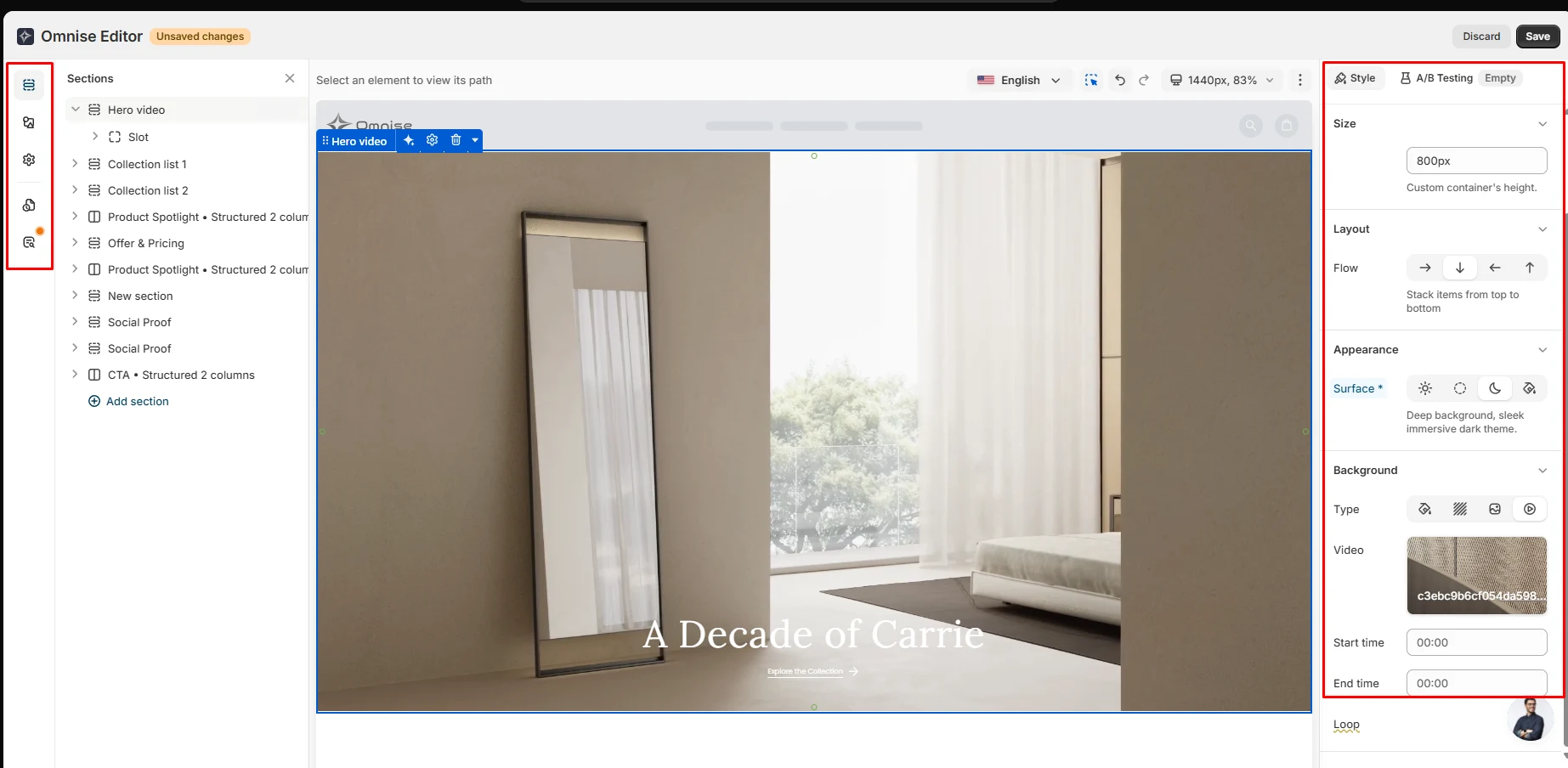
The Free editor did not feel like a simple preview.
We could see a full page structure with separate sections. The style controls included layout options, height settings, appearance controls, and video background settings. We also saw undo, redo, viewport controls, and a language selector.
We went beyond inspection and made a real edit by changing background images. The edit worked as expected. We also checked the page in mobile preview, where the layout looked fine in our test.
The plan screen describes Free as having Limited Editor features, so we cannot say every control is included. We did not map each locked feature.
What we can say is that the Free editor was usable enough to make changes, preview them responsively, and publish a working page.
Publishing Worked — and We Did Not See the Branding the Plan Mentions
We published one page from Omnise to the Shopify storefront, and it worked properly.
That matters because publishing is where a page builder stops being a demo and becomes useful. In our test, we could move from editing to a live storefront page without a publishing failure.
There was also one unexpected detail. The in-app Free plan screen says the single published slot comes with Omnise branding. The current Shopify App Store listing similarly describes the Free slot as including a watermark. On the page we published and checked, we did not see either.
We are treating this as a test result, not a universal rule. Branding could depend on template, account state, placement, or another condition we did not test. But for our published page, it was not visible.
Store Health Is Useful, but the Fixes Lead to an Upsell
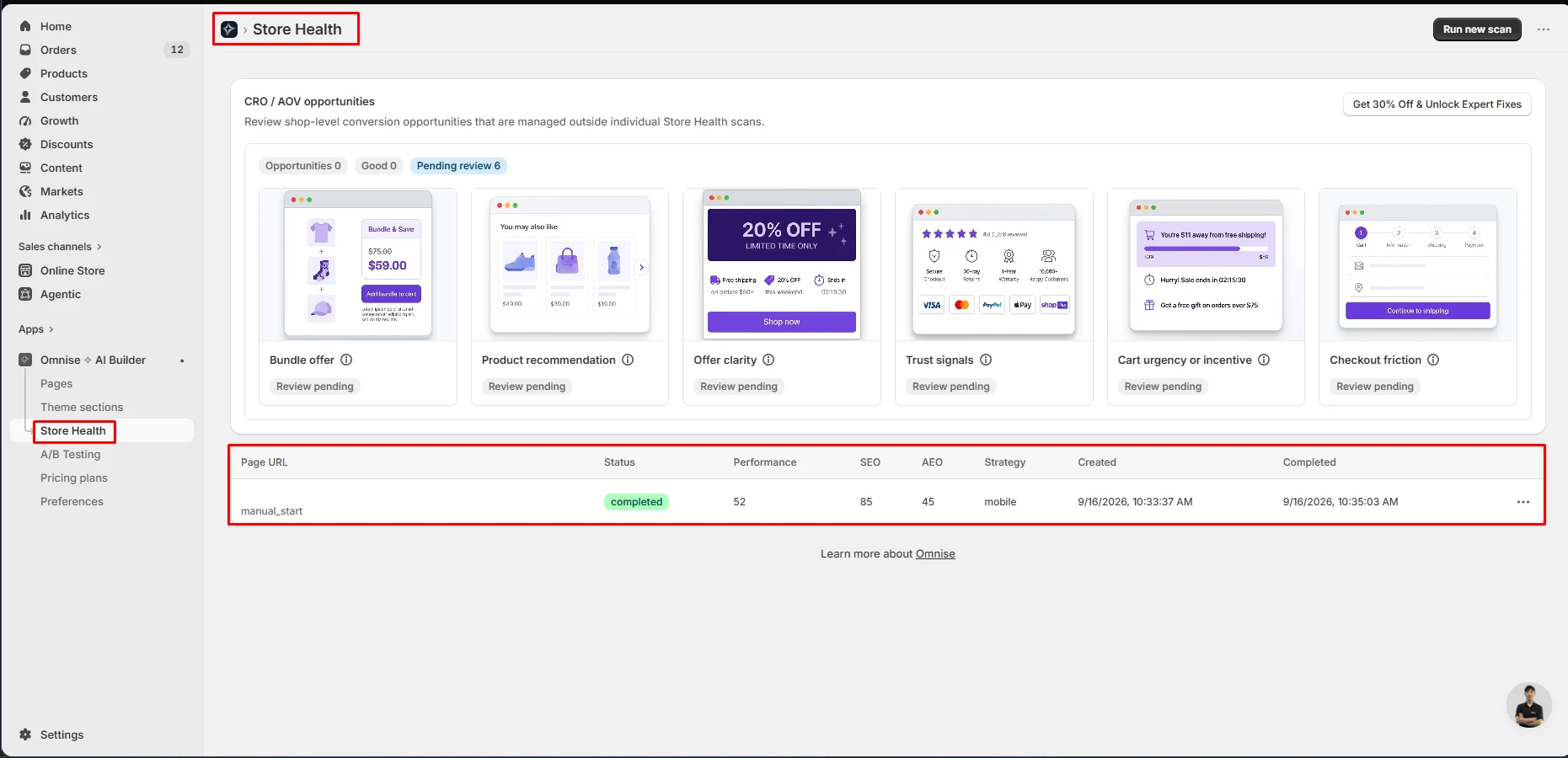
The Store Health scan worked in our test and finished in about ninety seconds.
Our test store received these scores:
- Performance: 52
- SEO: 85
- AEO: 45
The AEO score is an interesting addition because many store tools still focus only on SEO and speed.
Below the scores, Omnise showed six CRO and AOV areas to review. They covered issues such as offer clarity, trust signals, recommendations, urgency, bundles, and checkout friction.
All six were marked Review pending. The interface also promoted a paid offer to unlock expert fixes.
That still gives the Free audit some value. A merchant gets a quick snapshot and a list of areas worth checking. But the deeper help sits behind the upgrade.
Pricing and Value
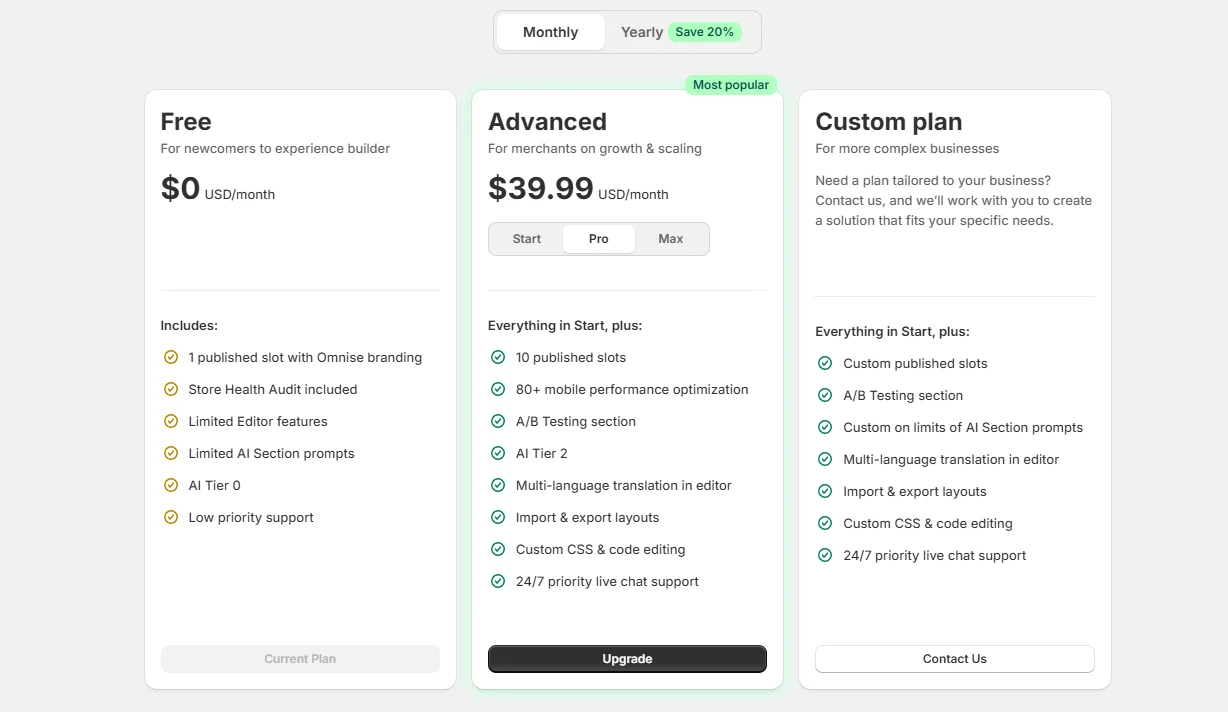
We checked the in-app pricing screen during testing, then verified the current public plans on September 17, 2026.
| Plan | Current public price | Published slots | Key details |
|---|---|---|---|
| Free | $0 | 1 | Listing says watermark, 10 draft pages, AI usage tier 01, low-priority live chat |
| Start | $19.99/month | 3 | Section-level A/B testing, AI usage tier 02, live chat |
| Pro | $39.99/month | 10 | Section-level A/B testing, AI usage tier 03, 24/7 live chat |
| Max | $79.99/month | 25 | Section-level A/B testing, AI usage tier max, high-priority live chat |
The Shopify listing also shows annual billing at a 20% saving.
This public pricing fills a gap in our original screenshot. During hands-on testing, the in-app screen showed Pro at $39.99 but did not expose the Start and Max prices in the captured view. We can now confirm that Start is the entry paid tier at $19.99 per month.
The official pricing page also says no credit card is required to start and mentions a seven-day refund period. It says published pages remain unaffected after uninstall, while Omnise-side page data is kept in trash for 30 days before permanent deletion.
The Free-plan branding conflict still remains. The listing says watermark, the in-app plan says branding, but our published page showed neither visibly.
What Merchants Report
The Shopify App Store rating is currently around 4.9 stars, with roughly 889 reviews at the time of our September 17 research refresh.
Most reviews are positive. A common theme is ease of use and responsive support, including merchants who say support staff helped them directly with setup or fixes.
We also found a small number of critical reviews. One three-star review described the product as promising but still beta-like, mentioning dashboard slowness and weak handling of some AI image-editing instructions. A one-star review reported an unexpected server error after several hours of work.
Those are merchant reports, not findings from our test. We did not encounter the same server error, and we did not test paid AI editing deeply enough to confirm or reject those concerns.
What We Liked
- Fast setup with very little friction.
- Modern templates with clear Free and Pro labels.
- A real editor that let us change background images.
- Mobile preview looked fine in our test.
- Publishing a page worked properly.
- Store Health gives quick, concrete scores.
- A/B testing is built into the same app.
- The current public listing makes plan pricing much clearer than our original in-app capture did.
What Could Be Better
- Our Free plan did not allow even one full-page AI generation.
- The onboarding still recommends the AI route before revealing that limit.
- The Free-plan AI tier wording differs between the current public listing and what our tested account showed.
- The listing says the Free page includes a watermark, while our published page did not show visible branding.
- Most templates in our captured homepage view were Pro.
- The audit shows useful issues, but the deeper fixes are part of an upsell.
Who Omnise Is Best For
Omnise is a better fit for merchants who want a template-based page builder now and may pay for AI, A/B testing, translation, or custom code later.
It may also suit teams that prefer to keep page creation and testing inside one app.
The Free plan is useful if your goal is to judge the editor, templates, mobile preview, and publishing workflow before paying.
Who Should Look Elsewhere
Omnise is a weaker fit if your main goal is to test AI page generation for free. The Free account we tested did not let us do that.
If a fully unbranded Free-plan page is critical, verify that point on your own store. The public listing and plan screen say branding is included, while the page we published did not show any visible Omnise branding.
For other page-builder options, Blinto also has hands-on reviews of PageFly, GemPages, EComposer, and Shogun.
Those reviews were completed separately, on different dates and plans. They are useful as context, not as a controlled ranking.
Final Verdict
Omnise has a solid editor, good-looking templates, a useful Store Health tool, and a publishing workflow that worked properly in our test.
After more than an hour using it, our reviewer impression was straightforward: publishing and editing worked well, but the AI positioning felt misleading because the Free plan did not let us test the feature.
Our view is simple: consider Omnise for its editor and templates, but do not install the Free plan expecting to test full-page AI generation.
If AI is the reason you are interested, the current paid entry point is Start at $19.99 per month. Test one generated page before moving important store pages into the app.
Frequently Asked Questions
Does Omnise Have a Free Plan?
Yes. The current Shopify listing shows a Free plan with one published slot, 10 draft pages, AI usage tier 01, and low-priority live chat. In our tested account, the in-app screen showed AI Tier 0 and full-page generation was blocked at 0/0.
Can You Generate an AI Page on the Free Plan?
Not in our test. The AI workspace showed “Monthly page generation limit reached (0/0)” before we generated anything.
Can You Publish a Page on the Free Plan?
Yes. We published one page successfully to our Shopify development storefront. It worked properly, and the mobile preview also looked fine.
Does the Free Published Page Show Omnise Branding?
The current listing says the Free published slot includes a watermark, and the in-app plan screen says it includes Omnise branding. However, we did not see visible branding on the page we published and checked.
How Much Does Omnise Cost?
Current public pricing is Free, Start at $19.99/month, Pro at $39.99/month, and Max at $79.99/month. Annual billing is also available.
Does Omnise Include A/B Testing?
Yes, section-level A/B testing is listed on paid plans. We did not run an A/B test during this review.
Is Omnise the Same App as Beae?
Yes. The current Shopify App Store listing says Omnise was formerly Beae.
Is Omnise Built for Shopify?
Yes. The current Shopify App Store listing marks Omnise as Built for Shopify.