
Shopify themes work well for routine store pages. They become more restrictive when a merchant needs campaign landing pages, custom product layouts, or a page that does not follow the theme’s standard structure.
Shogun offers a visual way to build those pages. We tested its Shopify connection flow, page-creation choices, template library, editor, responsive controls, media library, and plan screen. Our main question was simple: Does Shogun offer enough value to justify starting at $39 per month when several competing page builders offer limited free publishing?
Our answer is that Shogun is most relevant to merchants who expect to publish several custom pages and can use its 25-page Build allowance. Its free Draft Mode is useful for evaluating the editor, but it cannot publish a page. The next major step after Build is Grow at $199 per month, so stores should understand their page count and feature needs before committing.
Key Takeaways
- Best for stores with regular page work: Build includes up to 25 published pages, templates, page analytics, and reusable content sections for $39 per month.
- Free means draft-only: Draft Mode lets merchants explore the visual builder and templates, but it allows zero published pages.
- The paid jump is significant: Grow removes the published-page limit and adds scheduling, advanced media management, and global content sections, but costs $199 per month.
- The editor exposes detailed controls: Our test showed responsive views, layout elements, Shopify elements, animation, spacing, visibility, and custom CSS controls.
- Live output remains unverified: We did not capture a published storefront page, real-device behavior, page speed, or conversion results.
Our Verdict
Shogun is a capable-looking visual page builder with a clear path from templates or a blank page into a detailed editor. The test evidence showed a broad element library, responsive preview controls, reusable content options, and a separate settings panel for layout and styling.
The commercial decision is less simple. Draft Mode is free, but it is an evaluation environment rather than a free publishing plan. Build costs $39 per month and supports 25 published pages. That allowance may suit a merchant running several campaigns or replacing multiple theme pages. Stores that need unlimited publishing face a steep move to Grow at $199 per month.
Our verdict is Consider. Shogun deserves a trial when a store expects to use its 25-page allowance or needs the workflow shown in the editor. Merchants who only need one or two simple pages should compare lower-cost builders or their Shopify theme first. Before paying, build one representative page in Draft Mode, start the trial only when ready to publish, and verify the result on a real storefront.
What Shogun Offers
The Shopify App Store listing names the product Shogun — Landing Page Builder and the developer Shogun Labs, Inc. The listing marks it as Shopify Plus Certified. It does not display a Built for Shopify badge as of September 14, 2026.
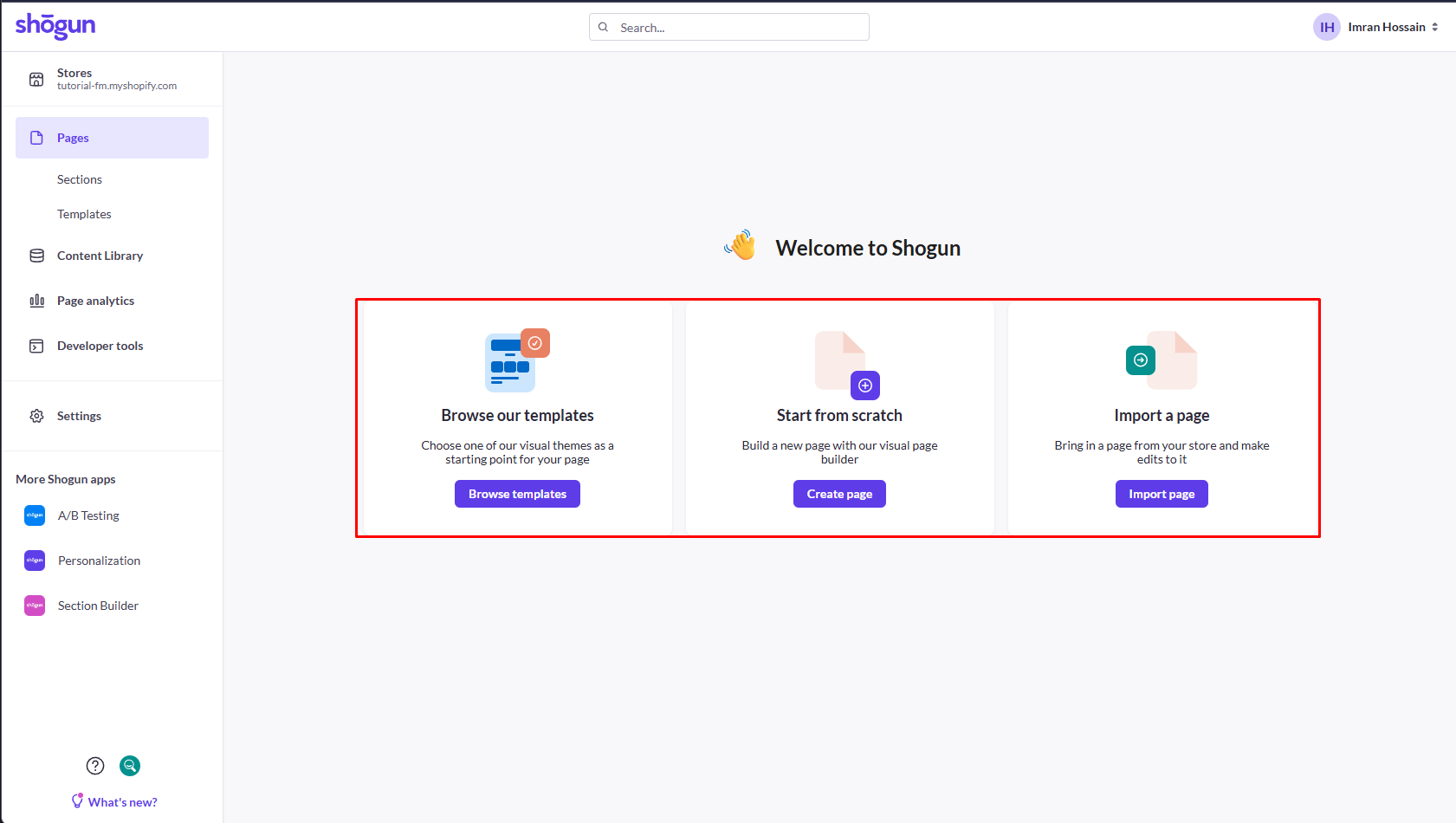
The dashboard gave us three ways to begin:
- browse Shogun’s templates,
- create a page from scratch,
- or import an existing store page and edit it.
The app can work with landing pages, home pages, product and collection pages, blog posts, theme sections, and other custom page types. Its editor includes structural elements, content elements, Shopify-specific blocks, responsive views, and custom-code options.
Shogun also promotes page analytics, reusable content, global content, scheduling, content syncing, and CMS tools. Access depends on the plan. A/B testing is not part of this Page Builder listing; the Shopify App Store directs merchants to Shogun’s separate A/B Testing app.
What We Tested
Imran conducted a partial hands-on test on September 14, 2026. The supplied evidence covered:
- connecting a Shopify test store to Shogun,
- the main page-building choices,
- browsing the template library and its categories,
- opening a template inside the visual editor,
- reviewing structural, content, and Shopify elements,
- checking desktop, tablet, and mobile editor views,
- opening container design and layout controls,
- reaching the media-upload area,
- and reviewing the complete in-app plan screen.
The screenshots do not identify whether a paid trial was activated. We did not verify a completed media upload, a published storefront page, theme integration after publishing, a real-device result, page speed, analytics, support, A/B testing, personalization, content syncing, or conversion performance.
For those reasons, this is a Level 2 — Partial Hands-On Test, not a full end-to-end evaluation.
Blinto sells no page builder, has no affiliate arrangement with Shogun, and received no payment for this review. The screenshots from Imran’s test are the main evidence. We also checked Shogun’s official pricing page and the Shopify App Store listing on September 14, 2026.
Building a Page
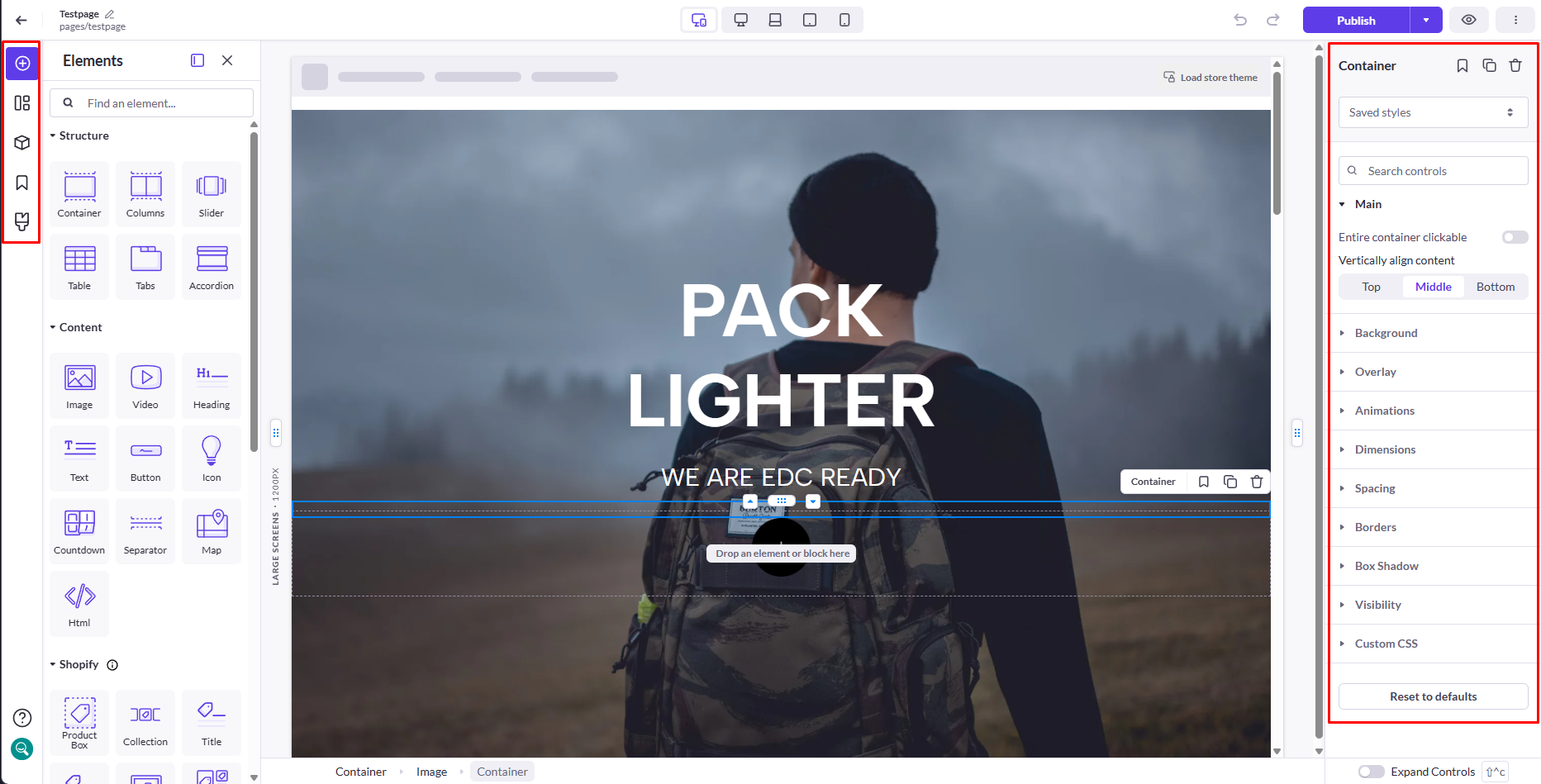
The editor places the page canvas in the middle, element choices on the left, and settings for the selected item on the right. This layout keeps page structure and styling controls visible at the same time.
The structural group in our test included containers, columns, sliders, tables, tabs, and accordions. Content choices included images, video, headings, text, buttons, icons, countdowns, separators, maps, and HTML. Shopify-specific options such as product boxes, collections, and titles appeared in their own group.
The selected container’s settings included vertical alignment, background, overlay, animations, dimensions, spacing, borders, box shadow, visibility, and custom CSS. Desktop, tablet, and mobile buttons were available above the canvas.
These screens show that merchants can handle a large amount of layout work visually. They do not prove that every page will be easy to build or maintain. We did not record the total build time, test a large production page, or measure editor responsiveness under heavy use.
Choosing a Template
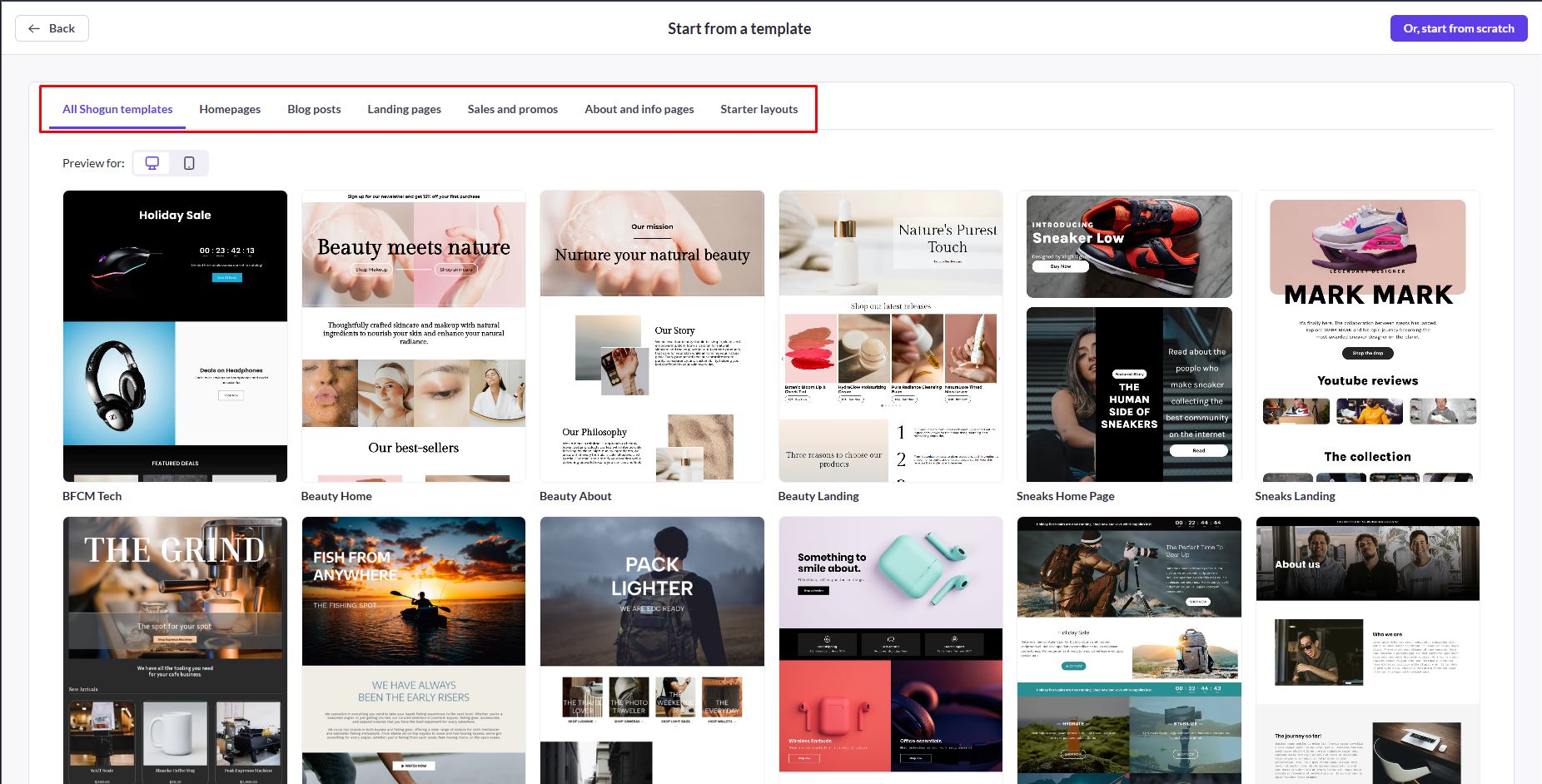
The template library grouped designs into home pages, blog posts, landing pages, sales and promotions, about and information pages, and starter layouts. It also offered desktop and mobile preview controls and a direct route to start from scratch.
Our editor evidence showed the “Pack Lighter” design open on a test page. That confirms a template can be taken into the editor and modified with the same element and container controls. We did not publish this design or compare every template category.
Uploading Media
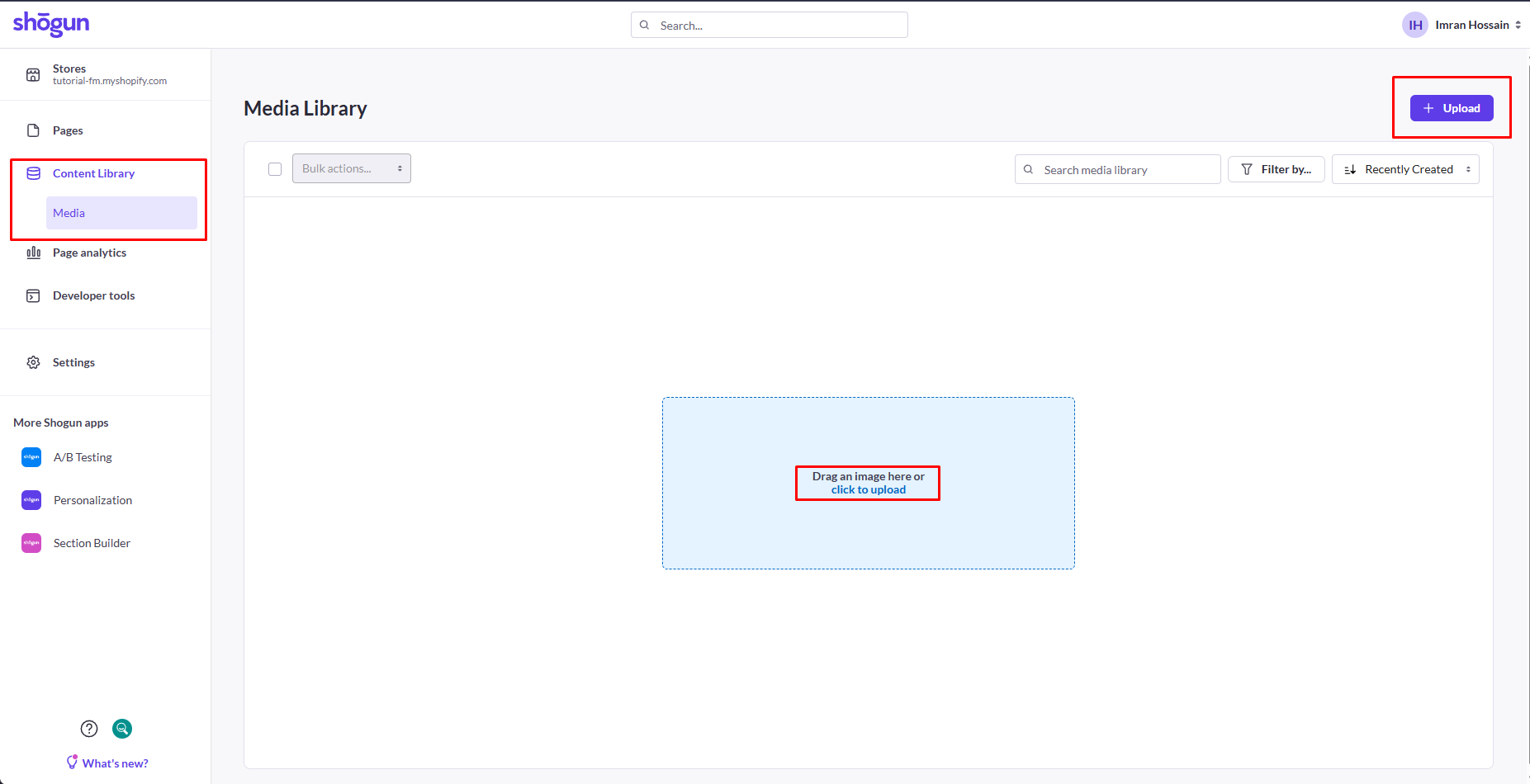
The media library provided an Upload button and a drag-and-drop area. It also included search, filtering, sorting, and bulk-action controls.
Our evidence confirms that the upload workflow is available. It does not show a completed upload, image editing, asset replacement, or how uploaded media behaves on a published page. We therefore do not rate the reliability or speed of the media workflow.
Publishing and the Shopify Theme
Publishing was outside the captured test. We did not receive a storefront screenshot showing a live Shogun page beside the Shopify theme’s header, footer, navigation, or other theme-controlled content.
This matters because an editor preview cannot confirm the final customer experience. A merchant should check the published page on desktop and mobile, confirm that theme elements and Shogun content feel consistent, and compare performance before moving important pages into the builder.
The free Draft Mode cannot complete this check because it allows no published pages. Merchants need the Build trial or a paid plan to verify live output.
Pricing: What You Actually Pay
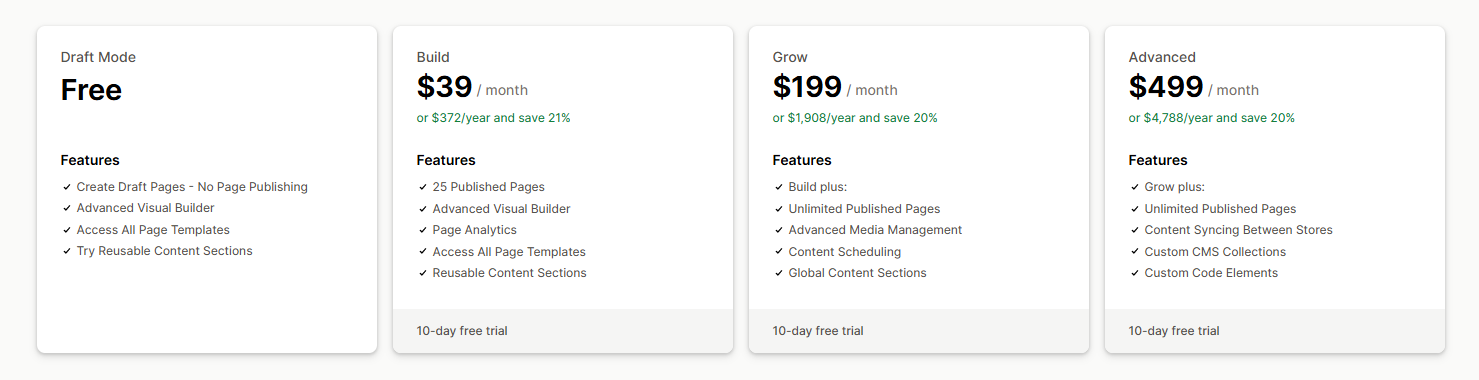
We verified the following prices from the in-app plan screen on September 14, 2026. The Shopify App Store states that charges are billed in US dollars.
| Plan | Monthly price | Annual price shown | Published pages | Main features shown |
|---|---|---|---|---|
| Draft Mode | Free | Free | 0 | Draft pages, visual builder, all page templates, and a trial of reusable content sections |
| Build | $39/month | $372/year | 25 | Visual builder, page analytics, all templates, reusable content sections, and a 10-day trial |
| Grow | $199/month | $1,908/year | Unlimited | Build features plus advanced media management, content scheduling, global content sections, and a 10-day trial |
| Advanced | $499/month | $4,788/year | Unlimited | Grow features plus cross-store content syncing, custom CMS collections, custom code elements, and a 10-day trial |
Draft Mode is a free evaluation plan, not a free publishing plan. It is useful for learning the editor and preparing a page before starting a paid trial.
Build is the practical entry plan. If a store uses all 25 published-page slots, the monthly price works out to about $1.56 per published page. The more important limit is what happens next: Grow costs $160 more per month. That upgrade adds unlimited pages and workflow tools, so it should be justified by more than page count alone.
What the Other Builders Cost
These figures come from Blinto’s separate hands-on tests. They were checked on different dates and do not represent a controlled head-to-head test.
| App | Free publishing allowance | Entry paid plan | Blinto test date |
|---|---|---|---|
| PageFly | 1 published page or section | $24/month | September 1, 2026 |
| GemPages | 1 published page | $29/month | September 9, 2026 |
| EComposer | 1 live page or section | $25/month | September 11, 2026 |
| Shogun | No publishing in Draft Mode | $39/month for 25 published pages | September 14, 2026 |
Shogun’s entry price is higher, but its 25-page allowance is also much larger than the one-page entry allowances in these other tests. The right comparison depends on how many pages a store will actually publish and which workflow features it needs.
What We Liked
- Three clear starting routes: Templates, a blank page, and page import are visible from the main screen.
- A broad template library: Categories cover common marketing and store-page needs.
- Detailed visual controls: The editor exposes layout, responsive, styling, visibility, animation, and custom CSS settings.
- Shopify-specific elements: Product and collection blocks sit alongside general content elements.
- Transparent plan boundaries: The plan screen makes Draft Mode’s zero-page limit and Build’s 25-page allowance clear.
What Could Be Better
- Draft Mode cannot publish: Merchants cannot inspect a real storefront result without starting a paid trial or plan.
- The next upgrade is expensive: Moving from Build to Grow raises the monthly price from $39 to $199.
- A/B testing is separate: The Shopify App Store points merchants to another Shogun app for testing.
- Media evidence was incomplete: We reached the upload area but did not capture a completed upload.
- The live result is still unknown: We did not verify theme consistency, real-device behavior, or page speed.
Who Shogun Is Best For
Shogun is best suited to Shopify merchants who expect to publish several custom pages and want more control than their theme provides. The Build plan is particularly relevant to stores that can make meaningful use of its 25 published-page allowance, templates, reusable sections, and page analytics.
Grow and Advanced are aimed at larger content operations. Their scheduling, global sections, cross-store syncing, CMS, and custom-code features make more sense when multiple campaigns, stores, or team members are involved.
Draft Mode gives both groups a useful evaluation path. It is not a long-term free publishing option.
Who Should Consider an Alternative
Merchants who need only one or two simple custom pages may not get enough value from a $39 monthly commitment. Shopify’s native theme sections or a page builder with limited free publishing may be a more economical starting point.
Stores should also consider alternatives if they need unlimited pages but cannot justify Grow at $199 per month. Blinto has separate hands-on reviews of PageFly, GemPages, and EComposer. Those products were tested separately, so we are not declaring a winner without a controlled comparison.
Teams with strict performance requirements should test a representative published page before choosing any builder. Our Shogun test did not measure storefront speed.
Final Verdict
Shogun gives merchants a structured route from templates or imported pages into a detailed visual editor. The tested screens showed strong layout coverage, responsive views, Shopify-specific blocks, reusable content options, and clear plan boundaries.
The pricing model defines the decision. Draft Mode is useful for preparation but cannot publish. Build costs $39 per month and supports 25 published pages, which can be reasonable for a store that will use that capacity. Grow removes the page limit and adds broader content-management tools, but its $199 monthly price demands a clear operational need.
Our verdict is Consider. Build a complete representative page in Draft Mode first. Then use the 10-day trial to publish it, check the theme integration on real devices, and test performance. Choose Build when 25 pages are enough. Move higher only when unlimited publishing, scheduling, global content, or multi-store tools justify the cost.
Frequently Asked Questions
Does Shogun Have a Free Plan?
Yes, but it is called Draft Mode and allows zero published pages. It includes draft-page creation, the visual builder, access to all page templates, and the ability to try reusable content sections.
How Much Does Shogun Cost per Month?
On September 14, 2026, Shogun showed Build at $39 per month, Grow at $199 per month, and Advanced at $499 per month. Paid plans offered a 10-day trial. Prices can change, so confirm them before subscribing.
What Happens When I Reach the Published-Page Limit?
Build supports 25 published pages. The next plan shown was Grow at $199 per month with unlimited published pages. We did not test whether Shogun offers temporary exceptions or custom arrangements outside the listed plans.
Is Shogun Easy to Use Without Code?
The tested workflow provides templates, drag-and-drop elements, and visual settings for layout and styling. Custom CSS and HTML are available for advanced work. We did not measure the learning curve or complete a timed build, so we cannot rate overall ease of use.
Does Shogun Include A/B Testing?
Not in the Page Builder app reviewed here. The Shopify App Store listing directs merchants to a separate Shogun A/B Testing app.
Is Shogun Better Than PageFly?
Our tests were separate and used different plans and dates, so they do not support a direct winner. Shogun Build offers 25 published pages for $39 per month. PageFly’s tested free plan allowed one published page or section, and its entry paid plan was $24 per month. Compare the editor, page allowance, and live output that match your store’s needs.
Does Shogun Slow Down a Shopify Store?
We did not measure Shogun’s effect on page speed. Test one published page with the same images, apps, and theme your store uses before making a performance decision.
Need Help With Your Shopify App Stack?
Blinto can help you assess whether a page builder fits your store’s design, workflow, and performance requirements before you expand it across important pages.