
Zipify OneClickUpsell, or OCU, helps Shopify stores add upsells to the buying journey.
You can show extra offers on product pages, in the cart, at checkout, after checkout, and on the thank-you page. The app also has a slide cart, A/B tests, reports, and AI tools.
We tested the main parts of OCU to see how easy they are to use. We looked at setup, funnels, cart offers, reports, tests, settings, and AI tools.
Key Takeaways
- Several offer locations: OCU can place offers at different points in the buying journey.
- Clear funnel builder: The funnel layout makes each offer position easy to follow.
- Manual and AI options: Merchants can build offers by hand or use AI-assisted tools.
- Slide Cart Drawer: A cart drawer and its reporting tools are included.
- Built-in testing: OCU has a dedicated area for A/B tests.
- Sales reports: The Statistics page shows sales and revenue data.
- Setup takes a few steps: Several Shopify permissions and app embeds must be enabled.
- No sales-lift claim: We did not have enough real orders to test an increase in sales, AOV, or conversion rate.
Quick Verdict / Our Verdict
Zipify OneClickUpsell packs a lot of upsell tools into one app.
The funnel builder was easy to understand in our test. It shows where each offer sits in the buying journey. This makes it easier to plan offers without jumping between several pages.
We also liked the Slide Cart Drawer. The app has A/B tests and reports too. These tools give stores more room to test different ideas.
The main downside is setup. You need to turn on several app embeds and connect OCU with parts of Shopify. This may take some time if you are new to Shopify.
We also had an issue with the AI Assistant. It showed a “Shop not found” error in our test, so we could not fully test that feature.
OCU makes the most sense for stores that want to use more than one type of upsell.
What Is Zipify OneClickUpsell?
Zipify OneClickUpsell is an upsell app made by Zipify Apps.
It helps Shopify stores show extra product offers before and after a sale. OCU supports product-page offers, pre-purchase offers, cart upsells, post-purchase offers, and thank-you-page offers. Checkout upsells are also available for Shopify Plus stores.
This gives stores several ways to add an offer. For example, you could suggest one item on the product page, show another in the cart, and make a final offer after checkout.
What We Tested
We did a partial hands-on test of OCU.
We tested the setup process and funnel builder. We also explored the Slide Cart Drawer, PostProfit, A/B tests, reports, settings, and AI Assistant.
Our test store did not have enough real customer orders. Because of that, we did not test how much OCU could raise sales, AOV, or conversion rate.
This review focuses on the tools we could use and see ourselves.
Getting Started With OCU
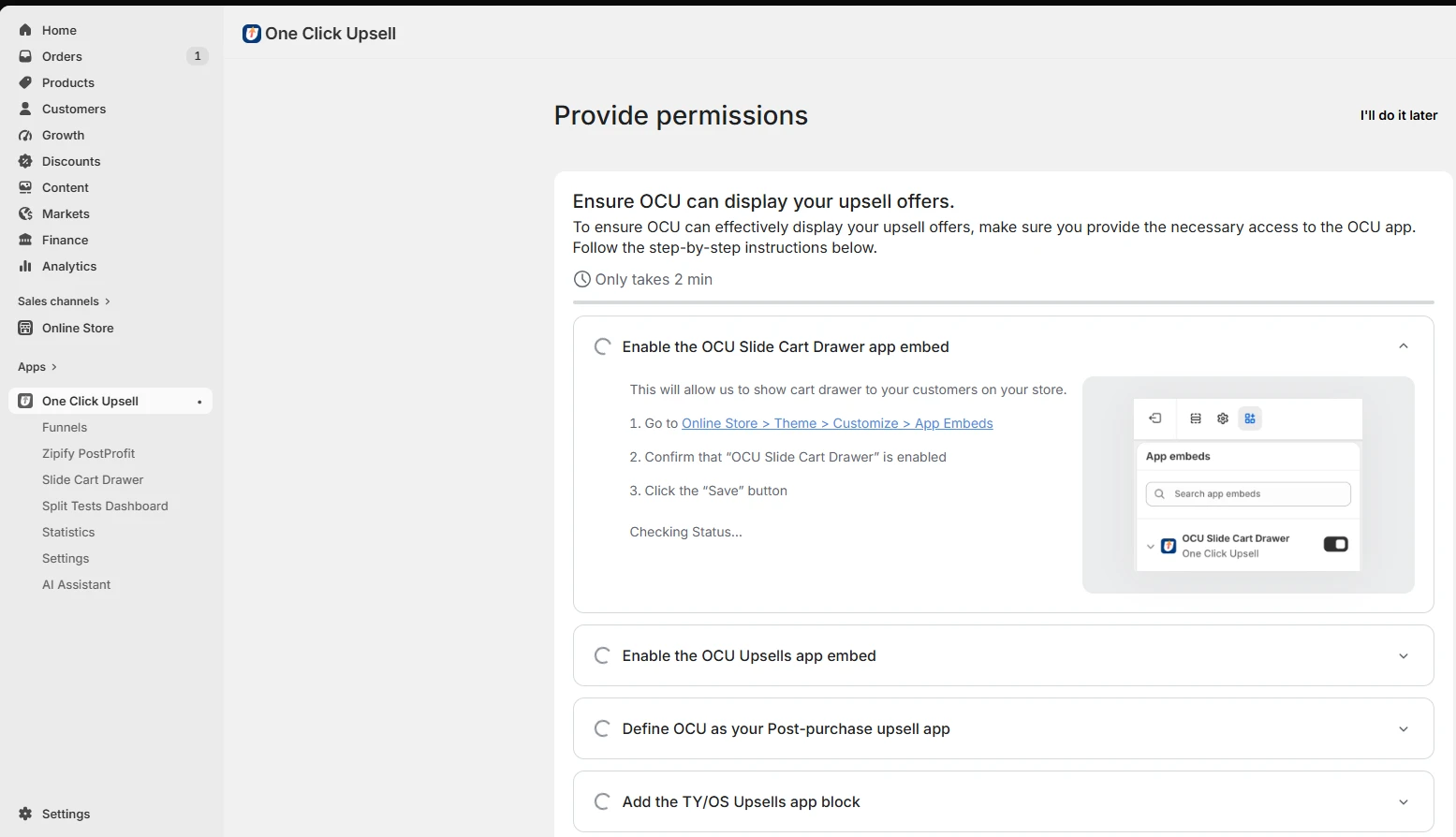
The first step is to give OCU the access it needs.
During our test, the app showed a setup list. It asked us to turn on the Slide Cart Drawer and OCU Upsells app embeds. It also asked us to set OCU as the post-purchase upsell app. Another step was needed for thank-you and order-status offers.
OCU said this process should take about two minutes. The steps were clear, but there are several of them. A new Shopify user may need more time to finish the setup.
Creating Your First Funnel
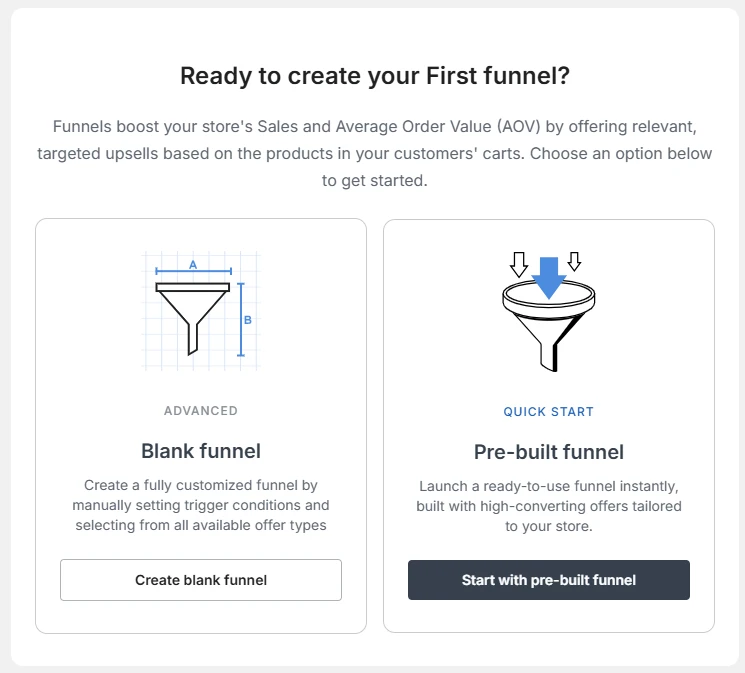
After setup, OCU asks how you want to build your first funnel.
We saw two choices: Advanced and Quick Start.
Advanced starts with a blank funnel. It gives you more control over the offers and rules. Quick Start gives you a ready-made funnel and is the easier choice if you want to get started fast.
We liked having both options. A new user can start with Quick Start, while a user who wants more control can choose Advanced.
Building an Upsell Funnel
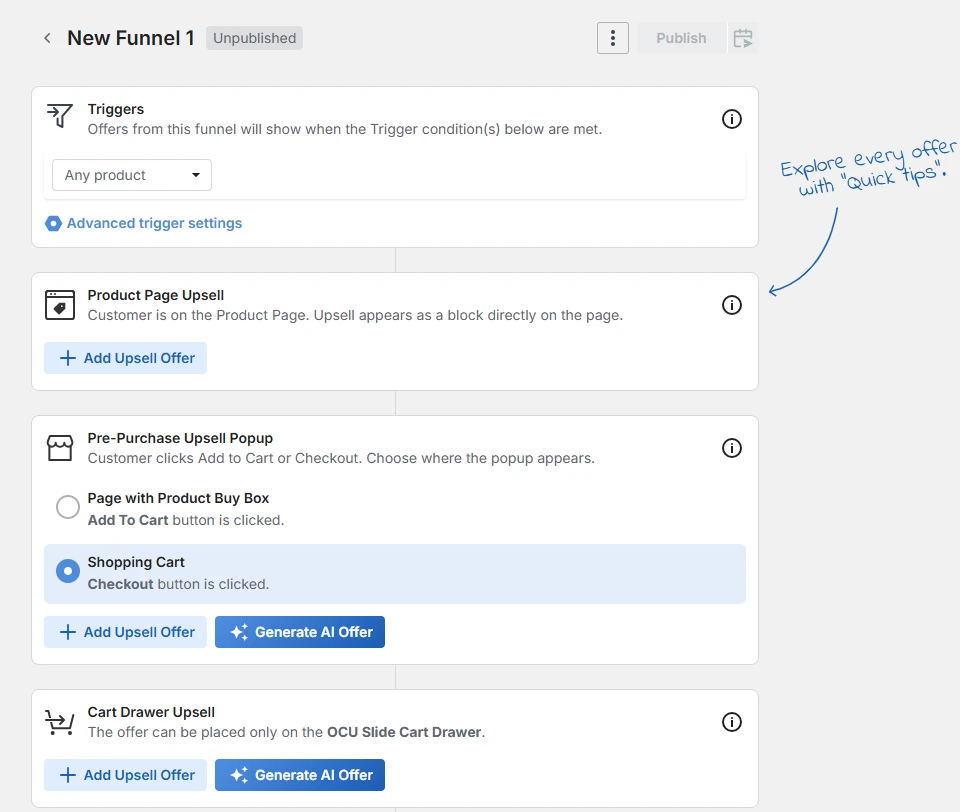
The funnel builder was one of the easiest parts of OCU to follow.
It puts different offer types into one clear flow. In our test, we saw areas for product-page offers, pre-purchase offers, and cart offers.
The pre-purchase area also gave us a choice of where to show the offer. We could add an offer ourselves or use the AI option.
This layout makes sense because you can see how each offer fits into the buying journey. OCU also adds Quick Tips to help users learn the tools.
Slide Cart Drawer
OCU comes with a Slide Cart Drawer.
We found separate areas for live carts and drafts. Our test store had a draft called “Slide Cart Drawer 1.”
The dashboard also had fields for impressions, checkout clicks, orders, revenue, conversion, and abandonment rate. This puts useful cart data in one place.
However, our store had no live cart data, so we could not test how the cart changed sales or conversion.
Zipify PostProfit
OCU also includes PostProfit.
This tool adds targeted ads to the Thank You and Order pages. The screen we tested said these ads are shown to customers in the US and Canada.
The setup screen asks merchants to turn on PostProfit and add it through the Shopify checkout editor. It also points to analytics and PayPal setup for payments.
PostProfit is different from a normal product upsell. It is another way to use the page shoppers see after an order.
A/B Testing
OCU has a built-in Split Tests area.
The page has separate tabs for active and completed tests. It also shows the funnel, offer, status, run time, and actions.
Our store had no active tests. We could check the tool and its layout, but we could not judge the test results.
Reports and Stats
OCU has a Statistics page for tracking results.
During our test, we saw sales and revenue at the top of the page. You can also change the date range and switch between bar and line charts.
Our test store showed $0 in sales and revenue. That was expected because we did not run real customer orders through the test.
The page itself was easy to scan. The main numbers were simple to find.
Settings
OCU has a large Settings area.
We found options for general settings, pre-purchase offers, post-purchase offers, AI preferences, thank-you-page offers, PostProfit, billing, integrations, translations, and MCP.
The General page also had controls for Application Status, Skip Cart, the Zipify Upsell Tag, and custom CSS.
That gives advanced users more control, but the number of settings may take time for a new user to learn.
AI Assistant
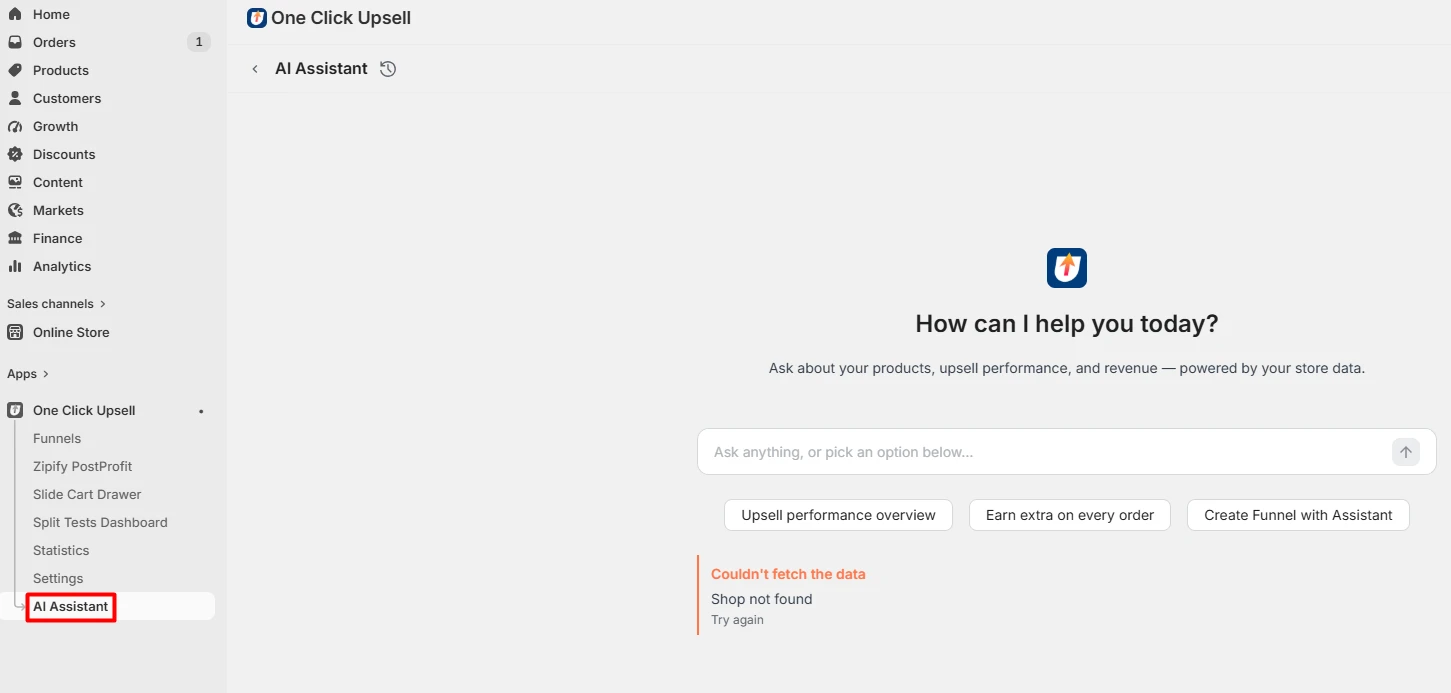
OCU also has an AI Assistant.
The tool says it can use store data to answer questions about products, upsell performance, and revenue. We also saw shortcuts for checking upsell results and creating a funnel.
However, we could not fully test it. The assistant showed a “Shop not found” error when we tried to use it.
This may have been an issue with our test store. We do not know if other stores will see the same error, so we are not judging the quality of the AI Assistant based on this test alone.
Zipify OneClickUpsell Pricing
OCU has a free plan for development and partner stores.
For live stores, the entry paid tier starts at $9.95 per month for up to $200 per month in upsell revenue. Higher tiers rise with the amount of upsell revenue generated by the app.
The Shopify listing also shows a 30-day free trial for paid plans. Pricing can change, so merchants should check the current Shopify App Store listing before choosing a plan.
The revenue-based model is worth watching as a store grows.
What We Liked
The funnel builder is the best part of the app from our test. It gives you a simple view of where each offer will appear.
We also liked having several upsell types in one app. The Slide Cart Drawer, A/B tests, reports, and offer tools all work around the same funnel system.
Quick Start is useful for new users. Advanced mode gives more control when you need it.
What Could Be Better
Setup could be easier. There are several steps before you can use every part of OCU, and new Shopify users may find this a little confusing.
The app also has many tools and settings. That is useful if you need them, but it may feel like too much if you only want one simple upsell.
Pricing is another point to watch because the cost can rise with upsell revenue.
Finally, we could not fully test the AI Assistant because of the error in our test store.
Who Is OCU Best For?
OCU is made for stores that want to use upsells at more than one point in the buying journey.
It may suit a store that wants product-page offers, cart offers, and post-purchase offers in the same tool. It also makes sense if you want to test different offers and track the results.
A very small store that only wants one basic upsell may not need all these tools.
Pros and Cons
| Pros | Cons |
|---|---|
| Several types of upsells | Setup takes several steps |
| Easy-to-follow funnel builder | Many settings to learn |
| Quick Start option | Cost can rise with upsell revenue |
| Slide Cart Drawer included | AI Assistant failed in our test |
| Built-in A/B tests | Some tools need real sales data to judge |
| Reports are easy to find | May be too much for very simple needs |
Final Verdict
Zipify OneClickUpsell is a strong fit for stores that want several upsell tools in one place. Its funnel builder is clear, and the Slide Cart Drawer, A/B tests, reports, and offer controls give merchants room to build a more complete upsell flow.
The trade-off is added setup and a larger set of tools to learn. Our test also could not prove a lift in sales, AOV, or conversion rate, and the AI Assistant did not work in our test store.
For merchants who plan to use more than one upsell placement, OCU offers useful control from one dashboard. Stores that only need one basic offer may prefer a simpler tool.
Frequently Asked Questions
Is Zipify OneClickUpsell easy to use?
The funnel builder is easy to follow. Setup takes more work because you need to turn on several Shopify app embeds and settings.
Can OCU add offers before checkout?
Yes. We found pre-purchase offers during our test. OCU also supports product-page and cart offers.
Does OCU have post-purchase upsells?
Yes. Post-purchase offers are one of its main features.
Can I add upsells to the cart?
Yes. OCU includes cart upsells and its own Slide Cart Drawer.
Does OCU have A/B testing?
Yes. There is a Split Tests area inside the app. We could access it during testing, but we did not have enough live data to judge the results.
Does OCU use AI?
Yes. OCU has AI-assisted offer creation and an AI Assistant. We could not fully test the assistant because it returned an error in our test store.
How much does Zipify OneClickUpsell cost?
The current entry paid tier starts at $9.95 per month for up to $200 in monthly upsell revenue. Higher tiers depend on the amount of upsell revenue the app generates. A free option is available for development and partner stores. Check the Shopify listing for the latest pricing.
Does OCU guarantee more sales?
No. Results depend on your products, offers, prices, customers, and store setup. We did not have enough live orders to measure a change in sales or AOV during our test.
Is OCU good for small Shopify stores?
It can be, but it depends on what the store needs. If you want several types of upsells, OCU gives you many tools in one app. If you only need one simple offer, a smaller app may be easier to manage.
Does OCU work with Shopify Plus?
Yes. Its Shopify listing includes in-checkout upsells for Shopify Plus.