
Upsell.com, formerly ReConvert, is built for Shopify merchants who want to place upsells at several points in the buying journey instead of relying on one basic recommendation widget.
The product has expanded beyond its original post-purchase focus. Upsell.com says it can support offers across product, cart, checkout, post-purchase, thank-you, and order-status touchpoints. In August 2026, the company officially rebranded ReConvert as Upsell.com.
More placements can create more opportunity. They also create more setup.
We tested Upsell.com inside a Shopify development store to answer one practical question:
Does Upsell.com give merchants enough useful control to justify the extra setup and learning curve?
Key Takeaways
-
Product-page upsells use separate conditions and slots.
-
Shopify theme integration was straightforward in our test.
-
Thank-you page options included product upsells, recommendations, bundles, banners, announcement-style blocks, and custom slots.
-
Visual customization was manageable without custom CSS.
-
The system is understandable, but it takes time to learn how the pieces work together.
-
Some areas of the app interface loaded more slowly than we expected.
-
Pricing scales with store activity or upsell revenue, so merchants should check the current tier that applies to their store.
-
We did not test every offer through a complete live purchase or measure long-term revenue impact.
Quick Verdict
Upsell.com gave us useful control over product-page and post-purchase offers.
The product-page workflow separates conditions from slots, while Shopify’s thank-you page editor exposes several Upsell.com blocks. That gives a merchant more flexibility than a simple related-product widget.
The tradeoff is complexity. Individual screens were manageable, but understanding how conditions, slots, placements, products, and post-purchase blocks fit together took time. We also experienced slow loading in some parts of the app interface.
Our verdict: Consider.
Upsell.com is worth testing if you want several upsell placements and are willing to learn the system. If you only need one simple related-product offer, a lighter app may be easier to manage.
What Upsell.com Offers
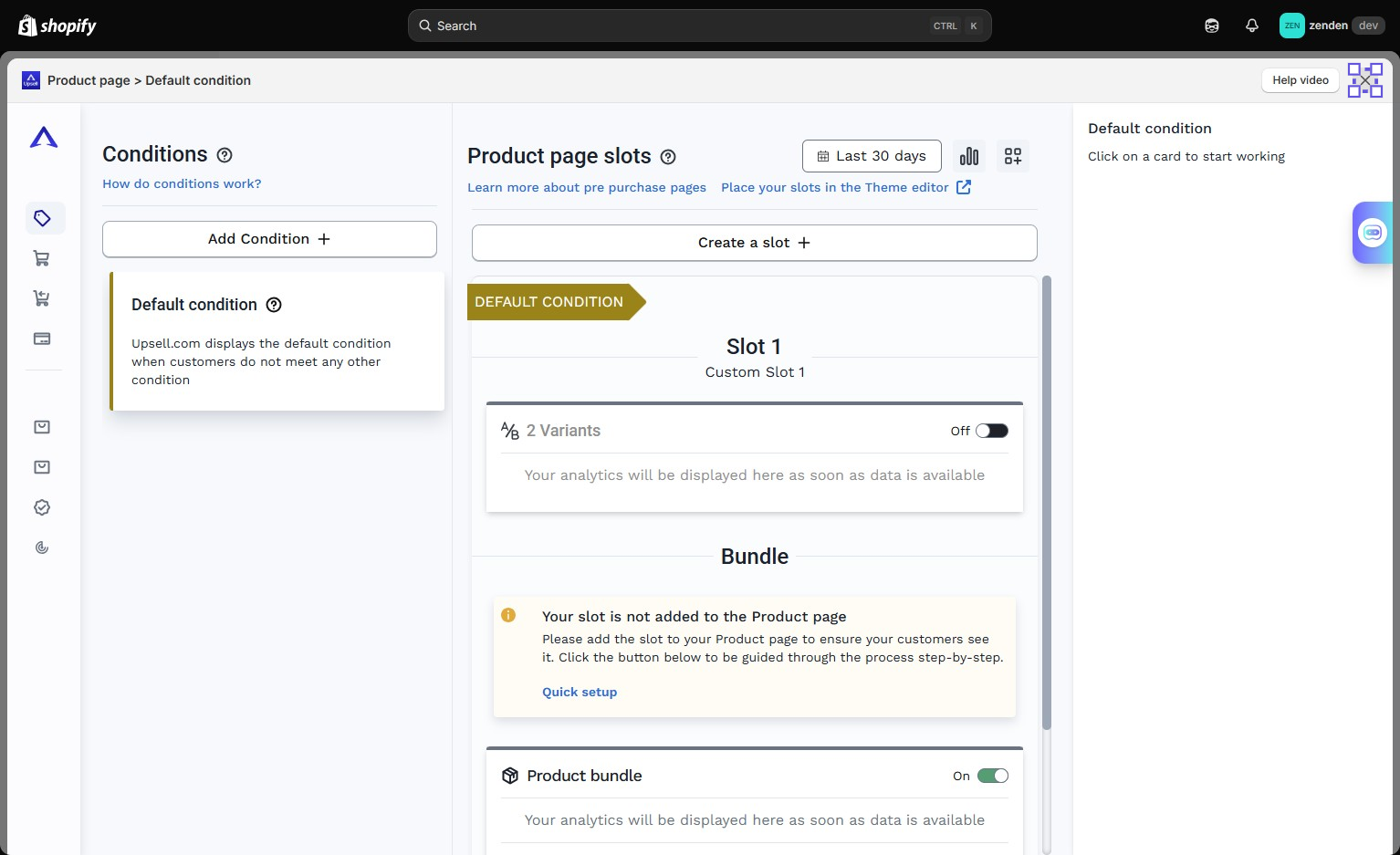
Upsell.com is designed for merchants who want more than one upsell moment.
According to its current Shopify App Store listing, the app supports a full upselling funnel, product recommendations, bundles, cross-sells, segmentation, analytics, and placements across product, cart, checkout, and post-purchase experiences.
In our test, the product-page workflow separated conditions from slots.
A condition decides when an offer should apply.
A slot decides what appears in that location.
That separation is useful when a merchant wants different offers for different situations. It also creates more settings to understand than a single recommendation widget.
We also saw bundle options in the same product-page workflow.
We did not test every available condition, offer type, or bundle configuration, so our findings are limited to the paths we actually used.
What We Tested
We tested:
- product-page conditions,
- product-page slots,
- bundle placement,
- Shopify theme editor integration,
- thank-you page blocks,
- product recommendations,
- post-purchase customization,
- general usability,
- and interface loading behavior.
We did not complete every offer type through a full live customer purchase.
We also did not validate long-term revenue impact, every targeting rule, A/B testing performance, or the accuracy of the app’s analytics.
That distinction matters. Seeing a feature in an editor is not the same as proving how well it performs in a live store.
Product-Page Upsells Are Flexible, but There Is More to Learn
The product-page builder was fairly easy to understand once we saw how the pieces were organized.
The basic flow in our test was:
Set the condition → Create the slot → Add the offer → Place it on the store
For a merchant who wants several different offers, that structure is useful. A store can create different rules instead of showing the same recommendation to every shopper.
The downside is setup overhead.
If your entire goal is to show one related item beside a product, this structure may feel more complicated than necessary.
That is the central tradeoff we found throughout the app: more control is useful when you need it, but you still have to configure and maintain that control.
Shopify Theme Integration Was Straightforward
Upsell.com connects with Shopify’s native theme editor for supported placements.
Once we moved into Shopify, the placement workflow felt familiar. Supported app blocks can be positioned through Shopify’s normal editing environment rather than requiring the entire storefront experience to be managed inside a separate builder.
That is useful for merchants who already know Shopify’s theme editor.
The tradeoff is that setup can involve moving between Upsell.com and Shopify while you configure the final experience. It was not difficult in our test, but it adds another layer to the workflow.
Thank-You Page Offers Were One of the Stronger Areas
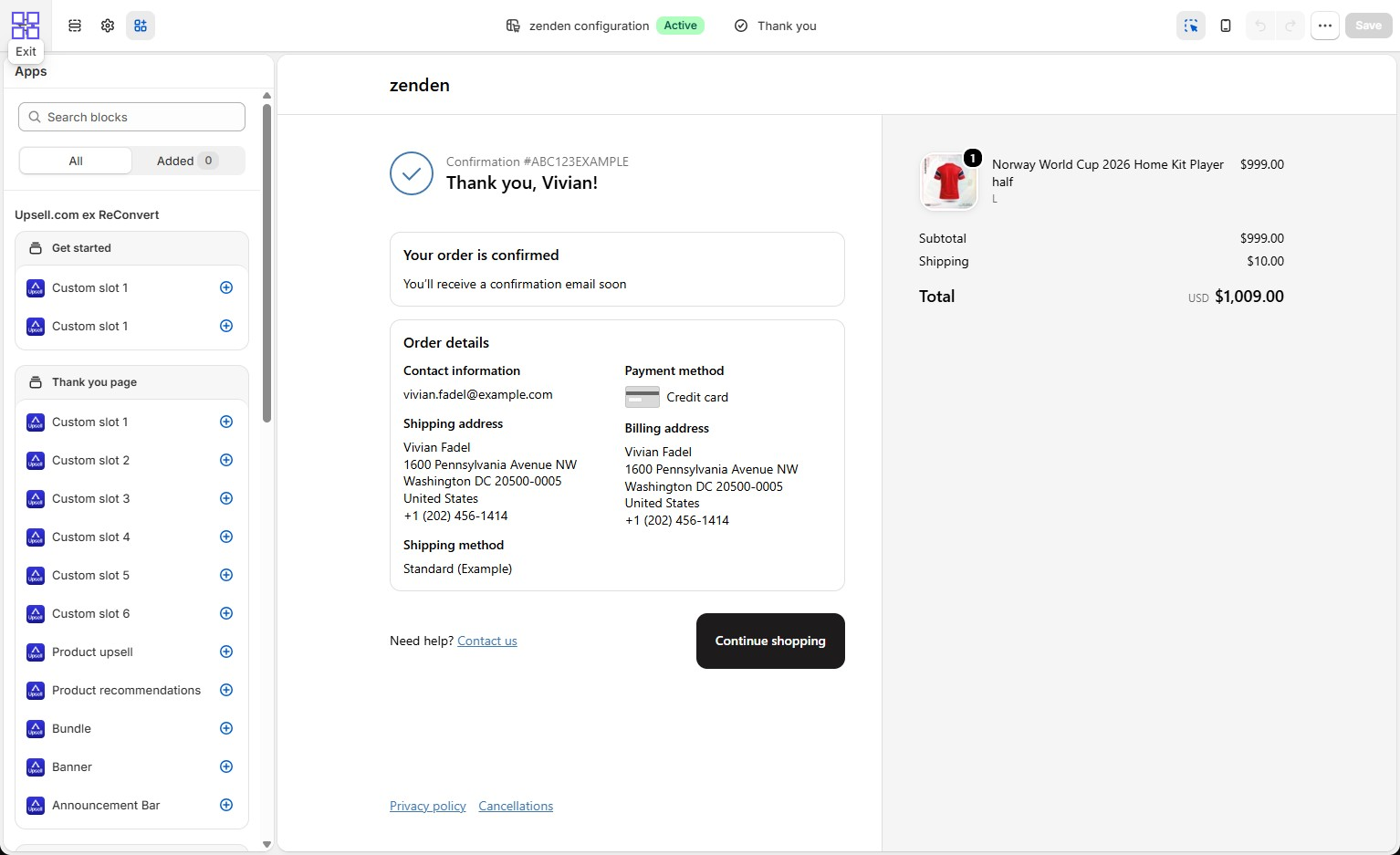
The thank-you page was one of the stronger parts of our test.
Inside Shopify’s editor, we saw several Upsell.com block options, including:
- product upsells,
- product recommendations,
- bundles,
- custom slots,
- banners,
- and announcement-style blocks.
Adding the blocks was straightforward.
The more important question is what should actually appear there.
A post-purchase page can become noisy if every available space is filled simply because the app allows it. The stronger use case is a relevant offer that makes sense immediately after the customer’s original purchase.
We did not run a live order to measure the conversion rate of these blocks. Our conclusion here is about setup flexibility and usability, not revenue performance.
Customization Was Manageable Without Code
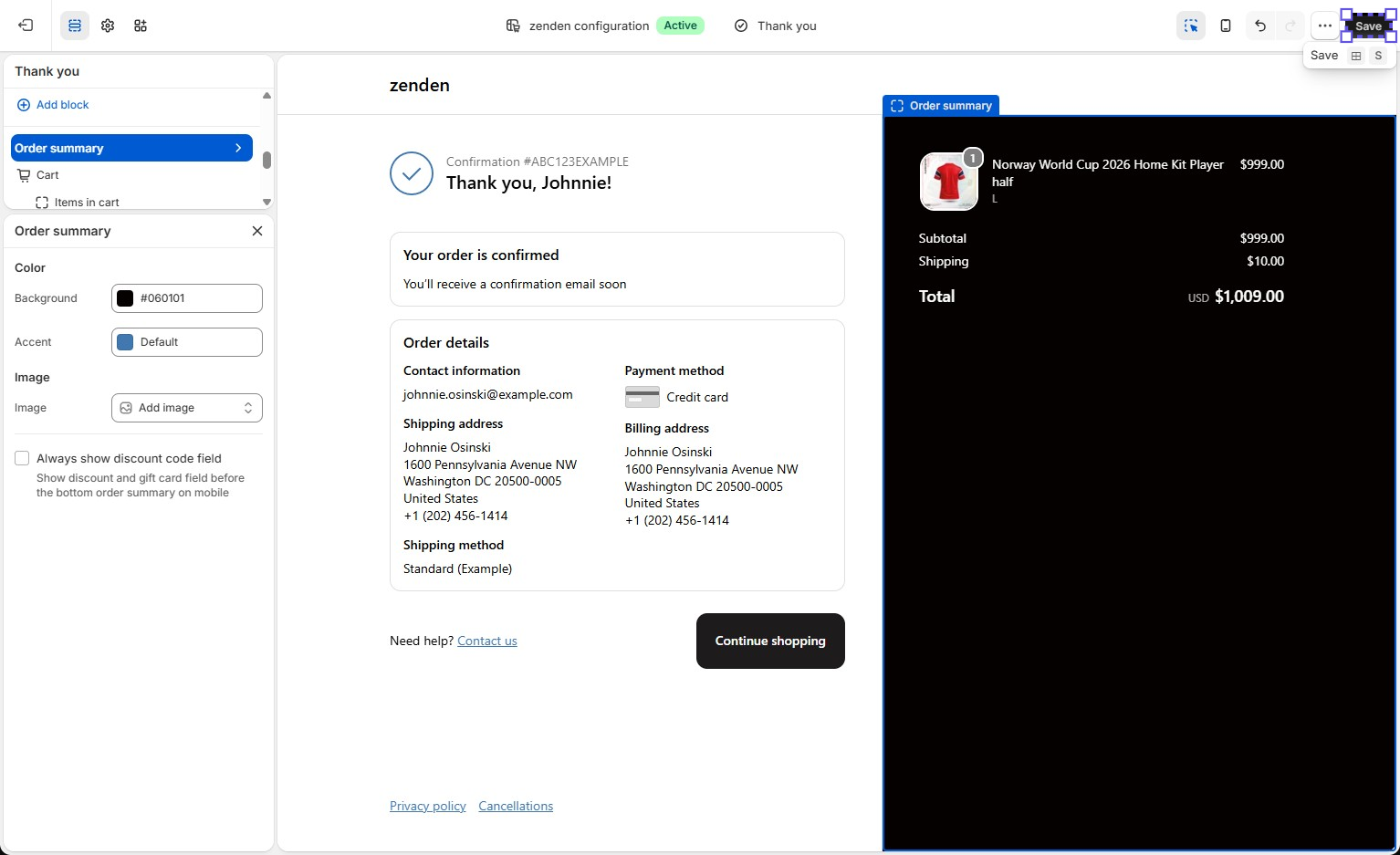
We also tested the visual customization available around the post-purchase experience.
The Shopify editor allowed us to change the presentation and preview the result without writing custom CSS.
During testing, we intentionally pushed the styling further than we normally would on a production store so we could see how much control the editor offered.
For most merchants, the built-in settings should be enough for basic brand matching.
A designer may still want deeper control, but ordinary visual adjustments did not require custom code in our test.
Is Upsell.com Easy to Use?
The individual screens were not especially difficult.
The learning curve comes from the system as a whole.
A merchant needs to understand how conditions, slots, products, offer types, Shopify placements, and post-purchase blocks relate to one another.
None of those concepts felt highly technical by itself. Using all of them together takes some time.
Our usability assessment is:
Easy enough to understand, but not instant to master.
That distinction matters because Upsell.com’s flexibility becomes valuable when you actually need multiple placements and rules. If you do not, the extra configuration may feel unnecessary.
Performance Could Be Better
One issue we noticed during testing was interface loading speed.
Some areas took longer to load than we expected. The app remained usable and we were able to continue configuring offers, but the experience was not always as smooth as we would want from a tool a merchant may open frequently.
We are keeping this finding narrow.
We observed slow loading inside parts of the app interface.
We did not run a controlled performance benchmark, and we did not establish that Upsell.com slows down a merchant’s storefront. Those would be different claims and would require different testing.
Pricing: Check the Tier That Applies to Your Store
Upsell.com’s pricing deserves a closer look because the cost can scale with store activity.
When we checked on September 18, 2026, the Shopify App Store listing showed:
- a Free tier for up to 50 orders or $50 in upsell revenue,
- Growth at $9.99/month for higher volume up to 2,000 monthly store orders or upsell revenue,
- Scale at $199/month for up to 10,000,
- and Elite at $499/month for up to 20,000.
The listing says the applicable volume is based on monthly store orders or upsell revenue, whichever is higher.
Upsell.com’s own pricing page was not presented identically when we checked, so merchants should verify the price and usage threshold shown inside Shopify before installing or upgrading.
That is more important than looking only at the entry price.
For a small store testing upsells, the free entry point can make experimentation easier. For a growing store, the relevant question is whether the value of the upsell system continues to justify the cost as order volume or upsell revenue increases.
What Public Merchant Feedback Adds
The Shopify App Store showed an overall rating of 4.8 from about 3.1K reviews when we checked on September 18, 2026.
The large majority of ratings were five stars. Recent positive feedback includes merchants praising the app’s support and help with offer configuration.
There are also recent negative reports about billing expectations. In responses to those reviews, the Upsell.com team has explained that billing depends on store orders or generated upsell revenue after the trial period.
These reports do not prove that every merchant will have the same experience, and we did not reproduce a billing problem ourselves.
They do reinforce one practical recommendation:
Understand the usage thresholds and billing model before the trial ends.
What We Liked
Flexible product-page logic
Conditions and slots provide more control than one generic recommendation widget.
Several post-purchase options
The thank-you page exposed multiple useful offer and content blocks.
Familiar Shopify editing
Supported placements used Shopify’s existing editor, which reduced the learning curve for placement itself.
Manageable visual customization
We could make meaningful design changes without writing custom CSS.
Room for a broader upsell system
The app makes more sense for merchants who want several offer types and placements rather than one isolated upsell.
What Could Be Better
The setup takes time to learn
More options mean more decisions and more relationships between settings to understand.
Interface loading could be faster
Some parts of the app were slower than we expected during our test.
Pricing needs active attention
The relevant cost can rise with store orders or upsell revenue, so the starting tier does not tell the whole story.
Our test did not cover the full purchase lifecycle
We cannot claim that every offer type converts correctly or improves revenue because we did not run every configuration through a complete live purchase.
Who Upsell.com Is Best For
Upsell.com makes the most sense for merchants who want to build a broader upsell system.
That includes stores interested in:
- product-page upsells,
- bundles,
- product recommendations,
- conditional offers,
- post-purchase offers,
- and thank-you page merchandising.
It becomes more valuable when you need several placements or different rules for different situations.
Those merchants are more likely to benefit from the additional flexibility.
Who May Prefer a Simpler App
Upsell.com may be unnecessary if you only want one basic recommendation.
If your requirement is simply:
“Show this related product next to this product.”
a lighter app may be faster to configure and easier to maintain.
The value of Upsell.com comes from having more control. If you do not need that control, you still inherit the extra setup.
Final Verdict
Upsell.com gave us useful control over product-page and post-purchase offers.
The condition-and-slot structure made product-page offers flexible. Shopify integration felt familiar once we reached the native editor, and the thank-you page provided several useful ways to continue merchandising after checkout.
The tradeoff is that this flexibility comes with more setup.
It took time to understand how the different parts worked together, and some areas of the interface loaded more slowly than we expected.
Pricing also deserves attention because the applicable tier can change as store orders or upsell revenue increase.
Our verdict: Consider.
Upsell.com is worth testing if you want a flexible upsell system across several stages of the Shopify buying journey.
If you only need one basic related-product offer, a simpler app may be easier to justify.
Frequently Asked Questions
Is Upsell.com the same as ReConvert?
Yes. ReConvert officially rebranded to Upsell.com in August 2026. Existing accounts, funnels, analytics, integrations, and store setups were described by the company as continuing under the new brand.
How much does Upsell.com cost?
When we checked on September 18, 2026, the Shopify App Store showed a Free tier, Growth at $9.99/month, Scale at $199/month, and Elite at $499/month, with usage thresholds based on store orders or upsell revenue. Because pricing can change and official pricing surfaces were not perfectly aligned when we checked, verify the current price shown in Shopify before installing.
Can Upsell.com add offers to Shopify’s thank-you page?
Yes. In our hands-on test, Shopify’s thank-you page editor showed Upsell.com blocks for product upsells, recommendations, bundles, banners, and custom slots.
Can you customize Upsell.com without coding?
We were able to make visual changes through Shopify’s editor without writing custom CSS.
Is Upsell.com easy for beginners?
The individual controls were manageable, but the overall system takes time to learn because merchants need to understand conditions, slots, placements, and different offer types.
Who is Upsell.com best for?
It is better suited to merchants who want several upsell placements and more control over when and where offers appear.