
Post-purchase upsells give stores another chance to sell. They appear after the main checkout. The hard part is the setup. You need to manage offers, pages, permissions, and reports.
Aftersell Post Purchase Upsell is made by Rokt. It offers one-click upsells, Smart Funnels, thank-you page offers, reports, and Rokt Thanks.
We tested Aftersell in a Shopify development store. We set up Smart Funnel and Rokt Thanks. We also opened the Thank You, Order Status, and Orders pages. Then we checked the reports and order tools.
Our main question was simple: Is Aftersell easy to set up and use?
Smart Funnel was easy to set up. Other Aftersell tools need more work. They use several Shopify pages. We did not complete a live upsell sale. So we do not claim that Aftersell raised AOV or sales.
Key Takeaways
- Smart Funnel is quick to set up: Its main rules sit on one screen.
- Some setup happens in Shopify: You may need to open several Shopify pages.
- Rokt Thanks has its own setup: It includes payout and offer settings.
- Reports help you find issues: You can check if an order can see an offer.
- We did not test a live sale: We cannot claim a rise in sales or AOV.
Our Verdict
Consider.
Aftersell suits stores that want more than one basic upsell. It works best if you plan to set up, test, and track your offers.
Smart Funnel cuts down manual setup. Analytics shows results. Order Browser helps you check which orders can see an offer.
The trade-off is extra setup. Aftersell is more than one upsell widget. Some tasks happen in Aftersell. Others happen in Shopify.
If you need one simple offer, a smaller app may be easier. If you want more pages, rules, and reports, Aftersell gives you more tools.
What Aftersell Offers
The Shopify App Store lists several Aftersell tools. These include one-click offers, Smart Funnels, and thank-you page offers. It also lists tests and checkout upsells. Cart tools are on other plans.
Aftersell says checkout upsells need Shopify Plus.
Aftersell also has Rokt Thanks. It can show third-party offers after a sale.
In our test, we started in Post-purchase funnels. It gave us three choices. We could use Smart Funnel, follow a guide, or start from scratch.
This gives new users a quick start. Manual setup is still there if you need it.
What We Tested
We tested:
- the Post-purchase funnels dashboard,
- Smart Funnel configuration and activation,
- Rokt Thanks setup,
- Shopify Thank You page access,
- Shopify Order Status page access,
- Shopify Orders page access,
- the requested data-access update,
- Rokt Thanks payout and vertical settings,
- Aftersell Analytics,
- the Order Browser,
- and the main Aftersell settings area.
We did not complete a live sale where a shopper accepted the offer.
We did not test long-term sales results. We also did not test payout income or every funnel type.
This limit matters. We can judge the setup and admin tools. We cannot say that Aftersell raised revenue.
Smart Funnel Makes the Core Setup Manageable
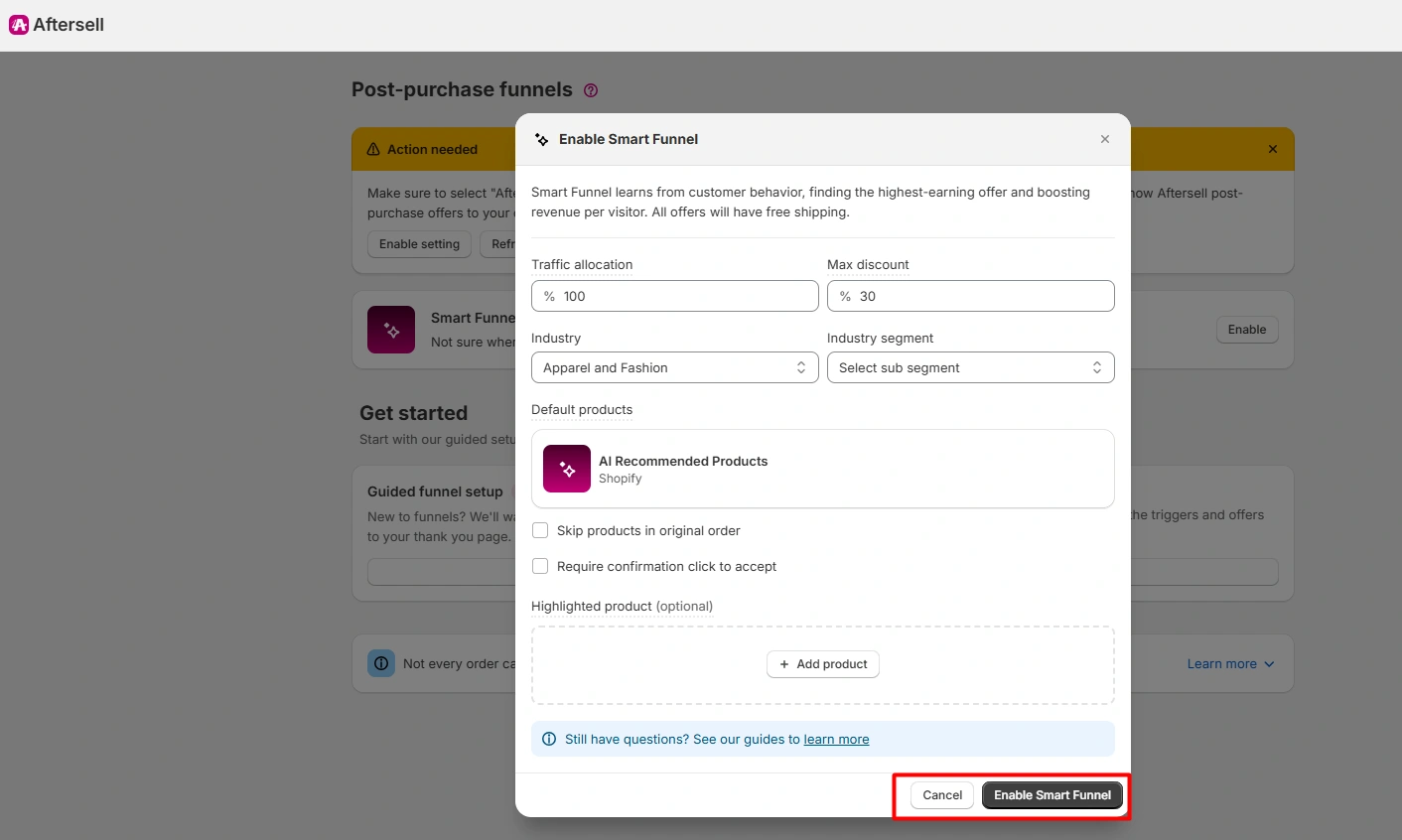
Smart Funnel was easy to use in our test.
The setup screen let us control:
- traffic allocation,
- maximum discount,
- industry,
- industry segment,
- AI Recommended Products,
- whether to skip products already in the original order,
- whether an acceptance needs a confirmation click,
- and an optional highlighted product.
The main controls sit in one place. That makes them easier to find.
We could turn on Smart Funnel in the same flow. The page then showed it as Active. It also showed visits, sales, and other result fields.
Our test had no live post-purchase traffic. So we could not use those fields to judge revenue.
Smart Funnel is a good starting point if you do not want to build every rule by hand. Stores with strict product rules may still prefer manual funnels.
Rokt Thanks Is Useful, but It Adds More Setup
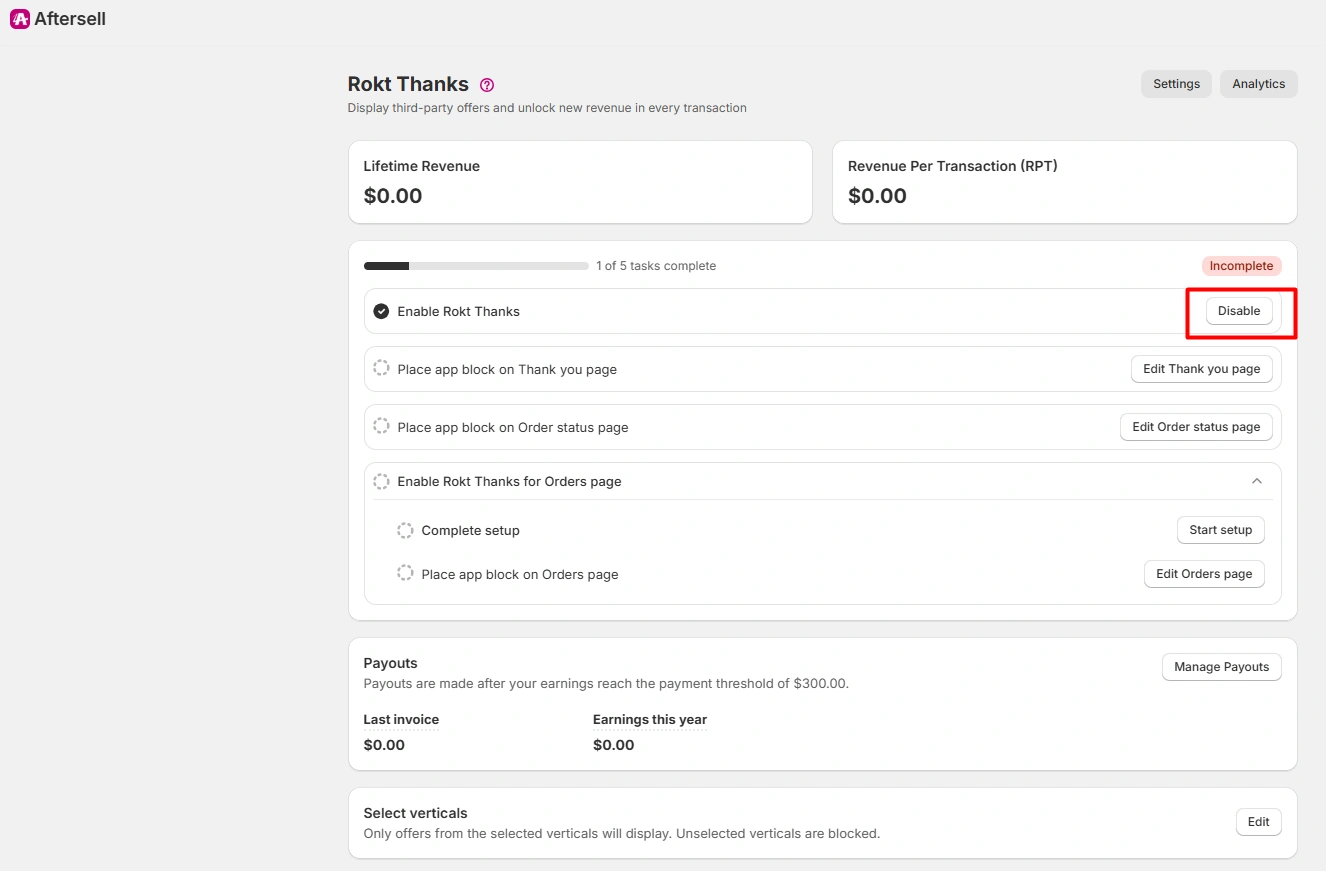
Rokt Thanks needs its own setup.
Its checklist sent us to the Thank You page, Order Status page, and Orders page. The Orders step also asked for more Shopify data access. Shopify showed us what data the app asked for.
We also found separate controls for:
- payout setup,
- PayPal payment details,
- and selecting which offer verticals are allowed.
Rokt Thanks can show third-party offers. You can block offer types that do not fit your store.
The downside is more setup. If you use both tools, check each Shopify page before launch.
Shopify-Native Page Editing Feels Familiar
Some Aftersell steps opened Shopify’s page editor.
We opened the Thank You page, Order Status page, and Orders page during testing.
This feels familiar if you know Shopify’s editor. But it also means some setup happens outside Aftersell.
Check these pages before launch. Keep key actions easy to find. These include payment, tracking, buying again, and support.
Analytics Help, but Our Test Did Not Generate Live Results
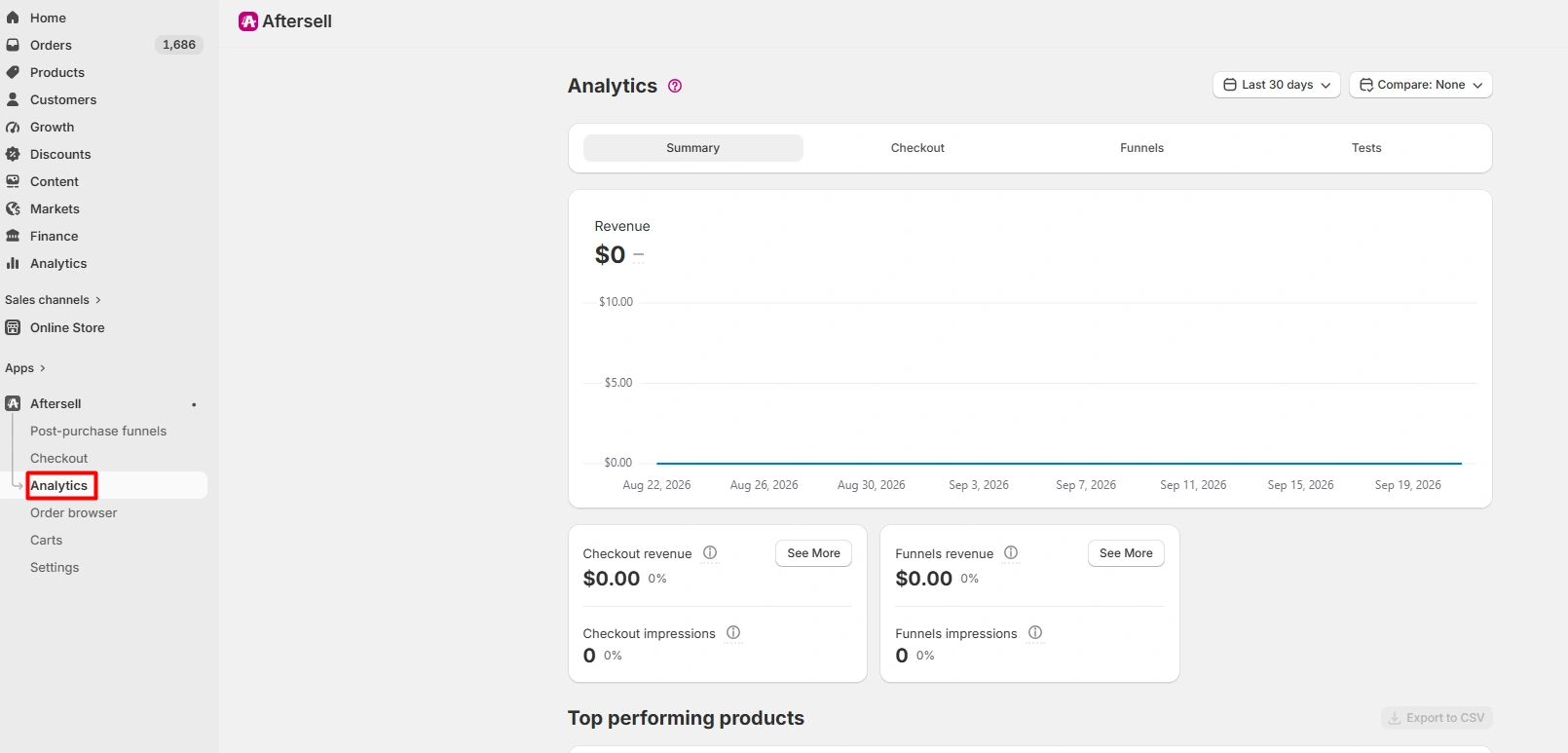
Aftersell splits its reports into summary, checkout, funnels, and tests.
The dashboard showed revenue and view data for checkout and funnels. Our values were zero. We had no eligible live post-purchase activity.
This is a limit of our test. It does not mean the feature fails.
The report layout is useful. It lets you view each part of the upsell system on its own.
We would need more real orders before judging conversion results.
The Order Browser Is the Right Place to Check Eligibility
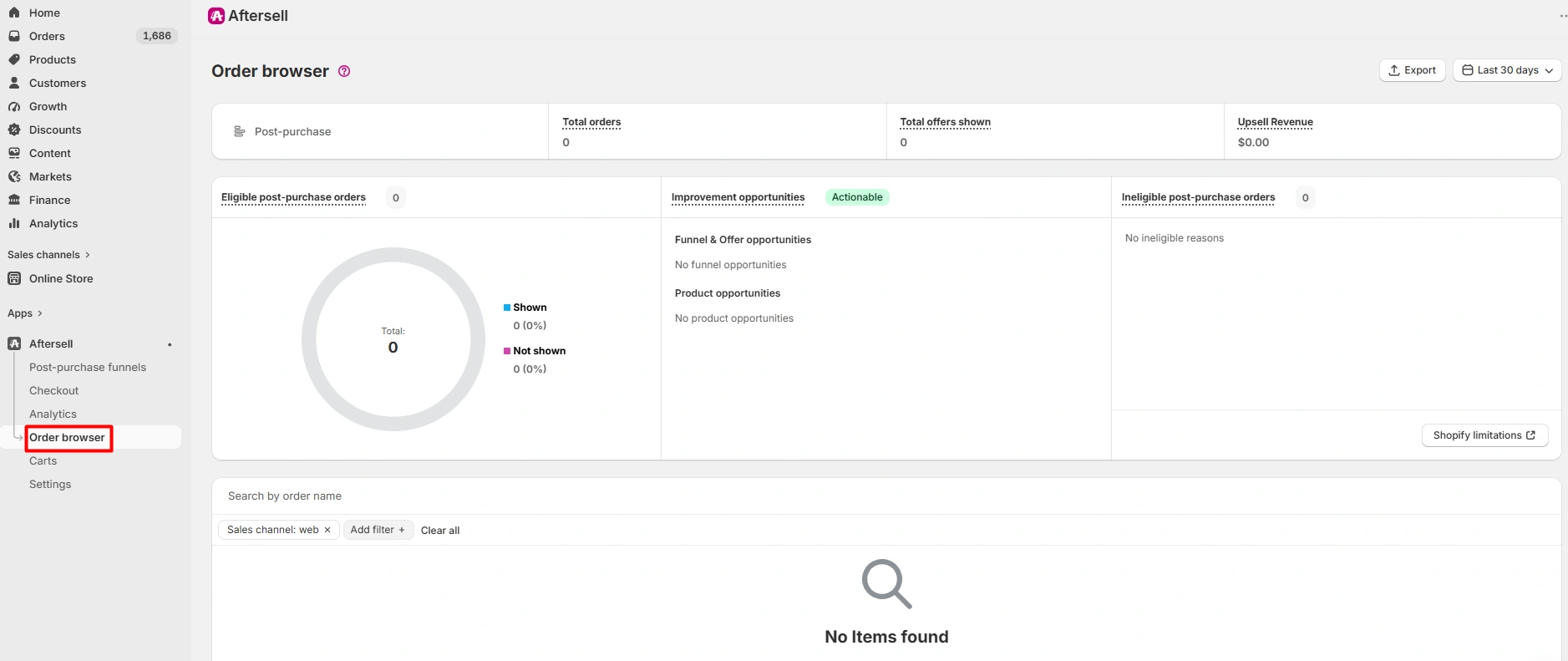
Order Browser gives you more detail.
The screen we tested included:
- total orders,
- total offers shown,
- upsell revenue,
- eligible post-purchase orders,
- ineligible post-purchase orders,
- and improvement opportunities.
Our test showed zero eligible orders and no items.
This does not show how Aftersell performs on a live store. But it shows where to look when an offer does not appear.
That can be more useful than one revenue number.
Settings Go Well Beyond One Upsell Funnel
The Settings page has many controls. We saw options for language, upsells, plans, payment, email, reviews, stock, money format, time zone, checkout style, and referrals.
These extra tools can help a growing store.
This supports our main finding. Aftersell is a broad upsell tool, not a small one-use widget.
The more tools you use, the more setup you will manage.
Pricing and Value
When we checked on September 21, 2026, the Shopify App Store listing showed:
- Development Stores — Free
- Post-Purchase — $34.99/month
- Pre-Purchase — $59.99/month
- Complete — $79.99/month
The paid plans showed a 30-day free trial.
Aftersell says price can rise with monthly orders. It also lists Rokt Thanks as free. Checkout tools need Shopify Plus.
Your cost depends on the tools and pages you need.
If you only need post-purchase offers, check the Post-Purchase plan. Also check your monthly order count. If you need cart tools too, compare the larger plans.
Prices can change. Check Shopify’s billing screen before you upgrade.
For context, the Shopify App Store showed a 4.9 rating from 1,048 reviews when we checked on September 21, 2026. That rating gives useful context. You should still test the app with your own store and products.
What We Liked
- Smart Funnel is simple: Its main controls sit on one screen.
- Shopify pages feel familiar: The pages open in Shopify’s own editor.
- Reports have clear jobs: Analytics shows results. Order Browser checks orders.
- Rokt Thanks has offer controls: You can block offer types you do not want.
- You can add more later: Manual funnels give you more control.
What Could Be Better
- Setup is spread out: You may move between Aftersell and Shopify.
- Setup does not prove sales gains: You need real orders before the data means much.
- There are many tools: A store that needs one offer may not need them all.
- Plans differ: Check which tools your store needs before you pay.
Who Aftersell Is Best For
Aftersell fits stores with products that sell well together. It also helps to have enough orders to test offers.
It also suits teams that want to test and change offers over time.
Its wider tool set is most useful when you plan to manage upsells often.
Shopify Plus stores can also test its checkout tools.
Who May Prefer a Simpler App
Aftersell may be more system than you need if your requirement is only:
“Show one related product after checkout.”
A smaller app may be faster to set up for that job.
Stores with few orders may get little useful test data. You need enough eligible orders to spot clear trends.
Final Verdict
Smart Funnel was simple to set up in our test. Aftersell also gave us more controls, Shopify page tools, reports, and order checks.
The main trade-off is extra setup. Rokt Thanks and Shopify pages add more steps. The reports also need real eligible orders before they become useful.
Our verdict: Consider.
Aftersell is worth a test if you want a wider upsell system and plan to track it after launch.
Before you trust the revenue data, run a full test order. Check the offer, acceptance step, final order, and reports. We did not complete that step.
Frequently Asked Questions
Is Aftersell built for Shopify?
Yes. Shopify lists Aftersell as Built for Shopify.
Does Aftersell support one-click post-purchase offers?
Yes. Shopify’s listing includes one-click post-purchase offers. We tested the setup. We did not test a real shopper accepting an offer.
Is Aftersell’s checkout upsell available to every Shopify store?
Aftersell lists checkout tools as a Shopify Plus feature. Check your Shopify plan before choosing Aftersell for checkout.
How much does Aftersell cost?
On September 21, 2026, Shopify showed a free development plan. Post-Purchase was $34.99 a month. Pre-Purchase was $59.99 a month. Complete was $79.99 a month. Aftersell says prices also depend on monthly orders. Check your current price before you buy.
What is Rokt Thanks?
Rokt Thanks shows third-party offers after a sale. In our test, it had its own page, payout, and offer settings.