
A basic Shopify cart does one job: it holds products before checkout.
Many merchants want more from that space. They want to show extra products, promote free shipping, offer gifts, and make the cart match their brand.
Kaching CartDrawer Cart Upsell is built for that purpose.
We tested the app on a Shopify test store to see how easy it was to set up and customize. We also explored its Sticky Cart, analytics area, pricing, and rule builder.
The biggest positive was simple: Kaching was quick to understand.
It took us about 5–10 minutes to get comfortable with the basic setup. The editor also felt organized and useful.
The main downside was the number of settings. Kaching gives merchants a lot of control, but that also means there is more to configure.
Key Takeaways
- Setup was fast: We understood the basic workflow in about 5–10 minutes.
- The editor was easy to navigate: Settings were grouped in a clear way.
- Customization is strong: Merchants get many controls for cart design and behavior.
- The main weakness is complexity: There are a lot of settings to work through.
- Sticky Cart worked in our desktop preview: We enabled and previewed it successfully.
- We did not test live upsell performance: We did not complete an end-to-end upsell or free-gift purchase flow.
- Best fit: Merchants who want an easy way to build a more advanced cart without starting with custom development.
Our Verdict
Consider.
Kaching CartDrawer made a good first impression during our test. The setup was quick. Navigation was easy to understand. The cart editor also gave us plenty of control without feeling badly organized. That makes Kaching a strong option for merchants who want to improve their cart experience without building everything from scratch.
However, the app has many settings. Merchants who want a very simple cart tool may find it more detailed than they need. We also did not test enough live-store activity to judge conversion rate, average order value, revenue impact, or long-term reliability.
Our recommendation is therefore based on setup, usability, customization, pricing, and desktop preview experience.
What Kaching CartDrawer Offers
Kaching CartDrawer is designed to replace a basic Shopify cart with a more flexible cart experience. The app includes tools for cart customization, sticky-cart behavior, upsell offers, progress bars, free gifts, shipping incentives, and product recommendations.
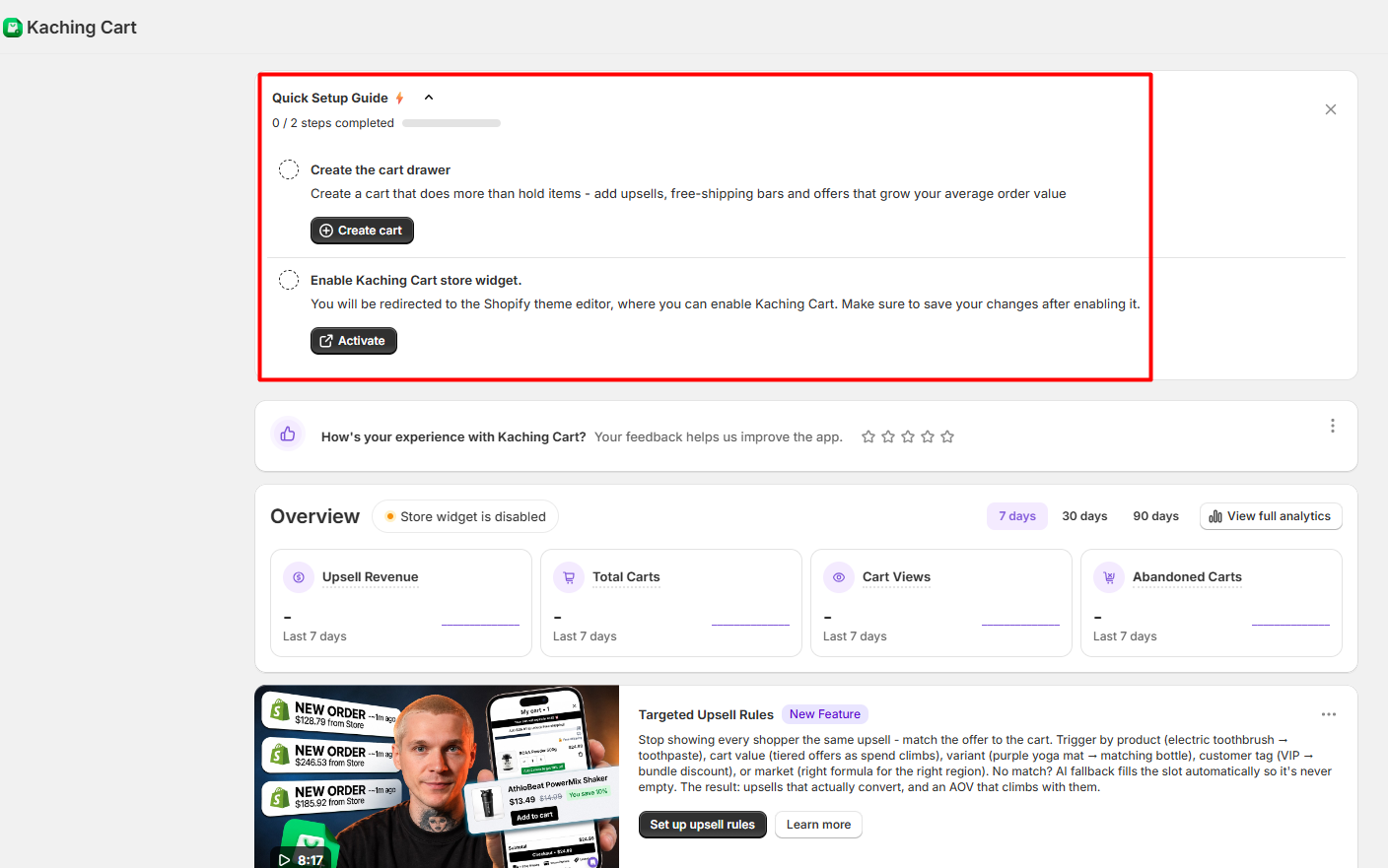
The dashboard also gives merchants a short setup guide. During our test, the first steps were clear. We could see where to create the cart drawer and where to enable the app in the Shopify theme.
That helped make the starting process easier.
What We Tested
We installed Kaching CartDrawer on a Shopify test store. We used the Up To 99 plan shown in the app at $9.99 per month.
During the test, we:
- explored the onboarding process;
- configured the cart drawer;
- reviewed styling and layout controls;
- enabled and previewed the Sticky Cart;
- inspected the analytics dashboard;
- reviewed the rule builder;
- checked the in-app pricing area.
The initial setup took around 5–10 minutes. We found the app easy to understand and navigate.
We did not complete a real cart-item test through checkout, trigger an upsell or free-gift rule end to end, test on mobile, verify analytics against orders, contact support, or measure revenue or conversion performance. Those limitations matter. Seeing a feature in the interface is not the same as proving that it performs reliably under live-store conditions.
Is Kaching CartDrawer Easy to Set Up?
Yes, based on our test. The basic setup took about 5–10 minutes.
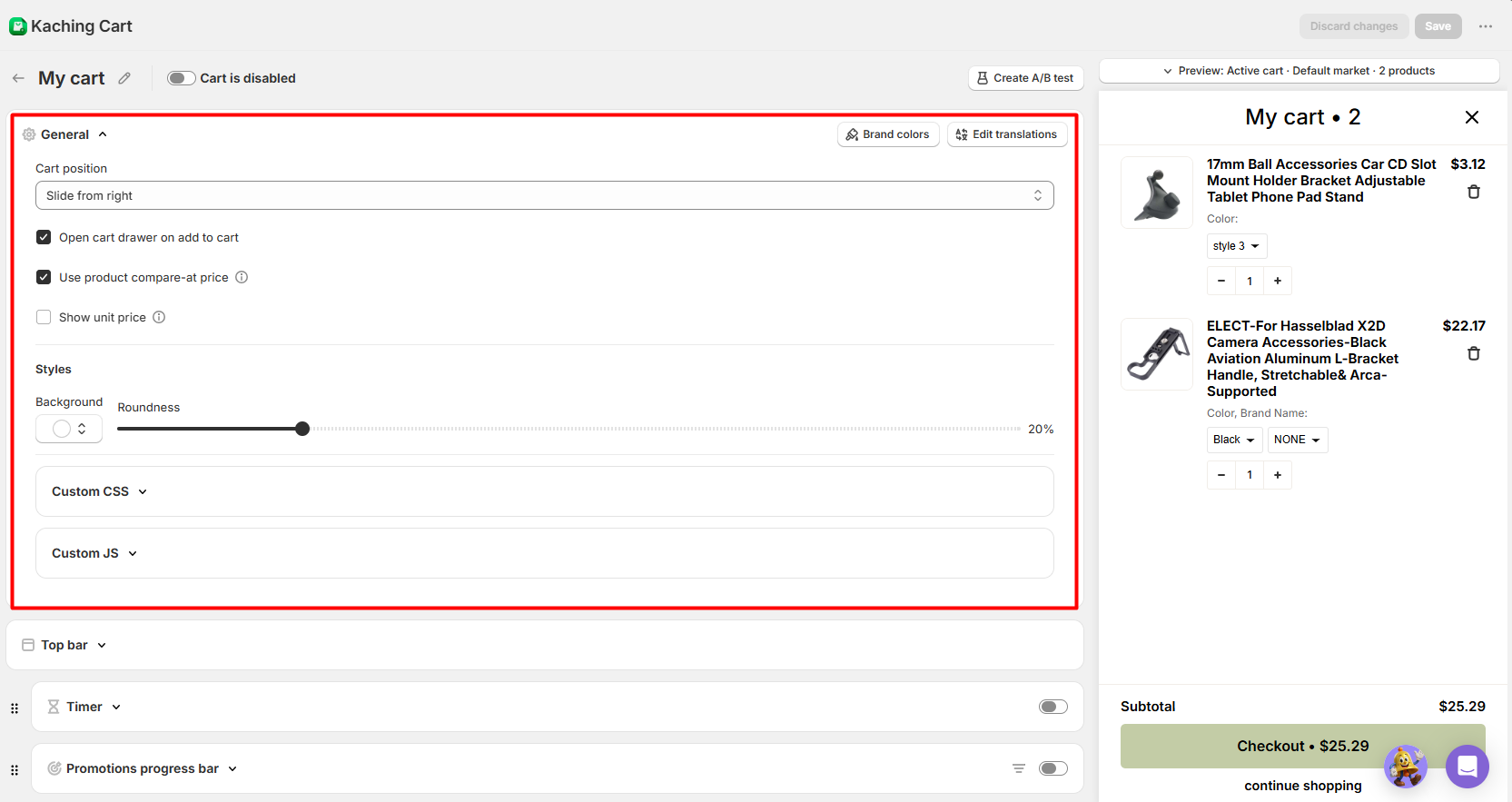
We did not need much time to understand where the main controls were located. The editor also felt organized. General settings included options for cart position, compare-at pricing, styling, translations, custom CSS, and custom JavaScript.
Other cart features were placed in separate sections below the main settings. This helped keep the editor manageable.
The live preview on the right was also useful. It made it easier to see how the cart would look while changing settings. For merchants who want more control over the cart without building a custom solution, this is one of Kaching’s strongest points.
The Main Drawback: There Are Many Settings
The biggest weakness we noticed was the amount of configuration. Kaching gives merchants a lot of control. That is useful if you want to adjust many parts of the cart.
However, it can also make the app feel busy. Once you move beyond the basic settings, there are several areas to explore. These include styling, progress bars, timers, upsells, rules, custom code, and other cart options. The interface itself was not confusing during our test.
The issue is simply that there is a lot to manage. For merchants who only want a very basic cart drawer, that level of control may feel unnecessary. For merchants who want to fine-tune the cart experience, the same depth may be a benefit.
Sticky Cart Was Easy to Configure
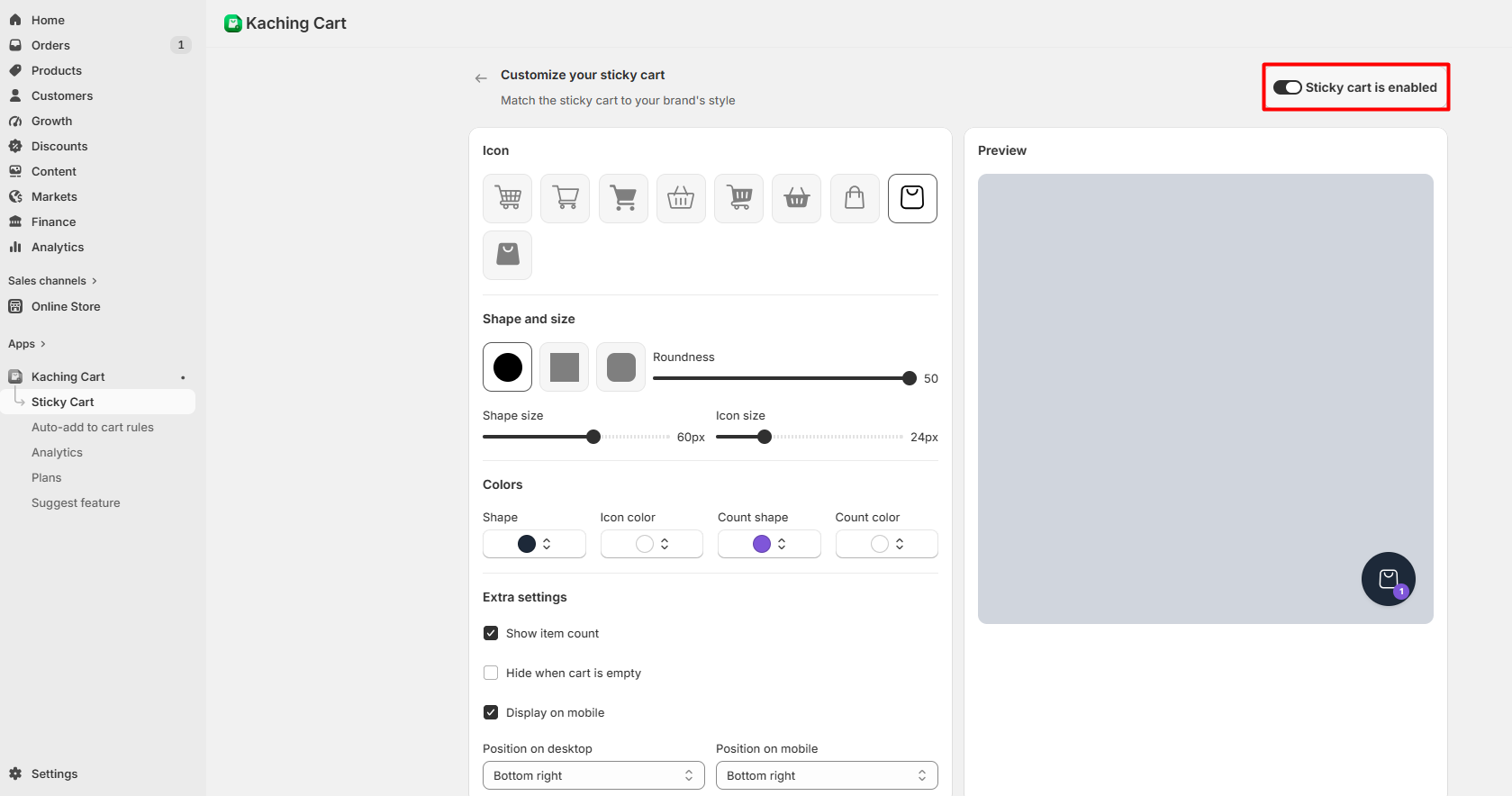
We also tested the Sticky Cart setup. The editor included controls for cart icon style, shape, icon size, colors, item count, desktop position, and mobile display settings. We enabled the Sticky Cart and previewed it on desktop.
In that preview, it worked as expected. We did not test the Sticky Cart on mobile devices. We also did not test it across different Shopify themes. Because of that, merchants using heavily customized themes or headless storefronts should run their own compatibility checks before launch.
We Inspected Upsell Rules but Did Not Test Them End to End
Kaching includes several upsell-related tools. The app provides areas for product offers, free gifts, shipping incentives, and other cart-based promotions. We also reviewed documentation related to more targeted upsell behavior.
However, we did not complete a full upsell test. We did not create an offer, change product variants, add products to the cart, and confirm that the rule triggered through the full storefront flow. That means we can confirm that these controls are available, but we cannot say that we fully verified their real-world behavior.
A feature being present in the interface is not the same as proving that it works perfectly in every store setup. Merchants should test their own rules before using them with real customers.
Analytics Look Detailed, but We Only Inspected Them
The analytics area provides metrics for carts, cart views, abandoned carts, checkout initiations, converted carts, conversion rate, upsell revenue, upsell conversion rate, average order value, and best-performing upsells. In our test environment, these values contained no meaningful transaction data.
We therefore only verified that the analytics interface exists and what it exposes. We did not verify the accuracy of Kaching’s attribution or compare its figures with actual Shopify orders. Merchants evaluating the app primarily for reporting should keep that distinction in mind.
Pricing and Value
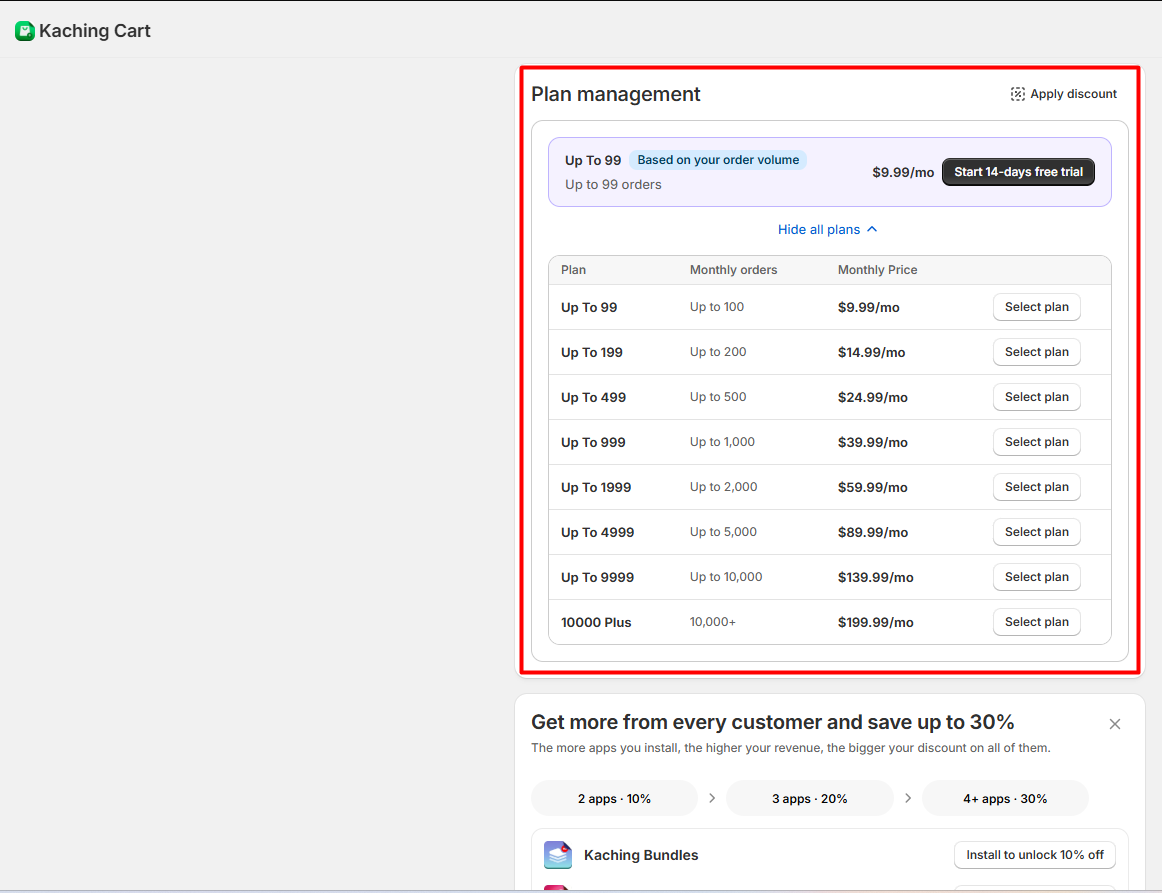
Kaching uses order-based pricing. The plan we tested was shown at $9.99 per month.
The in-app pricing screen labeled it Up To 99 and showed the first paid tier around the 99–100 order range. Higher plans increase in price as monthly order volume grows. This pricing model is easy to understand. It can also make Kaching affordable for smaller stores.
However, merchants should look beyond the starting price. A store that grows quickly may move into a higher pricing tier. That means the real value depends partly on monthly order volume.
For a smaller merchant, the $9.99 starting price gives access to a large amount of cart customization for a relatively low monthly cost.
What We Liked
- Fast setup: It took us around 5–10 minutes to understand the basic workflow.
- Simple navigation: The main controls were easy to find.
- Organized editor: Kaching offers many options without making the layout feel chaotic.
- Useful live preview: We could see the cart while changing settings.
- Strong customization: Merchants can control many parts of the cart experience.
- Low starting price: The plan we tested was $9.99 per month.
What Could Be Better
- There are many settings: Some merchants may find the amount of configuration tiring.
- The full upsell workflow still needs testing: We did not verify an upsell from rule creation through checkout.
- Mobile was not tested: Our storefront preview was desktop-only.
- Analytics were not verified: We inspected the dashboard but did not compare it with real order data.
- Pricing rises with order volume: Growing stores should check how quickly they may move into higher plans.
Who Kaching CartDrawer Is Best For
Kaching CartDrawer is a good fit for merchants who want more control over the cart without starting with a custom development project. Based on our test, Kaching CartDrawer is best suited to merchants who want an approachable, out-of-the-box way to configure a more advanced Shopify cart without a steep initial learning curve. It should be particularly interesting to merchants who want plenty of customization options and intend to experiment with cart incentives, sticky-cart behavior, product recommendations, gifts, shipping incentives, or related upsell tools. The setup experience makes the app relatively approachable even though its deeper configuration can become extensive.
Who Should Consider an Alternative
Kaching may be less suitable for merchants who want an extremely minimal cart tool with only a handful of options. Stores with deeply customized Shopify themes, large amounts of custom JavaScript, or headless architectures should also perform more technical compatibility testing than we completed here. Likewise, a merchant whose buying decision depends primarily on proven analytics accuracy, measured conversion improvement, or verified upsell revenue should not rely on this review for those questions. Our test did not establish those outcomes.
Final Verdict
Kaching CartDrawer Cart Upsell made a strong impression where we actually tested it: setup and customization. It took us only about 5–10 minutes to understand the basic workflow, and the interface was easy to navigate. The cart editor offers enough control to make the app attractive to merchants who want more than a basic cart without immediately turning the project into custom development work. The main downside is the volume of configuration. There is a lot to work through, and merchants who prefer minimal interfaces may find it excessive. We would recommend Kaching CartDrawer to growth-focused Shopify merchants who want a relatively approachable, lower-cost way to build a more configurable cart experience — with the important condition that they test their specific upsell rules, theme compatibility, mobile behavior, and real-order workflows before relying on them in production.
Frequently Asked Questions
Is Kaching CartDrawer easy to use?
In our test, yes. It took approximately 5–10 minutes to get through the basic setup and become comfortable with the interface. We found the navigation easy to understand.
How much does Kaching CartDrawer cost?
The plan we tested was shown at $9.99 per month. Kaching uses order-volume-based tiers, so the monthly price increases as order volume rises. The Shopify App Store also currently lists a free option for development stores and a 14-day trial for paid tiers.
Did Blinto test Kaching’s upsells?
Kaching’s Shopify listing includes product recommendations, frequently bought together offers, gift wrap, shipping protection, free gifts, free shipping, and other upsell-related tools. Shopify App Store We inspected some of these configuration areas but did not verify a complete upsell purchase flow.
Did Blinto test the Sticky Cart?
Yes. We enabled and previewed the Sticky Cart on desktop. It worked as expected during that preview. We did not test it on mobile.
Did Blinto test Kaching analytics?
We inspected the analytics dashboard. We did not verify its data against real or test orders, so we cannot confirm reporting accuracy.
Did Blinto test customer support?
No. We did not contact Kaching’s support team during this review.
Is Kaching CartDrawer good for beginners?
Based on our setup experience, it can be. The interface was easy to understand, and the main editor was organized. However, beginners may need extra time once they start exploring the larger number of advanced settings.