
Upselling works best when an extra offer feels useful rather than forced. The challenge is showing a relevant product at the right moment without making the store feel crowded.
Essential Upsell & Cross Sell gives Shopify merchants several places to recommend related products. It covers product-page, cart, and post-purchase offers, with campaign management and analytics in one app.
For this review, we examined the app inside Shopify. We checked its offer dashboard, post-purchase campaign management, activation state, analytics, and pricing. We did not run enough real customer orders to measure a change in average order value, conversion rate, or revenue.
Key Takeaways
- Several offer placements are available: The current listing includes product-page and post-purchase offers, while higher tiers add cart offers.
- Offer management is centralized: Our dashboard showed individual campaigns with their type, location, and publication status.
- Post-purchase campaigns were visible: We confirmed that these offers can be managed from the main dashboard.
- Analytics are built in: Merchants can track impressions, conversions, conversion rate, and attributed added revenue.
- Pricing scales with attributed revenue: The plans use different additional-revenue allowances.
- Our test does not prove a sales lift: The test account had no meaningful live conversion data.
Our Verdict
Essential Upsell & Cross Sell brings several common upselling tools into one interface without making the main dashboard feel unnecessarily complicated.
Its clearest advantage is coverage. Merchants can manage offers across different points in the buying journey instead of installing a separate app for each placement. The dashboard made campaign location and status easy to check.
The main trade-off is pricing. Lower plans limit the amount of additional revenue attributed to the app, so a store may need to upgrade as its campaigns generate more sales.
Based on the parts we tested, Essential Upsell & Cross Sell is worth considering for merchants who want straightforward campaign management across several placements. We cannot say that installing it will increase AOV or conversion rate; our evidence does not establish that outcome.
What Essential Upsell & Cross Sell Offers
The developer describes eight offer types, including product-page upsells, frequently bought together recommendations, cross-sells, cart and drawer upsells, bundles, post-purchase offers, and product add-ons.
That range lets a merchant match an offer to the buying stage. A related item can appear while a shopper considers a product, another recommendation can appear in the cart, and a post-purchase offer can follow the initial order.
The Shopify App Store lists the app as Built for Shopify and identifies the developer as Essential Bundles & Upsells. These are current public listing details, not findings from our hands-on test.
What We Tested
We used the app in a Shopify development store and inspected the main Offers dashboard, existing post-purchase campaigns, overall activation state, analytics, and the in-app pricing screen.
Our test account contained three post-purchase offers. We could see their type, location, and unpublished status. We also confirmed the metrics shown in analytics and the paid-plan limits shown in the pricing interface.
We did not create and publish a complete storefront offer, complete checkout, accept a post-purchase offer, test every offer type, compare theme compatibility, contact support, or run campaigns under meaningful live traffic. The active account was a development store, where the in-app pricing screen said the app was free and allowed unlimited added revenue.
For these reasons, this is a Level 2 — Partial Hands-On Test. Our evidence supports observations about management, status, reporting, and pricing—not claims about sales performance.
Creating and Managing Offers
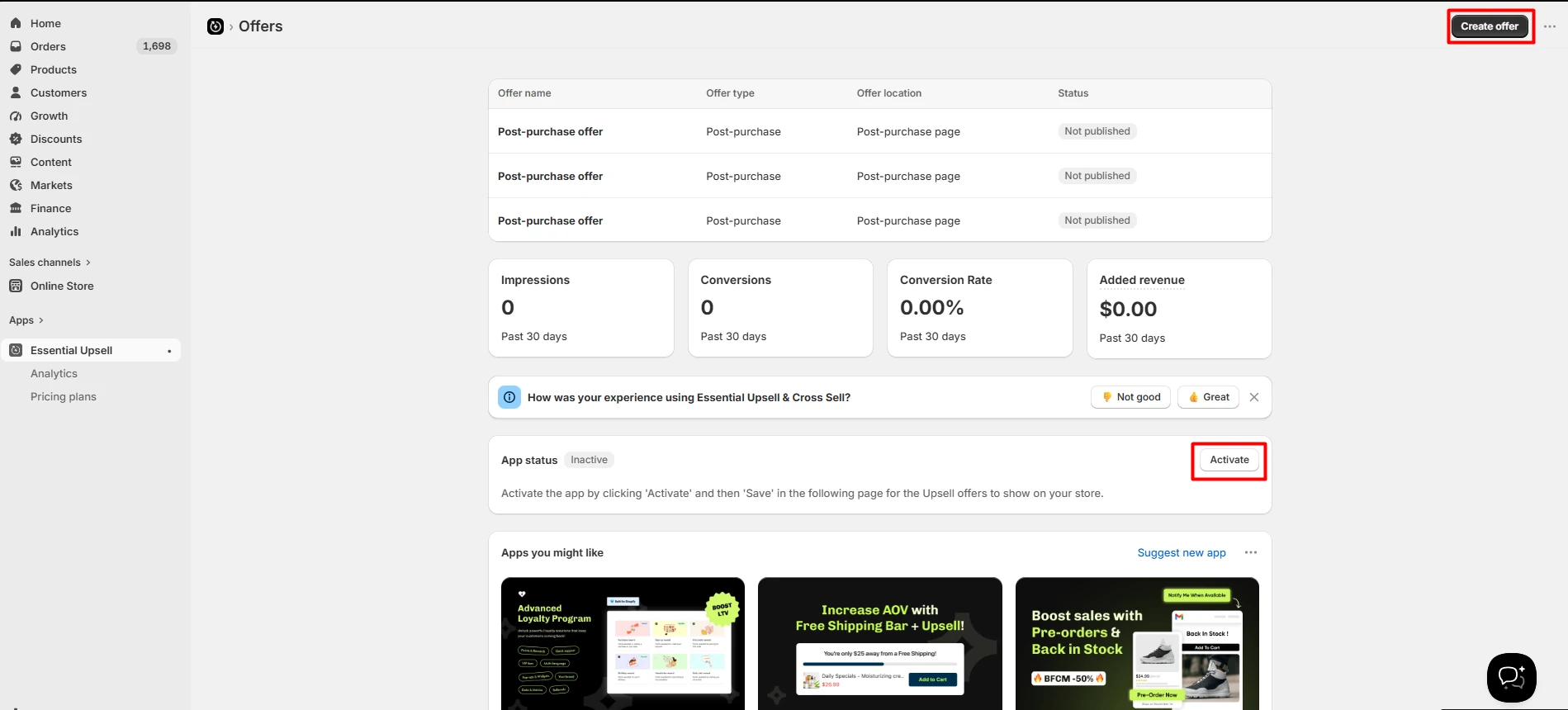
The Offers page acts as the main control center. Our test account showed three campaigns in a table, with columns for offer name, type, location, and status.
All three were post-purchase offers and all three were marked Not published. That distinction matters: a configured campaign is not necessarily live.
The same screen showed the app itself as Inactive, with an Activate button and instructions to save the activation in the next step. Merchants should check both the individual campaign status and the app’s overall activation state before expecting an offer to appear.
A clear Create offer button was available at the top. We did not complete that creation flow in this test, so we cannot judge every setup step or the final storefront result.
Upsell and Cross-Sell Options
The app is not limited to one recommendation format. Its current public pages describe product recommendations, frequently bought together offers, product add-ons, bundles, cart or drawer offers, and post-purchase offers.
Different placements serve different purposes. Product-page offers can introduce a complementary item while a shopper is deciding. Cart offers can make another suggestion before checkout. Post-purchase offers reach the customer after the original order decision.
More placements do not automatically create a better experience. Merchants should use offers selectively and recommend products with a clear connection to the original purchase. We did not test every format, so the wider feature range remains developer-listed functionality rather than hands-on verification.
Post-Purchase Offers
Post-purchase management was the clearest campaign type in our test. The dashboard listed three post-purchase campaigns and showed their publication status without requiring us to open each one.
This is useful operationally because a merchant can distinguish campaigns that merely exist from campaigns that are live. It also keeps post-purchase work in the same campaign list as other offer types.
Our test confirms the presence and management of these campaigns. It does not establish how they look to shoppers, how smoothly they work after checkout, or how well they convert.
Analytics and Reporting
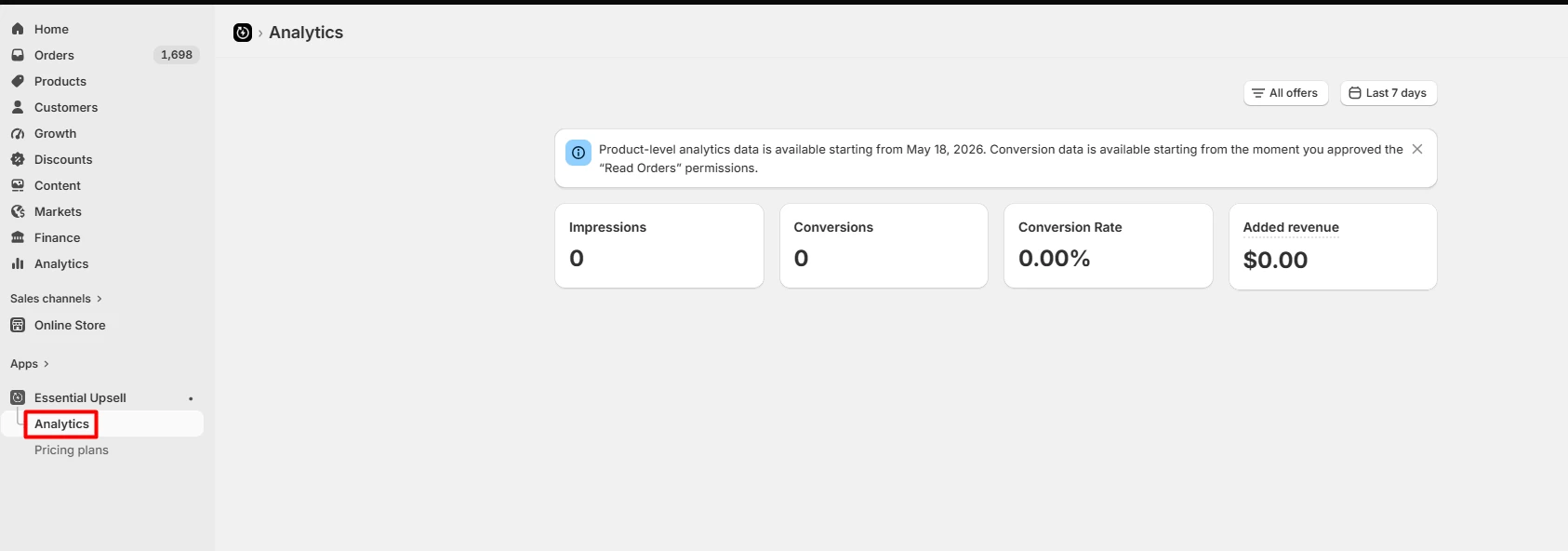
The analytics dashboard displayed four main metrics: impressions, conversions, conversion rate, and added revenue. It also had filters for the offer and date range.
Our account showed zero impressions, zero conversions, a 0.00% conversion rate, and $0.00 in added revenue. Those numbers are not evidence of poor app performance. They reflect a test environment without meaningful customer traffic.
What we could evaluate was the reporting layout. The core metrics were easy to identify, and the filtering controls were visible. Stores with live campaigns can use these measures to compare offer activity, but we did not validate attribution accuracy or reporting under real volume.
Design and Store Experience
The developer says offer layouts can be customized to match a store’s text, colors, and placement. We did not publish an offer or compare the result across Shopify themes.
Stores using heavily customized themes should preview each placement before launch. Check desktop and mobile presentation, product selection, discount behavior, and the full checkout or post-purchase path that matters to the campaign.
Essential Upsell & Cross Sell Pricing
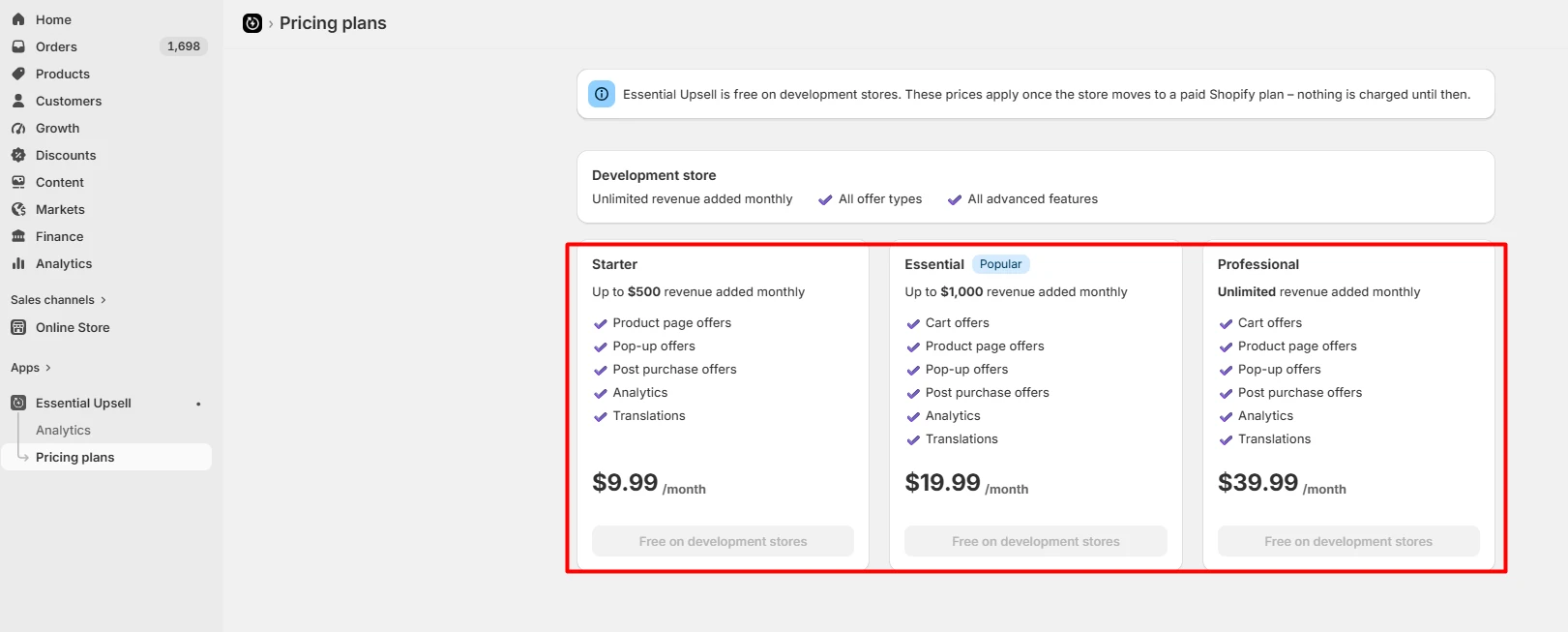
We checked both the in-app pricing screen and the Shopify App Store listing on September 24, 2026.
| Plan | Price | Additional-revenue allowance | Important listing details |
|---|---|---|---|
| Free | $0 | Up to $100 | Product-page and post-purchase offers, analytics, and translations listed |
| Starter | $9.99/month | Up to $500 | Product-page and post-purchase offers; 14-day trial listed |
| Essential | $19.99/month | Up to $1,000 | Adds cart offers; 14-day trial listed |
| Professional | $39.99/month | Unlimited | Cart, product-page, and post-purchase offers listed; 14-day trial listed |
Our in-app screenshot also showed pop-up offers on the paid tiers. The public Shopify listing did not repeat that item in the plan summary we checked, so merchants who need pop-ups should confirm the current entitlement before subscribing.
The in-app screen said development stores receive unlimited added revenue and all offer types and advanced features without charge until the store moves to a paid Shopify plan.
The important pricing detail is the revenue allowance. A lower subscription price may not remain the right tier if attributed upsell revenue passes its limit. Confirm current prices, features, and upgrade behavior before launch because listing terms can change.
What We Liked
- The dashboard made status clear: Campaign type, location, and publication status were visible together.
- Post-purchase offers stayed in the central campaign list: Merchants do not need a separate management area just to see whether those campaigns exist.
- The analytics were easy to scan: The main performance measures used familiar labels.
- The app disclosed activation state: The inactive notice reduced the chance of assuming that configured offers were already visible.
- Development-store testing is practical: The in-app screen allowed testing without a paid app charge while the Shopify store remained a development store.
What Could Be Better
- Revenue limits complicate the price comparison: Merchants should estimate their likely attributed revenue, not compare only monthly fees.
- A configured offer can still be inactive: Users must check both campaign publication and overall app activation.
- Real performance requires live data: The reporting interface was clear, but our empty test account could not validate conversion lift, AOV impact, or attribution accuracy.
- The wider workflow remains untested: We did not publish offers, test shopper-facing design, complete post-purchase acceptance, or check multiple themes.
Who It Is Best For
Essential Upsell & Cross Sell should suit Shopify stores with obvious complementary purchases and merchants who want several common offer placements in one app.
Fashion stores might recommend accessories, electronics stores might suggest compatible items, and beauty merchants might present add-ons or routines. The app may be especially appealing to teams that prefer one central offer list and straightforward performance metrics.
Smaller stores can use the Free or Starter tier to test a focused campaign. Growing stores should calculate which revenue allowance is likely to fit, while merchants needing advanced funnels or experimentation should compare more specialized options.
Is Essential Upsell & Cross Sell Easy to Use?
The parts we inspected were easy to understand. The Offers dashboard provided a useful overview without requiring us to open each campaign, and the analytics used familiar metrics.
That is a limited ease-of-use finding. We did not complete the full create-design-publish-purchase sequence. Merchants should still allow time to choose relevant products, preview the design, activate the app correctly, and test the customer path.
Final Verdict
Essential Upsell & Cross Sell offers a practical set of upselling and cross-selling tools in one Shopify app. Its central dashboard, visible status information, post-purchase campaign management, and simple analytics were straightforward in our test.
The main consideration is pricing. Lower tiers cap the additional revenue attributed to the app, which can make an upgrade necessary as campaigns grow.
Our verdict is Consider for merchants who want several common placements without managing separate upsell apps. That verdict is about the app’s visible workflow and feature coverage. It is not a claim that the app will increase AOV, conversions, or revenue for a particular store.
Before relying on it, publish a small relevant campaign and test the whole customer journey. Confirm the offer appears correctly, discounts work as expected, reporting records the event, and the likely paid tier fits your economics.
Frequently Asked Questions
Is Essential Upsell & Cross Sell free?
Yes. The Shopify App Store listed a Free plan with up to $100 in additional revenue when we checked on September 24, 2026. The in-app screen also said development stores were free until they moved to a paid Shopify plan.
How much does Essential Upsell & Cross Sell cost?
The current paid tiers were Starter at $9.99 per month, Essential at $19.99 per month, and Professional at $39.99 per month. The plans use different additional-revenue allowances, and paid plans listed a 14-day trial.
Does it support post-purchase upsells?
Yes. We saw three post-purchase campaigns in our test dashboard. They were not published, so we verified campaign management but not the shopper-facing post-purchase experience or conversion performance.
Does it include analytics?
Yes. The dashboard showed impressions, conversions, conversion rate, and added revenue, plus offer and date filters. Our account contained no meaningful live activity, so we did not validate attribution accuracy.
Does Essential Upsell & Cross Sell increase AOV?
The developer markets the app as an AOV tool, but an increase is not guaranteed. Results depend on the store, products, traffic, pricing, discounts, placements, and relevance of each offer. Our test did not generate enough real orders to verify an AOV increase.
Is it suitable for beginners?
The dashboard and analytics were approachable in our partial test. We did not complete every setup and storefront step, so new users should still test one campaign fully before expanding to more placements.
Should I use every available offer placement?
Not necessarily. More recommendations do not automatically improve the customer experience. Start with a few relevant offers, verify the entire flow, and use live campaign data to decide what to keep.