.webp?v=2026-10-12)
Selleasy helps you add more to each order. Its bundle setup was the best part of our test. We chose a main item, picked what goes with it, and chose whether to add a deal. The steps were clear.
You can do more than make bundles. The app has many types of offers. That gives you choice, but also more to learn.
We explored Upsell & Cross Sell — Selleasy, developed by Logbase, inside Shopify. This review covers what we saw, where the setup felt easy, what needs more testing, and whether the monthly cost makes sense.
Key Takeaways
- Best feature we explored: Frequently Bought Together lets you choose the products in a bundle.
- Ease of use: The core setup was clear, but the number of offer types takes time to understand.
- Offer controls: We found optional discounts and start and end dates in the campaign settings.
- Other features: Selleasy advertises product-page, cart, checkout, and post-purchase offers. We did not test all these placements live.
- Pricing: Plans start free for stores with up to 50 monthly orders. Higher tiers depend on the store’s total order count.
- Main caution: We did not measure any increase in sales, conversion rate, or average order value.
Our Verdict
Consider Selleasy if you want to show offers in more than one place.
The product pairing steps made sense in our test. We liked being able to pick relevant items rather than relying only on automatic suggestions. Optional discounts and campaign dates also give merchants more control.
The main drawback is choice. If you only need one small recommendation block, learning several offer types may not be worth the effort. Keep an eye on pricing too: the fee can rise as your store receives more orders, even if those orders do not come from Selleasy.
What Does Selleasy Do?
An upsell asks a buyer to add more to an order. A cross-sell shows what goes with an item. Think of a case for a phone.
Selleasy brings these offers into one app. Its official Shopify listing describes Frequently Bought Together bundles, product add-ons, in-cart offers, checkout upsells, post-purchase offers, and thank-you-page recommendations. It also advertises automatic recommendations.
You can choose where an offer shows. But more offers are not always better. One good pair on a product page may be enough. Too many offers can get in the way.
What We Tested
Testing level: Level 2 — Partial Hands-On Test.
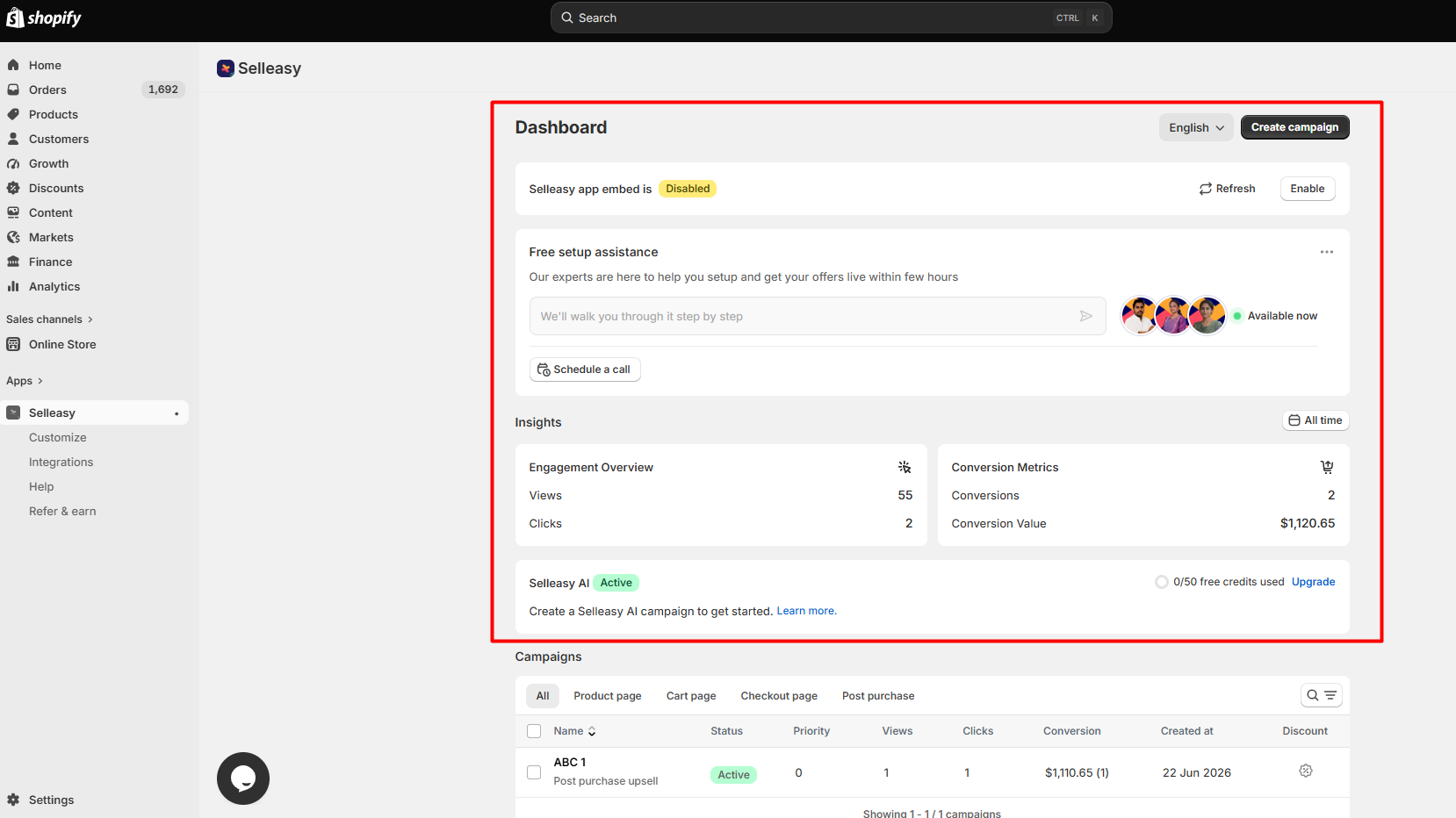
We inspected the dashboard, offer types, product selection, discount rules, campaign dates, design options, reports, integrations, help resources, and pricing. We explored the offer-building steps inside Shopify.
We did not run live sales tests. We did not check every place an offer can show. We did not test all app links or page speed. We did not track new sales.
That difference matters throughout this review. We can describe how clear the settings were, but we cannot claim that Selleasy increased sales or worked perfectly with every theme.
Creating an Upsell Campaign
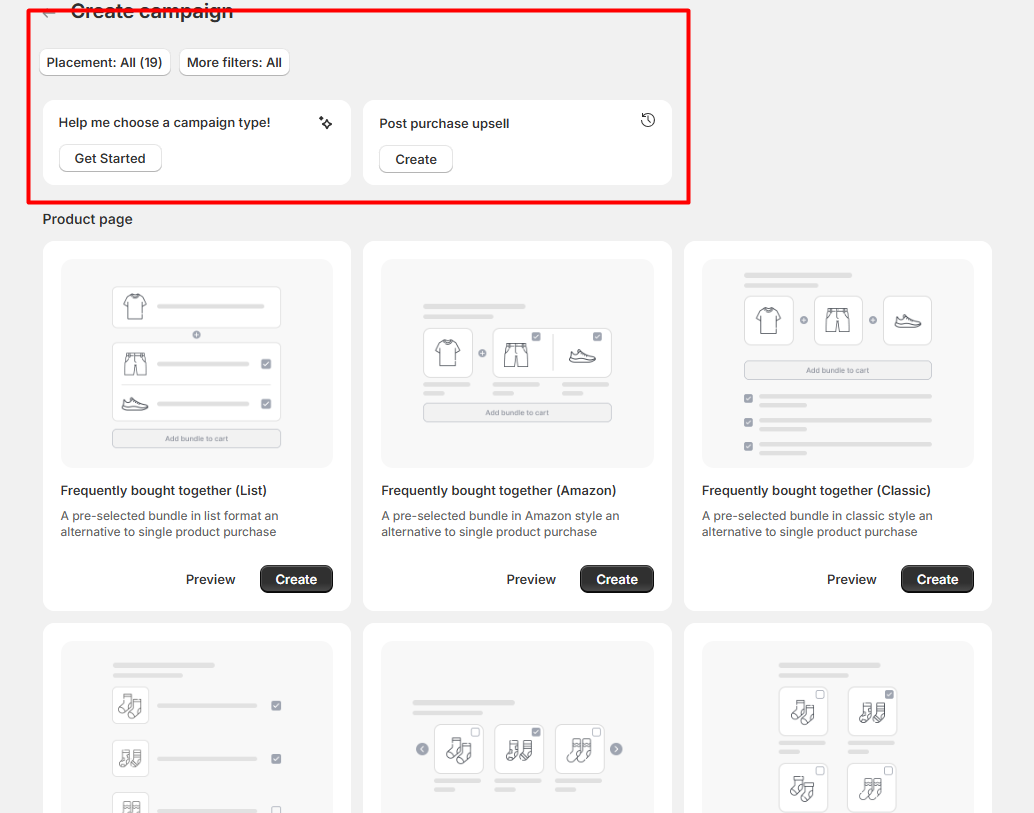
The setup starts with choosing an offer type. That is a useful first step because a bundle on a product page has a different purpose from an offer shown after checkout.
We chose a main item, then picked what to add. We could change the rules as we went. The steps made sense. We knew what each choice would do.
There are still many tools to learn. Start with one offer. Pick an item with a clear match. Check how it looks in your store. Add more only if they help.
Frequently Bought Together: What Stood Out
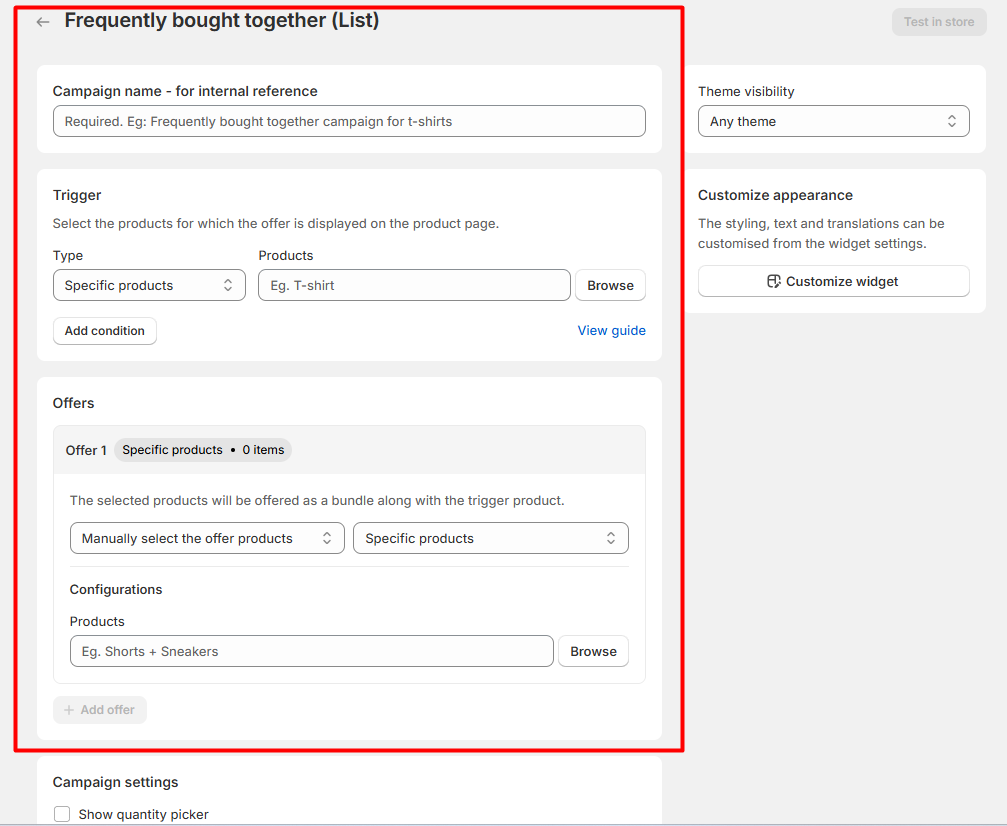
The bundle tool stood out in our test. We chose the main item first. Then we picked what to show with it. Each step had a clear use. We did not have to guess what came next.
That control matters when products need to match. For example, a merchant could pair a lamp with the correct bulb or a skincare item with a refill. These are examples of possible offers, not bundles whose sales we tested.
But you must keep each pair up to date. Check it when stock runs out or a new size goes on sale. An old pair may no longer make sense.
Selleasy advertises automatic product suggestions as well. We did not test how accurate those suggestions were, so we cannot compare them with manual pairings.
Discounts and Campaign Dates
In the Frequently Bought Together settings, we found that a discount was optional. You could suggest related products without cutting the price.
We liked that choice. A buyer may want an add-on at full price. A deal can also cut your profit. Check your costs first.
We also found start and end date controls. These can help with short promotions or seasonal campaigns. We inspected the settings, but did not verify an offer going live or ending on schedule in a live store. Merchants should still check both dates on their storefront.
Analytics: Helpful, but Read the Numbers Carefully
Selleasy has a page for offer stats. We looked at it. We did not run live sales tests, so we had no results to judge.
Stats can show which offers get used. But a sale linked to an offer may not be a new sale. The buyer may have bought the item with no offer at all.
If you run Selleasy, compare the results with your discounts, product margins, refunds, and wider sales trends. We would not promise a higher average order value based on the dashboard alone.
Integrations and Support
We saw integration information and help resources inside the app. The official listing also names chat, email, and Zoom support.
These options are useful to know about, but we did not connect every third-party app or measure support response times. A store using a custom theme, cart drawer, or several sales apps should test the actual combination before relying on it.
Selleasy Pricing: October 2026
Selleasy’s Shopify App Store listing showed these plans when checked on October 12, 2026:
| Plan | Total store orders per month | Price |
|---|---|---|
| Starter Tier I | Up to 50 | Free to install |
| Starter Tier II | Up to 500 | $9/month |
| Starter Tier III | Up to 1,000 | $19/month |
| Starter Tier IV | 1,000+ | $29/month |
The paid tiers listed a 30-day free trial. Charges are in USD, and prices may change.
The plan is based on all store orders. It does not count only orders with an upsell. As sales rise, your fee may rise too. This can happen even if you do not add new offers.
The free tier makes it easier for a small store to explore the app. At higher order volumes, check whether the features you use are worth the monthly fee. We did not measure a return on investment.
What We Liked
Clear product pairing. The Frequently Bought Together steps were simple to understand. We could choose the main item and matching products without losing track of the offer.
Useful control. We could decide whether to give a discount and set campaign dates instead of using the same rule for every offer.
Room to expand. Selleasy advertises several offer placements, so a merchant can start with one and explore more later. We did not verify them all live.
What Could Be Better
There is a learning curve. The range of offer types and settings can be more than a new merchant needs. The basic flow felt clear, but choosing the right campaign still takes planning.
Pricing rises with order volume. The subscription tier may increase even when Selleasy is not the source of those sales.
Live compatibility needs checking. We did not confirm every offer design, integration, or placement on a live store. Custom themes and cart apps deserve extra testing.
Selleasy vs. UpCart vs. Essential Upsell
These apps overlap, but our reviews suggest different starting points.
| App | Main focus | Best starting point |
|---|---|---|
| Selleasy | Product pairings and several upsell placements | Stores wanting a range of offer types |
| UpCart | Cart drawer design, cart offers, rewards, and sticky cart | Stores focused on improving their cart |
| Essential Upsell & Cross Sell | Managing offers across product-page and post-purchase stages, with cart options on eligible plans | Stores wanting a campaign-focused upsell tool |
Our UpCart review focuses on the cart builder, templates, discounts, and Sticky Cart. That makes it a closer match when cart design is the main task.
Our Essential Upsell & Cross Sell review looks at its campaign dashboard, offer status, analytics, and post-purchase setup. Its plan structure is different from Selleasy’s order-based tiers.
We tested different parts of each app. This comparison is about feature focus and usability, not a head-to-head conversion or speed test.
Who Is Selleasy Best For?
Selleasy is a good fit to consider when products have clear connections. Think accessories, refills, matching sets, and helpful add-ons. It also suits merchants who want to test more than one place for an offer.
It may be too much for a store that needs only one basic recommendation. In that case, compare the setup time and monthly fee with simpler options before installing.
For any store, we suggest starting with one offer. Check the product match, stock, price, mobile layout, and cart behavior. Then review results over time before adding more campaigns. These are recommended next steps, not actions we completed during our test.
Frequently Asked Questions
Is Selleasy free to use?
Selleasy lists a free-to-install tier for stores with up to 50 monthly orders. Paid tiers start at $9 per month. The tier depends on your store’s total orders, and rates can change.
Can I make a Frequently Bought Together bundle?
Yes. We explored this setup and could select a main product, add related items, and adjust offer settings.
Do I have to offer a discount?
No. The setup we reviewed allowed an offer without a price cut. Choose discounts based on your margins and the value of the pairing.
Does Selleasy support post-purchase offers?
Its Shopify listing advertises post-purchase, checkout, and thank-you-page offers. We did not test every placement on a live store. Check the requirements for your Shopify plan and theme.
Can I measure sales from Selleasy?
Selleasy includes analytics, but we only inspected the reporting area. The dashboard can help you review offers, while a claim of extra sales needs stronger evidence.
Who develops Selleasy?
Logbase develops Selleasy, according to the official Shopify App Store listing.
Final Verdict
The best part of Selleasy was its bundle setup. It let us pick items that go well as a set. We could also add a deal or set dates. These steps were easy to follow.
The tradeoff is a lot to learn. The fee may also rise as store orders grow. Our verdict is Consider. It is worth a look if you want more than one type of offer. Start small. Test each offer in your own store.