
Honeycomb Upsell & Cross Sell is a Shopify app for creating upsell and cross-sell offers at several points in the shopping journey. Its dashboard felt straightforward and intuitive, while the funnel builder stood out as the most useful part of the experience.
The app also includes design controls, analytics, advanced settings, and educational resources. The main drawback we noticed was the repeated promotional “Add app” recommendations across several areas of the dashboard.
Key Takeaways
- The funnel builder is the standout feature.
- Navigation feels straightforward and intuitive.
- Funnels can appear on product, cart, post-purchase, thank-you, and blog pages.
- Honeycomb includes design controls, analytics, advanced settings, and learning resources.
- Promotional “Add app” recommendations appear in several parts of the dashboard.
- We did not collect enough live-store data to judge its effect on revenue, conversion rate, or average order value.
Our Verdict
Honeycomb provides a clear way to build and manage upsell and cross-sell funnels without making the core workflow difficult to understand. Its placement options and funnel builder give merchants useful control over where offers appear.
The repeated app promotions make parts of the dashboard feel busier than necessary. We also did not verify sales-performance improvements, so merchants should judge the app primarily on whether its funnel-building workflow fits their store.
What Is Honeycomb Upsell & Cross Sell?
Honeycomb is a Shopify app designed to create upsell and cross-sell funnels. Merchants can place offers at different stages of the customer journey rather than limiting recommendations to a single page.
The app puts funnel setup, design tools, reports, extra settings, and learning guides in one dashboard.
What We Tested
We reviewed the main dashboard, funnel setup, offer controls, funnel list, design tools, analytics, advanced settings, learning area, and pricing screen. We also checked how the app presents related-app promotions. We did not contact support or collect enough live sales data to measure changes in revenue, conversion rate, or average order value.
Getting Started With Honeycomb
The dashboard felt straightforward and intuitive. The home screen provides onboarding guidance and a clear option to create a new funnel.
The layout makes the main workflow easy to identify. However, promotional recommendations for other apps also appear in the dashboard and can compete with the primary controls for attention.
Funnel Builder
The funnel builder was the standout feature. When creating a funnel, Honeycomb lets you choose where it should appear and then configure the offer.
The app shows five places for offers: Product Page, Cart Page, Post Purchase, Thank You Page, and Blog Page. This lets merchants show related offers at several points in the shopping journey.
Creating Upsell and Cross-Sell Offers
The funnel configuration provides manual and Auto Pilot options. Merchants can also choose between cross-sell and upsell offer types.
These controls are grouped into the funnel workflow, which keeps the process relatively easy to follow. Mobile-view options are also available while configuring offers.
Managing Funnels
The Funnels area brings created and recommended funnels into one screen. It shows placements alongside performance fields such as views, orders, conversion, and revenue.
Our test account did not contain meaningful sales activity, so we did not use those figures to make performance claims.
Design Customization
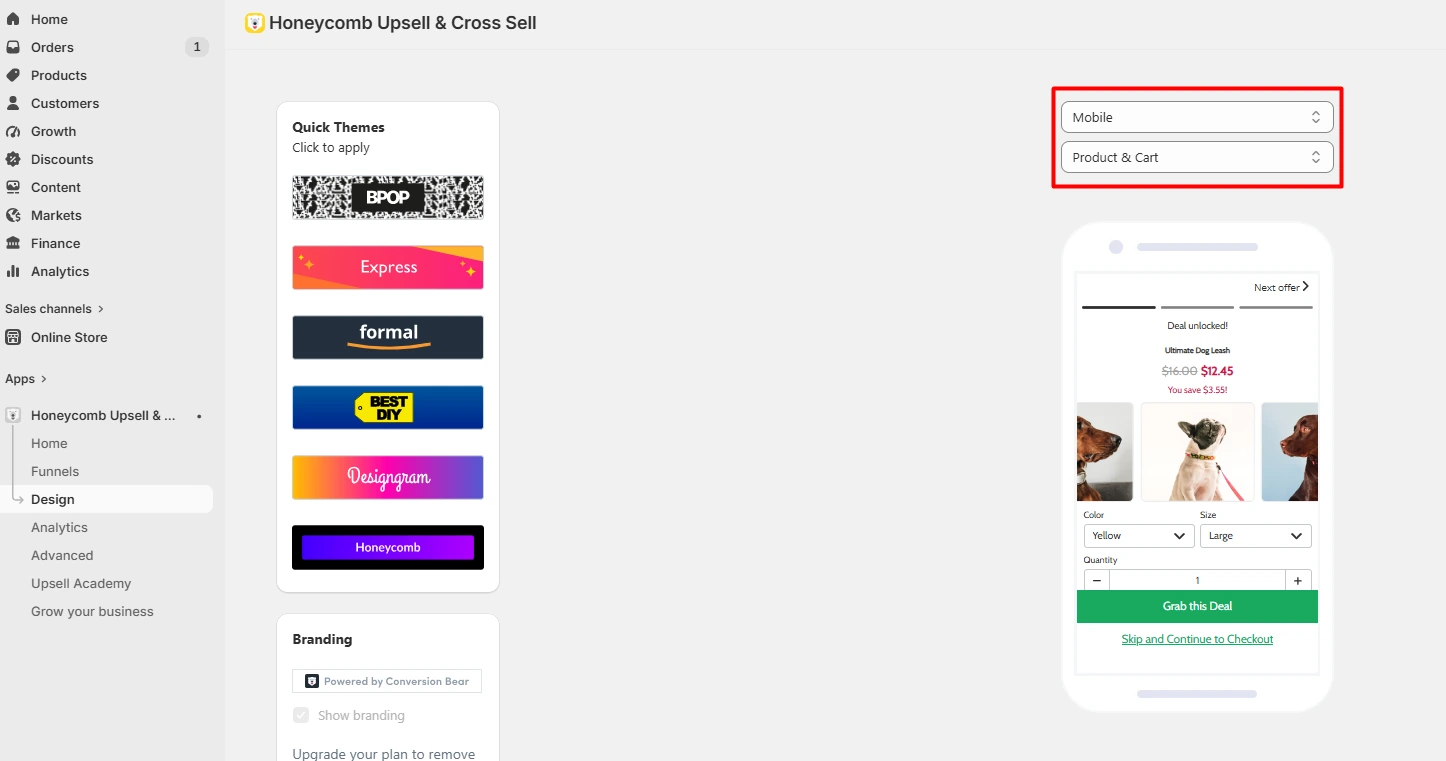
Honeycomb includes a Design section with quick themes and preview controls. This lets merchants adjust how offers appear across supported placements.
The preview is useful because it provides visual context while working on the offer rather than requiring merchants to rely only on settings.
Analytics
Honeycomb has a dedicated analytics area showing metrics such as revenue, clicks, and orders, along with a trend overview.
The account we reviewed showed no meaningful recorded activity. For that reason, we cannot judge how useful the analytics become on a store with substantial funnel traffic, and we do not claim that Honeycomb increases revenue, conversion rate, or average order value.
Advanced Settings
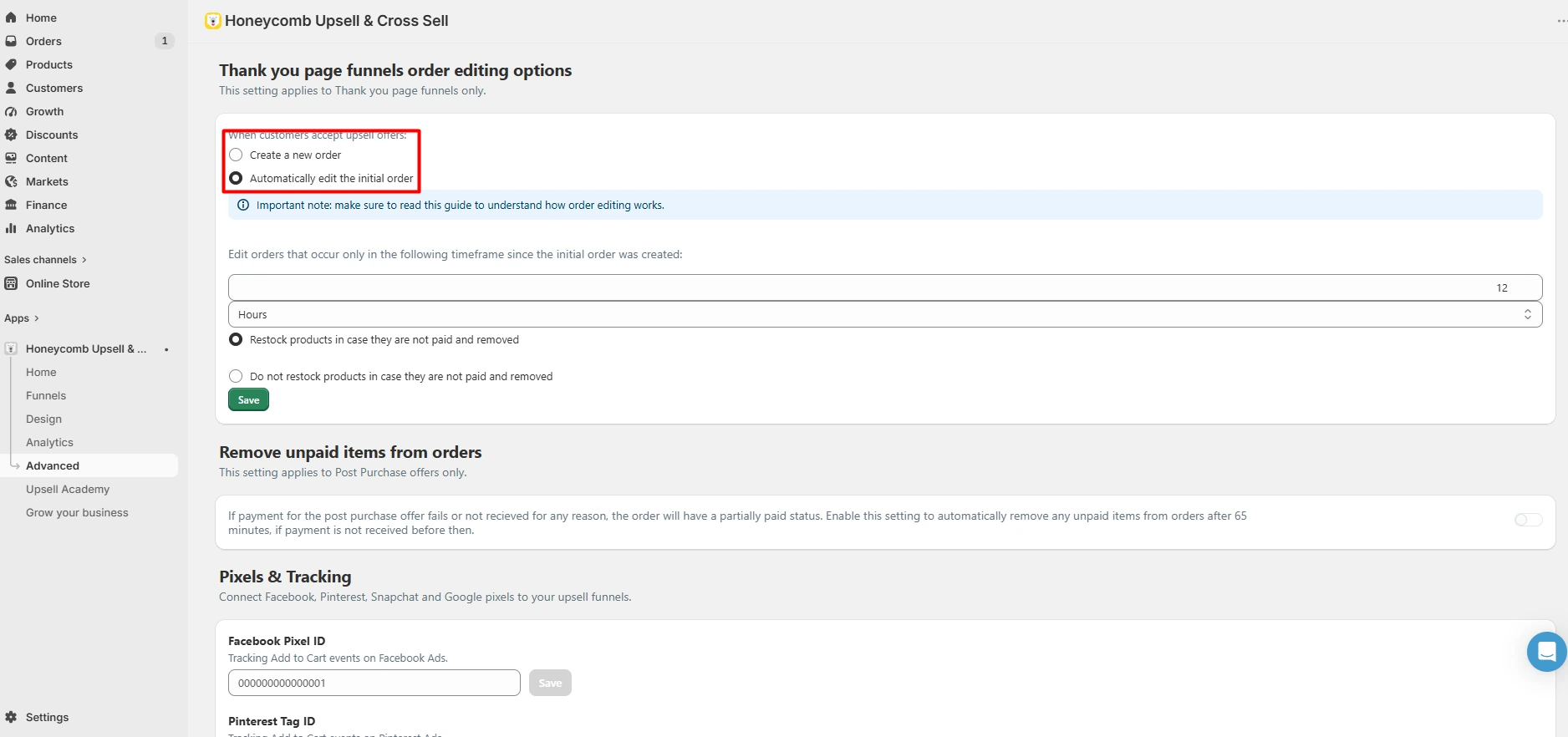
The app also has extra controls for thank-you-page order edits, restocking, unpaid items, pixels, and tracking.
These tools add more control beyond basic funnel setup. They may be useful for stores with more detailed tracking or post-purchase needs.
Upsell Academy
Honeycomb includes an Upsell Academy with educational material covering topics such as downsells, split testing, and upsell strategy.
This content gives merchants a place to learn about the concepts behind the tools they are configuring. We treated these resources as educational material rather than evidence that a particular strategy will improve store performance.
Grow Your Business Section
The Grow Your Business area includes a progress checklist and recommendations for additional apps.
This may help merchants discover related tools, but it also contributes to the promotional feel of the dashboard.
Too Many “Add App” Promotions
The most noticeable drawback was the repeated “Add app” promotion across several areas of the dashboard.
These recommendations do not prevent merchants from using Honeycomb, but they make some screens feel more promotional than necessary. A less prominent approach would keep the focus more clearly on the funnel-building workflow.
Honeycomb Pricing
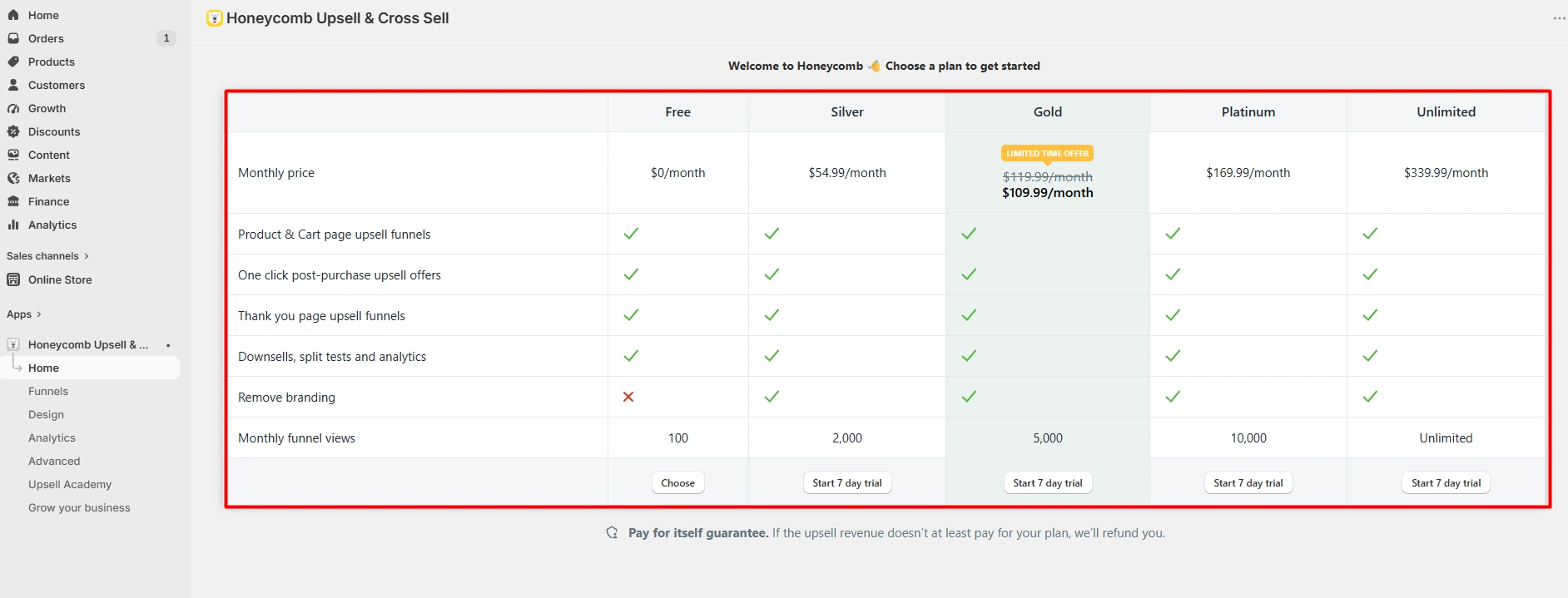
The pricing screen we reviewed showed five plans: Free, Silver, Gold, Platinum, and Unlimited. The plans differed in monthly funnel-view limits and included features.
The Free plan showed 100 monthly funnel views. Higher tiers increased that allowance, with the Unlimited plan showing unlimited monthly funnel views. The pricing screen also indicated that removing Honeycomb branding was unavailable on the Free plan.
Pricing can change, so merchants should check Honeycomb’s current Shopify listing or in-app pricing before choosing a plan.
What We Liked About Honeycomb
The funnel builder is Honeycomb’s strongest feature. It brings placement, offer type, and configuration into a clear workflow.
We also liked the range of funnel placements and the straightforward navigation. Design controls, analytics, advanced settings, and learning resources add useful supporting tools around the core funnel builder.
What Could Honeycomb Improve?
The repeated app promotions are the clearest area for improvement. Keeping related-app recommendations in a dedicated section would make the main dashboard feel cleaner.
Honeycomb could also make the distinction between its core funnel tools and promotional recommendations more obvious, especially for new users learning the interface.
Who Is Honeycomb Best For?
Honeycomb is relevant to Shopify merchants who want to create upsell and cross-sell funnels across several stages of the customer journey.
It may be particularly useful for merchants who want one interface for product-page, cart, post-purchase, and thank-you-page offers. Stores that only need a very simple recommendation widget may not need the full funnel workflow.
Is Honeycomb Good for Beginners?
The navigation we used was straightforward and intuitive, and the funnel creation process provides clear choices for placement and offer type.
The additional settings and promotional recommendations add some visual complexity, but the main funnel-building workflow remains easy to identify.
Final Recommendation
Honeycomb combines a useful funnel builder with multiple placements, design controls, analytics, and advanced settings. The funnel builder made the strongest impression because it keeps the core upsell and cross-sell workflow organized.
The main weakness is the amount of promotional content across the dashboard. We also did not gather enough live-store data to verify any effect on sales performance. Merchants should therefore evaluate Honeycomb based on its workflow, placement options, pricing, and fit with their store rather than assuming a specific revenue result.
Frequently Asked Questions
What does Honeycomb Upsell & Cross Sell do?
Honeycomb lets Shopify merchants create upsell and cross-sell funnels and place them at different stages of the shopping journey, including product, cart, post-purchase, thank-you, and blog pages.
Does Honeycomb have a free plan?
The pricing screen we reviewed included a Free plan with 100 monthly funnel views. Pricing and plan limits can change, so check the current app listing before making a decision.
Can Honeycomb create post-purchase offers?
Yes. Post Purchase is one of the funnel placements shown in the funnel builder.
Does Honeycomb include analytics?
Yes. The app has an analytics section for metrics such as revenue, clicks, orders, and trends. We did not have enough recorded activity to evaluate its analytics with meaningful sales data.
Did Blinto test Honeycomb customer support?
No. We did not contact customer support, so this review does not rate the quality or speed of Honeycomb’s support.
Does Honeycomb increase revenue or average order value?
We did not collect enough live-store data to verify an increase in revenue, conversion rate, or average order value. This review does not make those performance claims.