
Monster Cart Upsell + Free Gift helps Shopify merchants customize their cart and add offers such as free gifts, product recommendations, reward bars, and upsells.
We explored its cart setup, customization tools, free-gift options, campaign builder, Sticky Add To Cart settings, integrations, and support access.
The app made a good first impression. Its interface was easy to understand, quick to navigate, and friendly for beginners. Cart customization and free-gift options stood out most during our test.
We explored and configured the app, but we did not launch a campaign and complete a real customer purchase. We therefore cannot confirm its effect on sales, conversion rate, or average order value.
Key Takeaways
- Setup was easy to understand during our 10–15 minute test.
- The dashboard felt beginner-friendly, interactive, and quick to navigate.
- Cart customization and free-gift options were the highlights of our test.
- Monster Cart supports several offer types from one campaign area.
- A live cart preview makes basic customization easier to follow.
- We did not find bugs or errors during our limited test.
- Advanced campaigns may take more time to configure.
- We did not test sales, conversion, or AOV improvements.
Our Verdict
Monster Cart made a positive first impression. It combines useful cart tools with an interface that did not feel difficult to learn.
The cart customization and free-gift options were the strongest parts of our test. We also liked being able to preview the cart while working on its design.
Based on our test, Monster Cart is a good fit for very small or new Shopify stores. It gives them a simple way to add a slide-out cart, reward bars, free gifts, and basic upsells.
Stores with complex themes or several third-party apps should test their full setup before going live. We also suggest testing every campaign from the customer’s side because our review did not include a completed live purchase.
What Is Monster Cart Upsell + Free Gift?
Monster Cart Upsell + Free Gift is a Shopify app developed by Monster Apps.
It turns the standard cart into a place for offers and rewards. Its Shopify App Store listing includes free gifts, progress bars, Frequently Bought Together offers, volume discounts, product suggestions, and one-tick upsells.
At the time of our research, Monster Cart had a 4.7-star rating from 531 reviews on the Shopify App Store.
What We Tested
We checked the main dashboard, cart setup, live preview, free-gift tools, and upsell setup. We also opened Sticky Add To Cart, integrations, and the in-app support option.
The initial setup was easy to understand. Moving between the main sections was also quick. We described the interface as beginner-friendly, interactive, and fast to navigate.
We did not activate an upsell or free-gift campaign and complete a purchase on a live storefront. We also did not collect real customer data.
For that reason, this review does not claim that Monster Cart increased our conversion rate, revenue, or average order value.
Cart Setup Is Easy to Follow
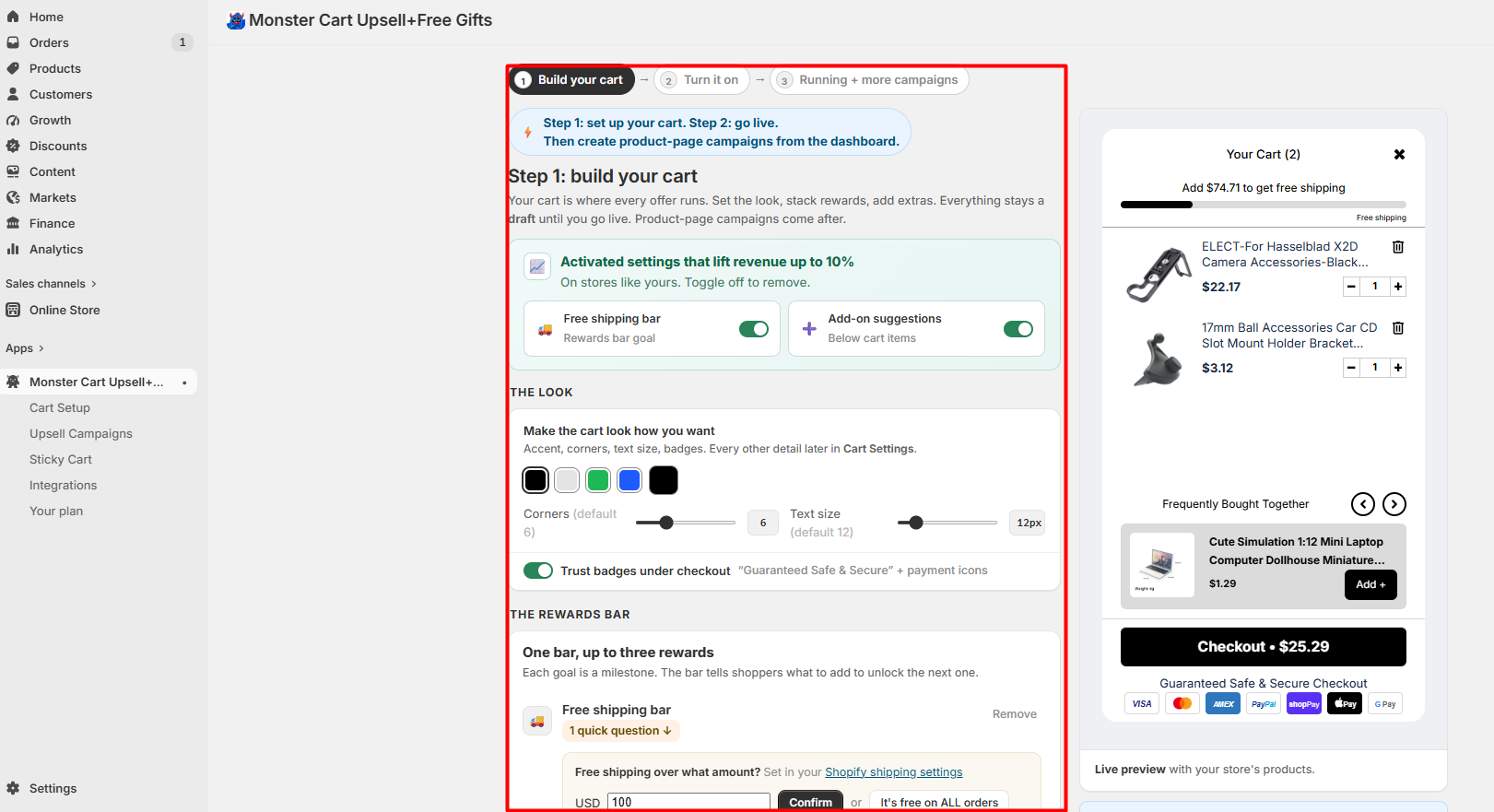
Monster Cart starts with a guided cart setup area. During our test, we could see a clear flow for building the cart, turning it on, and then creating campaigns.
The setup page brings several important options together. Merchants can work on the cart’s appearance, reward bar, add-on suggestions, and other settings while seeing a preview on the side.
We especially liked having the preview next to the settings. It gave us a better idea of what we were changing without making the dashboard feel too complicated.
Cart Customization Was One of the Highlights
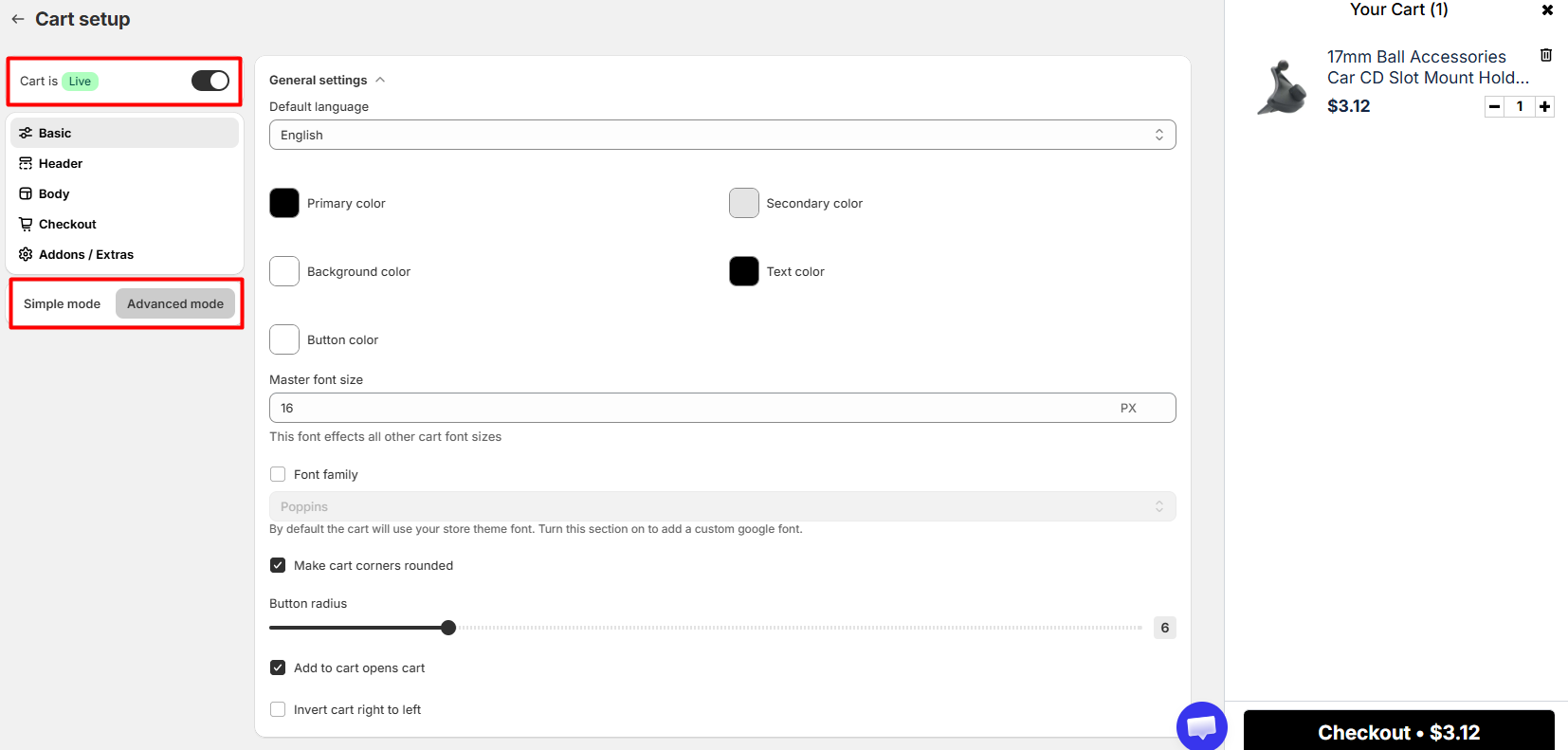
Cart customization was one of the two features that stood out most during our test.
Monster Cart provides simple and advanced customization options. We could access settings for colors, font size, rounded corners, cart behavior, and other design choices.
A cart preview stays visible while working on these settings. This is useful for beginners because changes are easier to understand when you can see the cart beside the controls.
We only tested the editor and preview. We did not publish a heavily customized cart to a production store, so we cannot comment on how every theme handles these changes.
Free-Gift Options Stood Out Most
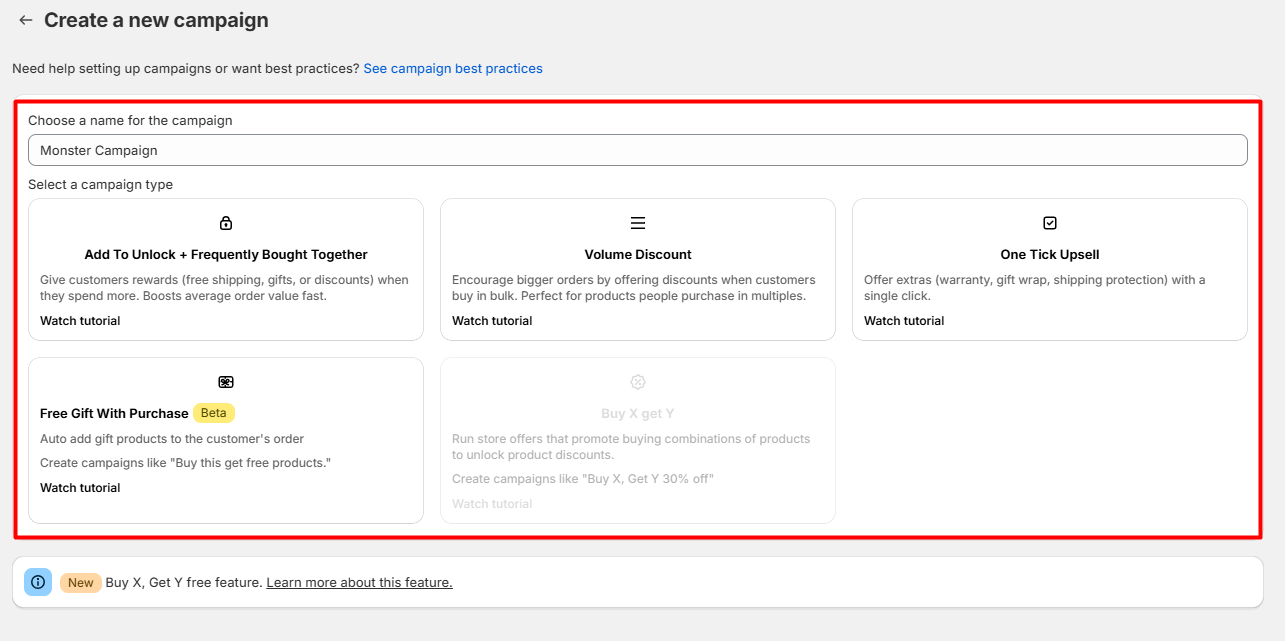
The app’s free-gift options were another highlight.
We found several campaign types. These included Add To Unlock, Frequently Bought Together, Volume Discount, One Tick Upsell, and Free Gift With Purchase. A Buy X, Get Y option was also visible.
Having these choices in one place makes it easier to understand what types of offers the app can create.
We explored these options but did not activate a campaign. Our comments here are therefore about the setup experience, not campaign results.
Creating a Campaign
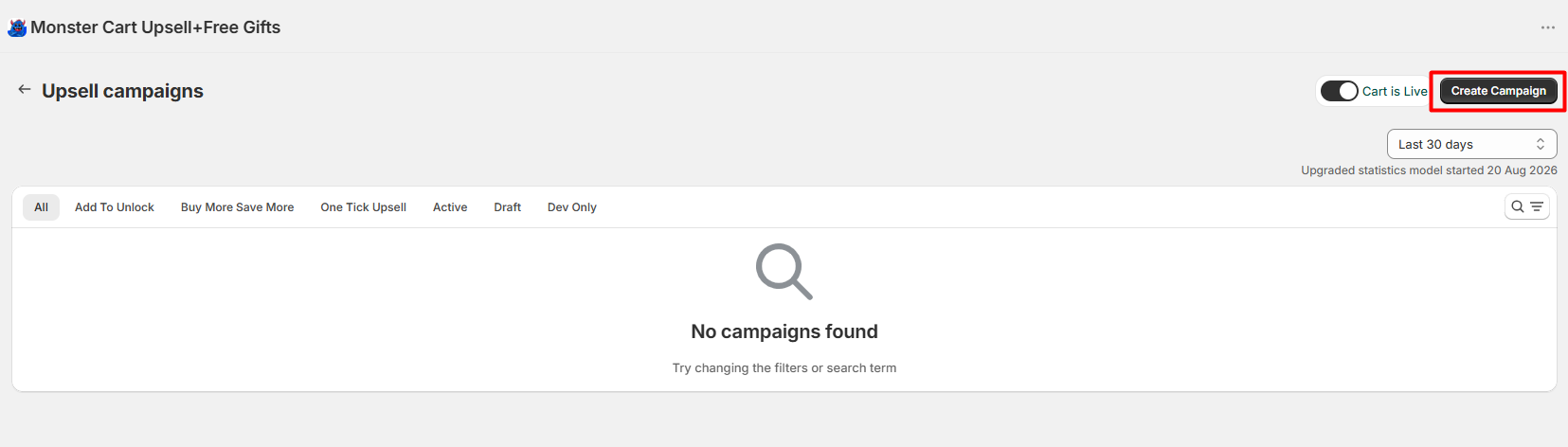
The campaign area gives merchants a central place to manage cart offers and start creating new ones.
This part was easy to follow. The basic setup looked simple. Advanced campaigns may take more time if a store needs detailed rules or uses several other apps.
We did not complete and publish a campaign, so we cannot judge live campaign behavior.
Sticky Add To Cart
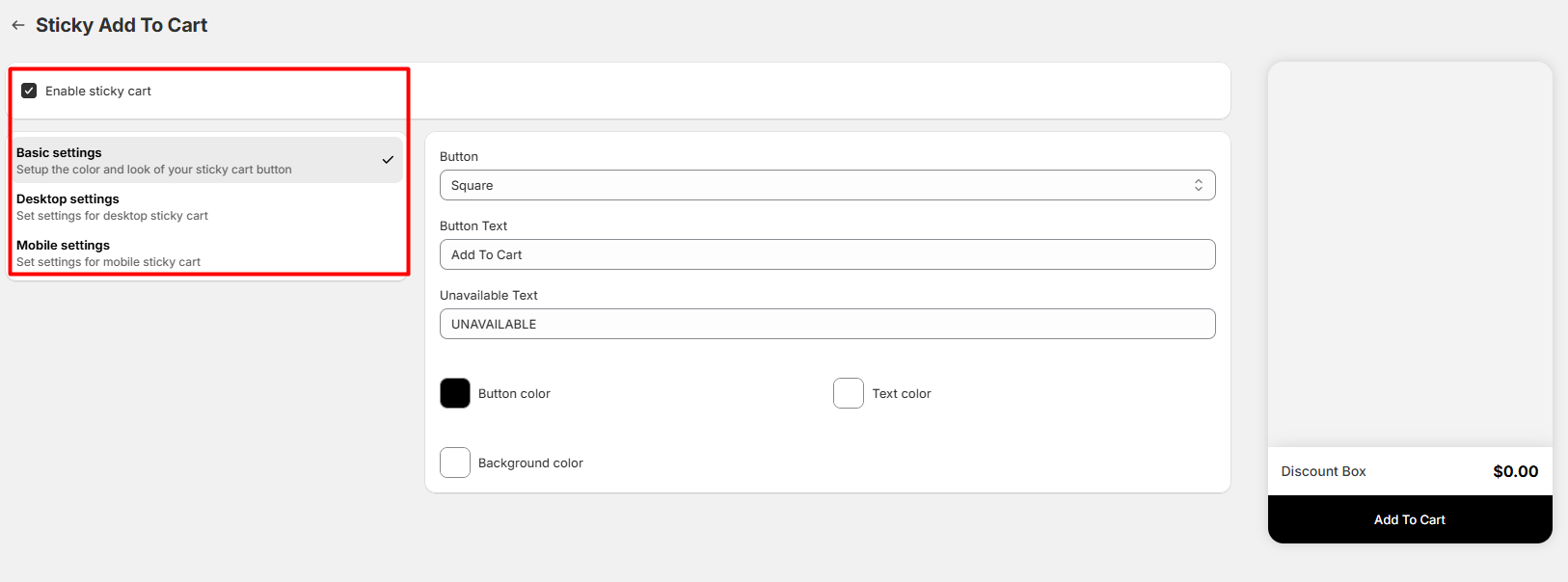
Monster Cart also includes a Sticky Add To Cart feature.
We opened its settings and found controls for basic, desktop, and mobile configurations. The editor also includes options for button style, button text, unavailable text, and colors.
The layout was straightforward during our test. We did not measure clicks, conversions, or customer behavior after enabling the feature.
Integrations
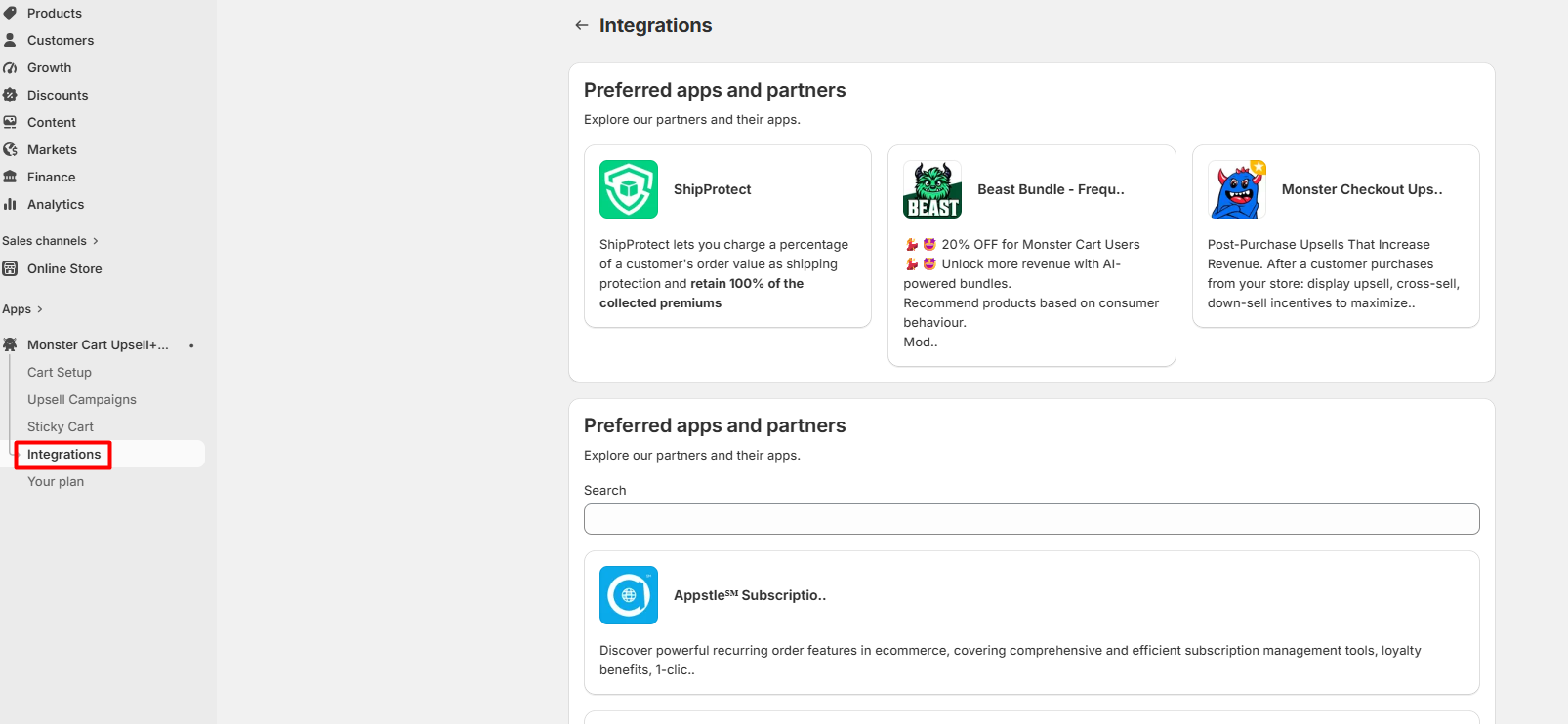
Monster Cart has a dedicated integrations area. During our test, we could see partner apps directly inside the dashboard.
The current Shopify listing names several integrations. These include Checkout, Shopify Admin, Appstle, Recharge, Kaching, Pumper, PageFly, Redeemly, Transcy, Weglot, and Wide Bundles.
Compatibility is still worth checking before launch, especially if your store uses many Shopify apps or has a heavily customized theme.
Customer Support Is Easy to Find
We found an in-app support option while testing Monster Cart.
However, we did not contact the support team. We can confirm that the support option exists and is easy to find, but we cannot rate response speed, helpfulness, or support quality from our own experience.
Ease of Use
Ease of use was one of the app’s strongest qualities during our short test.
The dashboard felt beginner-friendly, interactive, and fast to navigate. We could understand the main sections without spending much time learning the interface.
We did not encounter any bugs or errors during our 10–15 minute session. That observation has a limited scope because we did not run live campaigns or real customer orders.
Monster Cart Pricing
The Shopify App Store currently advertises a Free Launch Offer for stores with up to 50 orders.
Paid pricing starts at $9.99 per month for the Starter plan. The listing says this plan covers 51 to 200 store orders. It also shows a $14.99 per month Scaler plan and a 10-day free trial for paid plans.
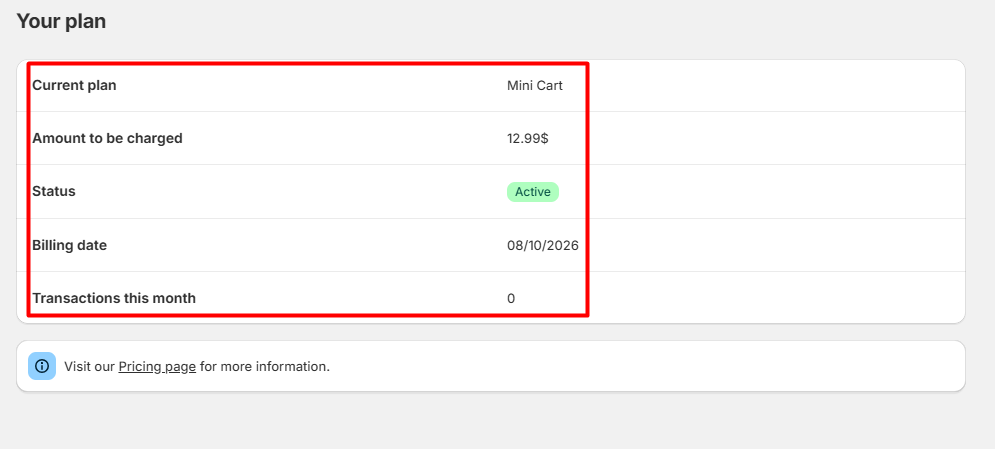
Our test account showed an active Mini Cart plan at $12.99 in the app’s own plan screen. This is evidence of what appeared in our account, not a replacement for the current public pricing page.
The Shopify listing currently shows overlapping order ranges between Starter and Scaler, so merchants should verify the live pricing page before choosing a plan.
What We Liked
Beginner-Friendly Interface
Monster Cart was easy to understand from the beginning. We did not need much time to find the main tools or move between sections.
Cart Customization
The cart editor gives merchants control over important visual settings while keeping a preview nearby. This was one of our favorite parts of the app.
Free-Gift Options
Free gifts stood out during our test. The campaign builder makes this feature visible alongside other types of offers.
Several Promotion Types
Monster Cart brings free gifts, upsells, volume discounts, reward-based offers, and product recommendations into the same app.
What Could Be Better?
Advanced Campaigns May Need More Learning
The basic interface is beginner-friendly, but more advanced campaigns can involve more conditions and settings. A merchant who wants complex promotional rules may need more time than our short test allowed.
Compatibility Should Be Tested
Stores using many apps or custom theme code should test their full setup before launch. We did not reproduce compatibility problems during our test.
Results Still Depend on Real Customers
Monster Cart provides tools designed to encourage larger orders, but having those tools does not guarantee better sales.
We did not collect real customer data to measure their effect. Merchants should judge campaign success using their own store data after launch.
Who Is Monster Cart Best For?
Based on our test, Monster Cart looks best suited to very small or new Shopify stores that want a simple cart upgrade.
It may suit merchants who want a slide-out cart, free gifts, reward bars, basic upsells, bundle-style offers, volume discounts, or Sticky Add To Cart.
Its beginner-friendly interface is a major advantage for merchants who do not want to start with a complicated cart system.
Final Verdict
Our overall impression after testing Monster Cart was simple: it is easy to understand and useful for beginners.
The cart customization tools and free-gift options made the strongest impression. Navigation was quick, the dashboard felt interactive, and we did not encounter errors during our limited test.
There are still clear limits to our test. We did not complete a customer purchase with an active campaign. We also did not test many integrations or collect sales data.
For that reason, our recommendation is based on usability and the features we explored, not on claimed revenue results.
FAQ
Is Monster Cart Upsell + Free Gift good for beginners?
Based on our test, yes. We found the dashboard easy to understand, interactive, and fast to navigate. Cart customization and campaign options were also presented in a way that was easy to explore.
Is Monster Cart free?
Monster Cart currently advertises a Free Launch Offer for stores with up to 50 orders on its Shopify App Store listing. Paid plans are also available. Pricing can change, so check the current listing before installing.
Can Monster Cart offer free gifts?
Yes. We explored the Free Gift With Purchase option during testing. However, we did not activate the campaign and complete a real storefront order.
Does Monster Cart support upsells?
Yes. Its current feature set includes options such as One Tick Upsell, Frequently Bought Together, volume discounts, and other cart-based promotions. We explored the campaign builder but did not measure how these offers affected sales.
Can I customize the Monster Cart drawer?
Yes. Cart customization was one of the strongest parts of our test. We found controls for colors, font size, rounded corners, cart behavior, and other design settings.
Does Monster Cart have a Sticky Add To Cart feature?
Yes. We accessed its Sticky Add To Cart editor during testing. It includes separate configuration areas for basic, desktop, and mobile settings.
Does Monster Cart have customer support?
Yes. We found an in-app chat option during testing. We did not contact the support team, so we cannot independently judge response time or support quality.
Did Blinto verify that Monster Cart increases AOV or conversion rates?
No. This was a Level 2 — Partial Hands-On Test. We did not collect enough real customer orders to measure changes in AOV, conversion rate, or revenue.
Would Blinto recommend Monster Cart?
Based on our limited hands-on experience, yes. We would consider it especially relevant for small or new Shopify stores looking for a beginner-friendly cart drawer, free gifts, reward bars, and basic upselling tools.