
If you sell products that people like to combine, such as snacks, coffee, skincare, pet treats, or gifts, you have probably wished shoppers could just pick their own set. Shopify doesn’t give you a “build your own box” page by default. Most merchants either create fixed bundle products by hand or install an app.
Easify Box Bundle Builder BYOB is one of those apps. Its promise is simple: give shoppers a page where they choose products, fill a box, and get a bundle price, while you control the layout and the rules.
The question I wanted to answer: can a merchant set up a proper build-a-box page without it turning into a project? I installed the app on a development store, created a box from a template, set up the selection rules in the visual editor, and previewed the result on the storefront.
Key Takeaways
- Main fit: Stores that want a mix-and-match or gift-box page where shoppers choose the contents themselves.
- Strongest finding: Four clear box pricing types and a visual editor that makes step rules, like “pick exactly 2”, easy to set.
- Biggest limitation: Templates carry their own example copy and sales-booster elements, so you need to rewrite and review every section before going live.
- Buying guidance: The Start plan is free while box sales stay under $500 a month, so you can build and test your page before paying anything.
Our Verdict
Recommended for build-a-box stores.
Easify Box Bundle Builder covers what a build-your-own-box page needs: a place for shoppers to pick products, clear steps with rules, a box summary, and several ways to price the bundle. Setup follows a guided path from box type to template to editor, and I didn’t need any code to get a working page.
The trade-off is cleanup. Templates are a fast start, but they come with example headings, offers, and urgency elements that you must replace or remove. Pricing also grows with your box sales, which is fair but worth planning for.
What Easify Box Bundle Builder Offers
The app adds a dedicated build-a-box page to your store. Shoppers pick products, add them to a box, and add the whole box to the cart.
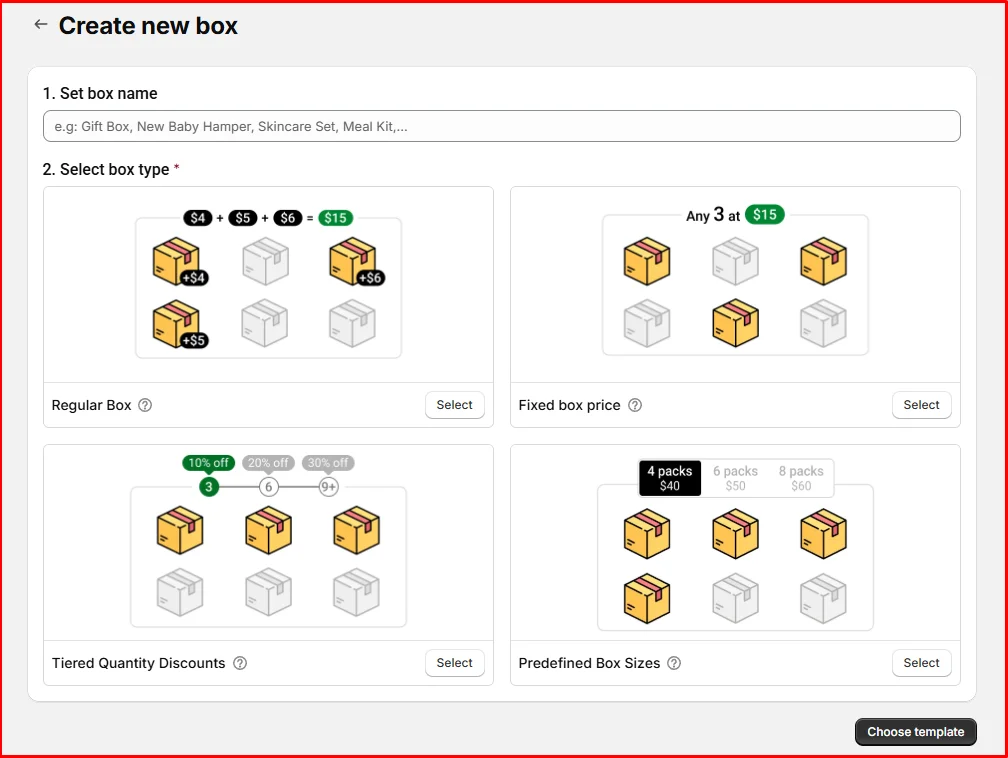
Creating a box starts with a name and a box type. There are four:
- Regular Box: Shoppers pay the sum of the items they pick.
- Fixed box price: Any set number of items for one price, like “any 3 for $15”.
- Tiered Quantity Discounts: The discount grows as shoppers add more items.
- Predefined Box Sizes: Shoppers choose a pack size, and each size has its own price.
These four cover the most common bundle offers. Choosing the type first is also a good design decision, because it makes you settle your offer before you start designing.
The app’s listing also mentions custom fields such as gift messages, product add-ons, and subscription boxes. The editor has a Discount & Subscription panel, but I didn’t test subscriptions or gift fields in this review.
What We Tested
I installed Easify Box Bundle Builder on a Shopify development store and stayed on the free Start plan. I created a box, chose a template, edited the steps and selection rules in the visual editor, checked the Box Review page, and previewed the page on the storefront.
I did not place real orders, test subscription boxes, test gift message fields, or measure the effect on sales. I also didn’t contact support. This review makes no claims about those areas.
Building the Box: Templates and the Visual Editor
After choosing a box type, you pick a template or start from scratch. Templates are split into one-page, multi-page, and seasonal groups, and you can save your own. There’s also a “Match store theme” toggle that applies your theme’s styling automatically. That’s a small touch, but it saves you from matching fonts and colors by hand.
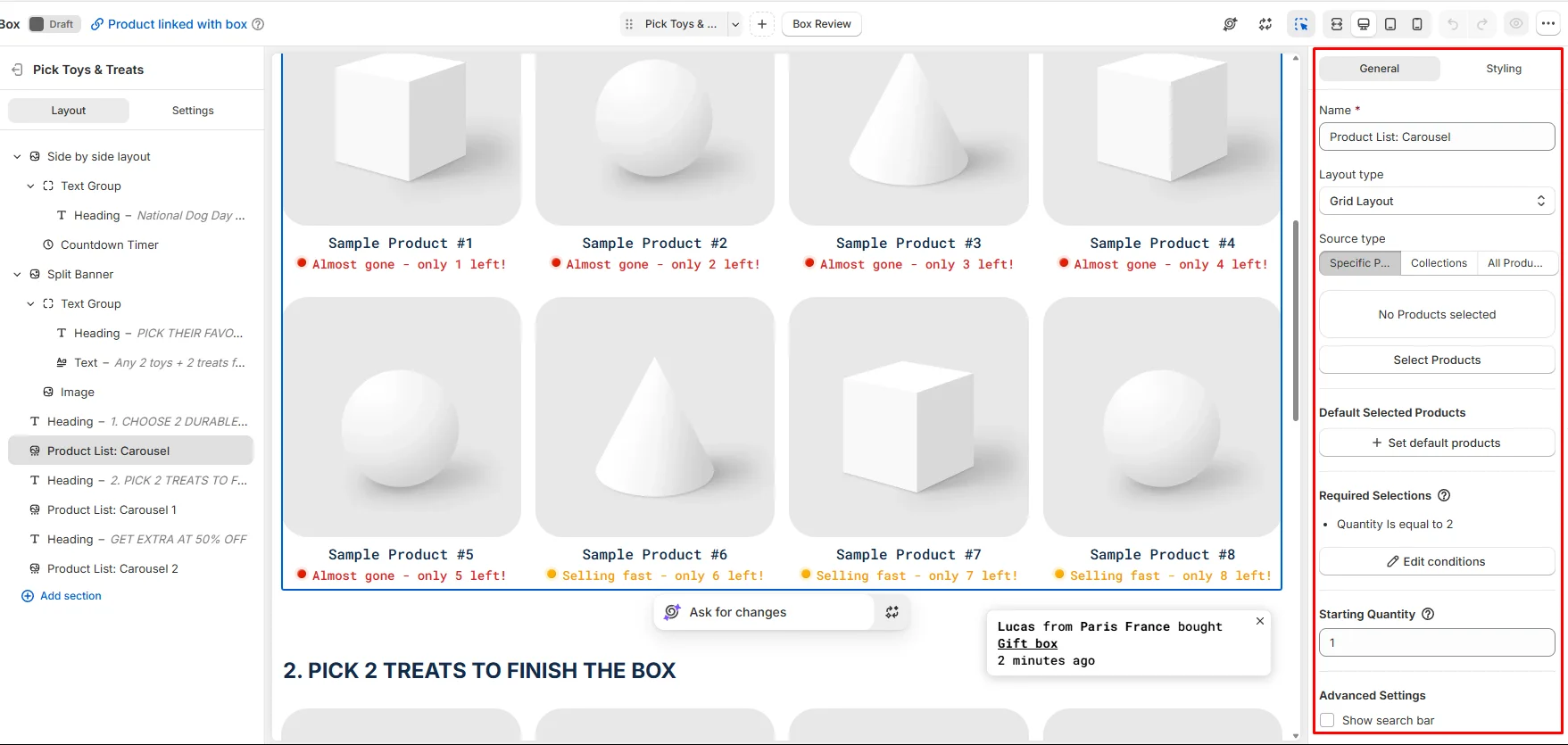
The visual editor is where most of the work happens. The left side shows the page structure: banners, headings, a countdown timer, and product lists for each step. The sidebar has panels for General, Box Content, Discount & Subscription, Sales Boosters, Templates, and Theme Settings. You can switch between desktop, tablet, and mobile views while you edit.
Selecting a product list opens its settings. You can:
- Pick products one by one, choose a collection, or use all products.
- Choose a layout, such as a grid.
- Set default products that are already in the box.
- Set required selections, like “quantity is equal to 2”.
- Set a starting quantity and turn on a search bar.
The required selection rule is the most useful part. In my test, the step showed a clear message that shoppers need to select exactly two items. That’s the kind of rule a “choose 2 toys + 2 treats” box depends on, and it only took one setting.
At the end, a Box Review page shows the items, quantities, and a box summary with buttons to add the box to the cart or create a new box. Shoppers can edit or delete the box from there.
Where It Starts to Fall Short: Template Leftovers
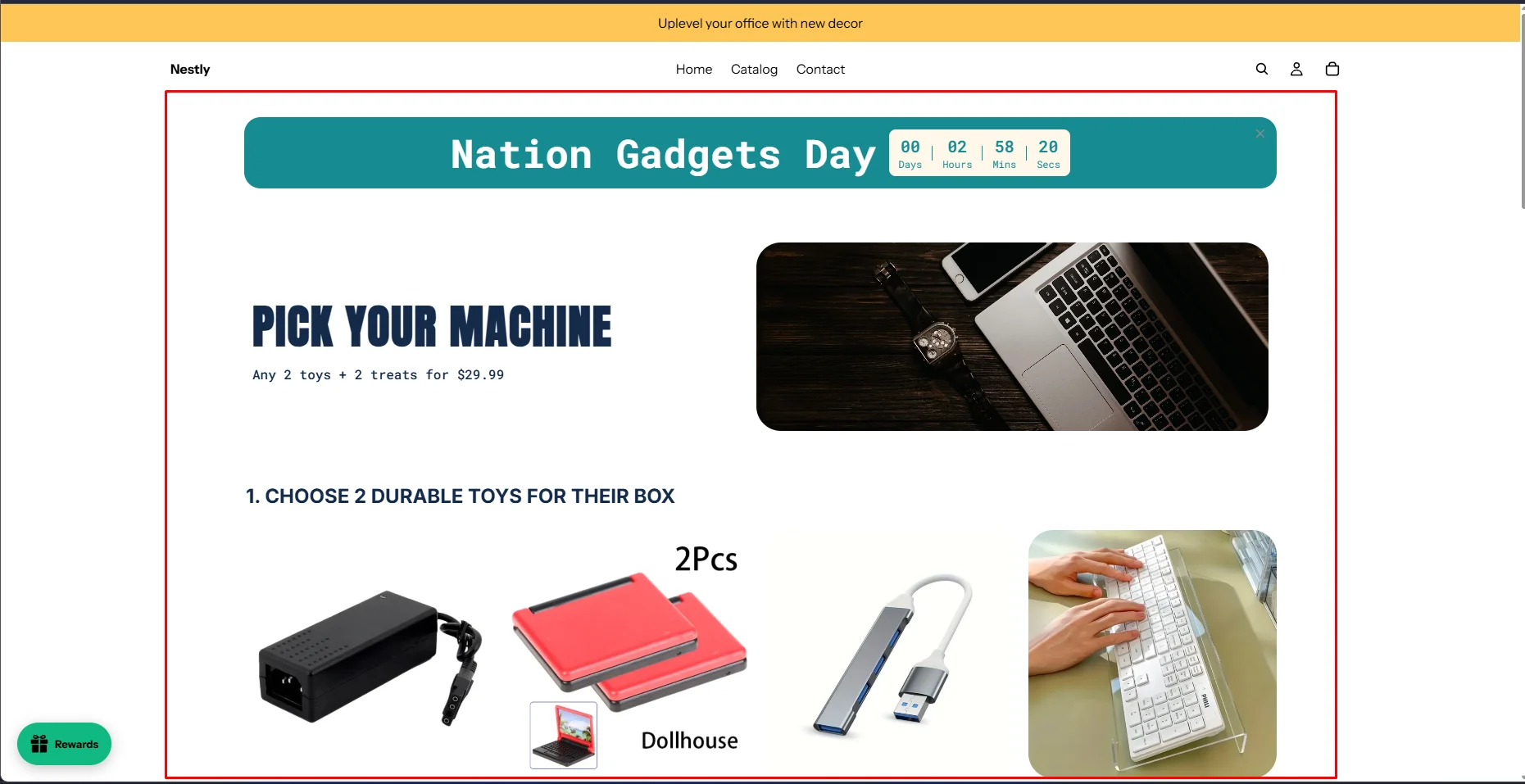
Templates are fast, but they are built around a specific story. The one I used was a pet box. When I adapted it for a gadget range, parts of the original copy stayed on the page. In the storefront preview, the banner text still said “Any 2 toys + 2 treats for $29.99”, and the step heading still talked about durable toys for “their box”.
This isn’t a bug. It’s example text you’re meant to replace. But the page has many text blocks, and it’s easy to miss one. A wrong price in a banner is a real risk, because shoppers will expect it.
The same goes for the sales-booster elements. The template I used included a countdown timer, low-stock labels such as “almost gone”, and a recent-purchase popup. These can help, but only if they reflect real stock and real orders. Review each one and remove what you can’t back up.
My advice: after choosing a template, go through every section in the editor’s structure list, and preview on the storefront before you activate the box.
Pricing and Value
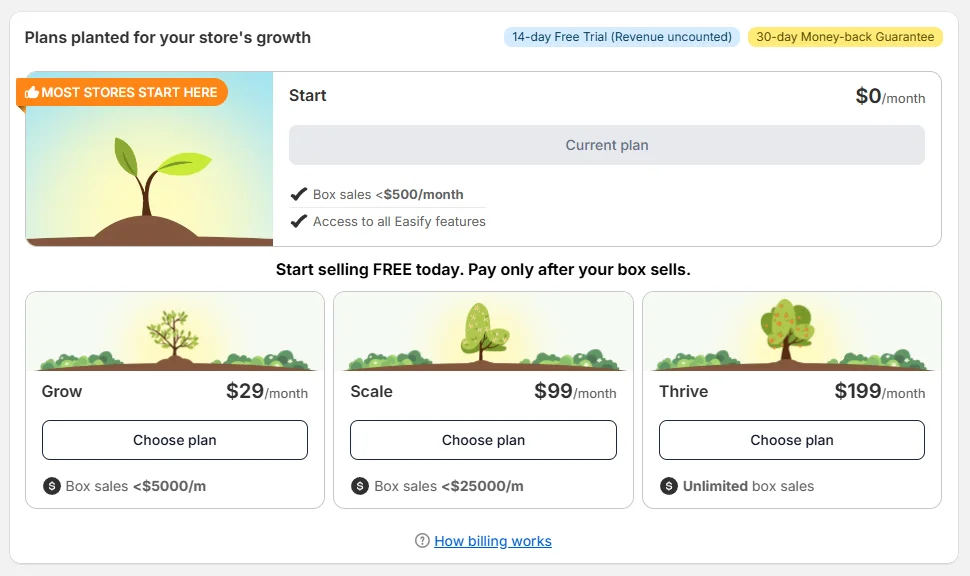
Pricing is based on how much you sell through boxes each month. This is what the in-app pricing page showed during my test:
| Plan | Monthly box sales | Price |
|---|---|---|
| Start | Under $500 | Free |
| Grow | Under $5,000 | $29/month |
| Scale | Under $25,000 | $99/month |
| Thrive | Unlimited | $199/month |
The Start plan includes access to all features, so the free plan isn’t a stripped-down demo. The page also lists a 14-day free trial, during which revenue isn’t counted, and a 30-day money-back guarantee.
I like that you only pay once boxes actually sell. The flip side is that a popular box pushes you up the tiers. A store selling around $6,000 a month through boxes would pay $99 a month, not $29. Check your expected box revenue against the tiers before you launch a big campaign.
What We Liked
- Clear box types: Four pricing models cover fixed-price, tiered, pack-size, and pay-per-item boxes.
- Selection rules are simple: Setting “pick exactly 2” for a step took one setting, and shoppers see a clear message.
- Flexible product sources: Steps can pull from specific products, a collection, or all products.
- Guided setup: Box type, then template, then editor. You always know the next step.
- Free to start: All features are available on the free plan until box sales reach $500 a month.
What Could Be Better
- Template copy needs a full rewrite: Example text, including a price, stayed on my storefront preview until I replaced it.
- Sales boosters need care: Countdown timers, low-stock labels, and purchase popups must match reality, or they hurt trust.
- Cost rises with box sales: The tiers are fair, but a successful box can move you to a higher plan quickly.
- Many settings for a first box: The editor is powerful, but first-time users will spend some time learning the panels.
Who Easify Box Bundle Builder Is Best For
It’s a good fit for stores selling gift boxes, pet boxes, sampler sets, snack or coffee boxes, self-care kits, and other products where shoppers enjoy choosing. It also suits merchants who run seasonal box campaigns, since there are seasonal templates to start from.
Who Should Consider an Alternative
If you only want a few fixed bundles or simple “frequently bought together” offers, a lighter bundle or upsell app may be easier. If you mainly want offers inside the cart, a cart-focused tool like the one in our UpCart review may fit better.
Final Verdict
Easify Box Bundle Builder does what a build-a-box app should: it lets shoppers choose their own items under clear rules, with bundle pricing that you control. The box types and step rules were the strongest part of my test.
The biggest caveat is cleanup. Templates save time, but you must rewrite their copy and review their urgency elements before going live. Start on the free plan, build one box, check it on the storefront, and upgrade when your box sales grow.
Frequently Asked Questions
Is Easify Box Bundle Builder free?
Yes. The Start plan is free while your monthly box sales stay under $500, and it includes all features. Paid plans start at $29 a month.
Can I make shoppers pick an exact number of items?
Yes. Each product list has a required selections setting, such as “quantity is equal to 2”, and shoppers see a message until they meet it.
Can I create a multi-step build-a-box page?
Yes. You can add several product list steps on one page, and there are also multi-page templates.
Does it support subscription boxes?
The app offers subscription boxes and has a Discount & Subscription panel in the editor, but we did not test subscriptions in this review.