
New Shopify stores need a simple way to collect email addresses and stay in touch with shoppers. A signup popup can help build a list. Welcome emails and cart reminders can then keep the conversation going. Ideally, one affordable app handles both.
CWILL Popup Email Marketing promises exactly that. The app was known as SendWILL and EcomSend, and it still appears as “CWILL(SendWILL)” in the Shopify admin. It combines popups, email campaigns, and automations in one place, and it has a Free plan. The catch is in the plan card: Free covers 30 new subscribers a month.
But is the free plan enough? You can get just 30 new signups a month. We looked at what the app gives you and when a paid plan may make sense.
We installed CWILL on a Shopify test store and explored its Free plan. We found a wide range of tools, but the small signup allowance stood out. We did not test live popup delivery or email sending.
Key Takeaways
- Popups, email, and automations in one app: The admin covers popups, subscribers, campaigns, automations, analytics, and email branding.
- Two popup templates: We saw an opt-in popup and a spin-the-wheel popup, both with a built-in discount offer.
- Strong automation library: We counted 5 preset automations and 9 custom flow templates. Only 2 templates carried a Pro badge.
- The real limit is subscribers: Free allows 30 new subscribers and 2,000 emails a month. Paid plans are priced by how many new subscribers you collect.
- Some plan details don’t match: The app offered a 7-day free trial, while the Shopify listing says 14 days.
- Testing scope: We inspected the admin on the Free plan. We did not publish a popup on the storefront, collect a subscriber, send an email, or turn on an automation.
Our Verdict
CWILL puts popup forms, email tools, and flow templates in one place. Its setup guide is clear, and the Free plan is easy to explore. Still, seeing a flow template does not mean you can use it for free.
The Free plan works best as a starting point. Its 30-new-subscriber monthly allowance may be enough for a new store with little traffic. A growing store could reach that limit quickly. Paid plans start at $11.90 per month, with higher tiers for more signups.
Our verdict: CWILL is a good tool to explore if you want popups and email in one app. But plan to pay if your email list grows. If you need many free signups, compare your options first.
What CWILL Popup Email Marketing Offers
CWILL INC makes the app. The company was once known as Channelwill. It also makes CWILL (Trustoo) Product Reviews. The popup app joined the Shopify App Store in October 2022. It has a Built for Shopify badge.
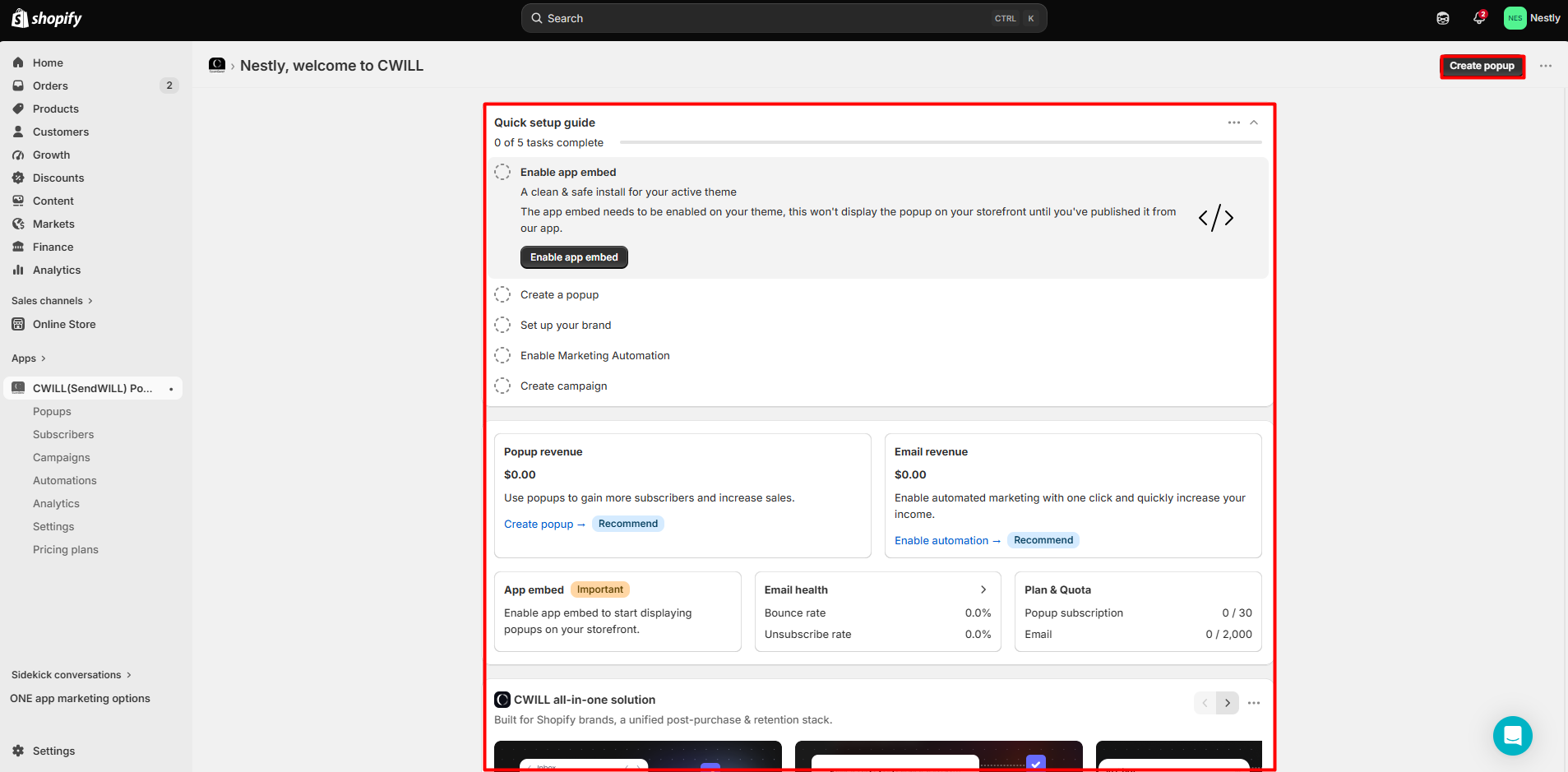
The home page has a Quick setup guide with five steps. You must turn on the theme app embed, make a popup, add your brand, set up a flow, and make a campaign. The page warns that your popup will not show on your site until the embed is on and the popup is live. CWILL says you must turn the embed on again if you change your theme.
Below the guide, the dashboard shows popup revenue, email revenue, email health (bounce and unsubscribe rates), and a Plan & Quota card. On our Free plan, that card read 0 / 30 popup subscribers and 0 / 2,000 emails.
The main menu covers:
- Popups: create and edit signup popups.
- Subscribers: a contact list with filters for email status, SMS status, popup, location, birthday, and subscription date, plus import and export.
- Campaigns: one-off emails, with a daily send limit.
- Automations: preset flows and custom flows.
- Analytics: popup and email performance in one report.
- Settings: email branding, opt-in rules, sending domain, notifications, and UTM tags.
The admin also shows promotions for the developer’s other apps. We saw a carousel on the home page and banners for an SEO app and a chatbot app on other pages. You can close the banners, but they do add noise.
What We Tested
We installed CWILL Popup Email Marketing on a Shopify test store and used the Free plan for the whole review. We did not start a paid trial.
We checked the home page, popup templates, and popup editor. We also viewed contacts, campaigns, email design, flows, reports, settings, and pricing.
This was a look at the app’s tools, not a live test. We did not turn on the app embed, publish a popup, collect an email, send a message, or run a flow. As a result, we cannot judge live popup design, signups, email delivery, or sales. All reports showed zero.
Building a Popup
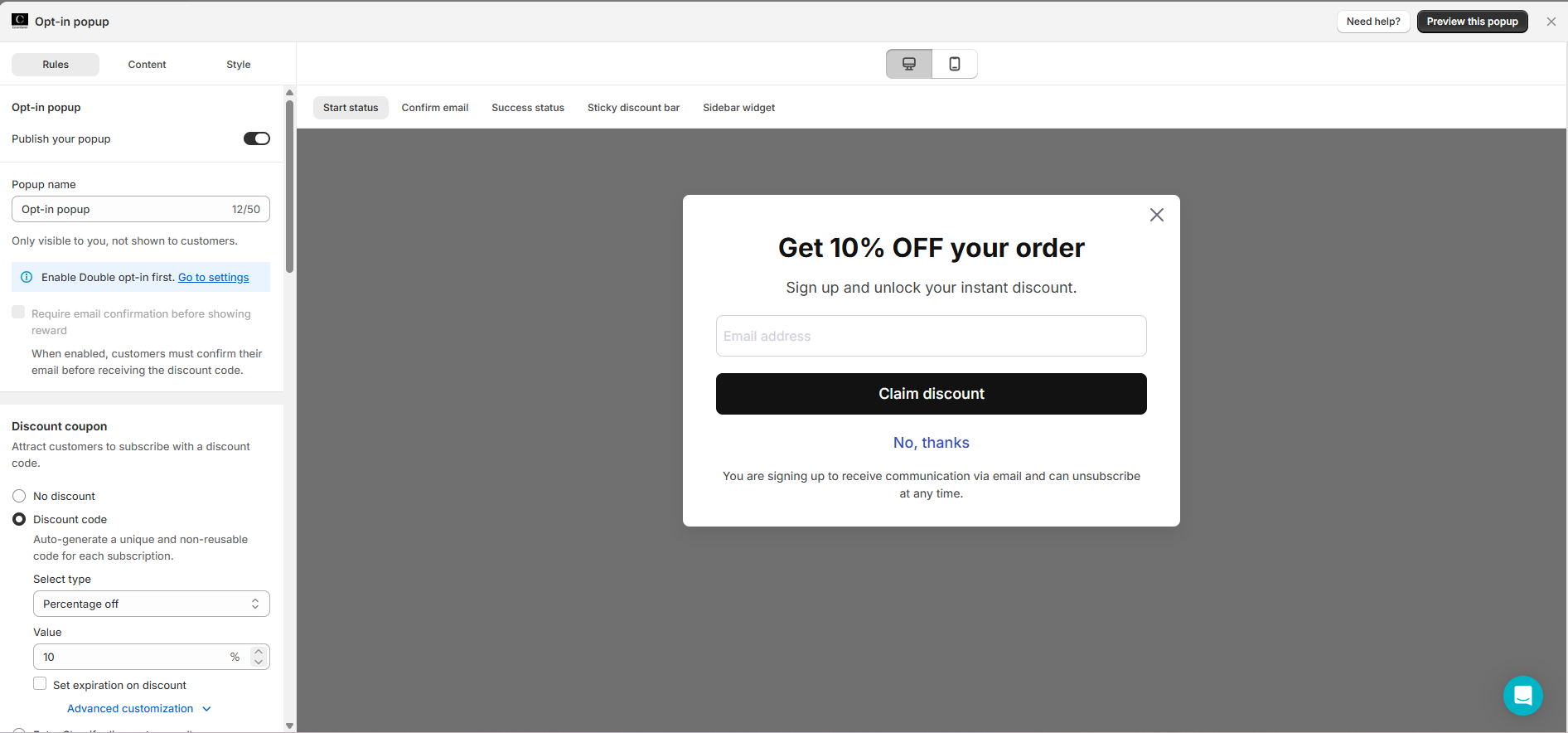
Clicking Create popup opens a template picker. We saw two templates: an Opt-in popup with a “Get 10% OFF your order” offer, and a Spin wheel popup with prizes such as free shipping, 10% off, and 15% off.
We opened the signup popup editor. It has three tabs: Rules, Content, and Style. A preview sits on the right. You can switch between desktop and phone views. You can also view each popup step, from signup to success. The editor shows a small discount bar and a side tab as well.
The discount settings are the most useful part for a store. You can choose No discount or Discount code. The app says it will “auto-generate a unique and non-reusable code for each subscription.” You can set a percentage or other discount type, choose the value, and add an expiration date. The default was 10% off.
One setting stood out. The choice to check an email before giving a reward was locked. A note said to turn on double opt-in first. Yet the default was single opt-in. To help stop fake signups from claiming codes, change that setting before you launch.
Branding Your Emails
When we opened Campaigns, CWILL asked us to set up our email style. We could add a logo and store name, choose a font, and set colors for text, links, and buttons. A sample email showed each change. This makes it easy to keep emails on brand.
The Campaigns page also showed a banner with a daily send limit of 2,000 emails. The app explains that this limit is based on store activity, protects sender reputation, and rises over time. There is a button to request a higher limit.
Emails are sent from a CWILL domain by default. A branded sending domain is locked to the Essential plan and above. Merchants who care about deliverability and brand trust will want that on a paid plan.
Automations: More Than Expected on Free
Automations are where an email app earns its keep. CWILL splits them into two groups.
Preset automations are ready-made flows with fixed triggers. We counted five: Welcome New Subscribers, Unused Discount Reminder, Abandoned Cart Recovery, Thank You for Your Order, and Back in Stock. All five were in Draft status on our store.
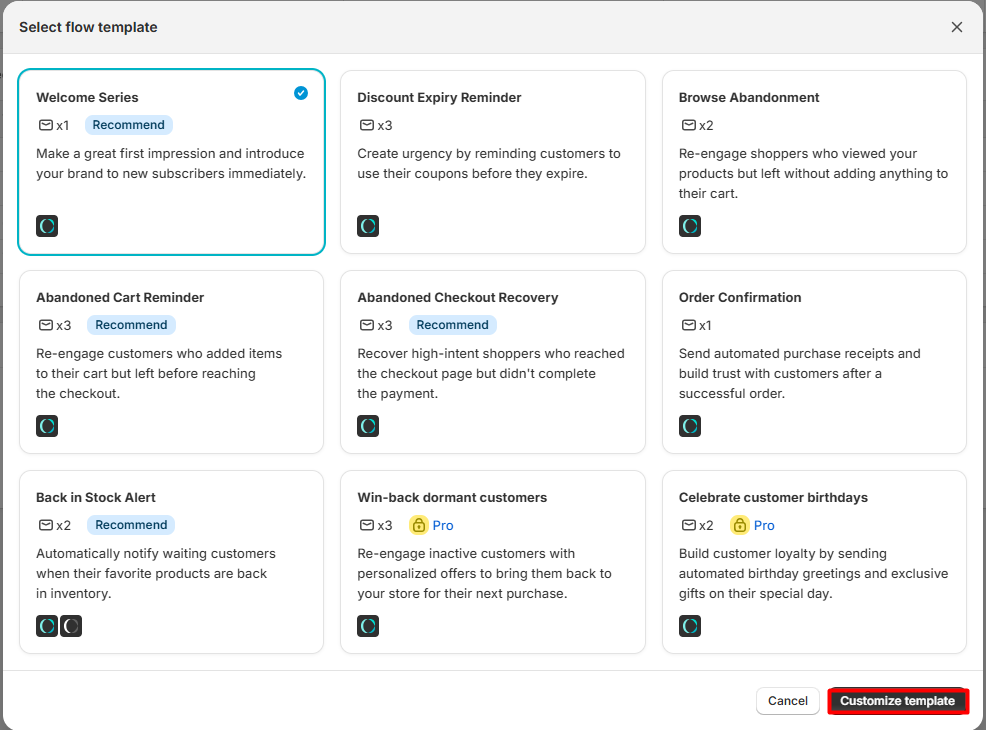
Custom flows offer more ways to set up emails. We saw nine templates for welcome emails, expiring deals, page visits, lost carts, lost checkouts, order updates, stock alerts, old buyers, and birthdays. Only the last two had a Pro badge. We did not run any of these flows.
There is one important catch. The Shopify listing places preset automations on Essential and custom flows on Pro. Yet our Free-plan dashboard showed the presets and most custom templates without locks. We did not activate a flow, so their availability on Free remains unconfirmed. Check this before choosing a plan.
Pricing and Value
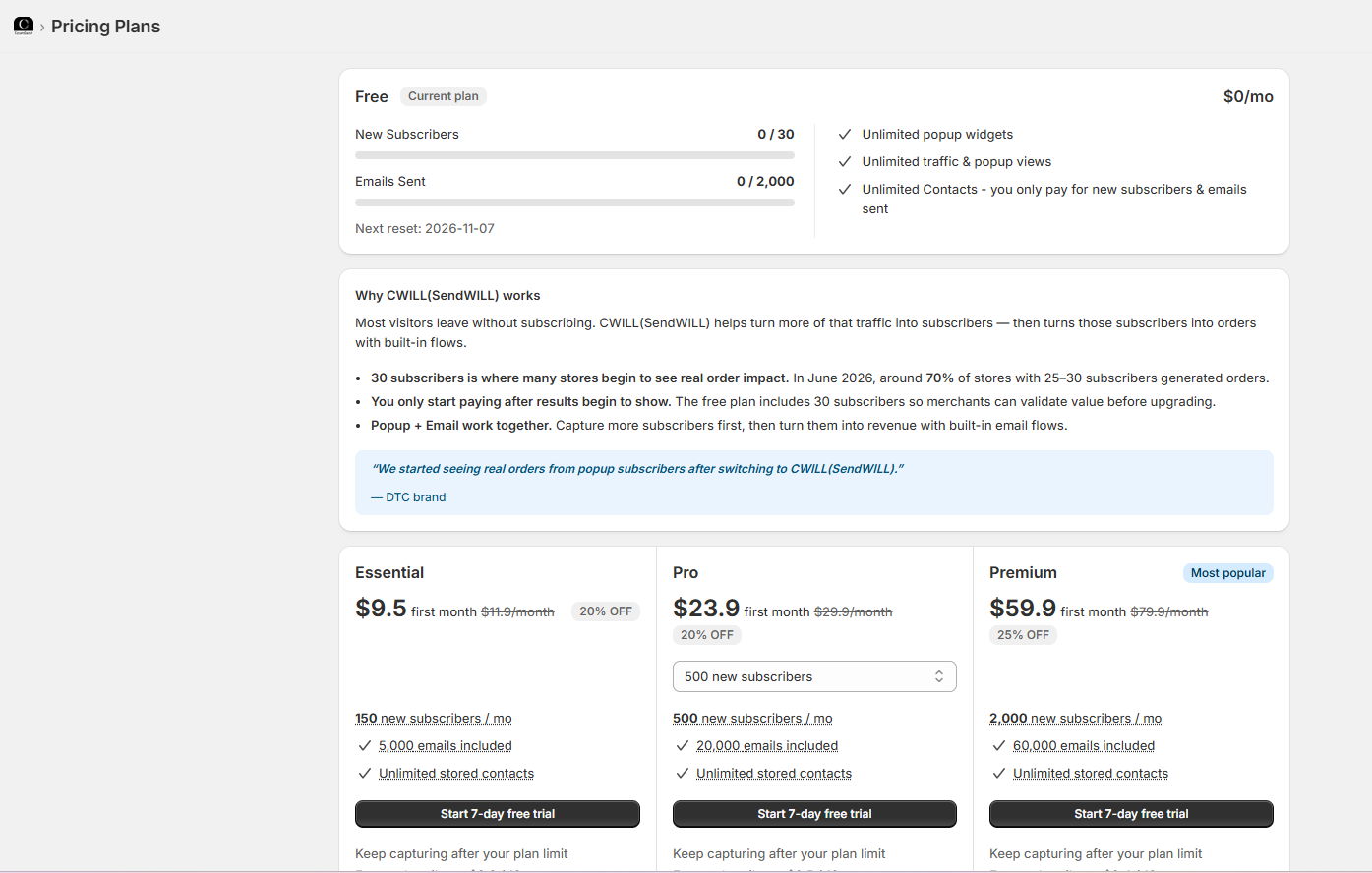
CWILL charges by new subscribers and emails sent, not by total contacts. As of October 8, 2026, the Shopify App Store lists these plans:
| Plan | Price | New subscribers / month | Emails / month | Key additions (from the listing) |
|---|---|---|---|---|
| Free | $0 | 30 | 2,000 | Unlimited popup views and stored contacts, 24/7 support |
| Essential | $11.90/month | 150 | 5,000 | Preset email automations, custom sending domain |
| Pro | $29.90/month | 500 | 20,000 | Custom email flows, multi-language email templates |
| Premium | $79.90/month | 2,000 | 60,000 | Custom email flows, customer success support |
Inside the app, we were offered first-month discounts: Essential at $9.50, Pro at $23.90, and Premium at $59.90 for the first month, before returning to the regular price. The in-app page marked Premium as “Most popular.”
Three things matter for budgeting:
- The 30-subscriber cap is small. A store that gains just one subscriber a day would use the whole Free allowance in a month. Our Free quota showed its next reset on November 7, 2026.
- The trial length didn’t match. The in-app buttons said “Start 7-day free trial.” The Shopify listing says each paid plan has a 14-day free trial. Check which one you are offered before you start.
- Extra charges are possible. The listing says “usage-based charges may apply,” and each paid plan in the app mentioned keeping capturing after your plan limit. We could not confirm how those extra charges are calculated.
CWILL says its Free plan helps stores try the tools before they pay. It also shares a sales claim based on its own data from June 2026. We could not check that claim, so we did not use it to judge the plan.
Essential costs $11.90 per month and allows up to 150 new subscribers. It also includes a branded sending domain. Whether that offers good value depends on how many signups your store gets and which email features you need.
Is 30 Free Subscribers Enough?
For a brand-new store, it may be. The Free plan lets you learn the popup editor and test your email style. It also lets you see the tools before you pay.
But the limit is low. Say your store gets one new email signup per day. That is about 30 in a month, so you may use the full free quota. If you get five signups a day, you may hit the limit in less than a week. These are simple examples, not results from our test.
The next plan costs $11.90 per month. It raises the cap to 150 new signups and adds a custom email domain. That may work for a small store. A store that grows faster may need a higher tier.
Before you make a choice, check three things: how many signups you get, which flows your plan can run, and what CWILL will charge when you reach the cap. The app did not make the last point clear in our test.
What We Liked
- Popups and email in one place: Signup forms, campaigns, automations, and analytics share one admin and one contact list.
- Clear setup guide: Five tasks show exactly what to do, including the app embed warning.
- Unique discount codes: The popup can create a non-reusable code for each new subscriber.
- Detailed popup preview: You can check every popup screen, on desktop and mobile, before publishing.
- Large flow library: Nine flow templates cover welcome, cart, checkout, browse abandonment, back-in-stock, and more.
- Simple branding editor: One screen sets the logo, fonts, and colors for every email.
What Could Be Better
- Small free subscriber cap: 30 new subscribers a month is enough to test, not to grow.
- Single opt-in by default: Email confirmation before showing a discount needs double opt-in turned on first.
- Mismatched plan details: The trial length and automation limits in the app did not match the Shopify listing on the day we checked.
- Branded domain costs extra: Free plan emails go out from a CWILL domain.
- Cross-promotion in the admin: Banners for the developer’s other apps appear on several pages.
What Merchants Say
CWILL Popup Email Marketing has a 4.9-star rating from 7,713 reviews on the Shopify App Store, as of October 8, 2026. About 97% of ratings are five stars.
Many recent five-star reviews praise the support team and simple setup. Some one-star reviews raise a key concern: the move to paid plans based on signup volume. In September 2026, some store owners said the new limits caught them off guard. CWILL replied to some and offered custom rates. Other reviews note weak signup rates or fears about shared discount codes. The developer says it has tied codes to each shopper.
We did not see any billing changes during our test. Still, the pattern is a good reason to read the current plan limits carefully before you rely on the Free plan.
Who Is CWILL Popup Email Marketing Best For?
CWILL is best for small Shopify stores that want a popup and basic email marketing in one simple app. It suits merchants who want discount popups, a few automated emails, and a clean branding setup without connecting separate tools.
It is also a good fit for stores that are ready to pay a modest fee once they start collecting subscribers. Essential at $11.90 a month covers 150 new subscribers and adds a branded sending domain.
Who Should Consider an Alternative?
Stores that expect to collect many subscribers for free should look elsewhere first. CWILL’s Free plan stops at 30 new subscribers a month.
Merchants who already use a full email platform may also only need a popup tool, or an email tool with deeper features. If you are comparing options, we have also reviewed Privy, Klaviyo, Mailchimp, tinyEmail, and Seguno.
Final Recommendation
Start on Free if you expect fewer than 30 new signups a month. Use that time to learn the editor and set up your email style. Before you pay, check the trial length, extra charges, and which flows you can turn on. If you need a large free email list, compare other apps first.
Frequently Asked Questions
Is CWILL Popup Email Marketing free?
Yes, there is a Free plan. The Shopify listing says it covers 30 new subscribers and 2,000 marketing emails a month, with unlimited popup views and stored contacts. Paid plans start at $11.90 a month.
Are SendWILL, EcomSend, and CWILL the same app?
Yes. The Shopify listing is now titled CWILL Popup Email Marketing and says the app was previously known as EcomSend. The Shopify admin still showed the name “CWILL(SendWILL)” during our test.
What happens when I reach 30 subscribers on the Free plan?
The app tracks new subscribers against your monthly quota, and our quota showed a monthly reset date. The listing says usage-based charges may apply on paid plans. We did not reach the cap, so we could not confirm exactly what happens on the Free plan when you do.
Can I run automations on the Free plan?
We are not sure. The listing places preset automations on Essential and custom flows on Pro. In our Free-plan admin, five preset automations appeared as drafts and only two of nine flow templates showed a Pro badge. We did not activate a flow.
Do I need to enable the app embed?
Yes. The app’s setup guide and help center say the popup will not appear on your storefront until the CWILL app embed is turned on in your theme and the popup is published. You need to turn the embed on again if you switch themes.
Did you test signup rates or email revenue?
No. We inspected the admin on the Free plan and did not publish a popup or send any email. All analytics in our test showed zero, so we make no claims about conversion rates, deliverability, or revenue.