
A new Shopify store usually wants three things from a review app: an automatic email asking customers for a review, a widget that shows those reviews on the product page, and star ratings on collection pages. Ideally, all of that costs nothing until the store is selling.
Trustoo, now sold as CWILL (Trustoo) Product Reviews, looks built for that store. Its Free plan promises unlimited reviews and more than ten widgets. The catch sits in one line of the plan card: Free displays 6 reviews per product. So the question we set out to answer is practical. Can a small store run a complete review setup on Trustoo’s Free plan, and at what point does it have to pay $11.99 or $29.99 a month?
We installed the app in a Shopify admin, went through its three-step onboarding and worked through the main widget editors. This review is built on those screens, checked against the Shopify listing, the developer’s help centre and recent merchant reviews. We did not send a review request or publish a review, and we say so wherever it matters.
Key Takeaways
- Free covers the setup, not the display: Collection is unlimited and the widget library is open on Free, but each product shows only 6 reviews until you upgrade.
- The editors are deep and approachable: Layout, 18 star icons, colours, form fields, carousels and a floating side tab are all point-and-click.
- The newest features sit on Pro: The Q&A widget and the AI review summary were both marked Pro in our admin. The AI summary also needs more than 15 reviews on a product.
- Google snippets are a paid feature: Star ratings in search results start on Essential at $11.99 a month.
- Low ratings are rare but consistent: Around 2% of listing reviews are one to three stars. The themes that repeat are Google syncing and review-request emails, with a recent complaint about page weight.
Our Verdict
Trustoo’s Free plan is generous. The widget library is large, the editors are clear, and a merchant without a developer can decide how reviews look and where they appear.
The Free plan works best as a starting point. The 6-review display cap does not matter while a product has a handful of reviews, but it becomes the reason to upgrade as soon as your best sellers collect more. Google star snippets, review replies and branded email templates sit on Essential, and the newest features — Q&A, the AI summary and video reviews — sit on Pro.
Install Trustoo on Free if you are starting from zero reviews and want a polished widget quickly. Plan to move to Essential once a product passes six reviews or once search snippets matter to you. Before you rely on it, send one real review request and follow it through to a published review. We did not reach that step.
What Trustoo Product Reviews Offers
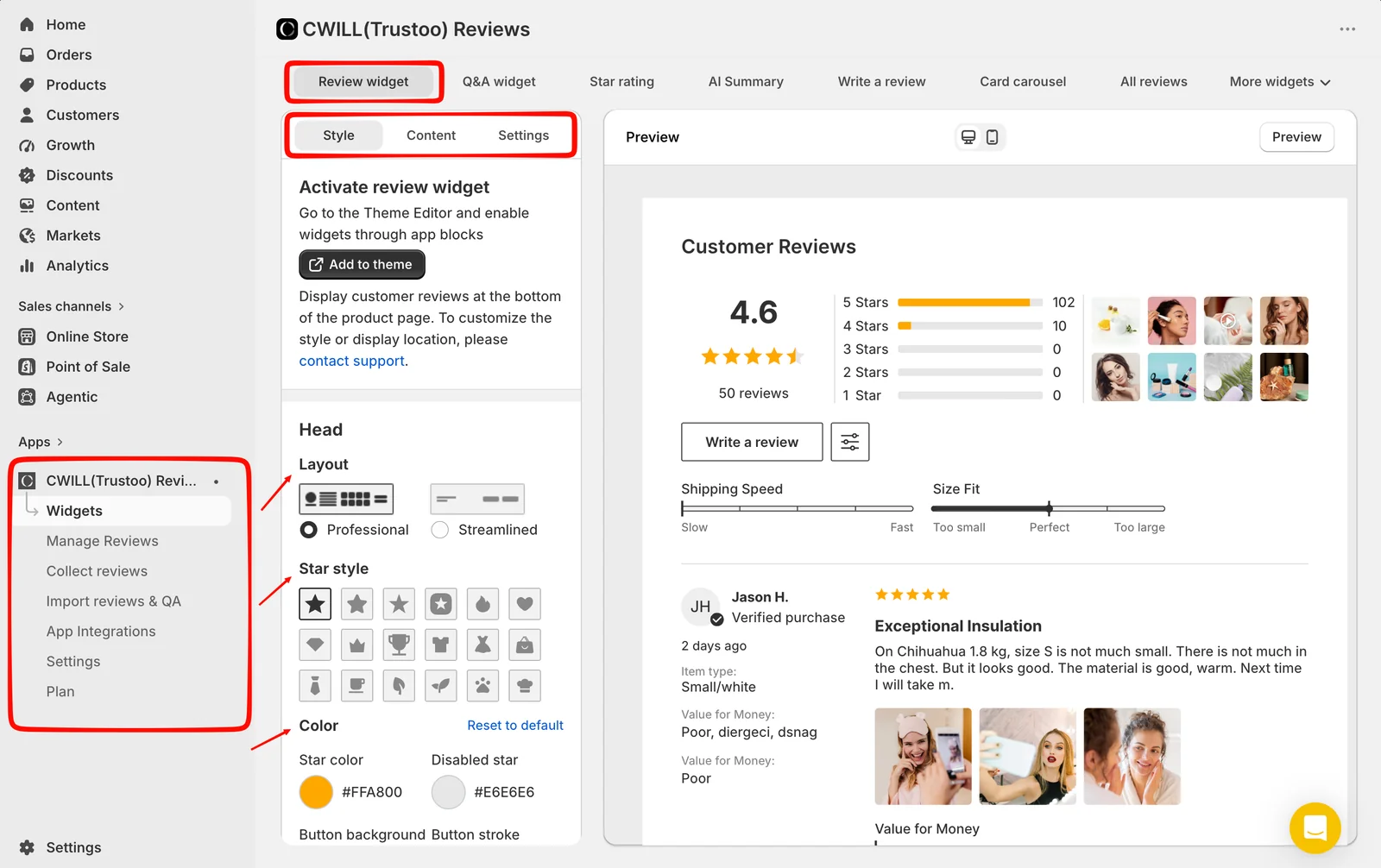
Trustoo collects product and store reviews through automated emails and shows them through storefront widgets. Its admin is built around a Widgets area with separate editors for the review widget, Q&A, star ratings, AI summary, the write-a-review form, card carousels and an all-reviews page, with more behind a More widgets menu. Alongside it sit Manage Reviews, Collect reviews, Import reviews & QA, App Integrations, Settings and Plan.
Beyond what we saw, the listing covers photo and video reviews, auto-translation of reviews, collection through QR codes, WhatsApp and Amazon, and review imports. It lists integrations with Shopify Flow, Customer Accounts, Checkout, PageFly, DSers and AliExpress. We did not test these areas; treat them as developer claims.
The app has had several names. The listing calls it CWILL(Trustoo) Product Reviews, its description calls it TrustWILL, and the onboarding simply says “Welcome to CWILL”. It is the same app, from the developer formerly known as Channelwill. It launched on the Shopify App Store in January 2022 and carries the Built for Shopify badge. On September 23, 2026 it showed a 4.9 rating across 1,565 reviews.
What We Tested
We installed CWILL (Trustoo) Product Reviews in a Shopify admin on the Free plan and went through all three onboarding steps: app language, review requests and reminders, and enabling the app embed in the theme editor.
We then opened the Review widget, Q&A widget, Star rating, AI Summary, Write a review, Card carousel and All reviews editors and reviewed their settings. Their previews use the app’s sample content, so the ratings, review counts and summaries shown in them are demonstration data, not results from our store.
This was a setup and configuration evaluation. We did not confirm how the widgets rendered on a live storefront, send or receive a review request, submit or moderate a review, import reviews, check Google snippets, measure page speed, contact support or run the store on a paid plan. We make no claims about those areas.
For these reasons, this is a Level 2 — Partial Hands-On Test.
Can a Small Store Set Up Reviews Without a Developer?
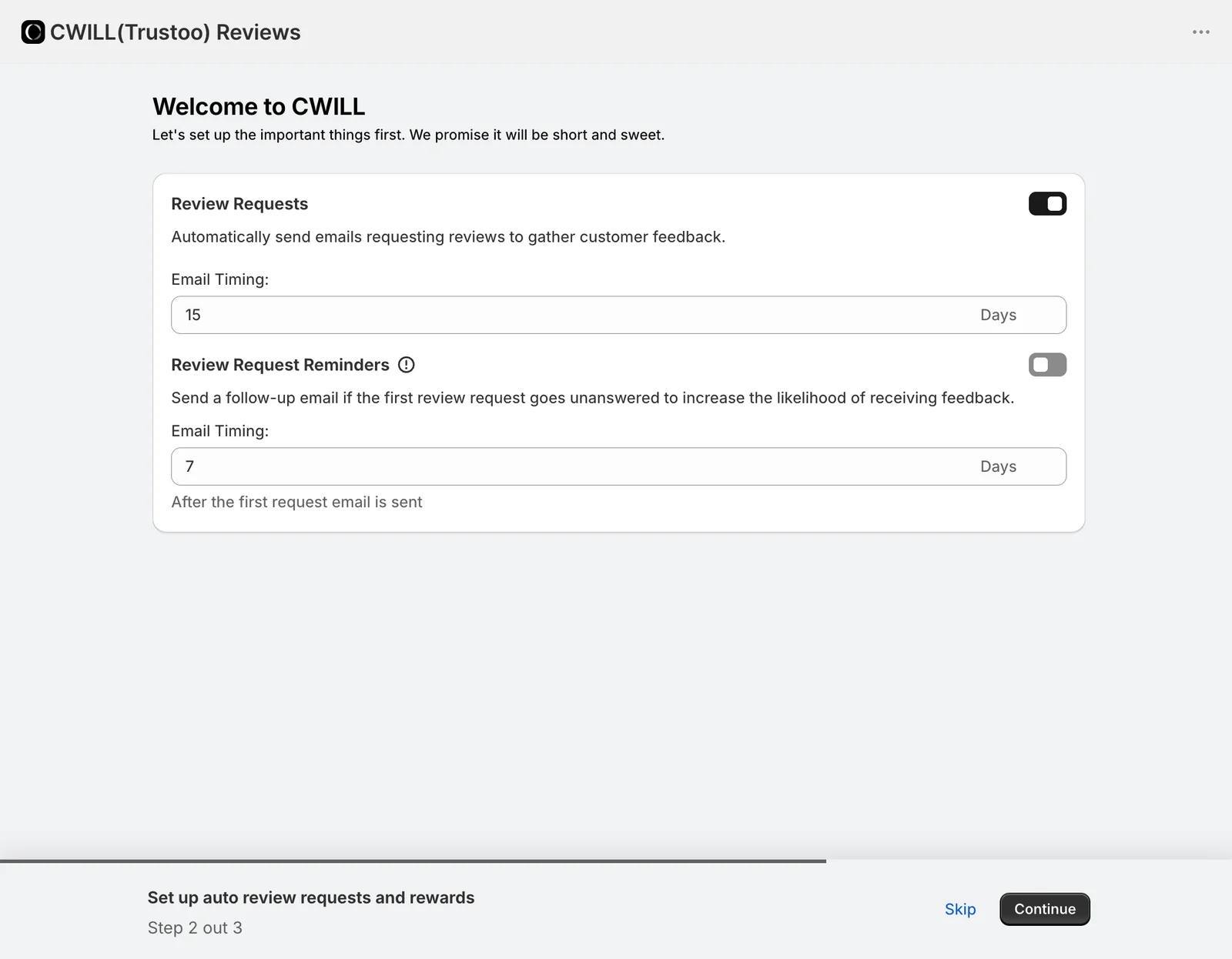
For configuration, yes. The onboarding is short and each step is one decision.
The first step sets the app interface language, with 20 options including English, German, Spanish, French, Japanese, Korean and both forms of Chinese. That is a practical touch for store owners who do not work in English.
The second step switches on automatic review request emails. In our run the first email was set to go 15 days out, and a reminder email was available but switched off, set to follow 7 days after the first request goes unanswered. The screen does not say which order event the 15 days count from, so check it in the full settings before you go live. It matters: in reply to one low rating, the developer traced emails a merchant thought were missing to a trigger that waited for orders to ship.
The third step asks you to enable the app embed in the theme editor, with a note that skipping it will affect the app’s functionality. The individual widgets are then added through theme app blocks with an Add to theme button in each editor.
Once set up, the widget editors are where Trustoo is strongest. The review widget offers two layouts, Professional and Streamlined, 18 star icon shapes from hearts to paw prints, and colour controls for stars and buttons. The star rating editor can show empty stars when a product has no reviews and lets you rewrite the label with tags such as the rating and review count. The carousel area has four types — image and text, text, photo, and testimonials — and the all-reviews area adds a side tab that floats alongside your store pages.
There is one gap in the editor. The review widget panel says it displays reviews at the bottom of the product page, and asks you to contact support to change its style or display location. The help centre gives the same answer for placements such as a product tab or a popup. That is fine if the default spot suits your theme. If it does not, you will be in chat.
How Customers Leave a Review
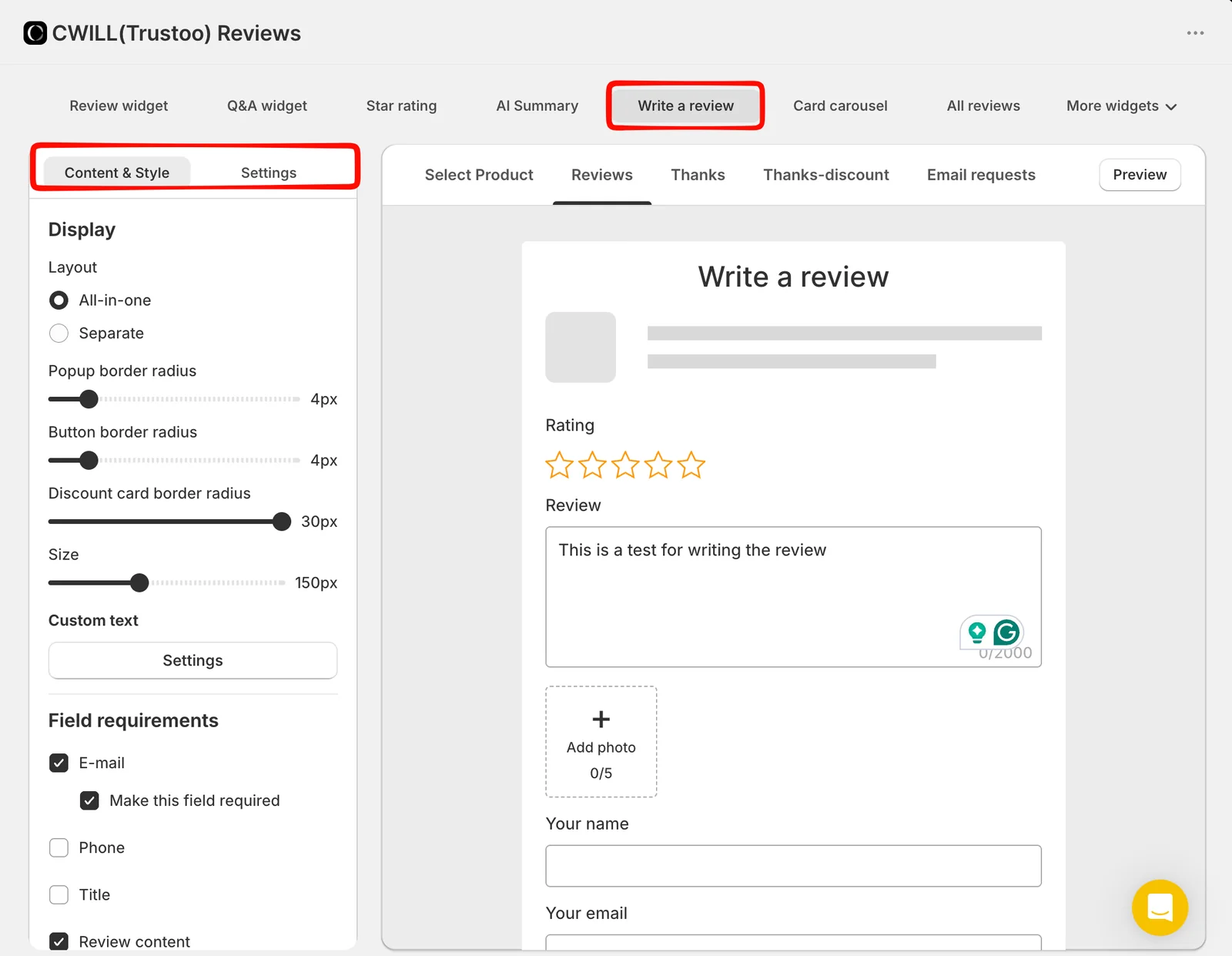
The write-a-review editor controls the form customers fill in. You choose an All-in-one or Separate layout, adjust corner radius and size, and decide which fields appear and which are required. In our admin, email was on and required, phone and title were off, and review content was on. The preview form accepts a star rating, up to 2,000 characters of text and up to five photos.
The preview tabs show the rest of the journey: selecting a product, the review itself, a thank-you screen, a thank-you screen with a discount, and the request emails. That suggests photo and review incentives are built into the flow, which matches the listing’s claim of photo incentives in request emails. We did not submit a review, so we cannot confirm how the form, discount or email behave for a customer.
Where Free Stops and Pro Starts
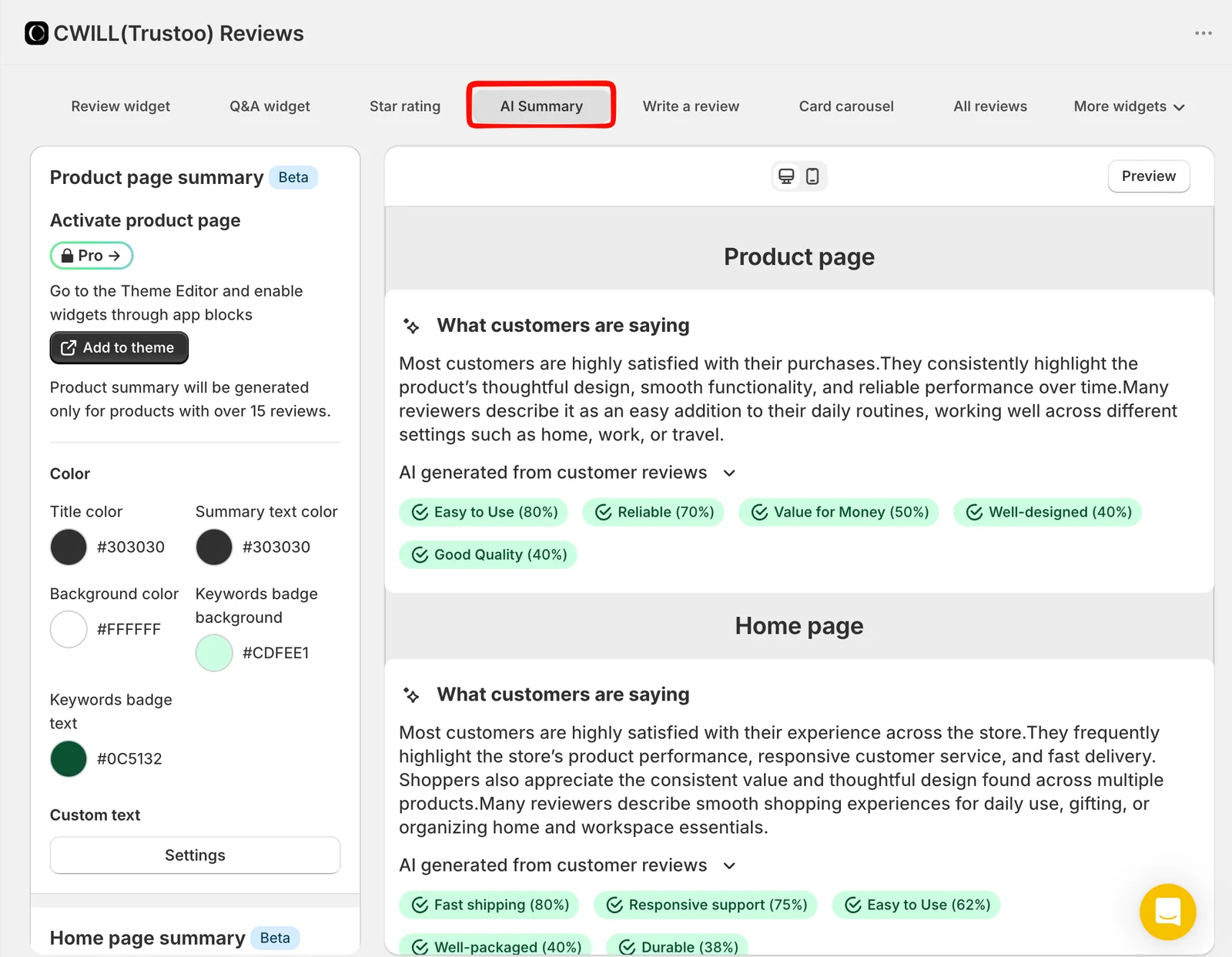
The plan boundary is easy to see in the admin. On Free, both the Q&A widget and the AI Summary carried a Pro lock.
The AI summary is a good example of why to read the fine print. It writes a “What customers are saying” paragraph with keyword badges and percentages, for a product page or for the whole store. The editor says a product needs more than 15 reviews before a summary is generated. The developer’s help centre adds a detail the editor does not: summaries are written from positive reviews. That makes the widget a highlight reel rather than a balanced overview, and a shopper cannot tell that from the label.
The Q&A widget is the more practical loss for a small store. It adds an “Ask a question” button beside the reviews, with an option to publish questions automatically before you answer them. For products where customers ask about sizing, ingredients or compatibility, that is useful, and it costs $29.99 a month.
The help centre also describes an Auto Reviews feature that creates a positive review on a customer’s behalf when they have consented but not written one, and counts its star rating in the product score. We did not see this option in the screens we reviewed and did not test it. A review the customer did not write is a trust risk with shoppers, and it may conflict with the review rules of the platforms and markets you sell in. We would leave it off.
Pricing and Value
These are the figures on the Shopify listing on September 23, 2026. Charges are billed in USD every 30 days, and both paid plans have a 7-day free trial.
| Plan | Monthly | Yearly | What the listing includes |
|---|---|---|---|
| Free | $0 | — | Unlimited product and store reviews, 6 reviews displayed per product, 10+ widgets, widget and email template customisation, 24/7 chat support |
| Essential | $11.99 | $115.10 | Unlimited reviews displayed, Google snippet, branded email templates, review replies, auto-translate into 1 language |
| Pro | $29.99 | $287.90 | Google Shopping, video review collection, multi-language translation, app integrations and API, product grouping |
Free is a real plan, not a trial. You can collect as many reviews as you like and use the full widget library. The limit is display: 6 reviews per product. For a new store, that is not a problem for months.
Essential is where most growing stores will land. $11.99 a month removes the display cap and adds Google star snippets and review replies. If a product is collecting reviews steadily, or organic search matters to you, this is the plan to budget for.
Pro is for stores that want the newer features. Q&A, the AI summary, video reviews, Google Shopping and multi-language translation all push you to $29.99 a month. That is a reasonable price for the feature list, but check that you need more than one of them before paying for Pro.
One caution: some help centre articles still refer to older plan names. The AI summary article, for example, says the feature needs the “Growth plan and above”, while the listing and our admin use Essential and Pro. Go by the plan card, and confirm with support if a feature you need is not listed there.
What Public Sources Add
On September 23, 2026 we also read the app’s recent one- to three-star reviews. They make up about 2% of the 1,565 reviews, so these are patterns from a small, negative slice, not findings from our test.
The recurring themes are consistent. One merchant this year blamed the app’s storefront files for slowing their store. Others described Google review snippets or Google product reviews not working reliably, including one merchant on the most expensive plan and another who said the problem had lasted months. One merchant in late 2025 reported review-request emails being flagged as spam and a difficult setup to send from their own domain. There are also billing disputes, a theme layout conflict and a photo-upload problem on iOS, which the developer says it has since fixed. The developer replies to most low ratings, though some replies came months later.
The recent five-star reviews often credit the support team, frequently by name. Many are brief, and some were left within an hour of installing, so they say more about the first support conversation than about long-term use.
What We Liked
- A generous Free plan: Unlimited collection and the full widget library at $0, with 24/7 chat support listed.
- Editors a non-developer can use: Layouts, 18 star icons, colours, form fields and carousels are all point-and-click with a live preview.
- Request reminders built in: The onboarding sets up a first request and an optional follow-up in one screen.
- Wide display options: Review widget, star ratings, four carousel types, an all-reviews page and a floating side tab cover most places a store shows reviews.
- A multilingual admin: 20 interface languages, set in the first onboarding step.
What Could Be Better
- The 6-review cap arrives quickly: A best-selling product will outgrow Free’s display limit well before the rest of the catalogue does.
- Key features are Pro-only: Q&A and the AI summary were locked on Free in our admin, and the AI summary needs more than 15 reviews per product.
- The AI summary is one-sided: The help centre says it is generated from positive reviews, which the storefront label does not make clear.
- Moving the review widget means contacting support: Style and placement changes beyond the defaults are handled through chat.
- Naming and documentation lag behind: Trustoo, TrustWILL and CWILL all refer to the same app, and some help articles use plan names that no longer appear on the listing.
- Key workflows remain untested by us: Storefront rendering, request delivery, moderation, imports, Google snippets and page speed were outside this evaluation.
Who Trustoo Product Reviews Is Best For
Trustoo suits a new or small Shopify store that wants a well-designed review widget and automated requests without paying at the start. The widget editors give a free-plan merchant a lot of control, and none of it needs code. It also suits stores that sell in more than one language, given the multilingual admin and the translation options on the paid plans.
Who Should Upgrade or Consider an Alternative
If your best sellers already have more than six reviews, budget for Essential from day one. If Google star snippets are central to your plan, Essential is the minimum, and given the syncing complaints, check Google Search Console after setup rather than assuming it works. If you want Q&A or AI summaries, you need Pro. If you want reviews in a custom position on a heavily customised theme, expect to work through support.
We have separately reviewed Judge.me, Junip, Loox and Fera. Those were separate evaluations, not a controlled head-to-head, so we are not ranking them here.
Final Verdict
Trustoo answers the first half of our question well. A small Shopify store can set up automated review requests, a branded review widget and star ratings on the Free plan without a developer. The editors are clear and the widget range is wide.
The second half has a clear answer too. Free holds back display, not collection. Once a product passes six reviews, or once you want Google snippets, the realistic cost is $11.99 a month. Q&A, AI summaries and video reviews take it to $29.99.
- Start on Free if you are building reviews from zero and want a polished widget today.
- Budget for Essential once any product passes six reviews or search snippets matter.
- Choose Pro only if you will use Q&A, video reviews or the AI summary.
Whichever plan you pick, send one real review request, publish the review and check how the widget loads on your theme. That is the step our test did not reach, and it is where the low ratings point.
Frequently Asked Questions
Is Trustoo Product Reviews free?
Yes. The Free plan includes unlimited product and store reviews and more than ten widgets, but it displays only 6 reviews per product. Essential at $11.99 a month removes that limit.
Are Trustoo, TrustWILL and CWILL the same app?
Yes. The listing is titled CWILL(Trustoo) Product Reviews, its description uses the name TrustWILL, and the in-app onboarding says CWILL. They all refer to the same Shopify app.
Which plan do you need for Google star ratings?
Essential. The Google snippet is listed on Essential at $11.99 a month, and Google Shopping on Pro at $29.99. It is not listed on Free.
How does Trustoo’s AI review summary work?
It writes a short paragraph and keyword badges from a product’s reviews, or from the whole store. It needs more than 15 reviews on a product, was locked to Pro in our admin, and the developer says it draws on positive reviews.