
A new Shopify store, especially one sourcing products from AliExpress or another marketplace, launches with empty product pages. The quickest fix is to bring in the reviews those products already have elsewhere, then start collecting real ones from customers. Ideally the app costs nothing until the store is selling.
Ali Reviews, from FireApps, is built around that first step. It imports reviews from AliExpress, Amazon, Temu, eBay and Etsy, translates them, and shows them in a review widget. Its Free plan includes unlimited AliExpress imports and unlimited review request emails. The catch sits in the Free row of the plan screen: 10 reviews per product. So the question we set out to answer is practical. Can a new store get reviews onto its product pages on Ali Reviews’ Free plan, and when does it have to pay?
We installed Ali Reviews on a Shopify development store, chose the Free plan, went through the three-step setup wizard and then looked at the dashboard, the Collect reviews area and the Manage reviews page. This review is built on those screens and checked against the Shopify App Store listing, the Ali Reviews help centre and recent merchant reviews. We did not import a review, send a review request or check the storefront, and we say so wherever it matters.
Key Takeaways
- Free covers a starter setup: AliExpress and CSV imports, unlimited review request emails, the review box, star ratings and badges are all on Free, but each product can publish only 10 reviews.
- The wizard is quick and visual: Brand colours, border style, logo, star icon, layout and widget placement take three short screens, with a live preview throughout.
- Finishing the wizard does not finish setup: Our dashboard still asked us to enable the Core Snippet, and our Collect reviews page showed review request emails switched off.
- Most import sources start on Basic: Free imports from AliExpress only. Amazon, eBay, Temu and Etsy, Google rich snippets, Q&A and review replies start on Basic at $14.95 a month.
- AI features sit on Growth: The AI review summary and multi-language AI translation start on Growth at $24.95 a month.
Our Verdict
Ali Reviews’ Free plan is a reasonable start for a store whose first reviews will come from AliExpress. Imports are unlimited, the core widgets are included, and request emails cost nothing however many orders you take.
The 10-review cap is the limit most stores will reach first. A product imported from AliExpress can arrive with many more reviews than that, and Free will publish only ten. Free also leaves out Google rich snippets and every marketplace other than AliExpress. Those are the realistic reasons to move to Basic.
Install Ali Reviews on Free if you sell AliExpress-sourced products and want reviews on your product pages without a monthly bill. When the wizard finishes, enable the Core Snippet and switch on review request emails yourself. Then import one product’s reviews and check how they look on your storefront. We did not reach that step.
What Ali Reviews Offers
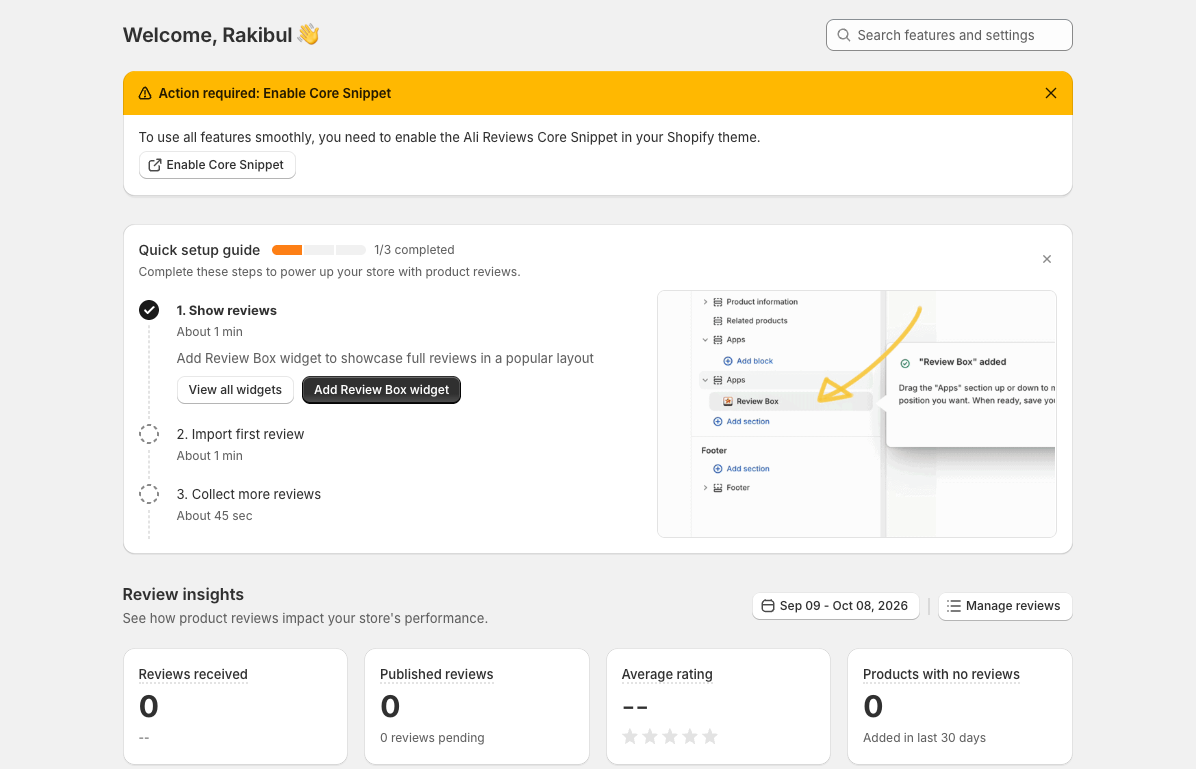
Ali Reviews imports, collects, translates and displays product reviews. Its admin menu reflects that order: Import Reviews, Collect Reviews, Manage Reviews, Show Reviews, Translation, and Settings & Pricing.
The dashboard opens with a three-step quick setup guide (show reviews, import your first review, collect more reviews) and a Review insights panel. The panel counts reviews received and published, the average rating and products with no reviews, with further cards for impact on sales and sales generated. On our development store every figure was zero, because nothing had been imported or collected. The panel shows what Ali Reviews measures, not how accurate those numbers are.
Collection lives under Collect reviews, with tabs for a request dashboard, email settings, email appearance, manual requests, product QR codes, review discounts and a blocklist. Manage reviews lets you view reviews by review, product or collection, and shows the AI summary status.
Beyond what we saw, the listing covers CSV imports, bulk import with AI, AI translation powered by Gemini, a media gallery, review popups and carousels. It lists integrations with Shopify Flow, DSers and other review apps including Judge.me, Loox, Yotpo and Stamped.io. We did not test these areas, so treat them as developer claims.
FireApps launched Ali Reviews on the Shopify App Store in March 2017, and it carries the Built for Shopify badge. On October 8, 2026 the listing showed a 4.8 rating across 1,441 reviews.
What We Tested
We installed Ali Reviews on a Shopify development store running the Dawn theme. We started from the welcome screen, chose the Free plan on the plan screen and went through all three wizard steps: set branding, customise the widget and install the widget. The wizard ended on a completion screen offering review imports. Afterwards we opened the dashboard, the Collect reviews request dashboard and the Manage reviews page.
This was a setup and onboarding evaluation. We did not import reviews, upload a CSV, send a review request, submit or moderate a review, or confirm how the widget looked on a live storefront. We also did not test translation, the AI summary, Google snippets, support or a paid plan. The previews in the wizard use sample content, so their ratings, reviewers and review counts are demonstration data. We make no claims about those areas.
For these reasons, this is a Level 2 — Partial Hands-On Test.
Can a New Store Set Up the Review Widget Without Help?
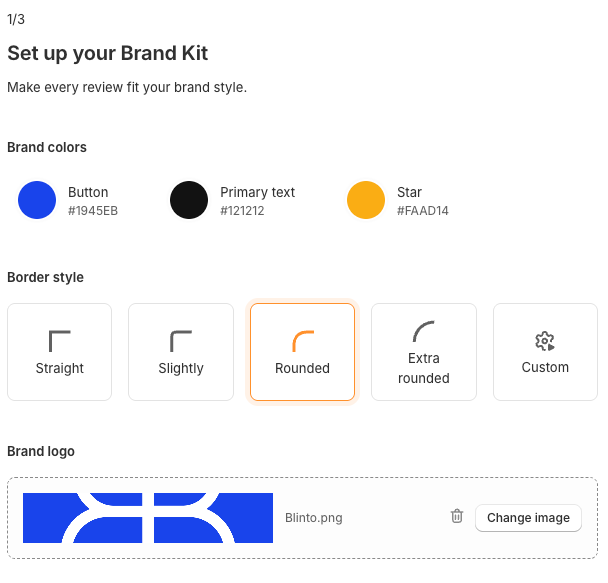
For the widget, yes. The wizard is three screens, each covers one topic, and a live preview on the right updates as you go.
The first step is a brand kit. You set three colours (button, primary text and stars), choose a border style from Straight, Slightly, Rounded and Extra rounded or set a custom one, and upload your logo. The preview applies those choices to a rating badge, a review card, a review form and a rating summary.
The second step customises the Review Box, the app’s main product-page widget. You pick a rating icon from eight shapes, including thin and rounded stars, circles, hearts and paw prints, and a layout: List, Grid or Slider. The preview switches between desktop and mobile, and a Preview full demo button opens a larger version. The demo shows reviews, photos and a Questions tab. Q&A is listed under Basic, not Free, so do not expect every element of the demo on a free store. The Basic plan card also lists full widget customisation, and we did not map which controls stay open on Free.
The third step installs the widget. You choose a theme and a page, here Dawn and the product page, and Add Review Box opens the Shopify theme editor with the widget placed in a suggested spot. The instructions ask you to save in the theme editor, return to the app and click Finish. Afterwards the dashboard’s quick setup guide marked Show reviews as complete. We did not confirm the result on a storefront.
The completion screen then points to the next job: getting reviews. It offers Import Reviews, shown beside AliExpress, Amazon, Temu, eBay and Etsy logos, and a CSV upload using the Ali Reviews template for stores that already have reviews elsewhere. On Free, only AliExpress imports and CSV uploads apply. The other marketplaces start on Basic, and the screen does not say so.
What the Wizard Leaves for You
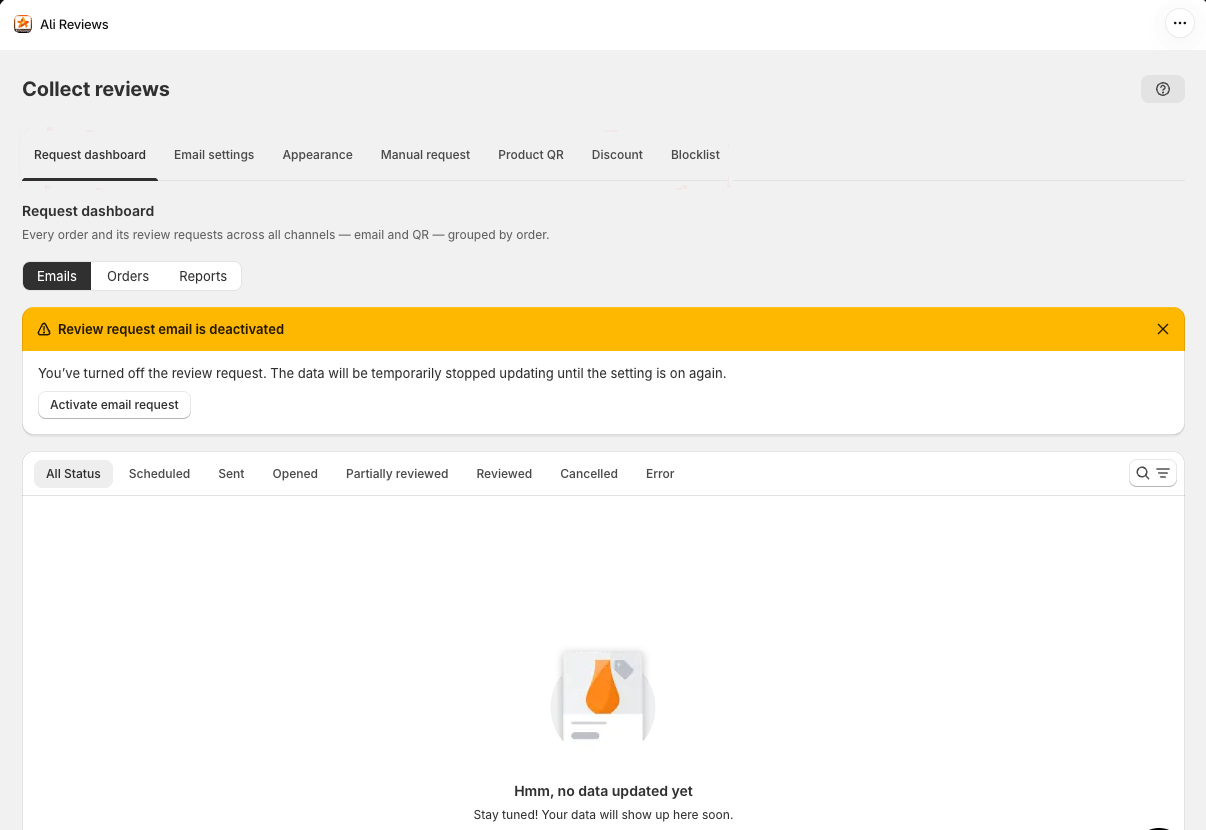
Two important settings were not done when the wizard finished.
The first was the Core Snippet. The dashboard greeted us with an “Action required” banner asking us to enable the Ali Reviews Core Snippet in the theme. This is the app’s theme app embed. The help centre calls it a required step and says it activates the review widgets and speeds up how they load. So clicking Finish does not mean your widgets are ready. Enabling it is one more trip to the theme editor: open App embeds, switch on Ali Reviews Core Snippet and save. The help centre also warns that on customised themes and some page builders, widgets may still not appear after the snippet is on.
The second was review request emails. The wizard has no step for collecting reviews. When we opened Collect reviews, the request dashboard showed a banner saying review request emails were deactivated, with an Activate email request button. For a store that installs the app to gather genuine reviews, that is the setting that matters most, and it is not mentioned during onboarding.
Once switched on, the help centre says the first request goes out 3 days after fulfilment by default. You can change the delay, or trigger it from delivery instead, which needs orders to be marked as delivered in Shopify. Customers with orders from the 60 days before you installed the app can receive a one-time request, which helps a store that already has sales. Ali Reviews also caps sends at 2 emails a day and 5 a month per customer across all its email types. Follow-up emails such as reminders start on Basic.
The request dashboard itself is well organised. It tracks emails, orders and reports, and filters requests by status: scheduled, sent, opened, partially reviewed, reviewed, cancelled and error. Partially reviewed and error are useful filters when you are chasing reviews.
Pricing and Value
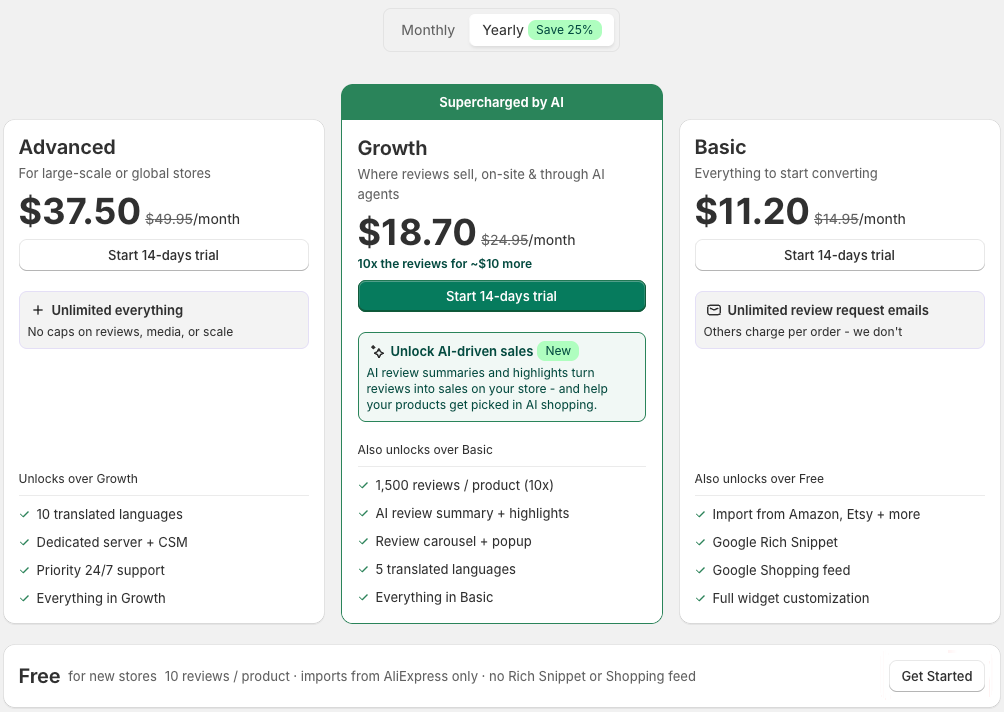
The plan screen appears before the wizard, with Free shown as a single row at the bottom. Prices below were verified in the app and on the Shopify App Store listing on October 8, 2026, in USD.
- Free — $0: 10 published reviews per product; unlimited AliExpress imports; CSV imports; unlimited review request emails; bulk import with AI; review box, star ratings and review badges; basic review translation.
- Basic — $14.95 a month or $134.40 a year: 150 published reviews per product; imports from Amazon, eBay, Temu and Etsy; Google rich snippets; a Google Shopping feed; full widget customisation; review replies, Q&A and dynamic discounts.
- Growth — $24.95 a month or $224.40 a year: 1,500 published reviews per product; AI review summary and highlights; AI translation into 5 languages; PageFly and GemPages integration; premium support and an onboarding specialist.
- Advanced — $49.95 a month or $450 a year: unlimited reviews and media; AI translation into 10 languages; a dedicated server and customer success manager; priority support.
Each paid plan has a 14-day free trial. With yearly billing, the in-app prices work out to $11.20, $18.70 and $37.50 a month.
Most stores will move to Basic for one of three reasons. The 10-review cap is the most likely. A best seller imported from AliExpress can carry far more reviews than ten, and Free will publish only ten per product. Other marketplaces are the second: Amazon, eBay, Temu and Etsy imports all start on Basic. Search visibility is the third, because Google rich snippets and the Shopping feed are not on Free.
Growth is harder to justify on features alone. Its main additions are 1,500 reviews per product, the AI summary and AI translation into five languages. That is worth paying for if you sell across languages or have products with hundreds of reviews. Otherwise, Basic covers most of what a growing store needs.
One detail needs checking before you buy. The in-app plan card lists the review carousel and popup as Growth features. The Shopify listing puts the media gallery, review popup and carousel on Basic. If those widgets are the reason you are upgrading, confirm the plan with Ali Reviews first.
We also could not find in the documentation what happens to reviews beyond the 10-review limit on Free, for example whether they are stored unpublished. If you import a large batch, check the product page afterwards.
What Merchants Report
Low ratings are rare. On October 8, 2026, about 3% of the listing’s 1,441 reviews were one to three stars.
The recent ones follow a few themes. In April 2026 a merchant of more than four years said reviews had stopped showing, and a review from May 2026 drew a developer reply about fixing a duplicated widget. In March 2026 a merchant said the widget did not fit their store’s design and disputed an annual charge. The developer says it issued a refund. Older low ratings mention an importer that skipped reviews, the cost of moving up the plans as a store grows, an unexpected subscription charge, and a support session that the merchant linked to a broken cash-on-delivery button. The developer attributed that last case to a theme conflict. A four-star review from February 2026 praises the app but mentions minor bugs.
The developer replies to most low ratings, usually with an offer to investigate. The recent five-star reviews mostly credit the support team, often by name, for helping with setup. Some come from merchants in their first days with the app, so they say more about onboarding help than about long-term use.
What We Liked
- A free plan built for importing: Unlimited AliExpress and CSV imports, unlimited request emails and the core widgets cost nothing.
- A short, visual setup wizard: Brand colours, border style, logo, rating icon, layout and placement take three screens, with live desktop and mobile previews.
- Branding up front: Colours, corners and logo are set in the first step, with the preview applying them to several widget types.
- A clear request dashboard: Status filters from scheduled to error make it easy to see where review requests stand.
- Long track record: The app has been on the Shopify App Store since 2017 and carries the Built for Shopify badge.
What Could Be Better
- The 10-review cap arrives quickly: Imported products often have more than ten reviews, and Free publishes only ten per product.
- Setup is unfinished when the wizard ends: The Core Snippet still needed enabling and review request emails were switched off in our admin.
- Import options that are not on Free: The completion screen shows five marketplaces, but of those a free store can import only from AliExpress.
- Plan details that do not match: The in-app plan card and the Shopify listing disagree on which plan includes the carousel and popup.
- Reports of display problems: Recent low ratings describe reviews not displaying and a duplicated widget. Check your storefront after setup.
- Key workflows we did not test: Imports, request delivery, review submission, moderation, storefront display, translation and support were outside this evaluation.
Who Ali Reviews Is Best For
Ali Reviews suits a new Shopify store, often a dropshipping store, that sources products from AliExpress and wants imported reviews on its product pages quickly and for free. It also suits a store that already has reviews in a spreadsheet and wants to bring them in by CSV, and a store that sells in several languages and is willing to pay for Growth to translate reviews automatically.
Who Should Upgrade or Consider an Alternative
If your products already have more than ten reviews each, plan on Basic from day one. If your reviews live on Amazon, eBay, Temu or Etsy, or you want Google rich snippets, Basic is also the minimum. If you want AI summaries or translation into several languages, budget for Growth.
If your store does not import marketplace reviews at all, Ali Reviews’ main strength matters less. Compare the free collection and display limits of other review apps before you choose.
We have separately reviewed Judge.me, Loox, Trustoo and Rivyo. Those were separate evaluations, not a controlled head-to-head, so we are not ranking them here.
Final Verdict
Ali Reviews answers the first half of our question well. A new store can set up a branded review widget on the Free plan in three short screens, and the plan includes AliExpress imports at no cost. The wizard is clear and the brand kit is a sensible starting point.
The second half has a clear answer too. Free holds back the number of reviews each product can publish and the marketplaces you can import from. Once a product passes ten reviews, or you need Amazon imports or Google snippets, the realistic cost is Basic at $14.95 a month. AI summaries and multi-language translation take it to Growth at $24.95.
- Start on Free if you sell AliExpress-sourced products and are building reviews from zero.
- Move to Basic once products pass ten reviews, or you need other marketplaces or rich snippets.
- Choose Growth only for AI summaries, multi-language translation or very high review counts.
Whichever plan you choose, enable the Core Snippet and switch on review request emails once the wizard finishes. Then import one product’s reviews and check how they look on your theme. That is the step our test did not reach.
Frequently Asked Questions
Is Ali Reviews free?
Yes. The Free plan includes unlimited AliExpress imports, CSV imports, unlimited review request emails and the review box, star ratings and badges. It publishes up to 10 reviews per product. Basic at $14.95 a month raises that to 150.
Can Ali Reviews import reviews from Amazon on the free plan?
No. Free imports from AliExpress and CSV files only. Imports from Amazon, eBay, Temu and Etsy start on the Basic plan.
Why does Ali Reviews ask me to enable the Core Snippet?
The Core Snippet is the app’s theme app embed. Ali Reviews’ help centre says it is required for the review widgets to work on your storefront. In our test, the dashboard still asked for it after the setup wizard was finished.
Does Ali Reviews send review request emails automatically?
It can, on every plan. In our admin, review request emails were switched off after onboarding and had to be activated under Collect reviews. Once on, the help centre says the first request goes out 3 days after fulfilment by default.