
A product page with an empty review widget does little for a hesitant shopper. Customer photos can do more: they show the product outside the studio, on real people and in real homes. But a store has to collect those photos first. That means asking at the right moment, giving buyers a reason to upload something, and displaying the results well.
Loox is built around that job. With more than 9,600 merchant reviews on the Shopify App Store, it is one of the most-reviewed apps in the category, and it prices its paid plan by order volume. So the question we set out to answer was simple: Does Loox make photo-review collection easy to set up, and what will it actually cost once a store’s order count grows?
We installed Loox on a Shopify development store and worked through onboarding and the main collection settings in about 15–20 minutes. We then compared what we saw against Loox’s current plans and help documentation, and against a sample of recent low-rated merchant reviews.
Key Takeaways
- Setup puts the right decisions up front: Brand colours, layout, a photo-review discount and past-customer requests are chosen during onboarding, and request timing and follow-ups sit one tab away. None of it needs code.
- Beginner times requests from fulfilment, not delivery: Loox’s plan comparison places delivery-based scheduling on Convert and above. On the free plan, the request delay has to allow for shipping time.
- Beginner is a starter plan, not a permanent free tier: It stops at 500 total store orders, and review-request emails are capped at 2,000 a month.
- Convert is priced per order, not flat: $49.99 covers 300 orders a month, and each further 300 adds $50. At 1,800 orders a month, Convert costs the same as Unlimited.
- Billing is the main recent complaint: In the recent one-star reviews we sampled, the most common theme was unexpected usage charges, not the product itself.
Our Verdict
Loox is worth shortlisting if customer photos are central to how you sell, and if you have modelled the bill at your real order volume. The setup is decision-focused. Onboarding asks how reviews should look, what photo incentive to offer and whether to email past customers, and the Collect Reviews settings put request timing and every follow-up email on one screen.
The trade-off is cost structure. Beginner suits a newer store, but it ends at 500 lifetime orders. It also leaves out delivery-based timing, video reviews, referrals, Google Shopping and Klaviyo triggers. Convert adds those, but its price rises by about 17 cents for every order above 300 a month. For a store selling low-priced products, that can outweigh the benefit.
Our evaluation stopped at configuration. We did not complete an order-to-review cycle, so treat this verdict as “shortlist and verify”, not as proof that the collection loop works in your store.
What Loox Offers
Loox is a Shopify product-review app from the developer of the same name. It has been on the Shopify App Store since 2015 and carries the Built for Shopify badge. Its core is photo reviews, automated review-request emails and a set of storefront widgets. Paid plans add video reviews, referrals, marketplace syndication and AI features. Loox pricing
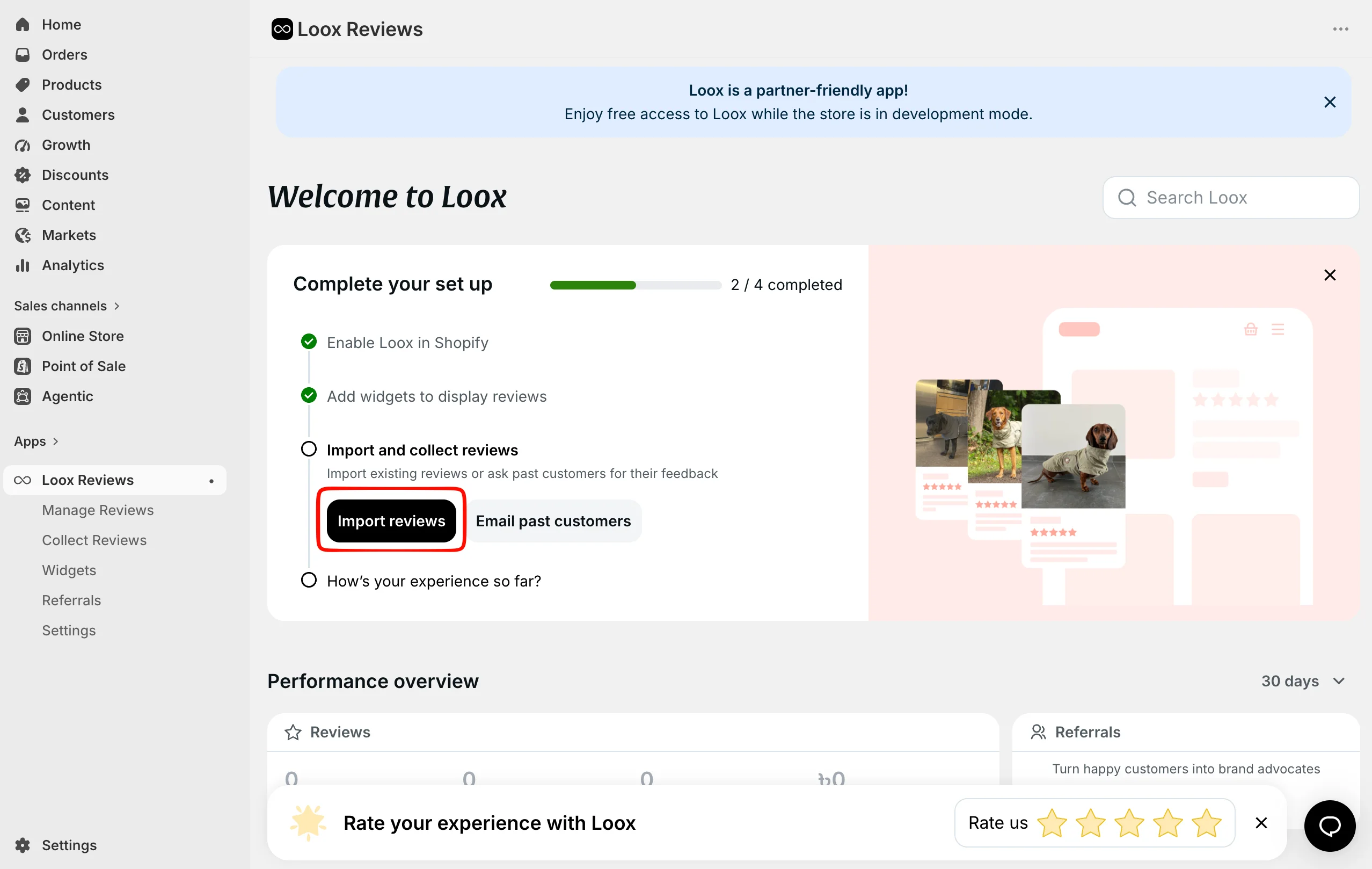
Our dashboard separated Manage Reviews, Collect Reviews, Widgets, Referrals and Settings in the app navigation. That split maps onto the three jobs a review app has to do: ask, moderate and display.
The setup checklist showed two of four steps complete: enabling Loox in Shopify and adding widgets. “Import and collect reviews” was still open, with buttons to import reviews or email past customers. A banner confirmed free access while the store stayed in development mode.
What We Tested
We evaluated Loox’s onboarding and configuration on a Shopify development store. Installation and onboarding took about 15–20 minutes, based on the reviewer’s own timing.
We worked through the dashboard, review-request scheduling and the follow-up email sequence. We also went through branding and layout choices, the photo- and video-review incentive, the past-customer request option and the referral setup previews.
That development-store access is separate from the production Beginner plan, and it exposed at least one feature, referrals, that Beginner does not include. The onboarding we saw is therefore not a preview of what a store staying on Beginner can use.
This is a Partial Hands-On Test focused on setup. We did not place an order and follow it through to a review request. We also did not submit a customer photo review, moderate a review or confirm how widgets rendered on a live product page. Email delivery, imports, integrations, support and storefront performance were outside the test as well.
Request Timing: Fulfilment on Beginner, Delivery on Convert
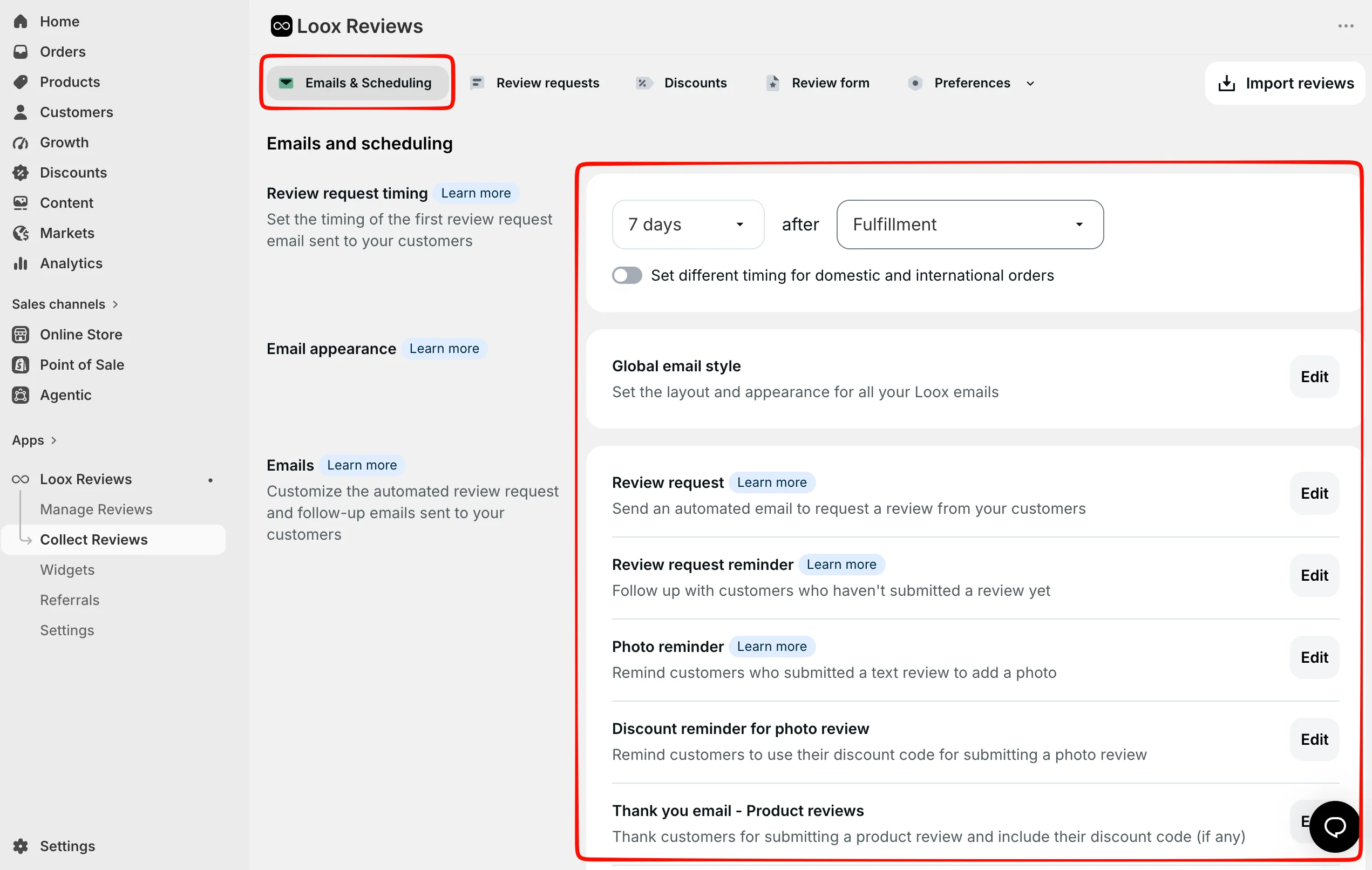
The Emails and Scheduling screen showed the first review request set to 7 days after Fulfillment. A toggle below it allowed different timing for domestic and international orders.
Fulfilment is when the store ships the order, not when the customer receives it. A request that arrives before the parcel is wasted, and a buyer who has not tried the product cannot leave a useful photo review.
The fix exists, but not on the free plan. Loox’s plan comparison lists delivery-based scheduling on Convert and Unlimited only. Its help documentation says delivery timing can use Shopify’s own tracking or an AfterShip integration. Shopify tracking only works if the carrier reports a delivered status back to Shopify. Scheduling by delivery date
For a Beginner store, the practical answer is to set the fulfilment delay to your typical delivery time plus a few days of use. Use the domestic/international split if you ship abroad. For a store with unpredictable delivery times, delivery-based timing is one of the stronger reasons to move to Convert.
The same screen groups the rest of the sequence: the initial request, a review reminder, a photo reminder for customers who left a text-only review, a discount reminder and a thank-you email. Each has its own editor. The photo reminder matters most for a visual-review strategy, because it asks text reviewers to add a photo. We did not confirm how these emails render or that they send.
Onboarding also offered to email customers from the previous 30, 60 or 90 days, with a clear “Do not send” option. That is a sensible way to seed reviews on a store that already has buyers. It is also a real decision about contacting people who did not expect it, and Loox makes you choose instead of opting you in.
Branding Choices Come Early, With One Merchant Caveat
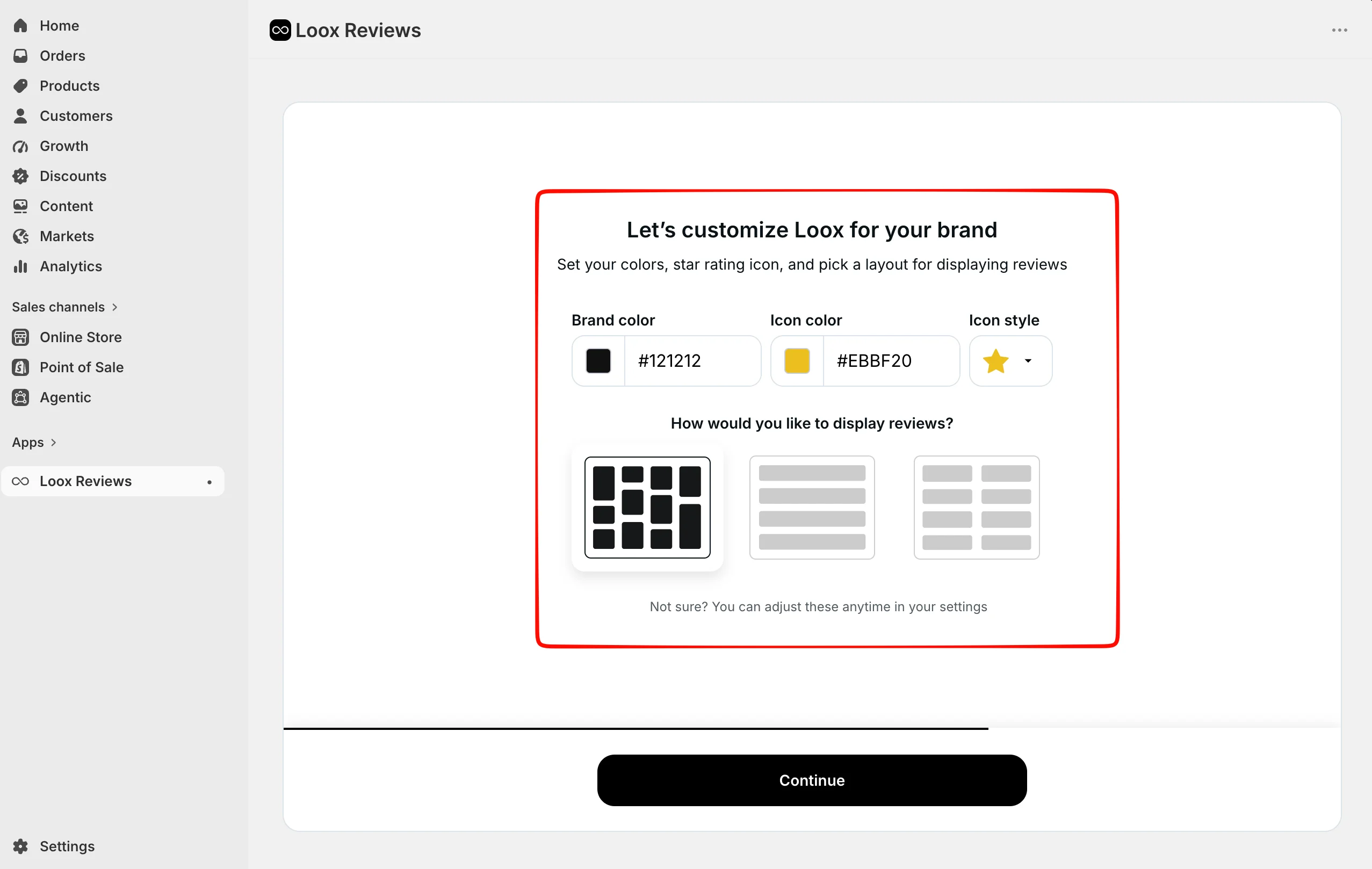
Loox asks you to set the look of your reviews during onboarding: a brand colour, a rating-icon colour, an icon style and one of three layouts. Our configuration used a dark brand colour, yellow stars and a grid layout.
Loox’s plan comparison includes widget colours, fonts and text customisation on every plan, including Beginner. Removing Loox branding requires Convert or above. A merchant who cares how the widget looks can therefore get most of the way on the free plan, but the Loox branding stays until they pay.
One recent low-rated review raised a limit worth knowing about: that merchant could not match their theme’s font closely enough without CSS access. That is one report, not a pattern we confirmed. But if your theme uses a distinctive typeface, check the widget on a real product page before you commit.
We did not see these choices on a rendered storefront widget, so spacing and mobile layout are unverified.
Photo Incentives Are a Margin Decision
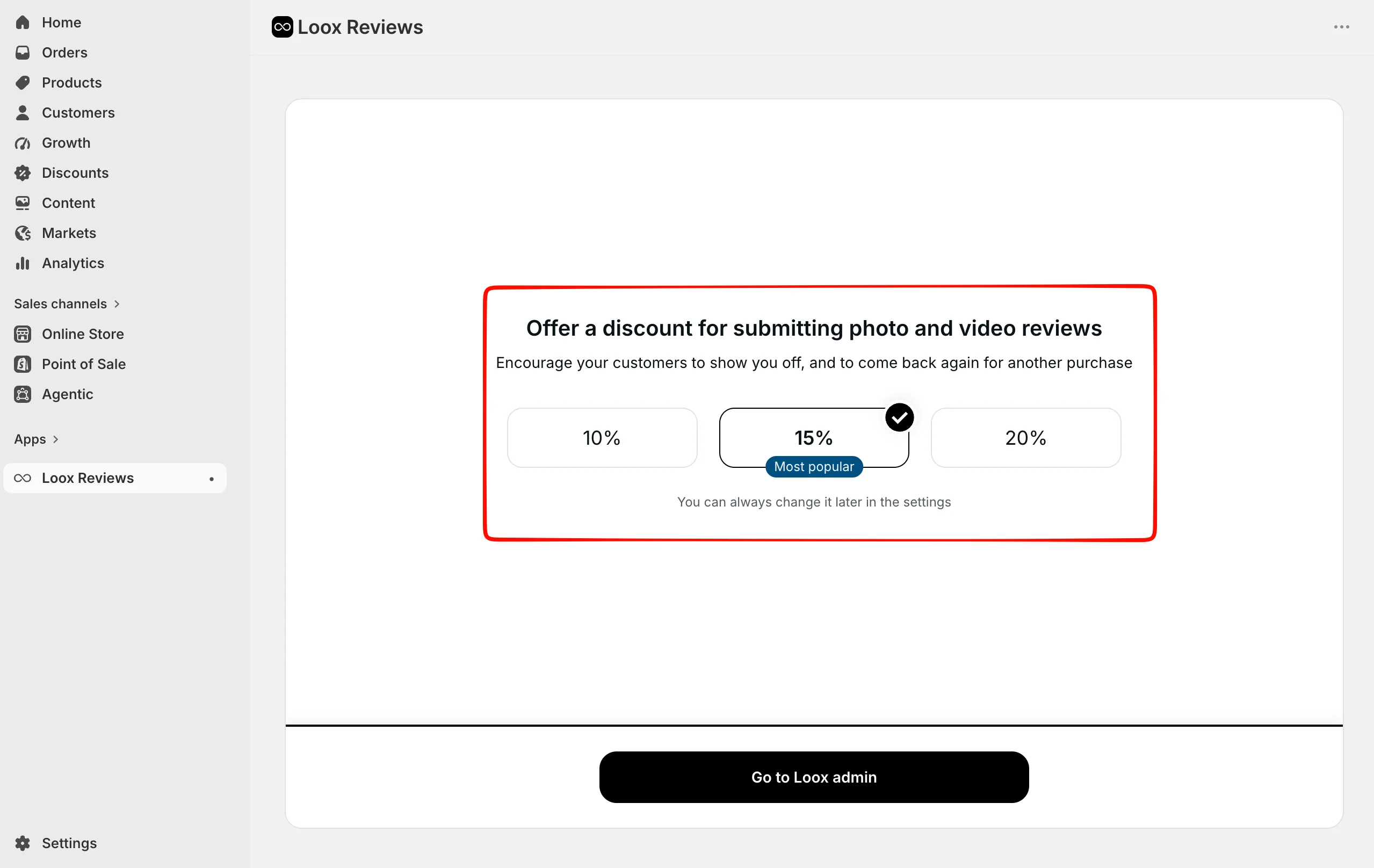
The incentive step offered 10%, 15% or 20% off a future order in exchange for a photo or video review. In our setup, 15% was preselected and labelled “Most popular.”
The screen makes this feel like a design choice. It is really a pricing decision. A discount on the next order can lift participation, but every redeemed code comes out of the margin on a repeat purchase. It may also stack with other promotions you run. Stores with thin margins may be better served by 10%, or by testing whether the photo reminder alone gets enough uploads.
The label “photo and video reviews” also needs context. Loox’s plan comparison lists video reviews on Convert and Unlimited, not Beginner. The discount-for-photo-reviews feature itself is available on every plan. We did not confirm that a discount was issued or redeemed.
Referrals Are a Paid Add-On You Will See During Setup
The development store also showed referral setup screens, with on-site, post-purchase and post-review placements and customer-facing previews. Loox’s plan comparison places all three placements, plus referral fraud protection, on Convert and above.
That makes referrals a second programme to evaluate, not part of the core review decision. A store starting from zero reviews should get collection and display working first. The sales-uplift figure in the referral screens is Loox’s own claim; we did not test referrals.
Pricing and Value
Pricing checked on September 25, 2026:
| Plan | Published price | What to budget for |
|---|---|---|
| Beginner | Free | Up to 500 total store orders; 2,000 review-request emails a month |
| Convert | $49.99/month base | 300 orders a month included; $50 for each additional 300 |
| Unlimited | $299.99/month | No order or email quota; priority support |
Plans, prices and Convert’s usage charges come from the Shopify App Store listing. Convert and Unlimited have a 14-day free trial. Billing runs through Shopify’s 30-day cycle with no annual commitment.
Beginner is a starter plan. Loox’s help documentation says it supports up to 500 total store orders after the trial ends. That is a lifetime threshold, not a monthly allowance, and Loox recommends upgrading once a store passes it. Review-request emails are also capped at 2,000 a month. Requests above that queue until the next billing cycle, and any still unsent 30 days after their scheduled time are marked as missed. Beginner plan details
Convert scales with every order. Loox’s quota documentation says each block of 300 extra orders is added to the monthly bill automatically, for $50. Loox monthly quota Using the published rates, here is what Convert costs at a few monthly order volumes:
| Orders per month | Convert monthly cost | Compared with Unlimited ($299.99) |
|---|---|---|
| 300 | $49.99 | Convert is far cheaper |
| 600 | $99.99 | Convert is cheaper |
| 900 | $149.99 | Convert is cheaper |
| 1,500 | $249.99 | Convert is still cheaper |
| 1,800 | $299.99 | Same price |
| 2,100 | $349.99 | Unlimited is cheaper |
Two things follow from this. First, past about 1,800 orders a month, Unlimited is the cheaper plan. It also removes the quota, so the bill stops moving. Second, above the included 300 orders, Convert works out to roughly 17 cents per order. That is small on a $60 product and material on an $8 one, which is the concern low-ticket sellers raise in recent reviews.
We did not test billing transitions on our development store. Before upgrading, check your average monthly order count in Shopify. Then look at the Loox line under Settings → Billing in your Shopify admin during the first paid month.
What Public Sources Add
Our setup evidence is the main basis for this review. On September 25, 2026, we also read the Loox listing, pricing page and help documentation, plus a sample of its recent one- to three-star merchant reviews.
The listing is overwhelmingly positive: 4.9 out of 5 from 9,672 reviews, with 94% at five stars. Low ratings are rare: 160 one-star, 28 two-star and 43 three-star. The recent positive reviews commonly praise responsive support, an interface that non-technical owners can use and smooth imports from other review apps.
In the recent low-rated reviews we sampled, from April to September 2026, billing was the clearest theme. Several merchants described usage charges they did not expect or confusion over what counts as an order, and one reported charges continuing after uninstalling. The table above is our attempt to make that cost visible before it arrives.
Other recurring complaints included a review widget not displaying on mobile, limited font control without CSS, difficulty exporting reviews and reviews publishing automatically without spam filtering. That last point is consistent with Loox’s documented rule that held reviews publish after 14 days unless rejected for valid reasons.
These are patterns from a small negative slice of a very large review base, not findings from our test, which did not reach billing, storefront display or moderation.
What We Liked
- Setup asks the questions that matter: Branding, the photo incentive and past-customer requests are settled in onboarding, and timing and follow-ups share one settings screen, so a new install is less likely to launch on defaults you never saw.
- The follow-up sequence is built for photos: A dedicated photo reminder for text-only reviewers is a practical way to turn existing reviews into visual ones.
- Past-customer requests are opt-in: The 30/60/90-day options sit beside an explicit “Do not send”, which respects buyers who never agreed to hear from you.
- Most visual customisation is on the free plan: Loox’s plan comparison includes widget colours, fonts, text and several display widgets on Beginner.
- No code needed to get started: Nothing in our onboarding required a developer or theme file edits.
What Could Be Better
- Request timing on Beginner starts at fulfilment: Delivery-based scheduling is a Convert feature, so free-plan stores have to estimate shipping time themselves.
- The bill moves with order volume: Convert’s $50-per-300-orders structure is documented, but it is easy to underestimate, and it is the most common theme in the recent one-star reviews we sampled.
- Development-store onboarding shows paid features: Referral setup appears in the development store even though referrals are not on Beginner, which can blur what the free plan includes.
- Loox branding stays on Beginner: Removing it requires Convert.
- The core loop is unverified by us: Email delivery, customer submission, moderation, storefront rendering and imports were outside this evaluation.
Who Loox Is Best For
Loox fits a Shopify store where customer photos genuinely sell the product: apparel, beauty, home goods, pet products and similar categories where shoppers want to see the item in use. It suits merchants who want requests, photo reminders, incentives and display widgets in one place, set up without a developer.
Convert fits stores with a mid-range order value, where about 17 cents per extra order is easy to absorb, and merchants who will use what it adds: delivery-based timing, video, referrals and Google Shopping or Klaviyo. Newer stores can start on Beginner and upgrade once they approach 500 orders.
Who Should Upgrade or Consider an Alternative
Move to Convert early if your delivery times vary a lot or you ship internationally, and you want requests to follow delivery rather than fulfilment. Do the same if you want video reviews or need reviews in Google Shopping.
Look at Unlimited once you are consistently near 1,800 orders a month, where it matches Convert’s price.
Consider an alternative if you sell many low-priced items at high volume, or if you need a predictable fixed bill. We have separately evaluated Judge.me, with a free plan and a flat $15 paid tier, and Junip, whose free plan has no order cap. We have also looked at Trustoo, whose free plan caps how many reviews each product displays, and Yotpo and Okendo, whose free plans cover 50 orders a month. Those were separate setup evaluations, not a controlled head-to-head, so we are not ranking them here.
Final Verdict
Loox made photo-review collection feel deliberate. In about 15–20 minutes of setup, it had us decide branding, a photo incentive, past-customer requests, request timing and follow-ups, all without code. That is a strong setup for a store that wants customer photos at the centre of its product pages.
The caveats are plan boundaries and cost, not the setup itself.
- Start on Beginner if you are a newer store, well under 500 total orders, and happy to set the fulfilment delay by hand.
- Move to Convert when you want delivery-based timing, video reviews, referrals or marketplace syndication, and you have checked the bill at your monthly order count.
- Switch to Unlimited once you pass roughly 1,800 orders a month.
Whichever plan you choose, send one real order through to a published photo review on your own product page before you rely on it. That is the step our test did not reach, and the one that proves the loop works.
Frequently Asked Questions
Is Loox free on Shopify?
Loox has a free Beginner plan, but it is not an unlimited free tier. According to Loox’s help documentation, Beginner supports up to 500 total store orders counted from the end of the Loox trial, plus up to 2,000 review-request emails a month. Once a store passes 500 orders, Beginner is no longer available and Loox recommends upgrading. Our development store had free access while in development mode, which is separate from this production plan. Beginner plan details
How much does Loox cost?
When we checked on September 25, 2026, the Shopify App Store listing showed three plans. Beginner is free up to 500 orders. Convert costs $49.99 a month with 300 orders included and $50 for each additional 300. Unlimited costs $299.99 a month. Convert and Unlimited come with a 14-day free trial, billing runs through Shopify, and there is no annual commitment. Shopify App Store listing
What does the Beginner plan leave out?
Loox’s plan comparison places video reviews, delivery-based request scheduling, referrals, Loox branding removal, Google Shopping, Meta Shops syndication, Klaviyo and Omnisend review triggers, Shopify Flow, custom review questions, product grouping, auto-translated reviews and AI features on Convert and above. Beginner does include photo reviews, review-request and reminder emails, discounts for photo reviews, the main display widgets, Google rich snippets and imports from other apps. Loox plan comparison
Can Loox send review requests after delivery instead of fulfilment?
Yes, on Convert and Unlimited. Loox can time requests from delivery using Shopify’s own delivery tracking, which depends on the carrier reporting a delivered status, or through an AfterShip integration. On Beginner, requests are timed from fulfilment, so set the delay to cover your typical shipping time. Scheduling by delivery date
Can I import reviews from another app into Loox?
Loox’s help centre describes a built-in import for reviews from Judge.me, Yotpo, Okendo, Shopify Product Reviews, Stamped, Reviews.io and Junip. For other sources, merchants can fill in Loox’s CSV template; custom-file imports are capped at 100,000 reviews per store. Importing reviews to Loox We did not test an import, so migrate a small sample first and check it on your product pages.
Can I moderate reviews before they go live?
Partly. Loox’s documentation describes auto-publishing options that range from publishing every review immediately to holding lower-rated reviews as “Pending.” Held reviews are published automatically 14 days after submission unless they are unpublished for valid reasons. Managing reviews in Loox In practice, that is a review window, not a way to hide negative feedback. We did not test moderation ourselves.
Does Loox work with Google Shopping and Klaviyo?
Yes, on paid plans. The App Store listing names Google Shopping, Klaviyo, Omnisend, Meta Shops, Shopify Flow and the Shop app among Loox’s integrations. Loox’s plan comparison places the other five on Convert and above, and the listing includes Shop app syndication on Beginner. We did not test any integration.
What is Loox’s rating on the Shopify App Store?
When we checked the listing on September 25, 2026, Loox had a 4.9 out of 5 rating from 9,672 merchant reviews, with 94% at five stars, and displayed the Built for Shopify badge. A high rating is a useful signal, but it does not replace running one real review through your own store from request to storefront display.