
Product reviews become important once a Shopify store starts getting customers. But a new merchant may not want another monthly app bill.
Judge.me offers a Free plan for collecting and showing reviews. Its Awesome plan costs $15 per month.
That raises a useful question. Can a Shopify merchant run product reviews for free, or will the limits soon require the paid plan?
We installed Judge.me on a Shopify development store with the Dawn theme. We stayed on Free and tested setup, theme links, widget controls, email styling, review tools, imports, and analytics. We then checked Judge.me’s plan comparison line by line to find the limits our setup could not reach.
Key Takeaways
- The Free plan is useful: We set up a working review widget without paying. It did not feel like a limited demo.
- Setup does not need a developer: We configured the widget in under 10 minutes. Judge.me gave clear steps for the Shopify theme app embeds.
- Branding is the visible limit: Review-request email styling was the clearest limit in our test. Logo size, alignment, fonts, and corner styling required Awesome.
- Reminders are the hidden limit: Judge.me’s plan comparison puts automatic reminder emails on Awesome only. On Free, each order gets one request with no follow-up.
- Free publishes reviews automatically: Auto-publish was on by default in our store. Judge.me lists its spam and profanity filter as an Awesome feature.
- Pricing is simple: $0 or $15 per month, with no order or request caps on either plan.
Our Verdict
Judge.me is easy to recommend for a new Shopify store that needs reviews without another monthly cost.
We went from install to a set-up review widget in under 10 minutes. The interface was clear. Judge.me also handled the theme steps well. Free gave us enough control for a useful review setup.
The limits appeared when we moved from basic tools to branding. Review-request email styling was the clearest example. We could upload a logo on Free, but its size, alignment, fonts, corner style, and other design controls needed Awesome.
Judge.me’s plan comparison adds a second limit we could not see in setup: no automatic reminders on Free. For a store that depends on review volume, that may matter more than email design.
The choice is simple. Start with Free if you mainly need to collect and show reviews. Budget $15 per month for Awesome when you need reminder emails, a branded email, or tools like Q&A and Google Shopping.
What Judge.me Offers
Judge.me collects product and store reviews and shows them on a Shopify storefront. It supports photos, videos, widgets, star ratings, request emails, imports, review controls, analytics, and app links.
The app has been on the Shopify App Store since 2015 and carries the Built for Shopify badge. When we checked on October 14, 2026, it showed a 5.0 rating across 48,481 reviews.
Popularity was not our main question. We wanted to know how far a merchant can get before the Free plan becomes a problem.
What We Tested
We installed Judge.me on a Shopify development store using the Dawn theme and chose the Free plan.
Our hands-on test covered:
- installation and permissions,
- Judge.me’s onboarding process,
- Shopify theme app embeds,
- adding the review widget,
- widget configuration,
- Free versus paid customisation controls,
- review-request email styling,
- review management screens,
- import options,
- analytics,
- and pricing and plan limits.
On a development store, onboarding offered the Awesome plan free for development stores. We declined and chose Free, so the locked controls we saw are the ones a live store on Free would see.
This was mainly a setup test. We did not view the widget on the live storefront, send a review request, collect a review, or run an import. We did not measure sales or page speed, and we did not contact support.
We do not use this test to make claims about tasks we did not complete.
For these reasons, this is a Level 2 — Partial Hands-On Test.
Can You Set Up Judge.me Without a Developer?
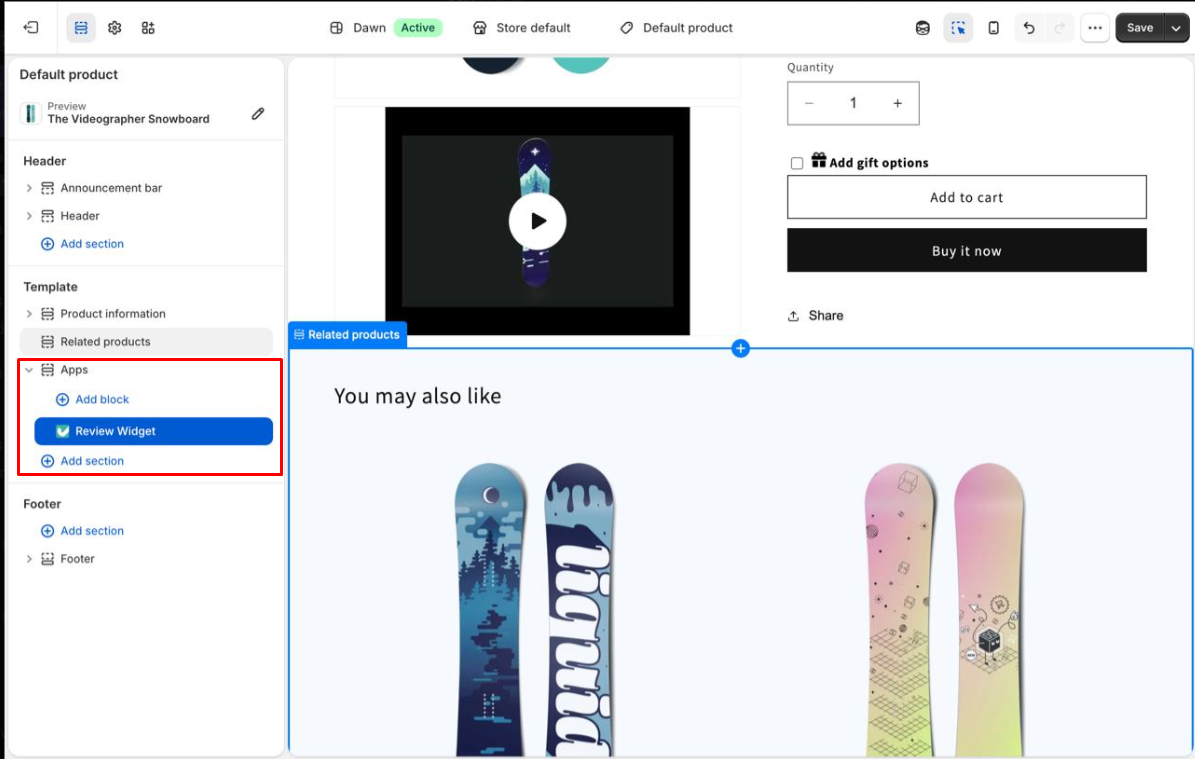
For the core setup, yes. From installation to a configured review widget took us under 10 minutes.
One harder setup step is linking the app to the Shopify theme. Judge.me needs two theme app embeds: its core snippet and the review widget. This may confuse a merchant who has never used the theme editor.
Judge.me handled this step well. It opened the theme editor and showed the exact toggle to enable. It also pointed out the Save button and detected the saved change. Both embeds worked on the first try.
There are still two trips between Judge.me and the theme editor. But we never reached a point where a developer felt necessary. For a newer Shopify merchant, that is an important strength.
Is the Free Plan Actually Enough?
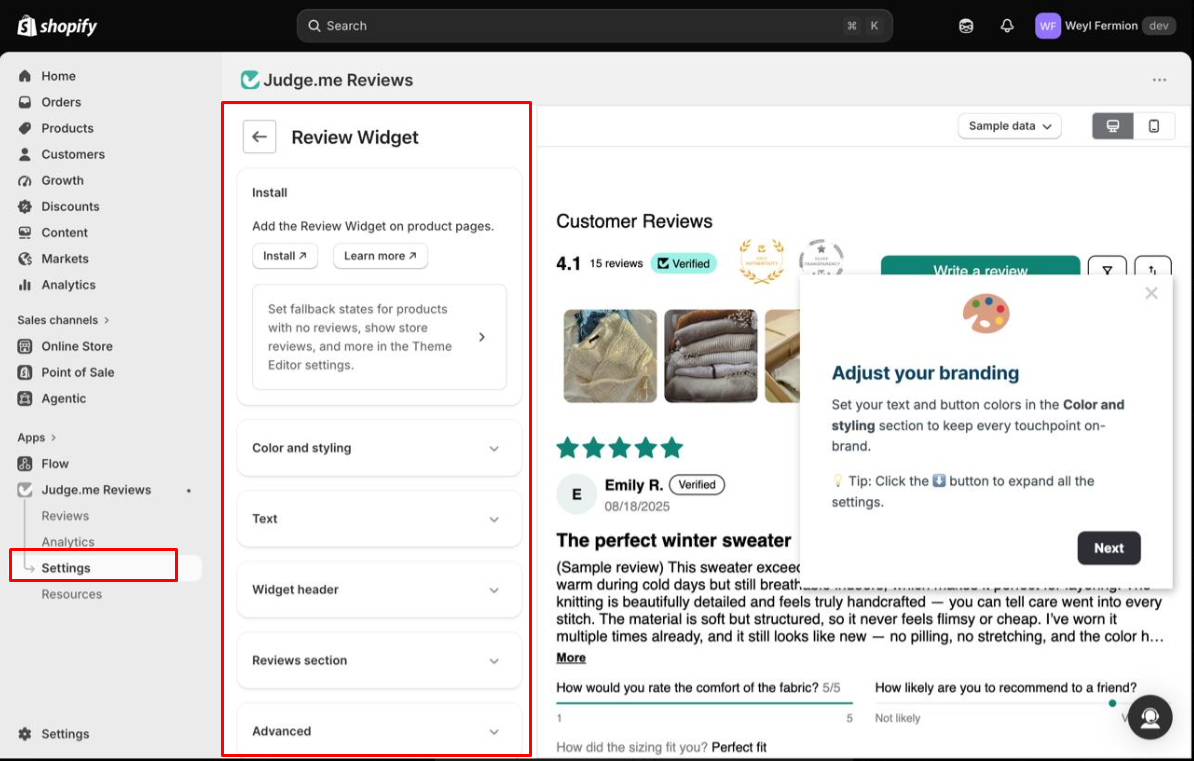
For many smaller stores, yes. The Free plan is not a restricted demo designed to force an immediate upgrade.
We could configure the core storefront review experience, including:
- star and bar-chart colours,
- button colours,
- text colours,
- the widget title,
- review terminology,
- empty-state messaging,
- button labels,
- and the widget layout.
The live previews made basic styling easy. Note that the preview uses Judge.me’s sample data, not your reviews. Judge.me also has an Advanced area with a 1,000-character custom CSS field and a Liquid widget snippet. These give skilled frontend teams another option when the standard controls are not enough.
Judge.me’s plan comparison also lists unlimited review requests, automatic scheduling, past-order requests, store reviews, imports, and support for 38 languages on Free. Free goes far if you simply need customers to see product reviews.
Where the Free Plan Starts to Feel Restrictive
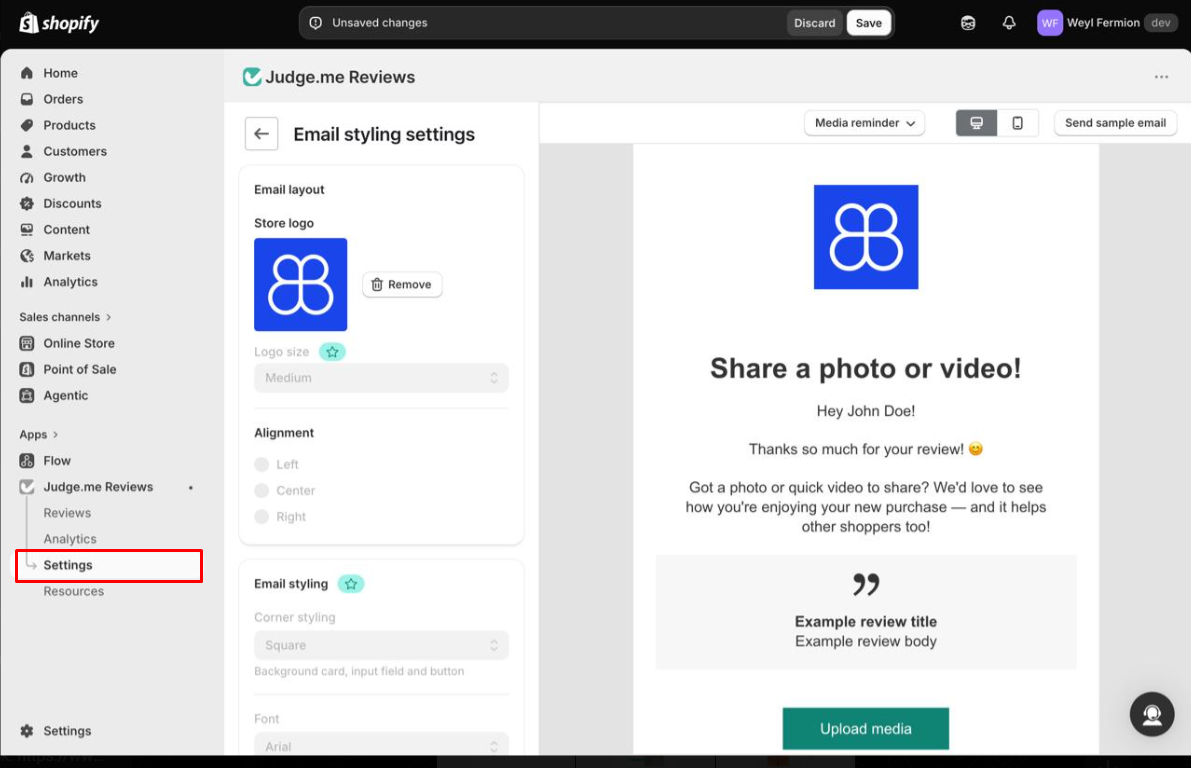
Judge.me shows paid controls inside the interface. As we worked, we kept finding controls marked for Awesome.
These included widget corners, reply author name, header text, rating display, bar-chart style, custom questions, AI review insights, and other design controls.
Most of these would not stop a smaller store from using Judge.me. Then we reached email styling, the clearest limit in our test.
On the Free plan, we could upload our store logo to the review-request email. But we could not control its size or alignment. Fonts and corner styling were also locked behind Awesome.
That difference matters. A new store may only need review emails that work. A mature brand may want every email to use the same type, spacing, and images.
The limits setup does not show you
The locked controls we saw were all about design. Judge.me’s plan comparison, checked on October 14, 2026, shows that several collection and display tools are also Awesome-only. We did not test these; they come from Judge.me’s own table.
| Tool | Free | Awesome | Why it matters |
|---|---|---|---|
| Unlimited review requests | Yes | Yes | No order or request cap on either plan |
| Automatic reminder emails | No | Yes | Free sends one request per order |
| Coupons and referrals for reviewers | No | Yes | No built-in incentive on Free |
| Spam and profanity filter | No | Yes | Matters because auto-publish is on by default |
| Questions & Answers widget | No | Yes | Q&A needs Awesome |
| All-reviews page and pop-up widgets | No | Yes | Free covers the product widget, badges, and carousels |
| Google Shopping, Meta and TikTok Shop sync | No | Yes | Free still includes Google rich snippets |
| Klaviyo, Omnisend, Gorgias, Smile, LoyaltyLion | No | Yes | Shopify Flow and PushOwl work on Free |
| Custom email sender domain and email logo | Yes | Yes | Design controls beyond the logo need Awesome |
The reminder line is the one to weigh most. Without a reminder, a customer who misses the first email is not asked again. If review volume matters more to you than email design, reminders are the stronger reason to upgrade.
Managing Reviews, Imports, and Analytics
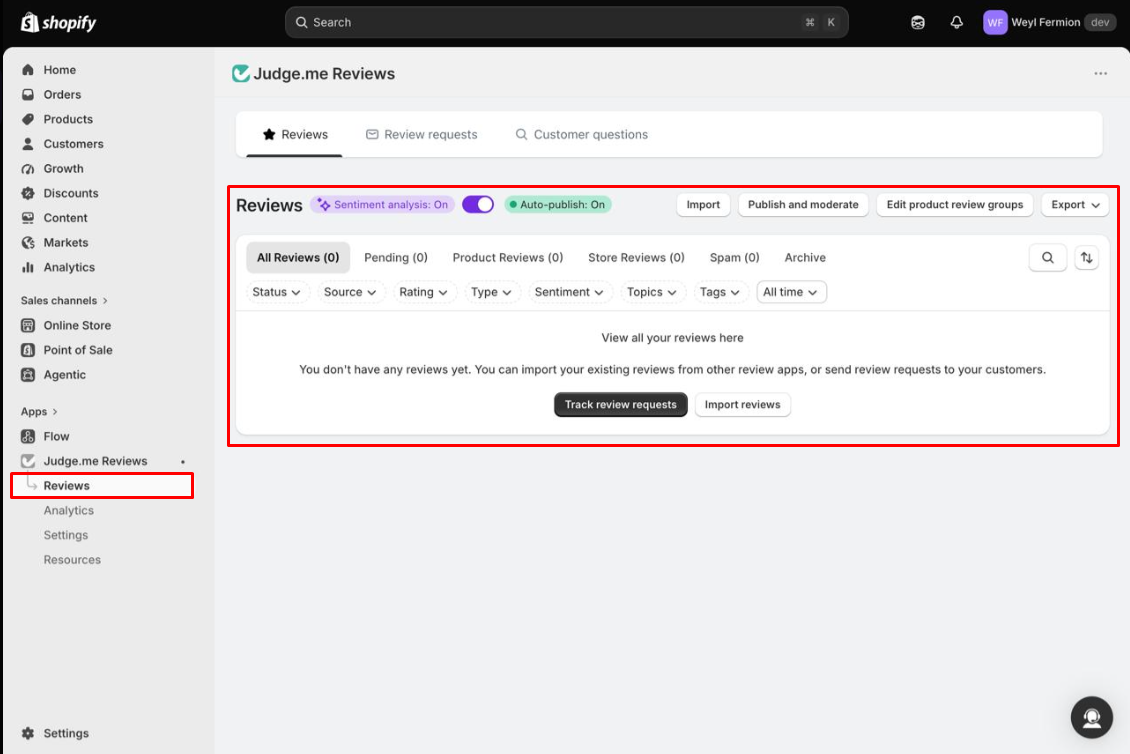
We also opened the Reviews and Analytics areas. Our store had no real review volume, so we could not test these tools under pressure. Still, the management screen offered many controls.
Reviews can be filtered by status, source, rating, type, sentiment, topics, tags, and date. The Analytics area includes metrics on review collection and requests, plus CSV export.
One default deserves attention. Auto-publish was on in our store, and Judge.me’s help centre confirms that new reviews publish automatically by default. Its plan comparison lists the spam and profanity filter, and AI auto-publish, on Awesome only. So on Free, a review goes live without that screen. If you sell in a sensitive category, consider switching auto-publish off and approving reviews by hand.
Judge.me offers imports from review apps, spreadsheets, marketplaces, and another Judge.me store. We did not run a migration. An import option only proves that the feature exists. Test a sample before moving a large review library.
Pricing: Free vs Awesome
Judge.me keeps pricing unusually simple. These figures come from its Shopify listing and pricing page on October 14, 2026.
| Plan | Price | Best suited for |
|---|---|---|
| Free | $0/month | Stores that mainly need review collection and display |
| Awesome | $15/month | Stores that need reminders, incentives, integrations, AI features, and full design control |
Neither plan caps orders or review requests. Judge.me’s pricing page states that $15 per month is the most a store can ever pay. Shopify converts the $15 USD charge for stores billed in other currencies.
Awesome has a 15-day free trial. Judge.me’s help centre adds three details worth knowing before you start it:
- The trial converts to a paid plan automatically. Refunds are limited to one month’s charge, once per store, and only if you downgrade or uninstall within 5 days of being charged.
- Downgrading is immediate. You lose Awesome features at once, even mid-cycle.
- Awesome settings are reset. Within 48 hours of downgrading, product groups are removed, custom forms and schedules are disabled, the all-reviews widget is uninstalled, and email templates revert. Your reviews are kept.
So if you trial Awesome, note what you set up. Coming back to it later means rebuilding those settings.
Which plan fits your store
| If your store… | Choose |
|---|---|
| Is new, and mainly needs stars and reviews on product pages | Free |
| Is happy with one request per order and default email styling | Free |
| Wants reminder emails to lift review volume | Awesome |
| Wants to reward reviewers with a coupon | Awesome |
| Needs on-brand review emails with set fonts and layout | Awesome |
| Needs Q&A, an all-reviews page, or Google Shopping reviews | Awesome |
| Already runs Klaviyo, Gorgias, or a loyalty app with reviews | Awesome |
How this compares with other review apps we set up
We have separately set up Junip, Okendo, Yotpo, Loox, and Fera. These were separate evaluations, not a head-to-head test, so this is context rather than a ranking. Prices are from each Shopify listing on October 14, 2026.
| App | Free plan | Cheapest paid plan |
|---|---|---|
| Judge.me | Unlimited orders and requests | $15/month, no order cap |
| Junip | Unlimited orders and requests | Core, $29/month |
| Okendo | Up to 50 orders a month | Essential, $19/month for 200 orders |
| Yotpo | Up to 50 orders a month | Starter, from $15/month |
| Loox | Beginner, up to 500 total store orders | Convert, $49.99/month for 300 orders |
| Fera | None | Startup, $9/month for 100 requests |
Among these apps, only Junip matches Judge.me’s uncapped Free plan, and Judge.me’s paid step is the smaller of the two. The trade-off on Free is one request per order and limited email design.
What Public Sources Add
Our setup evidence is the main basis for this review. On October 14, 2026, we also checked Judge.me’s Shopify listing, pricing page, help centre, and its newest reviews.
Low ratings are a very small share: 155 one-star, 36 two-star, and 74 three-star reviews out of 48,481. The newest reviews mostly praise support, often naming individual agents.
The newest one- to three-star reviews, from September and October 2026, raised a few repeated concerns:
- AI-first support: Some merchants wanted a human sooner. Judge.me switched one account to human-only support after a complaint.
- Requests not sent as expected: One merchant reported requests that did not go out; another said reminders were not scheduled. Judge.me replied to both and reported one as a bug.
- Marketplace sync: One merchant lost manual Etsy product matching after a sync issue. Judge.me said the old mappings could not be restored.
- Cancellation: One long-time user found the app hard to cancel.
Our August sample raised similar points about support follow-through, migrations, and request emails sent without approval. These reports come from a negative slice and were not seen in our test. If you plan a large migration or email campaign, test it with controlled data first.
What We Liked
- Setup is genuinely easy: Installation to a configured widget took under 10 minutes.
- The Free plan is actually usable: No order or request caps, and a meaningful review widget without a credit card.
- Theme setup is well guided: Judge.me explained Shopify’s theme app embeds clearly. Both worked on the first try.
- Technical teams get more control: Custom CSS and Liquid can help when the standard settings are not enough.
- Pricing is predictable: $0 or $15, with a stated $15 ceiling, is easier to budget for than order-based pricing.
What Could Be Better
- Free-plan limits appear slowly: Locked controls sit across the app, and the upgrade prompt does not list them. You learn where Free stops as you work.
- Branding is where Free feels most limited: The review-request email was the strongest example in our test.
- No reminders on Free: Judge.me’s own comparison puts automatic reminders on Awesome, which can hold down review volume.
- No content filter with auto-publish: Auto-publish is on by default, while the spam and profanity filter is an Awesome feature.
- Downgrading resets your setup: Awesome-only settings are removed within 48 hours of leaving the plan.
- Some key tasks remain untested: We did not test the storefront render, live request emails, imports, support, or long-term use.
Who Judge.me Is Best For
Judge.me is best for new and smaller Shopify stores that need reviews without another monthly cost. Start with Free if you mainly need to collect and show product reviews.
It also suits stores that want a clear price instead of a bill that grows with orders or reviews. Frontend skills can make Free more useful through CSS and Liquid.
Who Should Consider an Alternative
Choose Awesome from the start if every widget and customer email must closely match your brand, or if you rely on reminder emails. At $15 per month, it may cost less than working around Free’s limits.
Merchants planning a large review migration or relying on specific integrations should test those workflows carefully first. On Judge.me, reviewer coupons need Awesome; some of the apps above list incentives on their free plans.
What to Check After Installing on Free
Our test stopped before live use. These checks cover the steps we did not reach, and each takes only minutes.
- View a product page on desktop and mobile. Confirm the stars and review widget appear where the theme editor showed them.
- Decide on auto-publish. Leave it on, or switch it off and approve reviews yourself.
- Place and fulfil a test order to an inbox you can read. Confirm the request arrives at your chosen delay, and check how the default email looks.
- Submit a review with a photo through that email. Confirm it appears in the Reviews list and on the product page.
- Import a small sample before moving a large review library from another app.
If the request email looks off-brand, or one request is not bringing in enough reviews, that is your signal to try Awesome.
Final Verdict
Judge.me solves the core problem well. A merchant can set up product reviews quickly without a developer or another monthly bill.
Install was easy in our test. The theme steps worked well, and the widget had useful controls. We reached a usable setup in under 10 minutes.
The trade-off has two parts. Email and widget design controls need Awesome, which we saw first-hand. Reminder emails, coupons, and a content filter also need Awesome, according to Judge.me’s own plan comparison.
The choice is clear. A new store can start with Free. Upgrade to Awesome for $15 per month when you need reminders to lift review volume, or when Free starts to weaken the customer-facing brand experience. Do not upgrade only because Awesome lists more features.
The Free plan is not just there to let you try Judge.me. For the right Shopify merchant, it is enough to actually start solving the product-review problem.
Frequently Asked Questions
Is Judge.me free?
Yes. Free costs $0 per month with no order or request cap. It lists unlimited product and store reviews, photos, videos, widgets, star ratings, rich snippets, and imports. We ran our whole test on Free.
How much does Judge.me cost?
There are two plans: Free at $0 per month and Awesome at $15 per month. Awesome has a 15-day free trial and adds reminders, coupons, integrations, AI features, and full design control.
Do you need a developer to install Judge.me?
Not for the core setup in our test. Judge.me opened Shopify’s theme editor and showed the exact toggles. It also detected when we saved them. Both app embeds worked on the first try.
What can’t you do on the Judge.me Free plan?
In our test, review-request email styling had the clearest limits. Logo size, alignment, fonts, and corner style required Awesome, as did widget corners, header text, custom questions, and AI review insights. Judge.me’s plan comparison also places reminder emails, coupons, Q&A, the spam filter, Google Shopping, and Klaviyo on Awesome.
Does Judge.me send reminder emails on the Free plan?
No. Judge.me’s plan comparison lists automatic reminders on Awesome only. Free sends one review request per order. We did not send requests in our test.
What happens if I downgrade from Awesome to Free?
Judge.me’s help centre says the downgrade is immediate. Within 48 hours, Awesome-only settings such as product groups, custom forms, and the all-reviews widget are removed, and email templates revert. Your reviews are kept.
Can Judge.me import reviews from another app?
Judge.me shows import paths for other review apps, spreadsheets, marketplaces, and another Judge.me store. We did not run a migration, so test that workflow yourself before moving a large review database.