
Yotpo has a reputation as the review platform for bigger brands. That leaves a small Shopify store with a simple question: is the Free plan a real place to start, or a doorway to a bill that grows with every order?
Yotpo promises automated review requests, a branded on-site widget, and setup that does not need a developer. Its public pricing starts at $0, then scales by monthly order volume.
So we tested the practical version of that question. Can a small store get review collection running on Yotpo’s Free plan without touching code, and how soon do the limits show up?
We installed Yotpo: Product Reviews App on a Shopify development store, stayed on the Free plan, and completed the six-step onboarding. This is a setup evaluation. We did not send a live review request or verify the widget on a storefront page, and we say so wherever it matters.
Key Takeaways
- Onboarding is genuinely guided: Six steps take you from brand colours to widget install without leaving the app.
- Review requests are ready before you finish: The default sends a request 7 days after fulfillment, and Yotpo offers to backfill orders from the last 90 days using 200 bonus credits.
- The widget step is where our evidence stops: After we chose the automatic install, the dashboard still showed the Reviews Widget as Inactive.
- Free is capped and gated: Official pricing caps Free at 50 orders a month with no overage option, and keeps photo reviews, the carousel, Google Rich Snippets and branding removal on paid plans. Our dashboard showed a 250-order counter that no official page explains.
- Price it at your volume: Starter is $15 at 50 orders but $89 at 500 and $129 at 1,000.
Our Verdict
Yotpo’s Free plan is a credible starting point for a small store that needs automated review-request emails and a basic widget. The onboarding made the important choices easy, and nothing required a developer.
It is not a plan to grow into. Photo and video reviews, the carousel, Google Rich Snippets and removing Yotpo branding all sit on paid tiers, and Free has no overage: once you pass the cap, later orders simply do not get a request.
Start on Free only if your monthly orders are comfortably under the cap and you can live without visual reviews. Before you commit, complete one review from request to storefront on your own store. We did not, and the widget status on our dashboard is why that step matters.
What Yotpo Product Reviews Offers
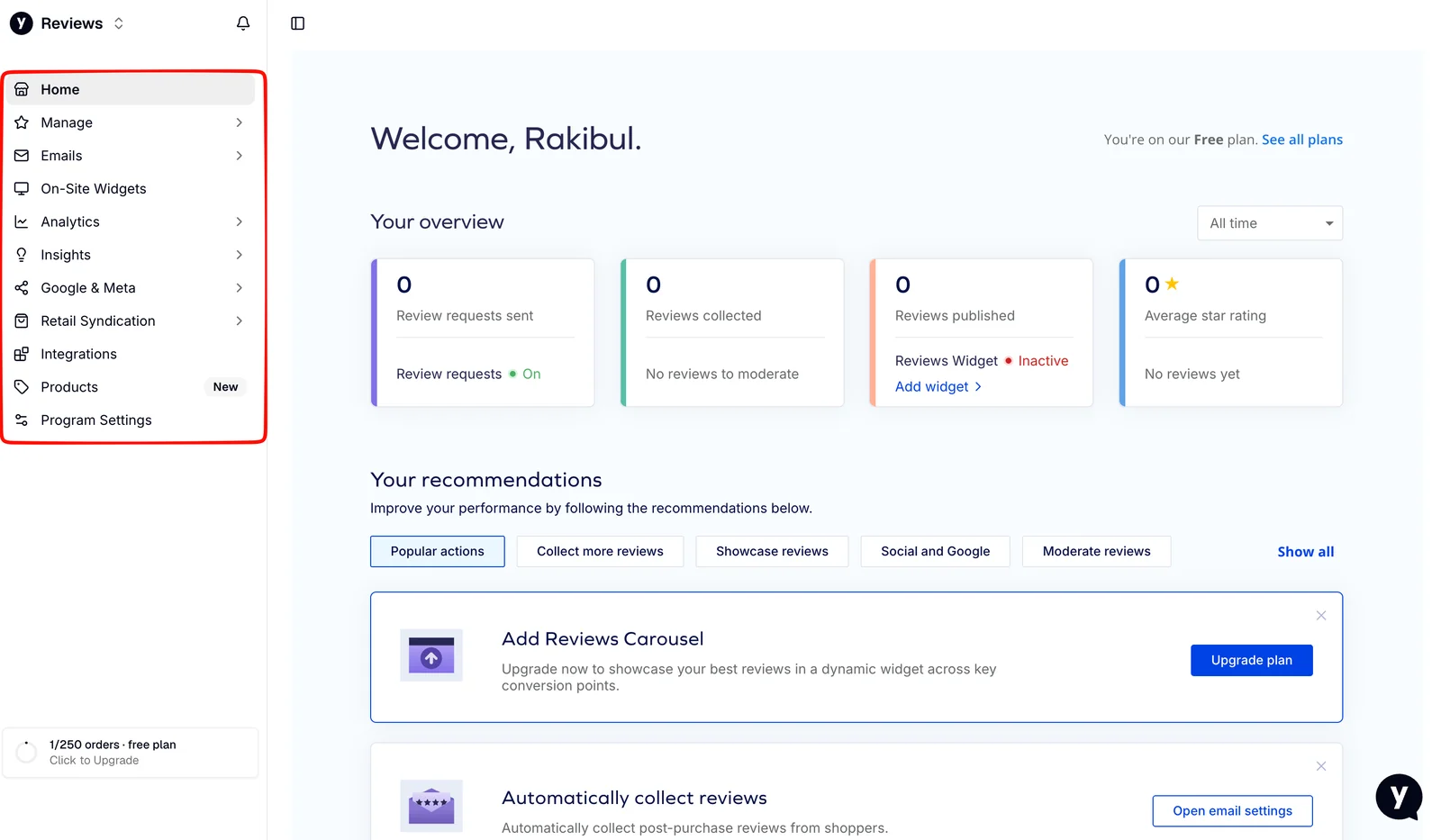
Yotpo collects product reviews through post-purchase emails and displays them in on-site widgets, star ratings, carousels and media galleries. The listing and the app’s navigation also cover photo and video reviews, imports, Google and Meta syndication, retail syndication and AI review summaries, with availability depending on the plan.
The app has been on the Shopify App Store since November 2011. When we checked on September 22, 2026, it showed a 4.8 rating across 4,628 reviews, with 92% at five stars and 3% at one star.
The dashboard after onboarding is clearly organised, and it shows the plan boundary immediately: the first recommendation on our Free dashboard was to add a Reviews Carousel, with an Upgrade plan button beside it.
What We Tested
We installed Yotpo on a Shopify development store and chose the Free plan. Our hands-on test covered the complete onboarding wizard: the brand kit, the email template choice, sender name and message editing, request timing and the past-order backfill, the widget layout, and the choice between automatic and manual widget installation. We then reviewed the dashboard state afterwards.
This was a setup evaluation. We did not send or receive a review-request email, submit or moderate a review, confirm the widget on a live product page, import reviews, test syndication, contact support or measure page speed. We make no claims about those areas.
For these reasons, this is a Level 2 — Partial Hands-On Test.
Can You Set Up Review Requests Without a Developer?
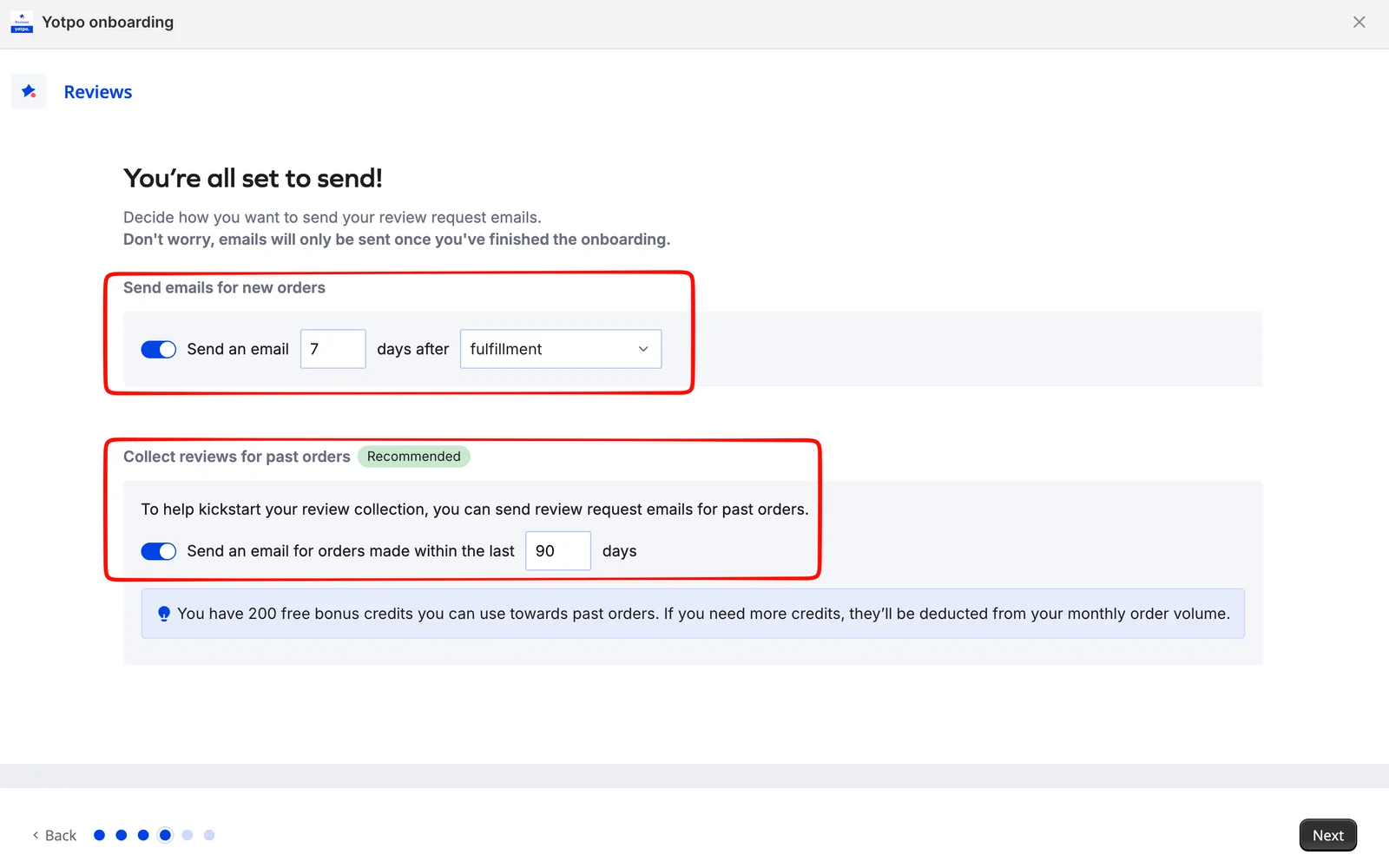
For the request side, yes. Everything a first campaign needs was configured inside the onboarding, and none of it involved theme code.
The timing step matters most. By default Yotpo sends a request 7 days after fulfillment, and the trigger is a dropdown you can change. Fulfillment is a sensible anchor, but it is not delivery, so a store shipping internationally should ask whether seven days is long enough for the product to arrive and be used.
The same screen offers to collect reviews for past orders, marked as recommended, with a 90-day default. Yotpo explained that we had 200 free bonus credits for this, and that additional credits would be deducted from our monthly order volume. That is a useful way to seed a new programme, but it means the backfill and the Free plan’s order cap draw from the same pool. Check how many past orders you have before switching it on.
Yotpo also stated that no emails would be sent until onboarding was finished, which removes the worry of emailing customers mid-setup.
What we did not do is send one. The dashboard showed Review requests: On with zero sent, and we did not run a test order through the seven-day trigger. Delivery, inbox rendering and reminder behaviour remain unverified.
One Brand Kit for Both the Widget and the Email
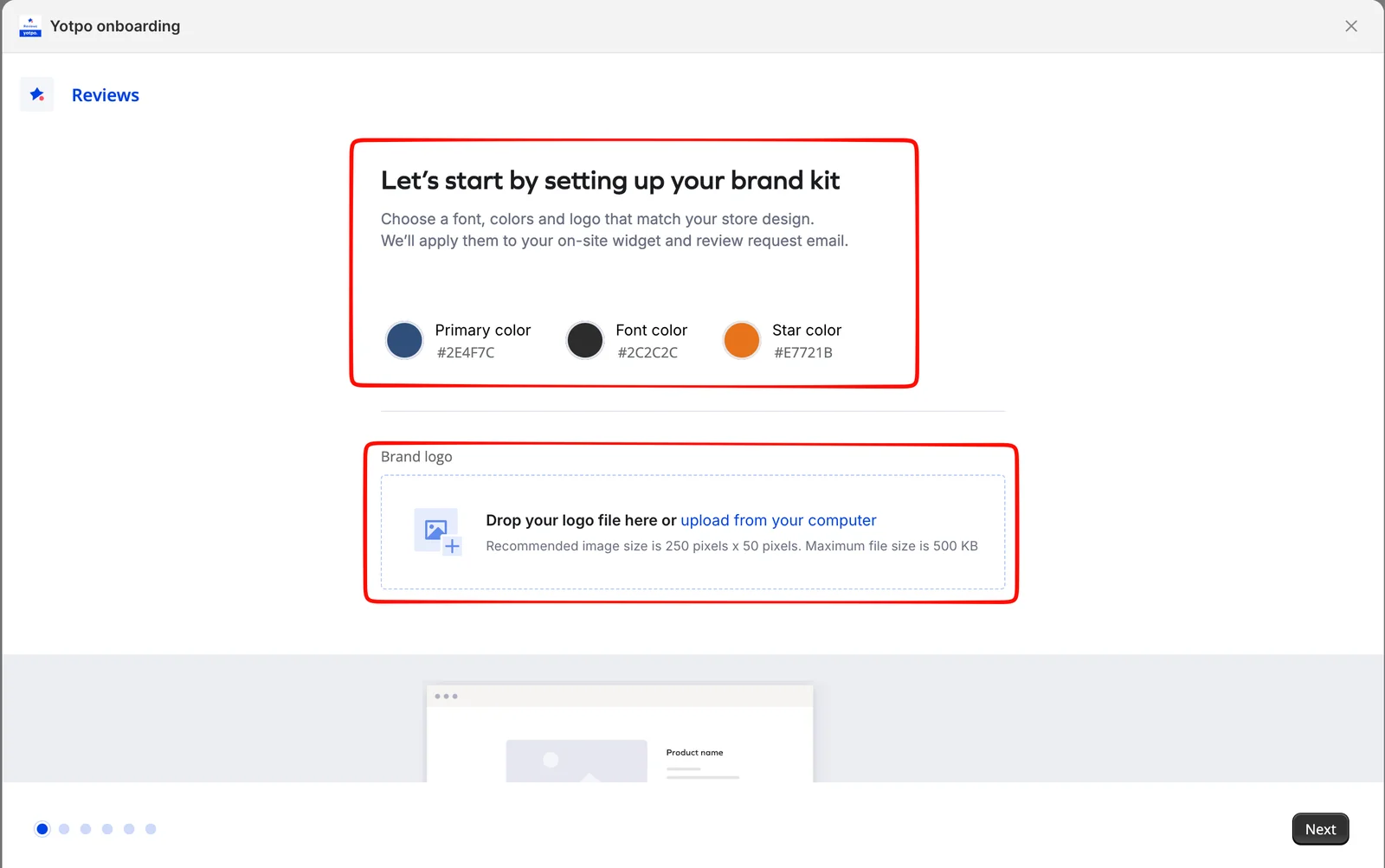
Yotpo opened onboarding with branding rather than settings, which is the right order for a merchant without design help.
The brand kit step asked for three colours — primary, font and star — and offered a logo upload at a recommended 250 by 50 pixels with a 500 KB limit. Yotpo stated on the same screen that these apply to both the on-site widget and the review-request email.
That single decision point matters more than it looks. Review apps often split widget and email styling into separate settings areas, and merchants end up with a widget that matches the theme and an email that does not. Setting both from one kit reduces that risk before a single request goes out.
The next step offered four email templates: Default, Pastel, Contrast and Hero, with a desktop and mobile preview. Default was selected in our session. One qualification from official pricing: removing Yotpo branding is not included on Free, so expect Yotpo’s own mark on the widget or email until you pay.
Writing the Request Email Without Template Syntax
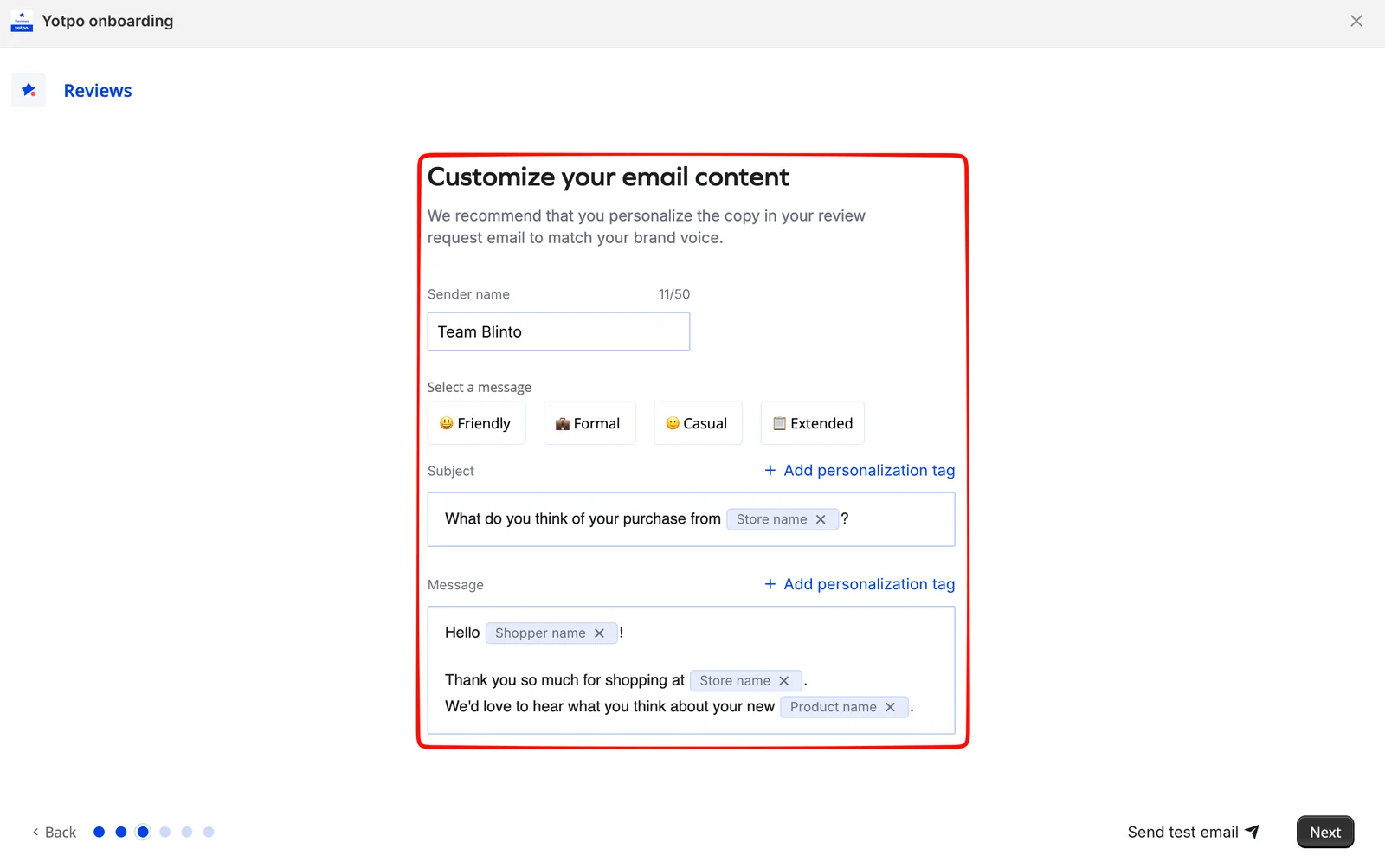
The content step was the part of onboarding most likely to stall a merchant who is not a writer, and Yotpo handled it well.
We set a sender name, with a 50-character limit shown as we typed. Four presets — Friendly, Formal, Casual and Extended — gave a starting draft rather than an empty box. The subject and message editors use personalisation tags for store name, shopper name and product name, inserted as labelled chips you can remove with one click. There is no template syntax to learn.
A Send test email action sits in the footer of this step. We did not use it, so inbox rendering and how the chips resolve in a delivered message are unverified. Send that test to a real address before going live.
The Widget Step Is Where Our Evidence Stops
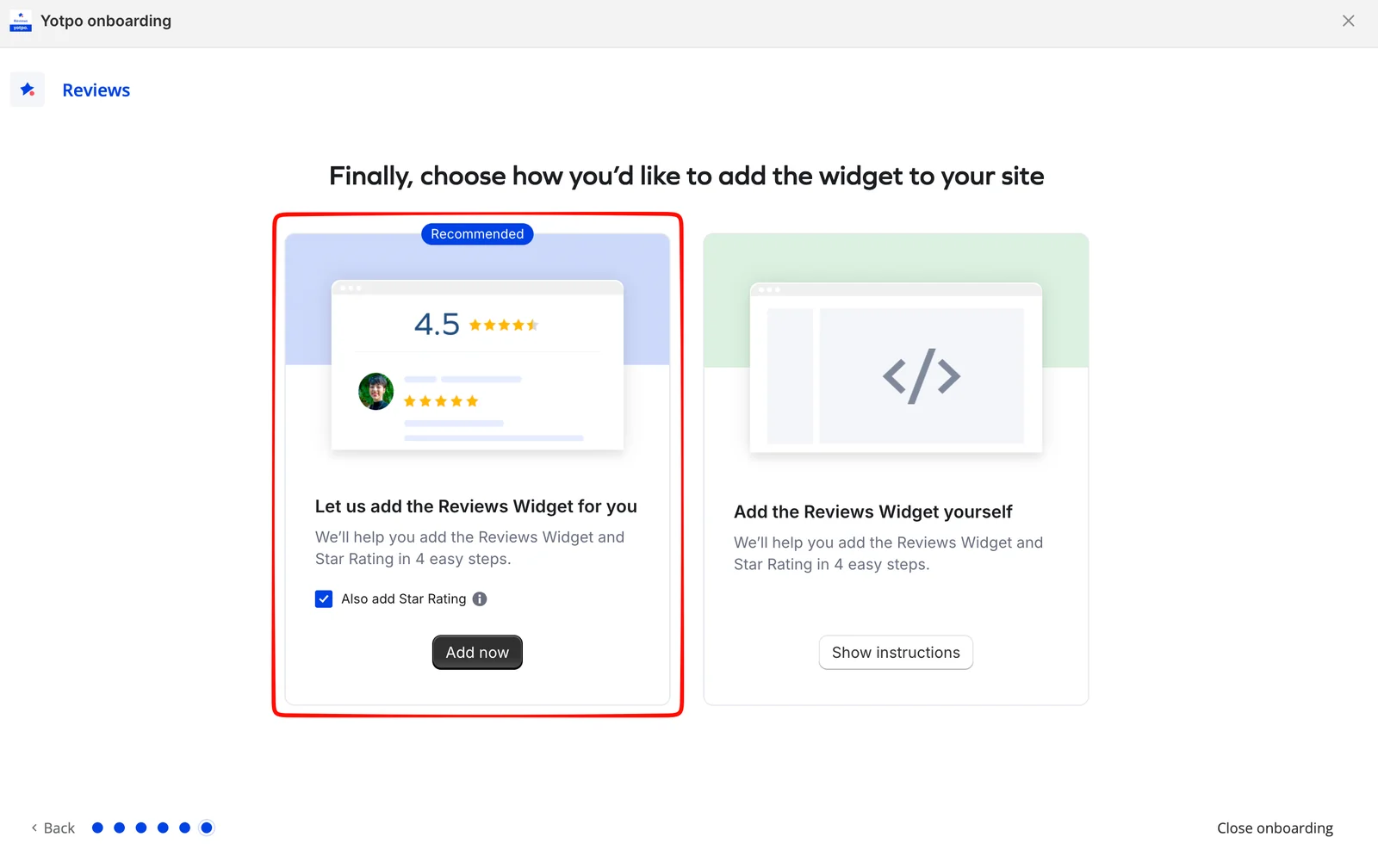
The last onboarding step puts reviews on your storefront. Yotpo offered two paths: Let us add the Reviews Widget for you, marked recommended, with an option to add the Star Rating at the same time, or Add the Reviews Widget yourself, which opens instructions.
The automatic option is the right default for a non-technical merchant. It is also the step we could not close the loop on.
After onboarding, our dashboard reported Reviews Widget: Inactive with an Add widget link beside it. We did not verify whether the automatic install had reached the theme, whether a further save in the theme editor was required, or how the widget looked on a product page. Yotpo’s own documentation for adding the widget describes a manual code method, which suggests the two paths may not behave identically across themes.
This is not a claim that the install failed. It is a claim that the dashboard status alone did not confirm success, and that the step deserves a check on your actual product page before you ask customers for reviews.
Pricing and Value
Yotpo prices Reviews by monthly order volume. These are the official figures on September 22, 2026.
| Plan | Price | Order limit | What it adds |
|---|---|---|---|
| Free | $0/month | Up to 50 orders | Automated requests, widget, star ratings, moderation, analytics, email support |
| Starter | $15–$129/month | 50 to 1,000 orders | Photo/video reviews, Google Rich Snippets, Google Shopping, carousel, Klaviyo |
| Pro | From $119/month on the Shopify listing; $169 at 500 orders on Yotpo’s site | To 10,000 orders | Google Seller Ratings, custom questions, AI summaries, smart sorting, 24/7 support |
| Premium / Enterprise | Custom quote | Custom | Dedicated success manager |
Starter’s steps are $15 for 50 orders, $24 for 100, $59 for 250, $89 for 500 and $129 for 1,000. Pro runs from $169 at 500 orders to $469 at 10,000. The Shopify listing notes that some charges may be billed by Yotpo separately from your Shopify invoice.
What happens above the cap is in Yotpo’s help documentation. Starter and Pro can enable a Reviews Booster that sends requests beyond the monthly limit at a per-order fee, with $0.20 per additional order given as the example for Starter at 50 orders. Free has no overage option: if you hit the limit, requests for orders placed after that point are not sent. That is the practical risk on Free — a good month does not cost you money, it costs you review requests.
Two things about Free deserve attention. First, the cap. Official pricing says 50 orders a month; our dashboard counter read 1/250 orders · free plan, and we could not establish why the figures differ. Confirm the limit inside your own account. Second, the gating: Free excludes photo and video reviews, manual requests, branding removal, Rich Snippets, the carousel and live chat.
So the value question is order volume. A store doing 40 orders a month can run Free for a long time. A store doing 400 is looking at $89 a month on Starter for photo reviews and Rich Snippets. Judge.me, by comparison, charges a flat $15 a month for its paid plan regardless of orders, which is worth knowing before you choose.
What Public Sources Add
Our setup evidence is the main basis for this review. On September 22, 2026 we also read Yotpo’s Shopify listing, its official pricing reference, its widget-installation documentation and a sample of one- to three-star merchant reviews.
Recent low-rating reviews commonly mention support follow-up slower than promised, review-request resends restricted to paid plans, and imported reviews losing the Verified Buyer badge on lower tiers. In one reply Yotpo confirmed that manual resends are designed for paid plans, which matches the official Free-plan exclusion. Older complaints centre on order-based pricing rising steeply, sales pressure and widget code lingering after uninstall. These are sourced patterns from a negative slice, not findings from our test, and Yotpo replied to several offering escalation.
What We Liked
- The onboarding makes the right decisions visible: Colours, template, sender name, tone, timing, backfill and widget layout appear in sequence, with no hunting through settings.
- One brand kit covers widget and email: Three colours and a logo set at step one apply to both surfaces.
- Request timing is explicit: The 7-days-after-fulfillment default is an editable choice, not buried, so you can match it to delivery times.
- Past-order collection is offered up front: 200 bonus credits and a 90-day window let a new store seed reviews without an import.
What Could Be Better
- The widget status after automatic install was unclear: Our dashboard showed the Reviews Widget as Inactive after we chose the recommended path.
- The Free order cap is ambiguous: Public pricing says 50 orders a month; our in-app counter said 250.
- Free has no overage path: The Reviews Booster is reserved for Starter and Pro, so orders past the cap get no request at all.
- Visual reviews and branding removal are paid: Both are among the first things a growing brand wants, and both need Starter or above.
Who Yotpo Product Reviews Is Best For
Yotpo’s Free plan suits a small or new Shopify store with modest monthly orders that wants automated review requests and a basic widget with minimal setup effort. A merchant with no design or development support can configure a first campaign in one sitting.
It also suits stores that expect to grow into Yotpo’s wider platform, since the dashboard already exposes Google and Meta syndication, retail syndication and Insights.
Who Should Upgrade or Consider an Alternative
If photo and video reviews are central to your product pages, budget for Starter from day one. If your order volume is already in the hundreds, calculate Starter or Pro at your actual volume rather than the entry price — a flat-price alternative may be cheaper for the same core features. We have separately tested Judge.me, which has a $0 or $15 flat structure, and Loox, which is built around photo reviews. Those were separate setup evaluations, not a controlled head-to-head, so we are not ranking them here.
If you rely on imported reviews carrying a Verified Buyer badge, check current plan rules before migrating.
Final Verdict
Yotpo’s Free plan does answer the small-store question, with a condition attached.
A small Shopify store can configure automated review requests, a branded email and a widget layout on Free without a developer. In our test the six-step onboarding covered every decision that matters for a first campaign, and it did so clearly.
The condition is the last step: our dashboard showed the Reviews Widget as Inactive after the automatic install, and we did not verify it on a product page. Until you have seen a review render on your own storefront, treat setup as incomplete.
Our recommendation in three lines:
- Start on Free if you are under the cap, text reviews are enough, and Yotpo branding on the widget is acceptable.
- Go straight to Starter if photo reviews or Google Rich Snippets are part of how you sell, and budget it at your real order count.
- Compare a flat-price app first if you are already in the hundreds of orders a month and only need core review collection.
Whichever you choose, complete one real review from request to storefront before you tell customers to leave one. That is the step our test did not close, and the one that proves the setup.
Frequently Asked Questions
Is Yotpo Product Reviews free on Shopify?
Yes. The Free plan costs $0 and, according to Yotpo’s official pricing, covers up to 50 orders a month with automated requests, a widget, star ratings, moderation and analytics. Our dashboard showed a 250-order counter we could not reconcile with that figure, so confirm the cap in your own account.
How much does Yotpo Reviews cost for a Shopify store?
Starter runs from $15 a month at 50 orders to $129 at 1,000. Pro is listed from $119 a month on the Shopify App Store and $169 at 500 orders on Yotpo’s pricing page, scaling to $469 at 10,000. Premium and Enterprise are custom quotes.
What happens if you go over the Free plan order limit?
Yotpo’s documentation reserves the Reviews Booster overage option for Starter and Pro. If a store reaches its limit without it, requests for orders placed after that point are not sent. On Starter at 50 orders, the documented Booster example is $0.20 per additional order.
Do you need a developer to set up Yotpo Reviews?
Not for the onboarding in our test. Colours, logo, email template, copy, request timing and widget layout were all configured inside the app. Yotpo offers to add the widget automatically; we did not confirm the result on a product page, so check yours before launch.
What does the Yotpo Free plan not include?
Official pricing excludes photo and video reviews, manual review requests, removing Yotpo branding, Google Rich Snippets, the reviews carousel and live-chat support. Our Free dashboard showed the carousel recommendation with an upgrade button attached.