
A review app has three jobs. It asks buyers for a review, it stores and moderates what comes back, and it shows those reviews on product pages where a hesitant shopper will see them. If the third job doesn’t happen, the first two don’t help sales much.
Stamped Reviews & Loyalty, from Stamped.io, has been on the Shopify App Store since 2016. It covers product reviews, photo and video reviews, Q&A, Net Promoter Score, checkout comments, and a separate loyalty program. It also has a free plan, which is where many merchants start. So the question I wanted to answer was simple: how far does the free plan get you, and what does going live actually cost?
I went through the Stamped admin on a store running the free plan. I looked at the dashboard, the main review widget editor, the display, image, and form widget lists, widget and email branding, the review email layouts, and the plan page. I then compared what I saw with the current App Store listing, Stamped’s help documentation, and recent merchant reviews, especially the low-rated ones.
Key Takeaways
- Main fit: Stores that want reviews, photo reviews, Q&A, and NPS in one admin, with lots of ways to display them.
- Strongest point: The display side is broad. There are seven main widget designs, at least ten display widgets, four image widgets, and a library of ready-made review request email layouts.
- Biggest limitation: The free plan is a setup space, not a live plan. The admin says you need to upgrade to process platform data and show reviews on your site.
- Buying guidance: Budget from $23 a month, and check your monthly order count first. The next tier, $99, starts above 200 orders.
Our Verdict
Stamped is a deep, mature review suite, but treat it as a paid app from day one. The widget and email options go well beyond the basics, and everything sits in one admin. You can configure all of it on the free plan and preview the result. But a banner across the top of the admin makes the boundary clear: on free, reviews don’t appear on your storefront.
Pricing is based on orders, not features. The paid Reviews tiers share one feature list and differ by how many orders a month they cover. That’s easy to understand, but the jump from $23 to $99 at 201 orders is steep for a growing store.
Recent merchant feedback is mixed. Several merchants praise the support team. Others report review requests that stopped sending, slow replies, and billing trouble. I didn’t test sending, so I can’t confirm either side, and that’s the area to watch most closely during your first weeks.
What Stamped Offers
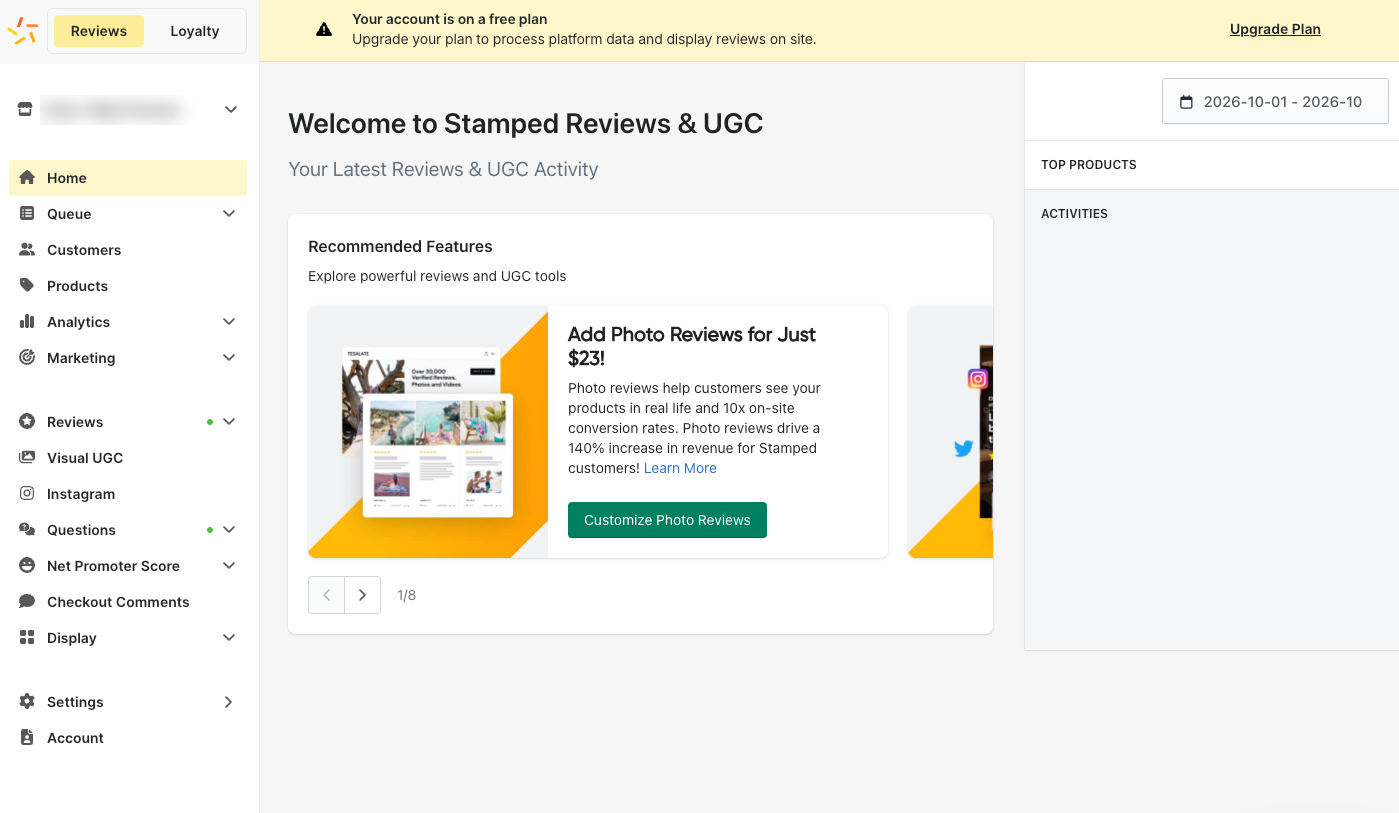
The admin opens on a home dashboard with a Recommended Features carousel and panels for top products and recent activity. A switch in the top-left corner moves between the Reviews and Loyalty sides of the app. They’re priced as separate products.
The Reviews menu is long. It covers Queue, Customers, Products, Analytics, and Marketing, then the content types: Reviews, Visual UGC, Instagram, Questions, Net Promoter Score, and Checkout Comments. Display, Settings, and Account sit at the bottom.
That breadth is the main reason to pick Stamped. If you want reviews, Q&A, NPS surveys, and Instagram content in one place, it’s all here. The downside is that a new user has a lot of menu to learn before finding the one setting they need.
The yellow banner is the most important thing on this screen. It sits at the top of the admin pages on the free plan and says the account needs an upgrade to process platform data and display reviews on the site.
What We Tested
I went through the Stamped admin on a store using the free plan. I opened the main widget editor and its preview, the Display Widgets, Image Widgets, and Form Widgets lists, the Branding screens for widgets and emails, the Reviews Emails layout library, and the Reviews plan page.
I did not publish a widget on a live storefront, send a review request, collect a real review, import reviews, or test the loyalty program, Instagram curation, integrations, or support. The free plan doesn’t display reviews on the site, so a full order-to-storefront test would need a paid plan. Anything below about those areas comes from Stamped’s listing and documentation or from merchant reviews, and I say so where it matters.
Setting Up the Main Review Widget
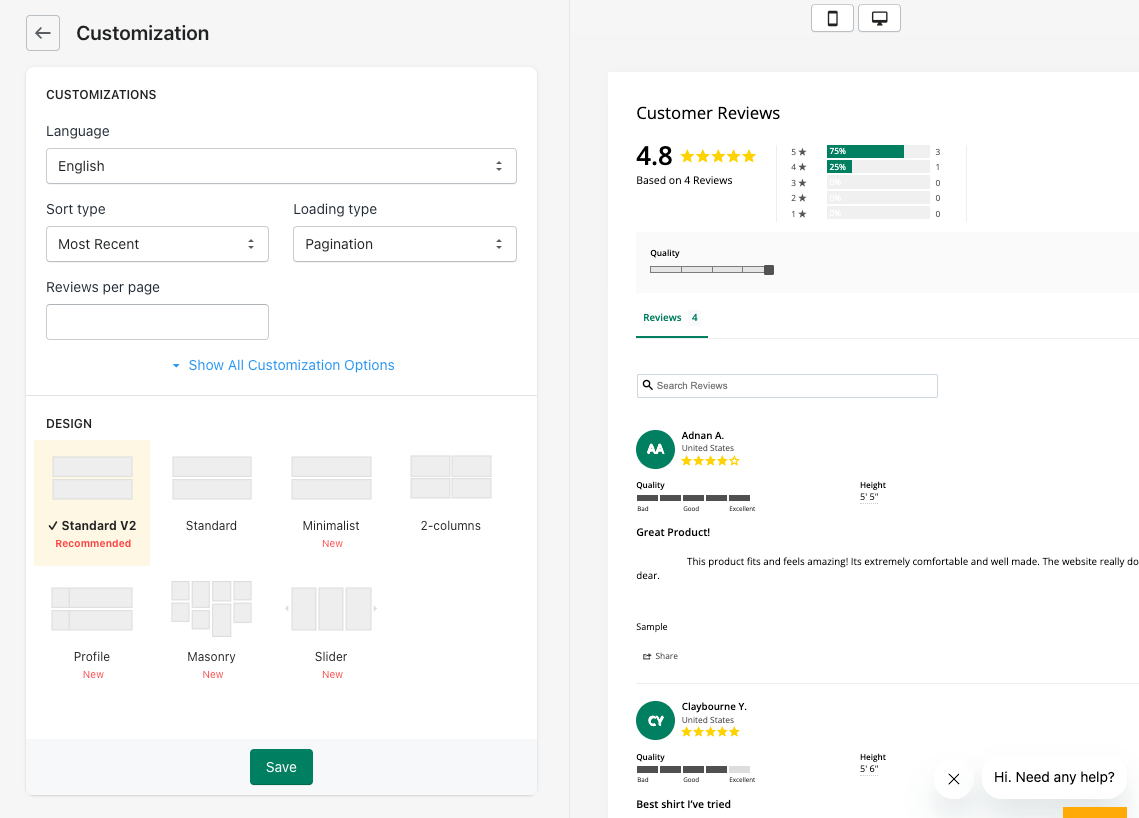
The main widget is the review block on your product pages. Its editor sits under Display → Widgets → Main Widget, and it’s split into two panels: settings on the left, a preview on the right with mobile and desktop toggles.
The top settings cover the basics: language, sort order (such as Most Recent or Highest Rating), loading type (such as Pagination), and reviews per page. A Show All Customization Options link opens the rest.
Below that, you pick from seven designs: Standard V2 (marked as recommended), Standard, Minimalist, 2-columns, Profile, Masonry, and Slider. The preview filled in with a rating summary, a star breakdown, a quality slider, a search box, and sample reviews with custom fields such as quality and height. That’s helpful, because you can see what shoppers would get before anything goes live.
One small note: the preview can take a moment. In one of my captures the panel was still empty, and the Display Widgets preview showed a loading spinner. Give it a few seconds before assuming something is broken.
Display Widgets, Badges, and Forms
The main widget is only one of the display options. The Display Widgets list includes Carousel, Full Page, Reviews Popup, Single Highlight, Visual Gallery, Wall Photos, Top Rated, Side Drawer, Site Badge, and Instagram Feed.
Image Widgets add four more: Badge Single, Badge Double, Badge Ribbon, and Product Rating. Form Widgets include a Net Promoter Score form modal and a self-hosted Write a Review page.
The Branding screen for widgets sets a theme color, a star color, and other colors from one place, plus an avatar image that shows on your replies to reviews. Setting these once saves you from styling each widget separately.
This is more display choice than most stores will use. A typical store might use the main widget, a star rating badge, and one carousel or gallery. The rest is useful if you want reviews on your homepage, a dedicated reviews page, or a side tab.
Review Request Emails
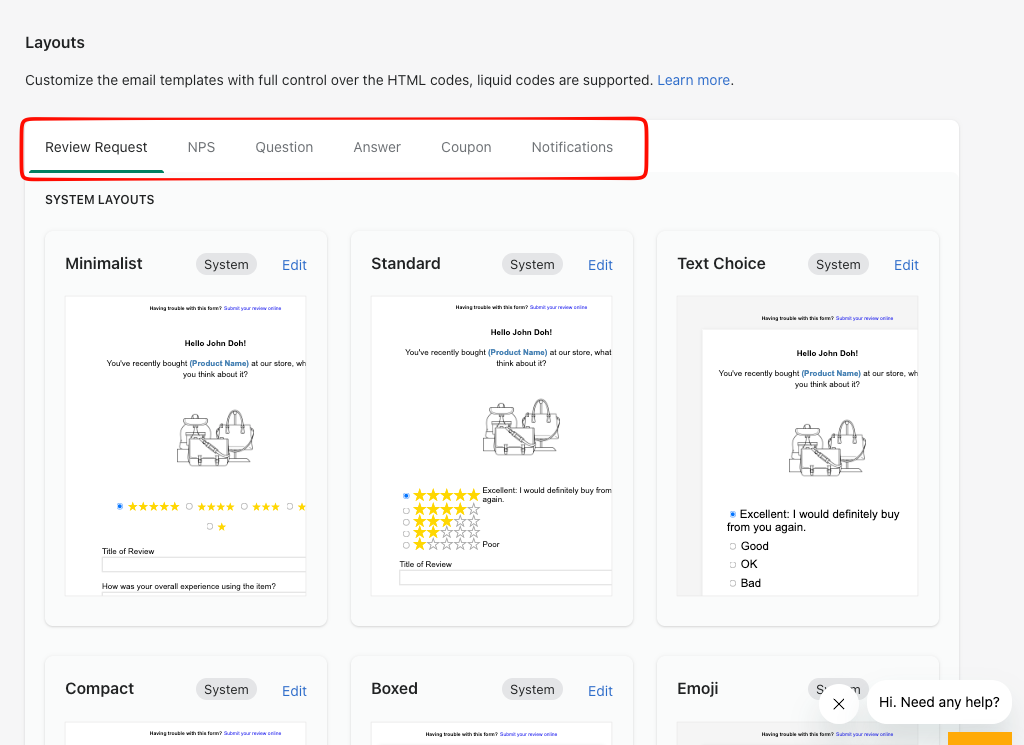
Collecting reviews starts with the request email, and Stamped gives this its own section under Display → Reviews Emails.
The Layouts screen has tabs for Review Request, NPS, Question, Answer, Coupon, and Notifications emails. For review requests, the system layouts include Minimalist, Standard, Text Choice, Compact, Boxed, and Emoji. In the previews, the buyer can pick a star rating and write a title and review inside the email itself, rather than clicking through to a separate page.
The screen says you can edit the templates with HTML and Liquid. Stamped’s own help docs add that its support for custom code changes is limited, so plan on doing that work yourself or with a developer.
The Branding screen for emails sets colors for text, links, buttons, and stars, plus a font family and a Google Fonts URL. The preview on the right shows the review request email with those settings applied.
I didn’t send a request, so I can’t speak to delivery or timing. That matters here, because failed or stalled review requests are the most specific complaint in recent low-rated reviews.
Pricing and Value
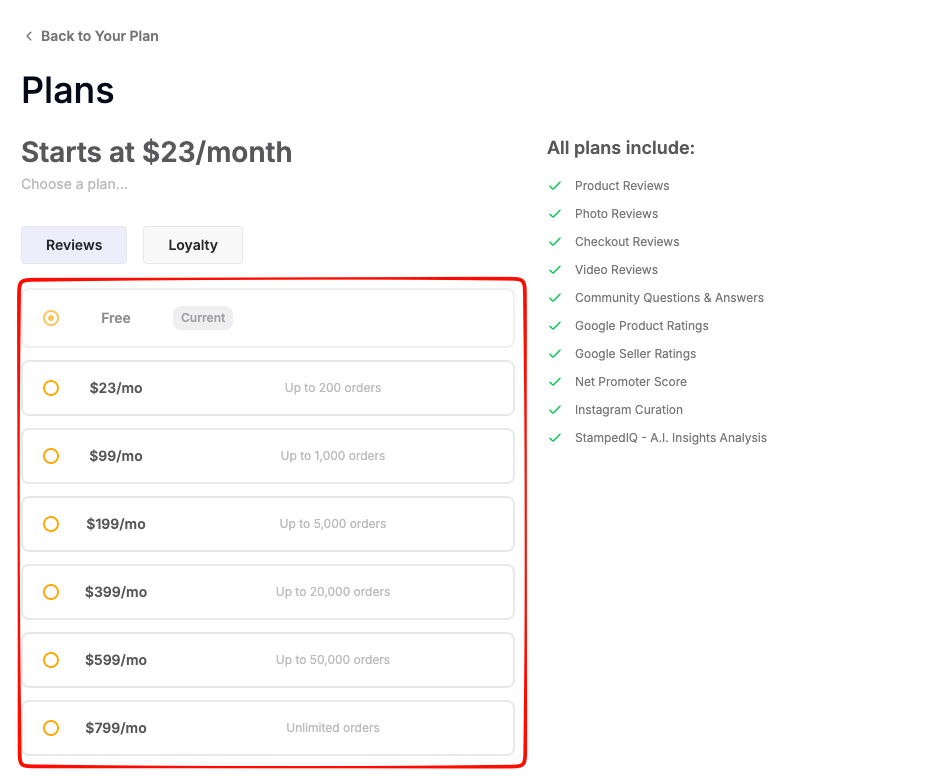
When I checked on October 8, 2026, the in-app plan page showed these Reviews tiers:
- Free: marked as my current plan. The in-app banner says reviews aren’t displayed on the site at this level.
- $23/month: up to 200 orders
- $99/month: up to 1,000 orders
- $199/month: up to 5,000 orders
- $399/month: up to 20,000 orders
- $599/month: up to 50,000 orders
- $799/month: unlimited orders
The plan page lists the same features for every tier: product, photo, checkout, and video reviews, community Q&A, Google Product Ratings, Google Seller Ratings, Net Promoter Score, Instagram curation, and StampedIQ AI insights. The App Store listing also shows the paid tiers with matching feature lists, billed every 30 days. Loyalty is a separate plan; the listing shows a $299/month tier for up to 5,000 orders.
The upside is that you don’t have to pay more to unlock photo reviews or Q&A. The downside is how fast the price climbs with volume. A store that grows from 200 to 201 orders a month goes from $23 to $99. Check your order history, not just this month’s number, before you pick a tier. Please confirm current prices on the Shopify App Store before installing.
Where It Falls Short
The free plan doesn’t put reviews on your site. It’s useful for setup and previewing, but it isn’t a way to run reviews for free.
The first price jump is big. Going from $23 to $99 at 201 orders a month is more than four times the cost. Stores near that line should plan for the higher tier.
Recent reliability reports are a concern. In the last few months of App Store reviews, several merchants describe review requests that stopped sending, display bugs, and slow support replies. One also reports being billed after uninstalling. Other recent reviews praise the support team, so the picture is mixed. Still, about 3% of the listing’s reviews are one star, and the recent ones are specific.
The admin takes time to learn. The menu covers many products at once. Some merchants describe the interface as complicated, and I can see why. Finding the right setting means knowing which section owns it.
What We Liked
- Wide display choice: Seven main widget designs, at least ten display widgets, four image widgets, and two form widgets.
- Live previews: Mobile and desktop previews for widgets and emails before anything goes live.
- Email layouts with in-email review forms: Several system layouts for review requests, plus separate tabs for NPS, Q&A, and coupon emails.
- One-place branding: Shared colors for widgets, and shared colors and fonts for emails.
- Same features on every paid tier: Photo and video reviews, Q&A, NPS, and Google ratings aren’t locked behind higher plans.
What Could Be Better
- No live reviews on the free plan.
- A steep jump from $23 to $99 once you pass 200 orders a month.
- Mixed recent merchant feedback about failed review requests, support speed, and billing.
- A long admin menu that takes time to learn.
- Limited help with custom email code, according to Stamped’s docs.
Who Stamped Is Best For
Stamped fits stores that want more than a single review widget: photo and video reviews, Q&A, NPS surveys, Instagram content, and Google ratings in one admin, with many ways to display them. It makes the most sense if you’re ready to pay from the start, and if your order volume sits comfortably inside a tier.
Who Should Consider an Alternative
If you need reviews on your storefront without paying anything, Stamped’s free plan won’t do it. Judge.me, which we reviewed separately, has a free plan that does display reviews. If you only need a simple star rating and review block, Stamped’s breadth may be more admin than you need.
Final Verdict
Stamped offers a wide set of review tools, with widget and email options that go further than most stores will need. The free plan is a good place to build and preview everything, but reviews only go live once you pay.
If you choose Stamped, start on the tier that matches your real monthly orders. Then send one test order all the way through: request email, submitted review, and review on the product page. Watch those first weeks of sends closely, since that’s where recent merchant complaints are focused.
Frequently Asked Questions
Is Stamped free on Shopify?
There is a free plan, but it doesn’t display reviews on your site. The admin shows a banner saying you need to upgrade to process platform data and show reviews. Paid Reviews plans start at $23 a month at the time of writing.
How does Stamped pricing work?
The Reviews plans are priced by monthly orders, from $23 for up to 200 orders to $799 for unlimited orders. The plan page lists the same features for every tier. Loyalty is priced separately.
Can I customize Stamped’s review request emails?
Yes. There are several system layouts for review requests, branding settings for colors and fonts, and HTML and Liquid editing. Stamped’s docs say its support for custom code is limited.
What widgets does Stamped include?
A main review widget with seven designs, display widgets such as Carousel, Visual Gallery, Side Drawer, and Site Badge, four image widgets (three badge styles and a product rating), and form widgets for NPS and a self-hosted review page.
Does Stamped include a loyalty program?
Yes, as a separate product. You switch between Reviews and Loyalty in the admin, and Loyalty has its own pricing.
What is Stamped’s rating on the Shopify App Store?
When I checked on October 8, 2026, the listing showed 4.7 out of 5 from 3,753 reviews.