
Most small Shopify stores want the same three things from a review app: an email that asks every customer for a review, a widget that shows those reviews on the product page, and a way to bring in reviews they already have. They also want to pay nothing until the store has real order volume.
Rivyo is built around that request. Its free Indie plan includes automated review requests, unlimited product reviews, CSV imports and Google rich snippets. The paid tiers top out at $19 a month, and loyalty and referral programmes are sold as add-ons in the same admin. The limit that matters is on the plan card: Indie collects reviews from 100 orders a month. So the question we set out to answer is practical. Can a small store get review collection running on Rivyo’s free plan, and when does it have to pay?
We installed Rivyo on a Shopify development store and went through its setup wizard from the goal picker to the plan screen, then opened the analytics dashboard. This review is built on those screens and checked against the Shopify App Store listing, Rivyo’s pricing page, its help centre and recent merchant reviews. We did not send a review request or publish a review, and we say so wherever it matters.
Key Takeaways
- Free covers the core loop: Automated requests, unlimited product reviews, CSV imports, review replies and Google rich snippets are all on Indie, capped at 100 orders a month.
- The wizard asks the right questions: It covers how you get your first reviews, how reviews reach the product page, when requests go out and what colour the widget uses. None of it asks you to edit theme code.
- Change one default before going live: The first request was set to go out 1 day after fulfilment. Rivyo’s own help centre suggests 7 to 14 days for most products.
- Several features start on paid plans: Reminder emails, unlimited photo reviews, Q&A and store reviews start on Starter at $9. Video reviews and the AI review summary need Enterprise at $19.
- Loyalty and referrals cost extra: Both sit in the same admin, but each is a $9 monthly add-on on top of the reviews plan.
Our Verdict
Rivyo’s setup is short and sensible. Each wizard screen covers one topic, and the free plan covers the full review loop for a store taking up to 100 orders a month.
The free plan is a real starting point. Most stores outgrow it in one of two ways. Either order volume passes 100 a month, or they want something Indie does not list: reminder emails, unlimited photo reviews, Q&A, video or the AI summary. Starter at $9 covers the first group of features. Enterprise at $19 covers the rest.
Install Rivyo on the free plan if you are under 100 orders a month and want automated review requests without a monthly bill. Before you switch requests on, move the first email further from fulfilment than the 1-day default. Then send one real request and follow it through to a published review on your storefront. We did not reach that step.
What Rivyo Product Reviews Offers
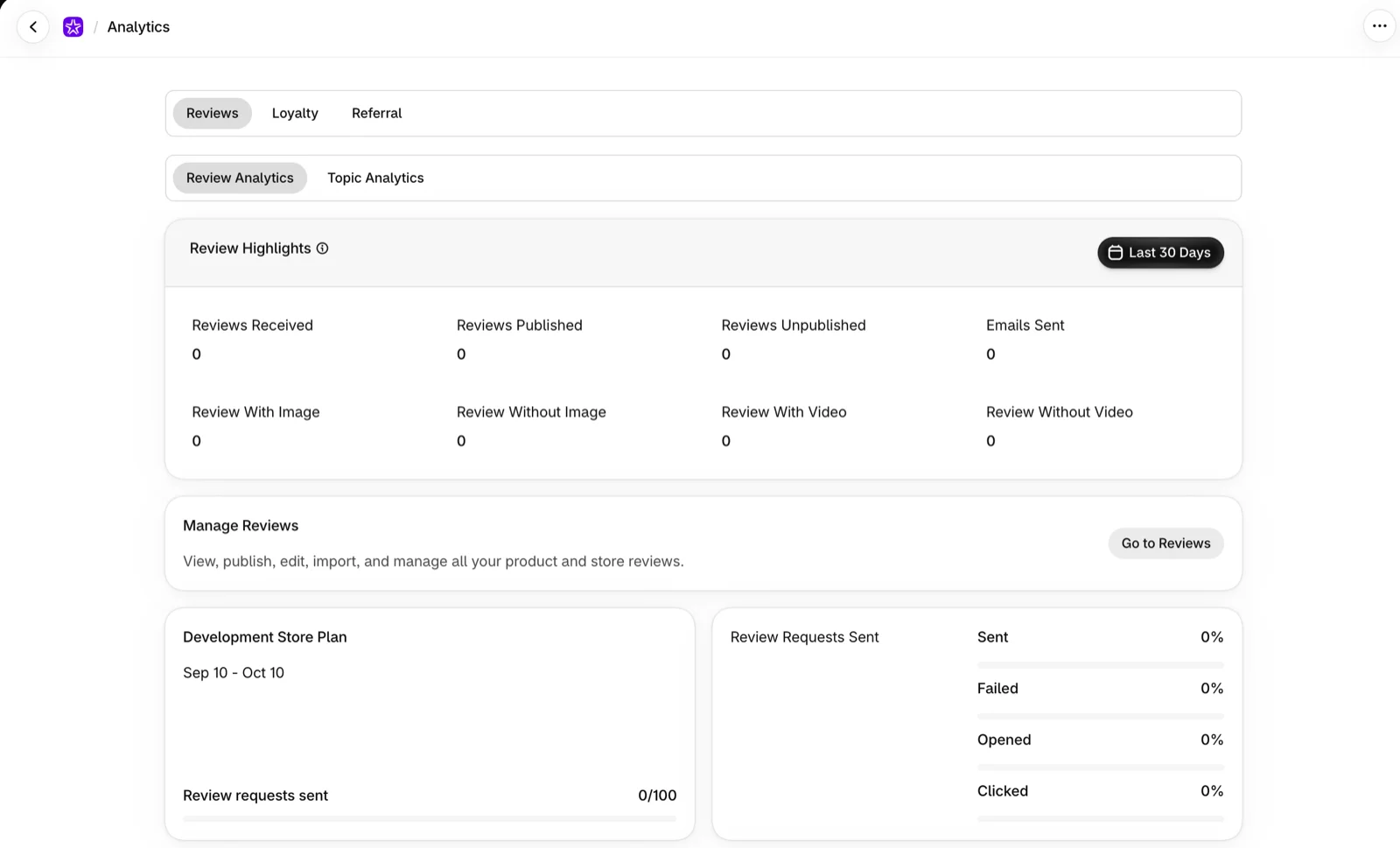
Rivyo collects product reviews through automated post-purchase emails and displays them on the storefront through widgets. In the admin it appears as Rivyo: Reviews & Loyalty, and its menu reflects that broader scope: Reviews, Loyalty Program, Referral Program, Customers, Analytics, Pricing and Settings.
The analytics page splits into Reviews, Loyalty and Referral tabs. On the reviews side there is a standard view and a Topic Analytics view. Review highlights track reviews received, published and unpublished, emails sent, and reviews with and without images or video. A request panel reports what share of requests were sent, failed, opened and clicked. On our development store everything read zero, because no orders or requests had gone through. The panel shows what Rivyo measures, not how accurate those numbers are.
Beyond what we saw, the listing covers photo and video reviews, carousels, testimonials, store reviews and Q&A. It lists imports from other review apps such as Judge.me, Yotpo and Loox, and from Amazon, AliExpress and Etsy, plus integrations with Shopify Flow, Shopify POS, Klaviyo, Slack, PageFly and GemPages. We did not test these areas, so treat them as developer claims.
Nexfal launched Rivyo on the Shopify App Store in June 2018, and it carries the Built for Shopify badge. On October 6, 2026 the listing showed a 4.9 rating across 935 reviews.
What We Tested
We installed Rivyo on a Shopify development store and chose Collect product reviews from the four goals in the opening screen. The other three were a loyalty programme, a referral programme and “just exploring”. We then went through each step of the reviews wizard: getting your first reviews, showing reviews on product pages, automatic review requests and widget theme. The wizard ended on the plan screen. Afterwards we opened the Analytics page. The store ran on Rivyo’s Development Store Plan, which showed a counter of 100 review requests.
This was a setup and onboarding evaluation. We did not import reviews, send a request or a past-customer campaign, submit or moderate a review, or check how the widgets looked on a live storefront. We also did not test Google snippets, the loyalty or referral programmes, contact support or use a paid plan. We make no claims about those areas.
For these reasons, this is a Level 2 — Partial Hands-On Test.
Can a Small Store Set Up Review Collection Without Help?
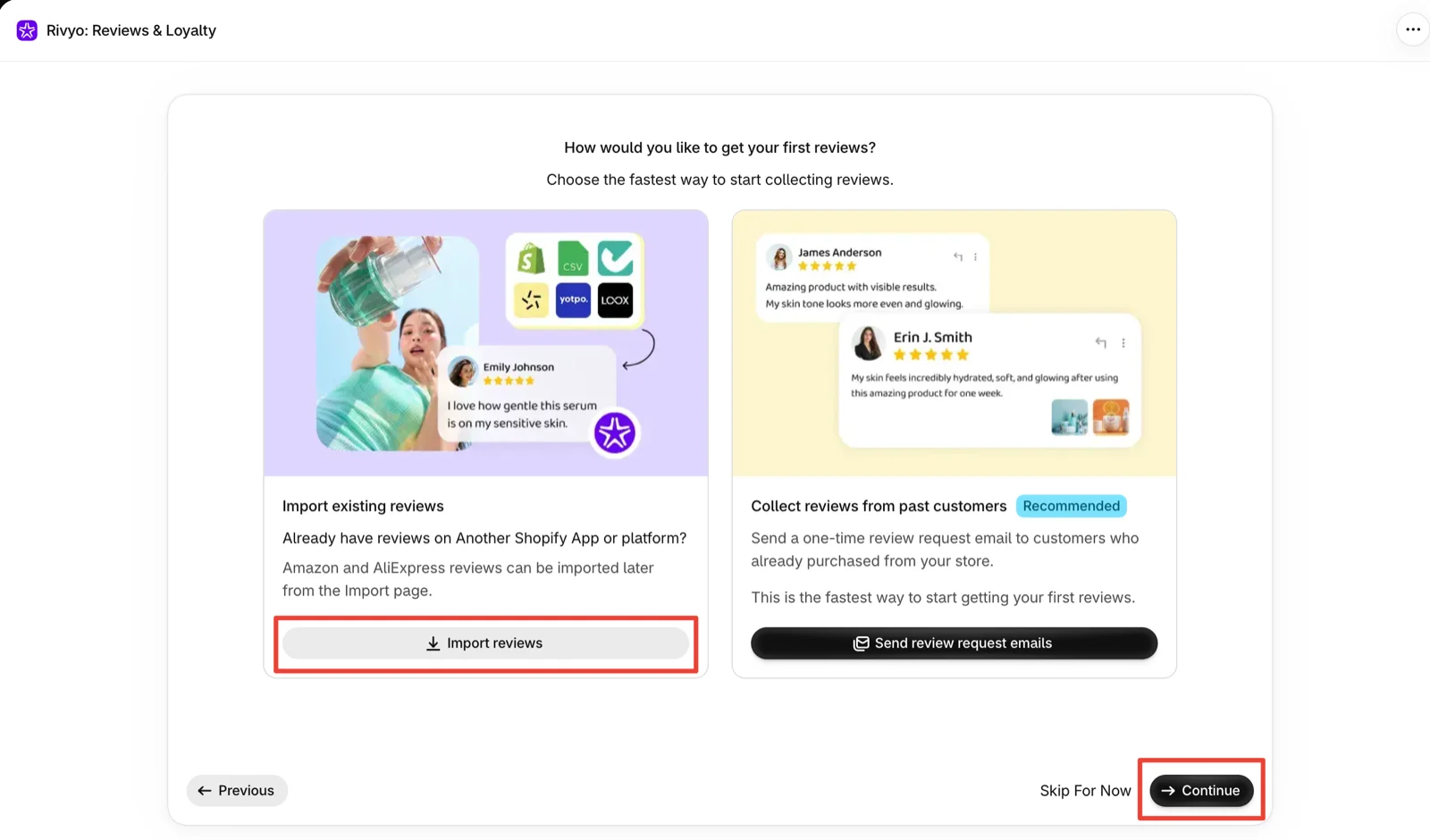
For setup, yes. The wizard is short, each step after the goal picker has a Skip For Now option, and none of it asks you to edit theme code.
The first reviews step addresses a real problem for a new install: a product page with no reviews. Rivyo offers two routes. Import existing reviews is for stores moving from another app or platform. Amazon and AliExpress reviews are left to a separate Import page. Collect reviews from past customers is marked as recommended and sends a one-time request email to people who have already bought from you. Rivyo’s help centre describes a similar review campaign that sends a one-time batch of requests to orders within a date range you choose, so a store doesn’t have to wait for new orders to come in.
If you are migrating, read the help centre before importing. It says an import adds reviews to Rivyo without removing them from your old app. Once you have checked the import in Rivyo, switch off the old app’s widgets so reviews don’t appear twice. If you ever upload the same file again, keep Rivyo’s skip-existing-reviews option on, or you will create duplicates. The plan card also lists review booster campaigns under Starter, and we could not confirm whether the past-customer send needs a paid plan. Check that before you rely on it.
The next step, Show reviews on your product pages, is a three-item checklist. The first item enables Rivyo on the store, which lets it display reviews and star ratings. The others add star ratings and reviews to product pages. An illustration beside the checklist shows the matching theme editor steps: open the app section, switch Rivyo on, add the widget and save. We did not confirm the result on a storefront.
The last setup step picks a primary colour for the widget, with a live preview of the review block and its Write a Review button. The preview uses sample content, so its rating and reviewer are placeholders. The screen notes that you can change the colour later under Display Settings.
The Request Timing Default Worth Changing
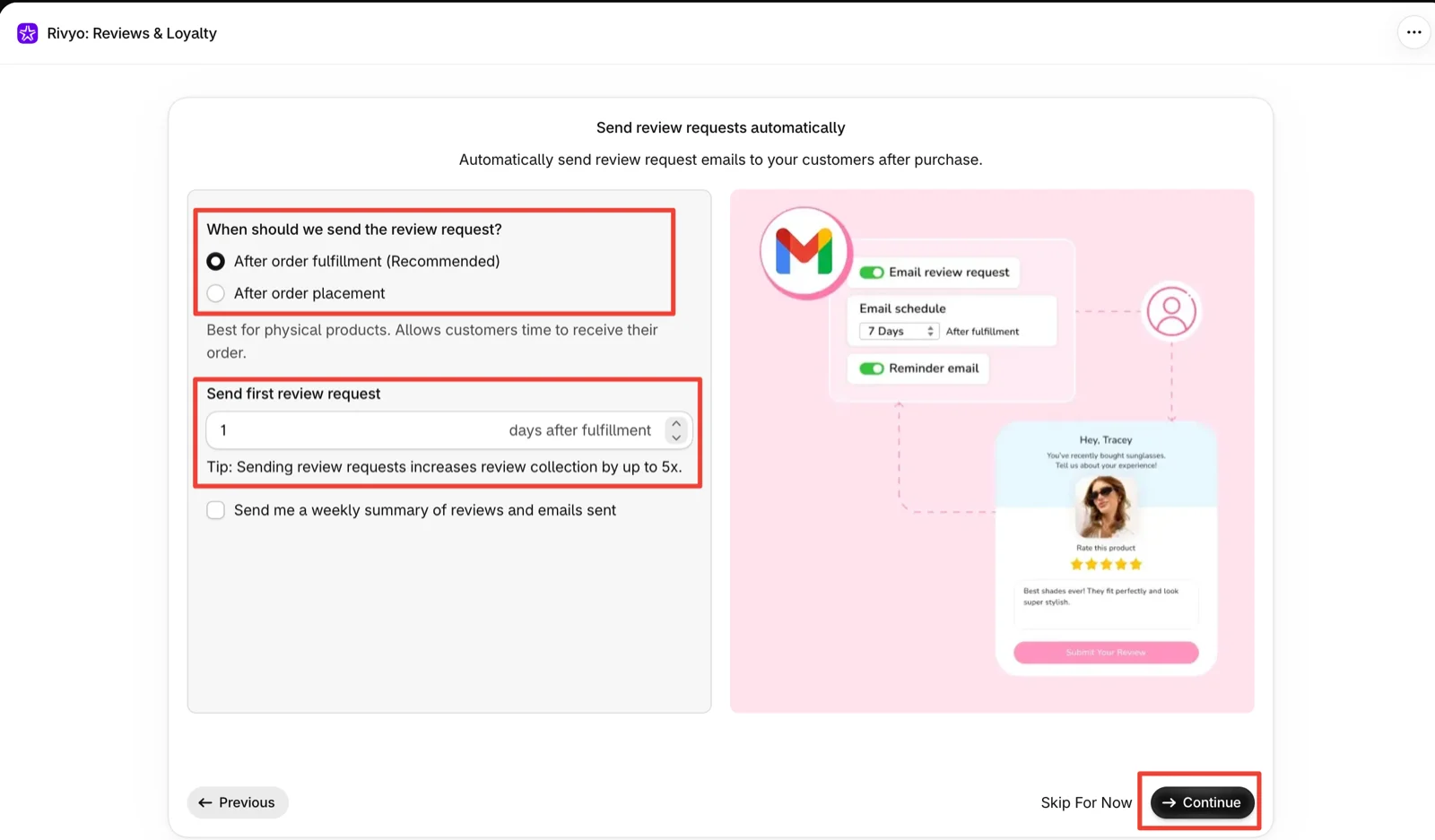
The request step makes the most important decision in a review app: when to ask. Rivyo gets the trigger right. It recommends After order fulfillment over After order placement, and explains that this gives customers of physical products time to receive their order.
The delay is the problem. In our run the first request was set to 1 day after fulfilment. Fulfilment usually marks when an order ships, not when it arrives. With a one-day delay, some customers of physical products may get a review request before their parcel has reached them. Rivyo’s own help centre suggests 7 to 14 days after fulfilment for standard items, and longer for products that take time to try, such as skincare or supplements. The setting is easy to change, but the wizard does not make the difference obvious, so set it deliberately.
Two other details stand out on this screen. It has no reminder control. On the plan cards, auto reminder emails first appear on Starter, so a free-plan store should expect one request per order. The illustration beside the form also shows a 7-day schedule with a reminder email switched on. Neither matches the form itself, which can confuse a merchant who sees the picture and assumes they are set.
The screen also offers a weekly summary of reviews and emails sent, unticked by default. It is worth turning on if you will not check the dashboard every week.
Pricing and Value
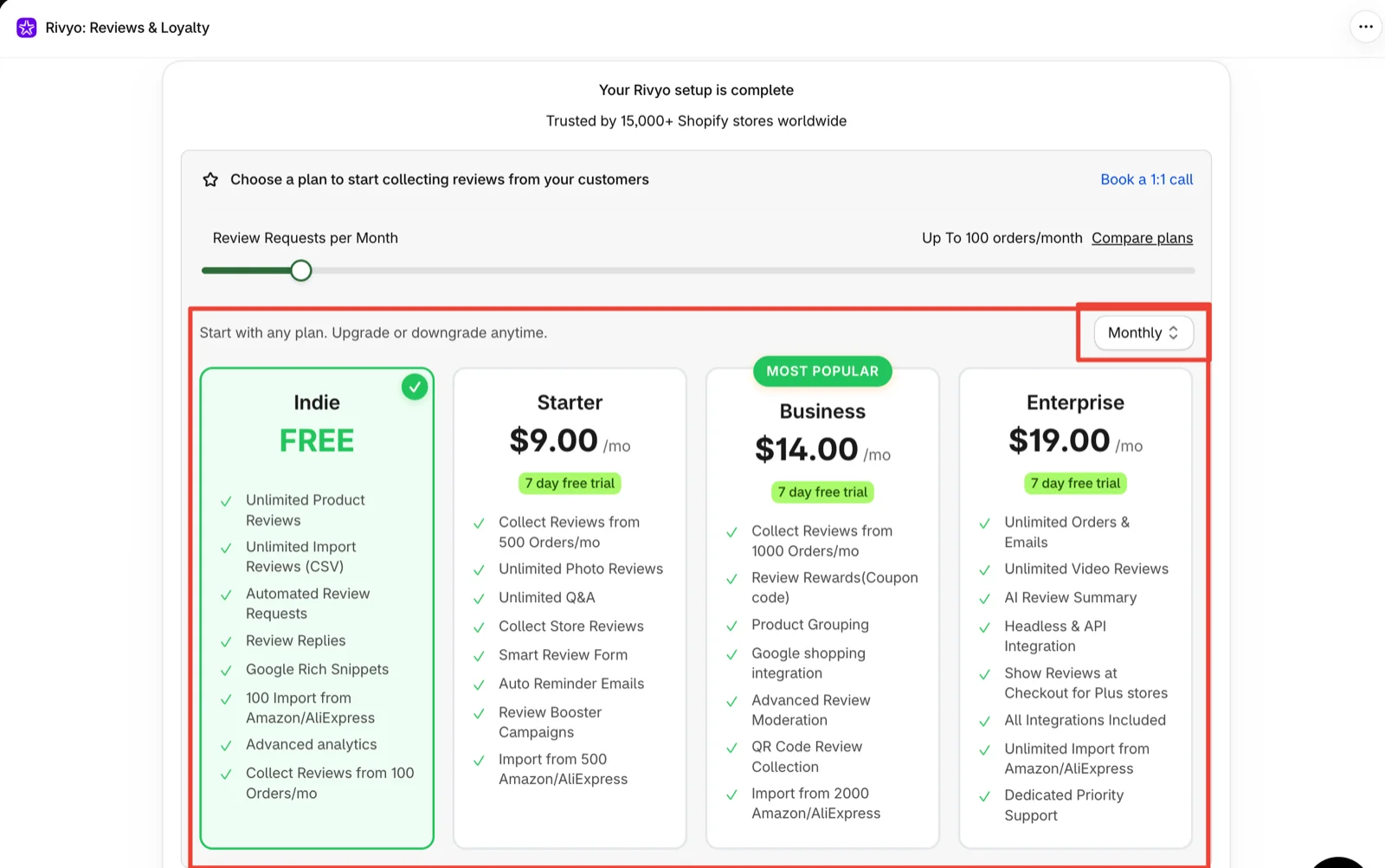
The wizard ends on the plan screen, with the free Indie plan selected in our run and a link to book a one-to-one call. Prices below were verified in the app and on Rivyo’s pricing page on October 6, 2026, billed monthly in USD.
- Indie — Free: reviews from 100 orders a month; unlimited product reviews; unlimited CSV imports; automated review requests; review replies; Google rich snippets; 100 imports from Amazon and AliExpress; advanced analytics.
- Starter — $9 a month: 500 orders a month; unlimited photo reviews; unlimited Q&A; store reviews; a smart review form; auto reminder emails; review booster campaigns; 500 Amazon and AliExpress imports.
- Business — $14 a month: 1,000 orders a month; review rewards with coupon codes; product grouping; Google Shopping integration; advanced moderation; QR code collection; 2,000 Amazon and AliExpress imports.
- Enterprise — $19 a month: unlimited orders and emails; unlimited video reviews; AI review summary; headless and API integration; reviews at checkout for Shopify Plus stores; all integrations; unlimited Amazon and AliExpress imports; dedicated priority support.
Paid plans include a 7-day free trial, and annual billing lowers the effective monthly price.
The price steps are small. At $5 between paid tiers, the choice depends on features more than budget. Most stores will move up for one of three reasons. Reminders and photo reviews are the usual reason to move to Starter, because the Indie card lists neither. Review incentives are the reason to move to Business, since coupon rewards start there. Video reviews and AI summaries are the only reasons to pay for Enterprise.
The loyalty and referral programmes change the total. Both appear in the wizard and the app menu, but each is a $9 monthly add-on. A store on Starter with both add-ons pays $27 a month. On Enterprise with both, it pays $37. That is still a modest bill for three programmes in one admin, but the free plan does not include them.
We could not find in the documentation what happens when a free-plan store goes past 100 orders in a month. If your volume is close to that line, confirm it with Rivyo before you rely on the free plan.
What Merchants Report
Low ratings are rare. On October 6, 2026, fewer than 2% of the listing’s 935 reviews were one to three stars.
The recent ones are still worth reading. Two from June 2026 describe a verification error that stopped reviews displaying and an app that did not work properly. In the first case the developer advised moving to a newer version of the app. Two long-time merchants in July 2025 said they could not access the app, and neither review shows a developer reply. A third merchant with several years on the app changed their rating to one star in October 2025, saying they had been unable to open it for months or reach support. Older complaints mention an incomplete review import and limited email template options. A four-star review from 2022 asks for more request templates, customer segments and automatic follow-ups.
The recent five-star reviews mostly credit the support team for fixing problems quickly, and one praises the range of widget styling options. Several come from merchants who have used Rivyo for four years or more, which says something about retention. Read them closely, though. More than one describes a bug, including a review widget that would not load, that support then fixed. Many others are a word or two long, or come from merchants in their first days with the app.
What We Liked
- A free plan that covers the full loop: Automated requests, unlimited reviews, CSV imports, replies and Google rich snippets are on Indie.
- A wizard built around the first-review problem: Import and past-customer requests are offered before anything else, which addresses the empty product page directly.
- The right request trigger by default: Fulfilment-based timing is recommended and pre-selected, with a clear explanation of why.
- Small, predictable price steps: $9, $14 and $19 for the paid tiers, each with a 7-day trial.
- Reviews, loyalty and referrals in one admin: Stores that want all three can manage them from one menu and one analytics page.
What Could Be Better
- A 1-day request delay out of the box: Requests can reach customers before the product does unless you change it.
- No reminders on the free plan: Reminder emails first appear on Starter, so a free-plan store should expect one request per order.
- An illustration that doesn’t match the form: The setup art shows a 7-day schedule and a reminder that the form does not offer.
- Add-ons that are easy to miss: Loyalty and referrals look like part of the app during setup, but each costs $9 a month.
- Recent reliability complaints: A June 2026 low rating reports reviews not displaying, and three long-time merchants said in 2025 that they could not access the app. Check your storefront after setup.
- Key workflows we did not test: Imports, request delivery, review submission, moderation, storefront display, Google snippets and support were outside this evaluation.
Who Rivyo Product Reviews Is Best For
Rivyo suits a small Shopify store taking under 100 orders a month that wants automated review requests without a monthly fee. It also suits a store moving from another review app that wants the import option early in setup, and a growing store that expects to need reminders or photo reviews and is comfortable paying $9 for them. Stores that want reviews, loyalty and referrals in one admin may also find the add-on model simpler than running three apps.
Who Should Upgrade or Consider an Alternative
If you take more than 100 orders a month, plan on Starter from day one. If follow-up reminders matter to your response rate, Starter is also the minimum. If you want to reward reviewers with coupons, budget for Business, and for video reviews or AI summaries, Enterprise. If you already run loyalty or referrals in another app, Rivyo’s add-ons do not save you anything unless you plan to consolidate.
We have separately reviewed Judge.me, Trustoo, Fera, Loox and Junip. Those were separate evaluations, not a controlled head-to-head, so we are not ranking them here.
Final Verdict
Rivyo answers the first half of our question well. A small store can set up automated review requests and storefront widgets on the free plan without a developer. The wizard addresses the empty product page early and recommends a sensible request trigger.
The second half has a clear answer too. Indie covers a store taking up to 100 orders a month that is happy with one request per order. Reminders and photo reviews move you to Starter at $9. Coupon rewards move you to Business at $14, and video and AI summaries to Enterprise at $19. Loyalty and referrals add $9 each.
- Start on Indie if you are under 100 orders a month and building reviews from zero.
- Move to Starter once you pass 100 orders or want reminder emails and photo reviews.
- Choose Business or Enterprise only for coupon rewards, video reviews or AI summaries.
Whichever plan you choose, change the 1-day request delay first. Then send one real request, publish the review and check how it appears on your theme. That is the step our test did not reach.
Frequently Asked Questions
Is Rivyo Product Reviews free?
Yes. The Indie plan is free and includes automated review requests, unlimited product reviews, CSV imports, review replies and Google rich snippets. It collects reviews from up to 100 orders a month.
Does Rivyo’s free plan send reminder emails?
Not according to the plan cards. Auto reminder emails are listed from the Starter plan at $9 a month, so on the free plan you should expect one review request per order.
Are Rivyo’s loyalty and referral programmes included?
No. They appear in the same admin, but each is a $9 monthly add-on on top of your reviews plan.
When should Rivyo send the first review request?
Start from order fulfilment, which Rivyo recommends. Set the delay longer than the 1-day default in our setup. Rivyo’s help centre suggests 7 to 14 days after fulfilment for most products.