
Most Shopify stores reach the same point sooner or later. Orders are coming in, customers are piling up in the admin, and nobody is emailing them. The store needs a way to collect subscribers, send a newsletter, and set up a welcome email without hiring a developer.
Mailchimp is one of the best-known answers to that problem. Its Shopify app, Mailchimp Email SMS Marketing, is built by Intuit Mailchimp and has been on the Shopify App Store since November 2018. It also has a free plan. That raises the real question for a small store: how much can you actually do before Mailchimp asks you to pay?
We installed the app on a Shopify test store, stayed on the Free plan, and explored the main tools. The setup was smooth and the app was easy to use. We did not find any bugs. But the free plan stops short of the automations most stores want, and the app reminds you about upgrading on almost every screen.
Key Takeaways
- Easy Shopify connection: The app synced our test store’s customers, products, and orders without any manual steps.
- Strong email builder: The drag-and-drop editor includes Shopify-specific blocks for products, recommendations, discounts, and reviews.
- Free plan is limited: Mailchimp’s pricing page says Free covers 250 contacts and 500 sends a month, with no automation flows.
- Automations need a paid plan: The welcome flow template pointed us to a free trial. Essentials allows only 4 flow steps; Standard raises that to 200 flows.
- SMS is paid only: The plan comparison states that SMS marketing is not available on Free plans.
- Testing scope: We inspected the app on the Free plan. We did not send a campaign, publish a form, or activate a flow.
Our Verdict
Mailchimp is a good, easy-to-use email app for Shopify stores. The store connection works with almost no effort, and the email builder includes blocks made for store emails. We found it easy to find our way around.
The Free plan, however, is best treated as a trial run. It lets you connect the store, build emails, and create signup forms. It does not include automation flows, and its send limit is small. Most stores that want welcome emails or abandoned-cart reminders will need at least the Standard plan, which starts at $20 a month on the Shopify App Store.
Our verdict: install it if you want a familiar, polished email platform and expect to pay for it. If you need free automations, look elsewhere first.
What Mailchimp Offers
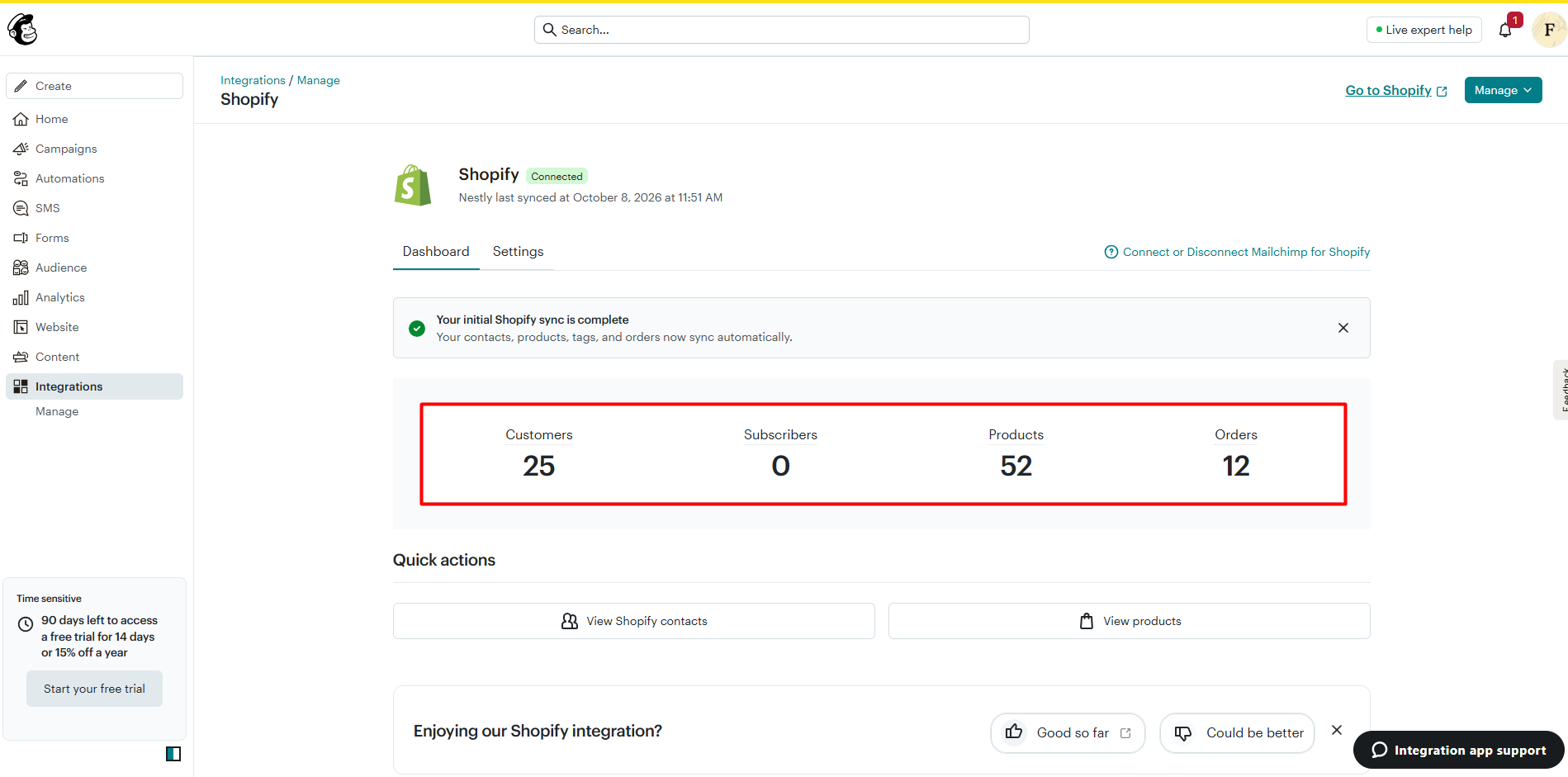
Mailchimp gives Shopify stores a full marketing platform inside one app. The main menu covers Campaigns, Automations, SMS, Forms, Audience, Analytics, Website, Content, and Integrations.
The Shopify connection is the starting point. After we installed the app, Mailchimp ran its first sync and showed a clear message: “Your initial Shopify sync is complete.” Our test store’s data came across in one go. Mailchimp showed 25 customers, 52 products, and 12 orders. It also said that contacts, products, tags, and orders would now sync automatically.
One number deserves attention: 0 subscribers. All 25 customers arrived as contacts, but none as email subscribers. That is expected on a test store where no one opted in to marketing. It still matters for real stores. Mailchimp’s help center explains that non-subscribed contacts cannot receive regular marketing campaigns. They can only receive transactional emails, such as order notices or abandoned-cart reminders. So a large customer list in Shopify does not mean a large mailing list in Mailchimp. Merchants should make sure the marketing opt-in is turned on at checkout.
Other tools we saw in the app include:
- Home checklist: A setup guide with five steps. These are connect your store, add contacts, authenticate your domain, import your brand, and set up SMS.
- Forms: Three form types. These are a popup form, an embedded form, and a signup landing page hosted by Mailchimp.
- Email templates: A gallery of ready-made designs grouped by goal, such as Sell products, Newsletter, Welcome, and Thank you. Several were labeled “Free.”
- Content Studio: A media library with uploads, free stock images powered by Shutterstock, your Shopify products, Instagram, Giphy, and Canva.
- Conversion insights: A report for revenue from Mailchimp, orders, and conversion rates. Ours showed $0 because we sent nothing.
What We Tested
We installed Mailchimp Email SMS Marketing on a Shopify test store and stayed on the Free plan for the whole review. We did not start the 14-day trial.
We connected the store and checked the first sync. We then explored the home dashboard, the campaign list, the email design options, the drag-and-drop builder, the image library, the template gallery, the flow templates, the form types, the contacts list, conversion insights, and the in-app pricing screens.
This was an inspection-based test. We did not send a campaign or a test email, publish a signup form, or activate an automation. We also did not test SMS, which is not available on the Free plan. Because of that, this review makes no claims about deliverability, inbox placement, revenue, or how flows perform over time. We found no bugs or errors during our session.
Building an Email: The Strongest Part of the App
When you create an email, Mailchimp offers four starting points. You can build from scratch, start with a basic layout, pick a fully designed template, or code your own HTML. The “From scratch” and “Basic layout” options were both marked as free.
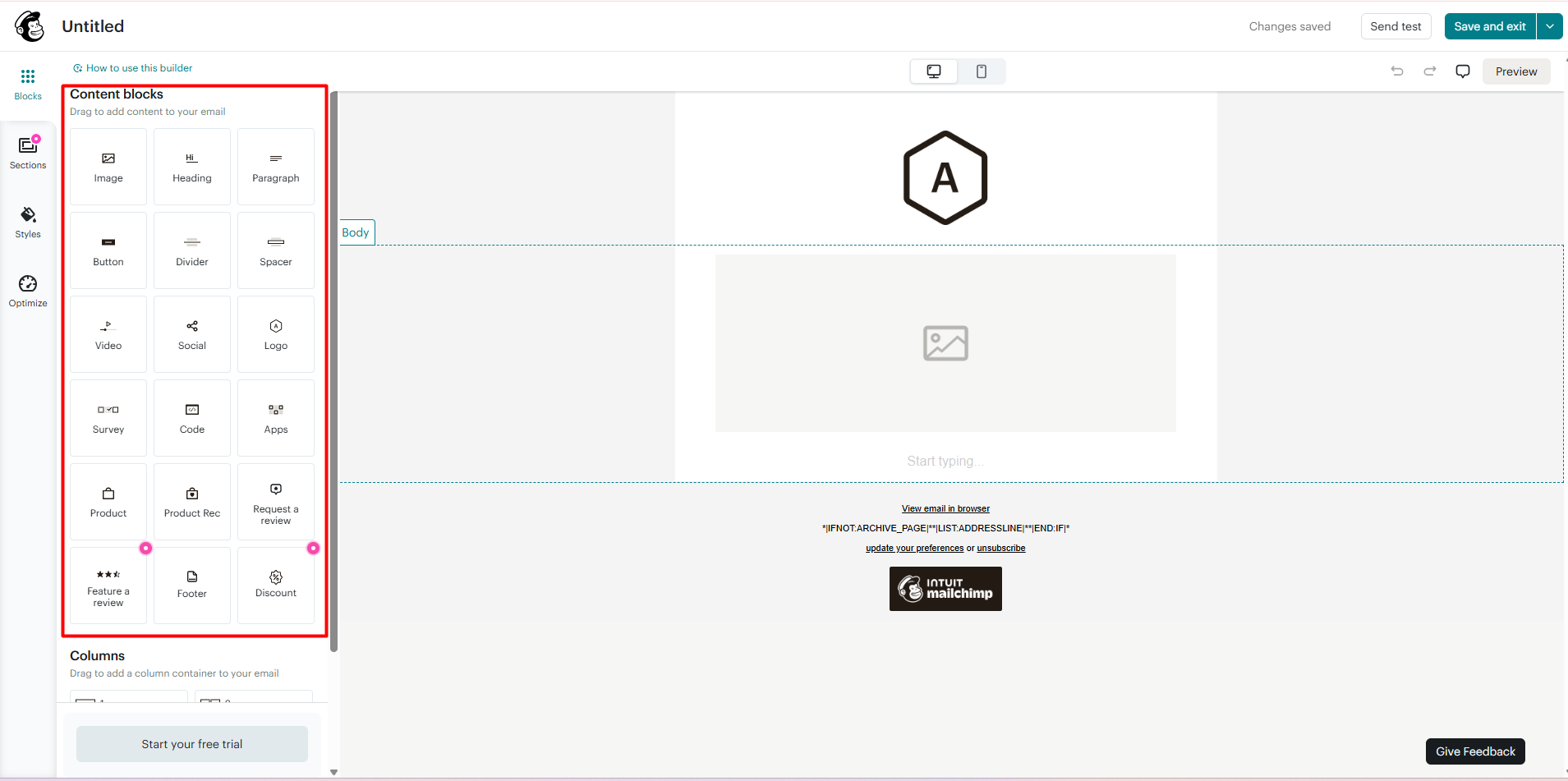
The builder itself is where Mailchimp stands out. We counted 18 content blocks in the side panel. They cover the basics, such as image, heading, paragraph, button, divider, and spacer. Then come the blocks that matter for a store:
- Product and Product Rec, for showing items from your catalog.
- Discount, for adding an offer.
- Request a review and Feature a review, for social proof.
- Video, Social, Survey, Code, and Apps, for more advanced layouts.
The builder also has a desktop and mobile preview toggle, a Send test button, and a full Preview mode. Adding an image opens the Content Studio. From there you can pull in your own uploads, free stock photos, or your Shopify product images.
For a merchant, this means you can build a product-focused email without leaving the app or touching code. The layout felt clean and easy to follow. The default footer in the builder also included an Intuit Mailchimp badge.
Where the Free Plan Stops
Automations are the main reason most Shopify stores pick an email app. A welcome email, an abandoned-cart reminder, and a post-purchase follow-up do much of the work on their own.
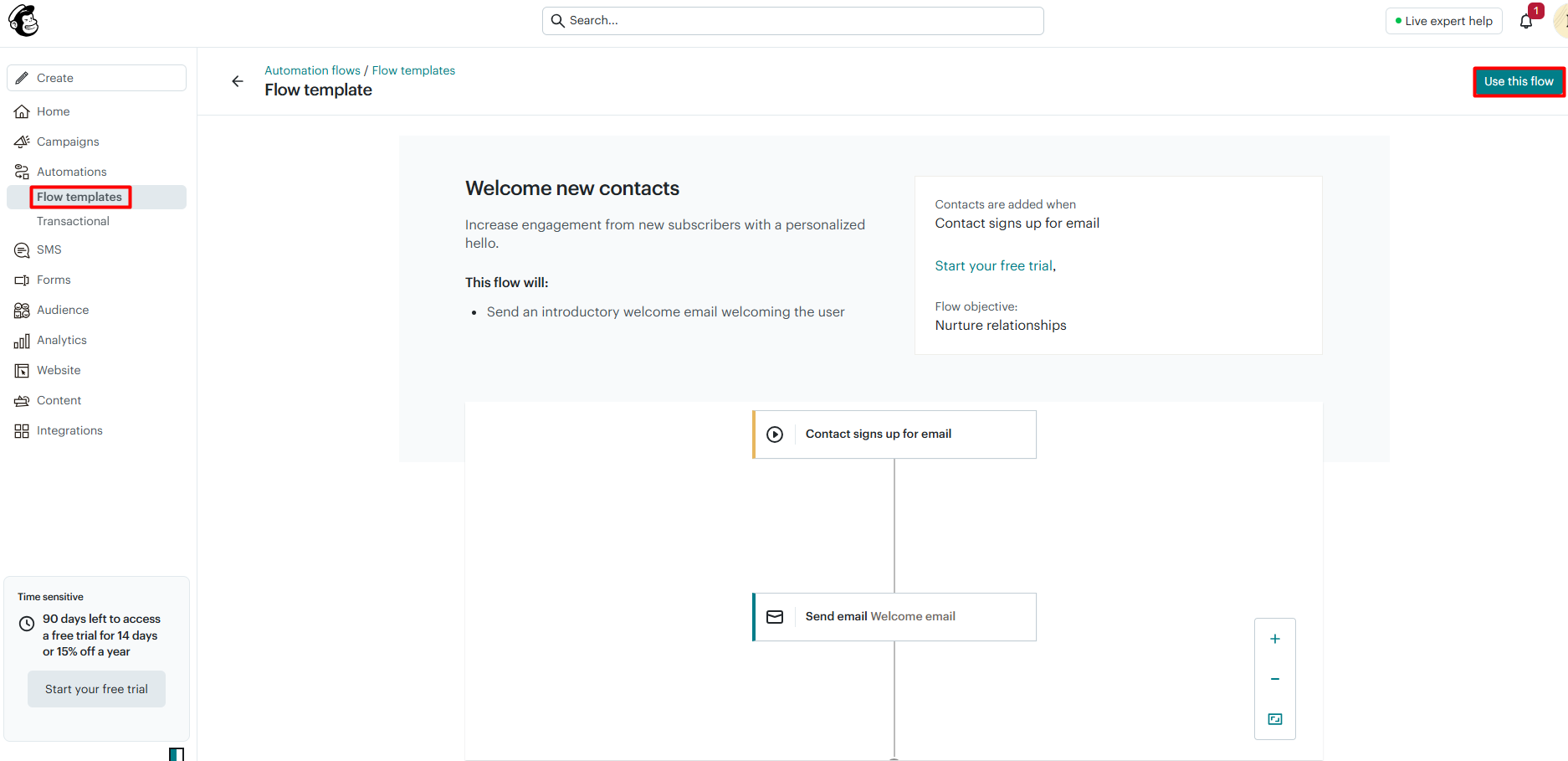
This is where the Free plan runs out. We opened the Welcome new contacts flow template. It shows a simple flow: a contact signs up, then Mailchimp sends a welcome email. The template page also displayed a “Start your free trial” link. We did not activate the flow, so we did not see the final upgrade step ourselves.
Mailchimp’s own pricing page explains the boundary. Automation flows are not included in the Free plan. The Essentials plan allows flows of up to 4 steps. Standard and Premium allow up to 200 flows. The Shopify App Store listing says the same, placing “Marketing Automation” in the paid plans only.
The upgrade prompts are hard to miss. A “Time sensitive” panel stayed in the sidebar on every page we visited. It said we had 90 days left to claim a 14-day free trial or 15% off for a year. This is not a bug, but merchants who only want the free tools may find it distracting.
Pricing and Value
Mailchimp’s price depends on your number of contacts. As of October 8, 2026, the Shopify App Store lists these starting prices:
| Plan | Starting price | Key limits (from Mailchimp) |
|---|---|---|
| Free | $0 | 250 contacts, 500 sends a month (250 a day), 1 seat, 1 audience, no flows |
| Essentials | $13/month | Flows up to 4 steps, 3 seats, 3 audiences, 24/7 email and chat support |
| Standard | $20/month | Up to 200 flows, 5 seats, 5 audiences, send time optimization |
| Premium | $350/month | Unlimited seats and audiences, advanced segmentation, phone support |
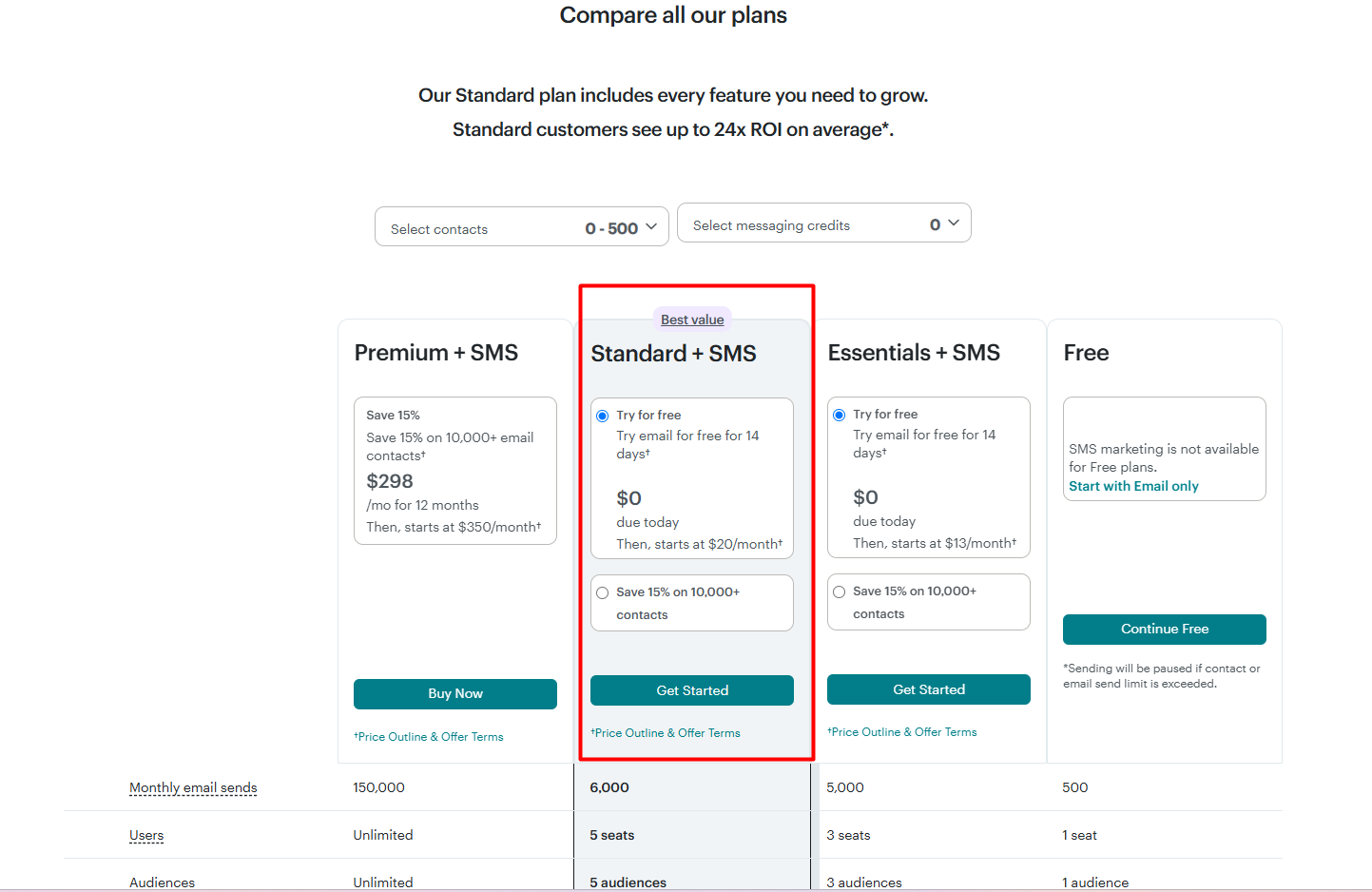
In our in-app plan comparison at 0–500 contacts, the monthly email send limits were 500 for Free, 5,000 for Essentials, 6,000 for Standard, and 150,000 for Premium. The comparison labeled Standard as the “Best value.” It also stated that “SMS marketing is not available for Free plans.”
Two points matter for budgeting:
- Billing is separate from Shopify. The App Store listing notes that external charges may be billed by Intuit Mailchimp separately from your Shopify invoice.
- Offers vary. In the app, we were offered a 14-day free trial of Standard, with $20 a month due after the trial ends. The other offer was 15% off for 12 months, but only for stores with 10,000 or more contacts. Mailchimp’s public pricing page showed a different offer on the same day: 50% off paid plans for 12 months. Check the offer you are shown before you commit.
For value, the Standard plan is the real starting point for most Shopify stores. It is the first plan with a useful number of automation flows. Essentials can work for stores that only need short, simple flows. The Free plan is good for learning the tools, but not for running an email program.
What We Liked
- Effortless store sync: Customers, products, and orders came across in the first sync with no setup work from us.
- Shopify-aware email builder: Product, recommendation, discount, and review blocks make store emails easy to build.
- Easy to use: The menus are clear, and the setup checklist shows exactly what to do next.
- Rich media options: Free Shutterstock images, Canva, and your own product photos are all a click away.
- No bugs in our session: We did not hit any errors on the screens we explored.
What Could Be Better
- No automations on Free: The flows most stores need start on a paid plan.
- Small free send limit: 500 sends a month is enough to test, not to grow.
- Constant upgrade prompts: The trial panel appears on every page of the app.
- Confusing offers: The in-app discount and the website discount did not match on the day we checked.
- SMS costs extra: SMS is only available on paid plans.
What Merchants Say
Mailchimp has a 4.8-star rating from 1,508 reviews on the Shopify App Store, as of October 8, 2026. About 83% of ratings are five stars, and about 7% are one star.
The most recent five-star reviews mostly praise Mailchimp’s support team, often naming the agent who helped. The one-star reviews from the past year repeat a different theme: sync problems. Some merchants report that new Shopify subscribers did not reach Mailchimp, or that contacts stayed in Mailchimp after they disconnected the store. We did not see any sync problems in our test, but our store was small and our session was short. Stores with large customer lists may want to check the sync closely in their first weeks.
Who Is Mailchimp Best For?
Mailchimp is best for Shopify stores that are ready to pay for email marketing and want a well-known, polished tool. It suits merchants who care about good-looking emails and want product blocks, templates, and image tools in one place.
It is also a good fit for teams. Paid plans add more seats and audiences, and Premium offers phone support and advanced segmentation.
Who Should Consider an Alternative?
Stores that need free automations should look at other options first. On Mailchimp, even a basic welcome flow needs a paid plan.
Very small stores on a tight budget may also find the costs add up as their list grows, since the price rises with contacts. If you are comparing tools, we have also reviewed Klaviyo, tinyEmail, Seguno, AVADA Email Marketing, and AfterShip Email Marketing, SMS.
Final Verdict
Mailchimp makes the first steps of email marketing easy for Shopify stores. The store sync worked without effort, the builder is strong, and the app was simple to use. We did not run into a single bug.
The catch is the Free plan. It is a good place to explore, but it leaves out automation flows and caps sends at 500 a month. Most stores will need the Standard plan, from $20 a month, to run the welcome and cart emails that make email marketing worth doing.
If that budget works for you, Mailchimp is a solid and easy choice. Start on Free, build your first email, confirm that your customers are opting in, and then use the trial to test flows before you commit.
Frequently Asked Questions
Is Mailchimp free for Shopify?
Yes, there is a Free plan. Mailchimp’s pricing page says it covers up to 250 contacts and 500 email sends a month, with one seat and one audience. It does not include automation flows or SMS.
Can I send automated emails on Mailchimp’s Free plan?
No. Mailchimp’s pricing page lists automation flows as not included on Free. Essentials allows flows of up to 4 steps, and Standard allows up to 200 flows. In our test, the welcome flow template showed a link to start a free trial.
Why do my Shopify customers show as contacts but not subscribers?
Only customers who opted in to marketing sync as subscribed. In our test store, 25 customers synced but 0 were subscribers, because none had opted in. Mailchimp’s help center says non-subscribed contacts can receive transactional emails but not regular marketing campaigns.
Does Mailchimp support SMS for Shopify stores?
Yes, on paid plans. The in-app plan comparison states that SMS marketing is not available for Free plans. We did not test SMS in this review.
Is Mailchimp billed through Shopify?
Not always. The Shopify App Store listing notes that external charges may be billed by Intuit Mailchimp separately from your Shopify invoice.
Did you test email delivery or revenue tracking?
No. We inspected the app on the Free plan and did not send any emails. Our Conversion insights report showed $0, so we make no claims about deliverability, revenue, or campaign results.