
Privy puts popups, email, SMS, flows, contacts, and reports in one Shopify app. We spent about one hour in the app. We set up a display and checked the main tools.
The setup felt guided. The menu was easy to read. The popup editor was quick to learn and simple to change. The main strength was the way the tools sit in one place.
The main concern was price. We also wanted more popup templates and more design variety.
Key Takeaways
- Setup felt guided and clear.
- The main menu was easy to understand.
- The all-in-one workflow was the best part of our test.
- The popup editor felt quick and flexible.
- The template filters were useful.
- We wanted more template choice and more design variety.
- We made and set up a display, but did not run it with live store traffic.
- We viewed flows, A/B tests, contacts, and reports, but did not run live tests.
- The pricing screen showed plans from $24, $30, and $45 per month.
- Privy is best suited to small and growing stores that want several marketing tools in one app.
Our Verdict
Privy is a good fit for a small or growing Shopify store that wants popups, email, SMS, and basic marketing flows in one place.
The app was easy to move around. The display builder was the strongest part of our hands-on test. It gave us clear controls without making the task feel hard.
The trade-off is cost. The price can rise as traffic, contacts, or SMS use grows. The template library also felt smaller than we wanted.
We would consider Privy for a store that wants one tool for list growth and cart-abandonment marketing. We did not test live sales, real signups, recovered carts, or revenue. Our view is based on the setup and tools we could use or inspect.
What Is Privy?
Privy is a Shopify marketing app. It brings popups, email, SMS, flows, contacts, brand tools, A/B tests, and reports into one system.
That mix is the main reason to look at it. A store may be able to do more work in one app instead of using a different tool for each task.
In our test, this all-in-one setup was Privy’s clearest strength.
What We Tested
We spent about one hour in Privy. We went through setup and the main dashboard. We also looked at displays, templates, the popup editor, flows, A/B tests, contacts, brand tools, reports, and pricing.
We made and configured a display. This gave us a real look at the display-building flow.
We did not run the display with live store traffic. We did not send a live email or SMS campaign. We did not run a flow or A/B test. We also did not test support.
This means we do not judge email delivery, SMS results, popup conversion rate, cart recovery, sales lift, or long-term results.
Setup and Onboarding
Privy’s setup felt guided and easy to follow.
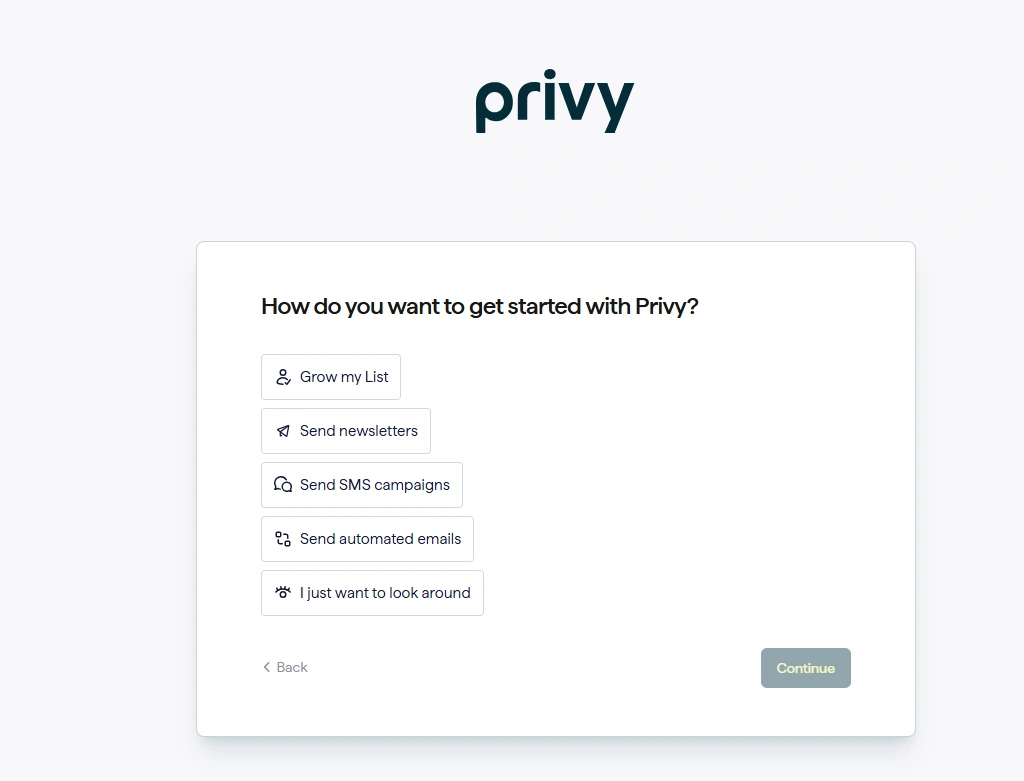
The first screen asks what you want to do. Choices include growing a list, sending email, sending SMS, using automated email, or just looking around.
This is a good start for a new user. You do not need to know the whole app before you begin.
The main menu was also easy to scan. Displays, Flows, Campaigns, Contacts, Brand and Assets, and Reports were all easy to find.
Popup and Display Templates
Privy has a template library for displays.
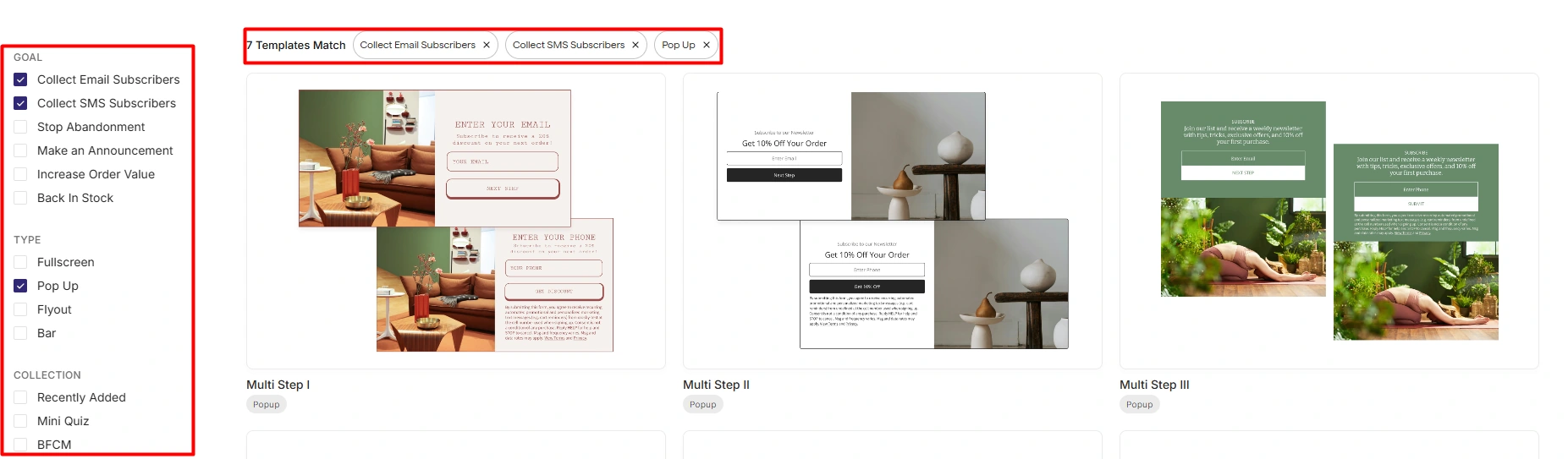
The page lets you filter by goal and display type. We saw goals for email signup, SMS signup, cart abandonment, announcements, order value, and back-in-stock use.
We also saw display types such as fullscreen, popup, flyout, and bar.
The filters worked well. They made it easy to narrow the list.
The weak point was choice. We wanted more templates and more visual variety. The designs we saw were useful, but the library did not feel broad.
Building a Popup
The popup editor was one of the best parts of Privy.
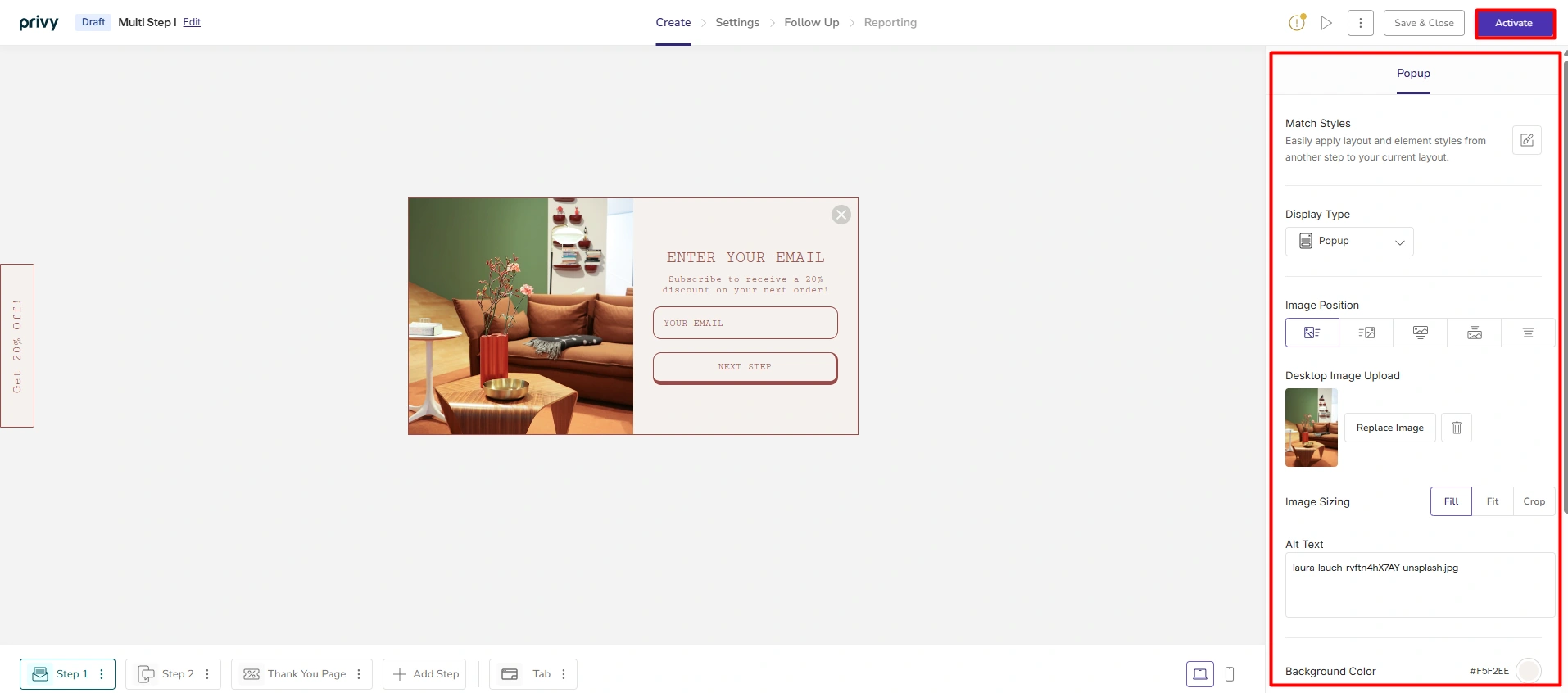
We set up a multi-step popup and checked the main design controls. The popup stays in view while the settings sit on the side.
We could change the display type, image position, image size, background, and other style options.
The editor felt clear, fast, and flexible. We did not need to dig through many screens to make changes.
This can help a small team. A store owner can make basic changes without needing a designer for every step.
Flows and Automation
Privy also has ready-made flows for common store tasks.
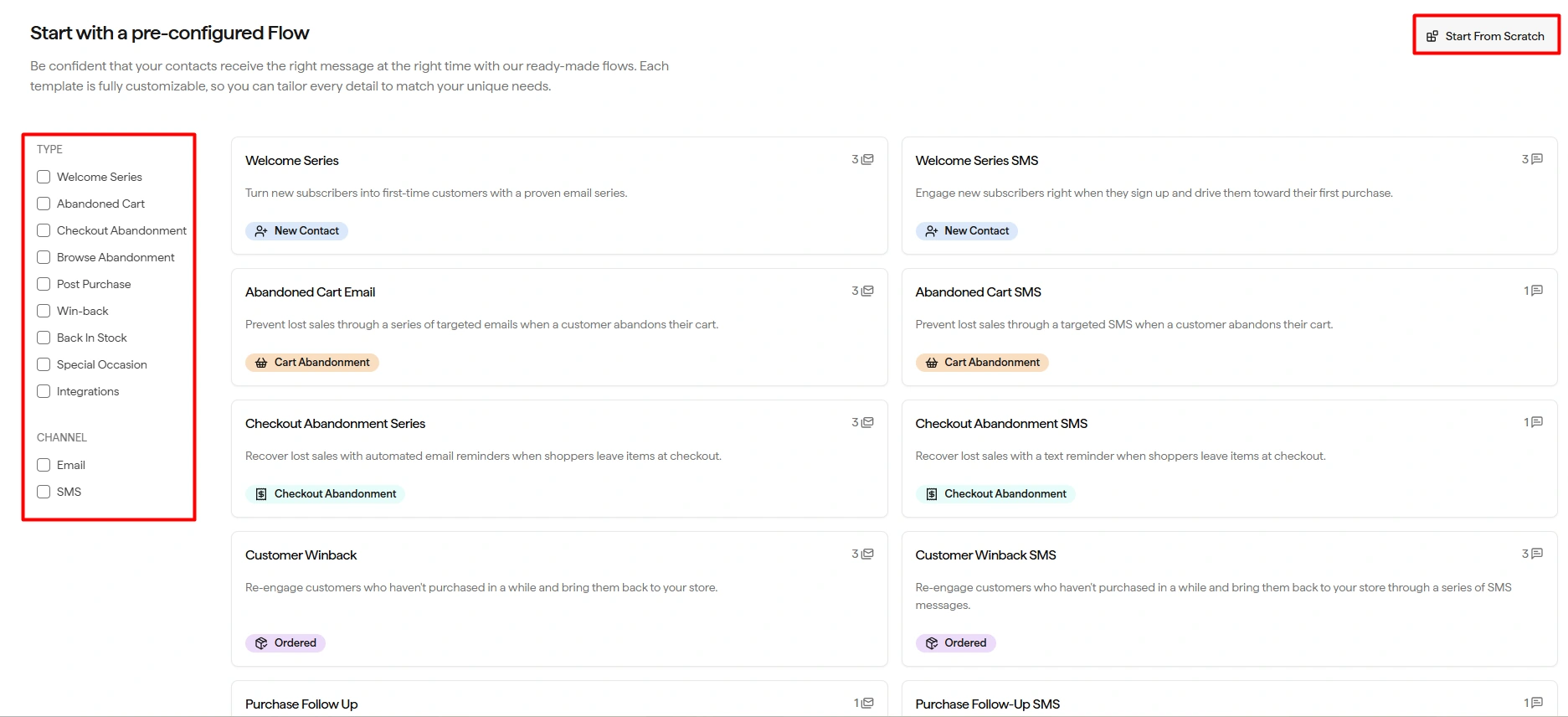
We saw flows for welcome messages, abandoned carts, checkout abandonment, browse abandonment, post-purchase messages, win-back campaigns, and back-in-stock alerts.
The flow list can also be filtered by email or SMS.
The layout made sense. A merchant can start from a clear goal instead of building from a blank page.
We also viewed the flow builder. It showed triggers, email steps, contact tags, and extra steps.
We did not publish or run a flow. So we cannot judge live results or how well the flows work over time.
A/B Testing
Privy has A/B tests for displays.
We opened the setup area and saw how a test can be made from an existing display. The screen lets you name the test, pick a display, and add a variation.
We did not start a live test. We also did not collect visitor data.
So we can confirm that the feature is there, but we cannot judge the quality of the test data.
Contacts and Brand Tools
The Contacts area includes contacts, segments, imports, and exports. We only viewed this part.
The layout was simple. It was clear where contact work would happen.
The Brand and Assets area also gives stores a place to manage a logo, colors, fonts, images, email templates, and coupons.
We did not build a full brand system or a large contact list. We only checked how these areas were set up.
Reporting
Privy has reports for displays and broader marketing work.
We saw fields for signup rate, revenue, order rate, average order value, and revenue per recipient.
Our test had no live campaign data. The report screens were empty or showed zero values.
We can say the reports were easy to find. We cannot judge their accuracy or depth from this test.
Pricing
Pricing was our biggest concern.
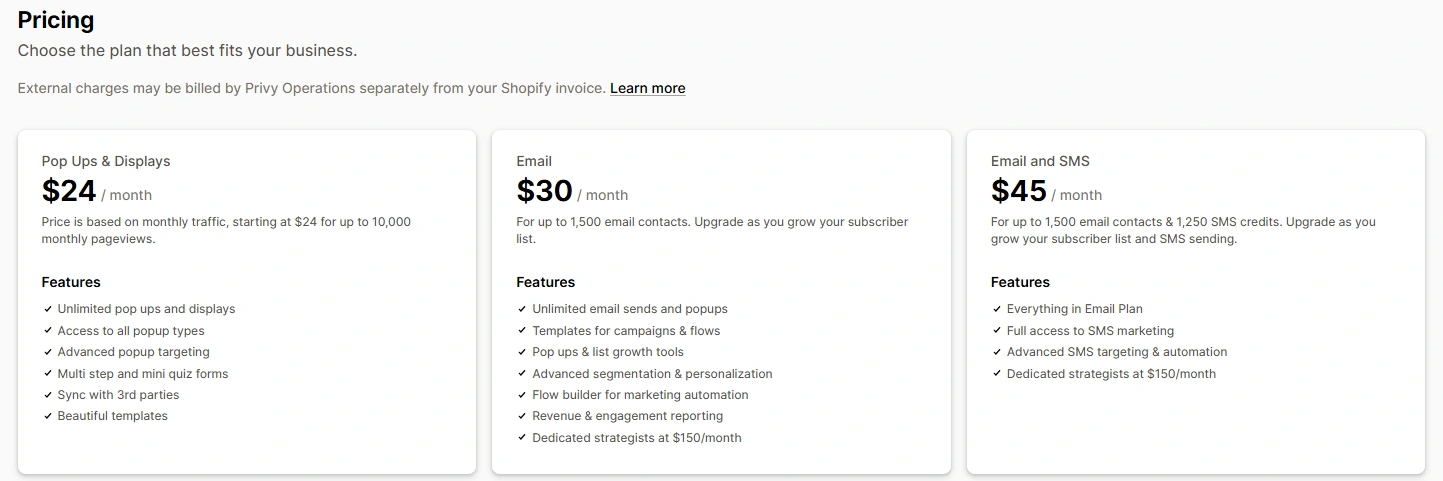
The pricing screen we reviewed showed:
| Plan | Starting price | Limit shown |
|---|---|---|
| Pop Ups & Displays | $24/month | Up to 10,000 monthly pageviews |
| $30/month | Up to 1,500 email contacts | |
| Email and SMS | $45/month | Up to 1,500 email contacts and 1,250 SMS credits |
The Pop Ups & Displays plan grows with traffic. Email pricing grows with the email list. The Email and SMS plan also adds SMS use.
This matters for a growing store. A price that looks fine at the start may rise as the store gets more traffic and more contacts.
Privy does put several tools in one app, so the price should be compared with the cost of using several separate apps. Still, merchants should check the price at their own traffic and contact level before they choose a plan.
What We Liked
The all-in-one workflow was the main strength.
Displays, campaigns, flows, contacts, brand tools, and reports all sit in the same app. The menu made it easy to move between them.
We also liked the popup editor. It was quick to understand and gave us enough control for a basic display.
The guided setup was another plus. It made the first use feel simple.
What Could Be Better
Our main concern was pricing. Costs can rise with traffic, email contacts, and SMS use.
We also wanted more template choice. The filters were good, but the design range felt limited.
We did not find any bug or clear tech issue in the parts we used.
Who Is Privy Best For?
Privy makes the most sense for small and growing Shopify stores that want several marketing tools in one place.
It may suit merchants who want to build popups, grow an email or SMS list, use basic flows, and keep contacts and reports in the same system.
The simple menu also helps stores that do not want to learn a large number of separate apps.
Who May Want Something Else?
Privy may be less appealing if you want a very large popup template library or lots of different design styles.
It may also be worth comparing other tools if cost is a key concern at your traffic or contact level.
Stores with deep automation or advanced reporting needs should test those parts in more detail. Our test was not deep enough to judge them.
Final Thoughts
Privy was easy to understand in our test. Setup felt guided. The menu was clear. The popup editor was quick and flexible.
Its best feature is the way it brings several marketing tasks into one app. That can be useful for a small team that wants fewer tools to manage.
The main trade-offs are price and template choice. Costs can rise as the store grows, and the template library did not offer as much variety as we wanted.
We would consider Privy for a small or growing Shopify store that wants one place for list growth, popups, email, SMS, and cart-abandonment workflows. This view is based on the tools we used and inspected. It is not based on live sales or conversion data.
FAQ
Is Privy easy to use?
In our test, yes. Setup felt guided, the menu was clear, and the popup editor was easy to learn.
What was the best part of Privy?
The all-in-one workflow stood out most. Privy keeps displays, flows, campaigns, contacts, brand tools, and reports in one place.
Did you test Privy on a live storefront?
No. We made and configured a display inside the app, but we did not run it with live store traffic.
Did you run Privy’s email or SMS flows?
No. We viewed the flow and automation areas, but we did not send live email or SMS messages.
Did you test cart recovery?
No. We saw cart-abandonment flow options, but we did not run them with real shoppers or measure recovered carts.
Does Privy have A/B testing?
Yes. We viewed the A/B test setup for displays. We did not run a live experiment.
What did we dislike about Privy?
Pricing was our main concern. We also wanted more popup templates and more design variety.
How much does Privy cost?
The pricing screen in our test showed Pop Ups & Displays from $24/month, Email from $30/month, and Email and SMS from $45/month. Prices and limits can change, so check the current plan details before you buy.
Who should use Privy?
We think Privy fits small and growing Shopify stores that want popups, list growth, email, SMS, and basic flows in one app.
Did you test Privy support?
No. We did not contact support, so we do not rate support quality in this review.