
Brevo PushOwl has a clear, simple setup. It puts email, web push, and SMS tools in one app. In our test, the main screens were easy to use. We liked the ready-made flows most. They were quick to turn on. We did wish we had more ways to edit them.
This review is based on a check of the app’s tools. We did not send live ads or messages. We did not track sales or test how buyers react.
Key Takeaways
- Best fit: Small Shopify stores that want a simple start.
- Top perk: We could turn on the ready-made flows with ease.
- Setup: The first steps were clear and well laid out.
- Main flaw: We wanted more ways to change flows and design.
- Test scope: We saw the tools but did not run live sends.
- Cost: The app lists a free plan and two paid plans.
Our Verdict
We like Brevo PushOwl for its ease of use. The home screen was clear. We could find the main tools fast. The built-in flows stood out. We could turn on all the flows shown to us.
Still, the simple setup has a cost. We wanted more room to shape each flow. We also wanted more choice in how a message looks. A brand with strict style rules may find this hard.
For a new shop, it is worth a look. Use the free plan to try the tools first. If you need deep rules or rich design, test them before you pay.
We did not test how well the app drives sales. Our view is about setup, not results.
What Is Brevo PushOwl?
Brevo PushOwl is a Shopify app for store news and updates. It has email, web push, SMS, forms, and preset flows. These tools help shops plan how to reach buyers.
The app page lists welcome notes, cart alerts, stock alerts, and more. These are claims from the app team. We did not test each one.
The main draw is that the tools share one place. You do not need to jump from one app to the next just to see the core tools. Yet one app may not suit each shop. Your needs and plan limits still count.
What We Tested
We spent about one hour in the app. We went through the first steps. We looked at the home screen, push tools, forms, SMS, stats, plans, and app settings. We also saw the Ad Studio area.
We spent the most time on flows. We turned on all the preset flows shown on the page.
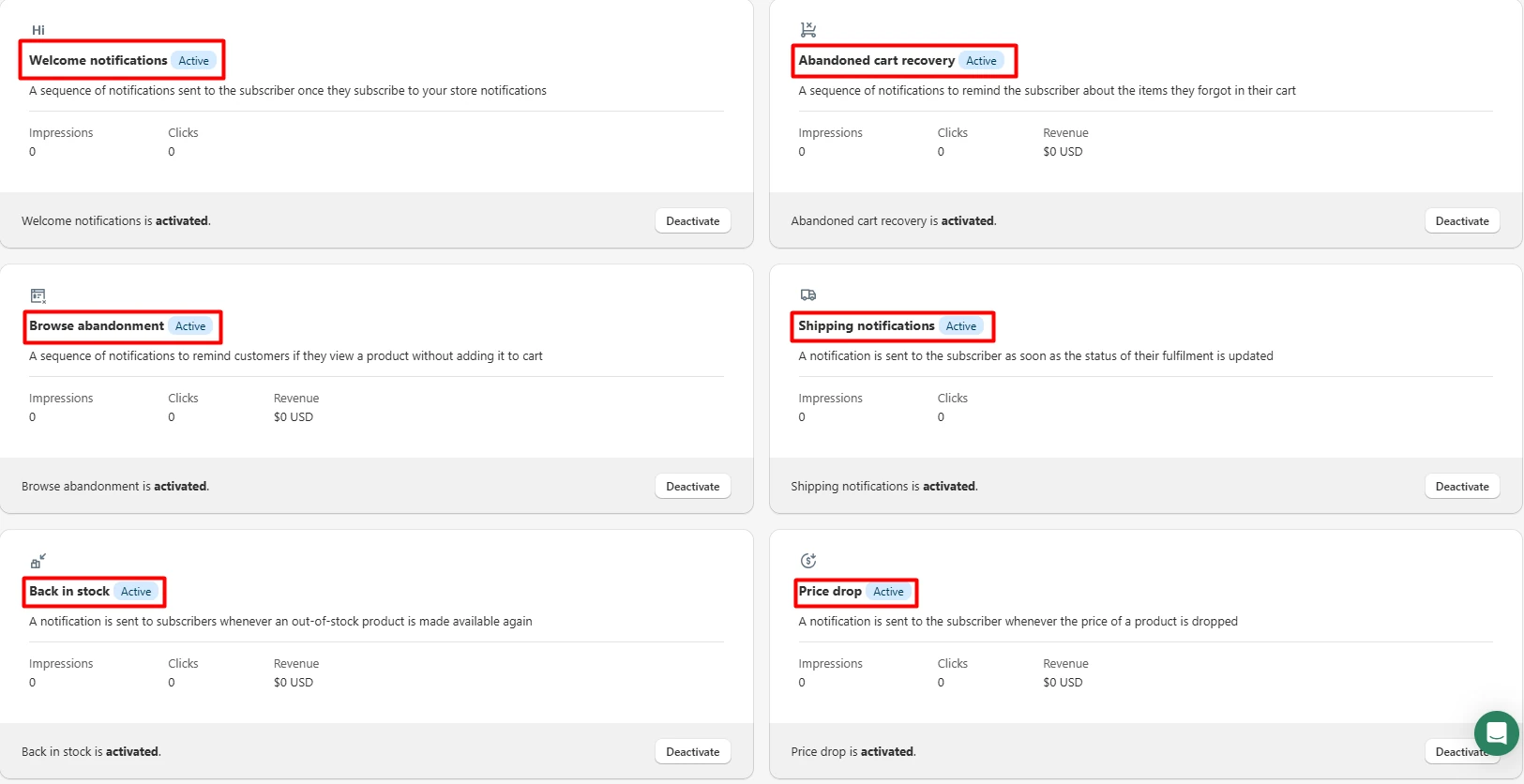
We did not send live email, push, or SMS. We did not make a live form. We did not run a test cart or track a buyer. We had no real send data to check.
So we can rate how the setup felt. We cannot rate send speed, clicks, sales, or how well each flow works with real users.
Setup: A Clear Start
The first steps felt guided. We knew where to go next. We did not need to hunt for the right page or guess what each step meant.
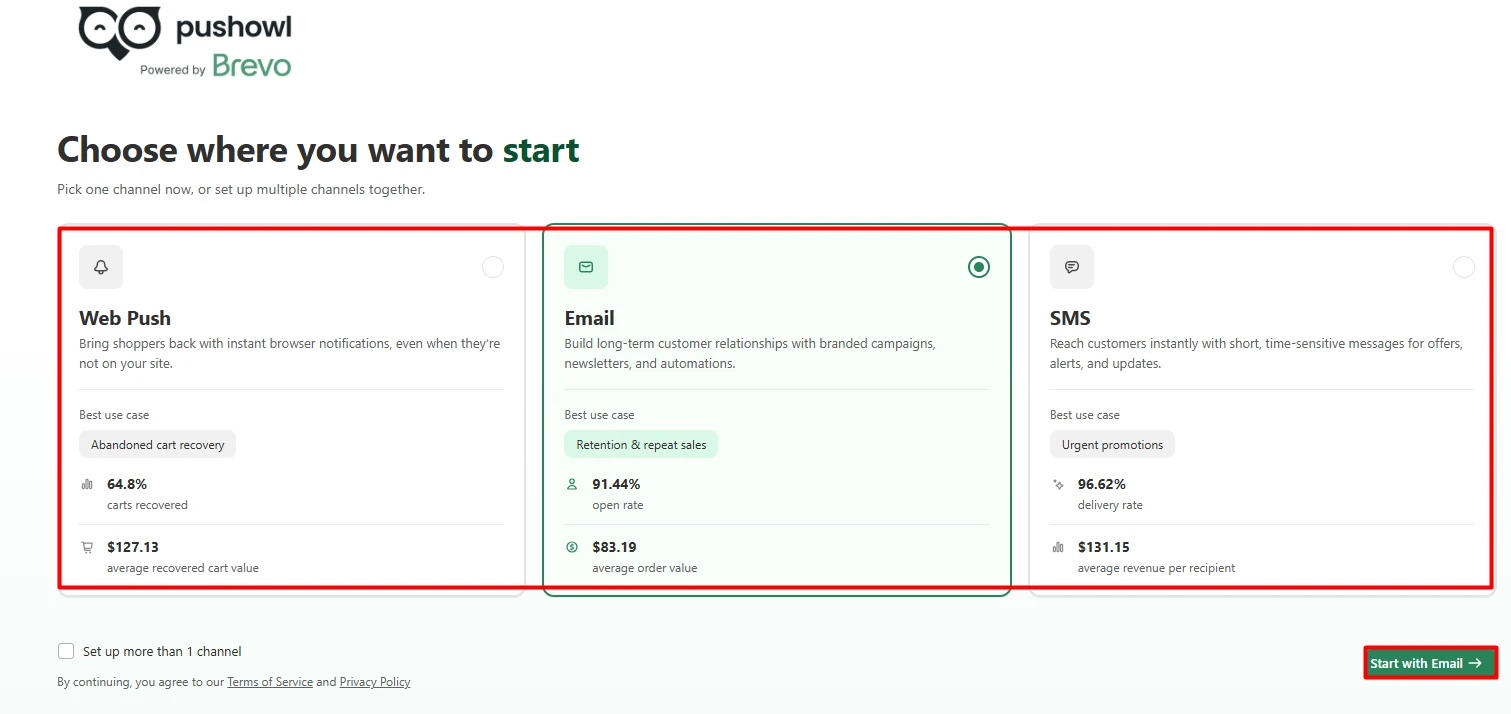
This is a plus for a new shop. Email, push, and SMS can be a lot to learn at once. Here, the first tasks felt calm and clear.
We did not take a store all the way to launch. Some live setup tasks may take more time. Our test does not prove that all parts of launch will be this smooth.
Dashboard: Easy to Find Each Tool
The home screen was neat. We found the links we sought. It was easy to move from one part of the app to the next.
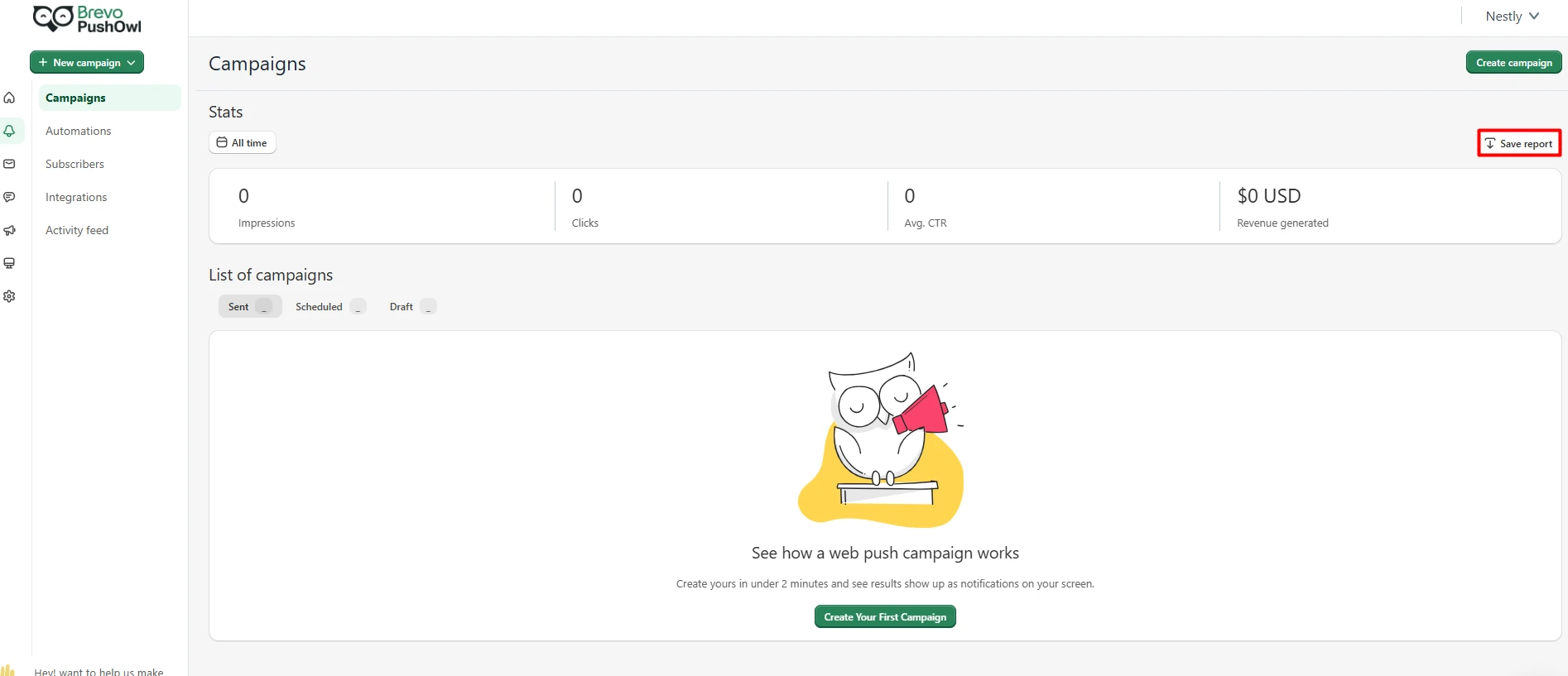
This helps when a shop has a small team. You may need to edit a note, check a flow, or view a list. A clear menu saves time on each task.
We did not run a large list or a full set of live sends. So we do not know how the app feels at scale.
Flows: The Best Part of Our Test
The preset flows were our top pick. We saw a set of choices on the page. We could turn on each one with ease.
This saves some of the work at the start. You can see the main paths first. You do not have to draw each path from scratch.
Yet we wanted more ways to tune the flow rules. We could switch them on, but the edit tools felt less open than we hoped. If you need fine rules, check the plan and test them first.
The app page lists cart and welcome flows. We did not prove how those work in a live shop. We did not cause a real event or check that a note was sent.
Web Push: We Saw the Builder
We went to the web push page. We saw how a shop can set up a push note.
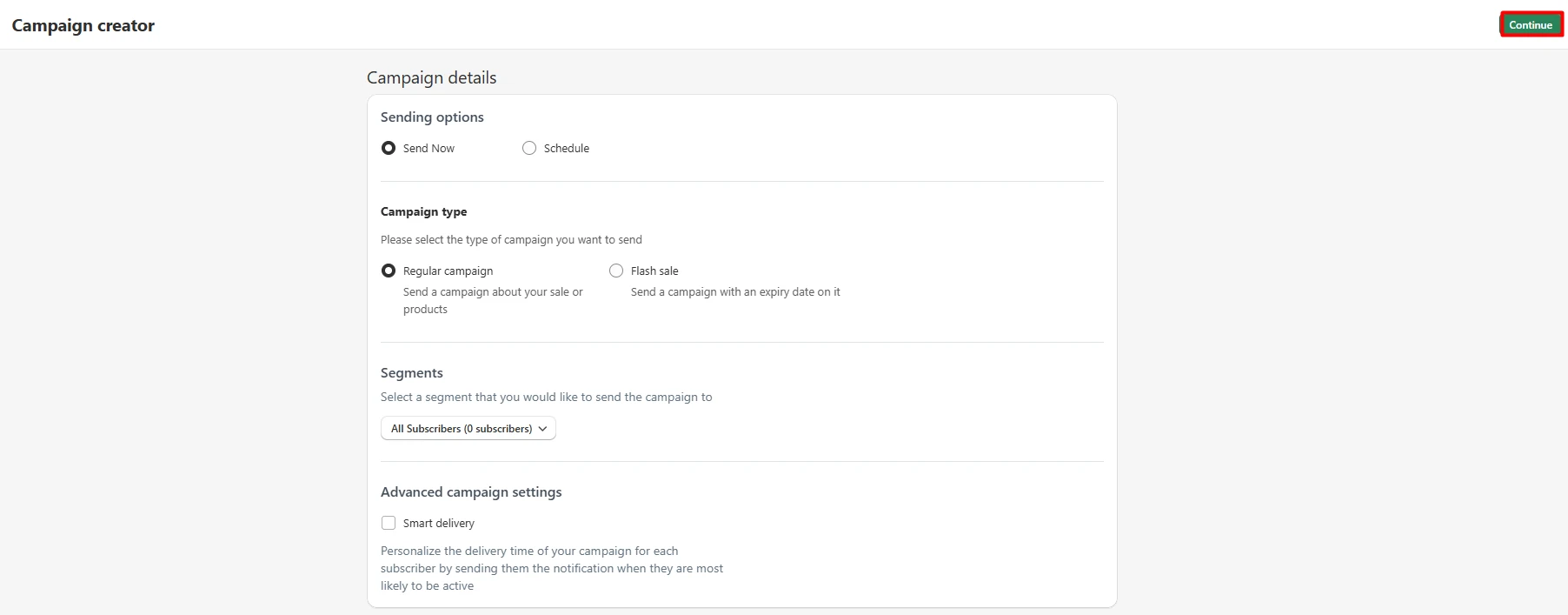
Push notes need a user to opt in. A shop should check how that works on the web and on each key device.
We did not send a push note. We did not see one on a phone or web screen. So we cannot rate how fast or how well push sends reach a user.
Before launch, send a test note to your own device. Check the link, text, opt-in, and opt-out steps.
Email, SMS, and Forms
We saw the email, SMS, and form pages. The tools are all in the same app. That may help a team keep its work in one place.
We did not send an email or text. We did not post a form on a live site. We also did not test what a buyer sees.
For your store, check how a form looks on a phone. Check that opt-in rules fit your market. Send a test email and SMS. Then make sure the right list gets each note.
This is a key step. A nice admin page does not prove that a live send will work as you wish.
Stats: We Looked, but Had No Live Data
The app has stats and a log of past work. We found and viewed these screens.
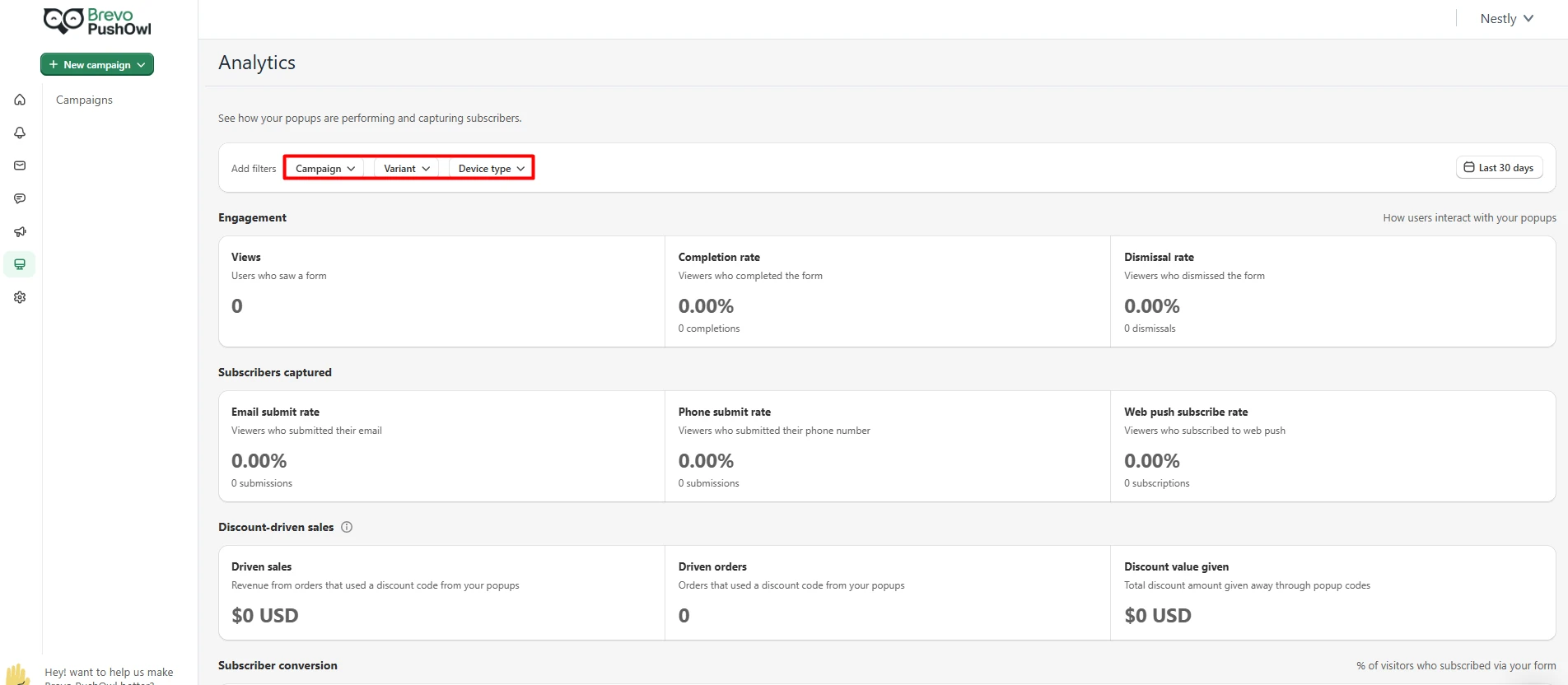
Our test had no real send or buyer data. We could not check how true or useful the stats were. We did not track sales from a push, email, or text.
If stats are key for your shop, run a small live test. Then check the app’s data with your own store data. Make sure the terms mean what you expect.
Brevo PushOwl Pricing in 2026
The Shopify app page lists these base plans. We last checked the prices on October 13, 2026.
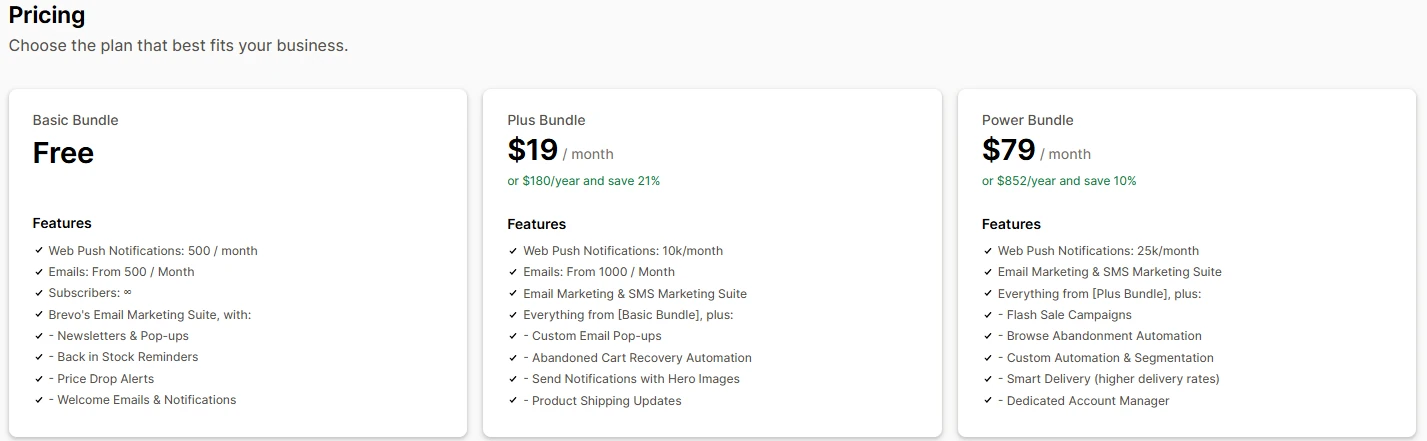
| Plan | Base price | What to check |
|---|---|---|
| Basic Bundle | Free | Core tools, send caps, and plan limits |
| Plus Bundle | $19/month | Paid flows, forms, and send caps |
| Power Bundle | $79/month | More flow tools and list rules |
The fee you pay may vary by use. The list of tools may also change. Check the live page for send caps, fees, and what each plan gets you.
Which plan should you pick?
Basic is a good first stop. It lets you see the app before you pay. Start here if your needs are light.
Plus may fit if you need more flows or forms. Check that the tools you want are part of the plan.
Power is for shops that may need more rules. We did not test those high-tier tools in full. Do not pay just for a long list of perks. Test your real needs first.
Pros and Cons
| Pros from our test | Cons and limits |
|---|---|
| Guided first steps | We wanted more flow edit tools |
| Clean, clear home screen | Less design choice than we hoped |
| Quick to turn on preset flows | We did not test live flow sends |
| Email, push, and SMS in one place | We could not check live stats |
| Free plan to try | Plan caps need a close look |
We list the lack of live tests as a limit of this review. It is not a flaw we found in the app.
Who Is Brevo PushOwl Best For?
A small store may like the clear start. You can see the main tools and try a few flows with ease. You do not need to know each part of email and push to find your way.
A shop that has begun to grow may like one place for its key send tools. That can be handy for a lean team.
Still, the app may not suit each brand. If you need many flow paths or strict design rules, do a deep test first. Check how each plan meets your needs. We did not test such a large setup.
What to Check Before You Pay
Start with one use case. Do not test all tools at once. Pick a simple welcome note or cart flow.
Then run a full test from start to end. Use your own email and phone. Check if the right note goes out at the right time.
Next, look at the design. Make sure the text, links, and brand style look right. Test on a phone as well as a laptop.
Last, look at the cost. Check the send cap and any extra fees. A cheap base plan may not be the best fit as your list grows.
These steps help you see how the app works for your shop. Our review of the admin screens cannot answer all these points.
Final Verdict
Brevo PushOwl is worth a look if ease of use comes first. Our test found a clear setup, neat menus, and preset flows we could turn on fast.
We were less keen on the flow and design edit tools. We wanted more choice. That may not be a deal-breaker for a small shop, but a large team may need more.
Try the free plan. Test one full flow with real test data. Then weigh the cost and limits before you make a choice.
We did not track live results. We make no claim about more sales, more clicks, or better send rates.
Frequently Asked Questions
Is Brevo PushOwl easy to use?
It was easy to use in our test. The first steps felt clear. The home screen was neat and the main tools were easy to find.
What did you like most?
The preset flows. We could turn on all the flows shown to us. That part felt quick and clear.
Did you test those flows with real buyers?
No. We turned them on in the app. We did not run a real buyer event or check live sends.
Does the app have email, push, and SMS?
Yes. The app page lists all three. We saw the tools, but did not send live notes.
Does it have cart recovery tools?
The app page lists cart flows. We did not test a live cart or see a cart note reach a buyer.
Is Brevo PushOwl free?
It has a free Basic plan. Check the app page for its current use caps and terms.
How much do paid plans cost?
The base price was $19 a month for Plus and $79 a month for Power when we checked. The total can vary with use.
Did you find any bugs?
We did not see major bugs in the pages we used. We did not test the full app or a live shop.
What did you not like?
We wanted more ways to edit flows and the look of each send. The simple tools may suit a new user but not all brands.
Did you test the stats?
We saw the stats page. We had no live data, so we could not check how well it works.
Who should try it?
Small and growing shops that want a clear start. If you need deep rules or rich design, test those needs first.
Would you use it for a large store?
We would test more before we made that choice. Our review did not cover a large list, deep flows, or live send results.
Source note: Our Blinto review of the app’s admin tools took place on October 2, 2026. We checked prices and listed features on the official Shopify app page on October 13, 2026. We did not test live campaign results.