
Small Shopify stores often need a practical email tool rather than a complex marketing suite. They want to collect subscribers, send campaigns, create forms, and automate common messages without adding another large monthly expense.
tinyEmail is designed for that use case. Its Shopify App Store listing currently shows a free plan, while the app includes campaigns, templates, forms, audience tools, automations, analytics, and a custom workflow builder.
We tested tinyEmail on a Shopify test store to see how easy it is to use, what the free plan includes, and where the product still has gaps. The core email tools are straightforward, but several features mentioned around the product were still marked “coming soon” during our review, including SMS, browse abandonment, and webhooks.
Key Takeaways
- Free Shopify plan: The Shopify App Store currently lists one free plan.
- Generous audience limits: tinyEmail’s FAQ says the Shopify plan includes unlimited subscribers and custom segments.
- Simple navigation: Campaigns, templates, forms, audiences, automations, workflows, and analytics are easy to locate.
- Two automation paths: Merchants can use prebuilt automations or create custom workflows.
- Some features are not ready yet: SMS, browse abandonment, and webhooks were marked “coming soon” in our test.
- Scheduled Shopify sync: The app says integration data syncs every 24 hours.
- Testing scope: We explored the interface, editors, templates, forms, integrations, and workflow tools, but did not send a live campaign or activate an automation.
Our Verdict
tinyEmail is a strong option for small Shopify stores that want straightforward email marketing without a monthly software bill. The interface is easy to follow, and the free plan covers the main jobs many smaller merchants need: campaigns, signup forms, templates, audience management, and basic automated flows.
Its biggest weakness is feature availability. SMS, browse abandonment, and webhooks are referenced around the product, but all three were still marked “coming soon” when we tested the app. Merchants who need those features now may need another tool.
We also did not send live campaigns or activate workflows. That means we cannot verify deliverability, revenue attribution, automation speed, or performance claims. Our assessment focuses on setup, usability, available features, and limitations visible inside the product.
What tinyEmail Offers
tinyEmail is listed on the Shopify App Store as tinyEmail; Email Marketing. The app is developed by tinyEmail® and has been available on the App Store since December 2021.
The main navigation keeps the core tools in one place:
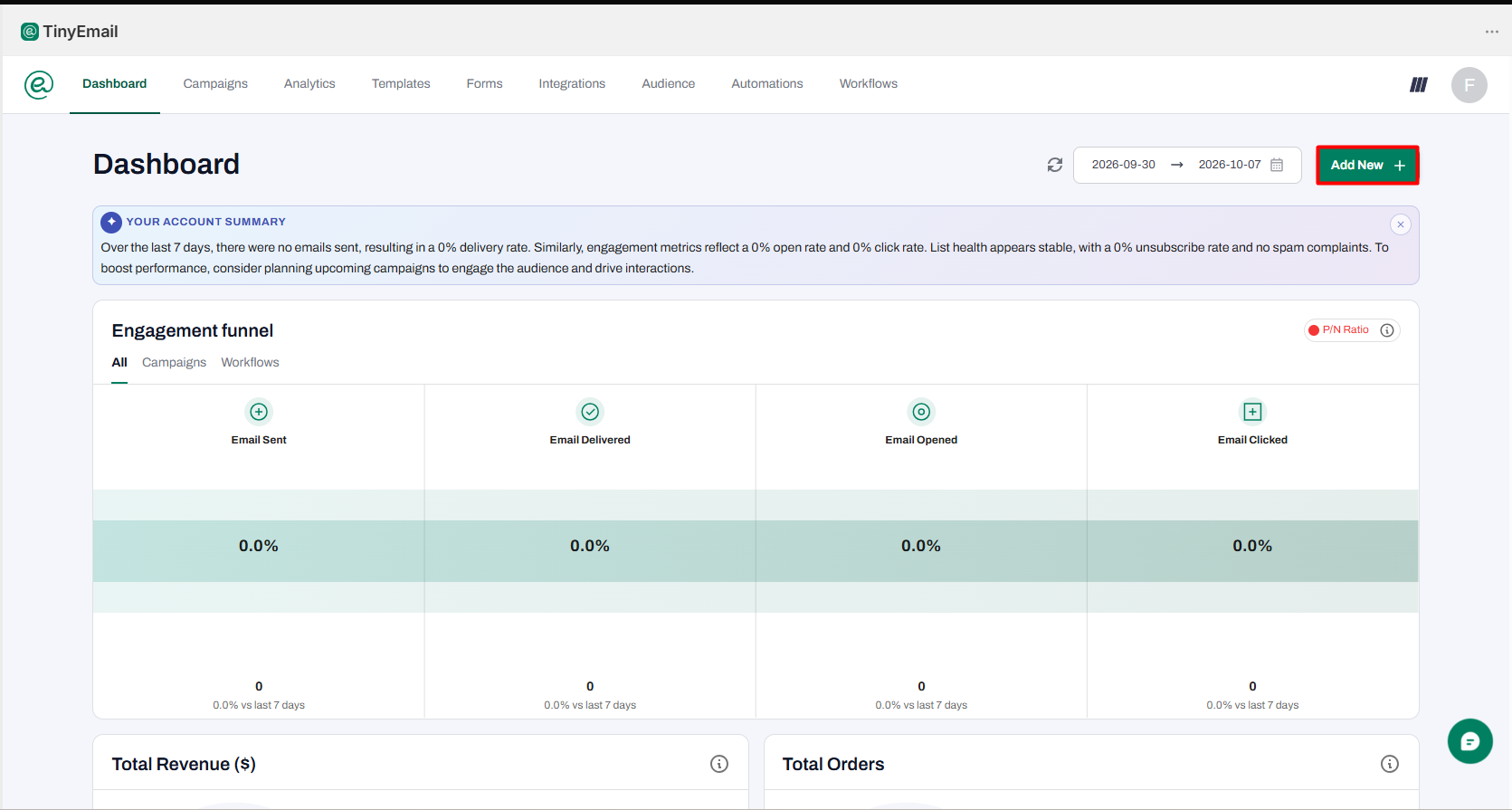
- Dashboard: Shows an AI-generated account summary and an engagement funnel for emails sent, delivered, opened, and clicked.
- Campaigns: Lets merchants create one-off email campaigns and includes a section for A/B testing.
- Analytics: Provides reporting tools for campaign activity.
- Templates: Includes a drag-and-drop template gallery and an option for custom code. During our review, we counted 85 templates under “Staff picks” and 66 under “Colorful.”
- Forms: Includes prebuilt embedded forms and popups. We saw 37 page forms and 38 popup designs.
- Integrations: Shopify was connected automatically in our test store. Other listed integrations included Zapier, Pabbly, Magento, WordPress, and Volusion.
- Audience: Includes contacts, segments, and a block list.
- Automations and Workflows: Gives merchants both prebuilt flows and a custom workflow builder.
The dashboard is simple and useful for a quick overview. Because our store was new and had no recent sends, the AI summary mainly noted the lack of activity and suggested creating a campaign.
You will also see tinyAlbert promoted across several parts of the app. It is tinyEmail’s AI assistant for tasks such as planning campaigns, drafting automation emails, and creating forms. The banners we saw promoted a free first month, which suggests tinyAlbert is a separate paid add-on. We did not test it or verify its current price.
What We Tested
We installed tinyEmail on a Shopify test store and explored the free plan. Our review covered the dashboard, campaigns, templates, forms, integrations, audience tools, automations, and the custom workflow builder.
We also opened the campaign editor, created a draft workflow, and previewed the Thank You For Purchase automation. The app automatically imported contacts from the store, and the Audience section displayed 25 contacts without us manually adding them.
We did not send a live campaign, activate an automation, publish a form, contact support, or use tinyAlbert. Because of that, this review does not judge email deliverability, automation speed, revenue attribution, or support quality from direct testing.
This testing level is enough to assess the interface, setup flow, feature availability, and basic workflow logic. It is not enough to make claims about conversion lift, inbox placement, or long-term reliability.
Automations: Useful Prebuilt Flows
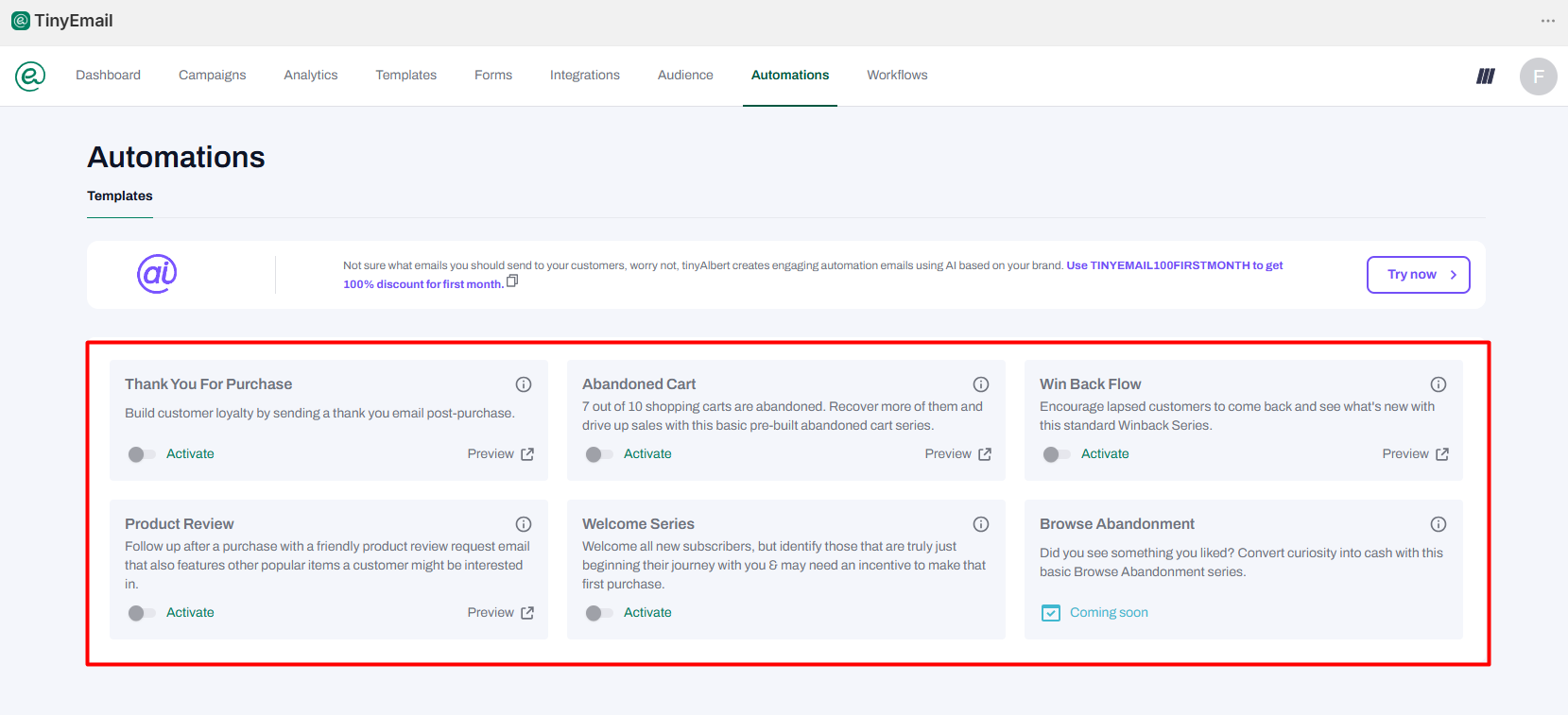
For merchants who do not want to build workflows from scratch, the Automations section is the easiest place to start. It provides prebuilt flows with an Activate switch and a Preview option.
The available flows we saw were:
- Thank You For Purchase
- Abandoned Cart
- Win Back Flow
- Product Review
- Welcome Series
- Browse Abandonment — marked “Coming soon”
We previewed the Thank You For Purchase automation. It uses a clean transactional layout with an order summary, shipping details, and a View order status button. The preview supports both desktop and mobile views.
The setup appears beginner-friendly because merchants can start from an existing flow instead of building every step manually. However, we did not activate any automation, so we cannot confirm send timing or how deeply each prebuilt email can be customized.
Browse abandonment is an important limitation. The Shopify listing and FAQ reference this feature, but the automation itself was still marked “Coming soon” during our test.
Custom Workflows: More Control, With Some Missing Actions
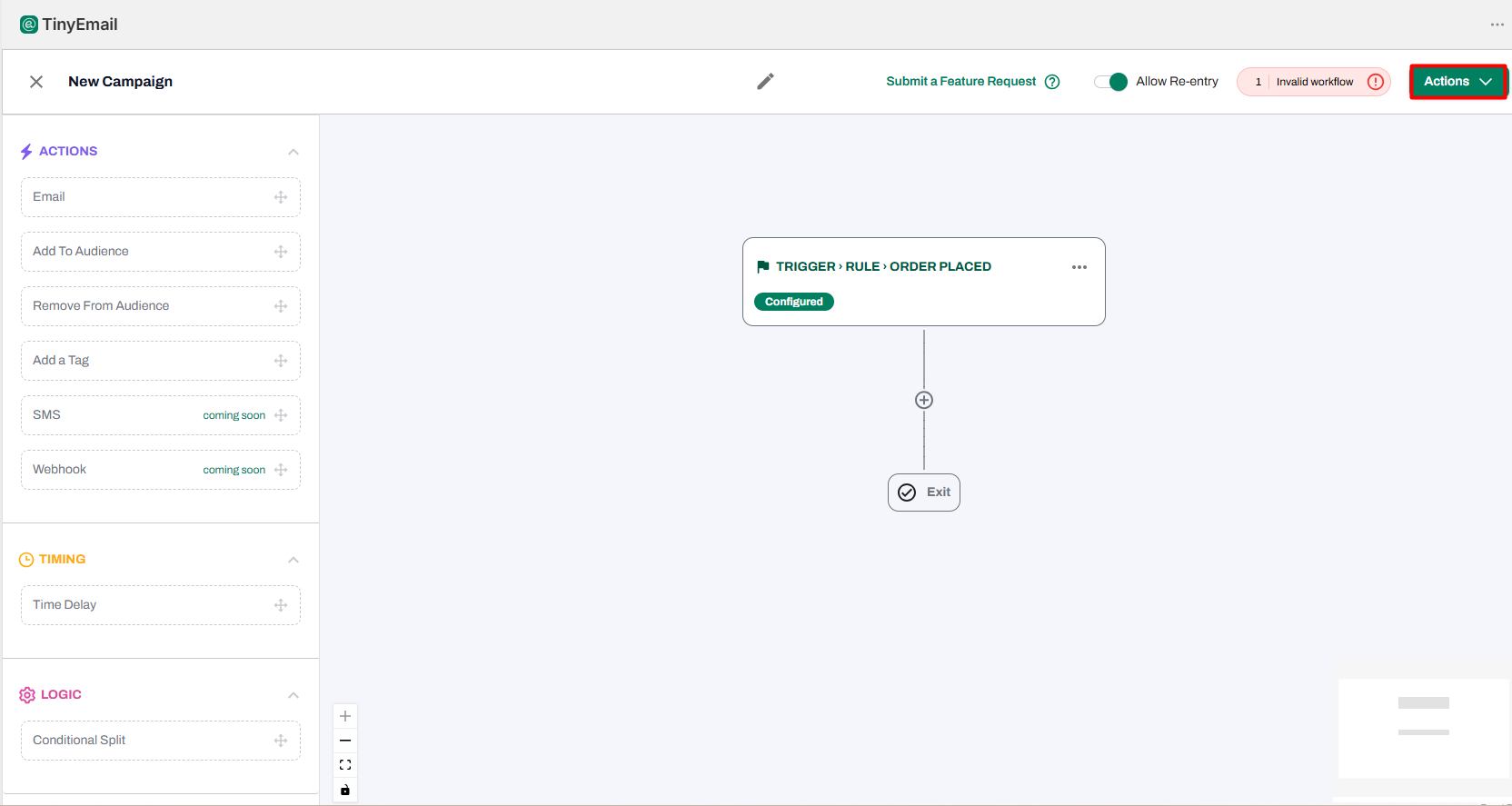
The Workflows section gives merchants more control than the prebuilt Automations page. You can start with a trigger, such as Order Placed, and then add actions, delays, and logic from the workflow panel.
Available options included:
- Actions: Email, Add To Audience, Remove From Audience, Add a Tag
- Timing: Time Delay
- Logic: Conditional Split
There is also an Allow Re-entry setting, which lets the same customer enter a workflow more than once when the trigger conditions are met.
The builder provides useful validation while you work. Our draft had a trigger but no action, so tinyEmail flagged it as an invalid workflow and kept it in the workflow list as a draft. That feedback should help beginners avoid activating incomplete automations.
Two actions were unavailable during our test: SMS and Webhook. Both were marked “coming soon.” We saw the same limitation when starting a campaign. Merchants could choose between email and SMS, but the SMS option also displayed a coming-soon message.
That difference between promoted features and available features matters. If SMS or webhook-based integrations are essential to your marketing setup, tinyEmail may not yet be complete enough on its own.
Shopify Data Syncs Once a Day
On the Integrations page, Shopify appeared as Connected. The app also displayed the message: “Your audience data from integrations is synced every 24hrs at 02:00 AM EST.”
A once-daily audience refresh may be perfectly acceptable for newsletters and general segmentation. However, merchants who expect newly added customers to appear in audience segments immediately should be aware of the possible delay.
We did not test how quickly order-triggered automations respond after a purchase, so we cannot confirm whether workflow triggers depend on the same sync schedule.
Templates and Forms
tinyEmail gives merchants a large number of starting points for both campaigns and list growth. During our review, the template gallery showed 85 designs under Staff picks and 66 under Colorful.
The Forms section was similarly broad. We saw 37 embedded forms and 38 popups, giving merchants multiple ways to collect subscribers without designing everything from scratch.
This variety is useful for smaller teams that value speed. Instead of beginning with an empty canvas, merchants can choose an existing layout and customize it. We did not publish a form, so we cannot judge live-store behavior, load speed, or theme compatibility.
Pricing and Value
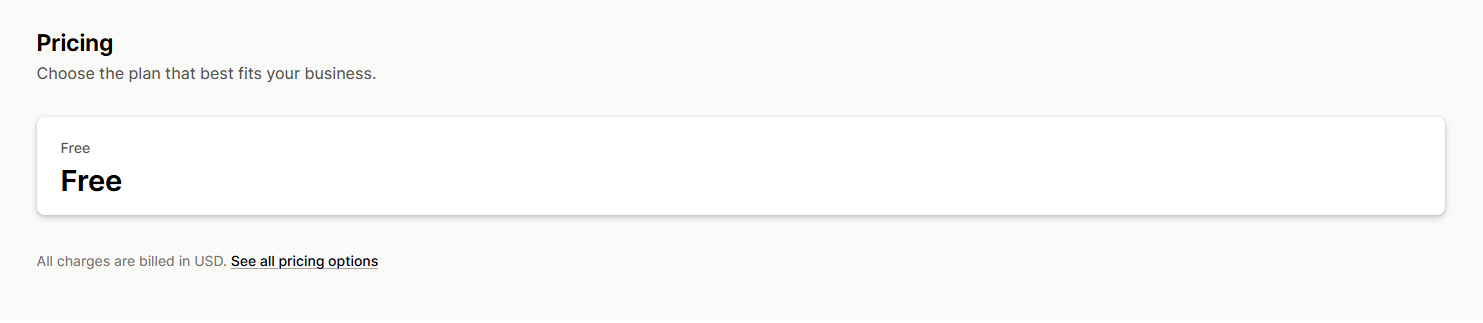
As of October 7, 2026, the Shopify App Store lists a single plan for tinyEmail, and that plan is Free.
tinyEmail’s FAQ refers to it as the Shopify Pro Plan and says it includes:
- unlimited subscribers
- unlimited custom segments
- an AI assistant for subject lines
We did not find a send limit on the Shopify listing or FAQ, and we did not send enough emails during testing to identify one ourselves.
There are two pricing details merchants should understand. First, tinyEmail’s own website also offers paid plans, so Shopify merchants should pay attention to where they create their account. The company has previously stated in an App Store review response that the free Shopify plan applies to stores that install through the Shopify App Store.
Second, tinyAlbert appears separate from the free core product. It is promoted frequently inside the app with a free-first-month offer. We did not verify its current paid pricing.
From a value perspective, the free Shopify plan is appealing because merchants can access campaigns, templates, forms, contacts, segments, and automation tools without an upfront monthly fee. The trade-off is that some more advanced features, particularly SMS, browse abandonment, and webhooks, were not yet available in our test.
Ease of Use
Ease of use is one of tinyEmail’s strongest qualities. The top navigation makes the product structure clear, while the automation area separates simple prebuilt flows from the more flexible workflow builder.
The workflow editor also gives useful feedback when a flow is incomplete. That matters for beginners because it reduces the chance of activating a broken sequence.
The interface is not completely distraction-free, though. tinyAlbert is promoted across several screens, and merchants who only want the core free email tools may find the repeated AI upsell unnecessary.
What Merchants Say
As of October 7, 2026, tinyEmail has a 4.3-star rating from 83 Shopify App Store reviews. Roughly 81% of those reviews are five stars, while about 10% are one star.
Recent positive reviews often mention three themes: affordability, helpful support, and ease of use. One merchant said they moved from Klaviyo because of tinyEmail’s affordability and simpler setup, while another described the app as easier to use than Mailchimp for basic email marketing.
Some positive reviewers had only used the app for a short time, so those comments may reflect onboarding impressions more than long-term performance.
Critical reviews, mostly from 2024 and 2025, raise concerns about account setup, frozen accounts, sender verification, support delays, and editing automations. One merchant also reported continuing to receive promotional emails after uninstalling the app.
We did not experience those problems during our test. Even so, merchants should use opted-in contacts and verify the sender email address before launching a campaign.
What We Liked
- Free Shopify plan: The app covers a useful set of email marketing features without a monthly fee.
- Clear interface: The main tools are easy to find, and the navigation feels manageable for beginners.
- Prebuilt automations: Merchants can start with common ecommerce flows instead of creating everything from scratch.
- Custom workflow builder: Triggers, delays, tags, and conditional splits provide more flexibility when needed.
- Large template selection: There are plenty of starting points for campaigns, forms, and popups.
- Helpful validation: The workflow builder flags incomplete setups before activation.
What Could Be Better
- SMS is not available yet: SMS campaigns and workflow actions were still marked “coming soon.”
- Browse abandonment is not ready: The feature appears in the product messaging but was unavailable during our test.
- Webhooks are still pending: The Webhook action was marked “coming soon.”
- Audience sync is scheduled: Shopify audience data updates once every 24 hours according to the Integrations page.
- Frequent tinyAlbert promotion: The AI add-on appears across many screens, which may feel distracting if you only want the free core product.
- Merchant feedback is mixed: Most reviews are positive, but some users report setup, account, and support problems.
Who Is tinyEmail Best For?
tinyEmail is best suited to small Shopify stores that mainly need email marketing and want to keep software costs low. It covers the essential building blocks for newsletters, signup forms, welcome sequences, purchase follow-ups, and abandoned-cart emails.
It is also a good fit for merchants who prefer a straightforward interface. The prebuilt automations reduce setup work, while the custom workflow builder is available when more control is needed.
Who May Want Something Else?
Merchants who need SMS marketing, browse-abandonment automation, or webhooks right now should consider other options. Those features were still marked as coming soon during our review.
Stores that depend heavily on email revenue may also want a longer trial before switching. Our testing did not include live sending, deliverability checks, revenue attribution, or long-term automation performance.
If you are comparing email tools, we have also reviewed AfterShip Email Marketing, SMS, Seguno, AVADA Email Marketing, and Klaviyo.
Final Verdict
tinyEmail delivers on two important promises for Shopify merchants: it is easy to navigate, and its Shopify plan is free. The app includes enough functionality for many small stores to build an audience, create campaigns, publish forms, and set up basic email automations without paying for a larger marketing platform.
Its main weakness is the gap between the broader feature set it promotes and what was available in the app during our test. SMS, browse abandonment, and webhooks were all still marked “coming soon.”
For stores that mainly need email, tinyEmail is worth considering. Start with the prebuilt purchase and abandoned-cart flows, verify the sender address before sending, and confirm that any advanced feature you depend on is already live before making the app central to your marketing stack.
FAQ
Is tinyEmail free for Shopify?
Yes. As of October 7, 2026, the Shopify App Store lists one tinyEmail plan, and it is free. tinyEmail’s FAQ says the Shopify plan includes unlimited subscribers and unlimited custom segments. Its main website also advertises paid plans, so Shopify merchants should install through the Shopify App Store if they want the Shopify-specific free plan.
Does tinyEmail support SMS marketing?
Not during our test. The app displayed SMS as an option in campaigns and workflows, but both areas marked it as “coming soon.” Merchants who need SMS immediately should verify whether the feature has launched before choosing tinyEmail.
Does tinyEmail have abandoned-cart emails?
Yes. Abandoned Cart is one of the prebuilt automation options available in the app. We could preview the automation and see its activation controls, but we did not enable it during testing.
Does tinyEmail support browse abandonment?
The product references browse abandonment, but the feature was still marked “Coming soon” inside the app during our review. If browse-abandonment recovery is important to your store, check the current feature status before installing.
Is tinyEmail easy to use?
We found the interface easy to understand. The main tools are clearly separated in the top navigation, and merchants can choose between simple prebuilt automations and a more flexible workflow builder.
Does tinyEmail sync Shopify customer data automatically?
Yes. Shopify was connected automatically in our test store. The Integrations page stated that audience data from integrations syncs every 24 hours at 02:00 AM EST.
Does tinyEmail include templates and signup forms?
Yes. During our review, we saw more than 150 email templates across two major template categories, plus dozens of embedded forms and popups. We inspected these options but did not publish a form to a live storefront.
Did we test email deliverability or campaign performance?
No. We explored the app and its editors but did not send a live campaign or activate an automation. Because of that, we do not make claims about inbox placement, revenue lift, conversion rate, or long-term campaign performance.