
A new Shopify store usually wants three things from an email app. It wants to collect sign-ups, send a few campaigns, and have a welcome email and a cart reminder go out on their own. It would also like to do all of that without paying much until the list grows.
AfterShip, best known for order tracking, offers an email and SMS app with a free plan for up to 300 contacts. So the question we wanted to answer was simple: how much of AfterShip Email Marketing, SMS can a small store actually use for free, and when does it start asking you to pay?
We spent more than an hour inside the app on a Shopify test store. Our short answer: the app is well organized and easy to move around, and the free plan covers the basics of email for a small store. But some tools that look free are not. The spin-to-win popup the app suggests on its home screen needs a paid plan once the trial ends. A/B tests and browse abandonment are marked as Premium. And the product recommendations screen froze on us once.
Key Takeaways
- Well organized: The app is laid out clearly, and a setup guide pops up the moment you open it.
- Automations sit under “Flows”: They live inside the Emails and SMS menu, not in their own top-level section. Ready-made templates cover welcome and abandoned cart emails.
- Free plan: 3,000 emails a month for up to 300 contacts. Our account also showed 50 free SMS credits a month.
- Not everything is free: Spin-to-win popups need Essentials ($11 a month) or higher. A/B tests and browse abandonment were marked “Email Premium”.
- One stability issue: The Recommendations screen froze, and we had to exit the page.
- Our scope: This was a partial hands-on test. We inspected the app but did not save, send or publish anything.
Our Verdict
AfterShip Email Marketing, SMS is a sensible free starting point for a new or small Shopify store that mainly wants to build a list and send simple emails.
The app is well organized. The home screen shows your contacts, email quota and SMS credits at a glance. A step-by-step guide suggests what to set up first. Ready-made templates exist for newsletters and for automated flows.
The catch is that the free plan is narrower than the first screens suggest. The app pushes a spin-to-win popup as your first step, but that popup is a trial feature. After the 7-day trial, it needs Essentials or higher. Some advanced tools, such as A/B tests and browse abandonment, carry a Premium label. Plan around the free plan’s real limits, not the trial.
We inspected the app only. We did not build a flow, send an email, publish a popup or send an SMS. So this verdict covers layout, setup and plan value, not email delivery or results.
What AfterShip Email Marketing, SMS Offers
AfterShip Email Marketing, SMS is listed on the Shopify App Store under that name. You may also see it called AfterShip Email & SMS. It comes from AfterShip, the company behind the AfterShip Tracking and Returns apps.
The developer describes it as an “all-in-one marketing platform” for leads, engagement and sales. In the app, we saw these main areas:
- Popups and forms, including a spin-to-win wheel and a welcome popup
- Emails and SMS, which holds email newsletters, SMS newsletters, Flows and email templates
- Coupons
- Conversion tools, such as product recommendations, a bar, social proof, sales boost and inactive-tab messages
- Contacts, with segments
- Analytics for popups, forms and emails
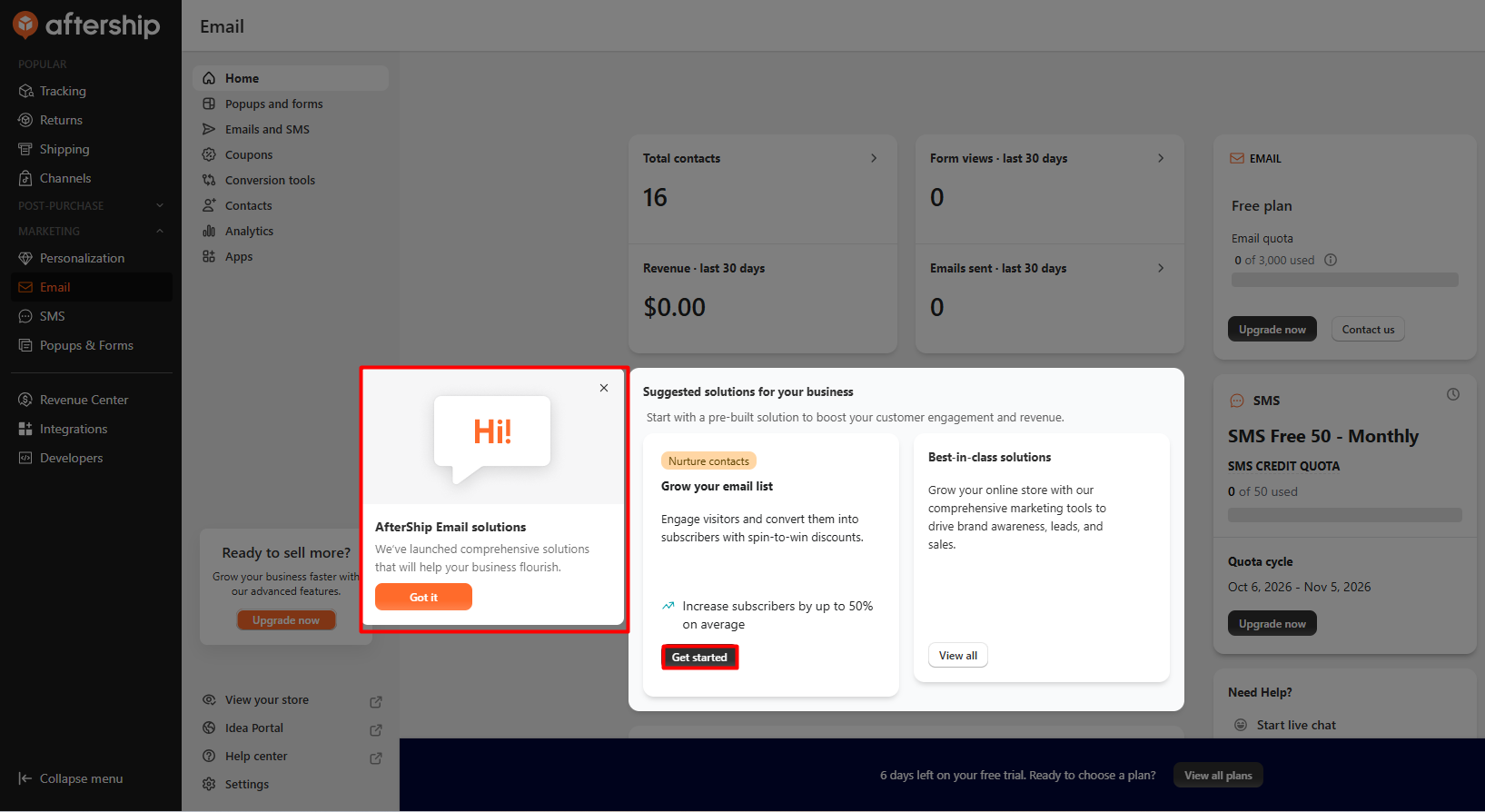
The home screen is a useful starting point. It shows total contacts, form views, revenue and emails sent. On the right, it shows your plan and quota. Our account was on the Free plan with 0 of 3,000 emails used and an “SMS Free 50 – Monthly” quota of 50 SMS credits.
AfterShip’s apps share one admin. If you already use AfterShip Tracking or Returns, the email app sits next to them in the left menu. This is handy, but keep in mind that AfterShip Tracking has its own shipping-notification emails. Those are separate from the marketing emails covered here.
The listing says the app works with Shopify Checkout, Shopify Flow, AfterShip and Klaviyo. We did not test any integrations.
What We Tested
We installed AfterShip Email Marketing, SMS on a Shopify test store and spent more than an hour inside it.
When we opened the app, a three-step setup guide appeared on its own. Its first step offered a welcome popup with a $10 discount. The app already showed 16 contacts. We did not import any.
We went through every main area:
- the home screen and its “Grow your email list” guide
- the spin-to-win popup editor
- the newsletter template gallery and email editor
- Flows and the flow template picker
- Conversion tools and product recommendations
- Contacts and analytics
We opened the editors to see how they work, but we did not save, send or publish anything. We did not turn on a flow, publish a popup, send a test email or SMS, or contact support. So we can judge layout, setup and plan limits. We cannot judge email delivery, popup sign-up rates or how accurate the reports are.
Setting Up Automations: Look for “Flows”
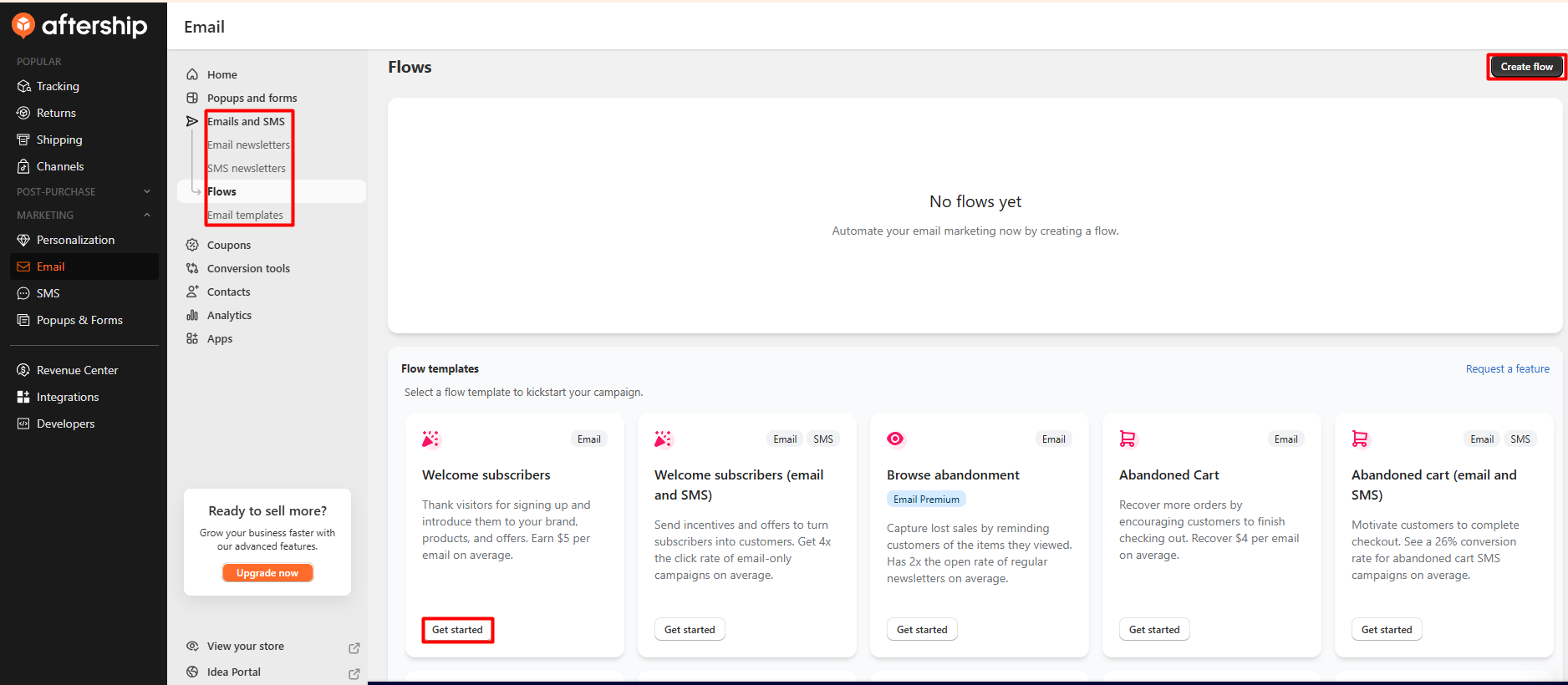
Automated emails are usually the first thing a new store wants. In AfterShip Email, they are called Flows, and they sit inside the Emails and SMS menu. They do not have their own top-level menu item. At first, we did not spot an automation section in the main menu. Expanding Emails and SMS showed Flows next to newsletters and email templates.
Once you are there, setup looks simple. The Flows page offers ready-made templates:
- Welcome subscribers (email)
- Welcome subscribers (email and SMS)
- Browse abandonment, marked “Email Premium”
- Abandoned cart (email)
- Abandoned cart (email and SMS)
When you pick a template, the app shows a preview of the whole flow before you create it. The welcome template we opened starts with a customer sign-up trigger. It splits by sign-up source and then sends a “Thanks for joining us” email. You can also start from scratch.
Each template card shows a performance figure from AfterShip, such as “Earn $5 per email on average”. These are AfterShip’s own claims, and we could not check them.
AfterShip’s help center adds a few details we did not test ourselves. It says flows are only available to Shopify stores. It also says that in flows, SMS messages “will be sent according to our standard template”. If you plan to rely on SMS in automations, check how much of that message you can edit.
Is the Free Plan Really Free?
This is the most important thing for a small store to understand.
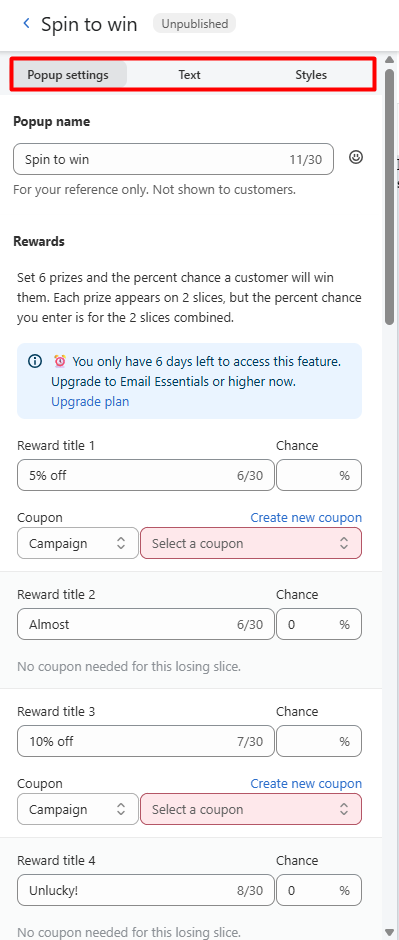
On the home screen, the app’s first suggestion is “Grow your email list” with a spin-to-win popup. Its guide has two steps: create a spin-to-win popup, then customize a welcome email. The spin-to-win editor itself is clear. You set six rewards, choose the chance of each one, and link a coupon to the winning slices.
But inside the editor, a notice said: “You only have 6 days left to access this feature. Upgrade to Email Essentials or higher now.” AfterShip’s help center article on the spin wheel popup, updated in July 2026, also lists it under the Essentials plan.
This clashes with the Shopify listing. The listing says the Free plan includes “all popup features”. From what we saw in the app, and what the help center says, spin-to-win is a paid feature after the trial.
We saw two more plan labels during our test:
- The Create A/B test button in the email editor sat next to an “Email Premium” label.
- The Browse abandonment flow template was marked “Email Premium”.
None of this is a problem if you expect it. But a new store owner who builds their sign-up strategy around the spin wheel during the trial may be surprised a week later.
One more setup step: you need a verified sender email before you can send. The email editor showed an error until a verified sender was added. It also showed a notice about Gmail’s bulk-sender rules, recommending that you verify your email domain.
Product Recommendations: The Page Froze
Under Conversion tools, the Recommendations screen lets you add product recommendation campaigns to five places: the home page, product pages, the cart, collection pages and search results.
While we were on this screen, the browser showed a “Page Unresponsive” message for the app. It did not recover, and we had to exit the page. It happened during our inspection, before we had created anything.
This was the only stability problem we hit. One freeze in one session does not prove a wider issue, but it is worth knowing if you plan to use this area. The same screen also shows a banner for AfterShip Personalization, a separate product with its own free trial.
Pricing and Value
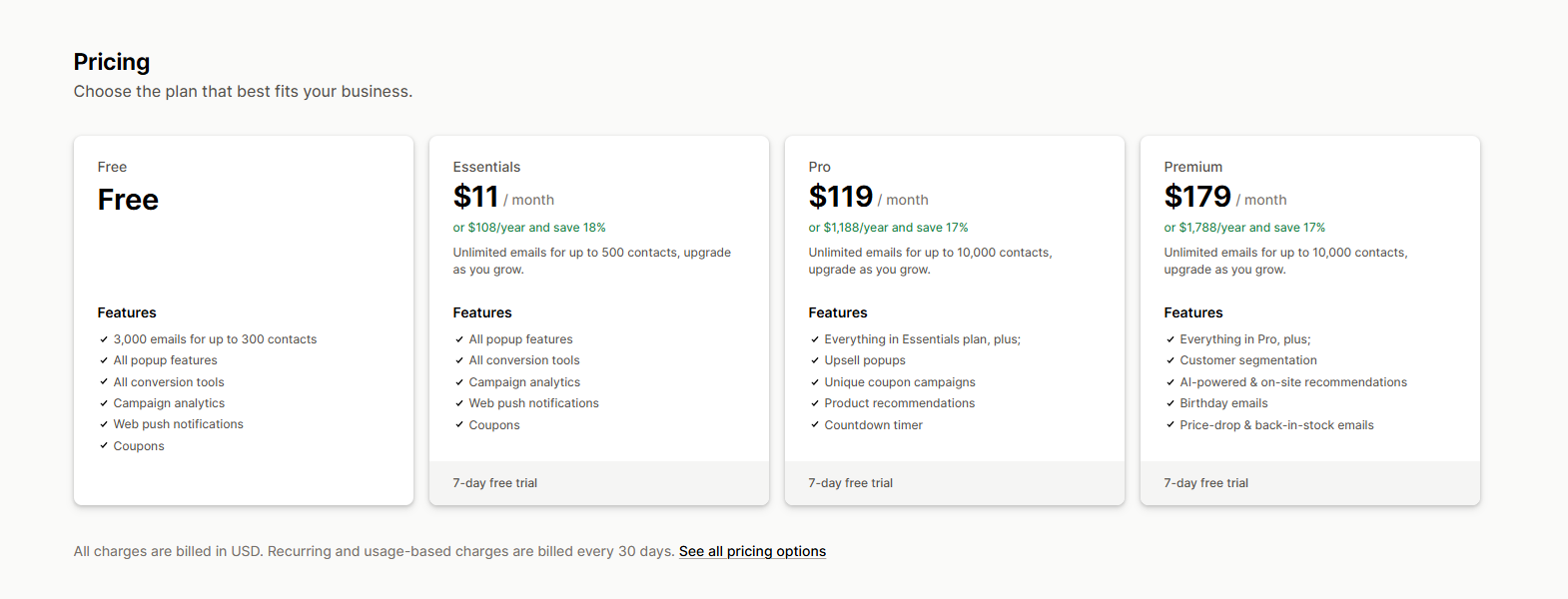
The Shopify listing, checked on 6 October 2026, shows four plans. All prices are in USD and billed every 30 days.
| Plan | Price | Contacts and emails | What it adds |
|---|---|---|---|
| Free | $0 | 3,000 emails, up to 300 contacts | Popup features, conversion tools, campaign analytics, web push, coupons |
| Essentials | $11/month or $108/year | Unlimited emails, up to 500 contacts | Same feature list as Free |
| Pro | $119/month or $1,188/year | Unlimited emails, up to 10,000 contacts | Upsell popups, unique coupon campaigns, product recommendations, countdown timer |
| Premium | $179/month or $1,788/year | Unlimited emails, up to 10,000 contacts | Customer segmentation, AI-powered and on-site recommendations, birthday emails, price-drop and back-in-stock emails |
Paid plans come with a 7-day free trial.
What the free plan really gets you. For a new store, 300 contacts and 3,000 emails a month are enough to send a welcome email and a few campaigns while the list grows. Our account also showed 50 free SMS credits a month, which the listing does not mention. But as covered above, the spin-to-win popup the app promotes needs Essentials after the trial. In our view, the Free plan is fine for basic email, as long as you know its limits.
Essentials is the cheap, sensible upgrade. At $11 a month, it removes the email cap, adds 200 contacts and unlocks spin-to-win. For a store that wants a gamified sign-up popup, this is the real starting price.
The jump after that is steep. Upsell popups and product recommendations start at Pro, $119 a month. Customer segmentation, birthday emails, and price-drop and back-in-stock emails need Premium at $179 a month. In the app, A/B tests and browse abandonment were also marked Premium. That is a big step for a small store that only wants one of those tools.
There is also a mismatch to check. The help center lists back-in-stock and price-drop flow templates, but the listing places those emails on Premium. Before you plan around a flow, check which ones your plan includes.
The listing does not show SMS prices beyond the free credits we saw in the app. Ask AfterShip about SMS costs before you plan regular text campaigns.
What Merchants Say
AfterShip Email Marketing, SMS holds a 4.8-star rating from 2,353 reviews on the Shopify App Store, as of 6 October 2026. Most reviews are five stars, and recent positive reviews praise helpful, patient support.
New reviews have slowed, though. We counted only a handful between October 2025 and May 2026. Several of those recent reviews are one star.
The low-star reviews from 2024 to 2026 repeat a few themes:
- Sending suspensions: some merchants say their email sending was suspended or frozen. In its replies, the developer usually points to high bounce rates or spam complaints.
- Billing disputes: some merchants describe plan upgrades they did not expect, charges after a suspension or refused refunds. In one reply, the developer says a subscription continues until it is cancelled.
- Support and cancellation: some describe slow replies and a hard time cancelling.
- Setup: one February 2026 review calls the app “extremely complicated and time consuming to setup and to remove.”
We did not run into any of these issues, and these reviews are a small share of the total. Still, a few habits help:
- Only import contacts who opted in.
- Verify your sender email and domain before sending.
- Cancel any paid plan or trial you do not want before you stop using the app.
What We Liked
- Well organized: The menus are clear, and the home screen shows your quota and SMS credits at a glance.
- Guided start: A setup guide opens on its own, and the home screen suggests what to build first.
- Ready-made templates: Newsletter templates and flow templates for welcome and abandoned cart emails mean you do not start from scratch.
- Flow preview: You can see the whole flow before you create it.
- Useful free plan for basic email: 3,000 emails for 300 contacts, plus 50 SMS credits in our account.
- One admin with other AfterShip tools: Stores using AfterShip Tracking or Returns can manage marketing from the same place.
What Could Be Better
- Spin-to-win is not free: The app’s first suggestion needs Essentials after the trial, even though the listing says the Free plan has all popup features.
- Premium labels on key tools: A/B tests and browse abandonment were marked “Email Premium”.
- Flows are tucked away: Automations sit inside the Emails and SMS menu, not in their own section.
- Page froze once: The Recommendations screen became unresponsive, and we had to exit the page.
- Steep plan jumps: Upsell popups and recommendations start at $119 a month, and segmentation needs $179 a month.
Who Is AfterShip Email Marketing, SMS Best For?
It fits new and small Shopify stores that want to start collecting emails and send basic campaigns and welcome flows on a free plan.
It also suits stores that will pay $11 a month for Essentials to get spin-to-win popups and unlimited emails for a small list.
And it suits stores that already use AfterShip Tracking or Returns and like keeping their tools in one admin.
Who May Want Something Else?
Stores that need A/B testing, browse abandonment, segmentation or back-in-stock emails, but do not want to pay $179 a month, should compare plans first. Other email apps we have reviewed include ONE, AVADA Email Marketing and Klaviyo.
Stores that rely heavily on SMS should get SMS pricing in writing first. They should also check how much they can edit SMS messages inside flows.
Final Verdict
AfterShip Email Marketing, SMS promises a free, all-in-one way to start email and SMS marketing. From our time inside the app, it delivers a well-organized admin, a helpful setup guide and ready-made flow templates. The free plan is a fair start for basic email.
The main catch is that the free plan is smaller than the first screens suggest. Spin-to-win needs Essentials after the trial. A/B tests and browse abandonment carry a Premium label. Bigger tools like segmentation sit behind a $179 plan.
Our advice: start on the free plan and set up a welcome flow under Emails and SMS → Flows. Verify your sender email before sending anything. If you want a spin-to-win popup, budget for Essentials at $11 a month, and check what each higher plan unlocks before you upgrade.
FAQ
Is AfterShip Email Marketing, SMS free?
Yes. The free plan includes 3,000 emails for up to 300 contacts. Our account also showed 50 free SMS credits a month. Some tools, such as spin-to-win popups, need a paid plan after the 7-day trial. Paid plans start at $11 a month.
Is the spin-to-win popup free?
Not after the trial, based on what we saw. In the app, the spin-to-win editor asked us to upgrade to Email Essentials or higher, and AfterShip’s help center lists the spin wheel popup under Essentials. The Shopify listing says the Free plan includes “all popup features”, so check your plan in the app.
Where are automations in AfterShip Email?
They are called Flows. Open the Emails and SMS menu and select Flows. You will find templates for welcome subscribers and abandoned cart emails, with email-and-SMS versions of both.
Is AfterShip Email easy to use?
We found it well organized. A setup guide opens on its own, and the home screen suggests what to set up first. The main thing to know is that automations sit under Emails and SMS → Flows.
Did you send emails or SMS during the review?
No. We inspected the app but did not save, send or publish any email, flow, popup, campaign or SMS. We cannot rate delivery or results.
Is the free plan enough?
For basic email on a new or small store, we think so. If you want spin-to-win popups or have more than 300 contacts, you will need Essentials at $11 a month. Upsell popups and segmentation need much higher plans.