
Many small Shopify stores end up with a pile of marketing apps. One app runs pop-ups. Another sends email. A third handles SMS. A fourth adds upsells. Each one has its own bill, its own setup and its own login. ONE promises to replace that pile with a single app and a single plan that starts at $9 a month.
So the question we wanted to answer was simple. Can a small store owner really run email, SMS, pop-ups and upsells from ONE without getting lost or hitting a wall?
We spent close to two hours inside ONE on a Shopify development store, on the Basic plan trial. We went through every main area and looked closely at the email, SMS and pop-up tools. Our short answer: the email automation setup is the best part, and the price is low for what is included. But the app has a lot of modules to learn, and the design options we saw felt limited.
Key Takeaways
- Best part: Email automations are grouped by trigger, such as “when customer abandons cart or checkout”, so it is easy to know what to pick.
- Less building: Ready-made automations (Cart Recovery, Upsell, Thank You and Birthday) mean you do not start from a blank page.
- Useful templates: The email gallery filters by goal and by “With Reward” or “No Reward”, which makes it quick to find a fitting design.
- Main drawback: There are many modules and menus to learn, and the design options for pop-ups and email templates felt limited to us.
- Price: The Basic (All-in-One) plan starts at $9 a month for up to 50 active customers, with a 10-day free trial. Cost rises as your active customer count grows.
- Our scope: This was a partial hands-on test. We did not publish a pop-up or send any email or SMS.
Our Verdict
ONE is a good fit for a small Shopify store that wants several marketing tools under one low price and is happy to learn as it goes.
The strongest thing we found was the email automation setup. ONE does not ask you to design a flow from scratch. Instead, it groups ready-made automations by what the customer did. You pick the moment, such as an abandoned cart or a first purchase, and choose the email that fits. For a store owner who is not a marketer, that removes a lot of guesswork.
The trade-off is breadth. ONE packs AI tools, email, SMS, pop-ups, upsells, rewards, analytics and customer data into one sidebar. That is the whole point of the app, but it also means there is a lot to take in. We also wanted more design control over pop-ups and email templates than we saw.
We did not see any bugs or broken pages in two hours of use. We also did not publish or send anything. So this verdict covers setup, layout and ease of use, not live results.
What ONE Offers
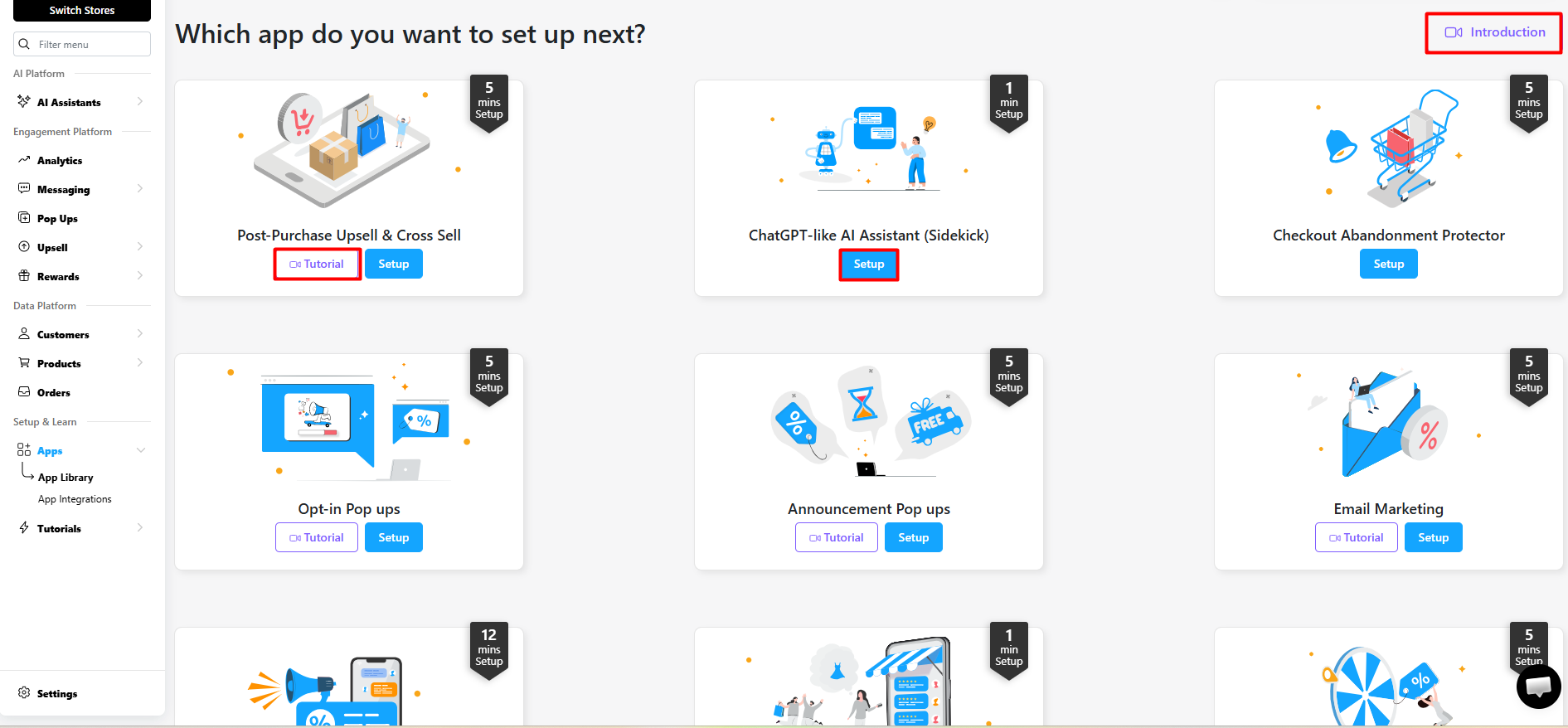
ONE is listed on the Shopify App Store as “ONE: AI, Pop Up, SMS Marketing”. The name has changed over time, and you may also see it called “ONE: AI, Email & SMS Marketing”. The developer, ONE, runs the product at one.store.
Inside the app, ONE calls each tool an “app”. The App Library asks, “Which app do you want to set up next?” and shows a card for each one. We saw cards for post-purchase upsell and cross-sell, a ChatGPT-like AI assistant called Sidekick, a checkout abandonment protector, opt-in pop-ups, announcement pop-ups and email marketing, with more below. Each card shows an estimated setup time, from 1 minute to 12 minutes. Most cards also have a Tutorial button, and there is an Introduction video at the top.
The sidebar splits the app into four groups:
- AI Platform: AI Assistants.
- Engagement Platform: Analytics, Messaging (email and SMS), Pop Ups, Upsell and Rewards.
- Data Platform: Customers, Products and Orders.
- Setup & Learn: Apps and Tutorials.
The first time you open ONE, a 13-card onboarding asks which tools interest you. The first card is the AI Sidekick, and each card has “Maybe Later” and “Interested” buttons. It is a light way to tell the app what you care about before you start.
According to the Shopify listing, ONE also connects with tools such as Klaviyo, Mailchimp, Omnisend, Attentive and ChatGPT. We did not test any integrations.
What We Tested
We installed ONE on Nestly, a Shopify development store Blinto uses for testing. We started the 10-day trial of the Basic (All-in-One) plan, which went through Shopify’s charge approval screen. We then spent close to two hours inside the app.
We went through the onboarding cards, the App Library and each main area in the sidebar. We spent the most time on email. We opened the Email Automations picker, the Email Broadcasts area and the template gallery. We also looked at the SMS page, the pop-up campaign builder, the Quick Setup screen for a reward pop-up, the Analytics page and the plan page.
We were careful about what we did not do. We did not publish a pop-up to the storefront. We did not create, edit, turn on or send an email, automation or SMS. We did not use the AI Sidekick, set up an upsell or test rewards. We did not connect another app, import a customer list or contact support. Our store had no live traffic, so the analytics showed zeros.
That means we can judge how ONE is laid out, how clear its setup paths are and what it offers at each step. We cannot judge email delivery, SMS delivery, pop-up sign-up rates, upsell revenue or how accurate the reports are.
Email Automations: The Strongest Part
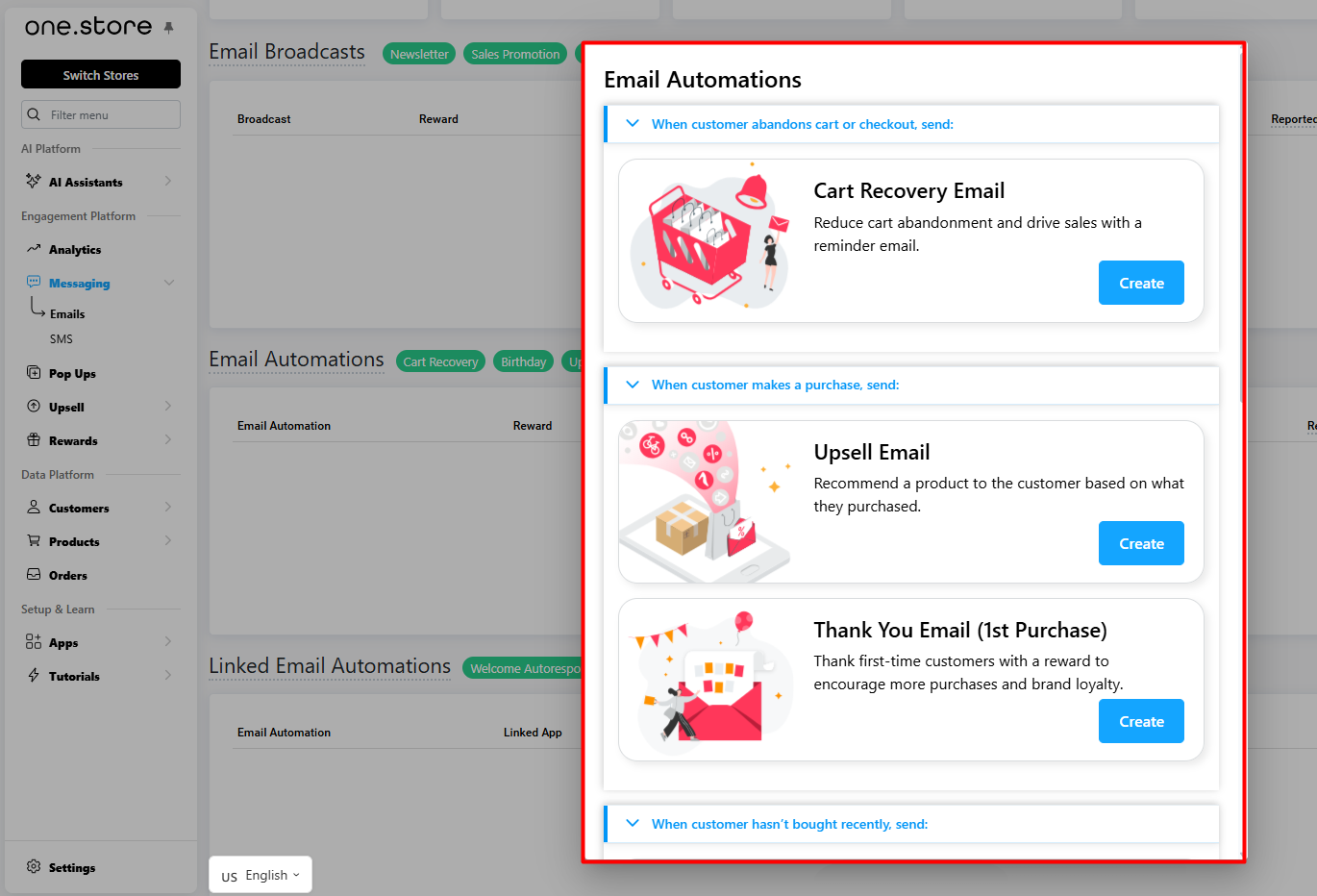
This was our favourite part of ONE.
When you create an email automation, ONE does not drop you into an empty canvas. It shows a list grouped by what the customer did:
- When customer abandons cart or checkout: Cart Recovery Email.
- When customer makes a purchase: Upsell Email and Thank You Email (1st Purchase).
- When customer hasn’t bought recently: a further section for customers who have gone quiet.
Each option has a one-line explanation and a Create button. The Thank You email, for example, is described as a way to “thank first-time customers with a reward to encourage more purchases and brand loyalty.”
Behind the picker, the Emails page has separate areas for Email Broadcasts (with Newsletter and Sales Promotion types), Email Automations (with Cart Recovery and Birthday among the types) and Linked Email Automations, where a Welcome Autoresponder is listed.
Why this matters: most small store owners know the moments they care about. They want to win back an abandoned cart, thank a new buyer and bring back someone who has gone quiet. ONE starts from those moments. You do not need to know how to build a flow. You need to know which customer action you want to respond to.
What we saw is a picker of ready-made automations, not a blank flow canvas. We did not create an automation, so we did not test how much each one can be changed or whether multi-step branching is possible. Stores that want complex customer journeys should check the editor closely during the trial.
Email Templates and Design
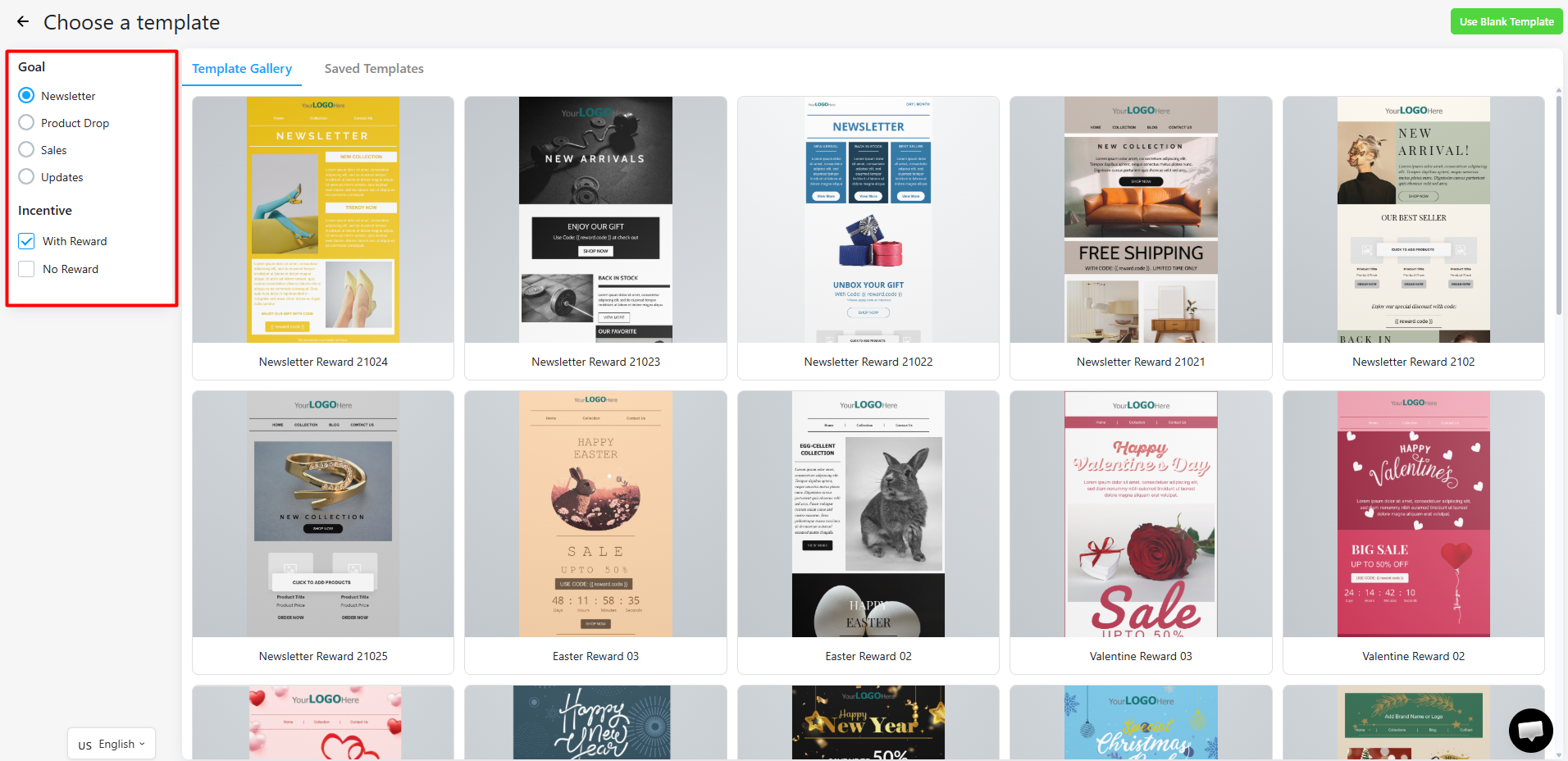
The template gallery was the second thing we liked. On the left, two simple filters narrow the list:
- Goal: Newsletter, Product Drop, Sales or Updates.
- Incentive: With Reward or No Reward.
The “With Reward” filter is a small but smart touch. Many small stores send a discount with almost every campaign. Being able to show only templates that already have space for a reward code saves time. The gallery also has seasonal designs for Easter, Valentine’s Day, New Year and Christmas, a Saved Templates tab and a “Use Blank Template” option.
The gallery made it easy to find a starting point. But the design choices we looked at felt limited, and we wanted more control over how the emails look. We did not build or edit a template, so this is an impression from what we inspected rather than a full test of the editor. Brands that care a lot about matching their look should open the editor during the trial and try to recreate one of their own emails.
Pop-Ups: Fast Setup, Less Design Control
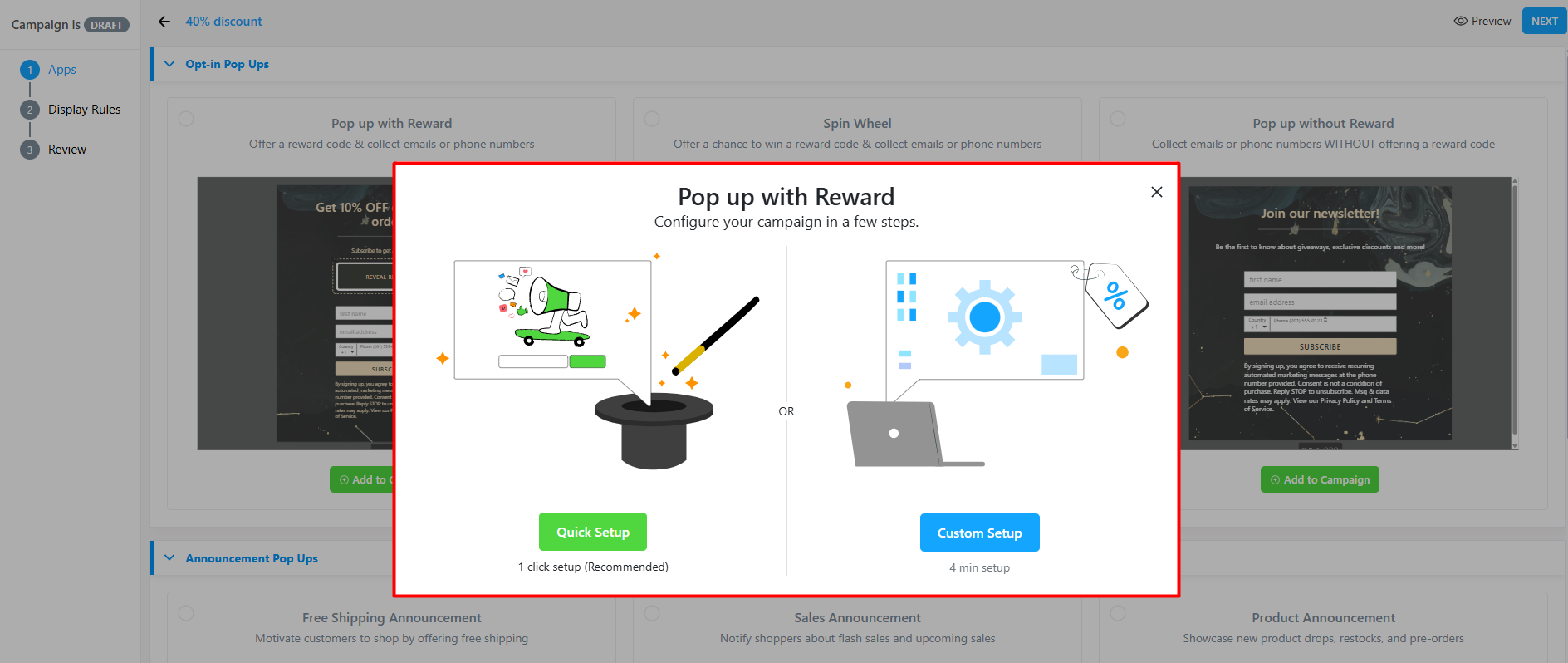
Pop-ups are where ONE collects emails and phone numbers. The campaign builder follows three steps: Apps, Display Rules and Review.
We saw two groups of pop-up types:
- Opt-in pop-ups: Pop up with Reward, Spin Wheel, and Pop up without Reward.
- Announcement pop-ups: Free Shipping, Sales and Product announcements.
When you pick a type, ONE offers two paths. Quick Setup is labelled “1 click setup (Recommended)”. Custom Setup is labelled “4 min setup”. We opened Quick Setup for a reward pop-up. It asked only two things: which reward code to give (we saw a 10% discount) and whether to turn on the email autoresponder. A preview showed a simple “Get 10% OFF on your first order!” pop-up, with a Publish button and a note that you “can customize later.”
For a store owner who just wants a sign-up form live today, that is about as simple as it gets. The trade-off is design. As with the email templates, the pop-up designs we saw felt limited, and we wanted more ways to shape them to a brand. We did not publish the pop-up or see it on the live store, so we cannot say how it looks to shoppers or how well it converts.
SMS and Other Modules
The SMS page sits next to email under Messaging. It shows Sent, Bounced, Delivered, Cost, ROI, Clicked and CTR at the top. SMS Broadcasts offer a Newsletter SMS with or without a reward. SMS Automations include Cart Recovery and Birthday. There are also buttons for SMS Settings, SMS History, Add Credits and Create SMS. Our account showed 250 SMS credits.
We did not send an SMS, so we cannot judge delivery, compliance setup or real costs.
The Analytics page brings online store, upsell, rewards and messaging numbers together. It tracks visitors, carts, checkouts, orders, conversion rate and revenue, plus offers, coupons and gift cards. Our development store had no traffic, so every figure was zero, and we cannot comment on accuracy.
ONE also includes post-purchase upsell, a checkout abandonment protector, rewards and the AI Sidekick. We saw these in the App Library and sidebar but did not set them up.
This is where the “too many modules” feeling comes from. Each area is clear on its own. But together, there are many places to visit and many settings to learn. A new user should expect to spend time just finding their way around before running a full plan.
Pricing and Value
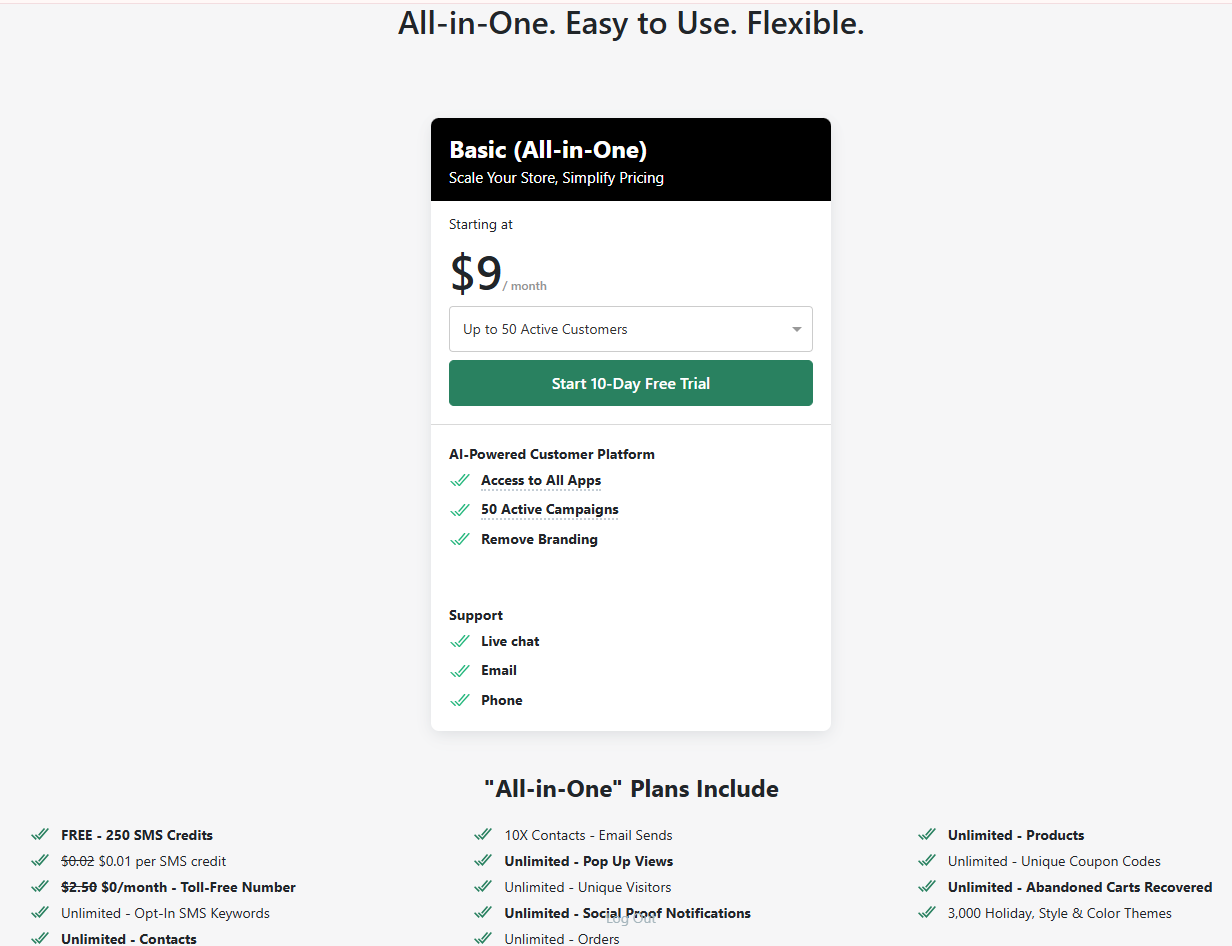
ONE uses one main paid plan. In the app, we saw Basic (All-in-One) “starting at $9 / month” for up to 50 active customers, with a 10-day free trial. That plan included:
- access to all apps
- 50 active campaigns
- remove branding
- live chat, email and phone support
The plan page also listed 250 free SMS credits, SMS credits at $0.01 each, a $0/month toll-free number, unlimited contacts, email sends of 10 times your contacts, and unlimited pop-up views, orders, products and coupon codes.
The Shopify listing, checked on 5 October 2026, matches this. It also shows a free Sandbox plan, but only for test, trial or sandbox stores, with 2 active campaigns and limited access. In practice, a live store should plan for the paid plan once the trial ends.
The key word is “starting”. The $9 price covers up to 50 active customers, and the plan is chosen from a dropdown of customer tiers. We did not check the higher tiers. A growing store should open that dropdown during the trial and find the tier that matches its real customer count. SMS also costs extra beyond the free credits.
On value, $9 a month is low for a tool that covers email, SMS, pop-ups and upsells. If ONE lets a small store cancel two or three other apps, the saving could be real. But that only holds if ONE’s version of each tool is good enough for your needs.
One more point from merchant reviews. ONE holds a 4.9-star rating from 999 reviews on the Shopify App Store. Most praise fast support. But a small number of low-star reviews describe billing surprises, such as charges after uninstalling or plan changes as usage grew. In its replies, the developer says some plans must be cancelled inside ONE before uninstalling. We did not experience this, but it is worth knowing. If you stop using ONE, cancel the plan in the app first, then uninstall.
What We Liked
- Automations grouped by trigger: It is easy to know which automation to pick because each one sits under the customer action that starts it.
- Ready-made automations: Cart Recovery, Upsell, Thank You and Birthday emails are ready to create, so there is no need to build from scratch.
- Helpful template filters: Filtering by goal and by “With Reward” or “No Reward” made it quick to find a fitting template.
- Clear setup paths: The App Library shows setup times and tutorials, and pop-ups offer a one-click Quick Setup.
- No bugs: We did not see any errors, crashes or broken pages in close to two hours of use.
- Low starting price: The Basic plan starts at $9 a month and includes access to every app.
What Could Be Better
- Too many modules and menus: ONE covers AI, email, SMS, pop-ups, upsell, rewards, analytics and customer data. Each area is clear, but there is a lot to learn at once.
- Limited design control: The pop-up and email template designs we inspected felt limited. Brand-focused stores may want more options.
- Pricing depends on customer count: The $9 price is a starting point. Costs grow with active customers, and SMS is billed by credit after the free allowance.
Who Is ONE Best For?
ONE fits small Shopify stores that want to cover the basics of email, SMS and pop-ups without paying for several separate apps.
It suits store owners who are not marketers. The trigger-based automations and the reward filter in the template gallery let you set up common campaigns without planning complex flows. Quick Setup for pop-ups helps you get a sign-up offer ready fast.
It also suits stores that like to grow into a tool. You can start with one or two modules, such as a pop-up and a cart recovery email, and add more later from the App Library.
Who May Want Something Else?
Brand-focused stores that need close design control should test the pop-up and email editors carefully during the trial. The options we saw may feel tight.
Stores that want to run deep, multi-step customer journeys should confirm ONE’s automation editor can handle them. We did not test how far ONE’s automations can be changed, and a dedicated email platform may suit those stores better.
Stores with large or fast-growing customer lists should check the higher pricing tiers before committing, since the cost scales with active customers.
Teams that want one focused tool, rather than many, may also find ONE’s breadth more than they need.
Final Verdict
ONE sets out to replace a stack of marketing apps with one plan that starts at $9 a month. From our two hours inside the app, it makes a solid case for small stores.
The email automation setup is the clear highlight. Grouping ready-made automations by trigger makes it easy to know what to set up and when. The template gallery’s goal and reward filters add to that ease. We saw no bugs.
The main caveats are breadth and design. There are many modules and menus to learn, and the pop-up and email designs we saw felt limited.
Our advice: use the 10-day trial to set up one pop-up and one cart recovery email, send them to yourself, and check the higher pricing tiers. That will tell you quickly whether ONE can replace the apps you already pay for.
FAQ
Is ONE easy to use?
Each area was clear to us, and the email automations were especially easy to understand. The App Library shows setup times and tutorials. The main challenge is the number of modules, so expect to spend some time learning where everything sits.
What did you like most about ONE?
The email automations. They are grouped by the customer action that triggers them, such as an abandoned cart or a first purchase, and come ready-made. That makes it easy to know what to set up.
How much does ONE cost?
In the app, the Basic (All-in-One) plan started at $9 a month for up to 50 active customers, with a 10-day free trial. The price rises with your active customer count. SMS credits cost $0.01 each after 250 free credits. Check the current plan page before you subscribe.
Is there a free plan?
The Shopify listing shows a free Sandbox plan, but it is limited to test, trial or sandbox stores, with 2 active campaigns and limited app access. Live stores should expect to use a paid plan.
Did you send emails or SMS during the review?
No. We inspected the email and SMS tools but did not create, turn on or send any messages. We cannot rate delivery, open rates or SMS costs in practice.
Did you publish a pop-up?
No. We opened the Quick Setup screen for a reward pop-up and saw the preview, but we did not publish it to the store. We cannot say how it performs with real shoppers.
Did you find any bugs?
No. We did not see any errors or broken pages during close to two hours of use. This was still a limited test, so it is not proof of long-term reliability.
What should I know before uninstalling ONE?
Some merchant reviews describe being charged after uninstalling. The developer says some plans must be cancelled inside ONE first. To be safe, cancel your plan in the app before you remove it from Shopify.