
Five days ago we asked a Shopify AI chatbot the cheapest product in a 51-item catalogue. It named a $1.85 item while a $1.18 item sat visible on the same page.
This week we installed Zipchat on the same store, with the same catalogue, and asked it the same question.
It answered correctly. It named the $1.18 product, offered the $1.29 runner-up, showed both as cards, and let us add the right one to the cart without leaving the chat.
That is not a verdict on either company’s engineering, and one question proves little on its own. But it is a clean, controlled comparison, and it points at a real architectural difference worth understanding before you buy.
Key Takeaways
- It got the catalogue question right. Asked for the cheapest product, Zipchat named the $1.18 item and a $1.29 alternative, with product cards for both — correct against the storefront.
- It asked rather than guessed. Given a vague question with no product named, the agent asked which product we meant instead of inventing an answer.
- It sells, not just answers. Product cards carry add-to-cart, and the item it recommended went straight into the Shopify cart at the right price.
- It is expensive. The free tier is 120 AI replies a month. The first paid plan is $80, and overage runs $49 per 250 replies.
- The default behaviour hands out discounts. Out of the box the agent is set to offer hesitant buyers up to 20% off.
Our Verdict
Zipchat is a strong choice for a Shopify store that wants an AI agent to sell, not just deflect tickets — provided the volume maths works at its prices.
Everything we asked of the product worked. Install was one dialog, the storefront bar appeared from a single theme toggle, and the agent had learned the catalogue before we finished reading the setup page. Its answers matched the store. It handled ambiguity by asking. It turned a correct answer into a cart.
The caution is cost and defaults. Zipchat is priced several times above the general-purpose support tools in this category, the free tier is a demo, and overage is billed per block of replies. The agent also arrives configured to offer discounts of up to 20% and to collect visitor emails. Both are reasonable for a sales agent; neither should be live before you have decided you want them.
What Zipchat Offers
Zipchat is an AI sales and support agent for ecommerce. Its Shopify App Store listing carries the Built for Shopify badge and describes an agent across web chat, WhatsApp, Instagram, Messenger and email, covering order tracking, returns, stock checks, discounts, product recommendations, upsells and cart recovery. The app launched in May 2023.
Listed integrations include Shopify Checkout and Admin, Gorgias, Zendesk, Re:amaze, Klaviyo, Omnisend, Brevo and the WhatsApp Business API. The admin covers Conversations, Contacts, Campaigns, Reports, AI training and Channels.
Notably, the developer describes the agent reading the product catalogue, collections and policies through the Shopify Admin API, with the catalogue syncing on a schedule and order data queried live. We could not verify that mechanism ourselves, but it is consistent with what we observed.
What We Tested
We tested Zipchat in October 2026 on a Shopify development store called Nestly, running the Tinker theme with 51 low-priced accessories — the same store, catalogue and theme we used for our Tidio review, which is what makes the comparison in this article meaningful.
Our test covered the install permissions, the dashboard onboarding including the agent behaviour settings, enabling the Zipchat Bubble app embed in the theme editor, the storefront chat bar, two real conversations as a shopper, the in-chat product cards and add-to-cart, the resulting Shopify cart, and the merchant-side Conversations view with its correction tools.
We did not test WhatsApp, Instagram, Messenger or email channels, Campaigns, Reports, the AI training screens, custom rules, human take-over, escalation, multilingual answers, mobile rendering, or Zipchat’s support team. We did not reach the end of a paid plan, so we saw no billing event, overage charge or uninstall. Pricing was read from the App Store listing and Zipchat’s own pricing page.
One boundary worth stating plainly: we asked a handful of questions in a single session. That is enough to report what happened, not enough to measure accuracy.
What Public Sources Add
On October 7, 2026 the listing showed a 4.9 rating from 204 reviews, with 96% at five stars and 3% at one star. Recent reviews run to September 2026.
Praise clusters on answer quality, revenue attribution, and fast no-code setup, with several merchants naming individual onboarding staff. More than one describes the app paying for itself several times over, which is the claim you would expect merchants to make about a tool at this price.
The negative set is small but specific. Merchants describe support replies taking over a week on paid plans, promised custom configuration never arriving, weak performance on niche catalogues with product suggestions that felt random, no way to export conversation data to a CRM, old training data persisting after retraining, and the widget still appearing on the storefront after uninstalling. One merchant reported receiving unsolicited sales email after moving to a competitor, and the developer’s public reply defended the outreach as normal practice.
We did not reproduce any of it. The export gap and the slow-support reports are the two worth weighing if you are consolidating tooling or buying at the top tiers.
Setup, and the Defaults You Should Read
The Shopify install dialog asks for customer data including sensitive device and activity data, staff and contributor data, and read-write access to customers, products, orders, discounts, store analytics and the online store.
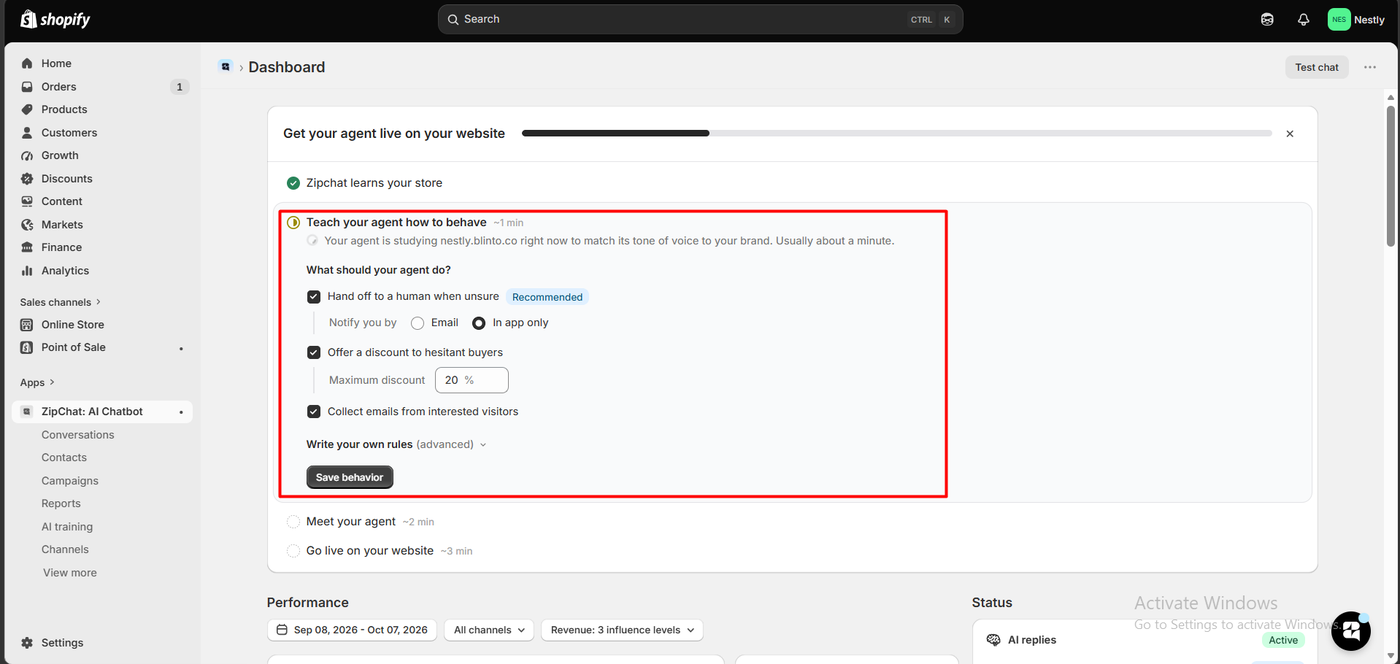
After install, the dashboard runs a four-step launch checklist. The first step, “Zipchat learns your store”, was already complete when we arrived. The second told us the agent was studying the storefront to match our brand’s tone, and said it usually takes about a minute.
That second step is where the defaults live, and they deserve a careful read:
- Hand off to a human when unsure, marked Recommended and enabled, with notification by email or in-app.
- Offer a discount to hesitant buyers, enabled, with a maximum discount of 20% pre-filled.
- Collect emails from interested visitors, enabled.
An advanced panel allows custom rules. We left all three defaults as they came.
A 20% discount ceiling switched on by default is the setting to think hardest about. For a store with healthy margins running a deliberate recovery strategy, it is exactly the behaviour you want from a sales agent. For a store with thin margins, an AI authorised to discount a fifth of the order value is a decision, not a default — and it is enabled before you have seen a single conversation.
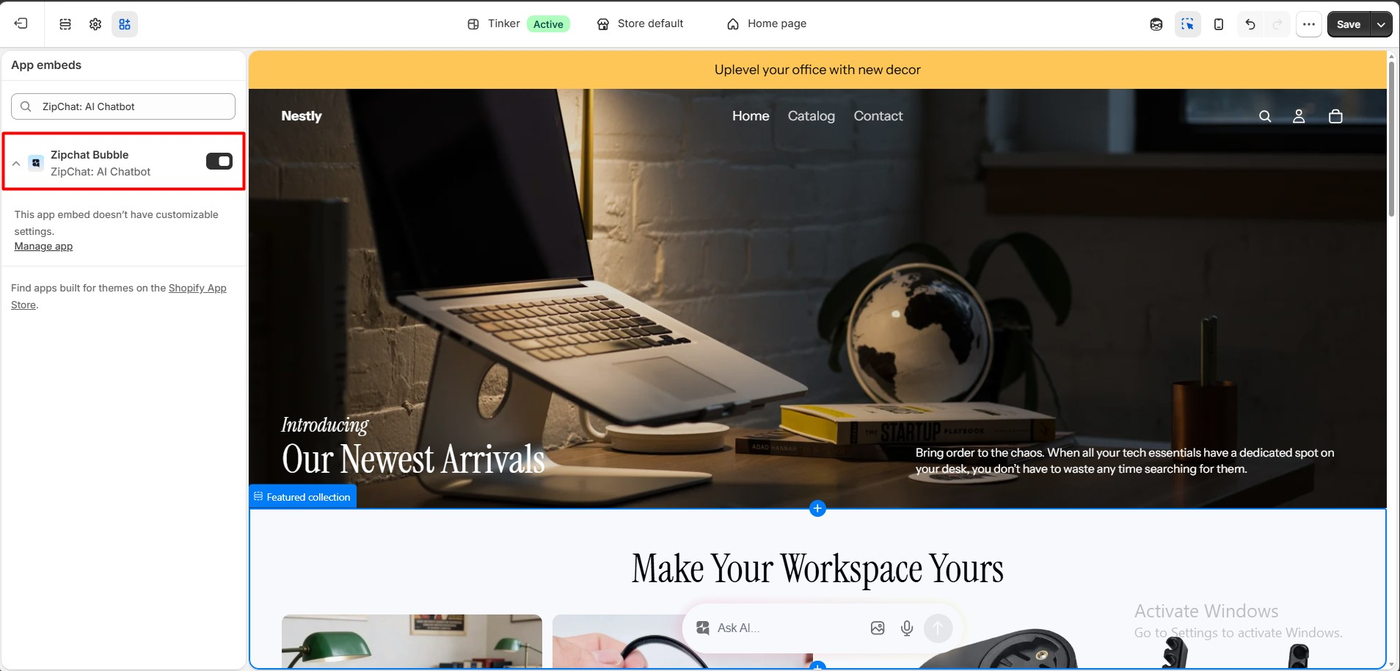
Going live took one toggle. The Zipchat Bubble app embed in the theme editor has no settings of its own — appearance is managed in the app. On the storefront it does not render as the usual corner bubble but as a pill-shaped “Ask AI…” bar centred at the bottom of the page, with image-upload and microphone icons beside the input.
That placement is more prominent than a corner bubble. Whether that is good depends on your view of how much screen a chat prompt should own.
Asking Instead of Guessing
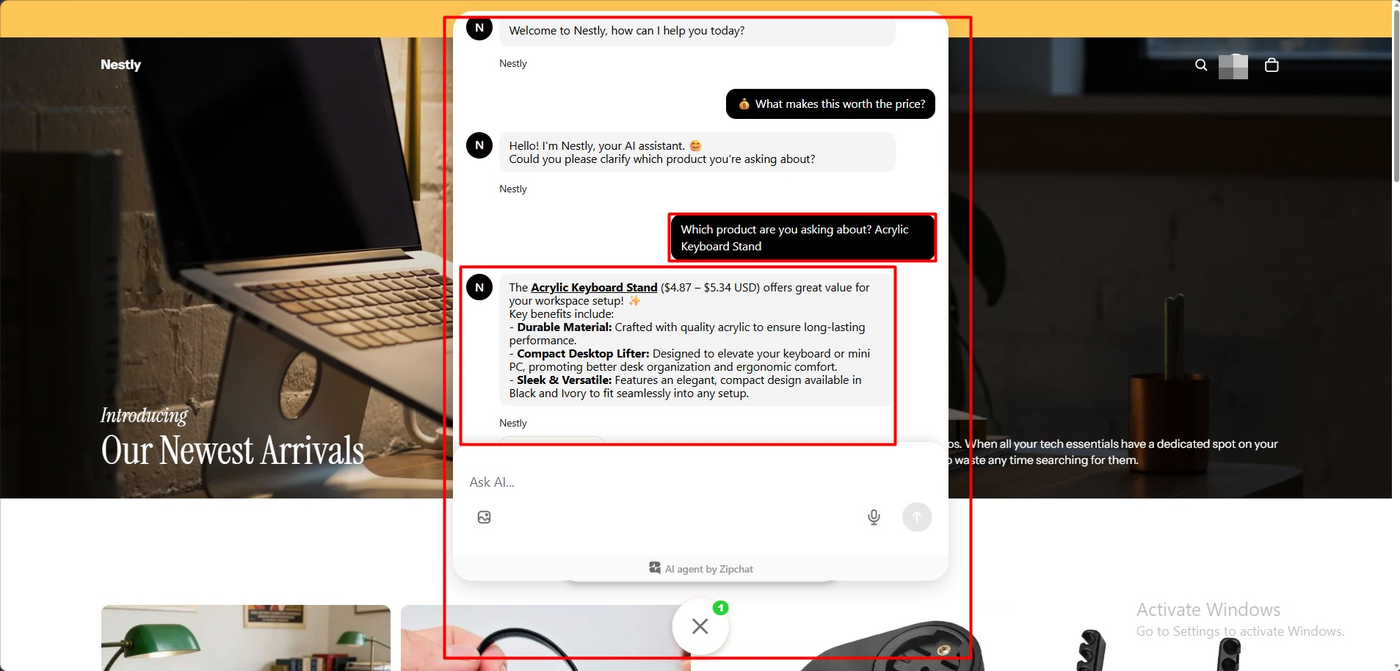
Our first question was deliberately vague: “What makes this worth the price?” — with no product named and no product page context.
The agent introduced itself under the store’s own name and asked us to clarify which product we were asking about. When we answered “Acrylic Keyboard Stand”, it returned a structured reply: the price range of $4.87 – $5.34 USD, then three labelled benefits covering material, function and finish, including the available colours.
The behaviour, not the copy, is the finding. Faced with a question it could not answer precisely, the agent asked a question back. That is the uncertainty handling the category talks about and does not always deliver — and it is the exact opposite of what we saw from a rival agent on this same store, which answered a question it should have been unsure about with complete confidence and got it wrong.
The Same Question, the Right Answer
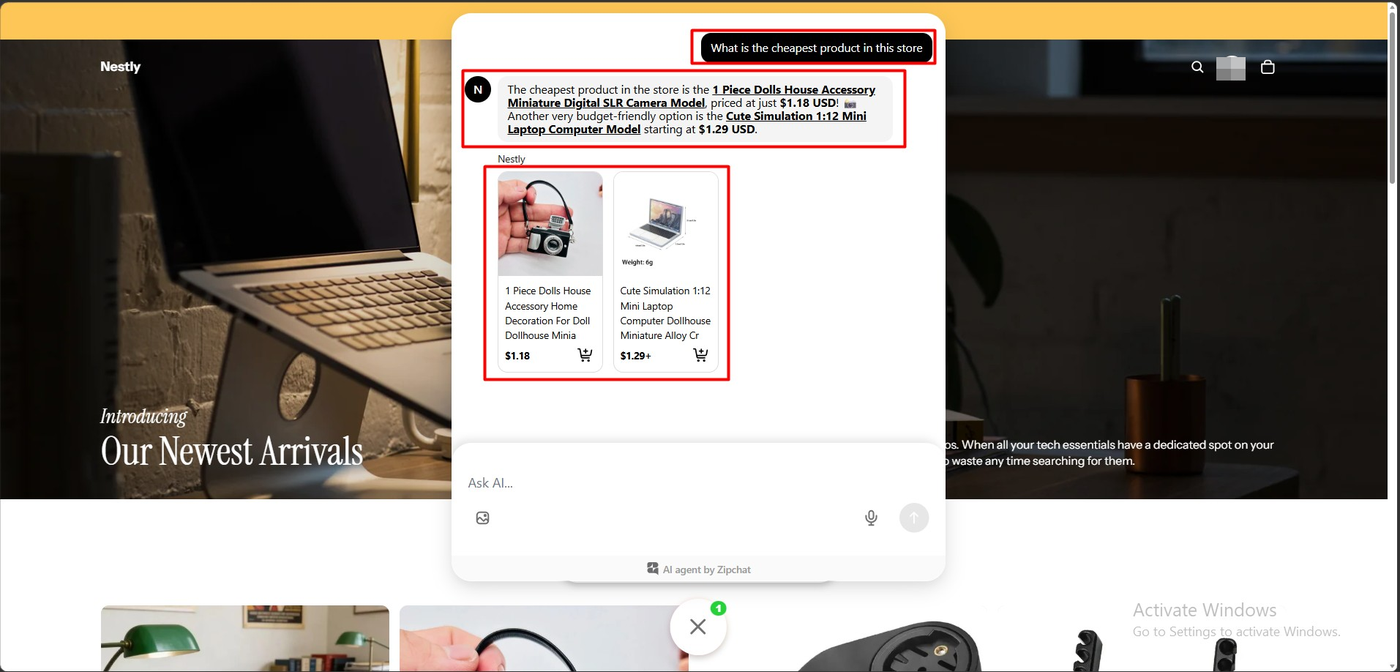
Then the controlled test: “What is the cheapest product in this store.”
Zipchat answered that the cheapest product was the 1 Piece Dolls House Accessory Miniature Digital SLR Camera Model at $1.18 USD, and added that another budget option was the Cute Simulation 1:12 Mini Laptop Computer Model from $1.29 USD. Both appeared as product cards with prices and add-to-cart buttons.
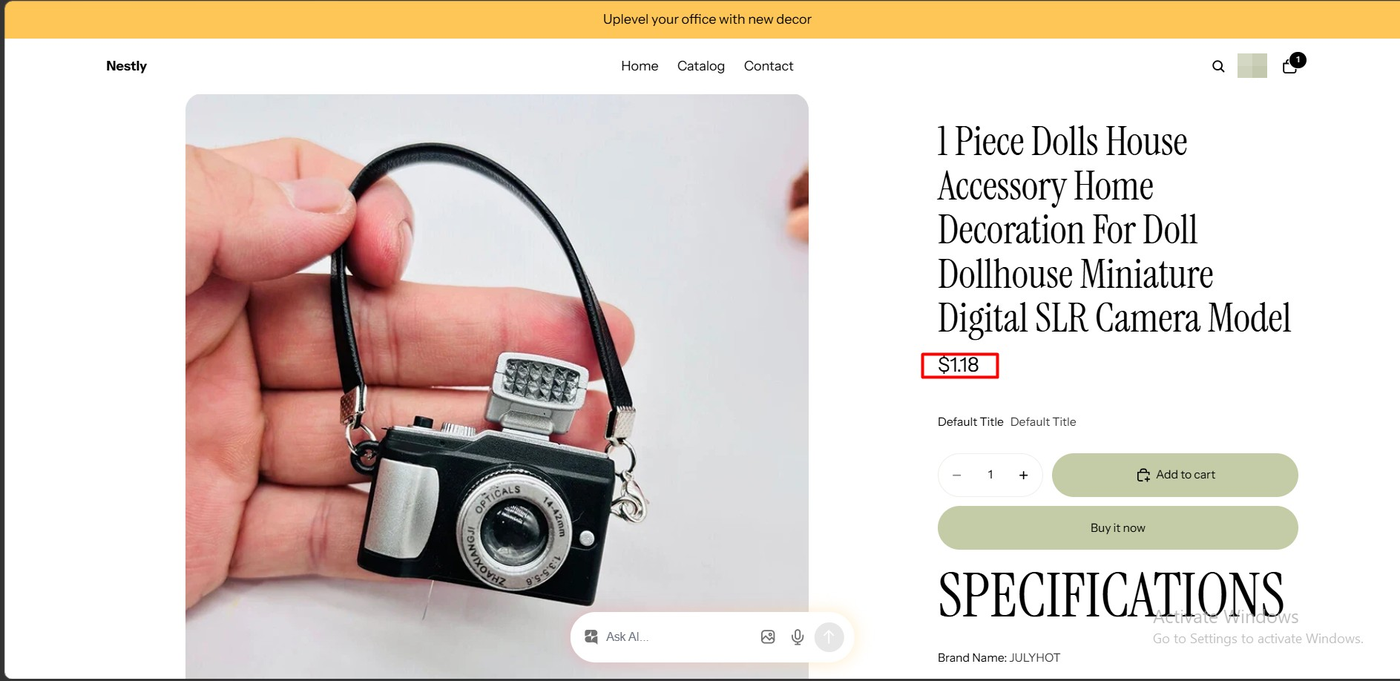
We checked it against the storefront. The product page confirms $1.18. The answer was right, the runner-up was right, and the prices matched the live catalogue.
Five days earlier, on this same store and catalogue, a different AI agent answered the same question by naming a $1.85 product as the cheapest, under a label stating the answer came from the merchant’s own sources. The difference is worth understanding rather than scoring. That agent was pointed at a website URL and crawled it. Zipchat’s developer describes reading products, variants and pricing through the Shopify Admin API with a synced catalogue. Comparing numbers across a product catalogue is a data problem before it is a language problem, and the tool holding structured product data has the easier job.
We tested one question in one session on one catalogue. Treat this as a reason to run your own comparison, not as a measured accuracy rate for either product.
From Answer to Cart
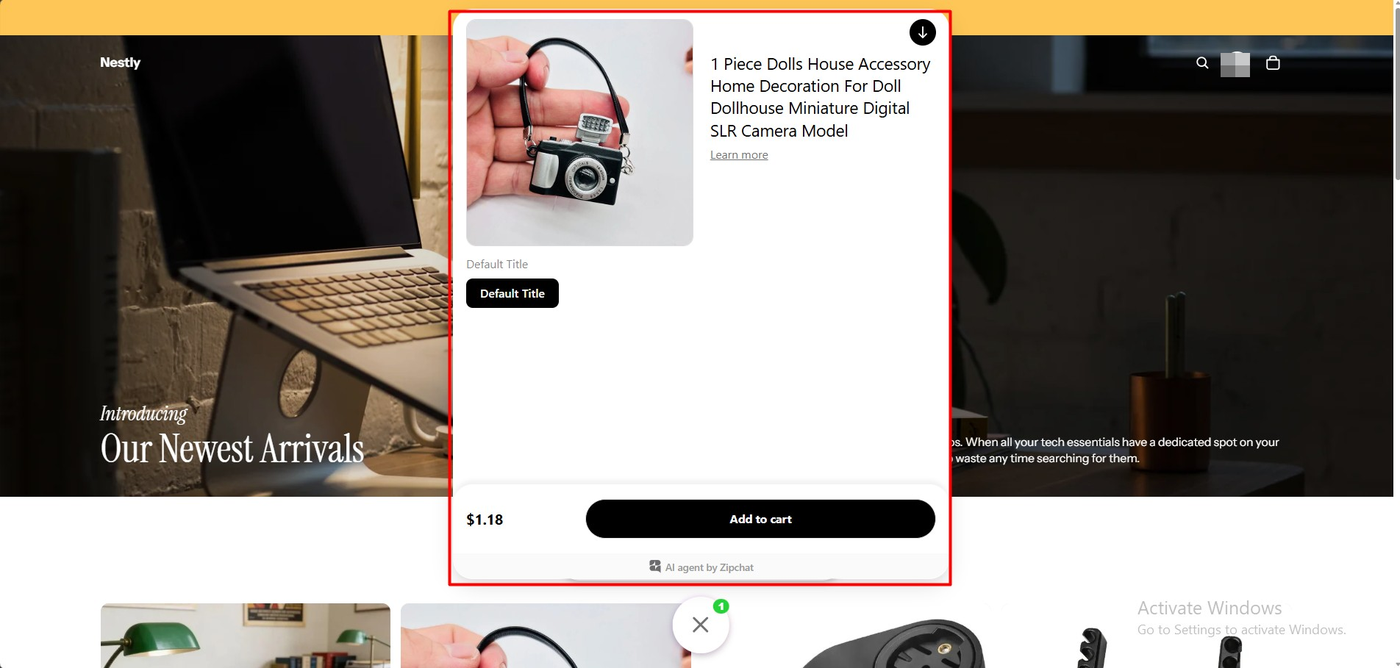
Tapping the recommended product opened a quick view inside the chat: image, full title, variant selector, price and an Add to cart button, without leaving the page.
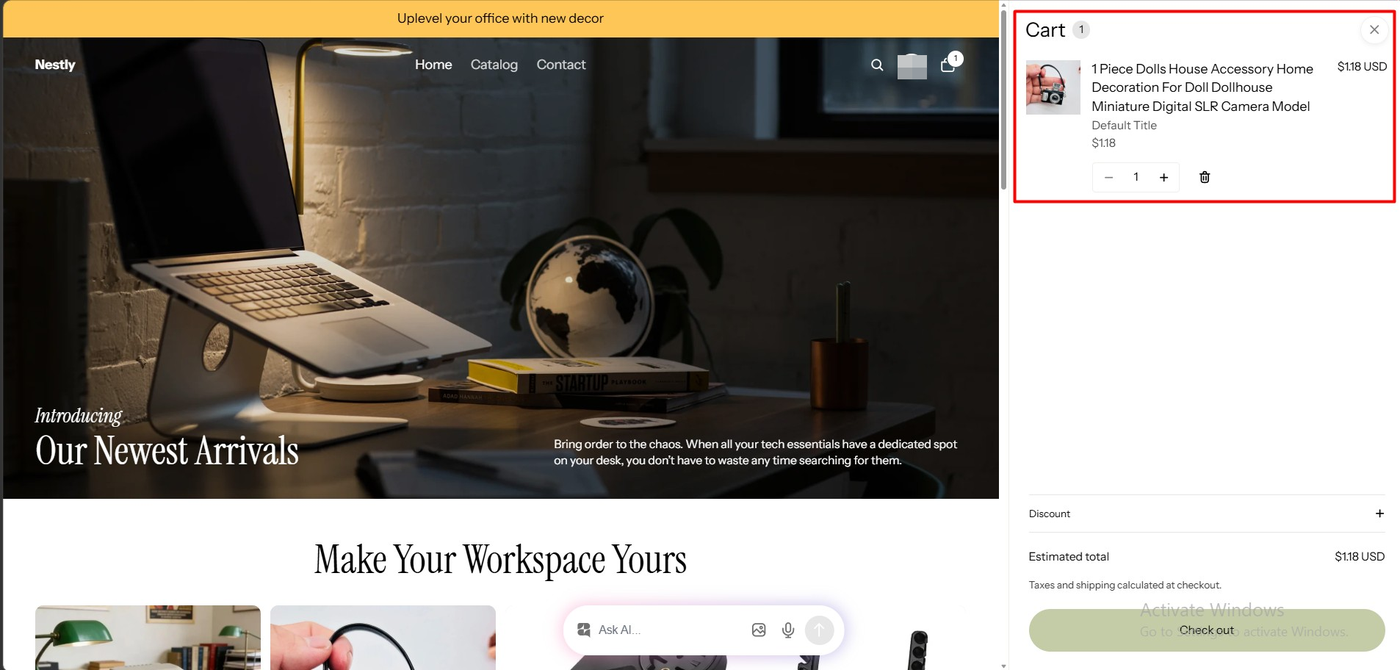
We added it. The card switched to a tick, the header cart badge incremented, and the Shopify cart drawer showed the correct item at $1.18 USD with an estimated total to match.
This is the part that separates Zipchat from a support tool that happens to have AI. The path from a shopper’s question to a line item in the cart had no page loads and no search. For stores where discovery is the bottleneck, that loop is the product.
We did not complete a checkout, so we cannot speak to the order itself.
What the Merchant Sees
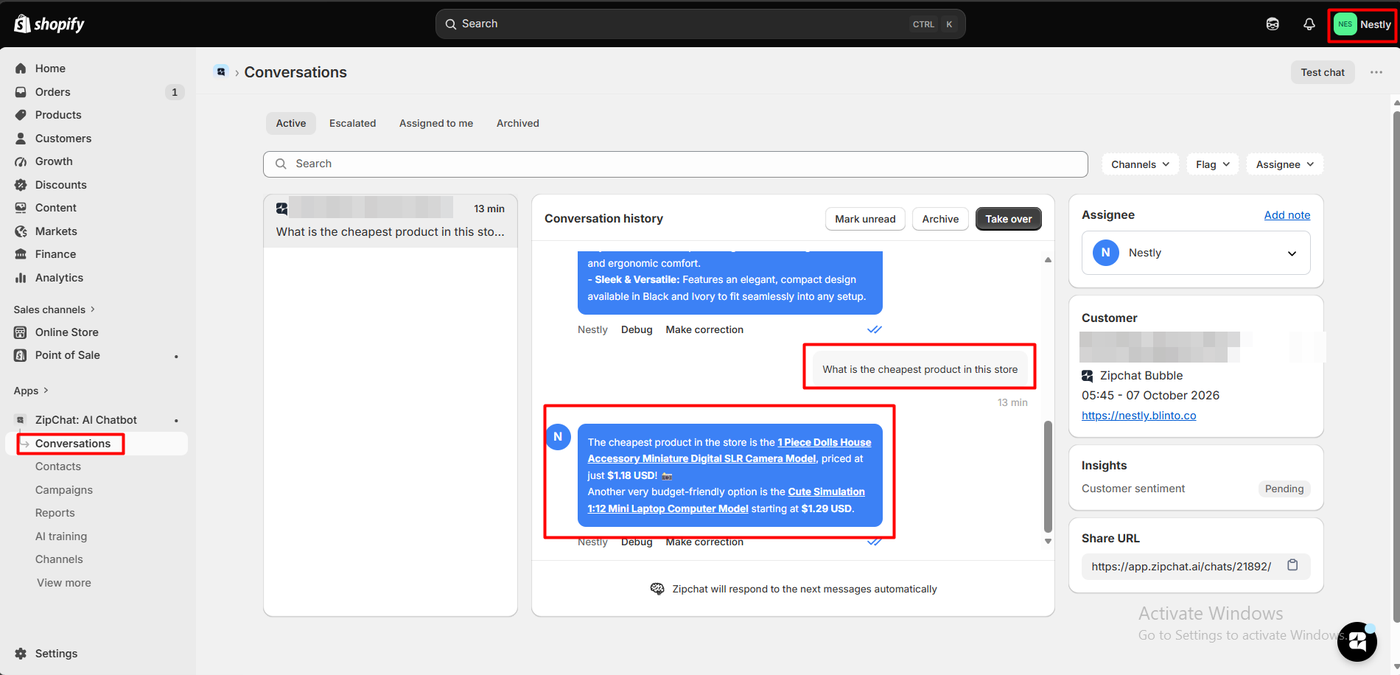
The Conversations view splits into Active, Escalated, Assigned to me and Archived, and showed our session with its full history.
Two controls sit under every AI message: Debug and Make correction. Alongside are Take over, Mark unread and Archive, with a footer noting that Zipchat will keep responding automatically until a human intervenes. The right rail carries the customer record, the channel, the timestamp, the store URL, a shareable conversation link, and an Insights panel where customer sentiment showed as Pending.
Per-message correction is the right shape for this problem. When the agent is wrong, the merchant fixes that answer where they found it, rather than hunting through a training screen. We did not use the control, so we cannot say what it changes downstream.
Pricing and Value
We checked both sources on October 7, 2026, and this time they broadly agree — the vendor site simply omits the free tier.
| Plan | Price (monthly) | AI replies | Training pages |
|---|---|---|---|
| Free (listing only) | $0 | 120 replies/month, ~50 conversations | 100 pages |
| Starter | $80 | 750 replies, ~300 conversations | 1,000 pages |
| Pro | $300 | 3,000 replies, ~1,250 conversations | 75,000 pages |
| Scale | $600 | 6,000 replies, ~2,500 conversations | 300,000 pages |
Zipchat’s own page adds a Scale Plus tier at $1,200 a month and a custom unlimited plan from $2,100, with annual billing roughly 20% cheaper, a 7-day trial on every plan and a 30-day money-back guarantee on the first payment.
Three things matter for budgeting.
Overage is billed in blocks. Extra replies cost $49 per 250 on Starter through Scale, which works out near twenty cents a reply. A busy month does not degrade gracefully; it adds charges.
The free tier is an evaluation, not a plan. At 120 AI replies a month, our short test session would have consumed a visible slice of it.
This is premium pricing for the category. The general-purpose support tools we have looked at start around $29 a month with free tiers that cover a real workload. Zipchat starts at $80 and climbs steeply. The case for it is revenue, not ticket deflection — which is exactly how the company positions it, and how its five-star reviewers talk about it.
What We Liked
- Correct catalogue answers, verified against the storefront on a question that defeated a rival on the same store.
- It asks when the question is ambiguous instead of answering anyway.
- Product cards that add to cart, closing the loop from question to purchase in one surface.
- Per-message Debug and Make correction controls in the merchant inbox.
- The agent had learned the store before setup finished.
What Could Be Better
- A 20% discount ceiling is enabled by default, along with email collection, before the merchant has reviewed a single conversation.
- Cost: $80 to start, $49 per 250 extra replies, and a free tier too small to trial properly.
- The storefront bar is prominent and the theme embed exposes no settings.
- Public reports of slow support on paid plans, no conversation export, training data persisting after retraining, and the widget remaining after uninstall. We experienced none of these.
- One merchant publicly reported unsolicited sales outreach after switching away, which the developer defended as standard practice.
Who Zipchat Is For, and Who Should Look Elsewhere
Zipchat suits Shopify stores treating chat as a sales channel, with enough margin to absorb AI-issued discounts and enough volume that a recovered cart covers the subscription. Stores with large, price-varied catalogues where shoppers ask comparative questions should take the catalogue-accuracy point seriously.
Look elsewhere if your need is ticket deflection on a tight budget, if you require conversation export into a CRM or helpdesk, or if your catalogue is niche enough that generic product recommendations would miss — that last one is the sharpest theme in the negative reviews.
Our other review in this category, Tidio, covers a cheaper, support-first tool on the same store; its free plan is more usable and its AI answered this catalogue question incorrectly. We have not run a structured head-to-head, and this was one question, so read both rather than taking either result as a ranking.
Final Verdict
Zipchat did what we asked of it. It learned the catalogue without configuration, asked for clarification when a question was vague, answered a comparative pricing question correctly when a rival on the same store did not, and turned that answer into a cart line at the right price.
What you pay for that is real: $80 to begin, overage in blocks, and a free tier that only demonstrates the product. And you should walk through the behaviour defaults before launch, because the agent arrives ready to discount.
Recommended for merchants who want chat to sell, who have checked the volume maths, and who review the discount defaults before going live.
Frequently Asked Questions
Is Zipchat free?
There is a free tier on the Shopify listing: 120 AI replies a month, roughly 50 conversations, and training on 100 pages. Zipchat’s own pricing page does not show it. Paid plans start at $80 a month with a 7-day trial, and the company advertises a 30-day money-back guarantee on a first payment.
Is Zipchat’s AI accurate?
In our test it was. It correctly identified the cheapest product in a 51-item catalogue with the right price, named a correct runner-up, and asked for clarification rather than guessing when a question was vague. We asked a handful of questions in one session, so this is an observation, not a measured accuracy rate.
Can customers buy directly from the chat?
In our test, partly. The agent showed product cards with add-to-cart, and the item it recommended went into the Shopify cart at the correct price from inside the chat window. We did not complete a checkout.
Does Zipchat offer discounts to customers on its own?
By default, yes. The onboarding behaviour settings arrive with “Offer a discount to hesitant buyers” enabled and a maximum discount of 20% pre-filled. Review that before going live.
How does Zipchat handle wrong answers?
Every AI message in the merchant’s Conversations view carries Debug and Make correction controls, alongside options to take over the chat, mark it unread or archive it. We did not exercise the correction tool, so we cannot say how it affects later answers.