
Every AI chatbot we review gets the same simple question from a shopper: what is the cheapest product?
The answers so far have varied. Tidio named the wrong item. Zipchat got it right. Willdesk repeated a stored question-and-answer entry.
Chatty did something different. It had learned all nine products in our store, with prices. It still said it could not verify the answer and would not guess. A team member then picked up the chat and answered in one message.
Whether that is a strength or a weakness depends on what you want from an AI agent. We installed Chatty AI Chatbot & Live Chat on a Shopify development store, set it up on the Free plan, asked it real questions, and tracked a real order through it.
Key Takeaways
- The AI tracked a real order. Given order number 2757, it replied that the order was paid and still processing, with a link to the order status page.
- It would not guess. Asked for the cheapest product, it said it could not verify the answer, even though all 9 products were marked as learned. A human answered instead.
- The human handover worked. The conversation moved to a team member in the inbox, and their reply appeared in the shopper’s chat window.
- The Free plan is usable. It includes 50 AI conversations a month, unlimited human conversations and AI trained on up to 200 products.
- Watch the AI overage. Paid plans charge $0.40 for each AI conversation above the monthly allowance, and recent merchant complaints centre on that charge.
Our Verdict
Chatty is a good choice for small and growing Shopify stores that want an AI agent backed by a real inbox, and that would rather the AI pass a question to a person than make up an answer.
Setup took four short screens. The AI answered a product question with a caveat, tracked an order correctly, and stepped aside on a question it could not settle. The inbox shows each conversation’s topic, the shopper’s device and recent orders, and a one-click way to take over.
The reservations are real, though. An AI that declines a price comparison across nine products will hand more chats to your team than you might expect. The inbox showed “0 orders” and “$NaN spent” for a customer with three paid orders listed beside it. And on paid plans, AI conversations above your allowance cost extra, so set the overage limit before you go live.
What Chatty Offers
Chatty AI Chatbot & Live Chat is published on the Shopify App Store by “Chatty AI Sales Agent - For live chat & helpdesk”, with a listed address in Singapore. Its Shopify App Store listing carries the Built for Shopify badge and shows a launch date of June 9, 2022.
The listing describes an AI chatbot that answers product questions, suggests products and helps with order tracking, plus a shared inbox for WhatsApp, Facebook Messenger, Instagram, email and more. It also covers a FAQ help center, proactive messages based on visitor behaviour, checkout chat and a mobile app. Listed integrations include Shopify Checkout, Flow and Admin, Klaviyo and Zendesk.
What We Tested
We tested Chatty in October 2026 on a Shopify development store called zenden. It runs the Horizon theme with a nine-product football jersey catalogue and about 1,700 orders of history.
Our test covered the install permissions, the four-step onboarding, the plan screen, the theme app embed, the AI agent setup page, and the product and knowledge-base training screens. On the storefront, signed in as a customer, we asked the AI for the best-selling product and the cheapest product, used the Track my order button with a real order number, and watched a team member take over a conversation from the inbox.
We did not test WhatsApp, Messenger, Instagram or email channels, proactive chat, the FAQ help center, custom instructions or scenarios, returns flows, analytics, the mobile app, or any paid plan. We stayed on the Free plan, so no trial, billing or overage charge happened. Pricing comes from the App Store listing and the in-app plan screen, both checked on October 12, 2026.
Setup: Four Screens and a Toggle
The install dialog asks to view customer data, including sensitive, device and activity data, and staff data. It also asks to view and edit customers, products, orders, discounts, store analytics, the online store, the Shopify admin and other data.
Onboarding then runs four short screens:
- How do you want to handle customer support? AI-powered, Human only, or Hybrid. We chose AI-powered: “AI handles all conversations 24/7. Your team steps in only when needed.”
- Your brand, your tone. Brand colour, AI name, welcome message and language.
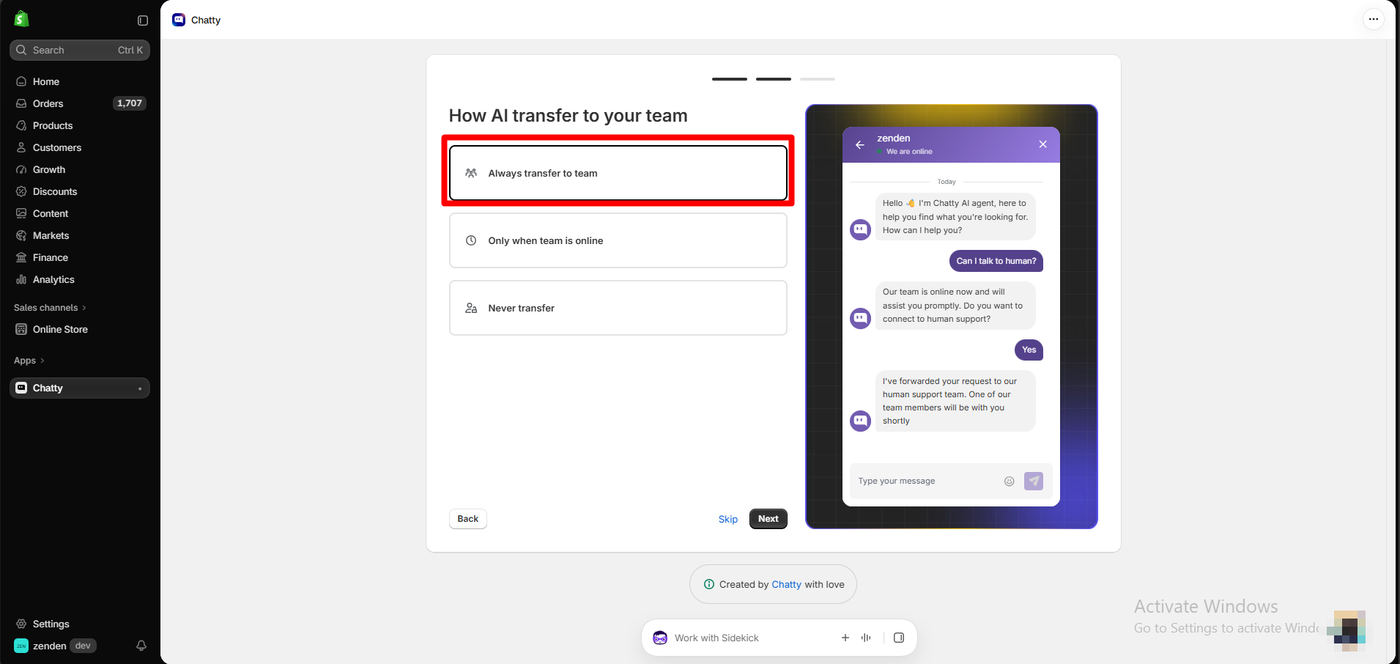
- How AI transfer to your team. Always transfer to team, Only when team is online, or Never transfer. We chose Always transfer to team, and the live preview showed a shopper asking for a human and being handed over.
- Try these use cases. Sample chats for product recommendation, order tracking, and returns.
A live chat preview updates on every screen. Then comes the plan screen, where we chose Continue as Free. In the theme editor, the Chatty - Core app embed is one toggle with no settings of its own.
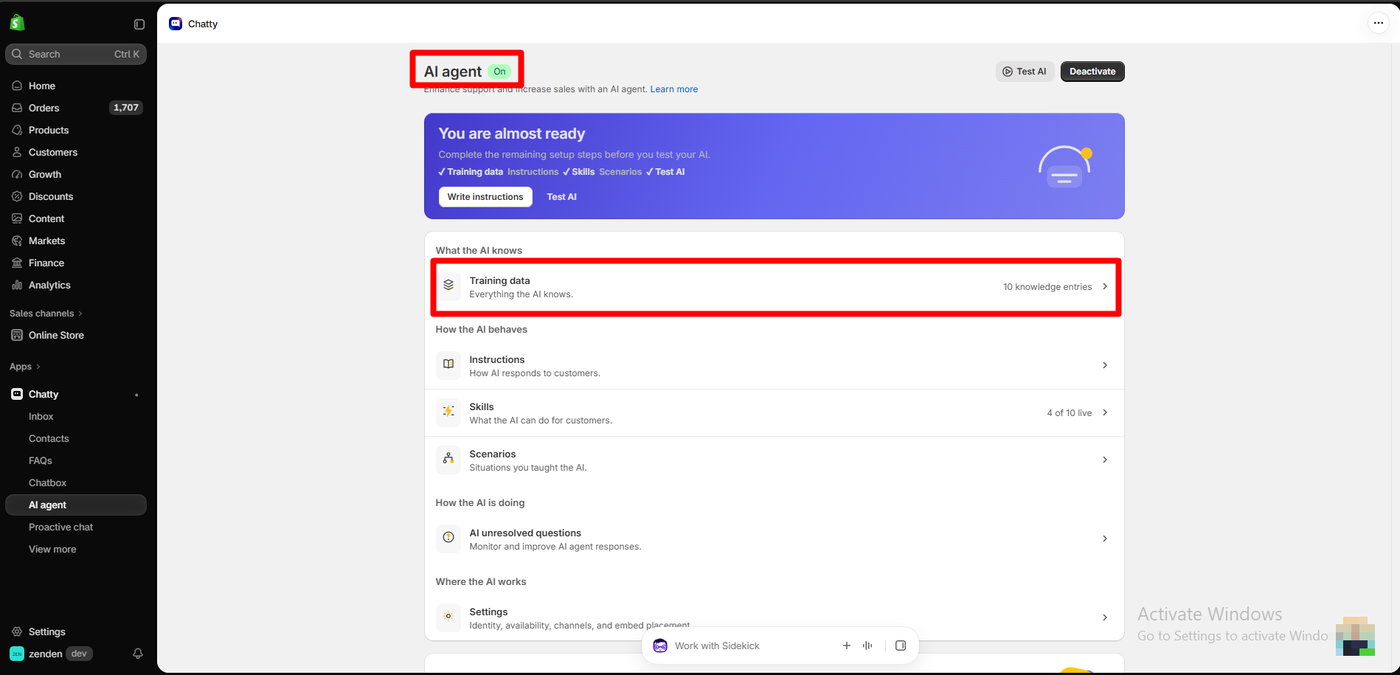
The AI agent page showed the agent On, with a banner reading “You are almost ready”. Training data, Skills and Test AI were ticked, while Instructions and Scenarios were still open. The page listed 10 knowledge entries, 4 of 10 skills live, and a section for AI unresolved questions.
What the AI Learned
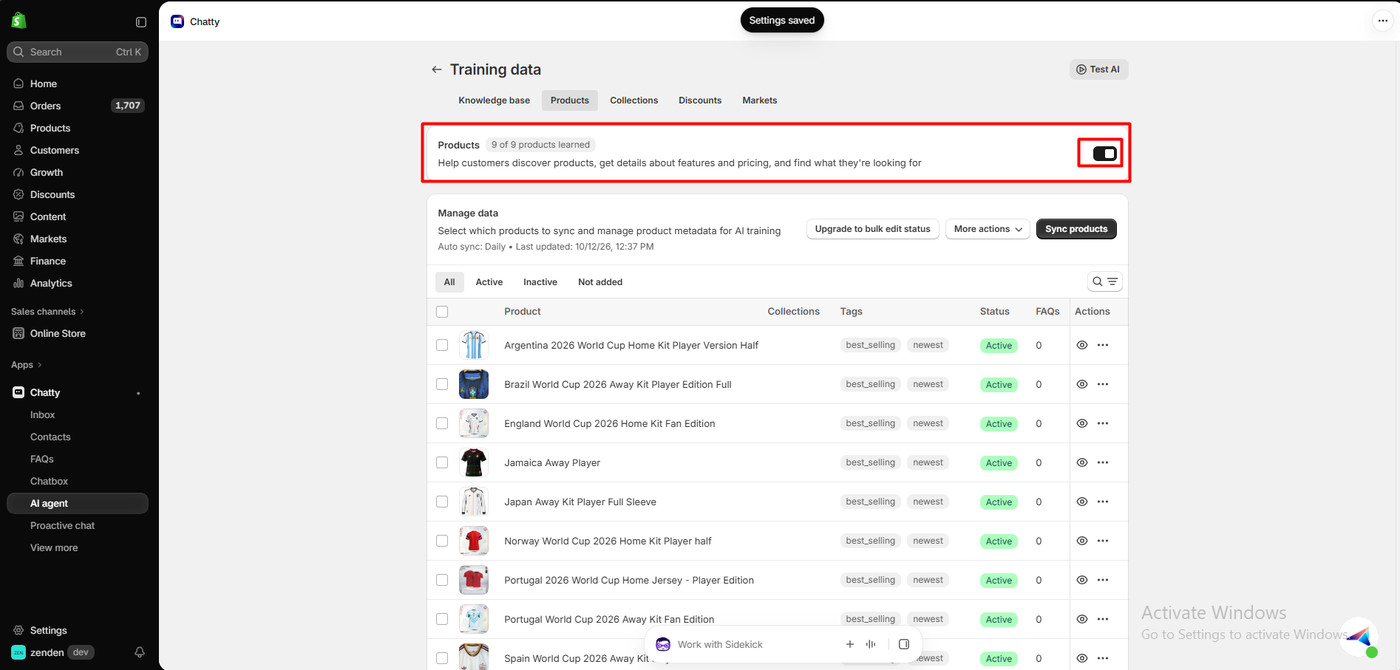
Chatty trains itself from the store. The Products tab showed 9 of 9 products learned, with daily auto-sync. The Knowledge base tab showed 10 entries, all live, built from 9 synced store FAQs and 1 of the store’s 3 pages, and flagged 2 issues.
One detail on the Products tab matters later. Every product in our store carries the tags best_selling and newest. Those are the store’s own tags, not Chatty’s, and they mean the AI has no way to tell one “best seller” from another.
Asking the AI: Best Seller and Cheapest Product
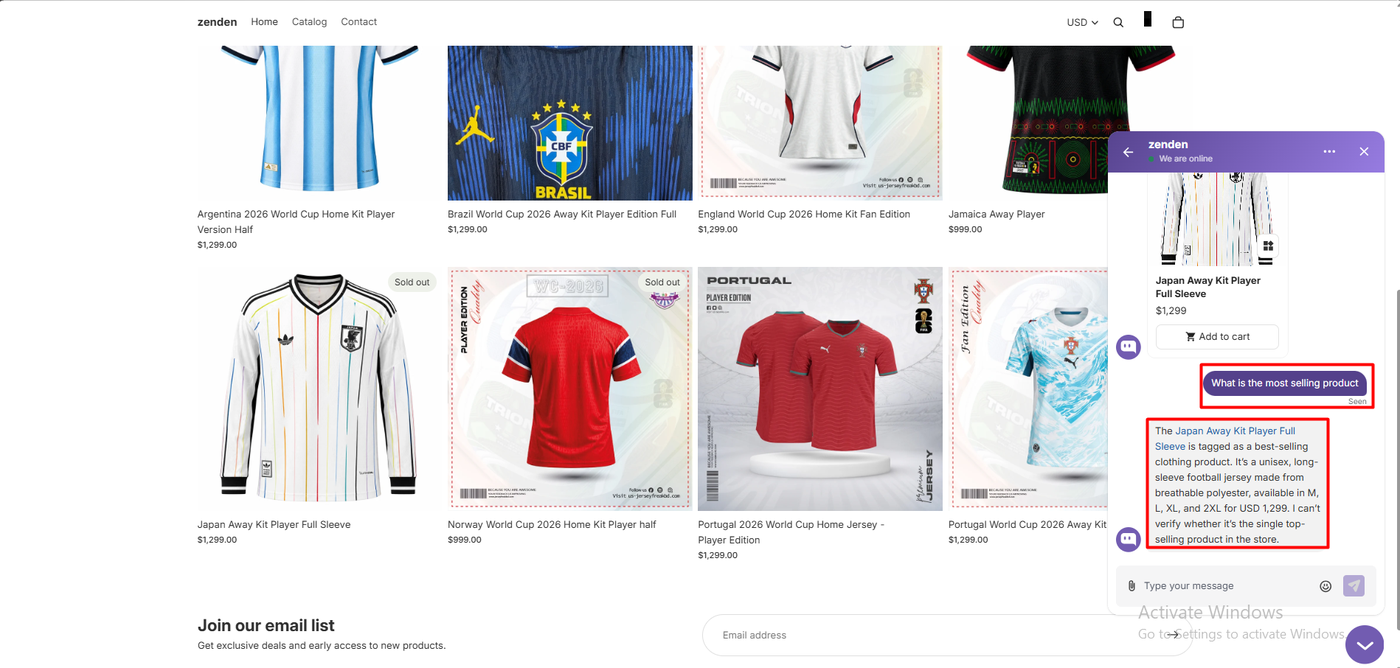
We asked: “What is the most selling product?”
The AI showed a product card for the Japan away jersey at $1,299 with an Add to cart button. It said the jersey “is tagged as a best-selling clothing product”, described the material and sizes, and added: “I can’t verify whether it’s the single top-selling product in the store.”
That caveat was correct. Every product was tagged best-selling, so the tag proved nothing.
Then we asked the question every AI agent gets from us: “What is the cheapest product based on price?”
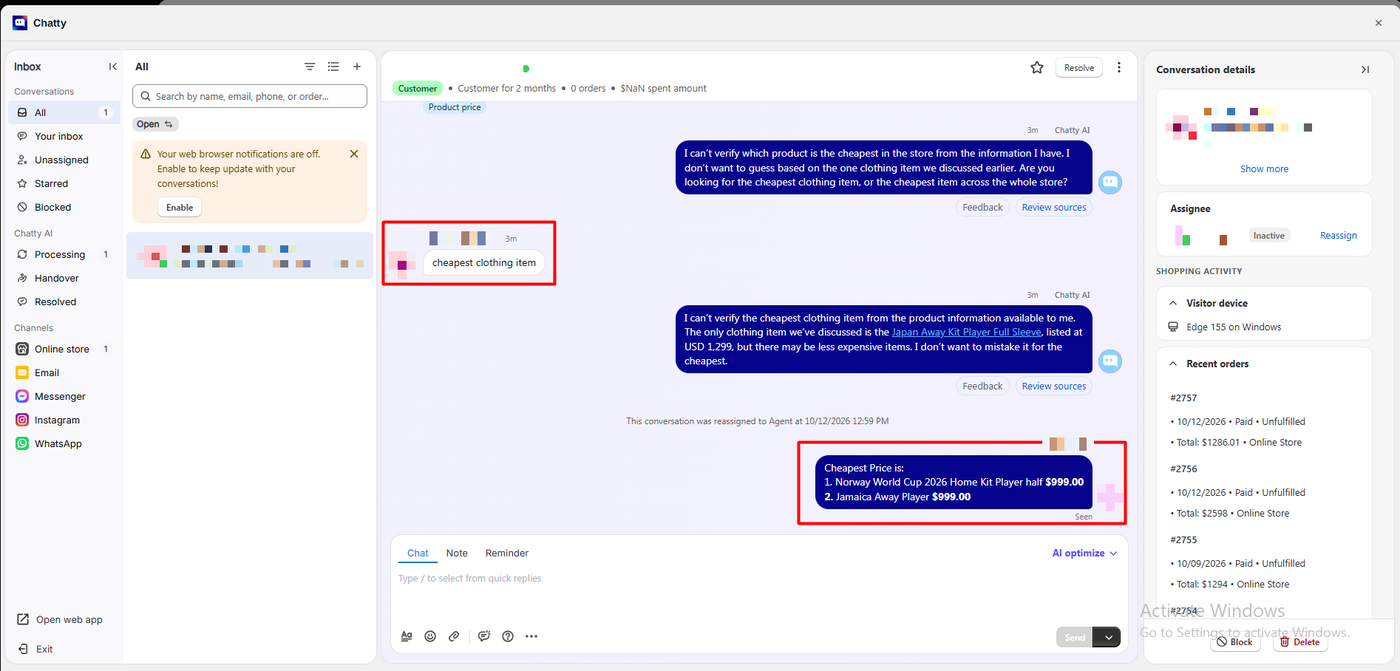
The AI replied: “I can’t verify which product is the cheapest in the store from the information I have. I don’t want to guess based on the one clothing item we discussed earlier.” It asked whether we meant clothing or the whole store.
We said “cheapest clothing item”. It again said it could not verify the answer, noted the only item we had discussed was $1,299, and said “there may be less expensive items.”
The inbox then logged that the conversation was reassigned to an agent, and a team member replied: the Norway home jersey and the Jamaica away jersey, both $999.00. That is correct against the storefront, where every other product costs $1,299. The reply appeared in the shopper’s chat window.
Here is how the four AI agents we have asked compare:
| App | Answer to “cheapest product” |
|---|---|
| Tidio | Named the wrong product, then corrected itself after pushback |
| Zipchat | Named the right product, with a correct runner-up |
| Willdesk | Repeated a stored question-and-answer entry |
| Chatty | Declined to guess; a human answered |
These were single questions, and Tidio and Zipchat were tested on a different store. Treat it as a pattern, not a ranking.
Our view: refusing is better than being wrong, and Chatty did not give a wrong price. But this was a nine-product catalogue the AI had already learned. A merchant who chose “AI-powered” should expect a question this simple to be answered. We had not written custom instructions, which the setup page still listed as open. That may change the result, and it is the first thing we would try.
Order Tracking and the Inbox
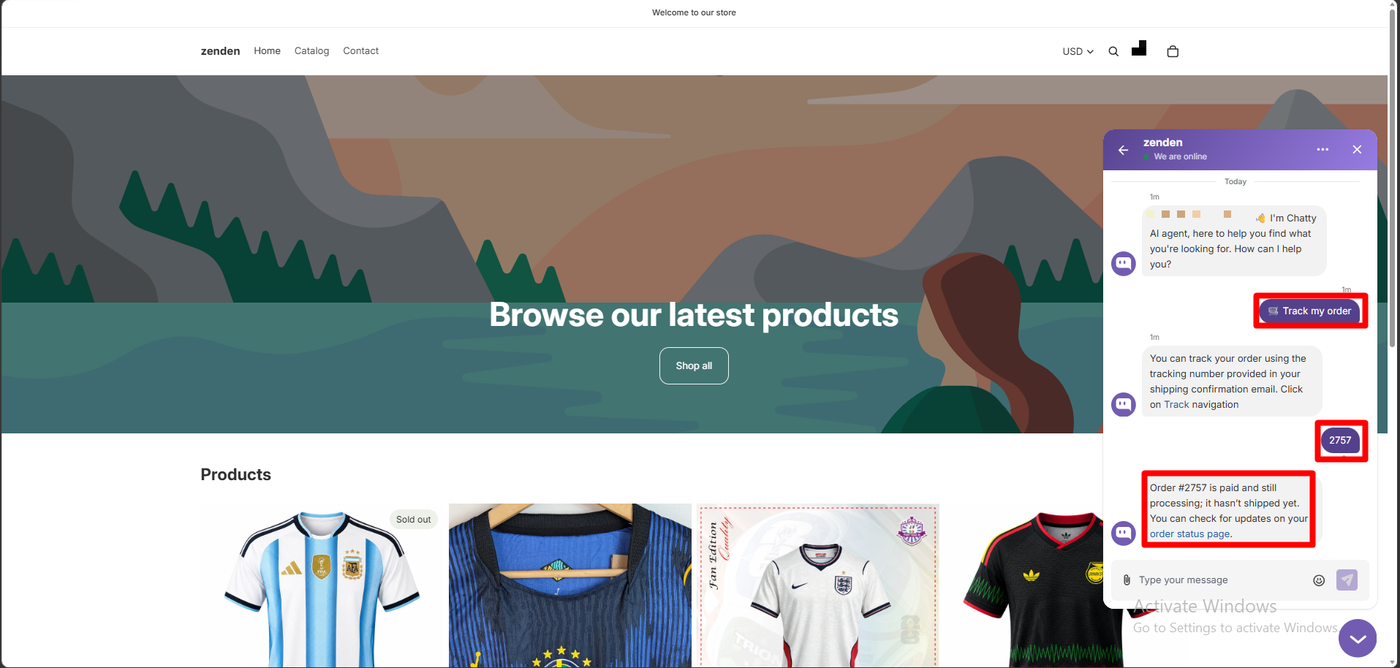
The storefront widget opened with a welcome message and three quick replies: Track my order, How long does delivery take? and Return policy. Signed in, it greeted us by name.
We tapped Track my order. The first reply was generic: use the tracking number in your shipping email. We then typed the order number from our confirmation email, 2757. The AI replied: “Order #2757 is paid and still processing; it hasn’t shipped yet,” with a link to the order status page. That matched the order exactly.
One thing to note. The in-app plan table lists AI order tracking as a Basic plan feature, yet it worked for us on Free. We cannot say whether that will last, so do not plan around it.
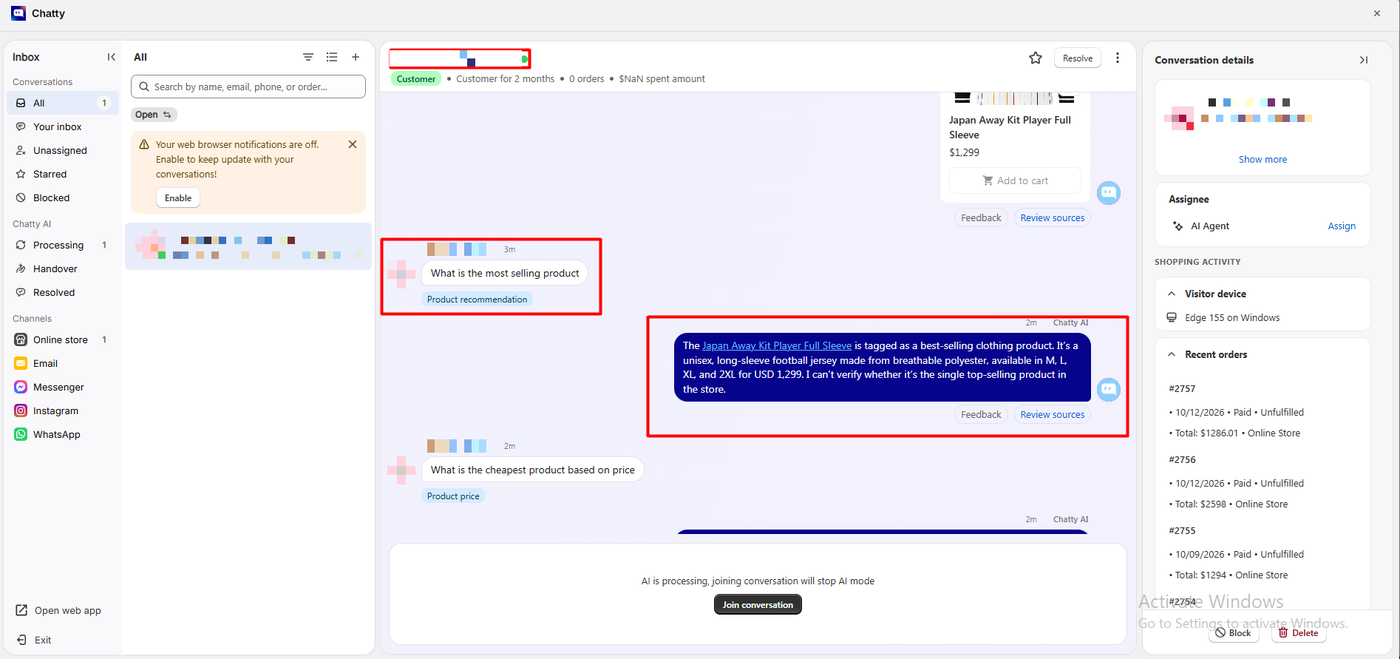
The inbox is well laid out. Shopper messages get intent tags such as Product price, AI replies have Feedback and Review sources buttons, and a Join conversation button stops the AI. Chats are grouped into Processing, Handover and Resolved, with channels for the online store, email, Messenger, Instagram and WhatsApp.
The side panel shows the visitor’s device and recent orders: three paid orders of $1,286.01, $2,598 and $1,294.
The header above the chat disagreed: “Customer for 2 months • 0 orders • $NaN spent amount.” “NaN” is a software error meaning “not a number.” It is a small bug, but it sits where an agent looks first.
Chatty Pricing
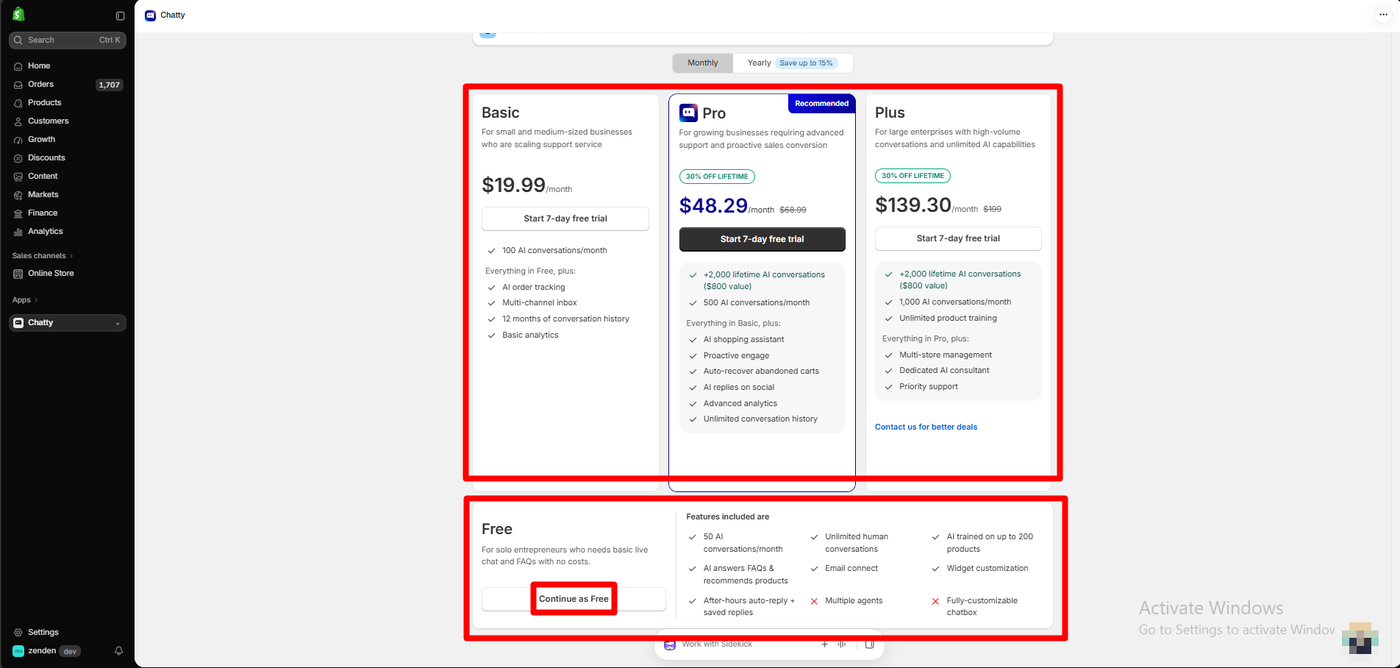
The listing and the in-app plan screen agree on the structure but not every price. Both were checked on October 12, 2026.
| Plan | Listing price | In-app price | AI conversations a month | Highlights |
|---|---|---|---|---|
| Free | $0 | $0 | 50 | Unlimited human conversations, AI trained on up to 200 products, FAQs and product recommendations, email connect, widget customisation |
| Basic | $19.99 | $19.99 | 100 | AI order tracking, multi-channel inbox, 5 members, 12-month history, basic analytics |
| Pro | $68.99 | $48.29 (30% off “lifetime”) | 500 | AI shopping assistant, proactive engage, abandoned-cart recovery, AI replies on social, Pro AI model |
| Plus | $199 | $139.30 (30% off “lifetime”) | 1,000 | Larger product training, multi-store, AI analytics consultant, priority support |
Paid plans include a 7-day free trial, and yearly billing saves up to 15%. In the app, Pro and Plus also advertised “+2,000 lifetime AI conversations ($800 value).”
The Free plan is generous for this category. It excludes multiple agents and a fully customisable chat box, but it can run a small store’s support.
The important line is in small print on the listing: $0.40 per additional AI conversation on every paid plan.
- AI overage is billed per conversation. One merchant complained in October 2026 about an extra $68 a month. The developer replied that it covered AI conversations above the 500 included on Pro, at $0.40 each. That works out to 170 extra conversations.
- There is a limit you can set. The same reply says the AI either pauses when the allowance runs out or keeps going up to a monthly overage cap, which you can change under Subscription settings. Set it on day one.
- The “lifetime” discount is the app’s own offer. The 30% off Pro and Plus appeared in the app but not on the listing. Confirm it applies before you rely on it.
What Public Sources Add
On October 12, 2026 the listing showed a 4.9 rating from 1,877 reviews: 96% at five stars, 57 at four, 5 at three, 6 at two and 16 at one.
Recent praise focuses on support. Merchants name staff such as Hazel, Jade, Liz and Andy, and describe fast setup help and fixes.
The criticism from 2025 and 2026 is specific, and the developer replied to each of these:
- AI overage charges that a merchant on Pro called “an extra $68 every month” (October 2026).
- A trial that did not apply because the store had installed the app before (July 2026).
- Reliability: an inbox outage a merchant said cost a day of support (June 2026), logouts on mobile, and a long-term user saying quality has fallen as prices rose (July 2026).
- AI behaviour: a returns link rewritten in AI replies (February 2026), and a store owner saying customers nearly cancelled orders until the owner stepped into the chat (November 2025).
- Performance: one store said the widget slowed its site and some predefined answers could not be clicked (November 2025). The developer said both bugs were fixed.
We reproduced none of these. Our own test found the AI cautious rather than wrong.
What We Liked
- Fast, guided setup, with a live chat preview on every screen and a one-toggle embed.
- An AI that does not bluff. It flagged that “best-selling” was only a tag and refused to guess a price.
- Working order tracking, with an exact, correct status for a real order.
- A clean human handover, with the agent’s reply appearing in the shopper’s window.
- A useful inbox: intent tags, source review, recent orders and channel grouping.
- A generous Free plan: 50 AI conversations a month and unlimited human chats.
What Could Be Better
- The AI declined a simple price question across a nine-product catalogue it had learned, sending the chat to a human.
- A “$NaN spent” and “0 orders” header that contradicts the recent-orders panel.
- $0.40 per extra AI conversation on paid plans, which drives the most recent complaints.
- In-app prices differ from the listing, and the plan table and our test disagree on whether order tracking is free.
- Sourced reports of outages, mobile logouts, rewritten links and site slowdown, which we did not experience.
Who Is Chatty Best For?
Chatty suits small and growing Shopify stores that want an AI agent and a human inbox in one app, and that value an AI which hands off rather than guesses. It fits stores whose questions are mostly about orders and policies, and teams who will spend time writing instructions for the AI.
Look elsewhere, or test carefully first, if you need the AI to answer catalogue questions like price and comparison without human help, or if your support volume could push you past your AI allowance without anyone watching.
On free allowance, it compares well with the support apps we have reviewed:
| App | Free plan allowance |
|---|---|
| Chatty | 50 AI conversations a month, unlimited human conversations |
| Zipchat | 120 AI replies a month, roughly 50 conversations (listing only) |
| Tidio | 50 AI conversations as a one-off lifetime allowance |
| Willdesk | 20 conversations a month |
| Chatra | 5 chats a month, one agent, no bots |
These figures come from each app’s published plan information, not from testing the limits, and the apps count conversations differently.
Final Verdict
Chatty did most of what a support app has to do. We set up an AI agent in four screens, tracked a real order through it, and watched a human take over a chat the AI could not settle, with the reply landing in the shopper’s window. Its AI was honest about what it did not know, and its Free plan is one of the more usable in the category.
What you are choosing alongside that is an AI that may pass more chats to your team than you expect, a small but visible data bug in the inbox, and per-conversation overage on paid plans.
Recommended for small and growing stores that want an honest AI agent with a real inbox behind it, as long as you write its instructions and set an overage limit before you scale.
Frequently Asked Questions
Is Chatty free?
Yes. The Free plan includes 50 AI conversations a month, unlimited human conversations, AI trained on up to 200 products, FAQ answers and product recommendations. Paid plans start at $19.99 a month with a 7-day trial.
How much does Chatty charge for extra AI conversations?
The listing shows $0.40 per additional AI conversation on every paid plan. According to the developer, the AI either pauses when the allowance runs out or keeps going up to a monthly overage limit you can set in the app.
Can Chatty’s AI track orders?
In our test, yes. Given order number 2757, it said the order was paid and still processing, with a link to the order status page. The in-app plan table lists AI order tracking as a Basic feature, although it worked for us on Free.
Did Chatty’s AI answer product questions correctly?
It answered carefully. It recommended a product while noting that “best-selling” was only a tag, and it declined to name the cheapest product, saying it could not verify the answer. A team member then answered correctly. We had not written custom instructions, which may change this.
Can a human take over from the AI?
Yes. During onboarding you choose whether the AI always transfers to your team, only when the team is online, or never. In our test, the conversation was reassigned to an agent in the inbox and the reply appeared in the shopper’s chat window.
Does Chatty work without coding?
In our test, yes. We completed onboarding and switched on the Chatty - Core app embed in the theme editor without touching theme code.