
Chatra is one of the oldest live chat apps on the Shopify App Store. It launched in 2015, it carries the Built for Shopify badge, and it still holds a 4.5 rating from more than 300 merchants.
It is also an app that its owner has stopped developing. Chatra is part of Brevo, and Chatra’s own website says plainly that it will not release any new features. They go to Brevo Conversations instead.
So does Chatra still do its core job well enough to choose it in 2026? We installed it on a Shopify store, sent a real shopper question through the widget, answered it from the dashboard, and checked what each plan includes.
Key Takeaways
- The core live chat works well. Install, one theme toggle, and the widget was live. A shopper question reached the dashboard, and our reply reached the shopper on the page they were browsing.
- Chatra did not try to answer for us. Its built-in bot collected the shopper’s name and email, then handed over to a human. Our agent gave the correct answer in about four minutes.
- The shopper got an email copy. Chatra sent the shopper a transcript of the chat, and the shopper could reply to it by email.
- The Free plan is very small. It covers one agent and five chats a month, with no bots, email help desk or detailed visitor info.
- No new features are coming. Chatra’s own Brevo page says new features will ship only in Brevo Conversations.
Our Verdict
Chatra is a clean, dependable live chat tool for small Shopify stores that want a person, not an AI, answering shoppers. In our test, every step worked first time and the merchant side was easy to read.
The catch is the future, not the present. Chatra is in maintenance mode. If you want AI answers, new channels or a growing feature set, this is not the product that will get them. And per-agent pricing makes it expensive for teams larger than two or three people.
Recommended for small stores that want simple human live chat today and accept that the product will not change much.
What Chatra Offers
Chatra is a live chat and messaging app. Its Shopify App Store listing is published by Roger Wilco LLC and names the app “Chatra — Live Chat & Chatbot”. It promises to help visitors “reach checkout faster with real time support and product recommendations.”
The listing names Facebook, Instagram, Help Scout, Slack, Zapier and webhooks as integrations, and five interface languages.
The Brevo Question
Chatra became part of Brevo, the email and marketing platform formerly called Sendinblue. Chatra’s own page about Brevo says three things a merchant should read before installing:
- Chatra “will keep working as an independent app” and will be supported in the same languages.
- “We will not be releasing any new features in Chatra. They will be released in Brevo Conversations only.”
- Moving conversations and settings from Chatra to Brevo “is not possible for now.”
So if you start on Chatra today and move to Brevo later, your chat history may not come with you. We saw the link ourselves: the email transcript Chatra sent our test shopper carried a “Chatra by Brevo” footer.
What We Tested
We tested Chatra on October 7, 2026, on a Shopify development store called Nestly, running the Tinker theme with a catalogue of low-priced accessories. This is the same store we used for our Tidio review, which lets us compare the two directly.
We covered the install permissions, the theme app embed, the storefront widget, a full shopper conversation including the bot’s introduction form, the dashboard view, an agent joining and replying, the shopper’s view of the reply, the email transcript, the Shopify integration screen, and the Billing page.
We did not test the Intelligent chat bot, Targeted chats and triggers, Automated answers, the email help desk, Facebook or Instagram channels, Saved replies, Reports, chat ratings, operating hours, agent groups, the mobile apps, or the cart view with items in the cart. Integrations and the API were also untested.
We stayed inside the free trial of the Pro plan, which showed 10 days left and an end date of October 17, 2026. We never saw a charge, a renewal, a downgrade to Free, or an uninstall. We did not contact Chatra’s support team. That is why we rate this a partial hands-on test.
What Public Sources Add
On October 7, 2026, the listing showed a 4.5 rating from 306 reviews. Of those, 92% were five stars and 3% were one star.
Recent praise is consistent. Merchants describe Chatra as reliable, simple, and good at catching shoppers with questions before they buy. One long-time merchant singled out the live view of how customers browse the store.
The complaints are mostly about price and plan changes, not about the chat itself:
- Per-agent pricing. One merchant said the “free” positioning felt misleading once per-seat costs were clear.
- A smaller Free plan. One merchant reported the Free plan’s monthly chat limit dropping from 20 to 5.
- Billing disruption. Two related stores said their subscription was cancelled without warning in June 2026. Chatra replied that a Shopify billing outage on June 3 broke some connections and offered to restore their previous terms.
We did not reproduce any of these problems in our short test.
Installing Chatra
The Shopify install dialog asked for only two permissions: view staff and contributor data (store owner), and view and edit store data (Online Store).
That is a narrow request. For comparison, Tidio asked us for customer data, sensitive device and activity data, and edit access to customers, products, orders and discounts. Chatra asks for much less, which suits a tool whose job is chat rather than store actions.
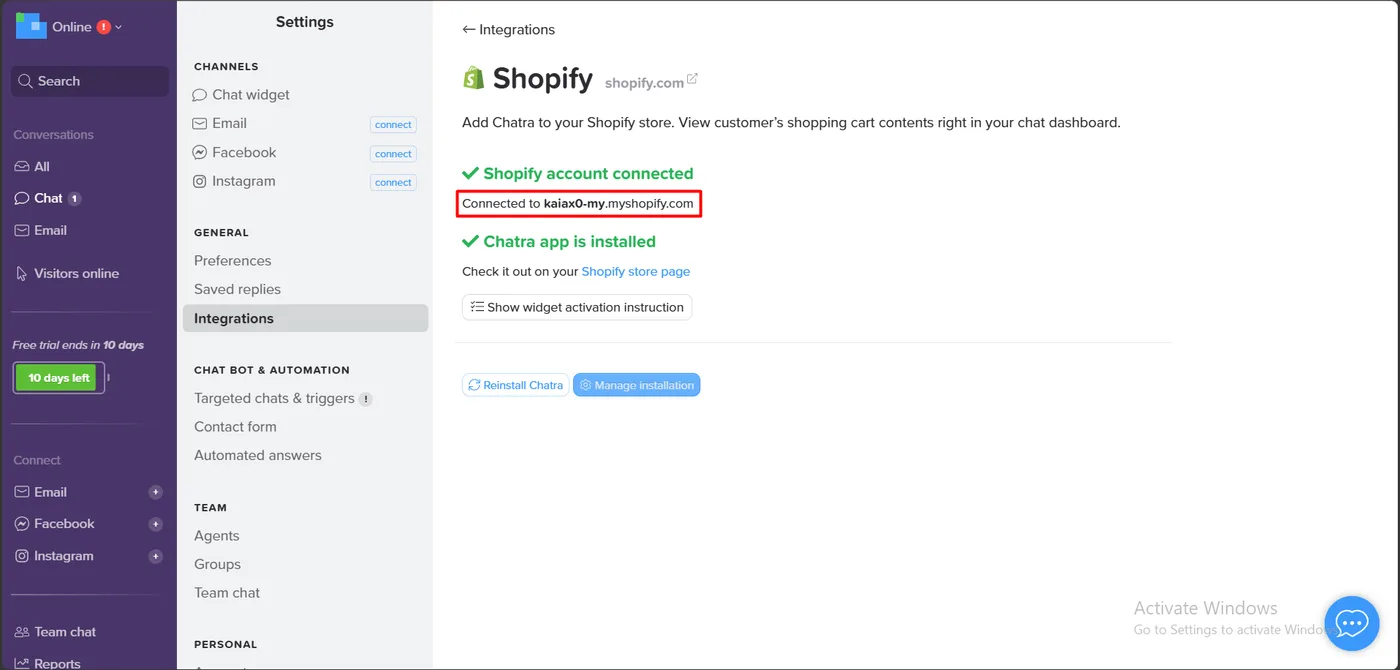
Inside Chatra, Settings › Integrations › Shopify confirmed the link with two green messages: “Shopify account connected” and “Chatra app is installed”. The page describes the purpose of the integration as letting you “view customer’s shopping cart contents right in your chat dashboard.”
Going Live Took One Toggle
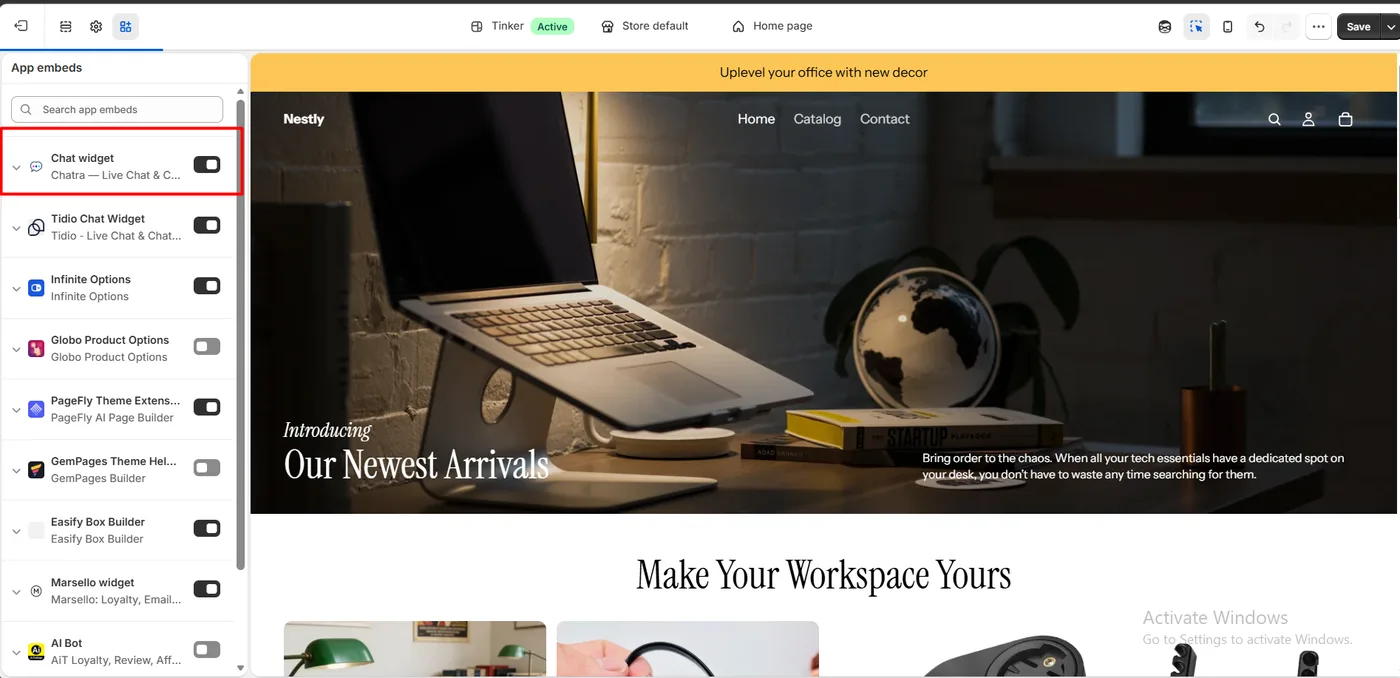
Turning the widget on meant switching on the Chatra “Chat widget” embed in the Shopify theme editor’s App embeds panel. No code and no snippet were needed.
After saving, a blue launcher reading “Chat with us, we are online!” appeared at the bottom right of the storefront, with a green dot showing an agent was available.
A Real Shopper Conversation
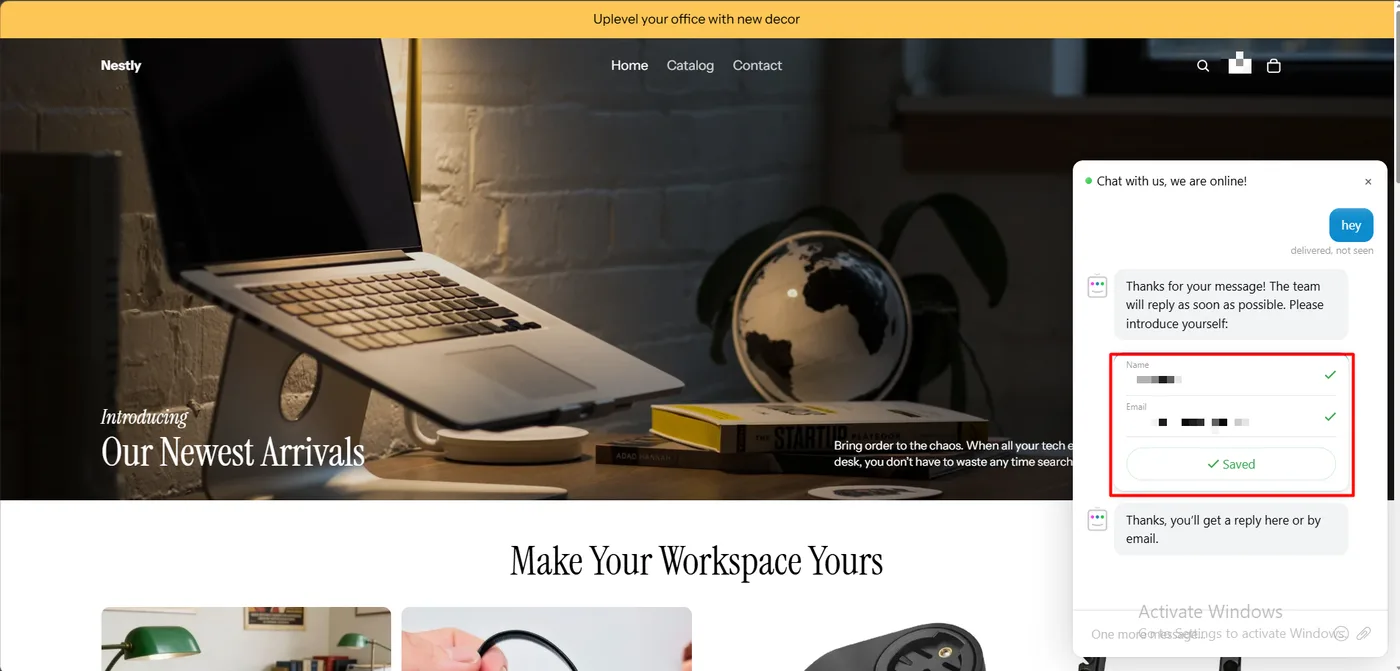
We typed “hey”. The Chatra Bot replied straight away: “Thanks for your message! The team will reply as soon as possible. Please introduce yourself.” It then showed a small form with Name and Email fields.
We filled it in and pressed Save. The bot confirmed: “Thanks, you’ll get a reply here or by email.” Under our message, the widget showed “delivered, not seen”, so the shopper knew nobody had read it yet.
Then we asked the same question we asked Tidio’s AI agent in our earlier test: can you find the cheapest product in the shop, with its name and price?
This is where Chatra behaves very differently. The bot did not try to answer. It had already told the shopper a person would reply, and it left the question for a person. Out of the box, Chatra’s bot is a greeter and a contact form, not an AI agent.
What the Merchant Sees
On the dashboard, the conversation appeared under Chat. The thread showed every step in order, including notes that the form was shown and then filled, with the saved name and email.
The first line of the thread showed where the shopper was. It listed their country, the page they were on, and the referrer. Before an agent joins, the reply box reads “Start typing to join”. When our agent did, the chat logged “joined” and listed them under Agents.
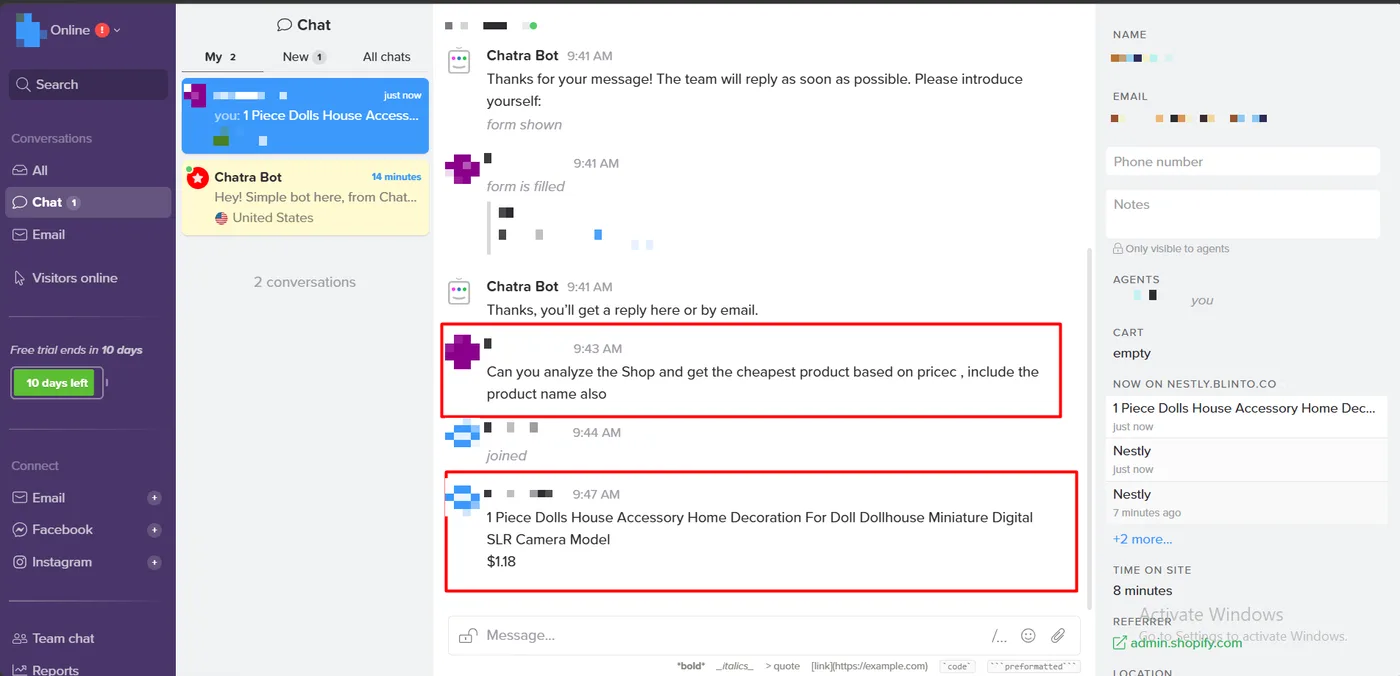
The right-hand panel is the most useful part of the screen. It showed the visitor’s name and email, empty fields for a phone number and private notes (“Only visible to agents”), the assigned agent, the cart, time on site, the referrer and location.
It also showed a live list headed Now on nestly.blinto.co, with each page the shopper had visited and how long ago. Right after our reply, it showed the shopper on that product’s page. Merchants praise this in public reviews, and it is genuinely useful: you see what a shopper is looking at while you talk.
The timestamps tell the story. The question arrived at 9:43 AM. Our agent joined at 9:44 and replied at 9:47 with the right answer: the dolls house camera model at $1.18.
How the Shopper Saw the Reply
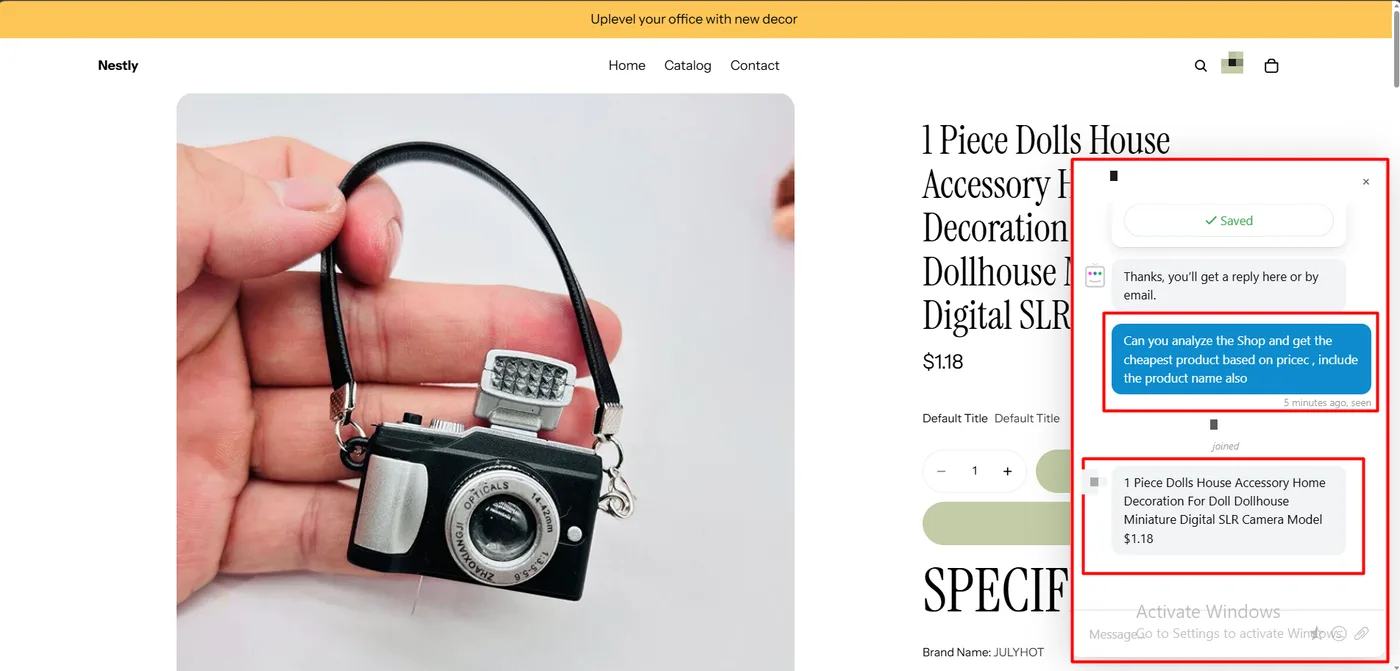
On the storefront, the widget header changed from the generic greeting to the agent’s name, with a green dot. The shopper’s question now read “seen”, a line showed that the agent had joined, and the reply appeared as a normal chat bubble.
The Email Transcript
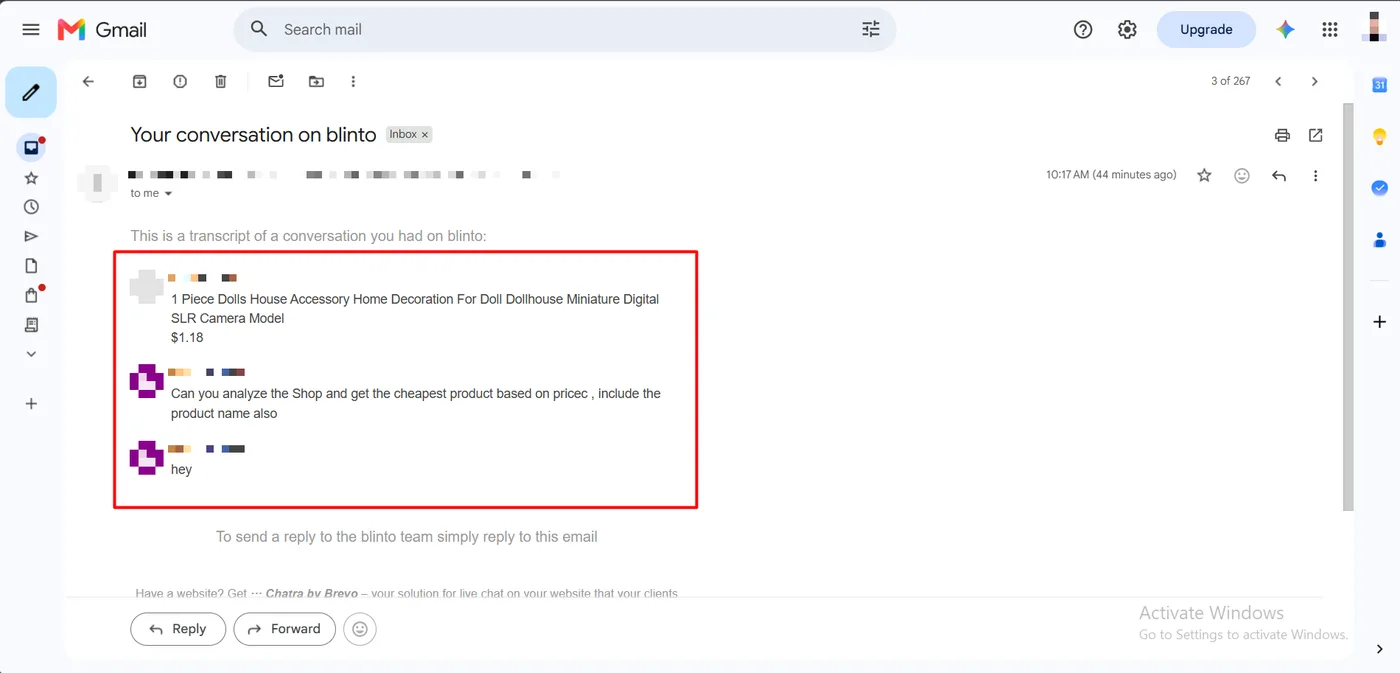
Later that morning, the shopper’s inbox received an email titled “Your conversation on blinto”, sent from the agent’s name through a Chatra inbox address. It began: “This is a transcript of a conversation you had on blinto.”
The transcript listed the shopper’s messages and the agent’s answer, newest first. The bot’s automatic messages were left out, which keeps it short. At the bottom it said: “To send a reply to the blinto team simply reply to this email.”
A shopper who leaves before the agent answers still gets the reply, as the bot had promised.
Chatra vs Tidio on the Same Question
Tidio’s AI agent answered in seconds, and got it wrong. It named a $1.85 product as the cheapest, then corrected itself to the $1.18 item when challenged.
Chatra took about four minutes, and got it right, because a person answered. Its bot did not guess.
A human reply needs someone watching the dashboard; an instant AI reply is only useful when it is accurate. Chatra is built for the first case, and its owner has said it will not add new features, so it will not grow into an AI agent.
Pricing and Value
We checked pricing in Chatra’s Billing page and on the App Store listing on October 7, 2026. The two sources agree.
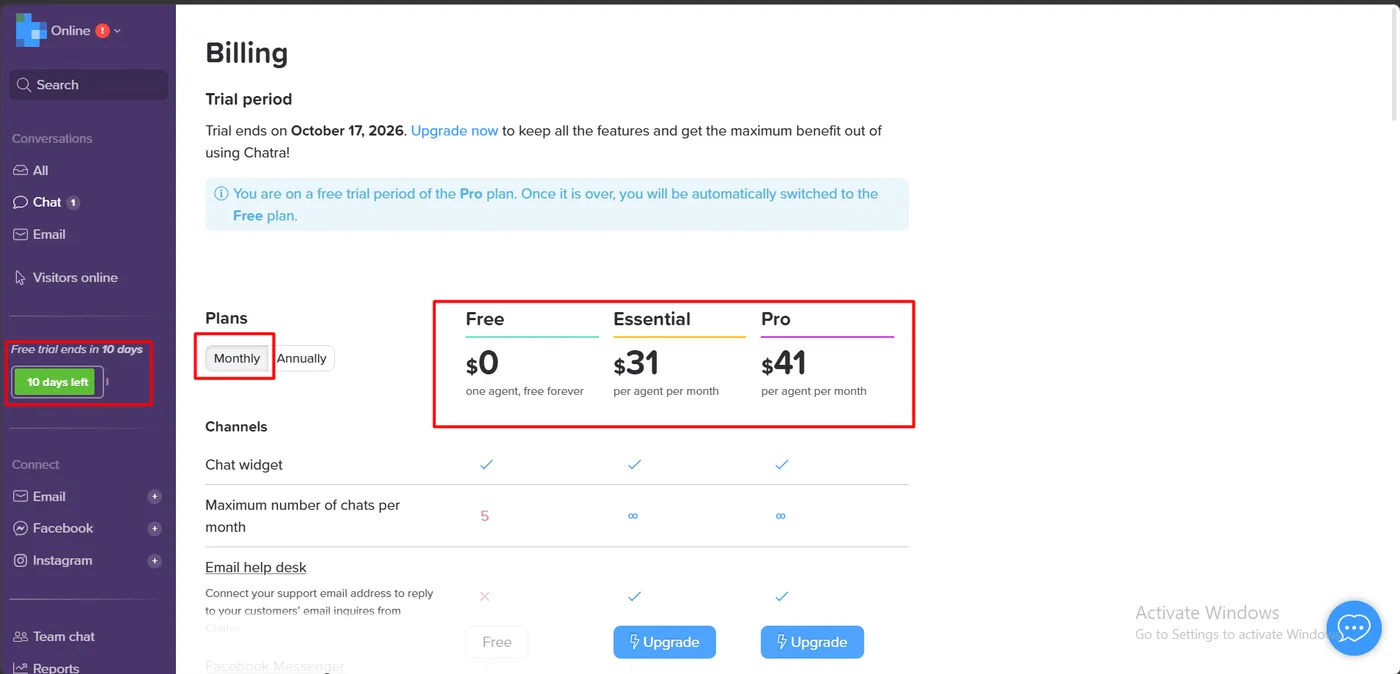
| Plan | Monthly billing | Annual billing | Chats per month |
|---|---|---|---|
| Free | $0 | $0 | 5, one agent |
| Essential | $31 per agent | $25 per agent | Unlimited |
| Pro | $41 per agent | $33 per agent | Unlimited |
The listing shows the annual prices as $300 a year for Essential and $396 a year for Pro, and offers a 10-day free trial on both paid plans. Inside the app, our trial was on Pro, and a banner said that when it ends, the account “will be automatically switched to the Free plan.”
The Free plan is a trial in disguise. Five chats a month is enough to confirm the widget works, not to run support. The billing table shows Free excludes the email help desk, the Intelligent chat bot, the Form and lead capture bot, targeted messages and triggers, and detailed visitor info such as location, device, current page and pages viewed.
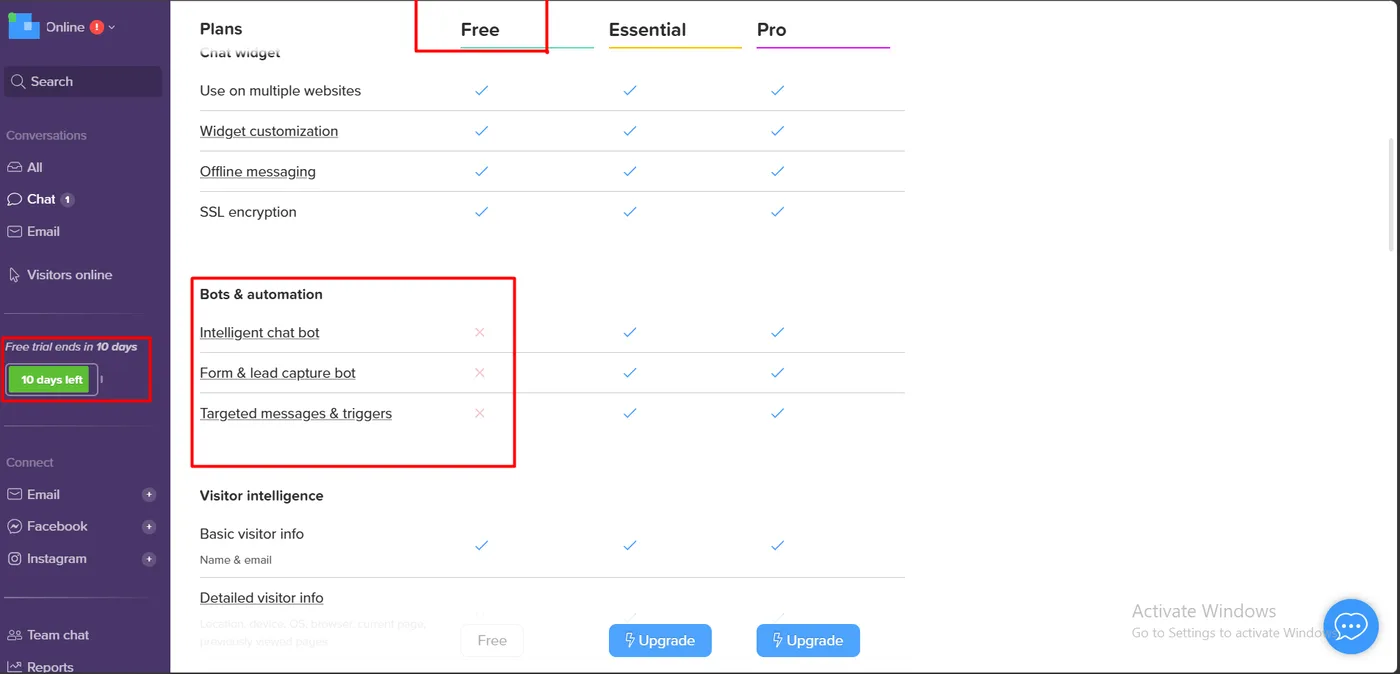
That last item matters. The live page history we found so useful is a paid feature. On Free, the plan table lists only basic visitor info, meaning name and email.
Integrations and the API need Pro. Slack, Help Scout, amoCRM and Zapier are Pro-only in the billing table, as are the REST API and outgoing webhooks. Integration with existing users needs Essential or above. The JavaScript API, plus Ecwid and BigCommerce, are on every plan.
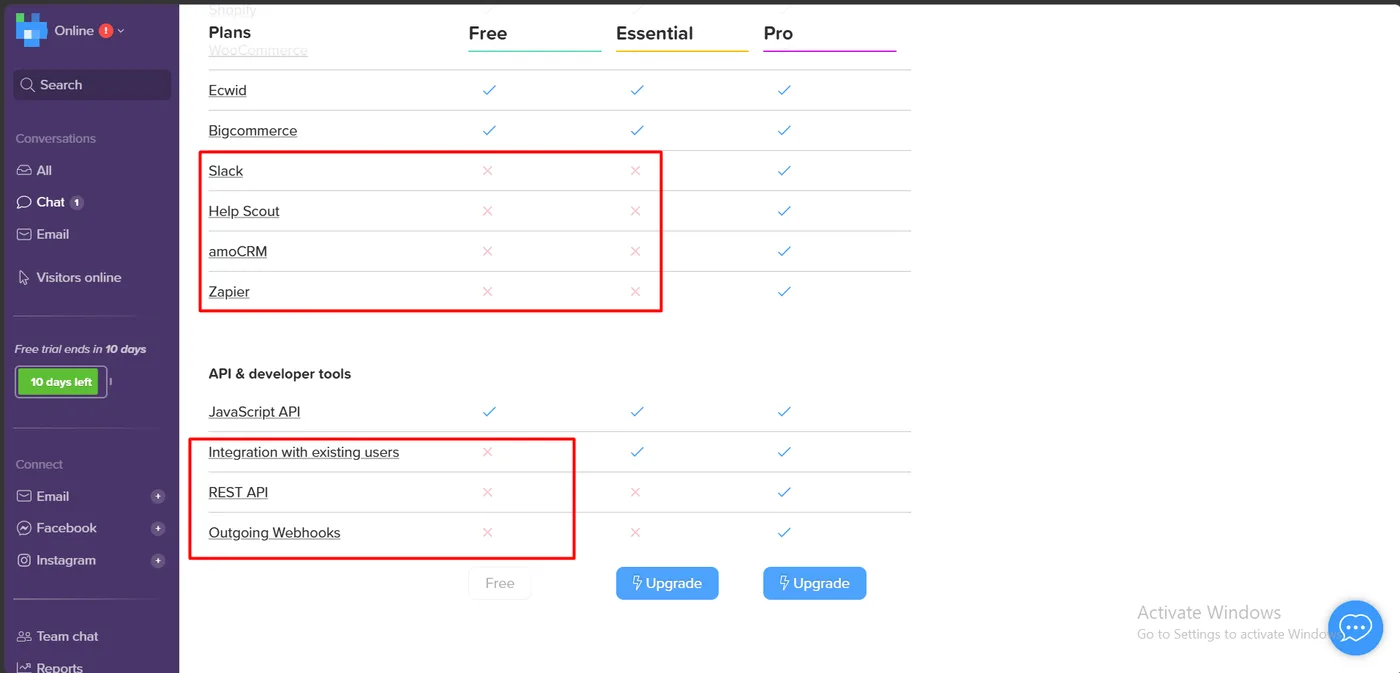
Per-agent pricing scales fast. One agent on Essential costs $31 a month. Three agents on Pro cost $123 a month, or $99 a month billed annually. The cost grows with every agent you add.
Chatra’s own Brevo page also says comparable chat in Brevo costs “13€/month instead of 41€/month”. We did not test Brevo Conversations, but it is unusual for a vendor to call its own product the pricier option.
What We Liked
- Narrow permissions: only staff data and Online Store access, far less than some rivals.
- One toggle to go live: the theme app embed needed no code.
- Clear read status: shoppers see “delivered, not seen”, then “seen”, then who joined.
- Live page history: agents see each page the shopper visits during the chat.
- Email transcripts: shoppers who leave still get the answer and can reply by email.
- No guessing: the bot collected contact details and left the answer to a person.
What Could Be Better
- No new features are coming, by the owner’s own statement.
- No data transfer to Brevo yet, so a future move may leave chat history behind.
- The Free plan is tiny: five chats, one agent, no bots and no detailed visitor info.
- Per-agent pricing gets expensive for larger teams.
- Human replies depend on someone being online, which is a staffing question, not a software one.
Who Is Chatra Best For?
Chatra suits small Shopify stores with one to three people who want to talk to shoppers directly, see what they are browsing, and follow up by email when they leave. It fits stores where a knowledgeable human answer wins the sale.
It is a poorer fit if you want an AI agent answering questions around the clock, if you need a support platform that will keep adding channels and features, or if you have a large team and per-agent pricing would add up. Stores already using Brevo for email should look at Brevo Conversations first, since that is where new development is going.
If you are weighing an AI-first option, our Tidio review covers the same store and the same question with an AI agent answering.
Final Verdict
Chatra does the basics of live chat very well. It installed with narrow permissions, went live with one toggle, routed a shopper’s question to a person, showed that person what the shopper was browsing, and followed up by email.
What it will not do is change. Its owner has said new features go to Brevo Conversations, and one merchant reports the Free plan has already shrunk from 20 chats a month to five. You are choosing a stable, finished tool.
For a small store that wants a human answering, that is a reasonable choice. Use the 10-day trial, decide whether you need the paid visitor details, and count your agents first.
Recommended for small stores that want simple, human-led live chat and do not need AI or a growing roadmap.
Frequently Asked Questions
Is Chatra free?
Yes, there is a free plan. It covers one agent and up to five chats a month. It does not include bots, the email help desk, or detailed visitor info such as the pages a shopper has viewed. Paid plans start at $31 per agent per month, or $25 per agent per month billed annually, with a 10-day free trial.
Does Chatra have an AI chatbot?
Not that we saw. In our test, the default bot asked for a name and email and left the question for a human. Paid plans add an Intelligent chat bot, a lead capture bot and targeted triggers, which Chatra describes as collecting contacts and offering quick FAQ options. We did not test them.
Is Chatra still being updated?
Chatra’s own page about Brevo says it will keep working as an independent app and will be supported, but that no new features will be released in Chatra. New features go to Brevo Conversations only.
What happens if a shopper leaves before I reply?
In our test, Chatra emailed the shopper a transcript of the conversation, including the agent’s reply. The email said they could reply to it to continue the conversation with the store’s team.