
Flyweight AI Chatbot is an AI shopping assistant first and a support tool second. It learns from your Shopify store, answers in a chat window, and shows products as cards that shoppers can add to the cart without leaving the chat.
We asked it the question we put to every support app: what is the cheapest product in this store?
It got it right. It named the Jamaica Away Player and the Norway World Cup 2026 Home Kit Player half, the only two jerseys in the store that start at $999. Every other product costs $1,299. The product cards showed the right prices, and one click on Add to cart put the Jamaica jersey in the cart at $999.00.
We installed Flyweight AI Chatbot & AI Chat on a Shopify development store, set it up, and chatted with the AI as a shopper.
Key Takeaways
- The AI answered correctly. Asked for the cheapest product, it named both $999 jerseys and offered to narrow the choice further.
- Answers turn into sales. The reply came with product cards, and Add to cart worked from inside the chat.
- Setup is one toggle. A Chat button app embed puts a floating chat on every page. An embedded chat window and AI Search can be added too.
- The Free plan includes 300 AI interactions. A paid plan adds a nightly refresh of the AI’s store knowledge.
- Paid plans are cheap but metered differently. Our store was offered $10 a month for 100 interactions or $30 a month for unlimited ones.
Our Verdict
Flyweight AI Chatbot is a strong choice for Shopify stores that want an AI assistant to answer product questions and help shoppers buy, at a low monthly price.
In our test it read the catalogue correctly, showed accurate prices on product cards, and let the shopper add an item to the cart in one click. In the admin, every AI reply has an Explain link that shows where the answer came from.
Two cautions. The Free plan does not include the nightly knowledge refresh. And we tested the AI, not the human side, so test live chat and channels yourself if your team needs a full helpdesk.
What Flyweight Offers
Flyweight AI Chatbot & AI Chat is published by Flyweight GmbH, which lists an address in Mannheim, Germany. Its Shopify App Store listing carries the Built for Shopify badge and shows a launch date of July 23, 2024.
The listing describes an AI suite with chat, search and live chat, powered by a “Knowledge Graph & ChatGPT.” It says the AI learns your store’s pages, articles and products, detects your brand’s personality, speaks English and over 100 languages, and is “GDPR & AI-Act compliant.” It also lists ticket and email AI for Gmail, Zoho, Outlook Web, Zendesk and Gorgias. These are developer claims; we did not test them.
What We Tested
We tested Flyweight in October 2026 on a Shopify development store called zenden. It runs the Horizon theme with a nine-product football jersey catalogue. Two jerseys start at $999 and the rest cost $1,299.
Our test covered the install permissions, the theme app embed, the Setup page, the Appearance settings, the in-app Subscription page, the floating chat button and an embedded chat window on the home page, a product question to the AI as a shopper, adding a product to the cart from the chat, and the same conversation in the admin.
We did not test AI Search queries, human agents or live chat handover, Routing, Personality or Content settings, Instagram, WhatsApp, email or ticket AI, completing an order lookup, or any paid plan. We used the Free plan. Pricing comes from the App Store listing, the in-app Subscription page and Flyweight’s website, checked on October 15, 2026.
Setup: One Toggle, Several Ways In
The install dialog asks to view customer data (including sensitive, device and activity data), staff and blog-contributor data, and store data: products, orders, the online store and the Shopify admin.
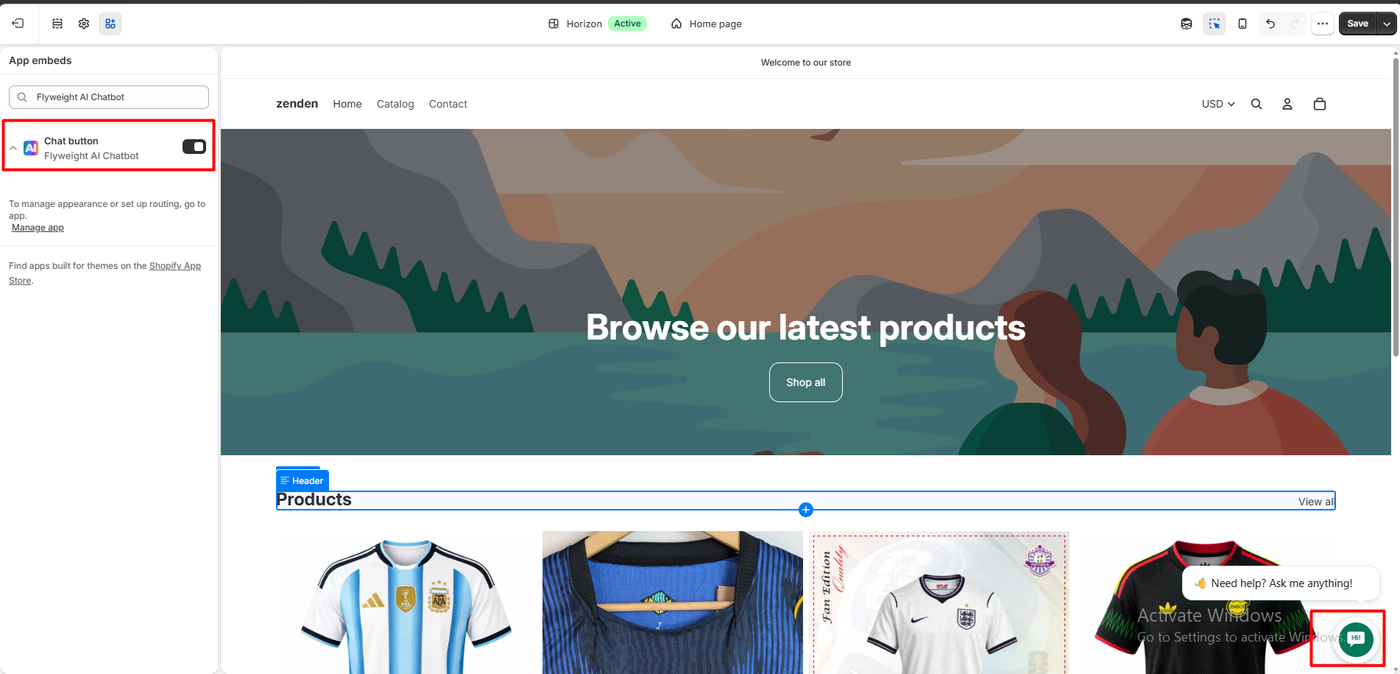
In the theme editor, the Chat button app embed is one toggle. Its note reads: “To manage appearance or set up routing, go to app.” With it on, a round chat button appeared in the bottom corner of the store with a greeting bubble: “Need help? Ask me anything!”
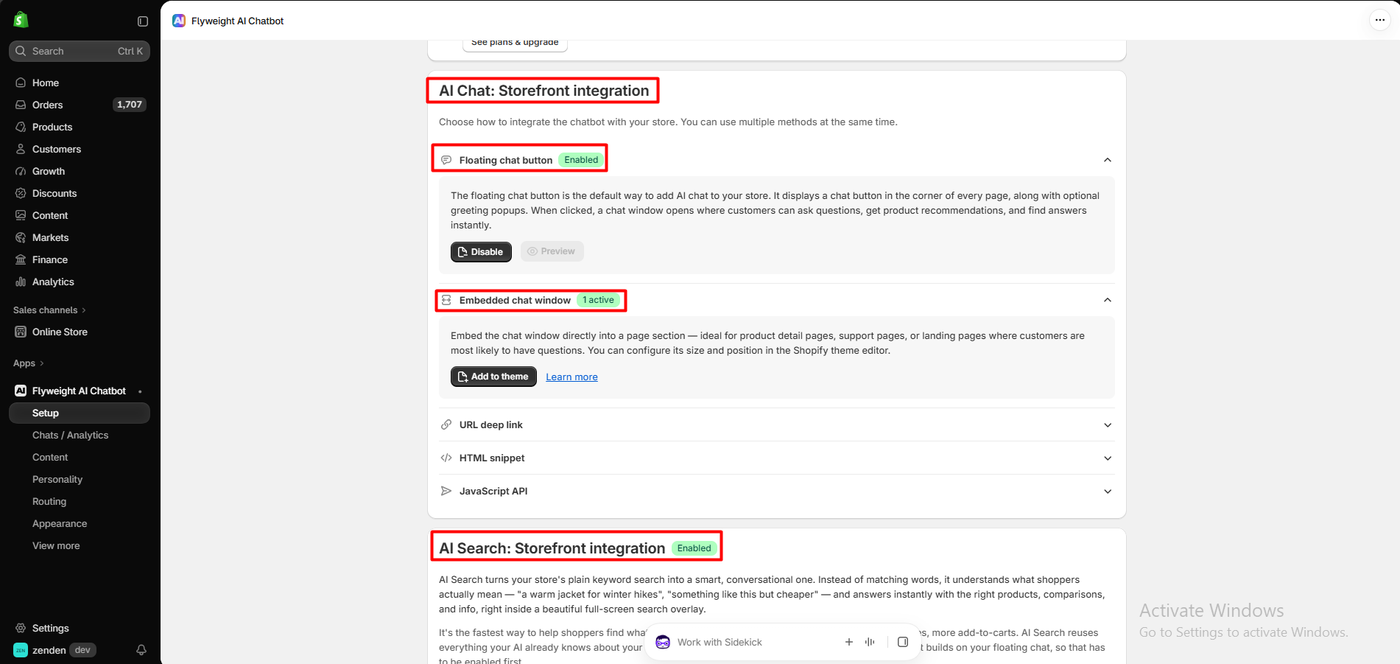
The Setup page lists five ways to add the chat, usable together: the floating chat button, an embedded chat window (an app block for product, support or landing pages; we added one to the home page), a URL deep link, an HTML snippet and a JavaScript API. We did not try the last three.
Below that, AI Search “turns your store’s plain keyword search into a smart, conversational one.” It needs the floating chat enabled first. We switched it on, and the dashboard showed the search page and search input as captured. We did not run any searches.
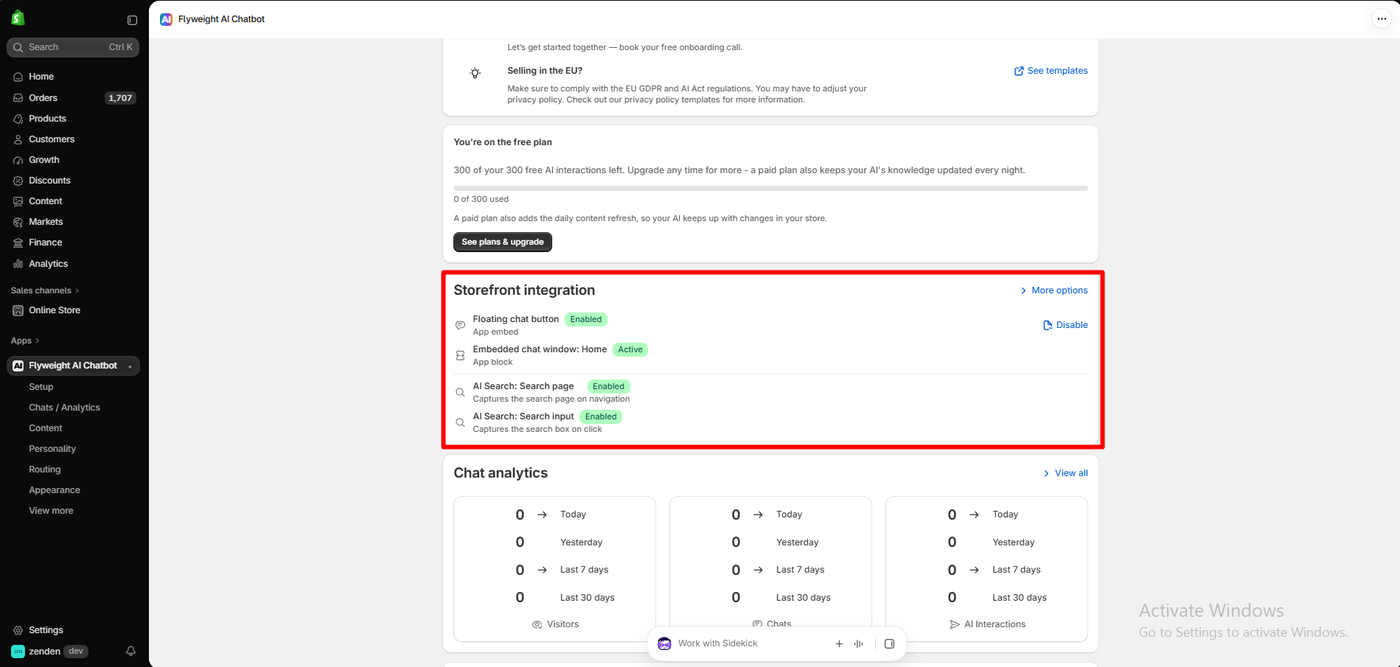
The dashboard also offers a free onboarding call and privacy-policy templates for stores selling in the EU.
Appearance: Brand Colour, Messages and Product Cards
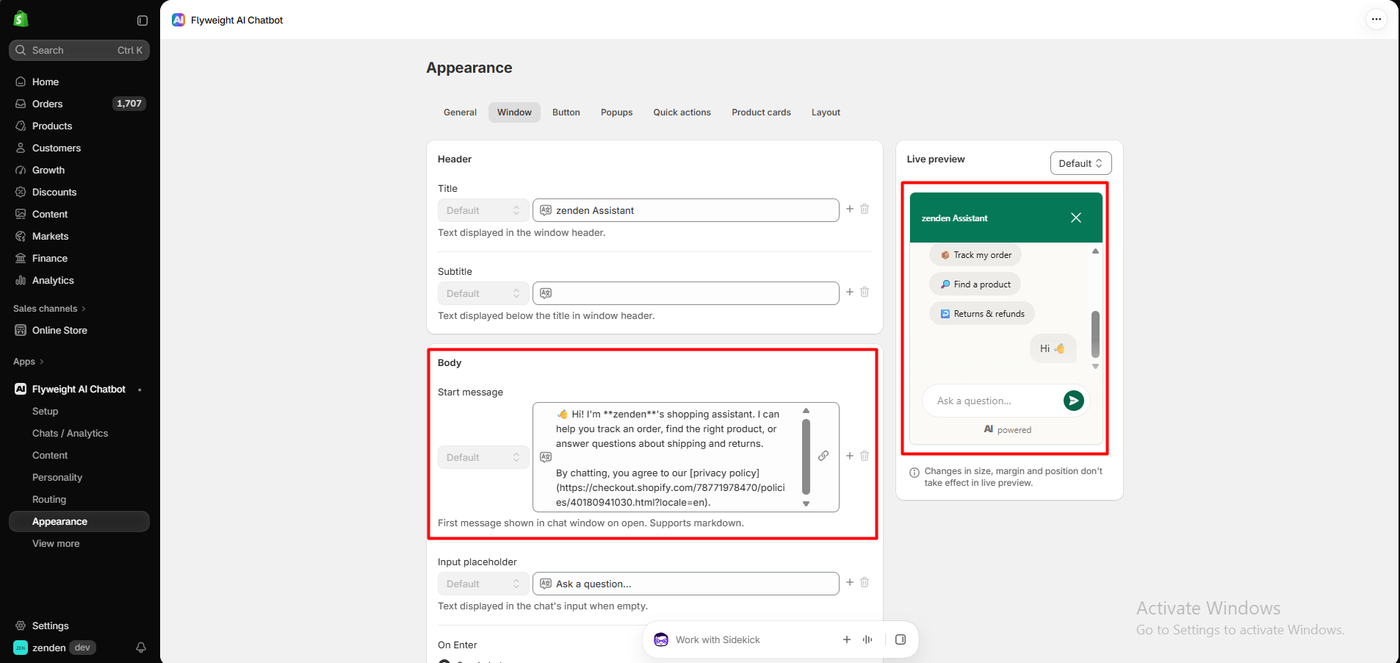
The Appearance page has seven tabs (General, Window, Button, Popups, Quick actions, Product cards and Layout) and a live preview. One brand colour drives the button, header and send button, and you can pick featured products to show as cards after the start message.
Our chat was titled “zenden Assistant.” Its markdown start message read: “Hi! I’m zenden’s shopping assistant. I can help you track an order, find the right product, or answer questions about shipping and returns.” It ended with “By chatting, you agree to our privacy policy,” linked to the store’s own policy page. The preview showed three quick actions: Track my order, Find a product and Returns & refunds.
Asking the AI for the Cheapest Product
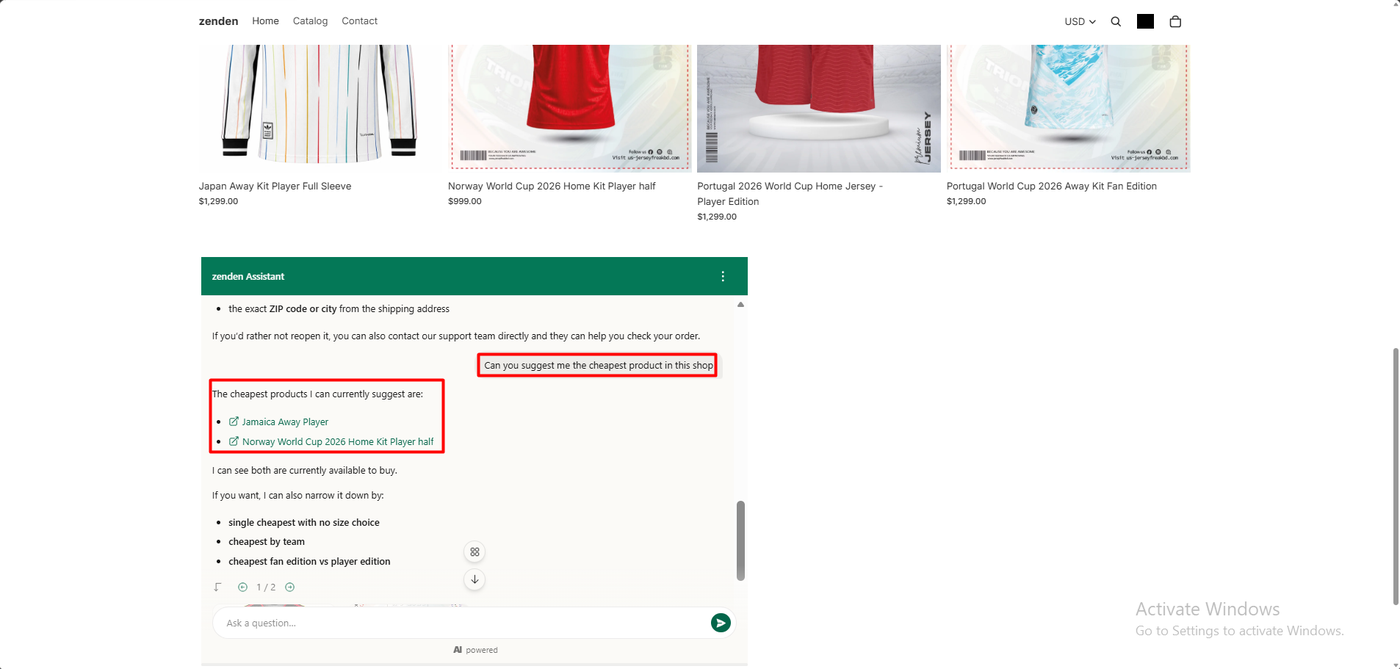
We chatted in the embedded window on the home page. Earlier in the same chat we had started an order-status request and cancelled the lookup form. The AI offered to reopen it and explained it would need the exact email from checkout and the exact ZIP code or city from the shipping address. It also suggested contacting the support team instead. We did not complete a lookup.
Then we asked: “Can you suggest me the cheapest product in this shop.”
The AI replied:
The cheapest products I can currently suggest are:
- Jamaica Away Player
- Norway World Cup 2026 Home Kit Player half
I can see both are currently available to buy.
It then offered to narrow the list, for example by team or by fan versus player edition.
This is correct. Jamaica and Norway are the two jerseys that start at $999. The other seven cost $1,299.
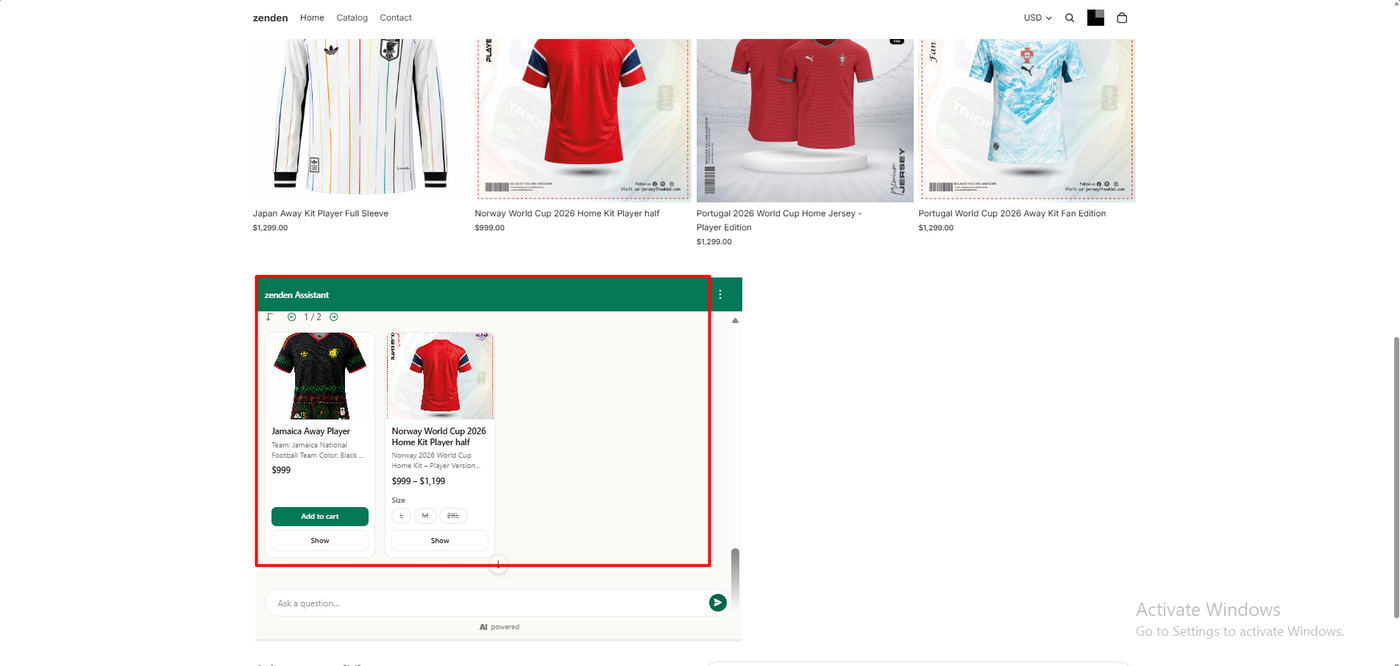
Under the text, two product cards appeared. Jamaica Away Player showed a short description, $999, an Add to cart button and a Show button. Norway World Cup 2026 Home Kit Player half showed $999 – $1,199, size buttons for L, M and 2XL, and a Show button.
Two small details. The text reply named the products but did not state prices; the prices were on the cards. And on the Norway card, the size buttons appeared struck through, with no Add to cart button. We did not check whether those sizes were in stock, so we cannot say whether “both are currently available to buy” was fully accurate for Norway.
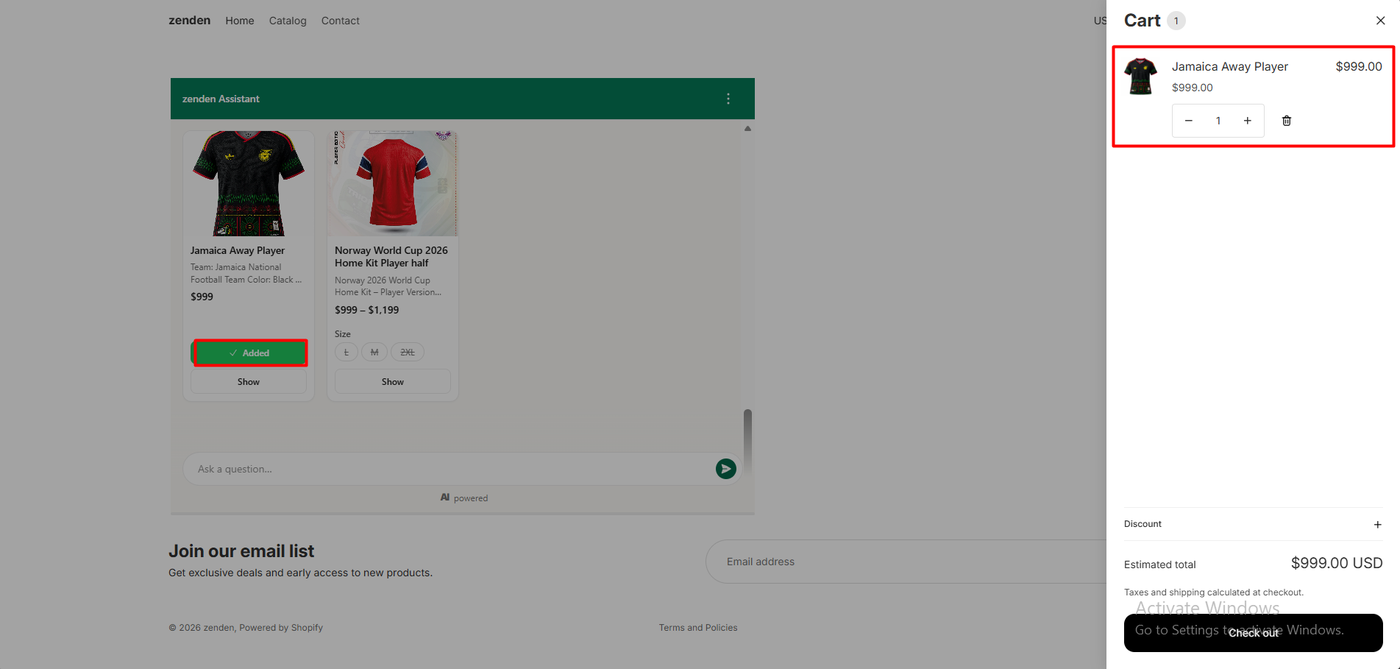
We clicked Add to cart on the Jamaica card. The button changed to Added, and the store’s cart drawer opened with Jamaica Away Player, $999.00, quantity one, and an estimated total of $999.00 USD.
Here is how the AI agents we have asked compare:
| App | Answer to “cheapest product” | Store |
|---|---|---|
| Zipchat | Named the cheapest item correctly, with a correct runner-up | Nestly |
| Tidio | Named the wrong item, then corrected itself after pushback | Nestly |
| Commslayer | Said pricing was not available; priced other items on follow-up | Nestly |
| Chatty | Declined to guess; a team member answered | zenden |
| Chatway | Named two $1,299 items; then the right items at $99 instead of $999 | zenden |
| Flyweight | Named both $999 items correctly, with accurate product cards and a working Add to cart | zenden |
These were single questions in single sessions, on two different test stores. Treat this as a pattern, not a ranking. We did not open Flyweight’s Content or Personality settings before asking.
The Conversation in the Admin
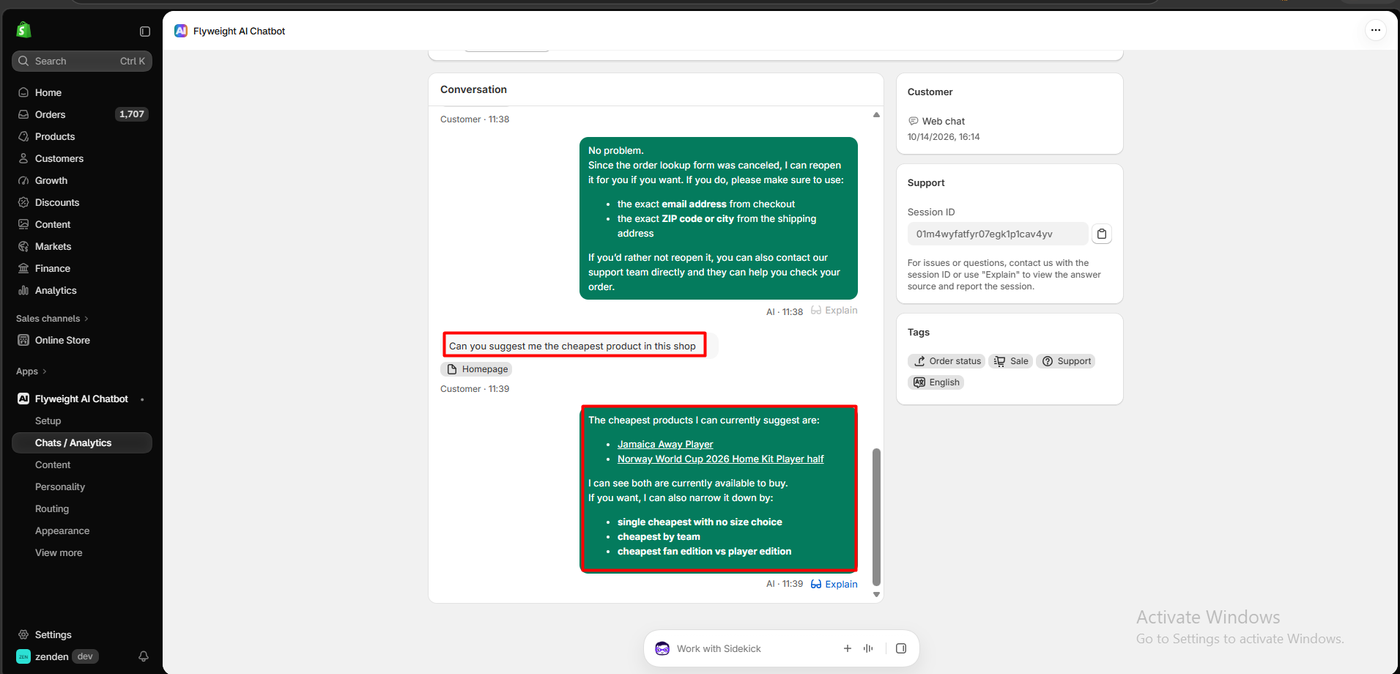
Under Chats / Analytics, the whole conversation was there, with the shopper’s message tagged by its page (Homepage).
Every AI reply has an Explain link, which the side panel says lets you “view the answer source and report the session.” The chat was also tagged Order status, Sale, Support and English automatically, and had a session ID for support requests. The dashboard tracks visitors, chats and AI interactions over 30 days.
Flyweight Pricing
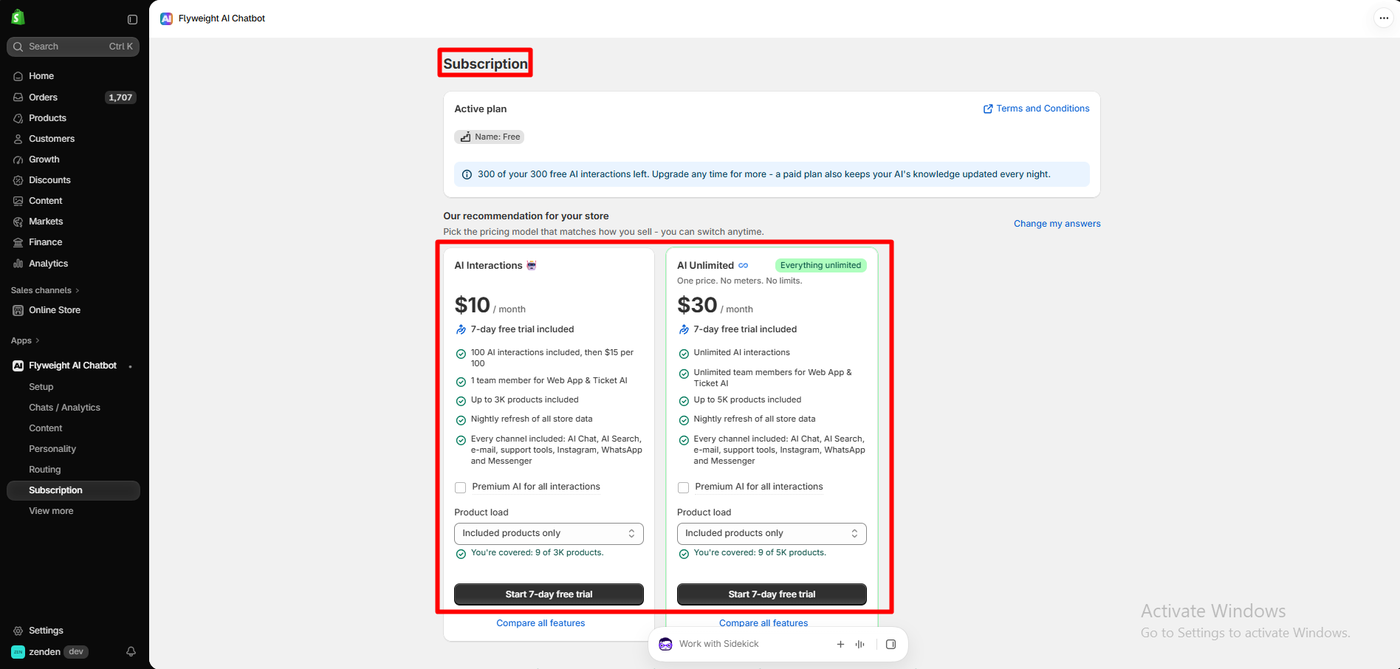
The App Store listing shows a single Free plan and the line “One click to your tailored plan.” The paid plans appeared inside the app, on a page titled “Our recommendation for your store,” with a Change my answers link. Other stores may see different options.
These are the plans our store was offered on October 15, 2026:
| Plan | Price | AI interactions | Team members | Products | Notes |
|---|---|---|---|---|---|
| Free | $0 | 300 free | — | — | No nightly knowledge refresh |
| AI Interactions | $10/month | 100 included, then $15 per 100 | 1 | Up to 3,000 | 7-day free trial |
| AI Unlimited | $30/month | Unlimited | Unlimited | Up to 5,000 | 7-day free trial |
Both paid plans include a nightly refresh of store data and “every channel”: AI Chat, AI Search, email, support tools, Instagram, WhatsApp and Messenger. An optional Premium AI checkbox showed no price. Flyweight’s website describes a tailored AI Unlimited plan without a published price.
Three things to know:
- The Free plan’s knowledge does not refresh nightly. The banner says a paid plan “also keeps your AI’s knowledge updated every night.” We did not see whether the 300 free interactions reset each month.
- Do the maths on the $10 plan. Extra interactions cost more than the first 100. At 200 interactions a month it costs $25. At 300 it costs $40, more than AI Unlimited at $30.
- Pricing is based on AI interactions. Older merchant reviews complained about charges based on site traffic. Flyweight replied in July 2026 that it had added interaction-based pricing “with unlimited visitors included.”
What Public Sources Add
On October 15, 2026 the listing showed a 4.8 rating from 124 reviews: 104 at five stars, 18 at four, 2 at three, and none at two or one.
Recent praise is consistent. Merchants call setup quick and easy, and several single out the support team. A US merchant using the app for over a year said the team helped with “custom routings” and “individual solutions.” A Spanish merchant mentioned the connection to Shopify orders and lower costs than other apps they had seen.
The criticism is mostly about pricing and limits:
- Traffic-based pricing. Three four-star reviews from 2025 and 2026 said costs rose with site visitors rather than chats. One US merchant said they cancelled because of it. Flyweight’s reply describes the newer interaction-based plans.
- Limits on training. A five-star Italian review from July 2026 mentioned a 5,000-character limit. A 2025 review wanted to upload past conversations for training.
- Human handover. A February 2025 review wished it could transfer to a live person. The listing now advertises live chat, which we did not test.
We did not reproduce any of these.
What We Liked
- A correct answer to our cheapest-product question, first time.
- Product cards with Add to cart that worked from inside the chat.
- One-toggle setup, with four other ways to place the chat.
- An Explain link and automatic tags on every conversation.
- A verified order lookup that asks for the checkout email and shipping ZIP or city.
- A real Free plan with 300 AI interactions, and low-priced paid plans.
What Could Be Better
- No nightly knowledge refresh on the Free plan.
- Overage on the $10 plan costs more than the base allowance.
- Paid plans are tailored, so the public listing shows only the Free plan.
- The Norway card’s struck-through sizes sat beside a reply saying both items were available.
- Broad install permissions, including sensitive customer data.
- Sourced complaints about character limits and training options, which we did not test.
Who Is Flyweight Best For?
Flyweight suits Shopify stores that want an AI shopping assistant to answer product questions and move shoppers to the cart, on a free start and a low monthly price. Its EU base and GDPR and AI Act positioning will also appeal to European merchants, though we did not verify those claims.
Look elsewhere, or test carefully, if you mainly want a human live chat helpdesk with agent seats, shared inboxes and social channels on a free plan.
Here is how its free plan compares with the other support apps we have reviewed:
| App | Free plan allowance |
|---|---|
| Commslayer | 300 conversations a month, unlimited agents |
| Flyweight | 300 free AI interactions |
| Chatty | 50 AI conversations a month, unlimited human conversations |
| Chatway | 50 conversations a month, 1 seat, 10 free AI credits |
| Willdesk | 20 conversations a month |
| Re:amaze | No free plan |
These figures come from each app’s published plan information, and the apps count conversations and interactions differently.
Final Verdict
Flyweight’s AI did the job we set it. Asked for the cheapest product, it named the right two jerseys, showed their real prices on product cards, and added one to the cart in a click.
Setup was simple, and the admin showed every reply with an Explain link. Watch the plan details: the Free plan skips the nightly knowledge refresh, and heavy use on the $10 plan can cost more than the unlimited one.
Recommended for Shopify stores that want an accurate, sales-focused AI chat at a low price. Test the live chat and channels yourself if your team needs a full helpdesk.
Frequently Asked Questions
Is Flyweight AI Chatbot free?
Yes. The Free plan includes 300 free AI interactions. Our store was offered paid plans at $10 a month (100 interactions, then $15 per 100) and $30 a month (unlimited), each with a 7-day free trial.
Did Flyweight’s AI answer correctly?
Yes. Asked for the cheapest product, it named the two $999 jerseys in our nine-product store. Its product cards showed $999, and Add to cart worked from the chat.
Can shoppers add products to the cart from the chat?
Yes. Clicking Add to cart on the AI’s product card added the Jamaica jersey to the store’s cart at $999.00.
Does Flyweight include AI search?
Yes. AI Search is a separate storefront integration that takes over the search page and search box, and it needs the floating chat enabled first. We switched it on but did not test search results.
Does Flyweight work without coding?
In our test, yes. We switched on the Chat button app embed and added an embedded chat window in the theme editor without touching code.