
Commslayer makes an unusual offer for a Shopify helpdesk: a free plan with unlimited agents, 300 conversations a month, and an AI agent included.
That makes the AI the part worth testing. So we gave it the same question we have put to two other AI agents on the same Shopify store: what is the cheapest product here?
Tidio named the wrong item on that store. Zipchat named the right one. Commslayer said pricing “isn’t directly available” and listed four products without prices. When we asked for the prices, it gave them, but none was the $1.18 item showing on the same page.
We installed Commslayer AI Helpdesk & Chat on a Shopify development store, set up the live chat widget, routed new chats to the AI agent, and chatted with it as a shopper.
Key Takeaways
- The helpdesk set-up worked. A five-step wizard created a chat inbox, the widget went live on the storefront, and conversations arrived in a shared inbox with order data beside them.
- The AI missed the catalogue question. Asked for the cheapest product, it listed four items without prices. Asked again, it priced them from $1.75 up, while a $1.18 item was visible on the page.
- The free plan is generous. It includes unlimited agents, 300 conversations a month, 300 AI agent messages and 300 AI drafts, plus email, chat, WhatsApp and social DMs.
- Setup takes longer than most. Commslayer needs its own account and email verification, and our checklist still read 3 of 9 steps done at the end of testing.
- It connects to Claude and ChatGPT. A built-in MCP option lets you run your helpdesk from an AI assistant, which several merchants praise.
Our Verdict
Commslayer is a strong choice for Shopify stores that want a real, multi-channel helpdesk for free or for little money, and that will treat the AI agent as something to train rather than something to trust on day one.
The helpdesk parts held up well. The chat inbox took a few minutes to create. The widget went live with one theme toggle. A simple automation sent new chats to the AI agent, and the inbox showed the shopper’s orders, spend and history beside the chat.
The AI is where to be careful. On a simple catalogue question it hedged, then gave prices that did not answer the question. Public reviews include similar complaints about the AI agent, alongside strong praise for value and for the team. Plan to spend time on the AI’s guidance before you let it answer shoppers alone.
What Commslayer Offers
Commslayer AI Helpdesk & Chat is published by Actuals Oy, based in Espoo, Finland. Its Shopify App Store listing carries the Built for Shopify badge, lists a launch date of January 1, 2024, and introduces the app as built by “the ex-Lifetimely founders.”
The listing describes one AI inbox for live chat, email, WhatsApp, Instagram, Facebook and TikTok. It says the AI agent resolves tickets, edits orders, drafts replies, summarises threads and auto-translates more than 40 languages. It also highlights AI moderation of ad and post comments, native support for subscription apps such as Recharge, Skio, Loop and Appstle, and unlimited agents on every plan. Listed integrations include Shopify Checkout, customer accounts and Flow, plus Facebook, Instagram, TikTok, Judge.me, Loop Subscription and Recharge.
What We Tested
We tested Commslayer in October 2026 on a Shopify development store called Nestly. It sells about 50 low-priced desk and electronics accessories on the Tinker theme. It is the same store and catalogue we used for our Tidio and Zipchat reviews.
Our test covered the install permissions, the account sign-up and onboarding, the getting-started checklist, the five-step chat inbox wizard, widget branding and features, the theme app embed, an automation that assigns new chats to the AI agent, inbox settings, and the MCP page. On the storefront, signed in as a customer, we asked the AI for the cheapest product and then for the prices of the items it suggested, and we checked both conversations in the inbox.
We did not test email, WhatsApp, Instagram, Facebook or TikTok channels, comment moderation, order editing, refunds, the help center or customer portal, subscription integrations, reports, the MCP connection itself, mobile layouts or any paid plan. We stayed on the Free plan, so no trial or billing happened. Pricing comes from the App Store listing, checked on October 13, 2026.
Setup: A Real Helpdesk, Not a Widget
The install dialog asks to view customer data, including sensitive, device and activity data, and staff data. It also asks to view and edit customers, products, orders, discounts, store credit, the online store and custom data.
Unlike most chat apps we have reviewed, Commslayer then asks you to create a separate account with a work email and password, and to confirm it from an “Activate your Commslayer account” email. Onboarding asks for your name and brand, your main goal (we chose Automate with AI), your store, your channels (we chose Live chat widget), your team size and ticket volume, and how you heard about the app. That last screen offers a 45-day free trial with a referral code.
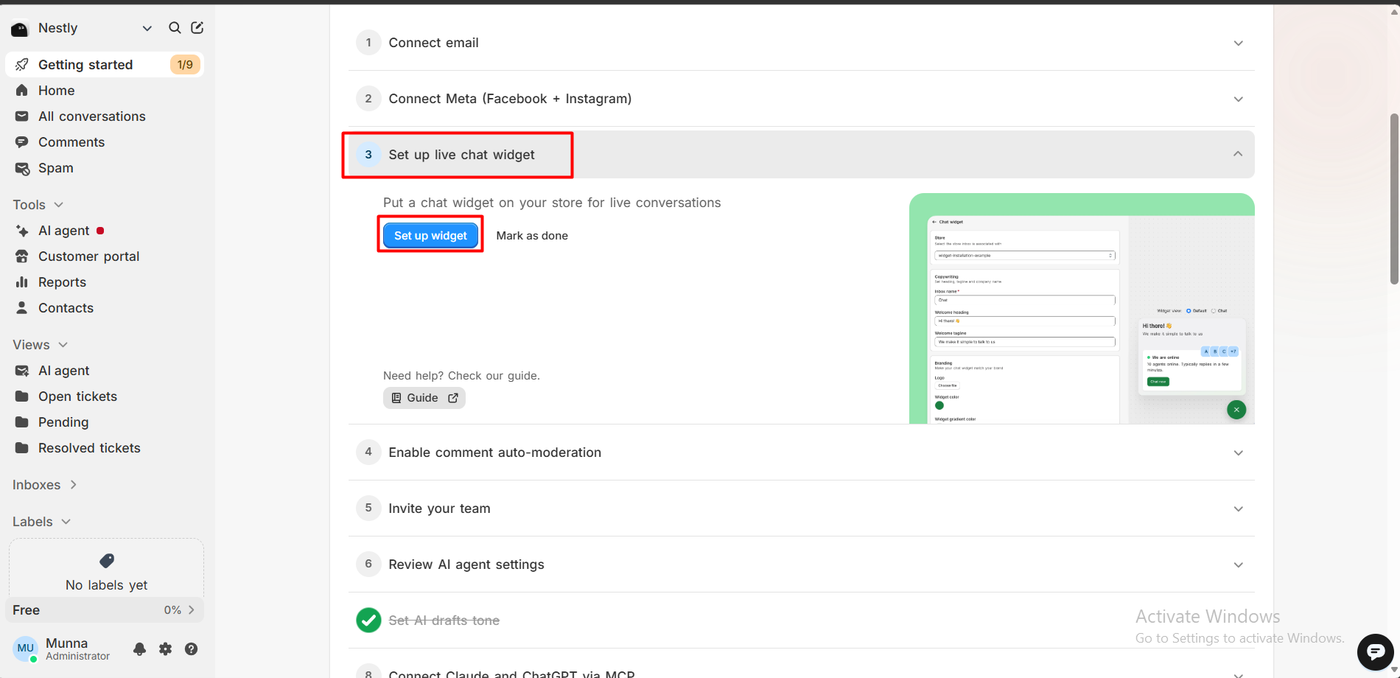
The dashboard then opens on a nine-step getting-started checklist: connect email, connect Meta, set up the live chat widget, comment auto-moderation, invite your team, review AI agent settings, set the AI drafts tone, connect Claude and ChatGPT through MCP, and set up a customer portal. It reflects what Commslayer is: a full helpdesk, with chat as one channel among several.
Setting Up the Chat Widget
The Set up widget step opens a five-step inbox wizard: choose the channel, create the inbox, add agents, enable chat on your store, and done. We linked the inbox to our store, kept the default heading “Hi there! 👋” and tagline “We make it simple to talk to us,” and added ourselves as the agent.
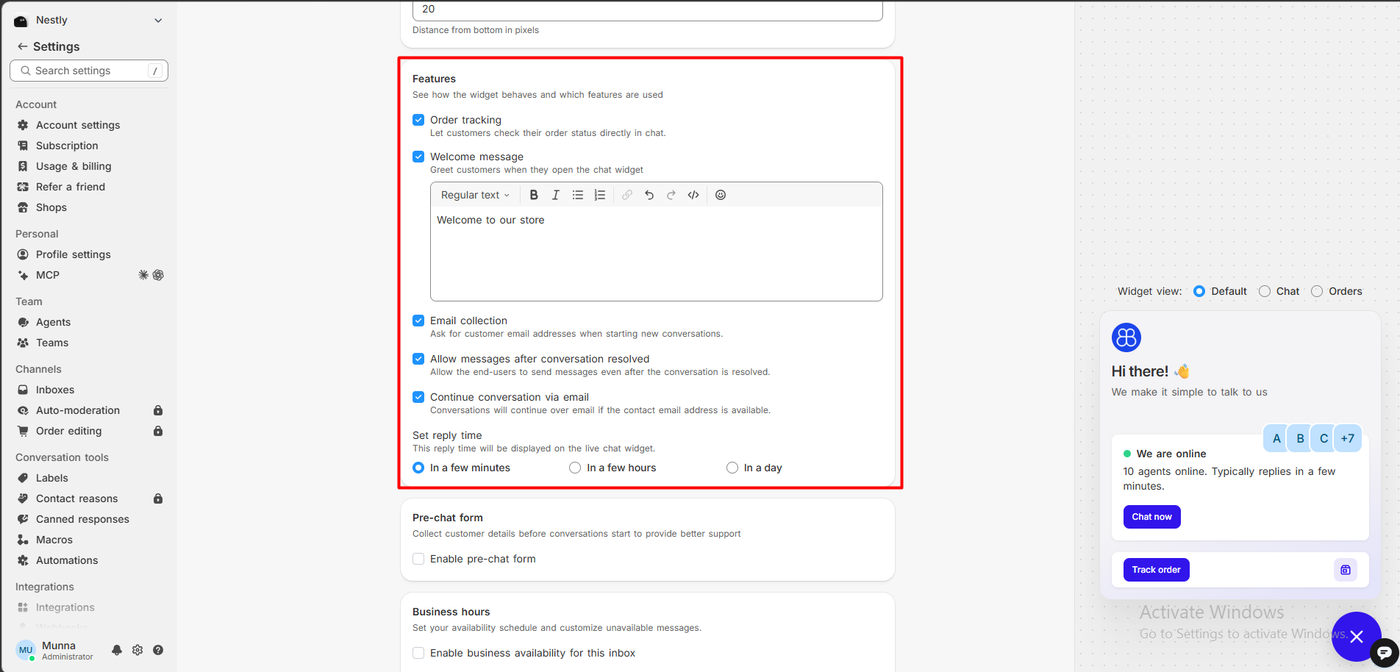
Branding covers a logo, widget and gradient colours, the chat icon, left or right position, a standard or expanded bubble, the launcher title and offsets. A features panel switches on order tracking, a welcome message, email collection, replies after a chat is resolved, continuing by email, and the reply time shown to shoppers. Inbox settings add auto-assignment (including offline agents, up to 50 chats each), business hours and CSAT surveys after a chat closes.
One small catch: the editor preview says “10 agents online” with sample avatars. That is placeholder text. The live widget correctly showed 1 agent online.
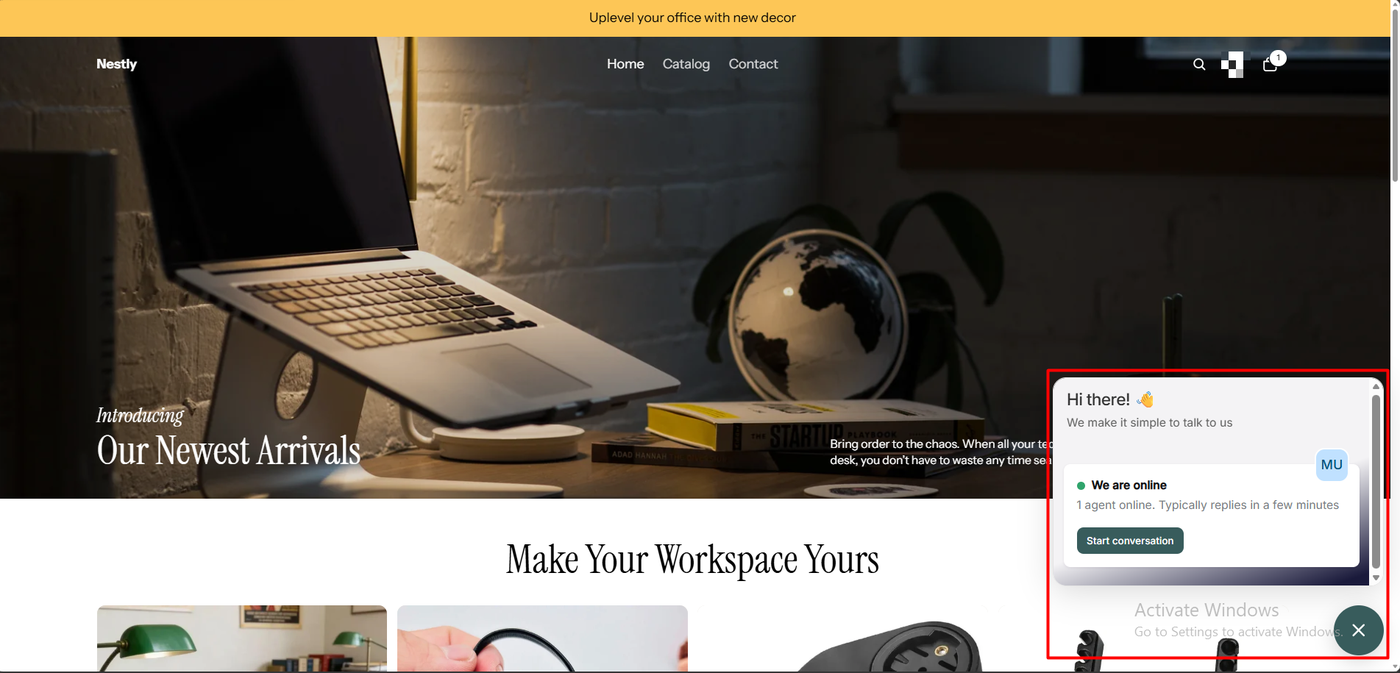
Enabling it on the store is one toggle, Commslayer chat widget, in the theme’s App embeds. The wizard then read 5 of 5, the inbox listed as Connected, and the storefront showed a teal launcher that opened to a Start conversation button.
Sending Chats to the AI Agent
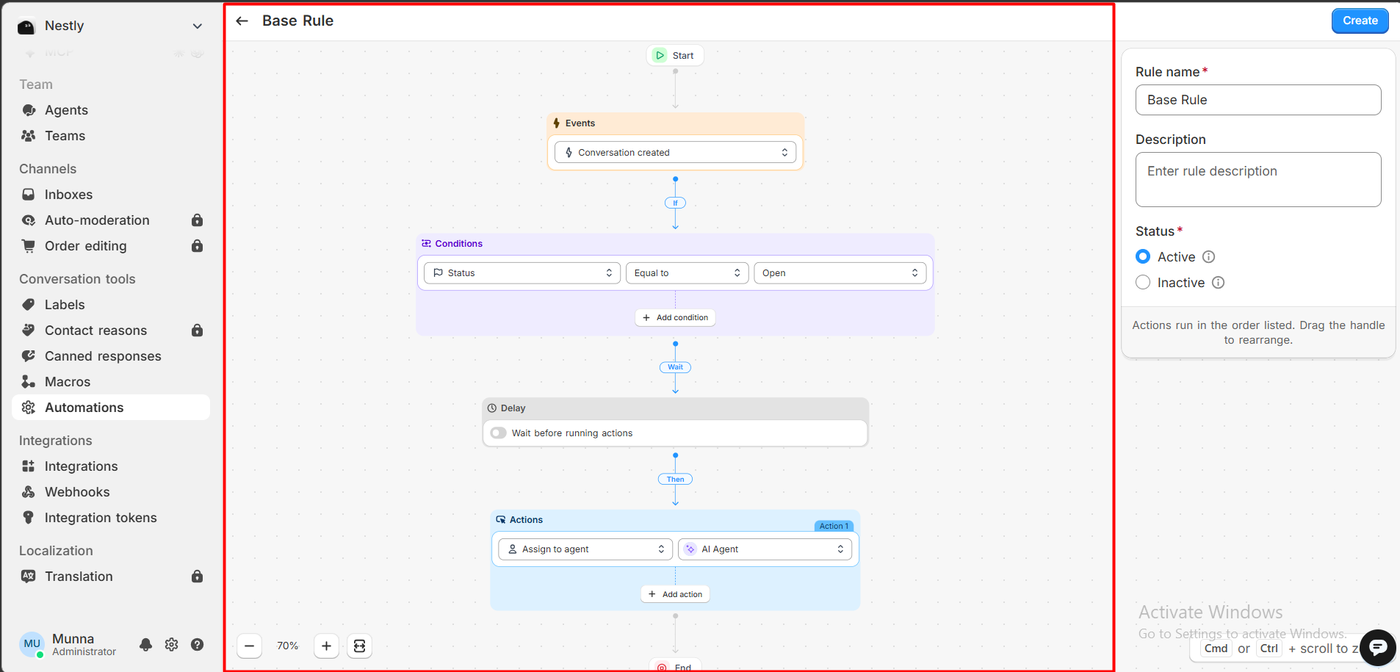
Routing is done with Automations, a visual flow builder. Our rule, “Base Rule,” reads: when a conversation is created, if its status is Open, then assign to agent: AI Agent. It also offers an optional delay and more conditions and actions. The rule was active in the Automations list.
It is more work than a single “let AI answer” switch, but it gives you control over which chats the AI gets.
Asking the AI for the Cheapest Product
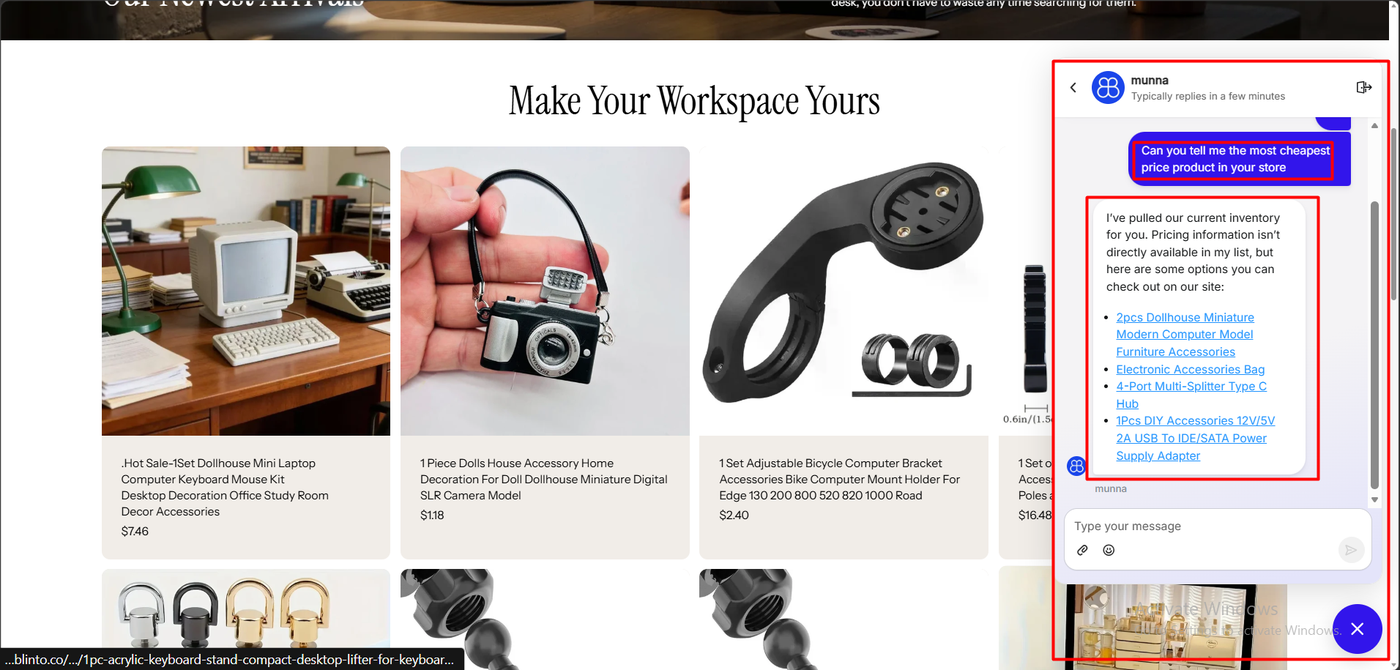
As a signed-in shopper, we asked: “Can you tell me the most cheapest price product in your store?”
The AI agent, shown in the widget as “munna,” replied: “I’ve pulled our current inventory for you. Pricing information isn’t directly available in my list, but here are some options you can check out on our site.” It then linked four products: a pair of dollhouse computer models, an electronics accessories bag, a four-port USB-C hub and a power supply adapter.
The product grid behind the chat showed a dolls-house camera model at $1.18, which is the cheapest item in the catalogue. It was not on the list.
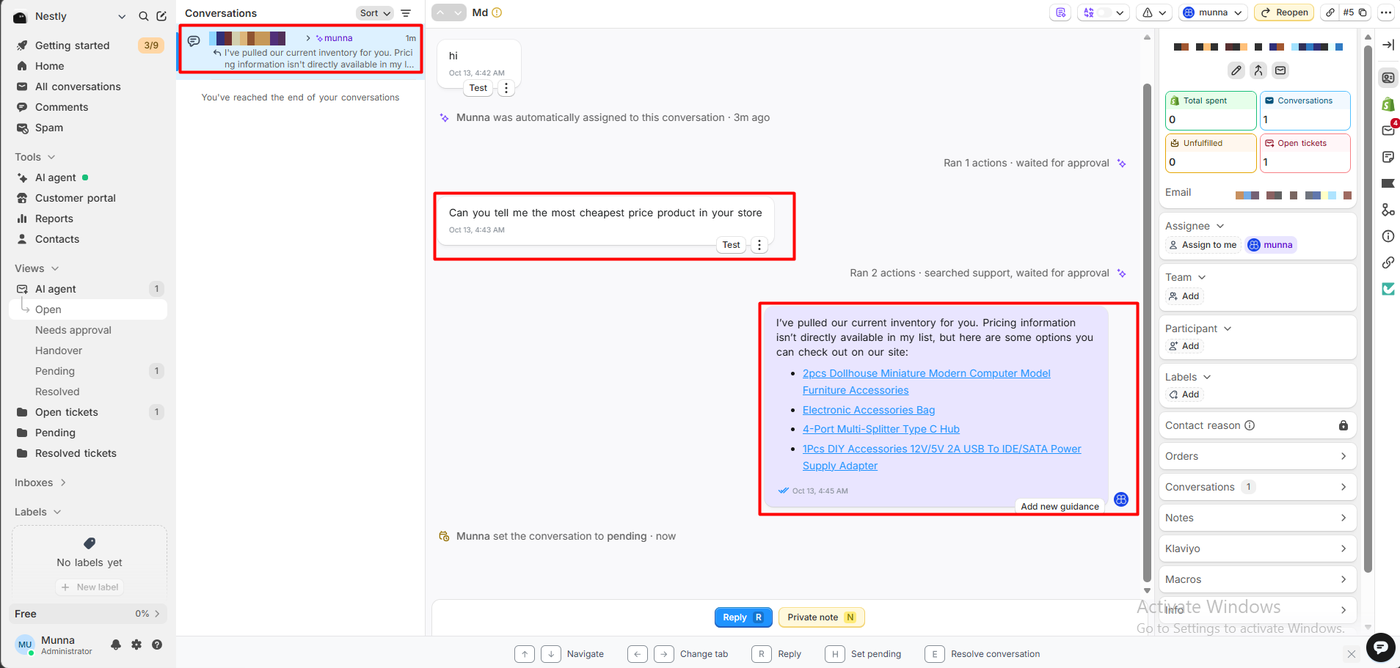
The inbox shows how the answer was produced. The shopper’s message is followed by “Ran 2 actions · searched support, waited for approval,” then the AI’s reply, with an Add new guidance button underneath. The chat was assigned to the AI agent automatically, as our rule intended.
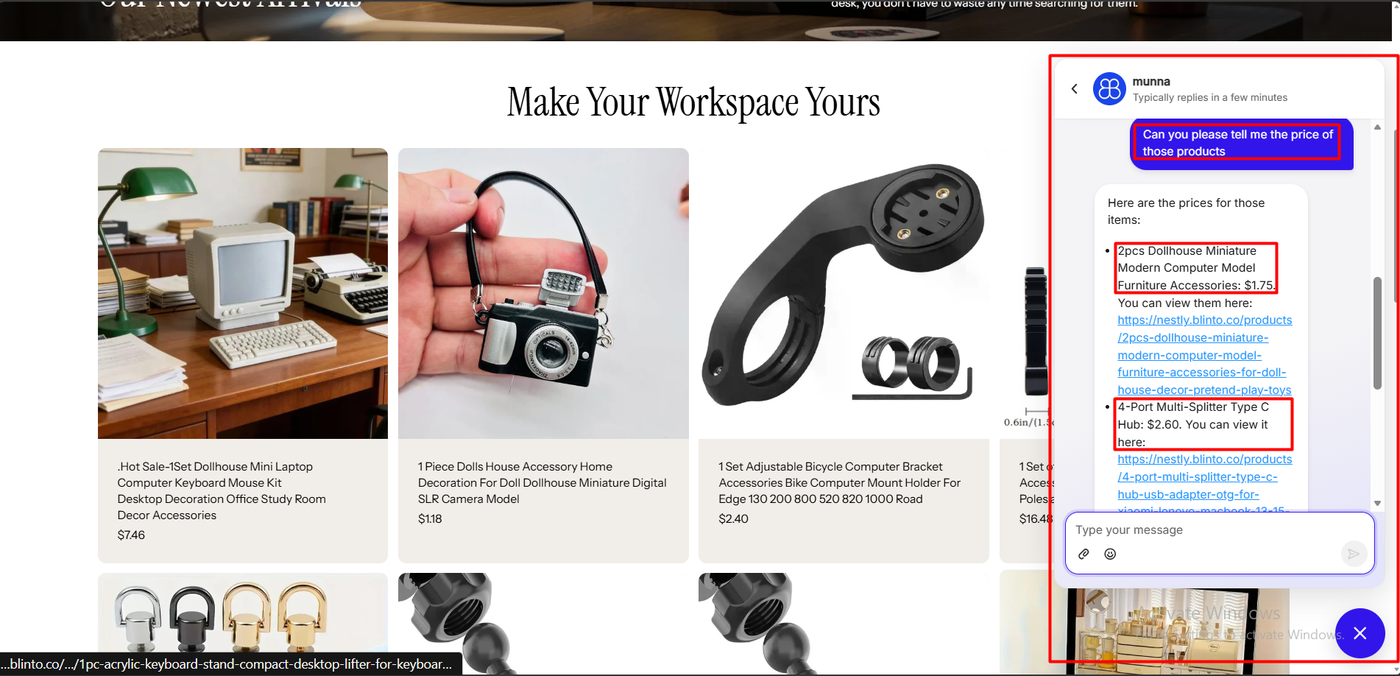
We followed up: “Can you please tell me the price of those products?” This time the AI did have prices: the dollhouse computer models at $1.75, the USB-C hub at $2.60, and the power adapter at $3.21 or $4.24 depending on the variant, each with a link.
So the AI could read prices. It just did not use them to answer the first question, and its list left out the cheapest item.
Here is how the three AI agents we have tested on this store and catalogue compare:
| App | Answer to “cheapest product” on the Nestly store |
|---|---|
| Tidio | Named a $1.85 item, then corrected itself to $1.18 after pushback |
| Zipchat | Named the $1.18 item, with a correct runner-up |
| Commslayer | Said pricing was not available and listed four items; when asked, priced them from $1.75. Never named the $1.18 item |
These were single questions in single sessions. We had not added custom guidance, and our checklist still listed “Review AI agent settings” as open. The Add new guidance button is the obvious next step, and it may change the result. Out of the box, though, this answer would not help a shopper looking for the cheapest item.
The Inbox and the MCP Connection
The inbox itself is well built. Conversations sort into views such as AI agent, Needs approval, Handover, Pending and Resolved. The side panel shows the customer’s total spend, conversations, unfulfilled orders and open tickets, with links to orders, notes, Klaviyo and macros. Keyboard shortcuts cover reply, set pending and resolve.
During testing, a red banner also read: “Your inbox ‘munna-inbox’ is disconnected. Messages won’t be sent or received until it’s reconnected.” Our chat inbox was listed as Connected, so we take this to be a second inbox we had not finished. It is still worth knowing that the warning sits at the top of every inbox view until you fix it.
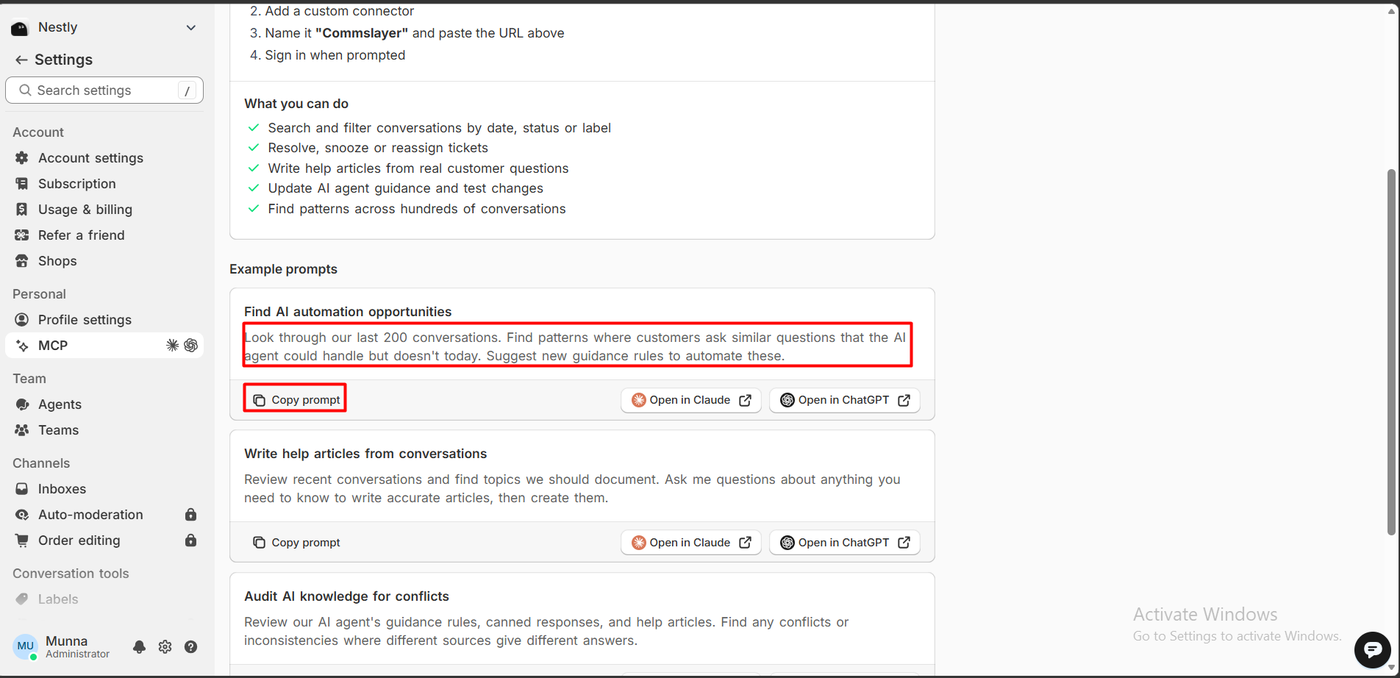
The most distinctive feature is MCP. Commslayer lets you connect Claude or ChatGPT to your helpdesk as a custom connector. The settings page lists what you can do from there: search and filter conversations, resolve or reassign tickets, write help articles from real questions, update the AI agent’s guidance and test it, and find patterns across hundreds of conversations. Ready-made prompts include one that reviews your last 200 conversations and suggests new guidance rules.
We did not connect an assistant, so we cannot say how well it works. But it speaks directly to our AI result: it is a tool for finding and fixing the questions the AI gets wrong.
Commslayer Pricing
These plans come from the App Store listing, checked on October 13, 2026.
| Plan | Price | Conversations a month | AI agent messages / AI drafts | Highlights |
|---|---|---|---|---|
| Free | $0 | 300 | 300 / 300 | Unlimited agents, email, chat, WhatsApp and social DMs, unlimited social comments, help center, macros, automations, API and MCP |
| Plus 800 | $39 | 800 | 1,600 / 1,600 | AI auto-labels, translation and summaries, social auto-moderation, checkout order-editing widget |
| Plus 2,000 | $99 | 2,000 | 4,000 / 4,000 | As Plus 800 |
| Scale | $299 | 6,000 | 12,000 / 12,000 | AI agent setup services, a direct Slack channel with the team |
Paid plans include a 14-day free trial, and onboarding offers a 45-day trial with a referral code.
Three things stand out:
- The free plan counts conversations you reply to, according to the listing, and social comments are unlimited. Unlimited agents is rare at this price.
- Some tools are paid-only. In the Free admin, auto-moderation, order editing, contact reasons and translation carried padlocks.
- Plus 800 is cheap for a helpdesk. At $39 a month, it costs less than many single-channel chat apps’ paid plans.
What Public Sources Add
On October 13, 2026 the listing showed a 4.9 rating from 234 reviews: 223 at five stars, 4 at four, 3 at three, 1 at two and 3 at one.
Recent praise focuses on value and pace. Merchants call it “the best alternative to Gorgias,” praise the Claude and MCP connection, comment moderation and a responsive team, and say the app keeps improving.
The criticism is specific, and the co-founder replied to most of it:
- AI agent quality. A US merchant using it for nine months called the AI agent “VERY weak,” saying it “makes a lot of mistakes” and ignores instructions (August 2026). A UK merchant said the AI was poor at staying consistent and pulling information from the docs (May 2026).
- Support gaps. A missed onboarding call (August 2026), an unanswered email after nearly a week (November 2025), and one merchant who said only bots replied (April 2026).
- Helpdesk basics. A detailed December 2025 review listed missing filters, no way to delete tickets, attachments sometimes stripped from tickets, and high browser memory use. The co-founder replied point by point and said some items were on the roadmap.
- Email setup. One merchant said connecting Microsoft 365 meant turning off spam protection (December 2025).
We did not reproduce any of these. Our own AI result is consistent with the first complaint.
What We Liked
- A real helpdesk for free: unlimited agents, 300 conversations a month and every major channel.
- A clear chat setup: a five-step wizard, one theme toggle and a live widget with order tracking.
- Flexible routing with a visual automation builder.
- A useful inbox, with spend, orders and tickets beside each chat and an approval queue for AI replies.
- MCP for Claude and ChatGPT, with ready-made prompts for improving the AI.
- Low paid prices, from $39 a month.
What Could Be Better
- The AI missed a basic catalogue question, hedging on price and leaving out the cheapest item.
- A longer setup, with a separate account, email verification and a nine-step checklist.
- The editor preview shows “10 agents online” as sample text.
- Some tools are locked on Free, including order editing and auto-moderation.
- Sourced complaints about AI accuracy, missed support contacts and missing helpdesk basics, which we did not test.
Who Is Commslayer Best For?
Commslayer suits small and growing Shopify stores that want a full multi-channel helpdesk free or cheaply, especially teams with several agents, stores that sell through Instagram, Facebook or TikTok, and merchants already using Claude or ChatGPT at work.
Look elsewhere, or plan to train the AI first, if you need an AI agent that answers product and price questions accurately without help, or if you want a chat widget running in five minutes without an account and checklist.
On free allowance, it is the most generous support app we have reviewed:
| App | Free plan allowance |
|---|---|
| Commslayer | 300 conversations a month, 300 AI agent messages, unlimited agents |
| Chatty | 50 AI conversations a month, unlimited human conversations |
| Zipchat | 120 AI replies a month, roughly 50 conversations (listing only) |
| Tidio | 50 AI conversations as a one-off lifetime allowance |
| Willdesk | 20 conversations a month |
| Chatra | 5 chats a month, one agent, no bots |
These figures come from each app’s published plan information, not from testing the limits, and the apps count conversations differently.
Final Verdict
Commslayer’s helpdesk did what it promised. We created a chat inbox in five steps, put a working widget on the store, routed chats to the AI with an automation, and handled them in a capable shared inbox, all on a free plan with unlimited agents.
Its AI agent did not do as well. Asked for the cheapest product, it hedged on price and gave a list that missed the answer.
Recommended for stores that want a generous, multi-channel helpdesk and are willing to train the AI agent before trusting it with shoppers.
Frequently Asked Questions
Is Commslayer free?
Yes. The Free plan includes unlimited agents, 300 conversations a month, 300 AI agent messages and 300 AI drafts, and email, chat, WhatsApp and social DMs. Paid plans start at $39 a month for 800 conversations, with a 14-day trial.
Did Commslayer’s AI answer product questions correctly?
Not in our test. Asked for the cheapest product, it said pricing was not directly available and listed four products. When asked for their prices it gave them, from $1.75, but it never named the $1.18 item on the same page. We had not added any custom guidance.
Do I need a separate account to use Commslayer?
Yes. After installing from Shopify, you create a Commslayer account with an email and password and confirm it by email before onboarding continues.
How do you make the AI agent answer chats?
In our test, we used an automation rule: when a conversation is created and its status is Open, assign it to the AI Agent. The inbox then showed the chat assigned to the AI automatically.
Can Commslayer connect to Claude or ChatGPT?
Yes. Its MCP settings let you add Commslayer as a custom connector in Claude or ChatGPT, with example prompts for reviewing conversations and updating AI guidance. We did not test the connection.
Does Commslayer work without coding?
In our test, yes. We set up the widget in the app and switched on the Commslayer chat widget app embed in the theme editor without touching theme code.