
Tidio’s AI agent, Lyro, is sold on a promise that most AI products avoid making: “Other AI agents make things up, Lyro doesn’t.”
That claim is testable. So we installed Tidio on a Shopify store, let Lyro learn the catalogue, and asked it the simplest factual question a shopper can ask: what is the cheapest product here?
It named the wrong product, at the wrong price, with a picture attached. When we pushed back, it apologised and gave the right answer immediately.
This review covers the whole install, what the merchant sees when that happens, and what Tidio costs once the trial ends.
Key Takeaways
- Lyro answered a basic catalogue question incorrectly. It named a $1.85 item as the cheapest when a $1.18 item was visible on the same screen, labelled “Answer generated from your sources”.
- It corrected itself the moment it was challenged, naming the right product and price without any merchant intervention.
- The merchant sees the failure clearly. The Inbox logged the exchange, the neutral rating and the customer’s “not accurate” comment, with thumbs and a Review control on the AI reply.
- Setup is genuinely quick. Install, a six-question onboarding, one theme toggle, and the widget was live and detected as installed.
- Pricing differs sharply between the App Store and Tidio’s own site, and the free Lyro allowance is a one-off 50 conversations, not a monthly one.
Our Verdict
Tidio is a capable, fast-to-deploy support tool, and we would recommend it for small Shopify stores — with an explicit instruction to supervise the AI rather than trust the marketing.
The live chat side did everything we asked. The widget installed from a single theme toggle, the Inbox consolidated the conversation with full visitor context, and the email channel connected in a couple of clicks.
The AI is the part that needs judgement. Lyro is fluent, fast and confident, and in our test it was also wrong about a fact sitting in plain view on the product grid. It recovered gracefully, but a real shopper would not have known to correct it. Treat Lyro as a first responder whose answers you audit, not as an unattended agent, and budget for the real pricing rather than the entry number.
What Tidio Offers
Tidio is a live chat, ticketing and AI support platform. Its Shopify App Store listing carries the Built for Shopify badge and describes chat, email, Instagram and WhatsApp in one inbox, Flows automation, and Lyro Actions that can handle refunds and order edits. The app launched in 2014.
Listed integrations include Google Analytics, Judge.me, Klaviyo, Mailchimp, Zapier and Zendesk. The admin is organised around Inbox, Lyro AI Agent, Flows, Customers, Analytics and Settings, with the AI agent given its own section covering knowledge sources, behaviour, channels and a playground for testing replies before customers see them.
What We Tested
We tested Tidio in October 2026 on a Shopify development store called Nestly, running the Tinker theme with a catalogue of 51 low-priced accessories. This is the same store we used for our AiTrillion review and a different one from our loyalty-app tests.
Our test covered the install permissions, the onboarding questionnaire, feeding Lyro the store URL as its knowledge source, enabling the Tidio app embed in the theme editor, the installation check, connecting a support mailbox, adding a sending domain, switching the Lyro email channel on, and a real storefront conversation with Lyro as a logged-in shopper — including the follow-up correction, the conversation rating, and how all of it appeared in the Inbox and the live visitor list.
We did not test Flows, Instagram, Facebook Messenger or WhatsApp channels, Lyro Actions for refunds or order edits, macros, departments, analytics reports, mobile rendering, team invitations, Tidio’s support team, or any billing event. We stayed inside the 7-day full-featured trial, so we never saw a renewal, an overage charge or an uninstall. Pricing was read from the App Store listing and Tidio’s own pricing page.
What Public Sources Add
On October 2, 2026 the listing showed a 4.8 rating from 1,349 reviews, with 86% at five stars and 4% at one star. Recent reviews run through September 2026.
Praise concentrates on fast setup, the consolidated inbox, and Lyro’s resolution rate, with one merchant reporting around 90% of common questions handled. Several describe a small team covering support that would otherwise need more people.
The negative reviews are mostly commercial and operational rather than about AI quality. Merchants describe pricing and feature descriptions that differ between the Shopify listing and Tidio’s website, a plan that needed upgrading within a day with real costs far above the advertised figure, duplicate charges with a refund refused, an inability to export conversations, a duplicate installation that silently blocked incoming messages, and a site scanner that mixed data from several websites. Tidio has replied to most of them.
We did not reproduce any of this. The pricing-discrepancy complaint is the one our own research independently ran into.
Installing and Onboarding

The Shopify install dialog requests customer data including sensitive device and activity data, staff and contributor data, and permission to view and edit customers, products, orders and discounts. That is a broad scope, though consistent with a tool that reads your catalogue and writes to orders.
Onboarding is a six-screen questionnaire: your name, your main goal, which channels you want, business model and industry, conversation volume, department, traffic and team size. It is quick but it is a sales qualification as much as a setup.
One screen matters more than the rest. Tidio asks whether the AI agent should resolve repetitive questions, and then takes a single URL to “feed Lyro, the AI Agent with knowledge”, explaining that it will use publicly available information. We gave it the store address. That one field is the entire basis for what Lyro later told our shopper.
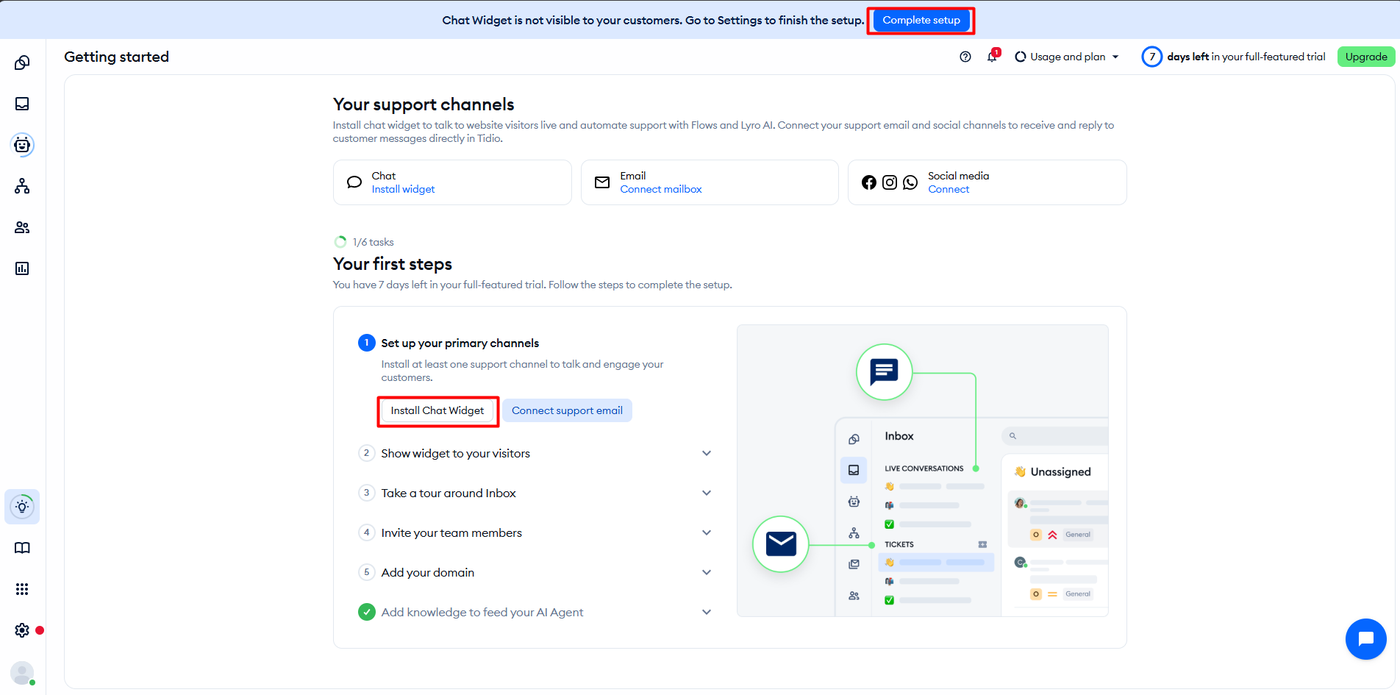
A modal then announced a 7-day full-featured trial, listing omnichannel agent, visitors info, live visitor list, live typing, multilanguage, operating hours, unlimited human conversations and unlimited Flows as trial features. After setting a password we landed on a Getting started page with a 1/6 checklist and a banner warning the chat widget was not yet visible to customers.
Going Live Took One Toggle

Switching the widget on meant enabling the Tidio Chat Widget embed in the Shopify theme editor, alongside the other apps on that store. No code, no snippet.
Tidio then confirmed the result on its own Installation screen: “The widget is installed properly. We’ve detected that your widget is installed properly, and is visible to your customers.” A green launcher reading “Chat with us” appeared at the bottom right of the storefront, and opening it gave a greeting offering assistance. Verifying its own installation is a small thing that removes the most common support ticket in this category.
Where Lyro Got It Wrong
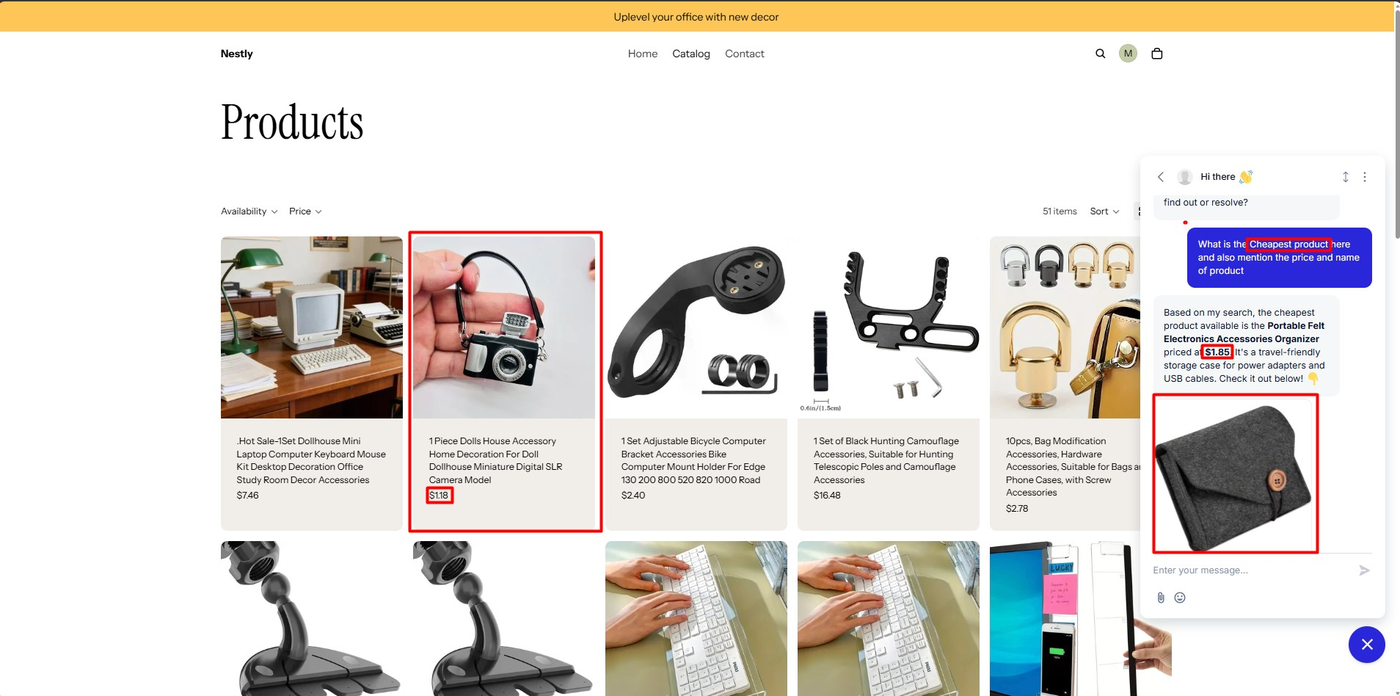
As a logged-in shopper on the product grid, we asked Lyro: what is the cheapest product here, with the price and name?
Lyro replied in seconds, naming the Portable Felt Electronics Accessories Organizer at $1.85, describing it as a travel-friendly storage case, and attaching a product card with an image. The answer was fluent, specific and formatted well.
It was also wrong. Visible on the same screen, in the same grid, was a dolls-house camera model at $1.18. Tidio’s own label under the reply read “Answer generated from your sources.”
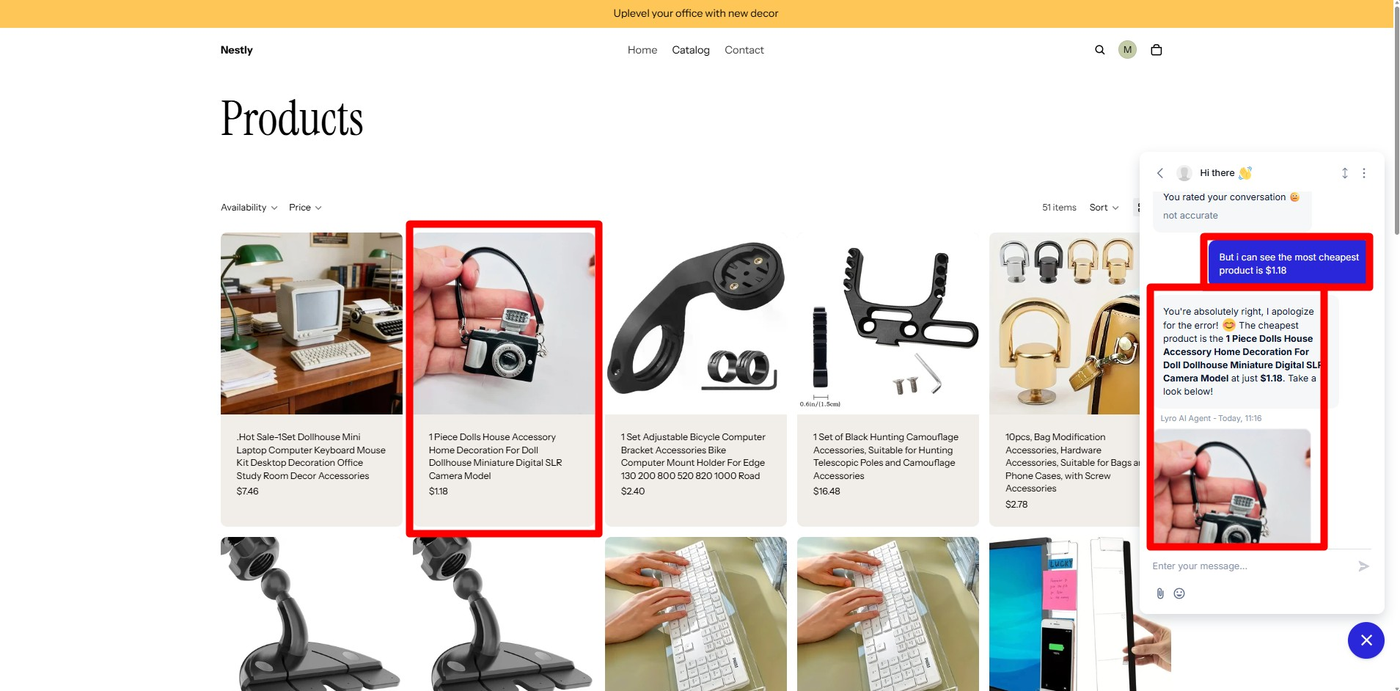
We replied that the cheapest product was $1.18. Lyro answered: “You’re absolutely right, I apologize for the error!” and named the dolls-house camera model at $1.18, with the correct product card.
Two things are worth separating here. The recovery is genuinely good — no handoff, no loop, no argument, just a corrected answer with the right product attached. But the failure mode is the dangerous kind. Lyro did not say it was unsure, and it did not decline. It produced a confident, sourced-looking answer that a shopper had no reason to doubt, about a fact the shopper could see was wrong.
This sits directly against Tidio’s marketing for the product, which states that other AI agents make things up and Lyro does not, and that every response is accurate. On this question, on this store, that was not our experience.
We tested one question on one catalogue, and a price-comparison query is a harder task than a shipping-policy question, which is the kind of thing Lyro is usually praised for. We did not test a wider set of questions, so we cannot say how often this happens. But it happened on the first factual question we asked.
The practical lesson is about which questions you let an AI own. Policy answers — shipping times, returns windows, order status — come from text you wrote, and that is where merchants report Lyro performing well. Questions that require comparing live catalogue values, like cheapest, newest or in stock, ask the model to reason over data rather than repeat it, and that is where ours failed. Before trusting Lyro publicly, we would spend twenty minutes asking it the ten questions your shoppers actually ask, including the awkward comparative ones, and check every answer against the storefront.
What the Merchant Sees When It Happens
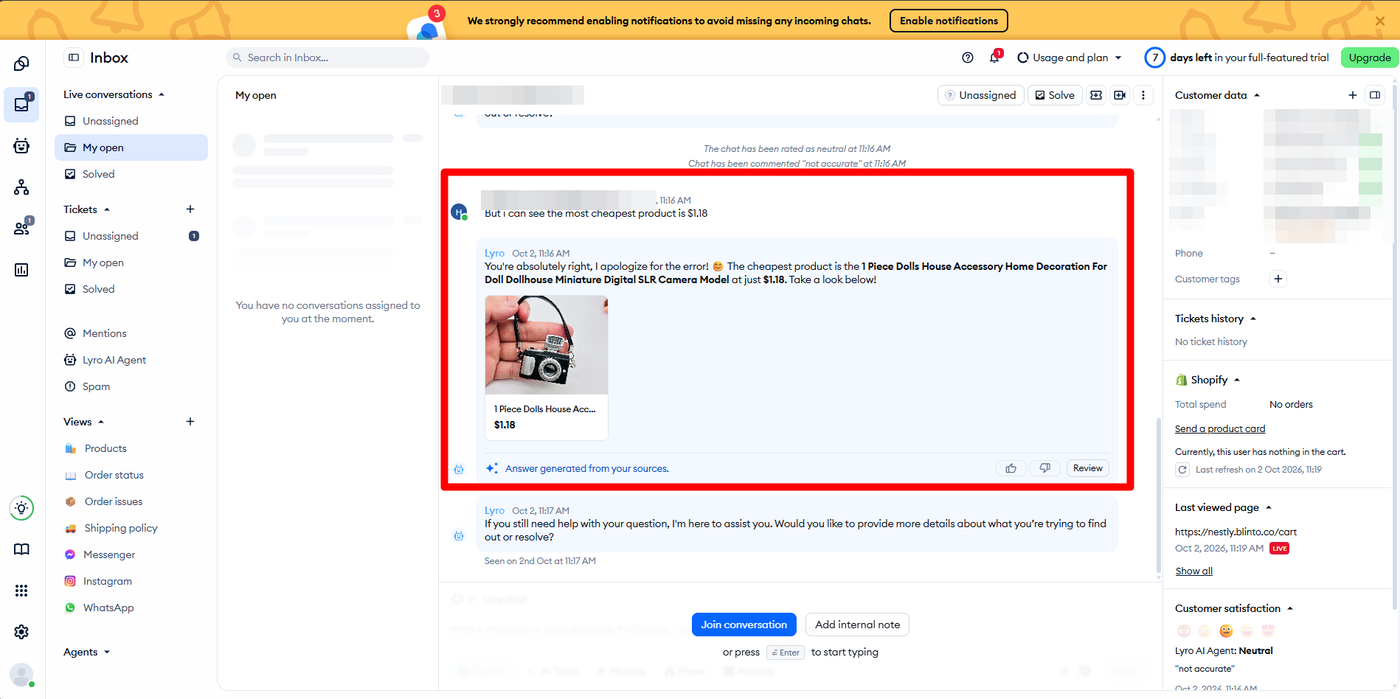
The merchant-side view is the reason we would still recommend Tidio with supervision.
The Inbox logged the full exchange with Lyro’s messages attributed by name, the “Answer generated from your sources” label, and thumbs-up, thumbs-down and Review controls on the AI reply. When we rated the conversation, Tidio recorded it inline — “The chat has been rated as neutral” and “Chat has been commented ‘not accurate’” — and surfaced it again in a Customer satisfaction panel reading Lyro AI Agent: Neutral, “not accurate”.
The right-hand panel carried the visitor’s location, browser, IP address and email, plus a Shopify block showing total spend, cart contents and last viewed page. A separate live visitor list showed the shopper in real time with the page they were on and a Start Chat button, marked as a paid feature.
The live visitor view is a separate screen listing everyone currently browsing, with the page they are on, how long ago they arrived, their country and browser, and a button to open a chat with them directly. It is labelled as a paid feature, and during the trial it showed our shopper in real time on the collection page they were viewing.
So the bad answer was not buried. A merchant reviewing their inbox would see the question, the wrong answer, the correction and the dissatisfied rating in one place. That is the control that makes an imperfect AI agent workable.
Email, Domains and the Lyro Channels
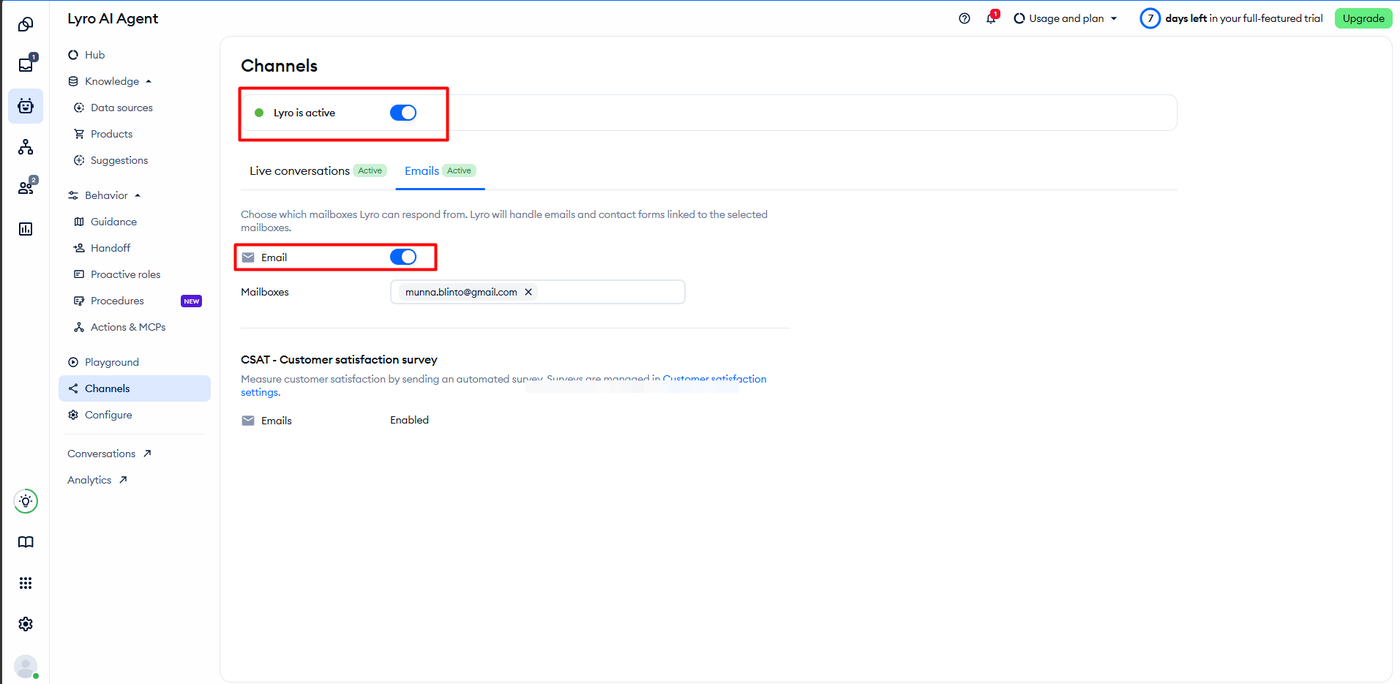
Connecting a support mailbox took two clicks and produced a clear confirmation: every email sent to that address would automatically create a ticket in the Tidio Inbox.
Lyro’s channels are controlled separately. On the Lyro AI Agent Channels screen, live conversations were active while Emails started inactive; switching Email on and selecting the mailbox moved it to Active. That separation is sensible — it lets a merchant trust the AI on chat while keeping email human, or the reverse.
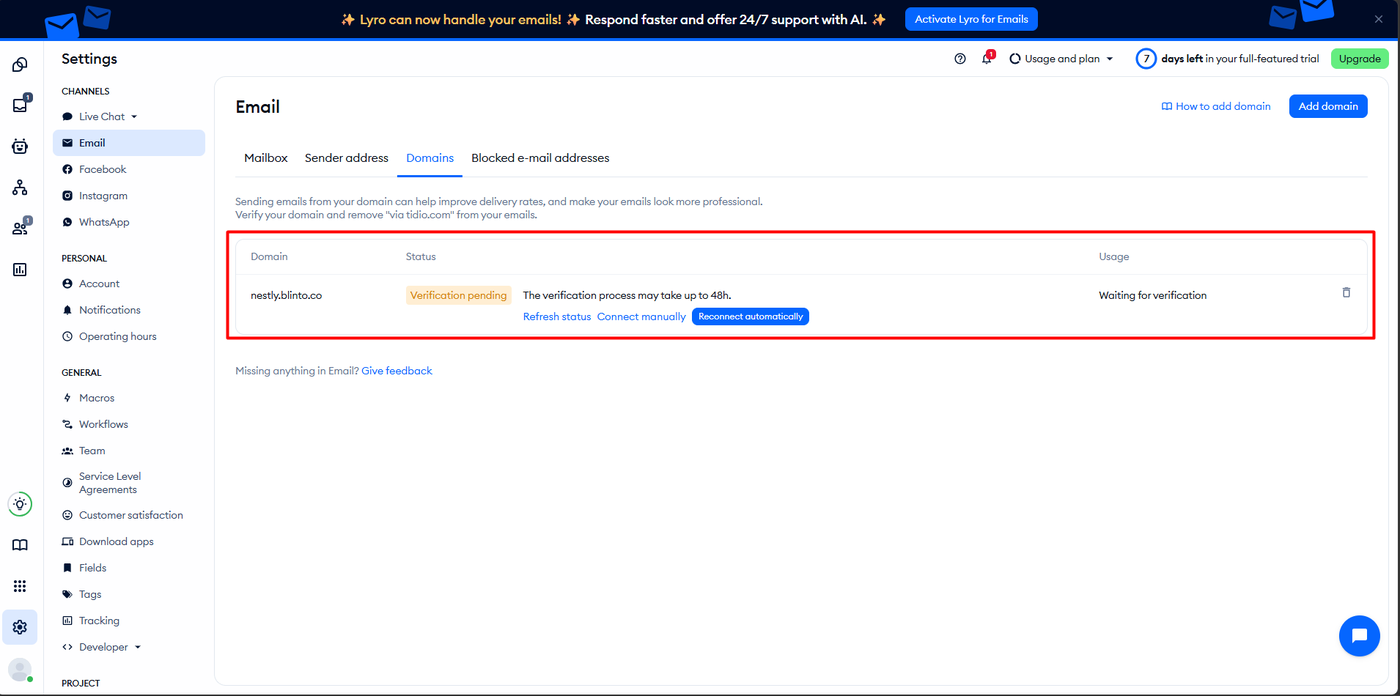
Adding a sending domain is slower. Ours sat at Verification pending, with Tidio noting the process can take up to 48 hours, and offering refresh, manual and automatic reconnection options. Until it verifies, outgoing email carries a “via tidio.com” marker. Worth starting on day one rather than the day before launch.
Pricing and Value
We checked pricing on both sources on October 2, 2026, and they do not agree.
The Shopify App Store listing shows a free plan plus three paid plans, each with a 7-day trial:
| Plan (listing) | Price | What it covers |
|---|---|---|
| Free | $0 | 50 users for live chat; Flows up to 100 visitors/month |
| Customer Service | $29/month | 100–1,000 conversations |
| Flows | $29/month | Up to 40,000 visitors |
| Lyro AI Chatbot | $39/month | Up to 200 Lyro conversations |
Tidio’s own pricing page lists a different ladder entirely: Free, Starter at $24.17 a month, Growth from $49.17, Plus from $300 plus usage, and Premium by quote. Lyro is sold there as an add-on from $32.50 a month, Flows from $24.17, and removing Tidio branding costs $16.67 a month.
Three things a merchant should take from that.
The free plan is smaller than it looks. Tidio’s site puts the free tier at 50 billable conversations a month and 50 Lyro conversations as a one-off lifetime allowance, not a monthly one. For an AI agent, that is a demo, not a plan.
A conversation is the billing unit. Tidio defines a Lyro conversation as a customer interaction with at least one AI reply. Our single test exchange — one wrong answer, one correction — consumed from that allowance.
Check the number in your own admin. Two official sources disagree on both plan names and prices, and merchants in recent reviews describe exactly that gap, including one who said real costs reached several times the advertised figure. Confirm what you will be billed before you rely on the entry price.
What We Liked
- Installation verifies itself: Tidio detected its own widget and said so plainly.
- One toggle to go live: the theme app embed needed no code.
- AI replies are labelled, rateable and reviewable in the Inbox, with the source note attached.
- Lyro took correction instantly and produced the right answer with the right product card.
- Channel-level AI control: chat and email can be automated independently.
What Could Be Better
- A confident wrong answer on the first factual question we asked, against marketing that promises the opposite.
- No visible uncertainty: Lyro gave no hedge or handoff when it did not actually know.
- Two official price lists that disagree, with different plan names on each.
- The free Lyro allowance is one-off, which is easy to misread as monthly.
- Domain verification can take up to 48 hours, which is a launch-planning constraint.
Who Tidio Is For, and Who Should Look Elsewhere
Tidio suits small Shopify stores that want live chat running today, with an AI agent deflecting routine questions and a human reviewing what it says. The inbox, visitor context and rating tools make that supervision practical.
It is a poorer fit if you want to leave the AI unattended on a catalogue where prices and specifics matter, if you need conversation exports, or if you need firm cost certainty from the published plans. Stores with heavy volume should price the Growth or Plus tiers directly with Tidio, not from the App Store listing.
Final Verdict
Tidio answered our question, though not the way its marketing suggests. The platform installs fast, verifies itself, consolidates channels, and gives a merchant good tools for watching what the AI says. The AI itself gave us a confidently wrong answer to the first factual question we asked, and fixed it only because we knew better.
That is not disqualifying. It is a description of what AI support costs you in attention right now, from a vendor that claims otherwise.
Recommended for small stores that will supervise the AI and confirm pricing in their own admin before committing.
Frequently Asked Questions
Is Tidio free?
There is a free plan. The App Store listing describes it as 50 users for live chat with Flows up to 100 visitors a month. Tidio’s own site puts it at 50 billable conversations a month and 50 Lyro AI conversations as a one-time lifetime allowance. Paid plans on the listing start at $29 a month with a 7-day trial.
Is Lyro accurate?
In our test, not on the first question. Asked for the cheapest product, Lyro named an item at $1.85 when a $1.18 item was visible on the same page, and corrected itself only after we pointed out the error. It handled the correction well. We tested one question on one catalogue, so this is a caution to verify rather than a measured error rate.
Does Tidio work without coding?
Yes. We enabled the Tidio Chat Widget app embed in the Shopify theme editor and the app confirmed the widget was installed and visible. No theme code was edited.
How does Tidio count AI conversations?
Tidio defines a Lyro conversation as a customer interaction through a connected channel that receives at least one AI reply. Allowances are set per plan, and Lyro is also sold as a paid add-on on Tidio’s own pricing page.
Can a merchant see and correct what the AI tells customers?
Yes. In our test every Lyro reply appeared in the Inbox attributed to the AI, labelled as generated from your sources, with thumbs-up, thumbs-down and a Review control beside it. Customer ratings and written comments were recorded against the conversation and summarised in a satisfaction panel, so a poor answer is visible without hunting for it.