
Chatway is quick to set up. A free plan, a three-step wizard, and an AI agent that learns from your Shopify store get a chat widget live with very little work.
Then we asked the AI the question we put to every support app: what is the cheapest product in this store?
The first answer named two Portugal jerseys at $1,299. That is the most expensive price in the catalogue. We asked it to try again. The second answer named the right two jerseys, Jamaica and Norway, but priced them at $99.00. On the store they cost $999.
The AI flagged that risk itself. Its opening line in the chat was: “I’ll do my best to help, but I might make mistakes sometimes.” In our test, it made a price mistake a shopper could act on.
We installed Chatway Live Chat & AI Chatbot on a Shopify development store, completed the setup, trained the AI agent on the store, and chatted with it as a shopper.
Key Takeaways
- The AI quoted a wrong price. Its second answer listed the two cheapest jerseys at $99.00 each. Both cost $999 on the store.
- Its first answer was also wrong. Asked for the cheapest product, it named two jerseys at $1,299, the highest price in the store.
- Setup is quick and free. A three-step wizard covered the widget, an AI agent trained on the store, and a plan choice. The theme embed is one toggle.
- The AI is metered by credits. The Free plan includes 50 conversations a month and 10 free AI agent credits. More AI credits are an optional add-on.
- The inbox shows the AI’s answers. Every AI reply appeared in the shared inbox, with the visitor’s location, device, orders and cart beside it.
Our Verdict
Chatway is a good free live chat tool for small Shopify stores that want a tidy widget, a shared inbox and mobile apps. Use its AI agent with caution.
The live chat side worked well. The setup wizard was clear, the widget went live on the theme with one toggle, and every conversation, including the AI’s, landed in an inbox with useful shopper details.
The AI result is the reason for caution. It answered a simple catalogue question wrongly twice: first with the most expensive items, then with the right items at a tenth of their price. A shopper who saw “$99.00” and then a $999 checkout would have good reason to complain. If you turn the AI on, check its answers in the inbox and add your own Q&A for price questions before you rely on it.
What Chatway Offers
Chatway Live Chat & AI Chatbot is published by Premio, which lists an address in Ashdod, Israel. Its Shopify App Store listing carries the Built for Shopify badge and shows a launch date of September 7, 2023.
The listing describes a live chat widget, a shared helpdesk inbox, WhatsApp, Facebook Messenger, Instagram and email, canned responses, FAQs, and an AI chatbot agent that answers common questions before handing chats to people. It says the inbox shows Shopify cart, order and coupon data, and that iOS and Android apps let you reply on the go. The Free plan also lists MCP, API and webhook access.
What We Tested
We tested Chatway in October 2026 on a Shopify development store called zenden. It runs the Horizon theme with a nine-product football jersey catalogue. Two jerseys cost $999 and the rest cost $1,299.
Our test covered the install permissions, account setup, the three-step setup wizard (widget, AI agent, plan), the theme app embed, the storefront widget, two questions to the AI agent as a signed-in shopper, and the same conversation in the inbox.
We did not test human agents replying, WhatsApp, Messenger, Instagram or email, the help center, automations, canned responses, the mobile apps, MCP or webhooks, translation, or any paid plan. We started on the Free plan with its 14-day Plus trial. Pricing comes from the App Store listing and the in-app plan screen, checked on October 15, 2026.
Setup: Three Steps and a Toggle
The install dialog asks to view customer data, including sensitive, device and activity data, and staff and blog-contributor data. It also asks to view and edit customers, products, orders, discounts and the online store.
Chatway then asks you to create a login with a display name, email and password. The screen promises “It takes less than 3 minutes.”
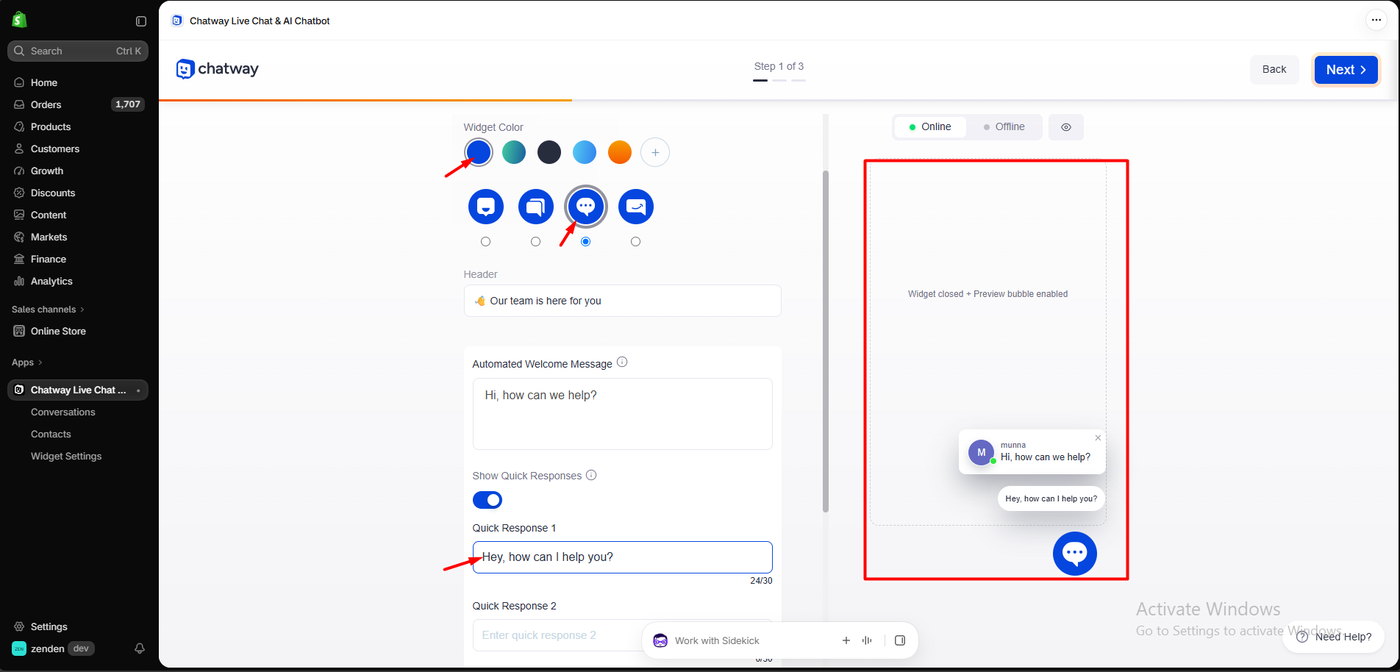
Step 1 sets up the widget: a colour, one of four chat icons, a header (“Our team is here for you”), an automated welcome message (“Hi, how can we help?”), and up to two quick responses for shoppers to tap. A live preview shows the result, including a preview bubble when the widget is closed.
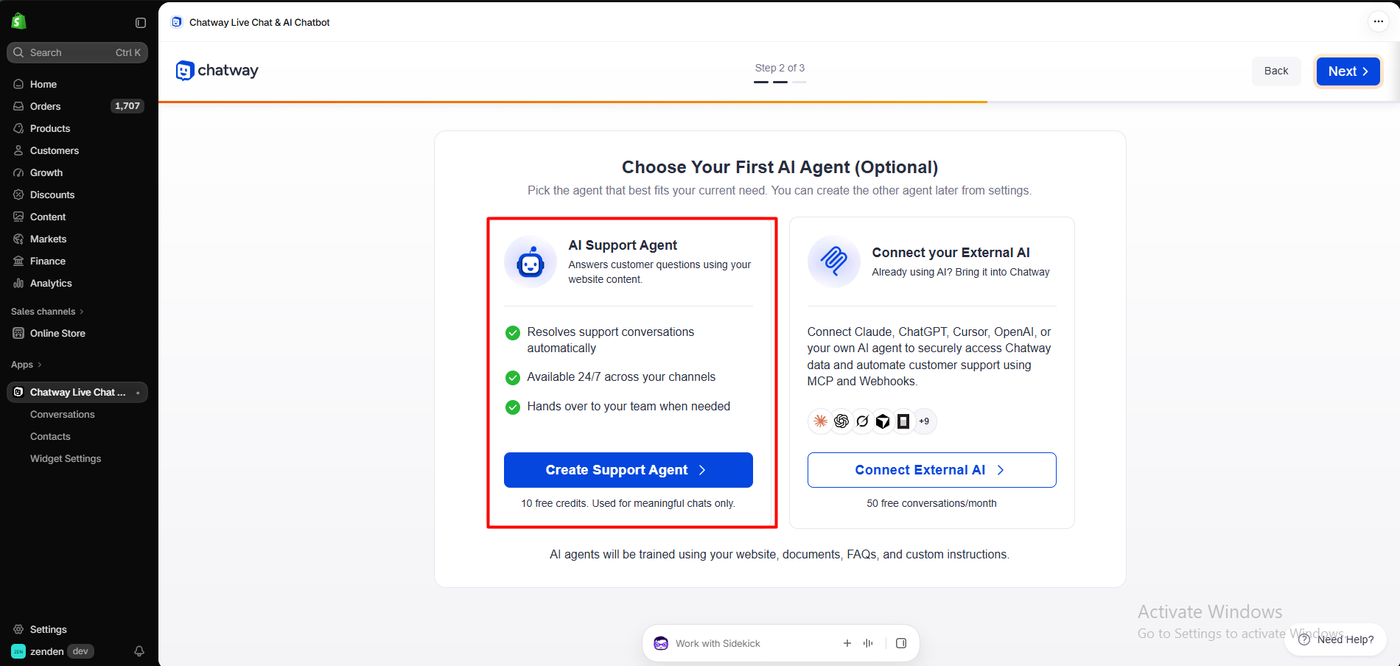
Step 2 is optional: Choose Your First AI Agent. The AI Support Agent “answers customer questions using your website content,” resolves conversations automatically, runs 24/7 and hands over to your team when needed. It comes with 10 free credits, “used for meaningful chats only.” The alternative, Connect your External AI, links Claude, ChatGPT or your own agent through MCP and webhooks, with 50 free conversations a month.
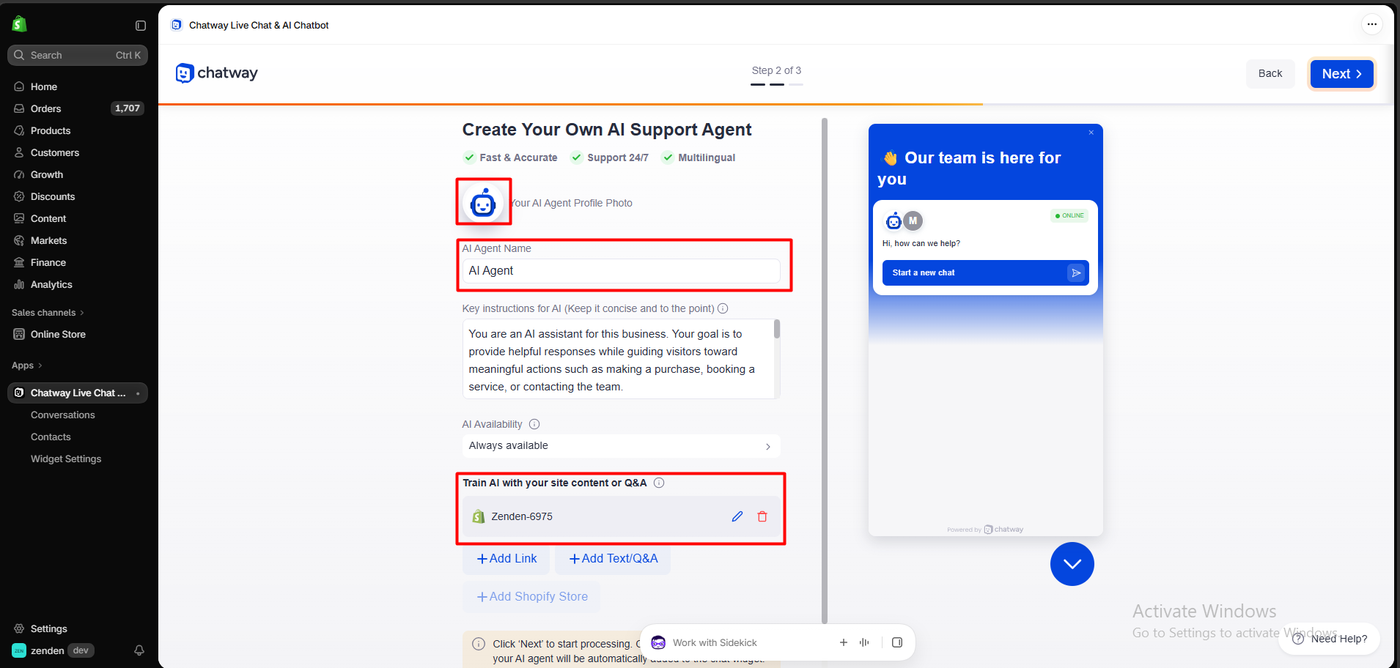
We created an AI Support Agent. The form has a name (“AI Agent”), short key instructions (by default, to give helpful answers and guide visitors toward a purchase), availability (Always available), and training sources. Our store, Zenden-6975, was added as the source automatically, with buttons to add links, text or Q&A. Clicking Next starts the training.
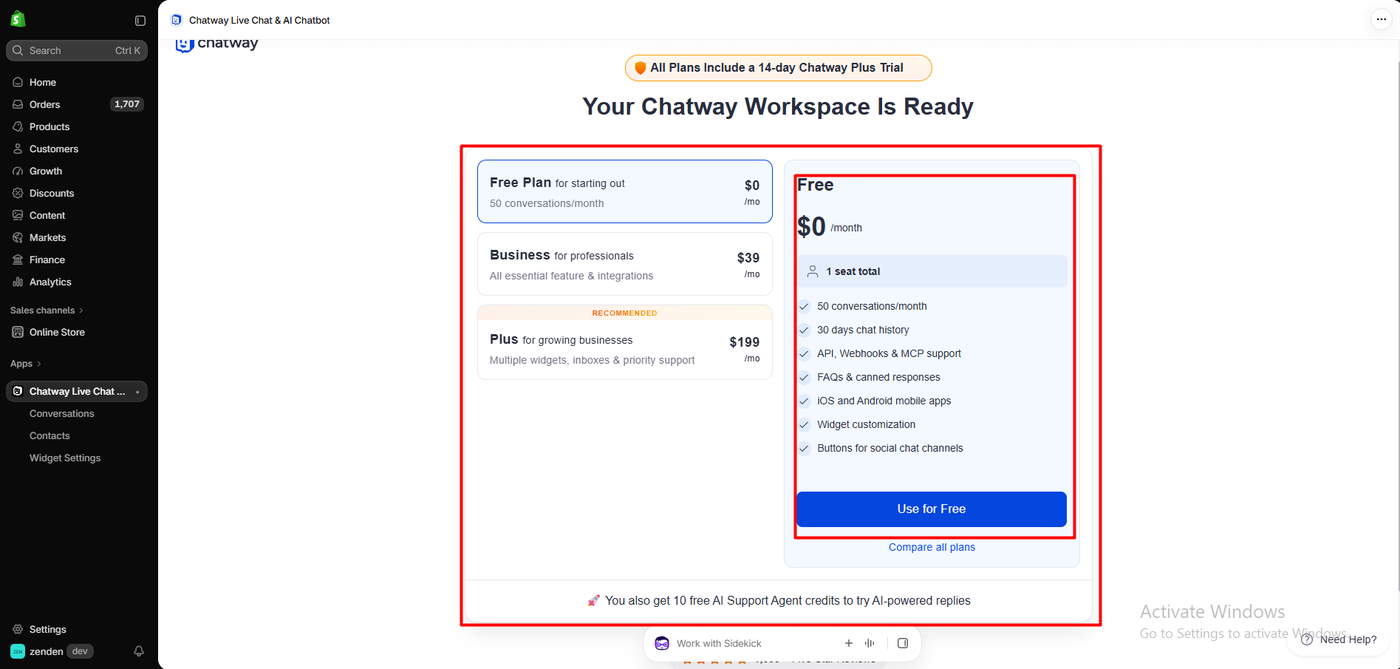
Step 3 is the plan. All plans include a 14-day Chatway Plus trial. We chose Free: one seat, 50 conversations a month, 30 days of chat history, API, webhooks and MCP, FAQs and canned responses, the mobile apps, widget customisation and social chat buttons. A note added: “You also get 10 free AI Support Agent credits to try AI-powered replies.” After the trial, the account moves to the Free plan.
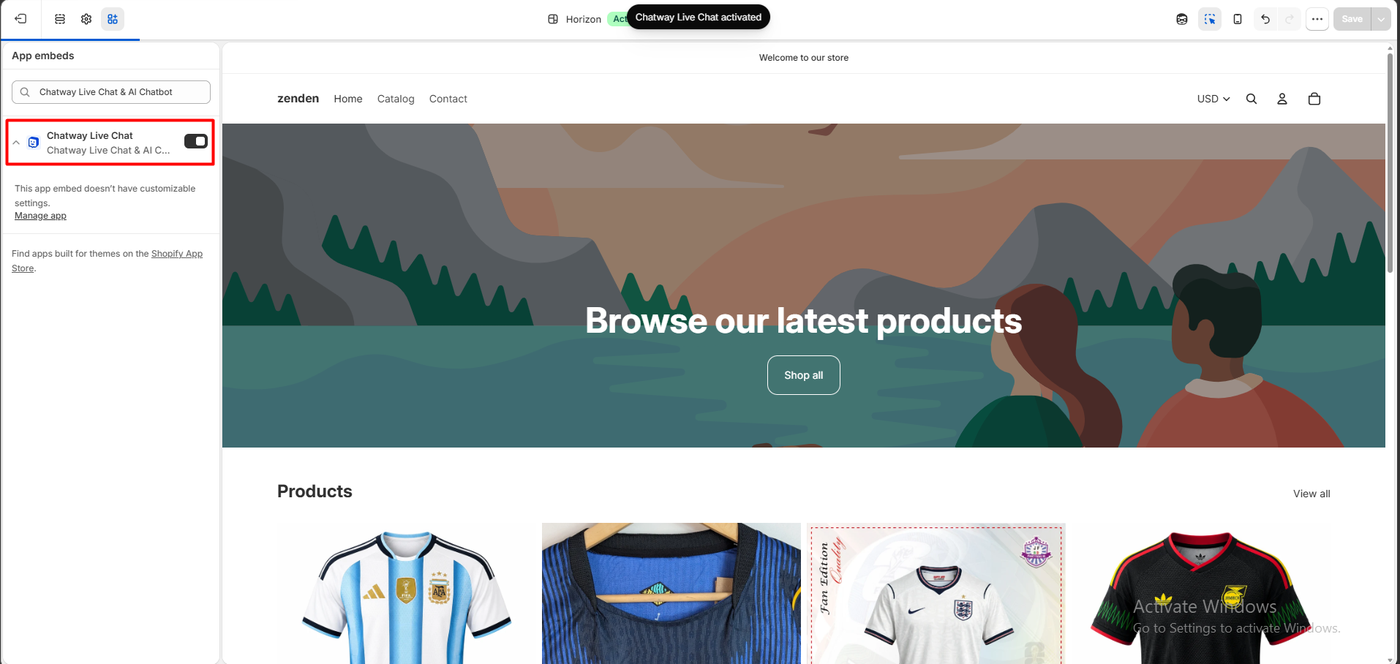
In the theme editor, the Chatway Live Chat app embed is one toggle, and the editor confirmed “Chatway Live Chat activated.” The widget appeared on the storefront with a robot avatar, “Hi, how can we help?” and our quick response.
Asking the AI for the Cheapest Product
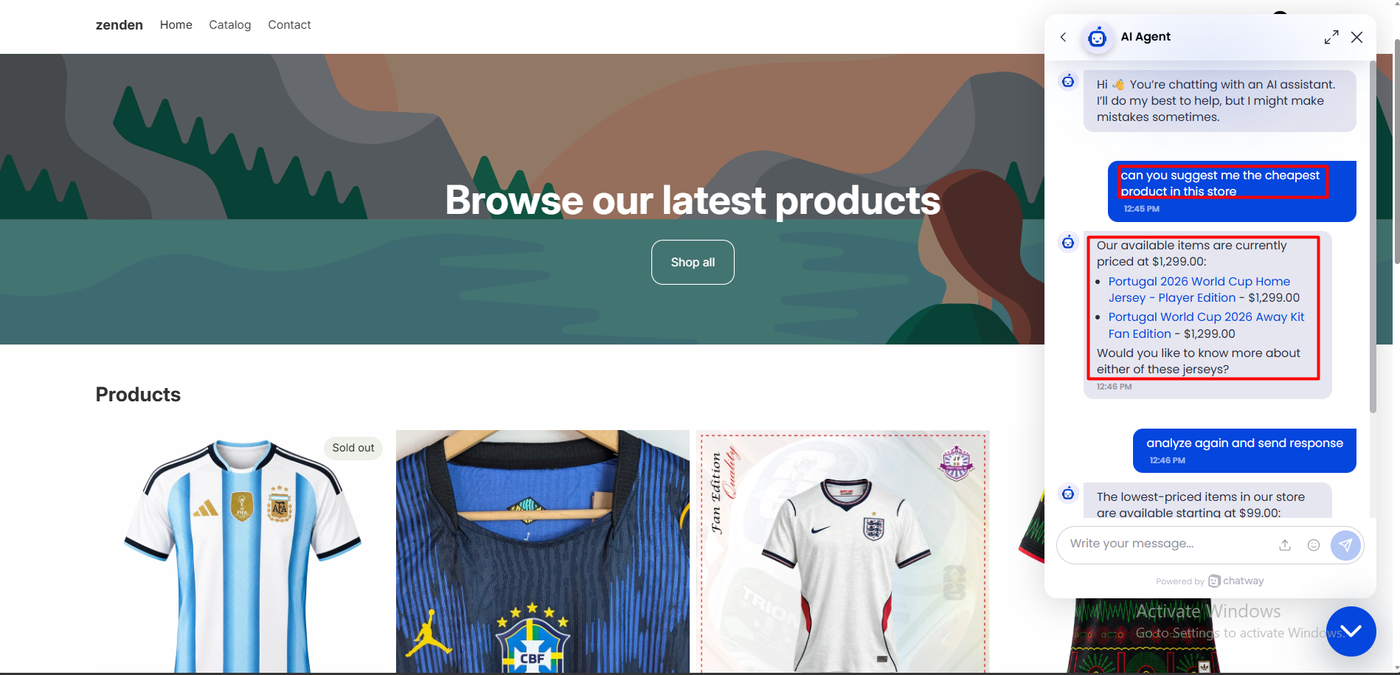
The chat opened with a clear disclaimer: “Hi 👋 You’re chatting with an AI assistant. I’ll do my best to help, but I might make mistakes sometimes.”
We asked: “Can you suggest me the cheapest product in this store?”
The AI replied: “Our available items are currently priced at $1,299.00,” and linked the Portugal 2026 World Cup Home Jersey – Player Edition and the Portugal World Cup 2026 Away Kit Fan Edition, both at $1,299.00. It then asked if we wanted to know more.
That is wrong. $1,299 is the highest price in the store. Two jerseys cost $999.
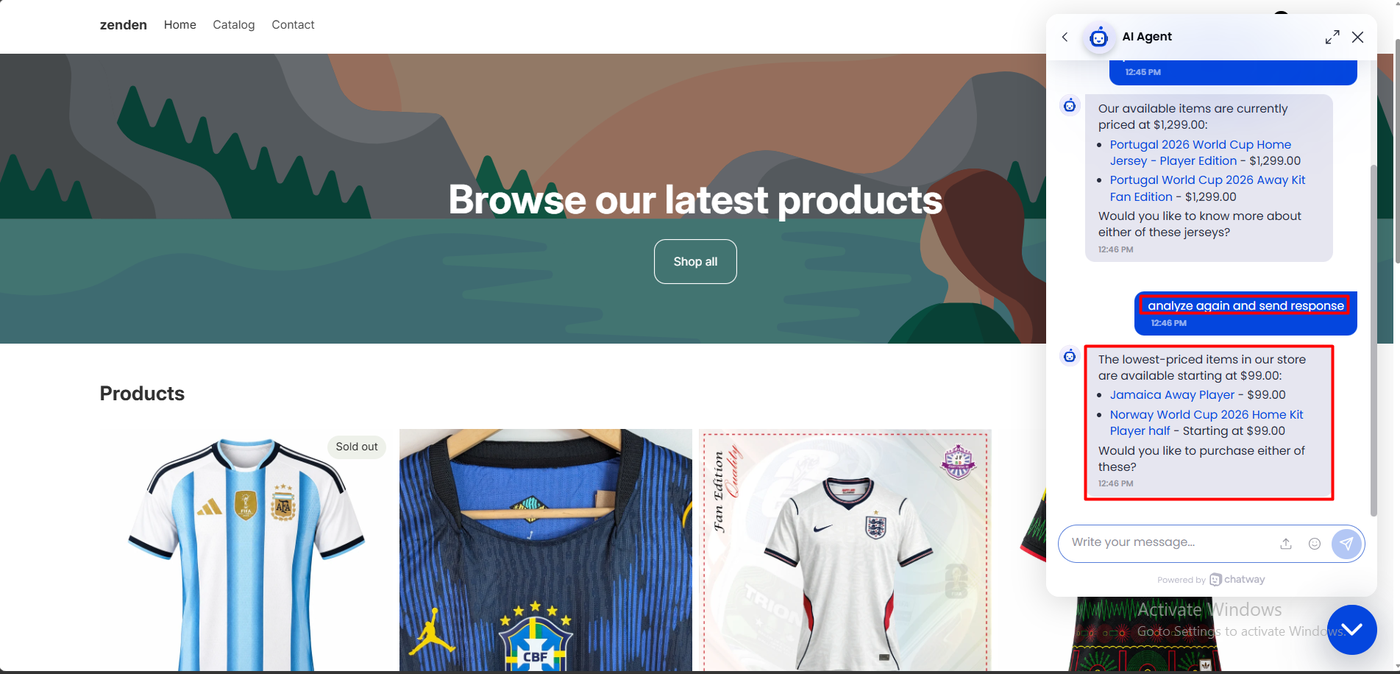
We wrote “analyze again and send response.” The second answer read:
The lowest-priced items in our store are available starting at $99.00:
- Jamaica Away Player - $99.00
- Norway World Cup 2026 Home Kit Player half - Starting at $99.00
Would you like to purchase either of these?
These are the right products. Jamaica and Norway are the two cheapest. But both cost $999, not $99. The AI dropped a digit and then asked the shopper whether they wanted to buy.
Of the AI mistakes we have recorded in this category, this is the one most likely to cost a sale or a refund. Here is how the AI agents we have asked compare:
| App | Answer to “cheapest product” | Store |
|---|---|---|
| Zipchat | Named the cheapest item correctly, with a correct runner-up | Nestly |
| Tidio | Named the wrong item, then corrected itself after pushback | Nestly |
| Commslayer | Said pricing was not available; priced other items on follow-up | Nestly |
| Chatty | Declined to guess; a team member answered | zenden |
| Chatway | Named two $1,299 items; then the right items at $99 instead of $999 | zenden |
These were single questions in single sessions, on two different test stores. Treat this as a pattern, not a ranking. We used the default instructions and the store as the only training source, without extra Q&A, which may change the result.
The Inbox
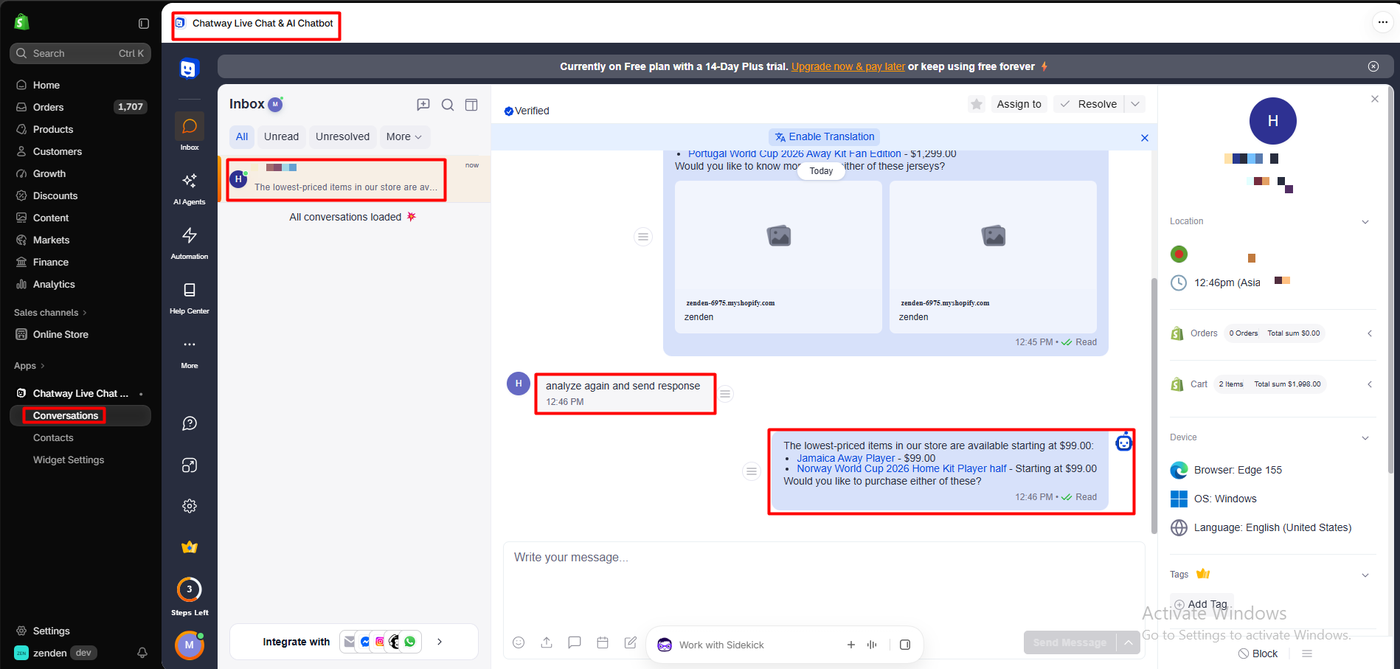
The inbox is where you would catch a mistake like this. The whole conversation was there, including both AI replies, with Assign to and Resolve buttons and an Enable Translation option.
The right-hand panel showed the visitor’s location and local time, their Shopify orders (0 orders, $0.00 for this visitor) and their cart (2 items, $1,998.00), plus their browser, operating system and language. A banner across the top read “Currently on Free plan with a 14-Day Plus trial.”
Two small gaps showed up. The product cards in the AI’s first reply showed placeholder images in the inbox rather than product photos. And nothing in the inbox flagged that the AI had quoted a price far from the real one. You would need to read each AI chat yourself.
Chatway Pricing
These plans come from the App Store listing, checked on October 15, 2026.
| Plan | Price | Seats | Conversations a month | Highlights |
|---|---|---|---|---|
| Free | $0 | 1 | 50 | 30-day chat history, FAQs and canned responses, mobile apps, MCP, API and webhooks, social chat buttons |
| Business | $39/month ($372/year) | 2 | 200 | Help center, 2 automations, email, WhatsApp, Messenger and Instagram, live translation, multilingual widget |
| Plus | $199/month ($1,908/year) | 10 | 1,000 | 15 automations, multiple widgets and inboxes, priority support |
Paid plans include a 14-day free trial, and new accounts start on a 14-day Plus trial.
AI is priced separately. Every plan lists “AI chatbot agent credits can be added” or “optional AI chatbot credits.” New accounts get 10 free AI Support Agent credits. We did not see a price for extra credits, so check before you plan around the AI.
Two things stand out:
- The Free plan is useful for live chat. One seat and 50 conversations a month covers a small store’s human chats.
- Channels cost money. WhatsApp, Messenger, Instagram and email start on Business at $39 a month, even though the listing leads with them.
What Public Sources Add
On October 15, 2026 the listing showed a 4.9 rating from 286 reviews: 275 at five stars, 5 at four, none at three, 1 at two and 5 at one.
Recent praise calls it simple and customisable. One merchant who moved from Shopify Inbox called it “a life saver” and liked the FAQ and contact options.
The criticism is specific:
- WhatsApp and automations. A UK merchant said in September 2026 that WhatsApp kept disconnecting and automations did not work for about three weeks. Premio replied that both were fixed.
- Admin and upsells. A US merchant said in April 2026 that the admin was confusing and kept asking them to upgrade.
- Widget bugs and support. A 2024 review described a chat bubble that would not close and an infinite scroll on the cart page. Premio said it fixed the Chatway issue and blamed other errors on the merchant’s site.
We did not reproduce any of these.
What We Liked
- A fast, clear setup wizard with a live preview.
- One theme toggle to go live.
- An honest AI disclaimer at the start of every chat.
- A useful inbox, with location, device, orders and cart beside each chat.
- A real Free plan for live chat, with mobile apps and MCP access.
- A choice of AI: Chatway’s own agent or your external AI.
What Could Be Better
- The AI quoted $99 for $999 jerseys, and first named the most expensive items as the cheapest.
- AI credits are separate, with 10 free and no visible price for more.
- Social and email channels start at $39 a month.
- No alert for questionable AI answers in the inbox.
- Placeholder images on the AI’s product cards in the inbox.
- Sourced complaints about WhatsApp, automations and upgrade prompts, which we did not test.
Who Is Chatway Best For?
Chatway suits small Shopify stores that want free, good-looking live chat with a shared inbox and mobile apps, answered mainly by people. It also suits teams that already run their own AI and want to connect it through MCP.
Look elsewhere, or keep the AI switched off, if you want an AI agent to answer product and price questions without supervision.
Here is how its free plan compares with the other support apps we have reviewed:
| App | Free plan allowance |
|---|---|
| Commslayer | 300 conversations a month, unlimited agents |
| Chatty | 50 AI conversations a month, unlimited human conversations |
| Chatway | 50 conversations a month, 1 seat, 10 free AI credits |
| Willdesk | 20 conversations a month |
| Re:amaze | No free plan |
These figures come from each app’s published plan information, and the apps count conversations differently.
Final Verdict
Chatway’s live chat did its job. We set it up in three steps, put the widget on the store with one toggle, and saw every conversation arrive in an inbox with the shopper’s orders and cart beside it.
Its AI agent did not. Asked for the cheapest product, it named the most expensive items, then named the right items at $99 instead of $999.
Recommended as a free live chat tool for small stores. Use the AI agent only with your own price Q&A in place and its answers checked in the inbox.
Frequently Asked Questions
Is Chatway free?
Yes. The Free plan includes one seat, 50 conversations a month, 30 days of history, FAQs, canned responses, mobile apps, and MCP, API and webhook access. Business costs $39 a month and Plus $199, each with a 14-day trial.
Did Chatway’s AI answer correctly?
Not in our test. Asked for the cheapest product, it first named two $1,299 jerseys. Asked again, it named the right two jerseys but priced them at $99.00 instead of $999.
How much AI does Chatway include?
New accounts get 10 free AI Support Agent credits. The listing says more AI credits can be added on every plan, but we did not see a price for them.
Can I use my own AI with Chatway?
Yes. Setup offers “Connect your External AI,” which links Claude, ChatGPT or your own agent through MCP and webhooks, with 50 free conversations a month. We did not test it.
Does Chatway include WhatsApp?
Not on the Free plan. The listing puts email, WhatsApp, Messenger and Instagram on Business, from $39 a month.
Does Chatway work without coding?
In our test, yes. We completed the setup wizard and switched on the Chatway Live Chat app embed in the theme editor without touching theme code.